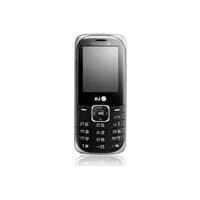
A165 - Cellphone LG - Free user manual and instructions
Find the device manual for free A165 LG in PDF.



| Brand | LG |
| Model | A165 |
| Product type | Mobile phone |
| SIM cards | Dual SIM (SIM1 and SIM2) |
| Screen | Color |
| Camera | Built-in |
| Video recorder | Built-in |
| FM radio | Yes, with recording and 9 preset stations |
| Media player | Yes (audio and video) |
| External memory | Micro SD card (optional) |
| Connectivity | Bluetooth |
| Messaging | SMS, MMS |
| Sound profiles | Customizable (ringtone, vibrate, etc.) |
| Security | ATMT (Anti-theft), phone lock, blacklist |
| SAR (head) | 1.27 W/kg |
| SAR (body) | 1.41 W/kg |
| Operating temperature | -10°C to +55°C (discharge) / +45°C (charging) |
| Alarm | Yes |
| Calculator | Yes |
| Stopwatch | Yes |
| Converter | Yes (currency, length, weight) |
| Maintenance | Dry cloth, no solvents |
Frequently Asked Questions - A165 LG
User questions about A165 LG
0 question about this device. Answer the ones you know or ask your own.
Ask a new question about this device
Download the instructions for your Cellphone in PDF format for free! Find your manual A165 - LG and take your electronic device back in hand. On this page are published all the documents necessary for the use of your device. A165 by LG.
USER MANUAL A165 LG
|LG-A165| USER GUIDE
This manual may differ from the phone depending on the phone software version and service provider used.
Contents
Installing the SIM card and the
handset battery 3
Phone Components 4
Selecting functions and
options. 6
Entering Text 7
Installing a Memory Card .8
How to set the tone 9
FM Radio 10
Activating and switching
SIM cards 11
Anti Theft Mobile Tracker
(ATMT) 12
Menu Tree. 13
Quick feature reference 14
Guidelines for safe and
efficien use 23
Accessories 27
Technical Data 28
Installing the SIM card and the handset battery
Installing the SIM Card
When you subscribe to a cellular network, you are provided with a plug-in SIM card loaded with your subscription details, such as your PIN, any optional services available and many others.
Important! The plug-in SIM card and its contacts can be easily damaged by scratches or bending, so be careful when handling, inserting or removing the card. Keep all SIM cards out of the reach of small children.
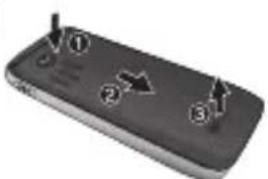
Illustrations
Always switch the device off and disconnect the charger before removing the battery.
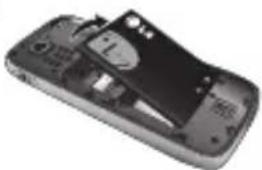
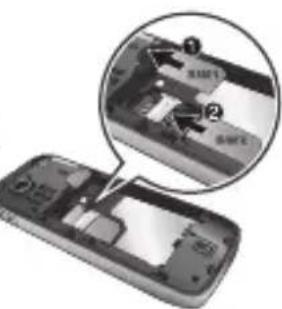
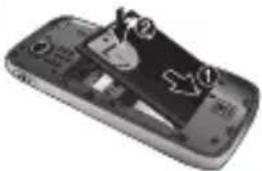
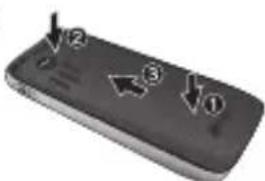
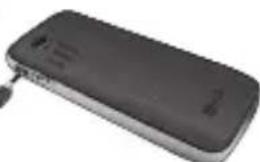
1 Remove the back cover.
2 Lift battery away.
3 Insert the SIM card.
4 Insert the battery pack.
5 Attach the back cover.
Charge the battery.
Note: Fully charge the battery before using it for the first time.
1
4
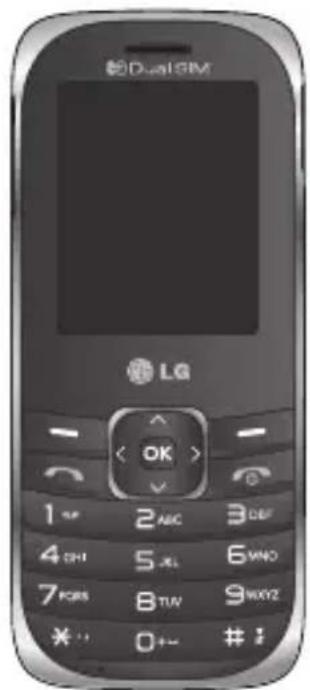
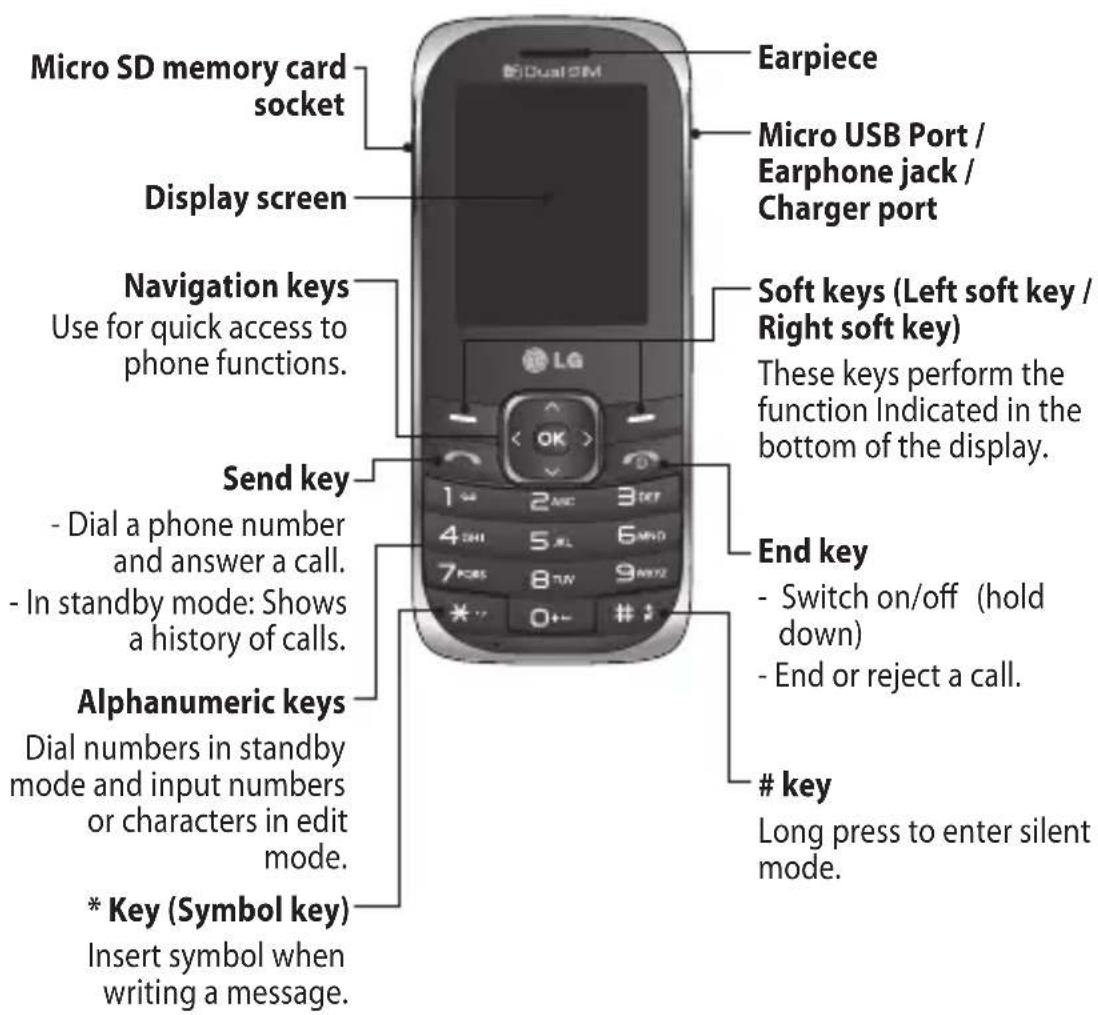
Phone Components
Turning Your Phone On and Off
- Press and hold the End key until the power comes on.
- Press and hold the End key until the power goes off.
Making a call
- Enter a phone number including the area code.
- Press the [Send] key or select options > call to call the number.
- To end the call, press the key.
Making an international call
- Press and hold the key for the international prefix. The ^+ character automatically selects the international access code.
- Enter the country code, area code, and the phone number.
- Press the [Send] key or select options > call to call the number.
Answering a call
- When you receive a call, the phone rings.
- Press the [Send] key or select option > OK to answer a call.
- To end the call, press the key.
Selecting functions and options
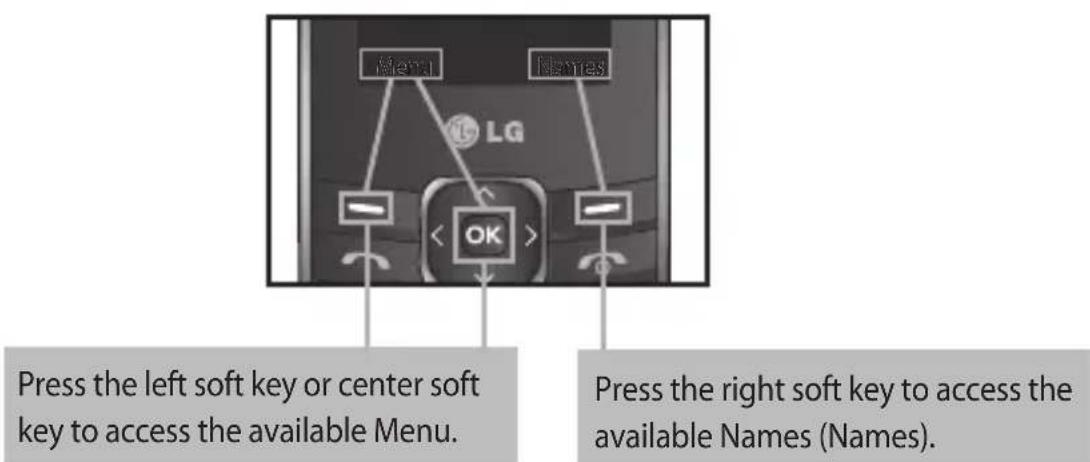
Your phone offers a set of functions that allow you to customize the phone. These functions are arranged in menus and sub-menus, accessed via the two soft keys marked and . Each menu and sub-menu lets you view and alter the settings of a particular function.
The roles of the soft keys vary according to the current context; the label on the bottom line of the screen just above each key indicates its current role.
Entering Text
You can enter alphanumeric characters by using the phone's keypad.
T9 Mode
The T9 predictive text input mode lets you enter words easily with a minimum number of key presses. As you press each key, the phone begins to display the characters that it thinks you are typing based on the built-in dictionary.
123 mode
Type numbers using one keystroke per number. You can also add numbers while remaining in letter modes by pressing and holding the desired key.
Symbol Mode
The symbol mode enables you to enter various symbols or special characters. To enter a symbol, select Options Insert Symbol or press Key. Use the navigation keys to select the desired symbol and press the OK key.
Installing a Memory Card
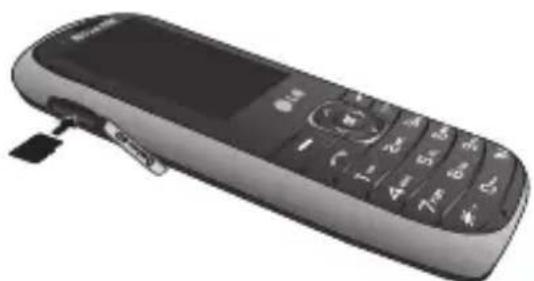
Using a memory card can expand the available storage space of your mobile phone. To insert a memory card, insert it into the card slot until it clicks into place. Ensure that the golden contact area faces downwards, as shown in the figure.
Note: A memory card is an optional accessory.
How to set the tone
You may set up the following different profiles to adapt to different environmental conditions.
- Select Settings from the main menu, then Select Profi les.
- Select a profile and press [Options - Customize] to set the ring tone.
- Press the left soft key [OK] and then you can set the desired ring tone. Your phone also provides the following options to customize tones/ alert types:
Tone settings: Selects a tone type (Incoming call, Power on, Power off, Message, Keypad).
Volume: Sets desired volume (Ringtone, Key tone).
Alert type: Selects an alert type (Ring only, Vib. only, Vib. and ring, Vib. then ring) for the ringing tone.
Ringtype: Selects a ring type (Single, Repeat).
Extra tone: Selects a extra tone (Warning, Error, Camp on).
Answer mode: If you select the Any key, you can receive a call by pressing any key except the key and the right soft key.
FM Radio (This function may be different in different regions.)
Listens to FM radio station. You can enjoy listening FM without using headset as phone supports wireless FM service.
- From main menu select Media then select FM radio.
- Use navigation keypad to search radio station. You can also press Options to search radio frequency for available channels and automatically store to the channel list.
- Press Options to edit the channel list. There are 9 stations you may pre-set. Your phone provides the following options for FM radio:
Record: Records your favorite radio programs.
Channel List: Bookmark up to 9 radio stations by entering the channel name and frequency.
Manual input: You can input frequency manually by using this option.
Minimize: This function allows you to do other work on phone by minimizing FM radio.
Auto Search: Auto search available channels and automatically store them to the channel list.
Settings: Allows you to switch the record audio quality and the record format. You can record in AMR or WAV formats.
Schedule FM record: You can record FM program on schedule when you set up the recording time.
Append:Resumes a previously recorded file.
Activating and switching SIM cards
Your phone supports the Dual SIM cards mode, enabling you to use two SIM cards at the same time without changing them. When there are two SIM cards installed, you can activate one of two or both SIM cards.
- Select [Settings] from the main menu, and then select [Dual SIM settings].
Anti Theft Mobile Tracker (ATMT)
Anti-theft mobile tracker (ATMT) allows you to track your lost phone. When someone uses your phone without your permission, the tracking service will be activated.
You are reminded by a text message sent to the default phone number you have set, without the unauthorized user's knowledge. You can always activate the ATMT and confi gure your personal settings.
To activate Anti-theft mobile tracker
- From the main menu, select Settings > Security settings > Anti-theft mobile tracker and press OK.
- Then in the Anti-theft mobile tracker menu, edit and save the name in Sender name and numbers in Sending number list.
- Select Set Anti-theft and press OK.
- Switch On or Off and press OK.
- Input the security code to enable or disable this function.
Note
The default ATMT code is "0000". You have to enter the code before configuring the ATMT settings.
Menu Tree
1. Messaging
1.1 Create message
1.2 Inbox
1.3 Drafts
1.4 Outbox
1.5 Sent items
1.6 Saved items
1.7 Broadcast message
1.8 Templates
1.9 Message settings
1.10 SOS message
2. Contacts
2.1 Add new contact
3. Log
3.1 Sim1 call log
3.2 Sim2 call log
4. Settings
4.1 Dual SIM settings
4.2 Profiles
4.3 Display
4.4 Connectivity
4.5 Call
4.6 Phone
4.7 Network
4.8 Security settings
4.9 Restore factory settings
5. Gallery
5.1 My images
5.2 My sounds
5.3 My videos
5.4 My game & apps
5.5 Others
6. Media
6.1 Camera
6.2 Video recorder
6.3 Image viewer
6.4 Media player
6.5 Slide show
6.6 Photo editor
6.7 FM radio
6.8 Voice recorder
7. Organiser
7.1 Alarm clock
7.2 Calendar
7.3 To-do list
7.4 Notes
7.5 Calculator
7.6 Stopwatch
7.7 Converter
7.8 World time
7.9 Go to
7.10 File manager
7.11 SIM services
8. Applications
8.1 My games & apps
8.2 Settings
9. Web
9.1 Home
9.2 Bookmarks
9.3 Last web address
9.4 Settings
9.5 Go to address
9.6 Saved pages
9.7 Open file
9.8 Recent pages
Quick feature reference
This section provides brief explanations of features on your phone.
Messaging Menu 1
Create message This menu includes functions related to SMS (Short Message Service) and MMS (Multimedia Message Service). You can send SMS to many contacts at a time.
Inbox You will be alerted when you have received messages. They will be stored in Inbox.
Drafts You can save the message temporarily in Drafts.
Outbox This is a temporary storage folder for the unsent messages or messages that you have sent but fail to deliver.
Sent items After sending out the message, the text message or multimedia message is saved in the Sent folder.
Saved items You can access your saved messages.
Broadcast message Choose whether to receive, block, view or edit channels to receive information service messages (broadcast messages). Also choose the languages of information service messages.
Templates There are pre-definned messages in the list. You can view and edit the template messages or create new messages.
Message settings This menu allows you to set features of your network service provider.
Messaging Menu 1 (Continued)
SOS message
An emergency message can be sent to the predefined number's (3 maximum) by long press of 9 Key. On long press of 9 key, a popup comes, 'Set SOS message?'. Press 'Yes' then type the required message and input 3 numbers for which you want to send the message in emergency mode and press Save/Done.
Contacts Menu 2
You can search for contacts in phonebook.
Note: Instant searching is available by inputting the initial letter of the name you want to search.
Add new contact You can add phonebook entries by using this menu.
Log Menu 3
Call log You can view all lists of outgoing or incoming calls.
Select sim1 call log or sim2 call log and from that select the following.
missed calls: You can view the unanswered calls.
received calls: You can view the Received calls.
dialled numbers: You can view the outgoing call numbers.
Log Menu 3 (Continued)
call duration: Allows you to view the duration of your incoming and outgoing calls. You can also reset the call timers.
text msg. counter: This application will count the number of messages received and sent from the phone.
packet data counter: You can check the amount of data transferred over the network.
call costs: View the charges applied to your dialled numbers and the call duration of all your received and dialled calls. Also you can do Cost Settings.
Settings Menu 4
Dual SIM settings Choose from the options what you want to change: Dual SIM open / Only SIM1 open / Only SIM2 open / Flight mode.
Tip: Dual SIM Single Talk : while one of Dual SIM is operating with network such like WAP/JAVA/ MMS/Call, another SIM can not use network related service.
Profi les You can adjust and customize the phone tones for different events, or environments.
Display You can change settings for the phone display.
Connectivity
Bluetooth: You can adjust setting on BT connection.
Data account: You can manage data account list that is used for profi le setting on WAP or MMS.
Settings Menu 4 (Continued)
Call You can set the menu relevant to a call.
Tip: Enable the Black list, by selecting Mode to ON in Black list, from Advance Settings. Once you switch On the Black List Mode, Type the Required Number to be in the Black List and save it. User can not receive any calls from the numbers which are saved in Black list.
Phone
Time and date: Set date, time, time zone, and formats.
Schedule power on/off: This menu allows you to set up time for the phone automatically power on or off. Once the time is set by you, the phone will power on automatically at the time specified. As for the powering off, the phone will ask you for the confirmation before powering off at the time specified by you. You can specify up to 4 different times.
Language/Writing language: You can change the language for the display texts in your phone. This change will also affect the Language Input mode.
Themes: Allows you to change the whole look of your phone display.
Greeting text: This menu allows you to customize the greeting text upon the phone's power on. You can also choose whether you want the greeting text on or off upon power on.
Dedicated key: Allows you to change the preferences on the Hotkeys that are currently assigned for your navigation keys (when in standby mode).
Settings Menu 4 (Continued)
Auto update of date and time: Allows you to set the phone to automatically update the time and date according to the current local time zone.
UART settings:User will be able to perform the operation from PC using modem for selected SIM card in UART settings (like AT command using HyperTerminal, PC dialup). User will be able to make the GPRS dialup on PC using the SIM which is selected in UART setting for e.g. if SIM1 is selected then user will be able to make the connection using selected SIM card.
Misc. settings: You can set the brightness and time of the display screen.
Network You can set select network and network mode settings using this menu. Also you can add a preferable network to be connected to Preferred lists.
Security settings > sim1/sim2 security settings: This menu allows you to set the phone's safety.
Phone lock: You can use a security code to avoid unauthorized use of the phone.
Auto keypad lock: You can make the key pad locked automatically after some time.
Change password: Changing your phone password, enter the old code followed by the new code.
Anti-theft mobile tracker: The ATMT feature of this phone provides you with the ability to have a tracking system in place for your mobile in case you lose or misplace it.
Restore factory You can initialize all factory defaults. You need Security settings code to activate this function.
Gallery Menu 5
My images Shows the list of image files.
My sounds Saved audio files are displayed in the list.
My videos Displays the list of video fi les.
My game & apps You can access a great selection of games and applications on your phone.
Others When you receive fi les of an undefi ned format via Bluetooth, the fi les are saved in this folder.
Media Menu 6
Camera You can take photos with the built in camera and adjust its settings to suit your needs.
Video recorder You can record a video clip through the built-in camera.
Image viewer Choose to view the picture with options after taking a photo.
Media player The player allows you play audio and video files. You can also manage play lists.
Slide show Slideshow mode will show all the photos in your gallery one at a time as a slideshow.
Photo editor You can edit images. The editor can resize, clip or add different effects to the picture.
Media Menu 6 (Continued)
FM radio You can use FM radio with or without your external earphone. You can listen to your favourite radio station anytime.
Note: You have to insert Ear-mic into Handsfree connector in order to listen to the Radio and keep the good radio reception.
Voice recorder You can record voice memo.
Organiser Menu 7
Alarm clock You can set the alarm clock to go on at a specified time.
Calendar You can see the calendar and add the events here in selected date.
To-do list You can view, edit and add tasks to do.
Notes You can add new memo, view and manage saved memos.
Calculator The calculator provides the basic arithmetic functions: addition, subtraction, multiplication and division.
Stopwatch This option allows you to use the function of a stopwatch.
Converter This converts any measurement into a unit you want. There are many types that can be converted into units: Currency, Length, Weight.
World time The World time function provides time information on major cities worldwide.
Organiser Menu 7 (Continued)
Go to It helps you to go to the menu you search for. You can set the item as Go to.
File manager This function allows you to view the content in your internal phone memory and the external memory card.
SIM services Display additional functions or applications provided by your network service provider.
Applications Menu 8
My games & apps Your LG-A165 comes with preloaded games to keep you amused when you have time to spare. If you choose to download any additional games or applications they will be saved into this folder. Press Menu and select Applications. Choose My games & apps.
Web Menu 9
Home Connects to a homepage. The homepage will be the site which is defined in the activated profi le.
Bookmarks This menu allows you to store the URL of favorite web pages for easy access at a later time.
Last web address You can view the latest page when you connected internet.
Settings You can set the profi le, cache and security related to internet service.
Web Menu 9 (Continued)
Go to address You can connect directly to the site you want. After entering a specific URL, press OK key to make the connection done to connect to the site.
Saved pages Allows you to view your saved web pages.
Open file You can open the following files saved in the phone. WML, XTHML, HTM, HTML.
Recent pages This menu shows the history of recently browsed pages.
Guidelines for safe and effici cient use
Please read these simple guidelines. Not following these guidelines may be dangerous or illegal. Further detailed information is given in this manual.
Warning
For your safety, use ONLY specified ORIGINAL batteries and chargers.
Switch off the phone in any area where required by special regulations, e.g. in a hospital where it may affect medical equipment.
Batteries should be disposed off in accordance with relevant legislation.
Product care and maintenance
WARNING! Only use batteries, chargers and accessories approved for use with this particular phone model. The use of any other types may invalidate any approval or warranty applying to the phone, and may be dangerous.
Do not disassemble this unit. Take it to a qualified service technician when repair work is required.
Repairs under warranty, at LG's option, may include replacement parts or boards that are either new or reconditioned, provided that they have functionality equal to that of the parts being replaced.
The unit should be kept away from heat sources such as radiators or cookers.
Use a dry cloth to clean the exterior of the unit. (Do not use any solvents.)
Do not keep the phone next to credit cards or transport tickets; it can affect the information on the magnetic strips.
Guidelines for safe and effici cient use (Continued)
Electronic devices
All mobile phones may get interference, which could affect performance.
Do not use your mobile phone near medical equipment without requesting permission. Avoid placing the phone over a pacemaker, i.e. in your breast pocket.
Road safety
Check the laws and regulations on the use of mobile phones in the areas when you drive.
Do not use a hand-held phone while driving.
Use a hands-free kit, if available.
Pull off the road and park before making or answering a call if driving conditions so require.
Blasting area
Do not use the phone where blasting is in progress. Observe restrictions, and follow any regulations or rules.
Potentially explosive atmospheres
Do not use the phone at a refueling point. Do not use near fuel or chemicals.
In aircraft
Wireless devices can cause interference in aircraft.
Turn off your mobile phone before boarding any aircraft.
Children
Keep the phone in a safe place out of children's reach. It includes small parts which if detached may cause a choking hazard.
Guidelines for safe and effici cient use (Continued)
Emergency calls
Emergency calls may not be available under all cellular networks. Therefore, you should never depend solely on the phone for emergency calls. Check with your local service provider.
Battery information and care
You do not need to completely discharge the battery before recharging. Unlike other battery systems, there is no memory effect that could compromise the battery's performance.
Use only LG batteries and chargers. LG chargers are designed to maximize the battery life.
Do not disassemble or short-circuit the battery pack.
Replace the battery when it no longer provides acceptable performance. The battery pack may be recharged hundreds of times before it needs to be replaced.
Do not expose the battery charger to direct sunlight or use it in high humidity, such as the bathroom.
Risk of explosion if battery is replaced by an incorrect type.
Dispose off used batteries according to the manufacturer's instructions.
Guidelines for safe and effici cient use (Continued)
Exposure to radio frequency energy
Radio wave exposure and Specific Absorption Rate (SAR) information This mobile phone model LG-A165 has been designed to comply with applicable safety requirement for exposure to radio waves. This requirement is based on scientific guidelines that include safety margins designed to ensure safety of all persons, regardless of age and health.
The radio wave exposure guidelines employ a unit of measurement known as the Specific Absorption Rate, or SAR. Tests for SAR are conducted using standardised methods with the phone transmitting at its highest certified power level in all used frequency bands.
While there may be differences between the SAR levels of various LG phone models, they are all designed to meet the relevant guidelines for exposure to radio waves.
The SAR limit recommended by the International Commission on NonIonizing Radiation Protection (ICNIRP) is 2W / kg averaged over ten (10) gram of tissue.
The highest SAR value for this model phone tested by DASY4 for use at the ear is 1.27W / kg (10g) and when worn on the body is 1.41W / kg (10g).
SAR data information for residents in countries/regions that have adopted the SAR limit recommended by the Institute of Electrical and Electronics Engineers (IEEE) is 1.6W / kg averaged over one (1) gram of tissue.
□ Accessories
There are various accessories for your mobile phone. You can select these options according to your personal communication requirements.
Standard Battery Travel Adapter
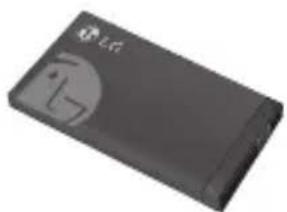
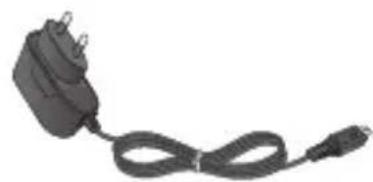
Data cable and CD Headset
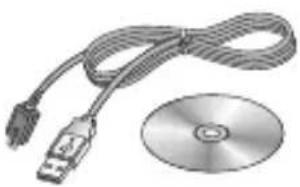
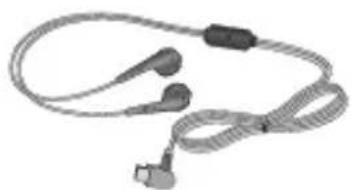
Note
Always use genuine LG accessories. Failure to do this may invalidate your warranty.
Accessories may be different in different regions; please check with our regional service company or agent for further enquiries.
Technical Data
Ambient Temperatures
Max:+55°C(discharging)
+45°C (charging)
Min:-10°C






- |LG-A165| USER GUIDE
- Contents
- Installing the SIM card and the handset battery
- Installing the SIM Card
- Illustrations
- Phone Components
- Turning Your Phone On and Off
- Making a call
- Making an international call
- Answering a call
- Selecting functions and options
- Entering Text
- T9 Mode
- mode
- Symbol Mode
- Installing a Memory Card
- How to set the tone
- FM Radio (This function may be different in different regions.)
- Activating and switching SIM cards
- Anti Theft Mobile Tracker (ATMT)
- Note
- Menu Tree
- Messaging
- Contacts
- Log
- Settings
- Gallery
- Media
- Organiser
- Applications
- Web
- Quick feature reference
- Messaging Menu 1
- Messaging Menu 1 (Continued)
- SOS message
- Contacts Menu 2
- Log Menu 3
- Log Menu 3 (Continued)
- Settings Menu 4
- Settings Menu 4 (Continued)
- Phone
- Gallery Menu 5
- Media Menu 6
- Media Menu 6 (Continued)
- Organiser Menu 7
- Organiser Menu 7 (Continued)
- Applications Menu 8
- Web Menu 9
- Web Menu 9 (Continued)
- Guidelines for safe and effici cient use
- Warning
- Product care and maintenance
- Guidelines for safe and effici cient use (Continued)
- Electronic devices
- Road safety
- Blasting area
- Potentially explosive atmospheres
- In aircraft
- Children
- Emergency calls
- Battery information and care
- Exposure to radio frequency energy
- □ Accessories
- Standard Battery Travel Adapter
- Data cable and CD Headset
- Technical Data
Brand : LG
Model : A165
Category : Cellphone