BEA3 - Lighting Aukey - Free user manual and instructions
Find the device manual for free BEA3 Aukey in PDF.



| Product type | Portable RGB LED lamp |
| Brand | Aukey |
| Model | BEA3 (LT-ST23) |
| Dimensions | 95 x 95 x 75 mm |
| Weight | 259 g |
| Power supply | DC 5V 1A (charges via Micro-USB) |
| Battery capacity | 2200 mAh Li-ion |
| Charging time | 3.5 hours |
| Battery life | 6 hours (full power) to 100 hours (low brightness) |
| Maximum luminous flux | 180 lumens |
| Color temperature | 2700K (warm yellow) / 6500K (cool white) |
| Color rendering index (CRI) | ≥ 80 Ra |
| LED type | SMD2835 (29 LEDs) |
| Protection rating | IP65 (equivalent) |
| Lighting modes | Cool white, warm yellow, manual RGB, auto RGB |
| Special features | Touch control, magnetic base, carabiner, adjustment memory |
| Package contents | Lamp, Micro-USB cable, 2 adhesive metal plates, carabiner, user manual, warranty card |
| Maintenance | Clean with a soft, dry cloth. Recharge at least once every 3 months. |
| Safety | Do not repair, disassemble or modify. Keep away from extreme heat. |
| Warranty | Manufacturer's warranty included. Contact AUKEY customer service. |
Frequently Asked Questions - BEA3 Aukey
User questions about BEA3 Aukey
0 question about this device. Answer the ones you know or ask your own.
Ask a new question about this device
Download the instructions for your Lighting in PDF format for free! Find your manual BEA3 - Aukey and take your electronic device back in hand. On this page are published all the documents necessary for the use of your device. BEA3 by Aukey.
USER MANUAL BEA3 Aukey
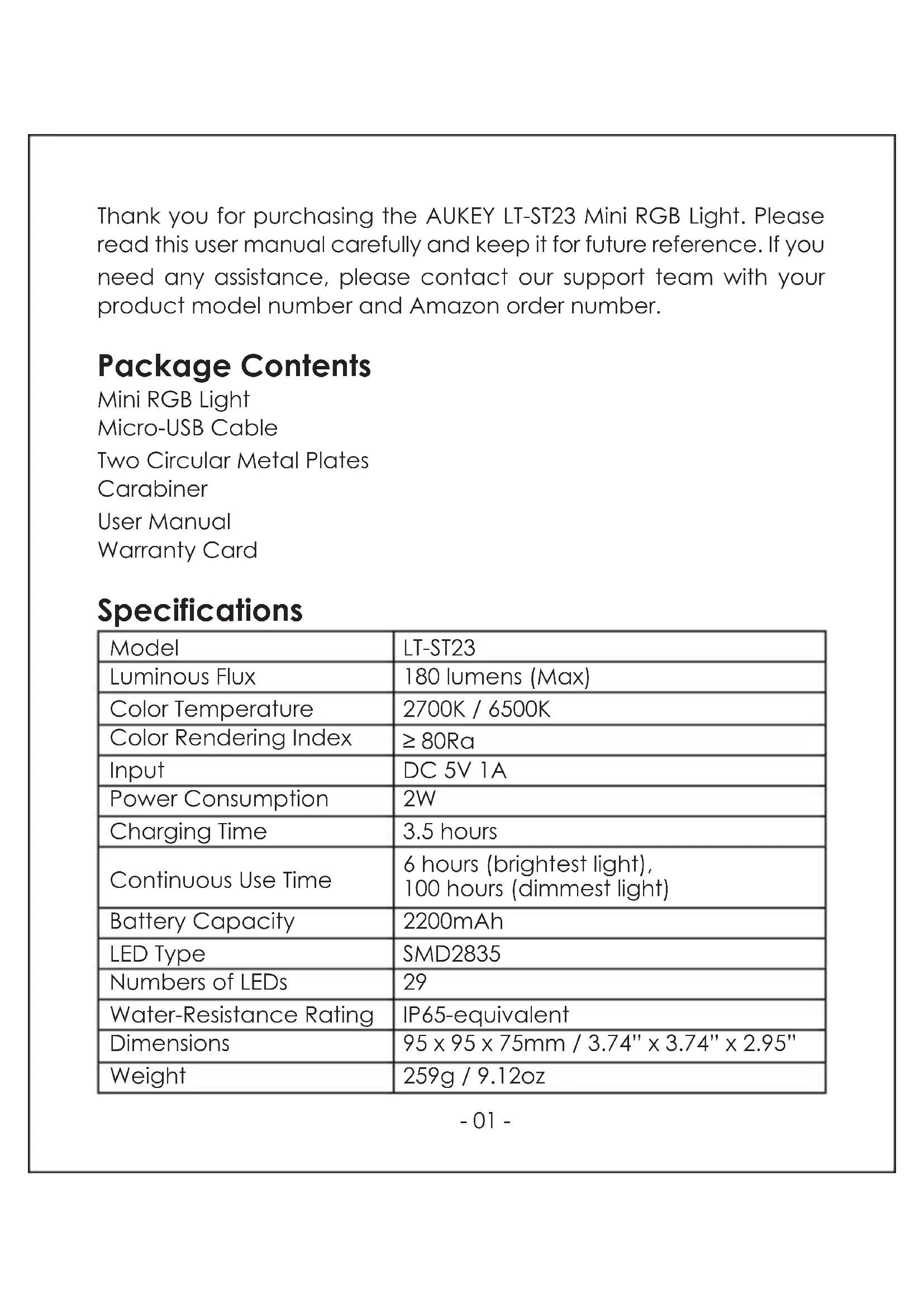
Thank you for purchasing the AUKEY LT-ST23 Mini RGB Light. Please read this user manual carefully and keep it for future reference. If you need any assistance, please contact our support team with your product model number and Amazon order number.
Package Contents
Mini RGB Light
Micro-USB Cable
Two Circular Metal Plates
Carabiner
User Manual
Warranty Card
Specifications
| Model | LT-ST23 |
| Luminous Flux | 180 lumens (Max) |
| Color Temperature | 2700K / 6500K |
| Color Rendering Index | ≥ 80Ra |
| Input | DC 5V 1A |
| Power Consumption | 2W |
| Charging Time | 3.5 hours |
| Continuous Use Time | 6 hours (brightest light),100 hours (dimmest light) |
| Battery Capacity | 2200mAh |
| LED Type | SMD2835 |
| Numbers of LEDs | 29 |
| Water-Resistance Rating | IP65-equivalent |
| Dimensions | 95 x 95 x 75mm / 3.74" x 3.74" x 2.95" |
| Weight | 259g / 9.12oz |
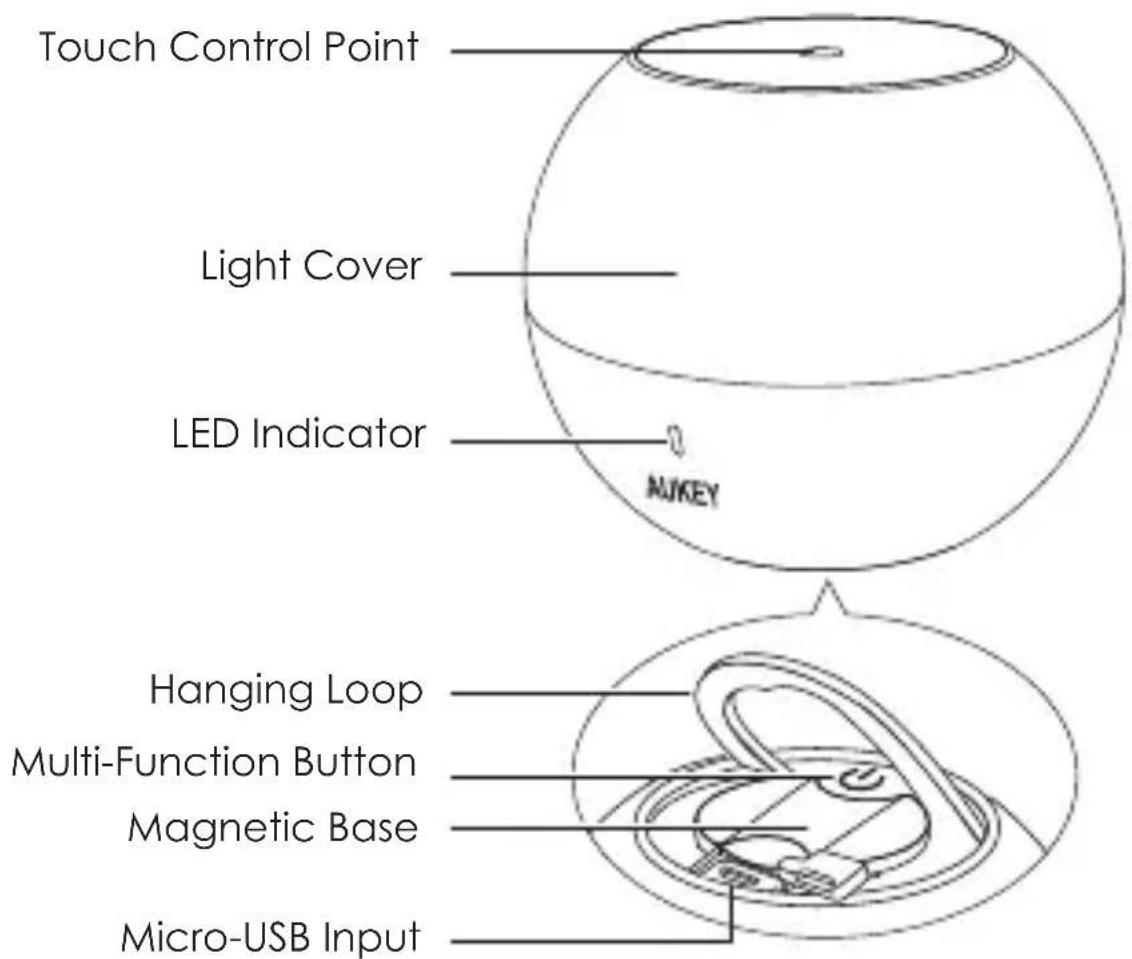
Product Diagram
text_image
Touch Control Point Light Cover LED Indicator NUKEY Hanging Loop Multi-Function Button Magnetic Base Micro-USB InputGetting Started
Connect one end of the included micro-USB cable to the charging input port of the LT-ST23 and the other end of the cable to a USB charger or charging port to charge. LED indicator will be flashing red while charging and blue when fully charged. Charging takes around 3.5 hours.
Powering On/Off the Light
- Long-press the multi-function button to turn on/off the light
- When the light is switched on, the LED indicator is blue (or flashes red when battery is below 20%)
- With the light on, double-tapping the touch control point (center-top of the light cover) also switches the light on/off, but off is standby with touch control active. Only the multi-function button switches the light fully off
Switching Between Light Modes
There are four main light modes: cool white, soft yellow, manual RGB color-cycling, and automatic RGB color-cycling.
Switch between light modes by pressing the multi-function button●
Adjusting Light Brightnes
- Long-press the touch control point until you get the desired brightness. On each long press, the brightness will smoothly scale in the opposite direction
- Stop at any brightness level between the highest and lowest (LED indicator will flash green when these are reached)
- Brightness is only adjustable in cool white and soft yellow light modes
Using the Light Color Modes
There are two RGB color-cycling light modes. The first is manual and the second is automatic. Use manual to choose a color. Automatic cycles through all the colors continuously.
- In manual, long-press the touch control point until you get the desired color
Light Memory Function
The light switches on with the last-set mode, so you don't need to repeat color selection or brightness adjustment to reach your preferred setting.
Using the Magnetic Light Mounts
The light directly attaches to many metal surfaces. For convenient mounting on other surfaces, two metal plates are included.
- Clean the flat surface (such as a wall) where you want to install the light with a mixture of equal parts (1:1) isopropyl alcohol and water
- Carefully remove the metal plate's adhesive backing and adhere the plate to the surface
- Press and hold firmly for a few minutes to ensure tight adhesion
- Place the light's magnetic base against the magnetic plate so that it magnetically attaches
Product Care & Use
- Don't repair, dismantle, or modify the product
- Keep away from extreme heat
- When using the hanging strap, ensure secure fixing to avoid the light falling
- Disconnect power cable and switch off light before cleaning or when not in use for a long time
- Clean the light only with a soft, dry cloth
- Charge the LT-ST23 at least once every 3 months
Warranty & Customer Support
For questions, support, or warranty claims, contact us at the address below that corresponds with your region. Please include your Amazon order number and product model number.
Amazon US orders: support.us@aukey.com
Amazon EU orders: support.eu@aukey.com
Amazon CA orders: support.ca@aukey.com
Amazon JP orders: support.jp@aukey.com
*Please note, AUKEY can only provide after sales service for products purchased directly from AUKEY. If you have purchased from a different seller, please contact them directly for service or warranty issues.
Powering On/Off the Light
natural_image
Technical line drawing of a mechanical component with no visible text or symbolsPour Commencer
Amazon EU orders: support.eu@aukey.com
Amazon EU orders: support.eu@aukey.com
natural_image
Technical line drawing of a mechanical component with concentric ovals and internal curved features (no text or symbols)Dare Inizio
www.aukey.com | support@aukey.com
No.102, Building P09, Electronics Trade Center
Huanan City, Pinghu Town, Longgang District
Shenzhen, Guangdong, 518111, CN

RoHS
Made in China