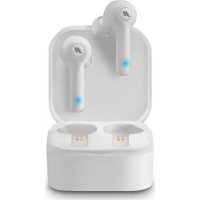
Twin Light - Earplug Music Hero - Free user manual and instructions
Find the device manual for free Twin Light Music Hero in PDF.


| Product Type | True Wireless Earbuds (TWS) |
| Brand | Music Hero |
| Model | Twin Light |
| Dimensions (earbud) | Approximately 30 x 20 x 20 mm |
| Dimensions (case) | Approximately 60 x 40 x 25 mm |
| Weight (earbud) | Approximately 5 g each |
| Weight (case) | Approximately 40 g |
| Power supply | Rechargeable lithium-ion battery (earbud 50 mAh, case 500 mAh) |
| Battery life | Approximately 4 hours of listening |
| Main functions | Calls, music, voice command, Bluetooth pairing |
| Connectivity | Bluetooth 5.0 |
| Range | Up to 10 meters |
| Care and cleaning | Clean with a soft, dry cloth. Do not immerse. |
| Safety | Do not expose to excessive heat. Non-removable battery. |
| Spare parts | Not provided |
| Repairability | Not user-repairable |
Frequently Asked Questions - Twin Light Music Hero
User questions about Twin Light Music Hero
0 question about this device. Answer the ones you know or ask your own.
Ask a new question about this device
Download the instructions for your Earplug in PDF format for free! Find your manual Twin Light - Music Hero and take your electronic device back in hand. On this page are published all the documents necessary for the use of your device. Twin Light by Music Hero.
USER MANUAL Twin Light Music Hero
MHLIGHBTTWSW - MHLIGHBTTWSG - MHLIGHBTTWSK - MHLIGHBTTWSAG
Twin Light Wireless Stereo Earset
With Charging Case 400 mAh
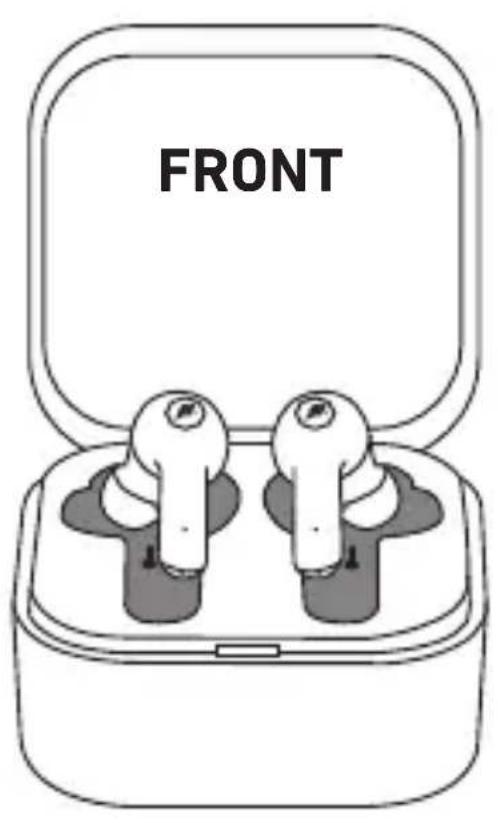
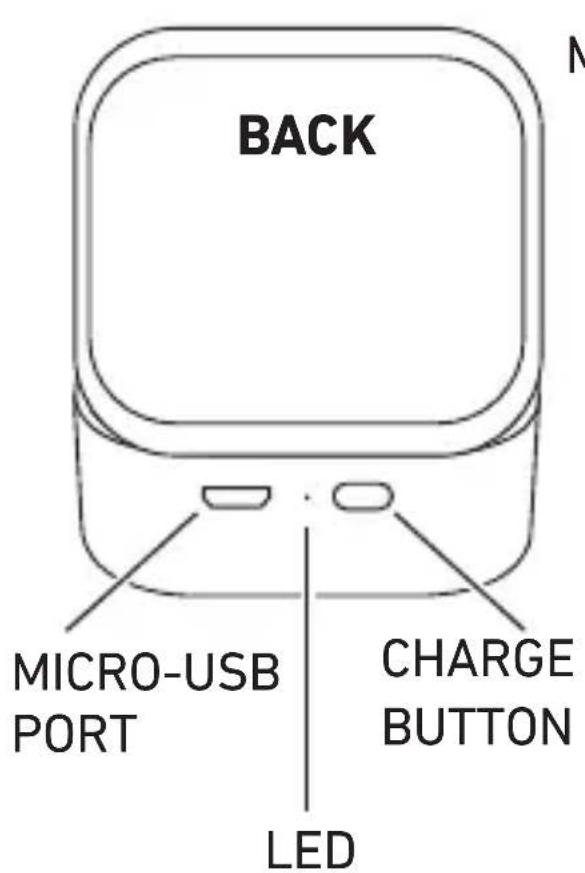
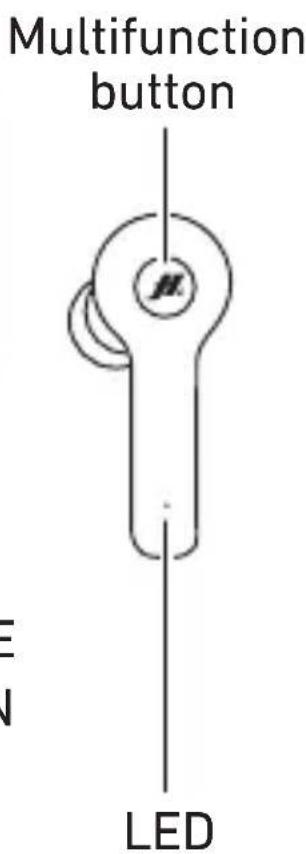
Specification:
Working range: 10 m
Wireless: 5.0
Battery: 50 mAh*2
Charging Box: 400 mAh
Power input: 5V D.C. / 1A
Impedance: 16 Ω
Distortion: <3%
Playing time: up to 2.5 hours
Standby time: 100 hours
Charging time: 1-1.5 hours
Talking time: up to 2 hours
P_RF 6 mW max
f:2402÷2480MHz
UK User Manual 4
- Press the MLF button for approx. 3 seconds: a voice message confirms correct activation. The TWS earbuds will automatically connect to each other when switched on.
Power off:
- Turn off the TWS earbuds by placing them in the charging case, or press and hold the MLF button for about 5 seconds until a voice message indicates that they have been turned off.
If not connected correctly to your smartphone, the TWS earbuds will switch off automatically after approx. 5 seconds.
Pairing the earbuds with a smartphone
- Keep your TWS earbuds close to your device.
- Turn off Bluetooth on the smartphone.
- Turn on the TWS earbuds
- Activate the Bluetooth function on your phone, select 'MH TWSLIGHT' from the Bluetooth list and pair the earbuds to your phone by selecting them.
- When the earbuds are correctly paired, the blue LED indicator flashes.
Pairing the earbuds to the smartphone after a failed pairing attempt
Turn on both earbuds; they will flash in red and blue.
Press the MLF button of both earbuds twice: they will associate with each other. After they are correctly associated, one of the LED indicators in the earbuds will blink alternately red and blue, the other will turn off.
Please repeat the instructions above in the event of a failed pairing.
Accepting/rejecting a call
Press the MLF button to answer an incoming call.
Press the MLF button for about 2 seconds to reject an incoming call.
Press the MLF button during a call to end it.
Press the MLF button twice to redial the most recent number.
Music
Briefly press the MLF button to pause/restart a track.
Press the MLF button for about 2 seconds to select the next song.
Charging the earbuds
Insert the earphones into the charging station.
The red LED indicates charging is in progress.
The LED indicator will turn off once charging is complete.
An alert tone every 10 seconds indicates when the battery is almost discharged.
Charging the case
The red LED indicates that the case is charging.
When the LED indicator goes out, the case is fully charged
Briefly press the button on the case to start or pause charging of the earbuds.
The indicator on the case turns blue during charging of the earbuds.
The indicator on the charging case flashes blue when the battery is low.
Additional notes for use of the earbuds.
Make sure that the earbuds are properly paired before use; also make sure that the Bluetooth function is activated on your phone.
Make sure that the TWS earbuds are fully charged.
Batteries inside the product are non-removable lithiumbatteries
Ecnn CBeToNDnOHDhIn INHdNkATOp NOrac - 3TO O3HaayeT, Keic NOJIHOCTbIO 3apJxKeH
KpaTKo HaxMnte KHONKy Ha Kopnyce, YTO6bl Haayatb IINI npnoCTaHOBNTb 3apAky HayuHNKOB.
IHHdkaTop Ha Kopnyce ropnt cHnM npi 3aprKe HayshNKOB.
INDnKaTOp Ha 3apAnHom yCtpoiCTBe MnaeT cHm, KOrda6aTapeR pa3pJxKeHa.
Slll lalalw TWS 1 aI
.
TWS 3
"MH TWSLIGHT"
.
LED 5
slll llll lalwll sssgddle! 1aill llll algln 2d 1 1 1 1 1 1 1 1 1 1 1 1 1 1 1 1 1 1 1 1 1 1 1 1 1 1 1 1 1 1 1 1 1 1 1 1 1 1 1 1 1 1 1 1 1 1 1 1 1 1 00000000000000000000000000000000000000000000000000000000000000000000000000000000000000000000000000
AR
1
□
:
28010 Miasino (No) - Italy
Made in China
MHLIGHBTTWS

©2020 SBS SpA, Italy
customercare@sbsmobile.com