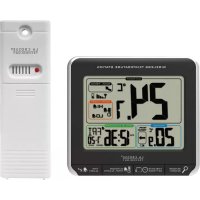
CA85169 - Thermometer LA CROSSE TECHNOLOGY - Free user manual and instructions
Find the device manual for free CA85169 LA CROSSE TECHNOLOGY in PDF.


| Product Type | Wireless Temperature Station with Alarm Snooze |
| Brand | La Crosse Technology |
| Model | CA85169 |
| Station Dimensions | 108 x 38 x 99 mm (4.27 x 1.48 x 3.88 in) |
| Transmitter Dimensions | 40 x 20 x 130 mm (1.57 x 0.79 x 5.12 in) |
| Station Power | 2 AA (LR6) batteries, not included |
| Transmitter Power | 2 AA (LR6) batteries, not included |
| Indoor Temperature Range | 0 °C to 50 °C (32 °F to 122 °F) |
| Outdoor Temperature Range | -40 °C to 60 °C (-40 °F to 140 °F) |
| Transmission Range | Over 60 m (200 ft) in open field |
| Frequency | 433 MHz RF |
| Main Functions | Time/date display, alarm clock with snooze, indoor/outdoor temperatures, trends, temperature alerts, min/max values |
| Alarm Clock | Yes, with snooze function (3 times) |
| Temperature Alerts | Yes, for high and low outdoor temperature |
| Time Display | 12h or 24h, adjustable |
| Temperature Unit | °C or °F, adjustable |
| Care and Cleaning | Clean with a soft damp cloth; do not use solvents |
| Safety | Keep out of reach of children; do not use for medical purposes |
| Warranty | 1 year (defects in workmanship or materials) |
| Spare Parts | Batteries only |
Frequently Asked Questions - CA85169 LA CROSSE TECHNOLOGY
User questions about CA85169 LA CROSSE TECHNOLOGY
0 question about this device. Answer the ones you know or ask your own.
Ask a new question about this device
Download the instructions for your Thermometer in PDF format for free! Find your manual CA85169 - LA CROSSE TECHNOLOGY and take your electronic device back in hand. On this page are published all the documents necessary for the use of your device. CA85169 by LA CROSSE TECHNOLOGY.
USER MANUAL CA85169 LA CROSSE TECHNOLOGY
Wireless Temperature Station with Snooze Alarm
Model: CA85169 | Quick Setup Guide
INTRODUCTION: The Wireless Temperature Station features manual set time, date, time alarm with snooze, indoor and outdoor temperature with high and low outdoor temperature alarms. Current temperatures at your fingertips!
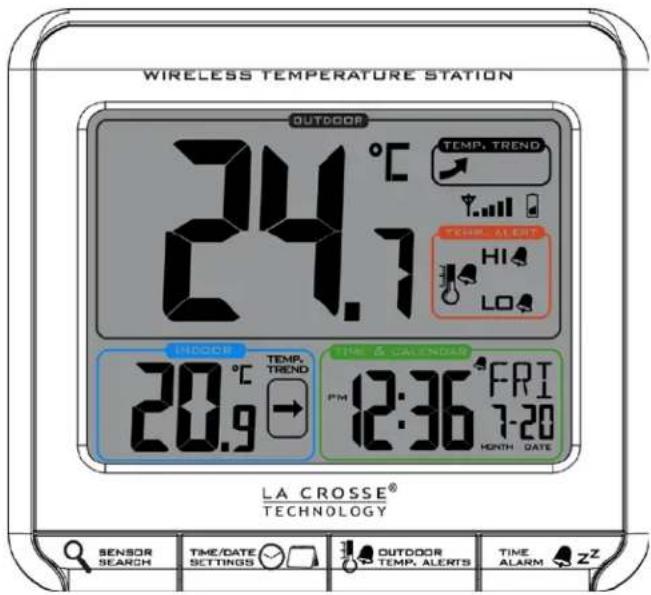
SETUP INSTRUCTIONS STEP BY STEP:
STEP 1:
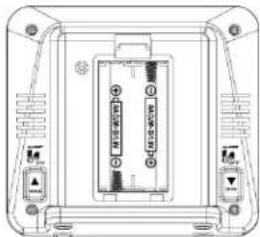
- Remove battery cover from the Temperature Station. Slide tab down
and pull out to remove the battery cover. - Insert 2 NEW AA batteries (not included) into the back of the Temperature Station. Observe the correct polarity (see marking inside the battery compartment).
- The Temperature Station will light up and show, indoor temperature.
- Do Not Mix Old and New Batteries
- Do Not Mix Alkaline, Standard, Lithium or Rechargeable Batteries
STEP 2:
- Ensure that the transmitter is within 10 feet of the Temperature Station.
- Remove battery cover from TX141-A transmitter: Slide the battery cover down and lift off the front of the transmitter.
- Insert 2 NEW AA batteries into the transmitter. Observe the correct polarity.
- Within 3 minutes the Temperature Station will show readings in the outdoor temperature area on the LCD.
- Note: Allow the Temperature Station and the transmitter to stay within 10 feet of each other for the first 15 minutes of set up.
natural_image
Technical line drawing of a device rear panel with buttons and ports (no text or symbols)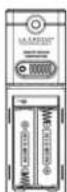
SEARCH FOR TRANSMITTER:
- After the batteries are inserted, the forecast station will search for the outdoor temperature transmitter for 3 minutes.
- The antenna symbol 📂 will flash during reception, and temperature display will be dashes “---”.
- The antenna symbol scroll during RF (radio frequency) synchronization.
- If synchronization fails once, the antenna will lose one bar.
- If synchronization fails twice, the antenna will lose two bars.
- If reception continuously fails to receive 5 times, the antenna symbol will be shown as▼.
- The antenna will show full display with successful RF (radio frequency) reception.
TROUBLESHOOTING:
- If the outdoor temperature is not displayed after three minutes, hold the SENSOR SEARCH button on the temperature station for three seconds to search for outdoor transmitter.
- Next remove the battery cover from the TX141-A transmitter then press the TX button to send a signal.
- If it still does not receive the outdoor temperature, remove the batteries from both the temperature station and the transmitter for 15 minutes repeat setup instructions from step 1.
TIME/DATE:
The TIME/DATE button will move through the program menu and confirm settings.

The UP arrow (on back) will increase a selected value.

The DOWN arrow (on back) will decrease a selected value.
Set Time and Date:
Hold the TIME/DATE button for three seconds to enter time set mode.
- YEAR: The Year will flash, use the ARROW buttons to choose the year, and press the TIME/DATE button to confirm and move to the month.
- MONTH: The Month will flash, use the ARROW buttons to choose the month, and press the TIME/DATE button to confirm and move to the date.
- DATE: The Date will flash; use the ARROW buttons to choose the date. Press the TIME/DATE button to confirm and move to 12/24 hour time format.
- 12/24-HOUR: The time format 12H will flash, use the ARROW buttons to choose 12-hour or 24-hour time format and press the TIME/DATE button to confirm and move to hour.
- HOUR: The Hour will flash, use the ARROW buttons to choose the hour, and press the TIME/DATE button to confirm and move to minutes.
- MINUTES: The Minutes will flash, use the ARROW buttons to choose the minutes, and press the TIME/DATE button to confirm and move to Fahrenheit/Celsius.
- FAHRENHEIT/CELSIUS: °F or °C will flash. Use the ARROW buttons to select Fahrenheit or Celsius. Press and release the TIME/DATE button to confirm and exit the program menu.
Note: When no buttons are pressed for ten seconds the Temperature Station will save the last change and default back to normal mode.
TIME ALARM
The TIME ALARM button moves you through alarm set mode and confirms settings.

The UP arrow (on back) will increase a selected value. The DOWN arrow (on back) will decrease a value.
Set Time Alarm
In normal mode, press and release the TIME ALARM button once to show alarm time. Hold the TIME ALARM button for three seconds to enter alarm set mode.
- HOUR: The Hour will flash, use the ARROW buttons to set the hour, and press TIME ALARM button to confirm. Then press the TIME ALARM button again switch to minute setting.
- MINUTES: The Minutes will flash, use the ARROW buttons to set the minutes, and press TIME ALARM button to confirm.
- Press the TIME/DATE button to return to normal mode Note: When no buttons are pressed for ten seconds the Temperature Station will save the last change and default back to normal mode.
Activate/Deactivate Time Alarm
- In normal mode, press and release the TIME ALARM button once to show alarm time.
- Press and release the TIME ALARM button repeatedly to turn the alarm ON/OFF. The alarm icon 🔔 appears when alarm is activated.
Snooze
When the alarm sounds press the TIME ALARM button to snooze the alarm for 10 minutes. The snooze option can be repeated three times. Note: while the alarm sounds press any button except the TIME ALARM button to turn the alarm off.
LOW BATTERY
- When this icon 📋 appears in the outdoor (OUT) readings section, replace the batteries in the outdoor transmitter.
MIN/MAX
The Temperature Station will show the daily minimum and maximum temperatures each day starting at midnight (12:00 AM). The Temperature Station automatically resets the min/max temperatures at midnight (12:00 AM).
- View MIN data: Press and release the MIN button to view the minimum Indoor and Outdoor Temperatures.
- Reset MIN data: Hold the MIN button for 3 seconds and the Indoor and all Outdoor Minimum Temperatures will be reset to current temperatures.
- View MAX data: Press and release the MAX button to view the maximum Indoor and Outdoor Temperatures.
- Reset MAX data: Hold the MAX button for 3 seconds and the Indoor and all Outdoor Maximum Temperatures will be reset to current temperatures.
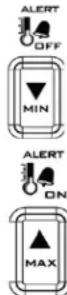
TEMPERATURE ALERTS:
Press and release the TEMP ALERTS button to toggle between the temperature alerts. Hold the TEMP ALERTS button to set individual high and low alerts.
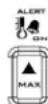
The UP ARROW button (on back) will increase temperature alert value in alert set mode (flashing). Turn alert ON when alert is selected but not flashing.

The DOWN ARROW button (on back) will decrease values when temperature alert flashes. Turn alert OFF when alert is selected but not flashing.

The bell icon indicates an alert is active.
One or all the temperature alerts may be set. Range for outdoor temperature alert: -40^ to 60^ ( -40^ to 140^ )
Select Temperature Alert Values
Hold the TEMP ALERTS button for three seconds to enter alert setting.
- OUTDOOR HI alert will flash where the outdoor temperature shows. Press the ARROW buttons to set the alert value, and press the TEMP ALERTS button to confirm. Then press the TEMP ALERTS button again switch to OUTDOOR LOW setting.
- OUTDOOR LO alert will flash where the outdoor temperature shows. Press the ARROW buttons to set the alert value, and press the TEMP ALERTS button to confirm and exit.
Note: After selecting temperature alert values use the next step to turn individual alerts ON or OFF.
Temperature Alerts ON/OFF
In normal mode, press and release the TEMP ALERTS button to toggle between:
- Outdoor HI
o Outdoor LO
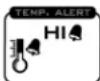
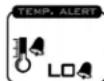
- Press the UP ARROW button (Alert ON) to turn the selected alert ON. The alert icon 🔔 appears when alarm is activated.
- Press the DOWN ARROW button (Alert OFF) to turn the selected alert OFF.
Note: When no temperature alerts are set the Temperature Alert area will show ALERTS OFF.
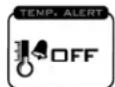
Temperature alert rings
- When temperature alert is ringing, corresponding alert icon will flash.
- The alert will ring for five seconds every minute, until the temperature is out of alert range.
- Press any button to stop alert. The alert icon will still show.
- Turn alert OFF: In normal mode, press and release the TEMP ALERTS button to select the alert to turn off. With HI or LO alert selected, press the DOWN ARROW button to turn that alert OFF.

TEMPERATURE TREND ICONS:
The indoor and outdoor temperature trend indicators will update every 30 minutes or less. These trends represent temperature changes over the past three hours.
Temperature rising more than 1°C/2°F in the past three hours
→ Temperature has not changed more than 1^ C/ 2^ F in the past three hours.
Temperature falling more than 1^ C/ 2^ F in the past three hours
POSITION THE TEMPERATURE STATION:
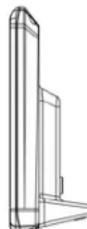
Choose a location for the Temperature Station that is within range of the outdoor transmitter. The Temperature Station has a built in base to sit on a table or desk.
- Choose a location 6 feet or more from electronics such as cordless phones, gaming systems, televisions, microwaves, routers, baby monitors, etc., which can prevent signal reception.
- Be aware of electrical wires and plumbing within a wall.
- Best reception is achieved when the front or the back of the Temperature Station is facing the outdoor transmitter. This allows a larger portion of the antenna to receive a signal.
POSITION THE WIRELESS OUTDOOR TRANSMITTER:
Once the Temperature Station shows the outdoor temperature, place it and the transmitter in the desired locations and wait approximately 1-hour before permanently mounting the transmitter to ensure that there is proper reception. The transmitter should be mounted vertically, in a shaded, protected area, at least 6 feet from the ground to avoid
damage and ensure accurate readings. The transmitter is water resistant, not waterproof and should not be placed anywhere it will become submerged in water or subject to standing water or snow. Choose a location for the transmitter that is within range of the Temperature Station and under an overhang for accuracy.
Option 1:
- Install one mounting screw (not included) into a wall leaving approximately 12 of an inch (12.7mm) extended.
- Place the transmitter onto the screw, using the hanging hole on the backside.
- Gently pull the transmitter down to lock the screw into place.
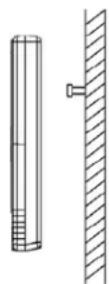
Option 2:
- Insert the mounting screw (not included) through the front of the transmitter and into the wall.
- Tighten the screw to snug (do not over tighten).
To achieve a true temperature reading, mount where direct sunlight cannot reach the outdoor transmitter. Mount the outdoor transmitter on a North-facing wall or in any well shaded area. Under an eave or deck rail work well. The maximum transmitting range in open air is over 200-feet (60 meters). Obstacles such as walls, windows, stucco, concrete, and large metal objects can reduce the range. Place the transmitter at least 6 feet in the air to improve signal transmission.
CARE AND MAINTENANCE:
• Do Not Mix Old and New Batteries
- Do Not Mix Alkaline, Standard, Lithium or Rechargeable Batteries
- Do not expose the Temperature Station to extreme temperatures, vibration or shock.
- Keep Temperature Station dry.
- Clean Temperature Station with a soft damp cloth. Do not use solvents or scouring agents.
- The Temperature Station is not a toy. Keep it out of reach of children.
- The Temperature Station is not to be used for medical purpose or for public information, but is determined for home use only.
- The specifications of this Temperature Station may change without prior notice.
- Improper use or unauthorized opening of housing will void the warranty.
SPECIFICATIONS:
Indoor:
| Temperature Range: | 0°C to 50°C (+32°F to +122°F) |
| Interval: | About every 30 seconds |
| Outdoor: | |
| Temperature Range: | -40°C to 60°C (-40°F to 140°F) |
| Distance: | Over 200 ft. (60 meters)RF 433MHz (open air) |
| Interval: | About every 50 seconds |
| Power: | |
| Temperature Station: | 2-AA, IEC, LR6 batteries (not included) |
| TX141-A Transmitter: | 2-AA, IEC, LR6 batteries (not included) |
Battery Life:
TX141-A Transmitter
Battery Life: Battery life is over 24 months when using reputable battery brands.
Temperature Station
Battery Life:
Battery life is over 24 months when using reputable battery brands.
Dimensions:
Temperature Station: 108 x 38 x 99 mm (4.27"L x 1.48"W x 3.88"H)
TX141-A
Transmitter:
40 x 20 x 130 mm
(1.57" L × 0.79" W × 5.12" H)
Warranty Information
Limited Warranty: Springfield warrants this instrument to be free from defects in workmanship and material for a period of 1 year from date of purchase, and will repair or replace it at our option, without charge.
For warranty issues please contact Springfield Instruments, Inc.:
Phone: 1-844-687-4040
Email: info@springfieldinstruments.com
Springfield Instruments, Inc.
104 Barr Street
Saint-Laurent, QC H4T 1Y4
Canada Statement
This device complies with Industry Canada RSS-210. Operation is subject to the following two conditions: (1) this device may not cause interference, and (2) this device must accept any interference, including interference that may cause undesired operation of the device.
Product Registration:
www.lacrossetechnology.com/support/register
Protected under U.S. Patents:
5,978,738
6,076,044
6,597,990
FCC Statement
This equipment has been tested and found to comply with the limits for a Class B digital device, pursuant to part 15 of the FCC Rules. These limits are designed to provide reasonable protection against harmful interference in a residential installation. This equipment generates, uses and can radiate radio frequency energy and, if not installed and used in accordance with the instructions, may cause harmful interference to radio communications. However, there is no guarantee that interference will not occur in a particular installation. If this equipment does cause harmful interference to radio or television reception, which can be determined by turning the equipment off and on, the user is encouraged to try to correct the interference by one or more of the following measures:
—Reorient or relocate the receiving antenna.
—Increase the separation between the equipment and receiver.
—Connect the equipment into an outlet on a circuit different from that to which the receiver is connected.
—Consult the dealer or an experienced radio/TV technician for help.
This device must not be co-located or operating in conjunction with any other antenna or transmitter. Operation is subject to the following two conditions:
(1) this device may not cause harmful interference, and
(2) this device must accept any interference received, including interference that may cause undesired operation.
Caution!
The manufacturer is not responsible for any radio or TV interference caused by unauthorized modifications to this equipment. Such modifications could void the user authority to operate the equipment.
All rights reserved. This handbook must not be reproduced in any form, even in excerpts, or duplicated or processed using electronic, mechanical or chemical procedures without written permission of the publisher.
This handbook may contain mistakes and printing errors. The information in this handbook is regularly checked and corrections made in the next issue. We accept no liability for technical mistakes or printing errors, or their consequences. All trademarks and patents are acknowledge
Printed in China
LA CROSSE®
TECHNOLOGY
natural_image
Technical line drawing of a mechanical or electrical component with no visible text, numbers, or symbols.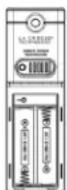

- Wireless Temperature Station with Snooze Alarm
- Model: CA85169 | Quick Setup Guide
- SETUP INSTRUCTIONS STEP BY STEP:
- STEP 1:
- STEP 2:
- SEARCH FOR TRANSMITTER:
- TROUBLESHOOTING:
- TIME/DATE:
- Set Time and Date:
- TIME ALARM
- Set Time Alarm
- Activate/Deactivate Time Alarm
- Snooze
- LOW BATTERY
- MIN/MAX
- TEMPERATURE ALERTS:
- Select Temperature Alert Values
- Temperature Alerts ON/OFF
- Temperature alert rings
- TEMPERATURE TREND ICONS:
- POSITION THE TEMPERATURE STATION:
- POSITION THE WIRELESS OUTDOOR TRANSMITTER:
- Option 1:
- Option 2:
- CARE AND MAINTENANCE:
- • Do Not Mix Old and New Batteries
- - Do Not Mix Alkaline, Standard, Lithium or Rechargeable Batteries
- Battery Life:
- Dimensions:
- TX141-A
- Warranty Information
- Springfield Instruments, Inc.
- Canada Statement
- FCC Statement
- this device may not cause harmful interference, and
- this device must accept any interference received, including interference that may cause undesired operation.
- Caution!
- LA CROSSE®
- TECHNOLOGY
Brand : LA CROSSE TECHNOLOGY
Model : CA85169
Category : Thermometer