CFBI902IX - Cooker BORETTI - Free user manual and instructions
Find the device manual for free CFBI902IX BORETTI in PDF.



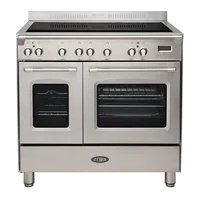
| Product type | Induction cooker with two electric ovens |
| Brand | Boretti |
| Model | CFBI902IX |
| Number of cooking zones | 4 induction zones |
| Zone diameters | Front right: 160 mm, rear right: 200 mm, rear left: 160 mm, front left: 200 mm |
| Hob functions | Levels 1-9, rapid heating (A), booster (P), child safety lock |
| Hob power per control | 3700 W max |
| Main oven | Multifunction: 7 modes (lighting, natural convection, fan-assisted, grill, fan grill, defrosting, keep warm) |
| Secondary oven | 4 modes: lighting, traditional cooking, grill, traditional grill with rotisserie |
| Oven thermostat | 50°C to 250°C |
| Timer | Electronic: timer, automatic and semi-automatic cooking |
| Rotisserie | Yes (for secondary oven) |
| Oven lighting | Halogen lamp (220-240V, 300°C) |
| Power supply | 230 V~ or 400 V 2N~ / 3N~ (depending on configuration) |
| Cable type | H05RR-F (cross-section according to voltage) |
| Adjustable feet | Yes |
| Safety | Hob child lock, automatic zone shut-off, anti-tilt bracket, lockable door |
| Cleaning | Ceramic glass hob (scraper), removable door (3 panes), oven interior with mild detergent |
| Supplied accessories | Grid, drip tray, rotisserie, telescopic supports |
| Approximate weight | 80 kg |
| Installation class | 2/1 (near furniture not exceeding the height of the hob) |
Frequently Asked Questions - CFBI902IX BORETTI
User questions about CFBI902IX BORETTI
0 question about this device. Answer the ones you know or ask your own.
Ask a new question about this device
Download the instructions for your Cooker in PDF format for free! Find your manual CFBI902IX - BORETTI and take your electronic device back in hand. On this page are published all the documents necessary for the use of your device. CFBI902IX by BORETTI.
USER MANUAL CFBI902IX BORETTI
natural_image
Exterior view of a stainless steel electric stove with open doors and control knobs (no visible text or symbols)CE
CFBI902AN / CFBI902IX / CFBI902OW / CFBI902ZW
GB | INSTRUCTIONS ON MOUNTING AND USE
Instruction for the use - Installation advice
Page 162
Descriptions and illustrations in this booklet are given as simply indicative.
The manufacturer reserves the right, considering the characteristics of the models described here, at any time and without notice, to make eventual necessary modifications for their construction or for commercial needs.
natural_image
Symbol of a trash bin crossed with no text or numbers, representing waste sorting or disposal (no text present)BELANGRIJKE VEILIGHEIDSINSTRUCTIES EN AANBEVELINGEN
text_image
Warning sign set with three triangular warning symbols: exclamation mark, flame symbol, and steam train.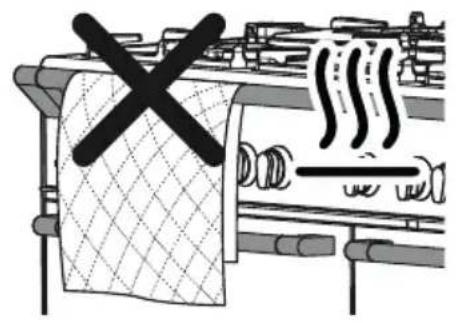
text_image
Diagram showing a kitchen with a crossed-out cloth and steam pipes, indicating a warning or hazard.OPGELET – HEEL BELANGRIJK !
BRAND/OVERVERHITTINGSGEVAAR:
natural_image
Illustration of a cooking pot with crossed black lines indicating resistance or crossed pan (no text or symbols)
natural_image
Simple line drawing of a cooking pot with crossed black lines and upward arrows indicating heating (no text or symbols)



natural_image
Simple line drawing of a cylindrical object with a diagonal line crossing through it, and scattered upward-pointing arrows below (no text or symbols)
Afb. 3.3
natural_image
Two abstract diagrams: a square with diagonal lines and a circular pattern with crosshairs (no text or symbols)Afb. 3.4
REINIGING
natural_image
Illustration of a hand using a tool to brush or mark on a circular object, with no visible text or symbols.Opgelet :
THERMOSTAAT (afb. 4.1)
THERMOSTAAT (afb. 5.2)
BRAADSPIT (afb. 5.3)
natural_image
Line drawing of an open refrigerator interior with handlebars and a labeled section (Afb. 5.3), no text or symbols on the diagram itself.
ELEKTRONISCHE DIGITALE PROGRAMMERING
natural_image
Technical diagram of a mechanical or electrical component with coiled spring and mounting bracket (no text or symbols)
natural_image
Technical line drawing of a heat exchanger or cooling unit with no visible text or symbolsnatural_image
Technical line drawing of a mechanical component with two parallel plates and mounting brackets (no text or symbols)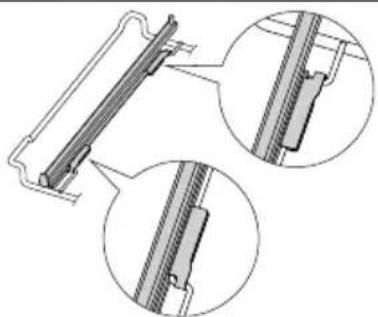
natural_image
Technical line drawing of a mechanical component with three circular insets showing close-ups of internal parts (no text or symbols)
natural_image
Technical line drawing of a rectangular metal grate or rack structure (no text or symbols)Afb. 7.8Afb. 7.7

text_image
8Afb. 7.7 2 2 1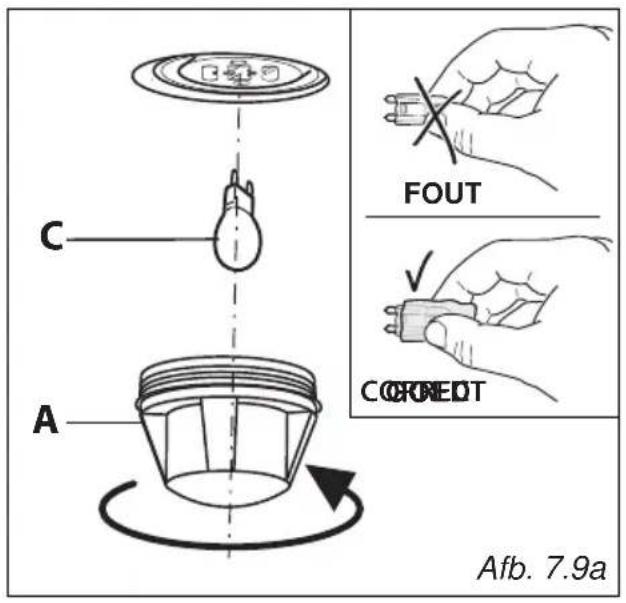
text_image
C A FOUT CORNEDT Afb. 7.9aVERVANGEN
VAN
HET
OVENLAMPJE
natural_image
Technical line drawing of a mechanical assembly with mounting feet and a base plate (no text or symbols)VERWIJDEREN EN TERUGPLAATSEN VAN HET BINNENGLAS VAN DE OVENDEUR
natural_image
Technical line drawing of a mechanical bracket assembly (no text or symbols)
text_image
A B Afb. 7.12
natural_image
Technical line drawing of a mechanical component or bracket (no text or symbols)
natural_image
Technical line drawing of a mechanical bracket assembly (no text or symbols)
text_image
A Afb. 7.16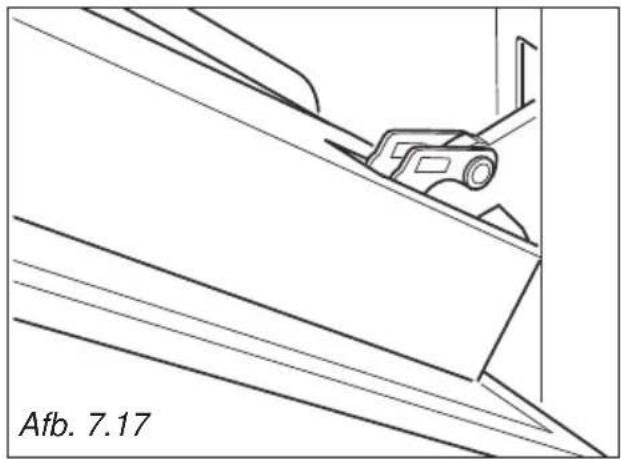
natural_image
Technical line drawing of a mechanical component on an inclined plane, labeled 'Afb. 7.17' (no other text or symbols)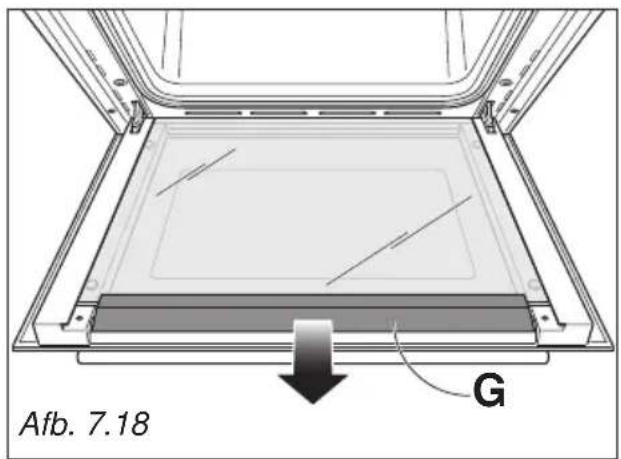
text_image
Afb. 7.18 GOVENDEUREN - HET REINIGEN VAN DE RUITEN
De ovendeur beschikt over 3 ruiten:
natural_image
Illustration of hands installing or adjusting a sheet on a vehicle door panel (no text or symbols visible)
natural_image
Technical line drawing of a mechanical assembly with no visible text or symbolsnatural_image
Diagram of a hand pressing a component into a tray, showing a directional arrow (no text or symbols present)
text_image
Afb. 7.22
text_image
M Afb. 7.23
text_image
Afb. 7.24
natural_image
Illustration of a hand pressing down on a mechanical device with an inset showing a close-up of a component (no text or symbols)TERUGPLAATSEN VAN DE MIDDELSTE EN BINNENSTE RUITEN
natural_image
Technical line drawing of a structural assembly with mounting holes and supports (no text or symbols)
natural_image
Line drawing of two people assembling a large stove on a tiled floor (no text or symbols)Afb. 8.4

natural_image
Line drawing of a person using a large piano with a horizontal double-slit line crossing, no text or symbols presentAfb. 8.5

natural_image
Line drawing of a person using a large kitchen stove with diagonal lines indicating resistance (no text or symbols)Afb. 8.6
BEWEGINGSSYSTEEM VAN HET FORNUIS
WAARSCHUWING
natural_image
Line drawing of a server rack unit with screw slots and a door, showing part assembly (no text or symbols)natural_image
Symbol of a trash bin crossed with no text or numbers, representing waste sorting or restriction (no text present)
ENERGIEVERBRAUCHSKENNZEICHNUNG/ÖKODESIGN
text_image
Warning sign set with three triangular warning symbols: exclamation mark, flame symbol, and steam train.
text_image
Diagram showing a kitchen with a crossed-out cloth and steam pipes, indicating a warning or hazard.natural_image
Simple line drawing of a cooking pot with crossed black lines on a stand (no text or symbols)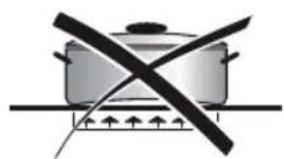
natural_image
Simple line drawing of a cooking pot with crossed black lines indicating resistance or crossed pan (no text or symbols)



natural_image
Simple line drawing of a cylinder with a diagonal black X mark and scattered upward arrows (no text or symbols)
Abb. 3.3
KEINE TÖPFE MIT UNBEARBEITETEM, RAUEN BODEN VERWENDEN

natural_image
Two abstract geometric diagrams: a square with diagonal lines and a circle with concentric circles, both marked with X marks (no text or symbols)Abb. 3.4
REINIGUNG
natural_image
Illustration of a hand using a tool to brush or mark on a circular surface, with no visible text or symbols.natural_image
Line drawing of a door with internal components and a label 'Abb. 5.3' (no text or symbols on the diagram itself)
GEBRAUCH DES ELEKTRONISCHEN PROGRAMMIERERS
natural_image
Technical diagram of a mechanical component with spring-like structure and directional arrows, labeled Abb. 7.1 (no text or symbols beyond label)
natural_image
Technical line drawing of a heat exchanger or cooling unit with cooling fins and cooling ends (no text or symbols)
text_image
Abb. 7.6 Abb. 7.5 Leitschiene
natural_image
Technical line drawing of a mechanical component with three circular insets showing close-ups of internal parts (no text or symbols)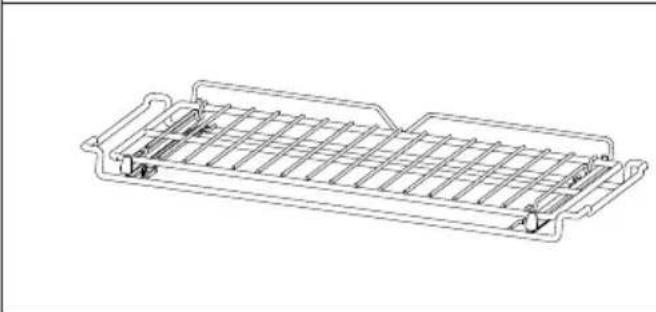
natural_image
Technical line drawing of a rectangular metal frame structure with internal ribs and mounting holes (no text or symbols)
text_image
Abb. 7.8Abb. 7.7 2 2 c 1ABTEIL TELLERWÄRMER
natural_image
Technical line drawing of a cabinet or enclosure structure with mounting feet and a horizontal shelf (no text or symbols)Abb. 7.9a
AUSTAUSCH
DER
BACKOFENLEUCHTE
natural_image
Technical line drawing of a mechanical bracket assembly (no text or symbols)
text_image
A B Abb. 7.12WICHTIG:
text_image
Warning symbol with warning triangle and hand gesture, indicating hazard or caution
natural_image
Technical line drawing of a mechanical component with diagonal lines and a central bracket (no text or symbols)
natural_image
Line drawing of a hand holding a metal tab with a ruler, next to a door frame (no text or symbols)
text_image
C Abb. 7.14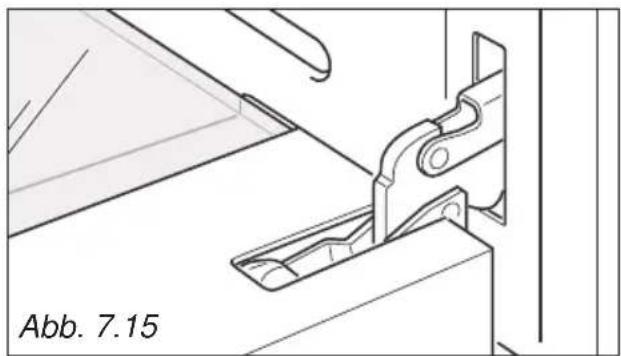
natural_image
Technical line drawing of a mechanical bracket assembly (no text or symbols)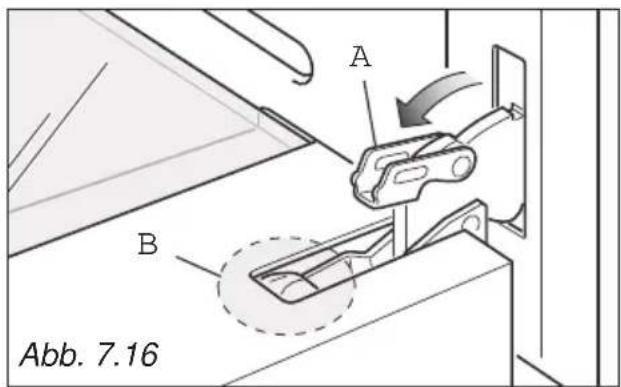
text_image
A B Abb. 7.16
natural_image
Technical line drawing of a mechanical component with diagonal lines and a central roller (no text or symbols)
text_image
Abb. 7.18 Gnatural_image
Illustration of hands installing or adjusting a panel on a vehicle door frame, with no visible text or symbols.
natural_image
Technical line drawing of a mechanical assembly with no visible text or symbols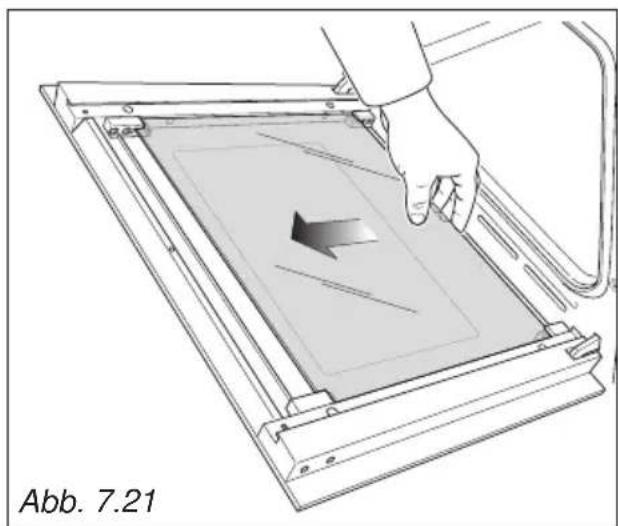
natural_image
Diagram of a hand pressing a component into a tray, showing a directional arrow (no text or symbols present)
text_image
Abb. 7.22natural_image
Illustration of a hand pressing down on a mechanical device with an inset showing a close-up of the component (no text or symbols)WIEDEREINSETZEN DES INNEREN UND MITTLEREN GLASSEGMENTS
natural_image
Technical line drawing of a structural assembly with mounting holes and supports (no text or symbols)
natural_image
Line drawing of two people installing or adjusting a large stove on a tiled floor (no text or symbols)Abb. 8.4

text_image
UH ON COOKIONAbb. 8.5
natural_image
Line drawing of a person using a large kitchen appliance with a diagonal line crossing the floor (no text or symbols)Abb. 8.6
KÜCHENHERD TRANSPORTIEREN
HINWEIS
natural_image
Technical diagram showing a mechanical assembly with rotational arrows and a dimension label (no readable text or symbols)ANTI-KIPP-HALTERUNG
natural_image
Line drawing of a server rack unit with a door and two screws attached, labeled Abb. 8.8 (no text or symbols on the diagram itself)- Prescriptions de la Directive 93/68/CEE;
- Prescriptions de la Directive 2011/65/UE.

AVERTISSEMENTS POUR L'ELIMINATION CORRECTE DU PRODUIT AUX TERMES DE LA DIRECTIVE EUROPEENNE 2012/19/UE.
natural_image
Symbol of a trash bin crossed with a diagonal line, representing no waste or discharge (no text or labels)
PRECAUTIONS DE SECURITE ET CONSEILS IMPORTANTS
text_image
Warning sign set with three triangular warning symbols: exclamation mark, flame symbol, and steam train icon
text_image
Diagram showing a kitchen with a crossed-out cloth and steam rising, indicating a warning or hazard.ATTENTION – TRÈS IMPORTANT !
DANGER D'INCENDIE/SURCHAUFFE:
text_image
8 | 8 8 | 8Fig. 3.1

= Zone cuisson off (pas active)

= Voyant plaque chaude

PROTECTIONS THERMIQUES
natural_image
Illustration of a cooking pot with crossed black lines indicating resistance or crossed pan (no text or symbols)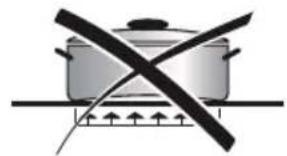
natural_image
Simple line drawing of a cooking pot with crossed black lines indicating resistance or crossed pan (no text or symbols)
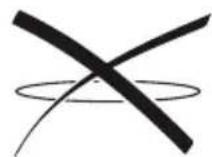
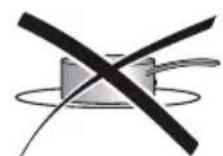


natural_image
Simple line drawing of a cylindrical object with a diagonal black X mark and upward arrows, no text or symbols present.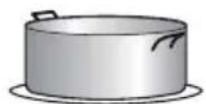
Fig. 3.3
NE PAS UTILISER DE CASSEROLES AVEC UN FOND AVEC USINAGE CIRCULAIRE RUGUEUX

natural_image
Two abstract diagrams: a square with diagonal lines and a circular pattern with crosshairs (no text or symbols)Fig. 3.4
NETTOYAGE
natural_image
Line drawing of a hand using a tool to clean or brush residue in a circular container (no text or symbols)Fig. 3.5
natural_image
Line drawing of a door with internal components and a clamp, labeled Fig. 5.3 (no text or symbols on the diagram itself)
PROGRAMMATEUR ELECTRONIQUE
natural_image
Technical diagram of a door frame with coiled heating element and directional arrows indicating movement (no text or symbols)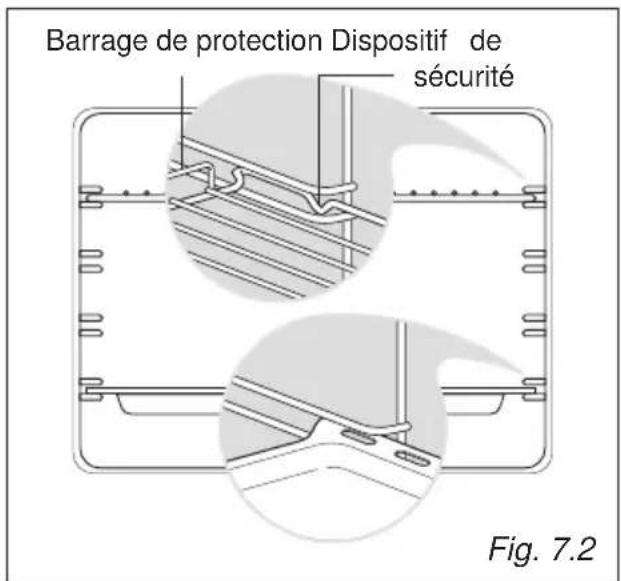
natural_image
Technical line drawing of a mechanical assembly with mounting feet and a base plate (no text or symbols)REEMPLACEMENT DE LA LAMPE DU FOUR
text_image
C A INCORRECT ✓ CORRECT Fig. 7.9bMONTAGE ET DEMONTAGE DE LES VITRES INTERIEURE POUR LE NETTOYAGE
text_image
Warning sign with warning triangle and hand holding a cross symbol, indicating hazard or caution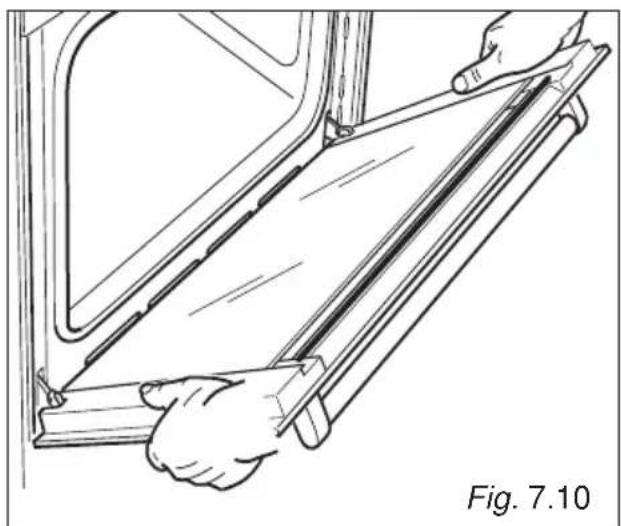
natural_image
Line drawing of a hand holding a metal bracket inside a vehicle (no text or symbols)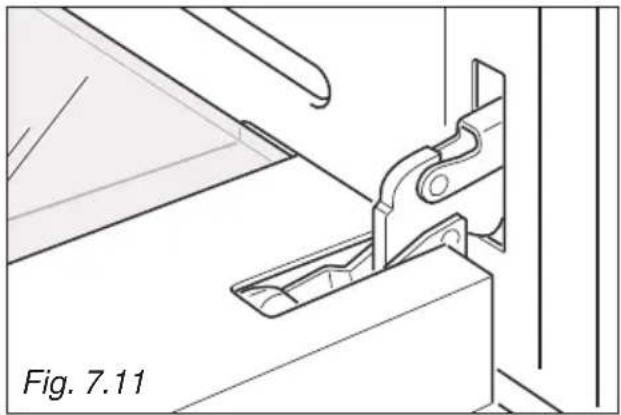
natural_image
Technical line drawing of a mechanical clamp or bracket assembly (no text or symbols)
text_image
A B Fig. 7.12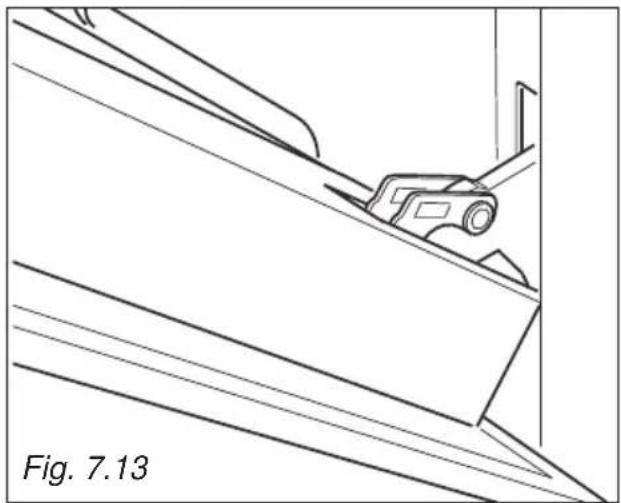
natural_image
Technical line drawing of a mechanical component with diagonal lines and a labeled section (Fig. 7.13), no readable text or symbols beyond the label.
text_image
C Fig. 7.14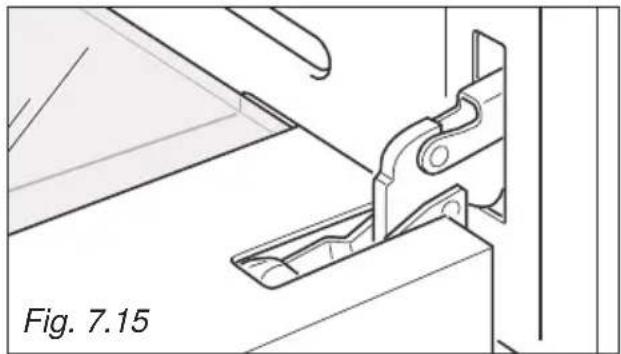
natural_image
Technical line drawing of a mechanical bracket assembly (no text or symbols)
text_image
A B Fig. 7.16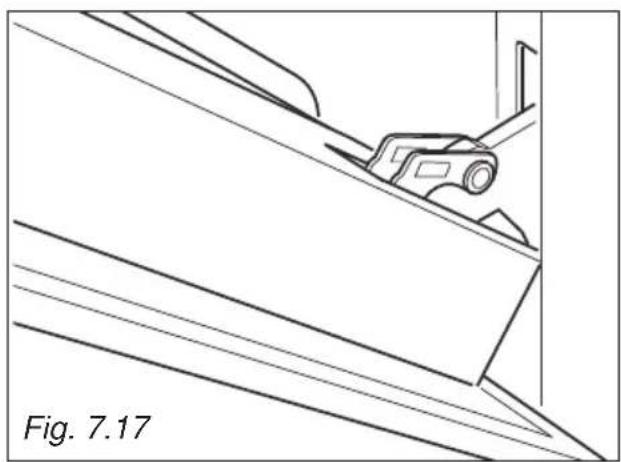
natural_image
Technical line drawing of a mechanical component or bracket with diagonal lines and a small car, labeled Fig. 7.17 (no text or symbols on the diagram itself)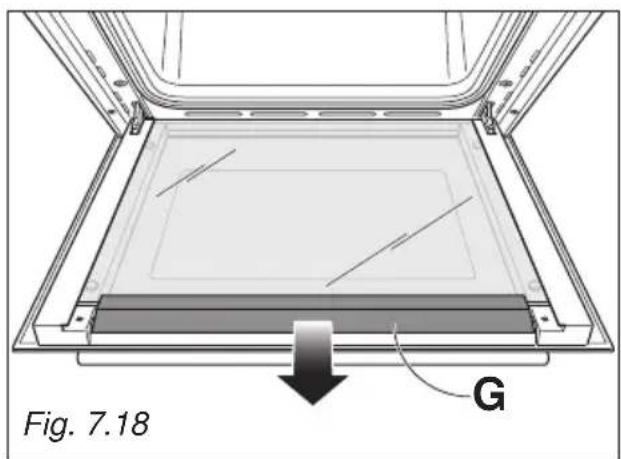
text_image
Fig. 7.18 GNETTOYAGE DE LES VITRES DE LA PORTE DU FOUR
natural_image
Illustration of hands installing or adjusting a sheet on a vehicle door panel, with no visible text or symbols.
natural_image
Technical line drawing of a mechanical assembly with a central rectangular component and mounting brackets (no text or symbols)natural_image
Diagram of a hand pressing a component into a tray, showing a left-side arrow and a diagonal line (no text or symbols)
text_image
Fig. 7.22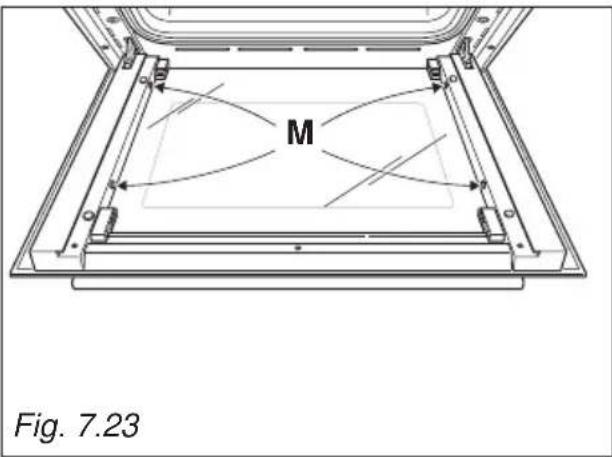
text_image
M Fig. 7.23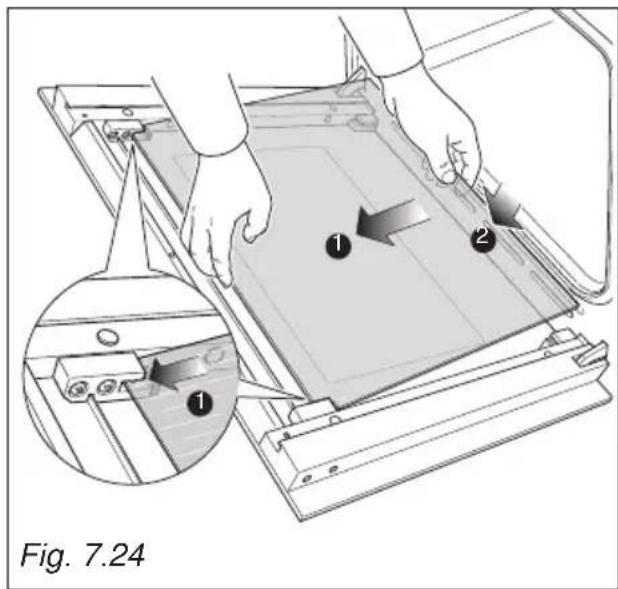
text_image
Fig. 7.24
natural_image
Illustration of a hand pressing down on a mechanical device with an inset showing internal components (no text or symbols)REMISE EN PLACE DE LA VITRE INTERIEURE ET DE LA VITRE DU MILIEU
natural_image
Technical line drawing of a structural assembly with mounting holes and supports (no text or symbols)
natural_image
Line drawing of two people assembling a large stove on a tiled floor (no text or symbols)Fig. 8.4
natural_image
Line drawing of a person operating a piano with a crossed tool, no text or symbols presentFig. 8.5

natural_image
Line drawing of a person using a kitchen appliance with a diagonal line crossing the floor (no text or symbols)Fig. 8.6
DEPLACEMENT DE LA CUISINIERE
AVERTISSEMENT
natural_image
Technical diagram showing a mechanical assembly with directional arrows indicating motion or force, labeled Fig. 8.7 (no text or symbols on the diagram itself)ÉQUERRE ANTI-BASCULEMENT
natural_image
Line drawing of a server rack unit with a door and two screws attached, labeled Fig. 8.8 (no text or symbols on the diagram itself)Thank you for having purchased and given your preference to our product.
The safety precautions and recommendations reported below are for your own safety and that of others. They will also provide a means by which to make full use of the features offered by your appliance.
Please preserve this booklet carefully. It may be useful in future, either to yourself or to others in the event that doubts should arise relating to its operation.
This appliance must be used only for the task it has explicitly been designed for, that is for cooking foodstuffs. Any other form of usage is to be considered as inappropriate and therefore dangerous.
The manufacturer declines all responsibility in the event of damage caused by improper, incorrect or illogical use of the appliance.
DECLARATION OF CE CONFORMITY
- This appliance has been designed to be used only for cooking. Any other use (such as heating a room) is improper and dangerous.
-
This appliance has been designed, constructed, and marketed in compliance with:
-
Safety requirements of the "Low voltage" Directive 2014/35/EU;
- Safety requirements of the "EMC" Directive 2014/30/EU;
- Requirements of EU Directive 93/68/EEC;
- Requirements of EU Directive 2011/65/EU.
IMPORTANT SAFETY PRECAUTIONS AND RECOMMENDATIONS
IMPORTANT: This appliance is designed and manufactured solely for the cooking of domestic (household) food and is not suitable for any non domestic application and therefore should not be used in a commercial environment.
The appliance guarantee will be void if the appliance is used within a non domestic environment i.e. a semi commercial, commercial or communal environment.
Read the instructions carefully before installing and using the appliance.
- This appliance has been designed and manufactured in compliance with the applicable standards for the household cooking products and it fulfills all the safety requirements shown in this manual, including those for surface temperatures.
Some people with sensitive skin may have a more pronounced temperature perception with some components although these parts are within the limits allowed by the norms.
The complete safety of the appliance also depends on the correct use, we therefore recommend to always pay a extreme attention while using the product, especially in the presence of children.
• After having unpacked the appliance, check to ensure that it is not damaged and that the oven door closes correctly.
In case of doubt, do not use it and consult your supplier or a professionally qualified technician.
- Packing elements (i.e. plastic bags, polystyrene foam, nails, packing straps, etc.) should not be left around within easy reach of children, as these may cause serious injuries.
- Some appliances are supplied with a protective film on steel and aluminium parts. This film must be removed before using the appliance.
- IMPORTANT: The use of suitable protective clothing/gloves is recommended when handling or cleaning this appliance.
- Do not attempt to modify the technical characteristics of the appliance as this may become dangerous to use. The manufacturer declines all responsibility for any inconvenience resulting from the inobservance of this condition.
- Do not operate your appliance by means of an external timer or separate remote-control system.
- Do not carry out cleaning or maintenance operations on the appliance without having previously disconnected it from the electric power supply.
- WARNING: Ensure that the appliance is switched off before replacing the oven lamp to avoid the possibility of electric shock.
- Do not use a steam cleaner because the moisture can get into the appliance therefore making it unsafe.
- Do not touch the appliance with wet or damp hands (or feet).
- Do not use the appliance whilst in bare feet.
- If you should decide not to use this appliance any longer (or decide to substitute another model), before disposing of it, it is recommended that it be made inoperative in an appropriate manner in accordance to health and environmental protection regulations, ensuring in particular that all potentially hazardous parts be made harmless, especially in relation to children who could play with unused appliances.
- The various components of the appliance are recyclable. Dispose of them in accordance with the regulations in force in your country. If the appliance is to be scrapped, remove the power cord.
• After use, ensure that the knobs are in the off position. - Children less than 8 years of age shall be kept away unless continuously supervised.
- This appliance can be used by children aged from 8 years and above and persons with reduced physical, sensory or mental capabilities or lack of experience and knowledge if they have been given supervision or instruction concerning use of the appliance in a safe way and understand the hazards involved. Children shall not play with the appliance. Cleaning and user maintenance shall not be made by children without supervision.
- The manufacturer declines all liability for injury to persons or damage to property caused by incorrect or improper use of the appliance.
- WARNING: During use the appliance and its accessible parts become hot; they remain hot for some time after use.
- Care should be taken to avoid touching heating elements (on the hob and inside the oven).
- The door is hot, use the handle.
- To avoid burns and scalds, young children should be kept away.
- Make sure that electrical cables connecting other appliances in the proximity of the cooker cannot come into contact with the hob or become entrapped in the oven door.
- WARNING: Unattended cooking on a hob with fat or oil can be dangerous and may result in fire. NEVER try to extinguish a fire with water, but switch off the appliance and then cover flame e.g. with a lid or a fire blanket.
- WARNING: Danger of fire: do not store items on the cooking surfaces.
- Do not place or leave empty pans on the glass ceramic hob.
- Do not allow heavy or sharp objects to drop on the glass ceramic hob.
- Do not scratch the hob with sharp objects. Don't use the hob as a work surface.
- WARNING: When correctly installed, your product meets all safety requirements laid down for this type of product category. However special care should be taken around the rear or the underneath of the appliance as these areas are not designed or intended to be touched and may contain sharp or rough edges, that may cause injury.
- FIRST USE OF THE OVEN - it is advised to follow these instructions:
– Furnish the interior of the oven as described in the chapter "CLEANING AND MAINTENANCE".
- Switch on the empty oven on max to eliminate grease from the heating elements.
- Disconnect the appliance from the electrical power supply, let the oven cool down and clean the interior of the oven with a cloth soaked in water and neutral detergent; then dry carefully.
- CAUTION: Do not use harsh abrasive cleaners or sharp metal scrapers to clean the oven door glass since they can scratch the surface, which may result in shattering of the glass.
- Do not line the oven walls or base with aluminium foil. Do not place baking trays or the drip tray on the base of the oven chamber.
- FIRE RISK! Do not store flammable material in the oven or in the storage compartment.
- Always use oven gloves when removing the shelves and food trays from the oven whilst hot.
- Do not hang towels, dishcloths or other items on the appliance or its handle – as this could be a fire hazard.
- Clean the oven regularly and do not allow fat or oils to build up in the oven base or tray. Remove spillages as soon as they occur.
- Do not stand on the cooker or on the open oven door.
- Always stand back from the appliance when opening the oven door to allow steam and hot air to escape before removing the food.
- SAFE FOOD HANDLING: Leave food in the oven for as short a time as possible before and after cooking. This is to avoid contamination by organisms which may cause food poisoning. Take particular care during warmer weather.
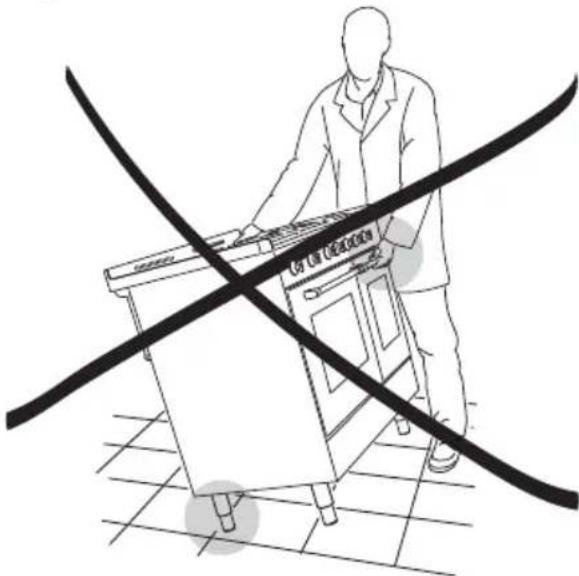
- WARNING: Take care NOT to lift the cooker by the door handle.
- CAUTION: The cooking process has to be supervised. A short term cooking process has to be supervised continuously.
- The appliance must not be installed behind a decorative door in order to avoid overheating.
- The oven accessories (e.g. oven wire rack) must be fitted correctly as indicated at page 196.
- If the power supply cable is damaged, it must be replaced only by an authorized service agent in order to avoid a hazard.
- INDUCTION HOBS:
- Metallic objects such as knives, forks, spoons and lids should not be placed on the hob surface since they can get hot.
- Do not use metallic kitchen utensils (e.g. ladles). It is preferable to use plastic or wood kitchen utensils.
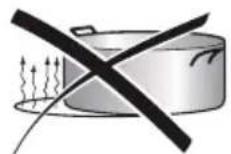
- Please use pans of recommended size (see minimum pan diameter recommended). It is not advisable to use pans smaller than the cooking zone. The pans have to be placed in the centre of the cooking zone.
- Do not use defective pans or pans with a curved bottom.
- Please use suitable pans marked for induction cooking.
- Please keep your distance from the electromagnetic fields by standing 5-10 cm from the cooking zones. When possible use the rear cooking zones.
- Magnetic objects (e.g. credit cards, floppy disks, memory cards) and electronic instruments (e.g. computers) should not be placed near the induction hob.
- The heating of magnetic tins is forbidden! Closed tins may explode by exceeding pressure while heating. There is a burning risk with open tins as well, because the integrated temperature protection will not work correctly.
- IMPORTANT WARNING: The induction hob complies with European Standards for domestic cooking appliances. Therefore it should not interfere with other electronic units. Persons with cardiac pacemakers or any other electrical implants must check with their doctor if they can use an induction cooking system (and check any possible interferences with the implants).
IMPORTANT INFORMATION FOR CORRECT DISPOSAL OF THE PRODUCT IN ACCORDANCE WITH EC DIRECTIVE 2012/19/EC.
At the end of its working life, the product must not be disposed of as urban waste. It must be taken to a special local authority differentiated waste collection centre or to a dealer providing this service.
Disposing of a household appliance separately avoids possible negative consequences for the environment and health deriving from inappropriate disposal and enables the constituent materials to be recovered to obtain significant savings in energy and resources. As a reminder of the need to dispose of household appliances separately, the product is marked with a crossed-out wheeled dustbin.

natural_image
Symbol of a trash bin crossed with no text or numbers, representing waste sorting or disposal (no text present)
ENERGY LABELLING/ECODESIGN
- Commission delegated regulation (EU) No 65/2014 (supplementing Directive 2010/30/EU of the European Parliament and of the Council).
- Commission regulation (EU) No 66/2014 (implementing Directive 2009/125/EC of the European Parliament and of the Council).
Reference to the measurement and calculation methods used to establish compliance with the above requirements:
• Standard EN 60350-1 (electric ovens). - Standard EN 60350-2 (hobs: electric cooking zones and/or areas).
USE OF THE APPLIANCE, ENERGY SAVING TIPS
OVEN
- Check the oven door always closes properly and the door gasket is clean and in order. During use, open the oven door only when strictly necessary to avoid heat losses (for some functions it may be necessary to use the oven with the door half-closed, check the oven operating instructions).
- Turn off the oven 5-10 minutes before the end of the theoretical cooking time to recuperate the stored heat.
- We recommend using oven proof dishes and adjusting the oven temperature during cooking if necessary.
HOB
INDUCTION COOKING ZONES AND/OR AREAS
- To save electricity, use lids whenever possible.
- When the pan comes to the boil, turn the heat down to the level desired.
- Please use suitable pans marked for induction cooking. Some cookware available on the market has an effective ferromagnetic area which is much smaller than the diameter of the pan itself. Avoid using this cookware because the induction cooktop may not function properly or may be damaged.
- Always use pans/coffee pots with thick, completely flat bottom. Do not use pans/coffee pots with concave or convex bottom; these could cause overheating of the cooking zone.
- Important: Do not use pots/coffee pot adaptors.
text_image
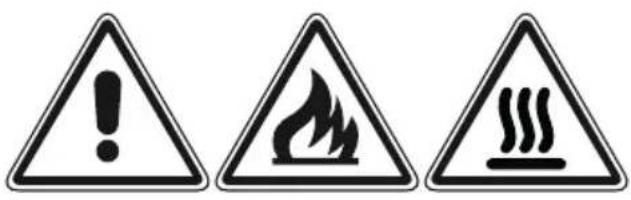
Warning sign with three triangular warning symbols: exclamation mark, flame symbol, and steam train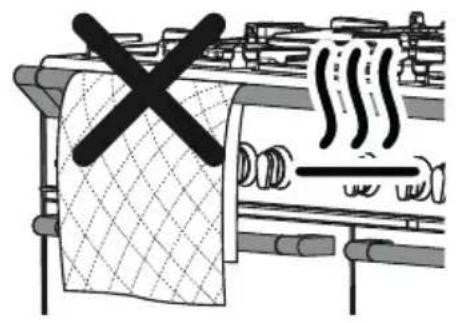
text_image
Diagram showing a kitchen with a crossed-out shower and smoke, indicating a warning or hazard.WARNING – VERY IMPORTANT!
FIRE/OVERHEATING HAZARD:
- Do not place towels/cloths etc onto the hob rail or oven door handle/s whilst the product is in use or hot.
TO AVOID DAMAGE TO THE APPLIANCE:
- Do not lift/move the cooker by the hob rail or oven door handle/s.
- Do not lean on the hob rail or oven door handle/s.

text_image
Hob rail Door handle/s This figure is indicative onlyFig. 1.1

text_image
1 2 2 3 1INDUCTION COOKING HOB
- Induction cooking zone ∅ 200 mm Normal Power: 2300 W
Booster Power: 3000 W
-
Induction cooking zone ∅ 160 mm Normal Power: 1400 W
-
Cooking zones display
Note:
The Nominal and Booster Power may change depending on the size and material of the pan set on the cooking zone.
Attention:
Detach the appliance from the mains if the ceramic glass is cracked and contact the After-Sales Service.
Metallic objects such as knives, forks, spoons and lids should not be placed on the hob surface since they can get hot.
text_image
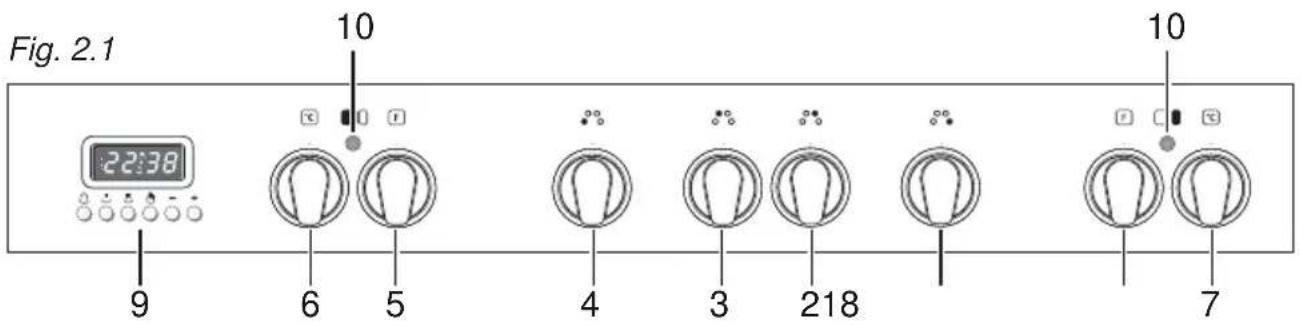
Fig. 2.1 22:38 10 10 9 6 5 4 3 218 7CONTROL PANEL - Controls description
- Front right cooking zone control knob
- Rear right cooking zone control knob
- Rear left cooking zone control knob
- Front left cooking zone control knob
- Multifunction oven switch knob (left oven)
- Multifunction oven thermostat knob (left oven)
- Conventional oven thermostat knob (right oven)
- Conventional oven switch knob (right oven)
- Electronic clock/programmer (left main oven only)
Pilot lamps:
- Multifunction oven temperature indicator light (left oven)
- Conventional oven temperature indicator light (right oven)

USE OF INDUCTION HOB
The ceramic hob is fitted with induction cooking zones.
These zones, shown by painted disks on the ceramic surface, are controlled by separate knobs positioned on the control panel.
In the front central area of the hob, the cooking zones display (composed by no. 4 luminous figures - one for each zone) indicates:
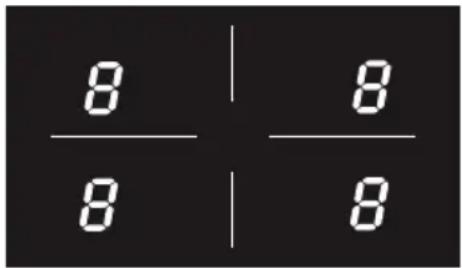
text_image
8 | 8 8 | 8Fig. 3.1

= Cooking zone Off (not activated)

= Cooking zone On (activated but not operating).
If all the zones are in zero setting, the display switches off automatically (cooking zones Off) after about 10 seconds.


= Power levels

= "Fast heating" function

= "Booster" function

= Remaining heat indicator

= Pan detection indicator

= Childlock safety
Note: each lit figure refers to the relevant cooking zone
INDUCTION COOKING SYSTEM
When your induction hob is switched on and a cooking zone has been selected, the electronic circuits produce induced currents that instantaneously heat the bottom of the pan which then transfers this heat to the food. Cooking takes place with hardly any energy loss between the induction hob and the food.
Your induction hob operates only if a correct pan with the right features is placed on a cooking zone. Please refer to COOKWARE FOR INDUCTION COOKING.
If the pan detection symbol 📋 appears on the display, your pan is not suitable and your induction hob will not operate After 10 minutes without detecting any pan, the cooking zone switches Off automatically and can only be switched On after the control knob has been returned into “O” (Off) setting.
REMAINING HEAT INDICATORS
When the temperature of a cooking zone is still hot, the relevant remaining heat indicator lights up on the display to alert you of the hot surface. Avoid touching the hob surface over the cooking area. Please pay special attention to children. When the H is lit on the display, it is still possible to start cooking again; just turn the control knob to the required power level.
COOKWARE FOR INDUCTION COOKING
The induction cooking system OPERATES ONLY if using correct cookware suitable for induction cooking.
The bottom of the pan has to be ferromagnetic to generate the electromagnetic field necessary for the heating process (meaning a magnet has to stick to the bottom of the pan).
Pans made from the following materials are not suitable:
- glass, wood, porcelain, ceramic, stoneware;
- pure stainless steel, aluminium or copper without magnetic bottom.
To check if a pan is suitable or not:
- test the bottom of the pan with a magnet: if the magnet sticks, the pan is suitable.
- if a magnet is not available pour a small amount of water inside the pan and place the pan on a cooking zone. Switch on the cooking zone: if the symbol (pan detection) appears on the cooking zone display (instead of the power level), the pan is not suitable.
Important note: the cooking zones will not operate if the pan diameter is too small (pan detection symbol will appear on the cooking zone display). To correctly use the cooking zones follow the indications given in the following table.
| Induction cooking zone Minimum pan diameter recommended |
| Front right ∅ 160 mm 110 mm |
| Rear right ∅ 200 mm 145 mm |
| Rear left ∅ 160 mm 110 mm |
| Front left ∅ 200 mm 145 mm |
Pay attention: The pan shall always be centred over the middle of the cooking zone. It is possible to use oversized pans but the bottom of the pan cannot touch other cooking zones.
Always use pans with thick, completely flat bottom.
Do not use pans with concave or convex bottom; these could cause overheating of the cooking zone.
Note: Some types of pans could cause noise when used on an induction cooking zone. The noise does not mean any failure on the appliance and does not influence the cooking operation.
CONTROL KNOBS
Each cooking zone is adjusted by a separate control knob positioned on the control panel and the operation is controlled by the electronic system.
If a cooking zone is not turned Off the electronic system automatically switches it Off after a pre-set time which depends on the power setting.

text_image
1 A 2 3 4 5 6 7 8 9
text_image
Fig. 3.2bFig. 3.2aEach cooking zone is automatically switched Off after a maximum preset time if no operation is performed.
The maximum preset time limit depends on the set power level, as illustrated in this schedule.
Each operation on the cooking hob by using the knob will reset the maximum operation time at its initial value.
| Power level of Cooking zones | Operation time limit |
| 360 minutes | |
| 360 minutes | |
| 300 minutes | |
| 300 minutes | |
| 240 minutes | |
| 90 minutes | |
| 90 minutes | |
| 90 minutes | |
| 90 minutes |
1 ÷ 9 POWER LEVEL
Turn the knob clockwise to set the desired power level between 1 (minimum) and 9 (maximum).
The power level can be modified at any time by turning the knob clockwise or anti-clockwise to a different setting.
The cooking zone display shows the selected level.
| EXAMPLES OF COOKING POWER SETTING | ||
| O Cooking zone not operating | ||
| 1 to 2 | MeltingReheating | Sauces, butter, chocolate, gelatineDishes prepared beforehand |
| 2 to 3 | SimmeringDefrosting | Rice, pudding, sugar syrupDried vegetables, fish, frozen products |
| 3 to 4 Steam Vegetables, fish, meat | ||
| 4 to 5 Water | Steamed potatoes, soups, pasta,fresh vegetables | |
| 6 to 7 | Medium cookingSimmering | Meat, lever, eggs, sausagesGoulash, roulade, tripe |
| 7 to 8 Cooking Potatoes, fritters, wafers | ||
| 9 | Frying, roastingBoiling water | Steaks, omelettes, fried dishesWater |
"FAST HEATING" FUNCTION
Turn the control knob anti-clockwise to the A setting and then release the knob (after the "beep"); the relative B symbol lights up on the cooking zone display. Within 5 seconds turn the knob to the desired power level (between 1 and 9); once a setting has been selected, B and the chosen power level will flash in alternation on the control panel display.
This function allows the cooking zone to operate at the maximum power (100%) for a time proportional to the selected power level; after this time the cooking zone will operate at the selected level.
This function is available on all the cooking zones.
While this function is operating it is possible, at any time, to increase the selected power level but it is not possible to decrease the power; by turning the knob anti-clockwise to a lower level the function will be disabled.
The function will be disabled also by turning the knob to the "O" (Off) position or by selecting the "Booster" function.
Note: If removing the pan from the cooking zone before the programme has been completed, the “Fast heating” function will be completed with the remaining time if the pan is put back on the cooking zone within 10 minutes.
"BOOSTER" FUNCTION
Turn the control knob clockwise to set the maximum power level (9), then turn clockwise again to the P setting and release the knob (after the "beep"); the control knob returns to the maximum setting (9) automatically and the relative P symbol lights up on the cooking zone display.
The "Booster" program is now operative.
This function allows the cooking zone to operate at the Booster maximum power (above the nominal power) for maximum 5 minutes; it could be used, for example, to rapidly heat up large amount of water.
This function is available on the front right/rear left zones.
To disable this function turn the knob anti-clockwise to a lower power level or to the "O" (Off).
The “Booster” is also disabled by turning the knob again to the p setting; in this case the cooking zone operates at the power level 9.
Note: if a cooking zone is still hot, it is not possible to use the “Booster” function and will flash if you try to activate. The cooking zone is automatically set to the maximum power level (9).
The “Booster” function is always limited to a maximum of 5 minutes. You can activate the “Booster” function again after 5 minutes.
IMPORTANT NOTES: The “BOOSTER” function is not suitable for use with non water based cooking.
Do not use this function for heating oil (e.g. deep fat frying)
The right and left cooking zones are controlled by two separate power boards and the maximum total power per each power board is 3700 W.
Should the cooking zones of one power board require more than 3700 W, the last selected power level has priority and the power of the other cooking zone is automatically reduced to the remaining power available. If this occurs, the cooking zone will display a flashing figure for about 3 seconds before automatically displaying the new power level.

text_image
Controlled by 1st power board Controlled by 2nd power boardThis means for example that:
- When setting a "Booster" programme for the second zone, the setting for the other zone could be reduced to the remaining power available.
- When setting a “Booster” programme for a zone and then another setting on the second zone, if the total power exceed 3700 W the “Booster” programme is deleted and the power reduced to the maximum power available.
THERMAL PROTECTIONS
The induction hob is fitted with safety devices to protect the electronic system and to protect each cooking zone from overheating.
In case of overheating, one of the following automatic functions could be started by the electronic system:
- "Booster" program deleted and power reduced;
• one or more cooking zone switched Off;
• cooling fan motor of the induction unit switched on.
CHILDLOCK SAFETY
When not using the induction hob, set the childlock safety to prevent children from accidentally switching on the cooking zones.
Ensure all cooking zones are switched Off, then turn the control knobs of the left cooking zones simultaneously to the left (A setting) and hold the knobs in this position until lights up on the cooking zones display; then release the knobs.
To deactivate the childlock repeat the same procedure until lights up on the cooking zones display; then release the knobs.
ERROR CODES ON THE COOKING ZONES DISPLAY
| Error code Example What to do | ||
| Erxxor Ex (not E2 or EH)ordisplaynot operative |  | 1. Switch off the cooker and disconnect it from the mains.2. Wait for about 1 minute, then reconnect the cooker and turn on the cooking zones.3. Wait for about 1 minute and if the error message does not appear again the cooking zones can be used.4. If the error message does not disappear repeat step from 1 to 3.5. If the problem continues do not use the induction hob (only use the oven) and contact your Authorised Service Centre. |
| E2orEH |  | E and 2 alternating for one or more cooking zones.This indicates an overheating of the cooking zone/s.1. Switch off the cooking zone/s and leave to cool.2. If the problem continues do not use the induction hob (only use the oven) and contact your Authorised Service Centre. |
| E6ordisplaynot operative | 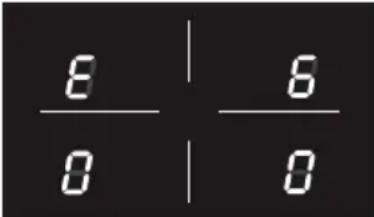 | The cooker has been incorrectly connected.The appliance shall be connected to the appropriate power supply by a qualified technician. |
| Symbolas persidegure | 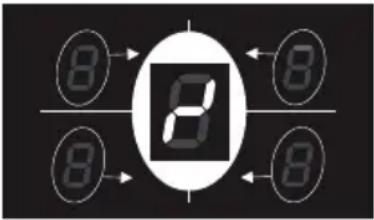 | This indicates an incorrect operation of one or more cooking zone control knob.1. Turn the cooking zone control knobs to the “O” (Off) position, then switch off the cooker and disconnect it from the mains.2. Wait for about 1 minute, then reconnect the cooker and turn on the cooking zones.3. Wait for about 1 minute and if the error message does not appear again the cooking zones can be used.4. If the error message does not disappear repeat step from 1 to 3.5. If the problem continues do not use the induction hob (only use the oven) and contact your Authorised Service Centre. |
ADVICE FOR SAFE USE OF THE HOB
- Before switching on make sure that you have the correct knob for the hotplate chosen. It is advisable to put the pan on the hotplate before switching on and to take it away after switching off.
- Use cookware with flat and even bottoms. Uneven bottoms can scratch the glass ceramic surfaces. Be careful that the bottom is clean and dry.
- Do not leave wet or damp lids on the bob.
- The glass-ceramic surface and pans must be clean. Carefully eliminate any food remains (especially containing sugar), dirt etc. with the aid of a cleansing agent.
• Make sure that the handles of cookware do not stick out over the edge of the cooker, to avoid them being knocked over by accident. This also makes it more difficult for children to reach the cooking vessels. - Do not lean over the cooking zones when they are switched on.
- Do not drop heavy or sharp objects on the glass ceramic cooktop. If the surface is broken or damaged unplug the cooktop and contact the after-sales service.
- Do not put aluminium foil or plastic objects on the cooking zones when they are hot.
- Follow the cleaning instructions carefully.

natural_image
Illustration of a cooking pot with crossed black lines indicating resistance or crossed pan (no text or symbols)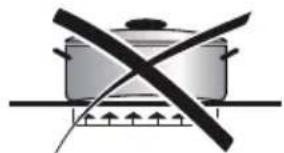
natural_image
Simple line drawing of a cooking pot with crossed black lines indicating resistance or crossed pan (no text or symbols)
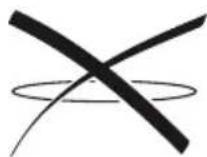
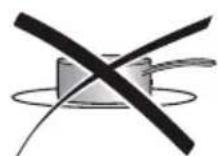

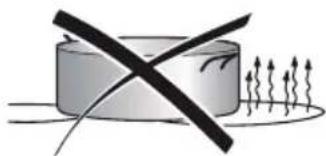
natural_image
Simple line drawing of a cylinder with a diagonal black X mark and scattered upward arrows below (no text or symbols)
Fig. 3.3
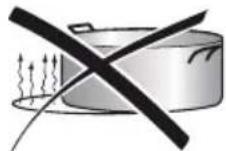
DO NOT USE PANS WITH ROUGH CIRCULAR MACHINED BASE.

natural_image
Two abstract diagrams: a square with diagonal lines and a circular pattern with crosshairs (no text or symbols)Fig. 3.4
CLEANING
- Before you begin cleaning make sure that the appliance is switched off.
- Remove any encrustation using the scraper provided.
- Dust or food particles can be removed with a damp cloth.
- If you use a detergent, please make sure that it is not abrasive or scouring. Abrasive or scouring powders can damage the glass surface of the hob.
- All traces of the cleaner have to be removed with a damp cloth.
- It is highly recommended to keep off the hob any article which can melt: plastic, aluminium foil, sugar, sugar syrup mixtures etc.
- If any of these products has melted on the ceramic surface, you should remove it immediately (when the surface is still hot) by using the scraper to avoid any permanent damage to the surface of the hob.
- Avoid using any knife or sharp utensil since these can damage the ceramic.
- Do not use steel wool or an abrasive sponge which could scratch the surface in an irreparable way
ATTENTION: MOST IMPORTANT!
If cleaning the glass ceramic hob using a special tool (i.e. scraper) take extra care to avoid damage to the seal at the edges of the glass ceramic surface.
Do not scratch the cooktop with cutting or sharp objects.
Do not use the glass ceramic surface as a work surface.

natural_image
Illustration of a hand using a tool to brush or mark on a circular surface, with scattered particles (no text or symbols)4 MULTI-FUNCTION OVEN (left oven)
Attention: the oven door becomes very hot during operation. Keep children away.
GENERAL FEATURES
As its name indicates, this is an oven that presents particular features from an operational point of view.
In fact, it is possible to insert 7 different programs to satisfy every cooking need.
The 7 positions, thermostatically controlled, are obtained by 4 heating elements which are:
- Bottom element
- Top element
- Grill element
- Circular element
NOTE:
Upon first use, it is advisable to operate the oven for 30 minutes in the position and for another 30 minutes at the maximum temperature (thermostat knob on position 250) in the positions and , to eliminate possible traces of grease on the heating elements.
Clean the oven and accessories with warm water and washing-up liquid.
WARNING:
The door is hot, use the handle.
During use the appliance becomes hot. Care should be taken to avoid touching heating elements inside the oven.
OPERATING PRINCIPLES
Heating and cooking in the MULTI-FUNCTION oven are obtained in the following ways:
a. by normal convection
The heat is produced by the upper and lower heating elements.
b. by forced convection
A fan sucks in the air contained in the oven muffle, which sends it through the circular heating element and then sends it back through the muffle. Before the hot air is sucked back again by the fan to repeat the described cycle, it envelops the food in the oven, provoking a complete and rapid cooking. It is possible to cook several dishes simultaneously.
c. by semi-forced convection
The heat produced by the upper and lower heating elements is distributed throughout the oven by the fan.
d. by radiation
The heat is irradiated by the infra red grill element.
e. by radiation and ventilation
The irradiated heat from the infra red grill element is distributed throughout the oven by the fan.
f. by ventilation
The food is defrosted by using the fan only function without heat.

text_image
50 100 250 150 200 °C Fig. 4.1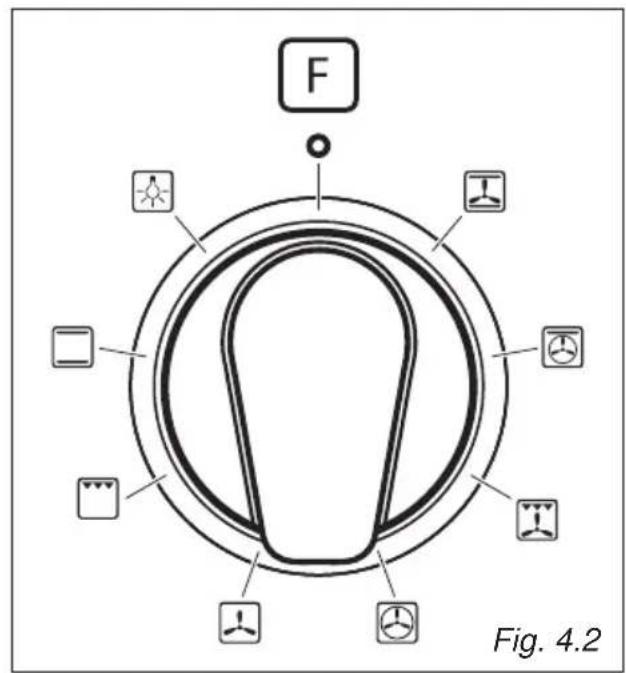
text_image
F Fig. 4.2THERMOSTAT KNOB (fig. 4.1)
To turn on the heating elements of the oven, set the switch knob on the desired program and the thermostat knob onto the desired temperature.
To set the temperature, it is necessary to make the knob indicator meet the chosen number.
The elements will turn ON or OFF automatically according to the energy need which is determined by the thermostat.
FUNCTION SELECTOR KNOB (fig. 4.2)
Rotate the knob clockwise to set the oven for one of the following functions:

OVEN LIGHT
By turning the knob onto this setting we light the oven cavity.
The oven remains alight while any of the functions is on.

TRADITIONAL CONVECTION COOKING
The upper and lower heating elements are switched on. The heat is diffused by natural convection and the temperature must be regulated between 50^ C and 250^ C with the thermostat knob.
It is necessary to preheat the oven before introducing the foods to be cooked.
Recommended for:
For foods which require the same cooking temperature both internally and externally, i.e. roasts, spare ribs, meringue, etc.

GRILLING
The infra-red heating element is switched on. The heat is diffused by radiation.
Use with the oven door closed and the thermostat knob to between 50° and 225°C for max 15 minutes, then to position 175°C.
Note: It is recommended that you do not grill for longer than 30 minutes at any one time.
Attention: the oven door becomes very hot during operation. Keep children away.
For correct use see chapter "USE OF THE GRILL"
Recommended for:
Intense grilling action for cooking with a broiler; browning, crisping, "au gratin", toasting, etc.

DEFROSTING FROZEN FOODS
Only the oven fan is on. To be used with the thermostat knob on “●” because the other positions have no effect. The defrosting is done by simple ventilation without heat.
Recommended for:
To rapidly defrost frozen foods; 1 kilogram requires about one hour.
The defrosting times vary according to the quantity and type of foods to be defrosted.

HOT AIR COOKING
The circular element and the fan are on. The heat is diffused by forced convection and the temperature must be regulated between 50^ and 250^ C with the ther mostat knob. It is not necessary to preheat the oven.
Recommended for:
For foods that must be well done on the outside and tender or rare on the inside, i. e. lasagna, lamb, roast beef, whole fish, etc.

VENTILATED GRILL COOKING
The infra-red ray grill and the fan are on. The heat is mainly diffused by radiation and the fan then distributes it throughout the oven. The temperature must be regulated between 50° and 200 °C for max 30 minutes, with the thermostat knob. It is necessary to preheat the oven for about 5 minutes.
Use with the oven door closed.
Attention: the oven door becomes very hot during operation.
Keep children away.
For correct use see chapter "GRILLING AND "AU GRATIN".
Recommended for:
For grill cooking when a fast outside browning is necessary to keep the juices in, i. e. veal steak, steak, hamburger, etc.

THAWING AND WARMING UP
The upper element and the circular element connected in series, are switched on; also the fan is on. The heat is diffused by forced convection with the most heat being produced by the upper element.
The temperature must be regulated between 50° and 140 °C with the thermostat knob.
Recommended for:
To keep foods hot after cooking. To slowly heat already cooked foods.

CONVECTION COOKING WITH VENTILATION
The upper and lower heating elements and the fan turn on.
The heat coming from the top and bottom is diffused by forced convection.
The temperature must be regulated between 50° and 250 °C with the thermostat knob.
Recommended for:
For foods of large volume and quantity which require the same internal and external degree of cooking; for ie: rolled roasts, turkey, legs, cakes, etc.
COOKING ADVICE
STERILIZATION
Sterilization of foods to be conserved, in full and hermetically sealed jars, is done in the following way:
a. Set the switch to position .
b. Set the thermostat knob to position 185^ C and preheat the oven.
c. Fill the dripping pan with hot water.
d. Set the jars onto the dripping pan making sure they do not touch each other and the door and set the thermostat knob to position 135 °C.
When sterilization has begun, that is, when the contents of the jars start to bubble, turn off the oven and let cool.
REGENERATION
Set the switch to position and the thermostat knob to position 150^ C.
Bread becomes fragrant again if wet with a few drops of water and put into the oven for about 10 minutes at the highest temperature.
ROASTING
To obtain classical roasting, it is necessary to remember:
- that it is advisable to maintain a temperature between 180 and 200 °C.
- that the cooking time depends on the quantity and the type of foods.
SIMULTANEOUS COOKING OF DIFFERENT FOODS
The MULTI-FUNCTION oven set on position 🎲 and 🏠 gives simultaneous heterogeneous cooking of different foods. Different foods such as fish, cake and meat can be cooked together without mixing the smells and flavours.
This is possible since the fats and vapors are oxidized while passing through the electrical element and therefore are not deposited onto the foods.
The only precautions to follow are:
- The cooking temperatures of the different foods must be as close to as possible, with a maximum difference of 20^ - 25^ .
- The introduction of the different dishes in the oven must be done at different times in relation to the cooking times of each one.
The time and energy saved with this type of cooking is obvious.
GRILLING AND "AU GRATIN"
Set the switch to position . ☐ Set the thermostat to position 200 °C and after having preheated the oven, simply place the food on the shelf.
Close the door and let the oven operate with the thermostat on, until grilling is complete.
Adding a few dabs of butter before the end of the cooking time gives the golden “au gratin” effect.
Note: It is recommended that you do not grill for longer than 30 minutes at any one time.
ATTENTION: the oven door becomes very hot during operation.
Keep children away.
USE OF THE GRILL
Preheat the oven for about 5 minutes.
Introduce the food to be cooked, positioning the rack as close to the grill as possible.
The dripping pan should be placed under the rack to catch the cooking juices and fats.
Grilling with the oven door closed.
Do not grill for longer than 30 minutes at any one time.
CAUTION: the oven door becomes very hot during operation. Keep children well out of reach.
OVEN COOKING
Before introducing the food, preheat the oven to the desired temperature.
For a correct preheating operation, it is advisable to remove the tray from the oven and introduce it together with the food, when the oven has reached the desired temperature.
Check the cooking time and turn off the oven 5 minutes before the theoretical time to recuperate the stored heat.
COOKING EXAMPLES
Temperatures and times are approximate as they vary depending on the quality and amount of food.
Remember to use ovenproof dishes and to adjust the oven temperature during cooking if necessary.
DISHES
TEMPERATURE
Cakes 180°C
Doughnuts 180°C
Potatoes in milk 200°C
Chicken breasts in tomato 200°C
Sole fish filet 200°C
Whiting 200°C
Cream puffs 200°C
Plum pie 200°C
Meat balls 200°C
Veal meatloaf 200°C
Grilled chicken - roast chicken 220°C
Baked lasagna 220°C
Roast beef 220°C
Oven cooked pasta 220°C
Lemon cake 220°C
Rice creol 225°C
Baked onions 225°C
Stuffed potatoes 225°C
Grilled veal joint 225°C
Marmalade pie 225°C
Pound cake 225°C
Turkish shishkebab 250°C
Pizza with anchovies 250°C
5
CONVENTIONAL OVEN (right oven)
Attention: the oven door becomes very hot during operation. Keep children away.
GENERAL FEATURES
As its name indicates, this is an oven that presents particular features from an operational point of view.
The conventional oven is provided with 3 heating elements which are:
- Top element
- Bottom element
- Grill element
WARNING:
The door is hot, use the handle.
During use the appliance becomes hot. Care should be taken to avoid touching heating elements inside the oven.
NOTE:
Upon first use, it is advisable to operate the oven at the maximum temperature (thermostat knob on position 250) for 60 minutes in the position and for another 15 minutes in the position to eliminate possible traces of grease on the heating elements.
OPERATING PRINCIPLES
Heating and cooking in the CONVENTIONAL oven are obtained in the following ways:
a. by normal convection
The heat is produced by the upper and lower heating elements.
b. by radiation
The heat is irradiated by the infra red grill element (grilling with the oven door closed).

text_image
F Fig. 5.1
text_image
°C 50 100 250 150 200 Fig. 5.2FUNCTION SELECTOR KNOB (fig. 5.1)
Rotate the knob clockwise to set the oven for one of the following functions.
THERMOSTAT (fig. 5.2)
This only sets the cooking temperature and does not switch the oven on.
Rotate clockwise until the required temperature is reached (from 50 to 250°C).
The light above the function selector will illuminate when the oven is switched on and turns off when the oven reaches the correct temperature.
The light will cycle on and off during cooking in line with the oven temperature.

OVEN LIGHT
By setting the knob to this position, only the oven light comes on.
It remains on in all the cooking modes.


RADITIONAL CONVECTION COOKING
The upper and lower heating elements come on.
The heat is dispersed by natural convection and the temperature must be set to between 50^ and 250^ C via the thermostat knob.
The oven must be preheated before cooking.
In the ☐ position the rotisserie motor come on for cooking with the rotisserie.
RECOMMENDED USE:
Dish warming using the special rack. For correct use see the chapter "USE OF SPECIAL DISH RACK".


TRADITIONAL GRILLING
The infrared grill element at the top of the oven comes on. The heat is dispersed by radiation.
Use with the oven door closed and the thermostat knob to position 225°C for 15 minutes then to 175°C.
In the ☐ position the rotisserie motor come on for cooking with the rotisserie.
For cooking hints, see the chapter "USE OF THE GRILL".
RECOMMENDED USE:
Intense grilling, browning, cooking au gratin and toasting etc.
It is recommended that you do not grill for longer than 30 minutes at any one time.
Attention: the oven door becomes very hot during operation.
Keep children away.
USE OF THE GRILL
Leave to warm up for approximately 5 minutes with the door closed.
Place the food inside positioning the rack as near as possible to the grill.
Insert the drip pan under the rack to collect the cooking juices.
Grilling with the oven door closed.
Do not grill for longer than 30 minutes at any one time.
Caution: the oven door becomes very hot during operation. Keep children well out of reach.
OVEN COOKING
Before introducing the food, preheat the oven to the desired temperature.
For a correct preheating operation, it is advisable to remove the tray from the oven and introduce it together with the food, when the oven has reached the desired temperature.
Check the cooking time and turn off the oven 5 minutes before the theoretical time to recuperate the stored heat.
COOKING EXAMPLES
Temperatures and times are approximate as they vary depending on the quality and amount of food.
Remember to use ovenproof dishes and to adjust the oven temperature during cooking if necessary.
DISHES TEMPERATURE
| Cakes | 180°C |
| Doughnuts | 180°C |
| Cheese soufflé 200°C | |
| Potatoes soufflé 200°C | |
| Roast veal 200°C | |
| Spinach crepes 200°C | |
| Potatoes in milk 200°C | |
| Chicken breasts in tomato 200°C | |
| Sole fish filet 200°C | |
| Whiting | 200°C |
| Cream puffs 200°C | |
| Plum pie 200°C | |
| Meat balls 200°C | |
| Veal meatloaf 200°C | |
| Grilled chicken - roast chicken 220°C | |
| Baked lasagna 220°C | |
| Roast beef 220°C | |
| Oven cooked pasta | 220°C |
| Lemon cake 220°C | |
| Rice creol | 225°C |
| Baked onions 225°C | |
| Stuffed potatoes | 225°C |
| Grilled veal joint | 225°C |
| Marmalade pie 225°C | |
| Pound cake | 225°C |
| Turkish shishkebab | 250°C |
| Pizza with anchovies | 250°C |
ROTISSERIE (fig. 5.3)
The oven is equipped with a rotisserie.
This device is made up of:
- an electrical motor mounted on the rear part of the oven
- a stainless steel rod, equipped with a detachable athermic grip and 2 recordable forks
- a rod support to be inserted into the central rack holders of the oven.
USE OF THE ROTISSERIE (fig. 5.3)
- Insert the dripping pan into the lowest rack holders of the oven and insert the rod support into the intermediate rack holders.
- Put the meat to be cooked onto the rod, being careful to secure it in the center with the special forks.
- Insert the rod into the motor opening and rest it onto the support of the spit collar; then remove the grip by turning it to the left.
The rotation direction of the rotisserie can be either clockwise or counter-clockwise. Grilling with the oven door closed.
Attention: the oven door becomes very hot during operation.
Keep children away.
It is recommended that you do not grill for longer than 30 minutes at any one time.

natural_image
Line drawing of an open refrigerator interior showing internal components and a labeled section (Fig. 5.3)
ELECTRONIC PROGRAMMER
The electronic programmer is a device which groups together the following functions:
• 24 hours clock with illuminated display
• Timer (up to 23 hours and 59 minutes)
• Program for automatic oven cooking
• Program for semi-automatic oven cooking
Description of the buttons:

Timer

Cooking time

End of cooking time

Manual position and cancellation of e inserted cooking program
To increase the numbers on the digital display
—To decrease the numbers on the digital display.
Description of the illuminated symbols:
AUTO - flashing - Programmer in automatic position but not programmed
AUTO - illuminated - Programmer in automatic position with program inserted.

Automatic cooking taking place

Timer in operation

and AUTO - flashing - Program error.
(The time of day lies between the calculated cooking start and end time).
Note:
Select a function by the respective button and, in 5 seconds, set the required time with the +/— buttons ("one-hand" operation). After a power cut the display resets to zero and cancels the set programs.
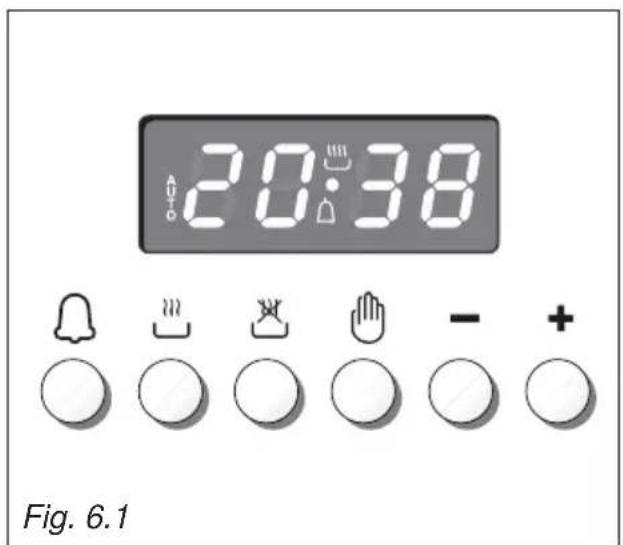
text_image
20:38 Fig. 6.1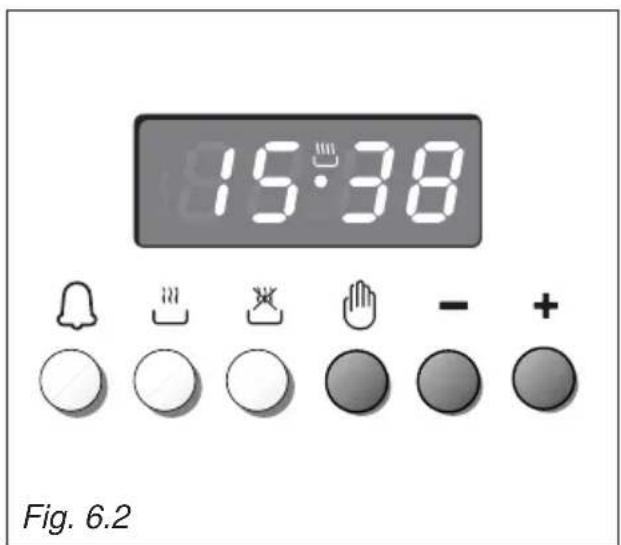
text_image
15:38 Fig. 6.2ELECTRONIC CLOCK (fig. 6.2)
The programmer is equipped with an electronic clock with illuminated numbers which indicates hours and minutes.
Upon immediate connection of the oven or after a power cut, three zeros will flash on the programmer display.
To set the correct time of day it is necessary to push the 🎨 button and then the +r — button until you have set the correct time (fig. 6.2).
In another way push simultaneously the two buttons and at the same time push the or button.
Note: If the clock is reset it deletes any previously set programs
NORMAL COOKING WITHOUT THE USE OF THE PROGRAMMER
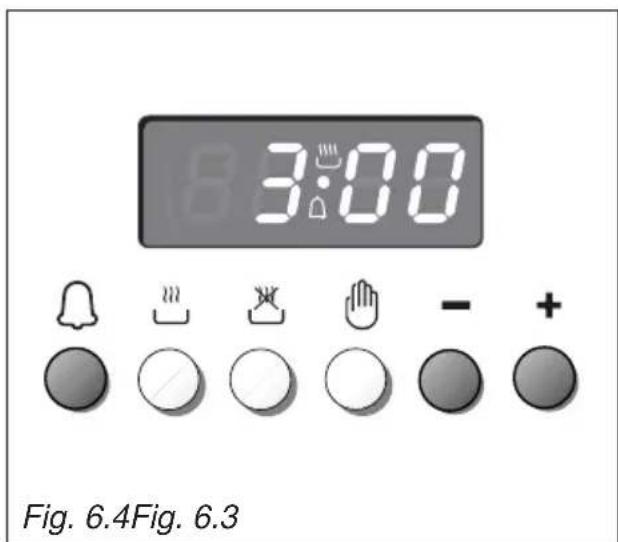
To manually use the oven, without the aid of the programmer, it is necessary to cancel the flashing AUTO by pushing the
button (AUTO will be switched off and the symbol 🎨 will illuminate - fig. 6.3).
Attention: If the AUTO is illuminated (which means a cooking program has already been inserted), by pushing the button you cancel the program and return to manual operation.
If the oven is switched on, you must switch off manually.

text_image
18:25ELECTRONIC TIMER
The timer program consists only of a buzzer which may be set for a maximum period of 23 hours and 59 minutes.
If the AUTO symbol is flashing push the button.
To set the time, push the 📄 button and the + or - until you obtain the desired time in the display (fig. 6.4).
Having finished the setting, the clock hour will appear on the panel and the symbol will be illuminated.
The countdown will start immediately and may be seen at any moment on the panel by simply pressing the button 🔒.
At the end of the time, the symbol will disappear and the buzzer will sound and continue for approximatley 7 minutes or until a button is pressed (not the + / — buttons). After a short time the display will revert back to the time of day.
SETTING THE FREQUENCY OF THE AUDIBLE SIGNAL
The buzzer has 3 different tones and can be changed by pressing the — button, but only when the time of day is displayed
text_image
3:00 Fig. 6.4Fig. 6.3To cook food automatically in the oven, it is necessary to:
- Set the length of the cooking period.
- Set the end of the cooking time.
- Set the temperature and the oven cooking program.
These operations are done in the following way:
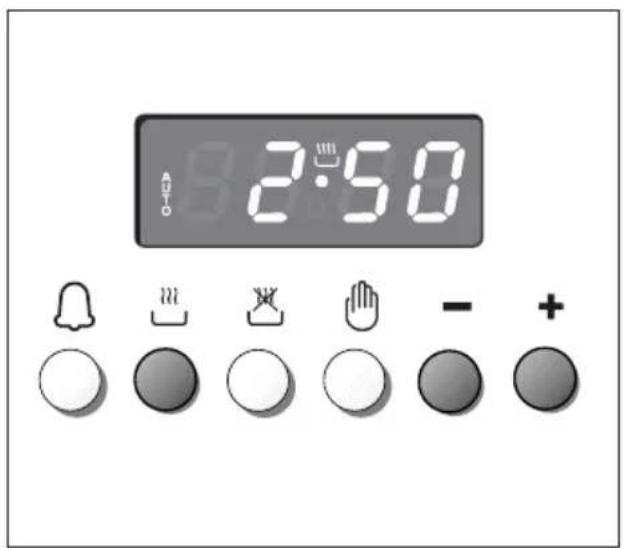
- Set the length of the cooking period by pushing the 🎨 button and the + button to increase, or -to decrease if you have passed the desired time (fig. 6.5). The AUTO and the 🎨 symbol will illuminate.
- Set the end of the cooking time by pressing the 📄 button (the cooking time already added to the clock time will appear), and the + button (fig. 6.6); if you pass the desired time you may get back by pushing the — button.
After this setting, the symbol will disappear. If after this setting, the AUTO flashes on the display and a buzzer sounds, it means there was an error in the programming, that is that the cooking cycle has been superimposed on the clock. In this case, modify the end of cooking time or the cooking period itself by following again the above mentioned instructions.
text_image
2:50- Set the temperature and the cooking program by using the switch and thermostat knobs of the oven (see specific chapters).
Now the oven is programmed and everything will work automatically, that is the oven will turn on at the right moment to end the cooking at the established hour.
During cooking, the ⏚ symbol remains illuminated.
By pushing the 📋 button you can see the time that remains until the end of cooking.
The cooking program may be cancelled at any time by pushing 🔒.
At the end of the cooking time the oven will turn off automatically, the ⏻ symbol will turn off, AUTO will flash and a buzzer will be sound, which can be turned off by pushing any of the buttons except the + / -buttons.
Turn the switch and thermostat knobs to zero and put the programmer onto "manual" by pressing the 🔊 button.
Attention: After a power cut the clock resets to zero and cancels the set programs.
After a power cut, three zeros will flash on the display.

text_image
12:55 Fig. 6.6Fig. 6.5SEMI-AUTOMATIC COOKING
This is used to automatically switch off the oven after the desired cooking time has elapsed.
There are two ways to set your oven:
- Set the length of the cooking time by pushing the button and the + button to advance, or to go backwards if you have passed the desired time (fig. 6.7).
or
- Set the end of the cooking time by pushing the 🎨 button and the + button to advance, or to-go backwards if you have passed the desired time (fig. 6.8).
AUTO and the 📋 symbol will be on.
Then set the temperature and the cooking programme using the oven switch and thermostat knobs (see specific chapters).
The oven is switched on and it will be switched off automatically at the end of the desired time.
During cooking, the 🎨 symbol remains on and by pressing the button you can see the time that remains till the end of the cooking.
The cooking program may be cancelled at any time by pushing 🔊.
At the end of the cooking time the oven will turn off automatically, the symbol will turn off, AUTO will flash and a buzzer will be sound, which can be turned off by pushing any of the buttons except the / -buttons.
Turn the switch and thermostat knobs to zero and put the programmer onto "manual" by pressing the 🎨 button.
Attention: After a power cut the clock resets to zero and cancels the set programs.
After a power cut, three zeros will flash on the display.

text_image
2:50
text_image
12:55 Fig. 6.8Fig. 6.7GENERAL ADVICE
- Before you begin cleaning, you must ensure that the appliance is disconnected from the electrical power supply.
- It is advisable to clean when the appliance is cold and especially when cleaning the enamelled parts.
- Avoid leaving alkaline or acidic substances (lemon juice, vinegar, etc.) on the surfaces.
- Avoid using cleaning products with a chlorine or acidic base.
- Important: The use of suitable protective clothing/gloves is recommended when handling or cleaning of this appliance.
WARNING
When correctly installed, your product meets all safety requirements laid down for this type of product category. However special care should be taken around the rear or the underneath of the appliance as these areas are not designed or intended to be touched and may contain sharp or rough edges, that may cause injury.
ENAMELLED PARTS
All the enamelled parts must be cleaned with a sponge and soapy water or other non-abrasive products.
Dry preferably with a microfibre or soft cloth.
Acidic substances like lemon juice, tomato sauce, vinegar etc. can damage the enamel if left too long.
STAINLESS STEEL, ALUMINIUM PARTS, PAINTED AND SILK-SCREEN PRINTED SURFACES
Clean using an appropriate product.
Always dry thoroughly.
IMPORTANT: these parts must be cleaned very carefully to avoid scratching and abrasion. You are advised to use a soft cloth and neutral soap.
CAUTION: Do not use abrasive substances or non-neutral detergents as these will irreparably damage the surface.
VITROCERAMIC COOKING HOB
- See page 180.
Important: The manufacturer declines all liability for possible damage caused by the use of unsuitable products to clean the appliance.
Attention!
The appliance gets very hot, mainly around the cooking areas. It is very important that children are not left alone in the kitchen when you are cooking.
Do not use a steam cleaner because the moisture can get into the appliance thus make it unsafe.
Do not use harsh abrasive cleaners or sharp metal scrapers to clean the oven door glass since they can scratch the surface, which may result in shattering of the glass.
INSIDE OF OVEN
The oven should always be cleaned after use when it has cooled down.
The cavity should be cleaned using a mild detergent solution and warm water. Suitable proprietary chemical cleaners may be used after first consulting with the manufacturers recommendations and testing a small sample of the oven cavity. Abrasive cleaning agents or scouring pads/cloths should not be used on the cavity surface.
NOTE: The manufacturers of this appliance will accept no responsibility for damage caused by chemical or abrasive cleaning.
Let the oven cool down and pay special attention no to touch the hot heating elements inside the oven cavity.
Fire risk! Do not store flammable material in the oven
ASSEMBLY AND DISMANTLING OF THE SIDE RUNNER FRAMES
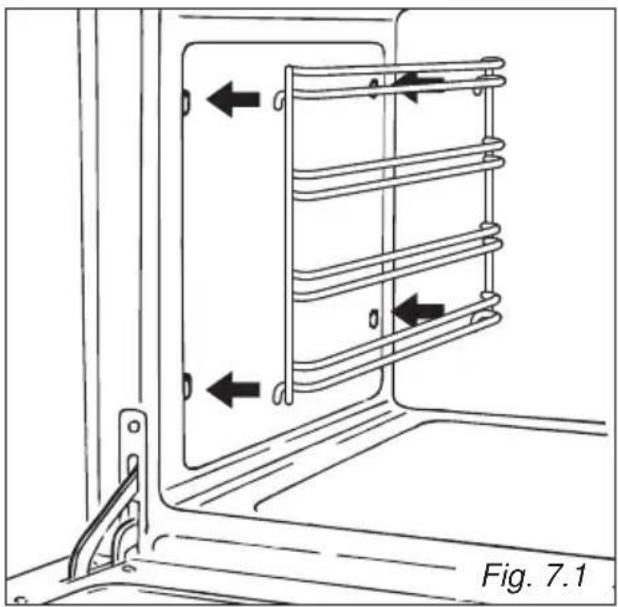
- Fit the side runner frames into the holes on the side walls inside the oven (fig. 7.1).
- Slide into the guides, the shelf and the tray (fig. 7.2).
- The rack must be fitted so that the safety notch, which stops it sliding out, faces the inside of the oven; the guard rail shall be at the back.
- To dismantle, operate in reverse order.
natural_image
Technical diagram of a door frame with coiled heating element and directional arrows indicating movement (no text or symbols)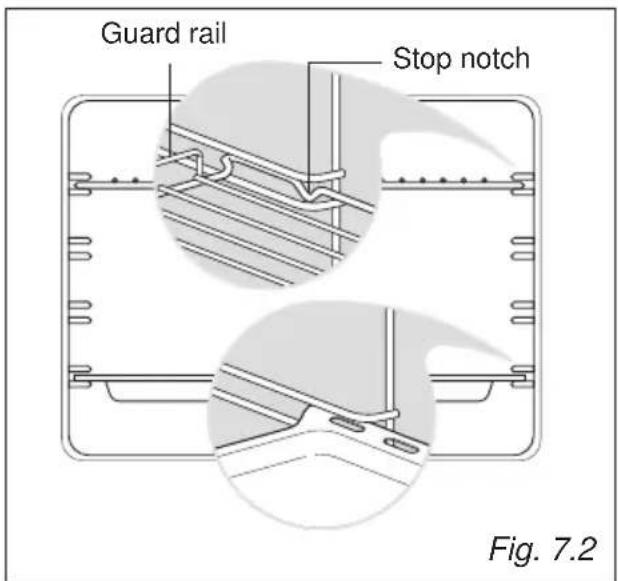
text_image
Guard rail Stop notch Fig. 7.2TELESCOPIC SLIDING SHELF SUPPORTS (fig. 7.3)
The telescopic sliding shelf support makes it safer and easier to insert and remove the oven shelf.
It stops when it is pulled out to the maximum position.
Important! When installing the sliding shelf support, make sure that:
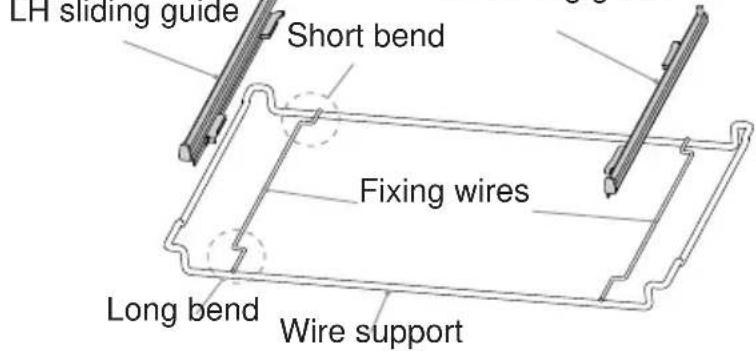
- You fit the RH and LH sliding guides on the wire support (fig. 7.4).
- You press the RH and LH sliding guides against the fixing wires (fig. 7.5). You will hear a click as the safety locks clip over the wire.
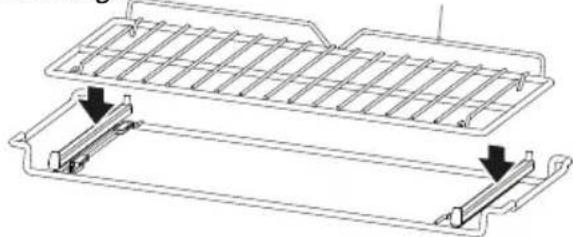
- You fit the oven shelf above the sliding shelf support (figs. 7.6, 7.8).
- You slide, on the guides inside the oven cavity, the sliding shelf support with the oven shelf fitted above:
– the oven shelf shall run out towards the oven door;
– do not use the top shelf position;
– the short bend on the wire support shall face the inside of the oven;
– the oven shelf must be fitted so that the guard rail faces the inside of the oven.
To remove the RH and LH sliding guides from the wire support:
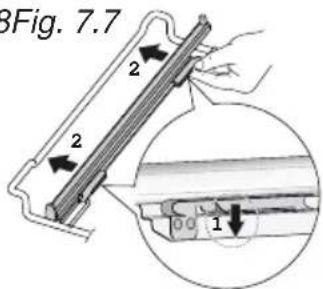
• Find the safety locks. These are the tabs that clip over the fixing wire (arrow 1 in fig. 7.8).
• Pull the safety locks away from the fixing wire to release the sliding guide (arrow 2 in fig. 7.8).
Cleaning the sliding shelf supports:
- Wipe the supports with a damp cloth and a mild detergent only.
- Do not wash them in the dishwasher, immerse them in soapy water, or use oven cleaner on them.
Fig. 7.3 RH sliding guide
text_image
LH sliding guide Short bend Fixing wires Long bend Wire supportFig. 7.4

natural_image
Technical line drawing of a heat exchanger or cooling unit with no visible text or symbolsFig. 7.6 Fig. 7.5 Guard rail
natural_image
Technical line drawing of a mechanical component with two parallel plates and mounting brackets (no text or symbols)
natural_image
Technical line drawing of a mechanical component with two magnified views (no text or symbols)
natural_image
Technical line drawing of a rectangular mechanical component with internal ribs and mounting holes (no text or symbols)Fig. 7.8 Fig. 7.7
text_image
3Fig. 7.7 2 2 1STORAGE COMPARTMENT
The storage compartment is accessible through the pivoting panel (fig. 7.9a).
Do not store flammable material in the oven or in the storage compartment.

natural_image
Technical line drawing of a mechanical assembly with mounting feet and a horizontal support (no text or symbols)Fig. 7.9a
REPLACING THE OVEN LAMP
WARNING: Ensure the appliance is switched off and disconnected from the electrical power supply before replacing the lamp to avoid the possibility of electric shock.
- Let the oven cavity and the heating elements to cool down.
- Switch off the electrical supply.
- Remove the protective cover "A" (fig. 7.9b).
- Replace the halogen lamp "C" with a new one suitable for high temperatures (300°C) having the following specifications: 230 V, 50 Hz and same power (check watt power as stamped in the lamp itself) of the replaced lamp.
IMPORTANT WARNING: Never replace the bulb with bare hands; contamination from your fingers can cause premature failure. Always use a clean cloth or gloves.
- Refit the protective cover.
Note: Oven lamp replacement is not covered by your guarantee.

text_image
C A WRONG ✓ CORRECT Fig. 7.9bREMOVING AND REPLACING THE INNER DOOR GLASS PANES FOR CLEANING
If you wish to clean the inner panes of glass of the door, make sure you follow the precautions and instructions very carefully.
Replacing the glass panes and the door incorrectly may result in damage to the appliance and may void your warranty.
IMPORTANT!
• Take care, the oven door is heavy. If you have any doubts, do not attempt to remove the door.
- Make sure the oven and all its parts have cooled down. Do not attempt to handle the parts of a hot oven.
• Take extreme care when handling the glass panes. Avoid the edges of the glass bumping against any surface. This may result in the glass shattering.
- CAUTION:
Do not use harsh abrasive cleaners or sharp metal scrapers to clean the oven door panes of glass since they can scratch the surface, which may result in shattering of the glass.
- If you notice any sign of damage on any of the glass panes (such as chipping, or cracks), do not use the oven. Call your Authorised Service Centre or Customer Care.
- Make sure you replace the glass panes correctly. Do not use the oven without glass panes correctly in place.
- If the glass panes feel difficult to remove or replace, do not force them. Call your Authorised Repairer or Customer Care for help.
Note: service visits providing assistance with using or maintaining the oven are not covered by your warranty.
REMOVING THE OVEN DOOR
The oven door can easily be removed as follows:
- Open the door to the full extent (fig. 7.11).
- Open the lever "A" completely on the left and right hinges (fig. 7.12).
- Hold the door as shown in fig. 7.10.
- Gently close the door until left and right hinge levers “A” are hooked to part “B” of the door (figs. 7.12, 7.13).
- Withdraw the hinge hooks from their location following arrow "C" (fig. 7.14).
- Rest the door on a soft surface.
• To replace the door, repeat the above steps in reverse order.

natural_image
Technical line drawing of a mechanical clamp or bracket assembly (no text or symbols)
text_image
A B Fig. 7.12Important!
Always keep a safe distance from the door hinges, paying special attention to position of your hands.
If the door hinges are not correctly hooked, they could unhook and close suddenly and unexpectedly with risk of injury.

text_image
Warning symbol with warning triangle and hand gesture indicating hazard or caution
natural_image
Technical line drawing of a mechanical component with diagonal lines and a labeled section (Fig. 7.13), no readable text or symbols beyond the label.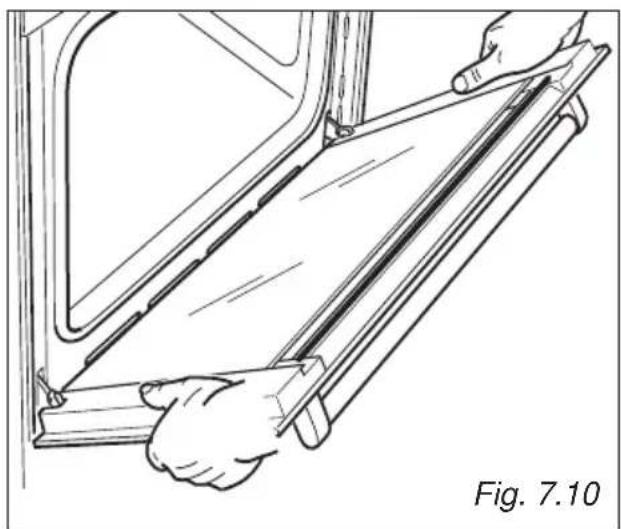
natural_image
Line drawing of a person installing or adjusting a door panel, labeled Fig. 7.10 (no text or symbols on the diagram itself)
text_image
C Fig. 7.14
natural_image
Technical line drawing of a mechanical clamp or bracket assembly (no text or symbols)
text_image
A B Fig. 7.16
natural_image
Line drawing of a vehicle climbing a slope, labeled Fig. 7.17 (no text or symbols on the diagram itself)
text_image
Fig. 7.18 GCLEANING THE INNER PANES OF GLASS
The oven door is fitted with no. 3 panes:
- no. 1 outside;
- no. 1 inner;
• no. 1 in the middle.
To clean all panes on both sides it is necessary to remove the inner and the middle panes as follows:
REMOVING THE MIDDLE AND INNER PANES OF GLASS
- Lock the door open:
• Fully open the oven door (fig. 7.15).
- Fully open the lever "A" on the left and right hinges. (fig. 7.16).
- Gently close the door until left and right hinge levers "A" are hooked to part "B" of the door (figs. 7.16, 7.17).
-
Remove the inner pane:
-
Gently remove the air deflector "G" at the top of the oven door (fig. 7.18).
• Gently pull out the inner pane of glass (fig. 7.19). - Clean the glass with an appropriate cleaner. Dry thoroughly, and place on a soft surface.

natural_image
Illustration of hands installing or adjusting a flatboard inside a vehicle door frame, with an arrow indicating the motion direction (no text or symbols present)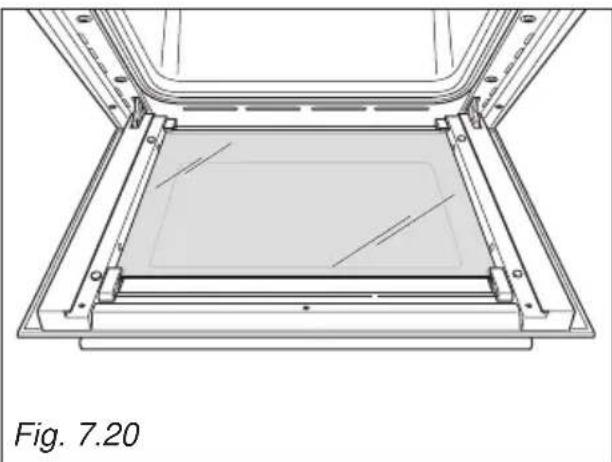
natural_image
Technical line drawing of a mechanical assembly with no visible text or symbols-
Remove the middle pane:
-
Gently unlock the middle pane of glass from the bottom clamps by moving it as in fig. 7.20.
• Gently lift the bottom edge of the pane (arrow 1 in fig. 7.22) and remove it by pulling it out from the top clamps (arrow 2 in fig. 7.22). - Clean the glass with an appropriate cleaner. Dry thoroughly, and place on a soft surface.
Now you can also clean the inside of the outer glass.
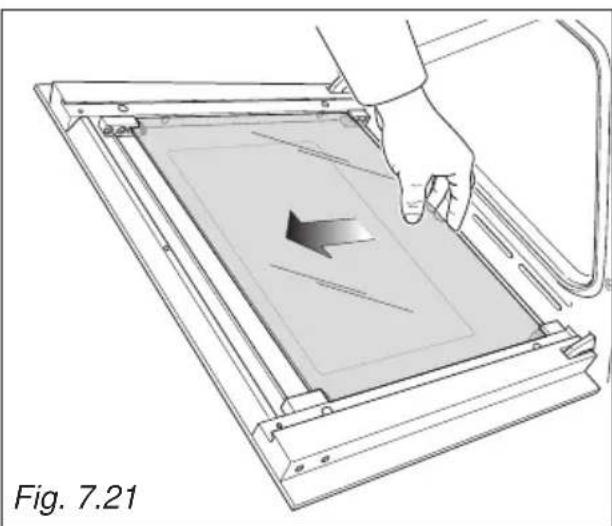
natural_image
Diagram of a hand pressing a component into a tray, showing internal structure and motion direction (no text or symbols)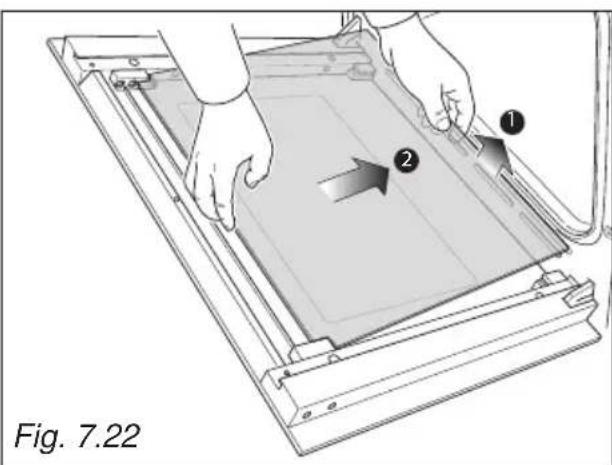
text_image
Fig. 7.22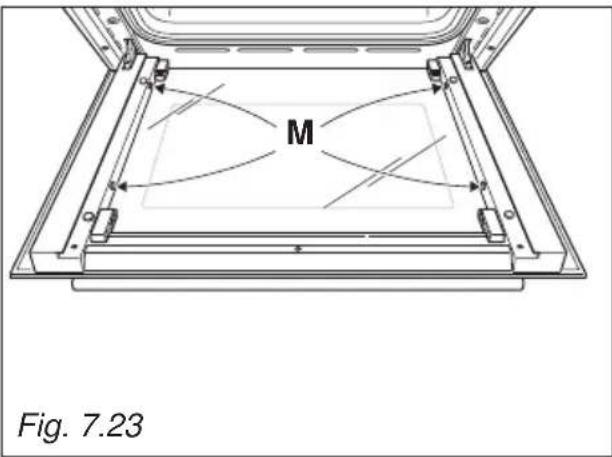
text_image
M Fig. 7.23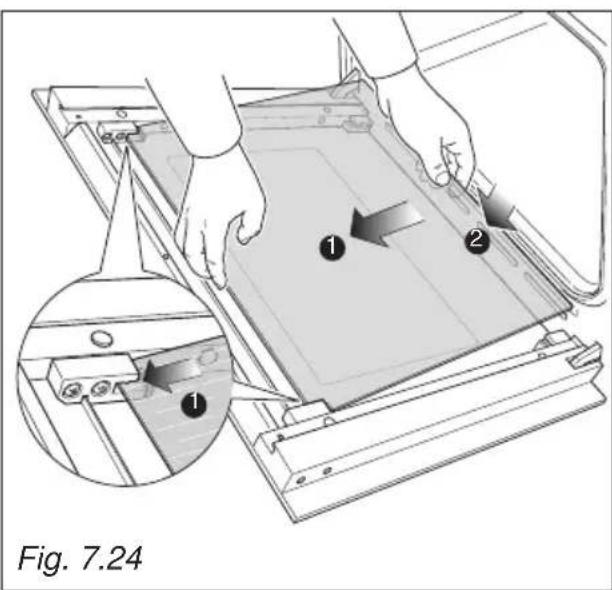
text_image
Fig. 7.24
natural_image
Illustration of a hand pressing down on a mechanical device with an inset showing internal components (no text or symbols)REPLACING THE MIDDLE AND INNER PANES OF GLASS
- Make sure the door is locked open (see fig. 7.17).
-
Replace the middle pane:
-
Check that the four rubber pads are in place ("M" in fig. 7.23).
- Check that you are holding the pane the correct way. You should be able to read the wording on it as it faces you.
- Gently insert the top edge of the pane into the top clamps (arrow 1 in fig. 7.24), then lower the pane and insert the bottom edge into the bottom clamps (arrow 2 in fig. 7.24); and then slide the pane into position (fig. 7.25).

text_image
DFig. 7.26
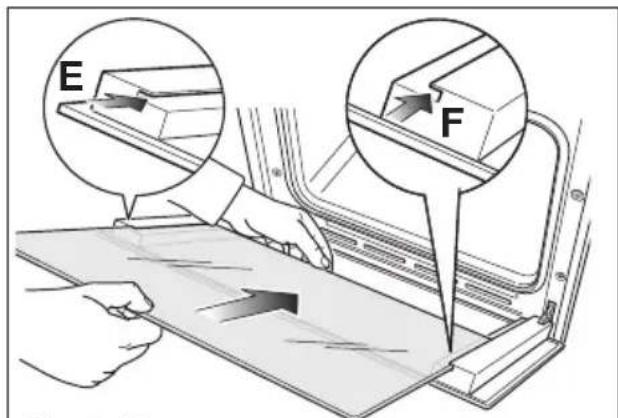
text_image
E FFig. 7.27

text_image
Fig. 7.28 H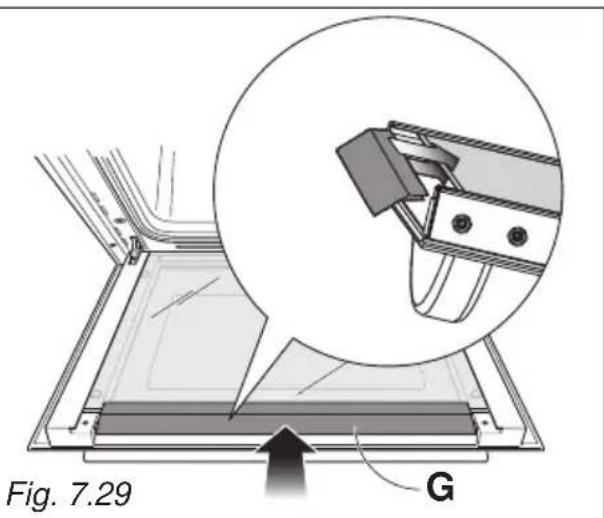
text_image
Fig. 7.29 G-
Replace the inner pane:
-
Check that the four rubber pads are in place ("D" in fig. 7.26).
- Check that you are holding the pane the correct way. You should be able to read the wording on it as it faces you.
- Insert the pane in the left "E" and right "F" slide guides (fig. 7.27), and gently slide it to the retainers "H" (fig. 7.28).
-
Gently push the air deflector "G" back into place (fig. 7.29).
-
Unlock the oven door by opening it completely and closing the lever "A" on the left and right hinges (fig. 7.30).

text_image
A Fig. 7.30Advice for the Installer
IMPORTANT
- Cooker installation and regulation must only be carried out by QUALIFIED TECHNICIANS and in compliance with the local safety standards. Failure to observe this rule will invalidate the warranty.
- The appliance must be installed in compliance with regulations in force in your country and in observation of the manufacturer's instructions.
- The electrical mains outlet, if located behind the cooker, must not be higher than 18 cm above the floor level.
- Some appliances are supplied with a protective film on steel and aluminium parts. This film must be removed before using the cooker.
INSTALLATION
This cookers has class "2/1" overheating protection so that it can be installed in a cabinet.
The appliance must be kept no less than 200 mm away from any side wall which exceed the height of the hob surface (fig. 8.1).
The furniture walls adjacent to the cooker must be made of material resistant to heat.
The veneered syntetical material and the glue used must be resistant to a temperature of 90^ C in order to avoid ungluing or deformations.
The cooker may be located in a kitchen, a kitchen/diner or bed-sitting room but not in a room containing a bath or shower.
Curtains must not be fitted immediately behind appliance or within 500 mm of the sides.
It is essential that the cooker is positioned as stated below.
The cooker must be installed by a qualified technician and in compliance with a local safety standards.

text_image
650 mm 450 mm 500 mm 200 mm Fig. 8.1BACKGUARD
Before installing the cooker, assemble the backguard "C" (fig. 8.2).
• The backguard "C" can be found packed at the rear of the cooker.
- Before assembling remove any protective film/adhesive tape.
- Remove the two spacers "A" and the screw "B" from the rear of the cooktop.
- Assemble the backguard as shown in figure 8.2 and fix it by screwing the central screw "B" and the spacers "A".

text_image
C B AFig. 8.2
FITTING THE ADJUSTABLE FEET
The adjustable feet must be fitted to the base of the cooker before use.
Rest the rear of the cooker an a piece of the polystyrene packaging exposing the base for the fitting of the feet.

natural_image
Technical line drawing of a structural assembly with mounting holes and supports (no text or symbols)
natural_image
Line drawing of two people assembling a large outdoor stove on a tiled floor (no text or symbols)Fig. 8.4

natural_image
Line drawing of a person operating a kitchen appliance with a diagonal line crossing the door (no text or symbols)Fig. 8.5
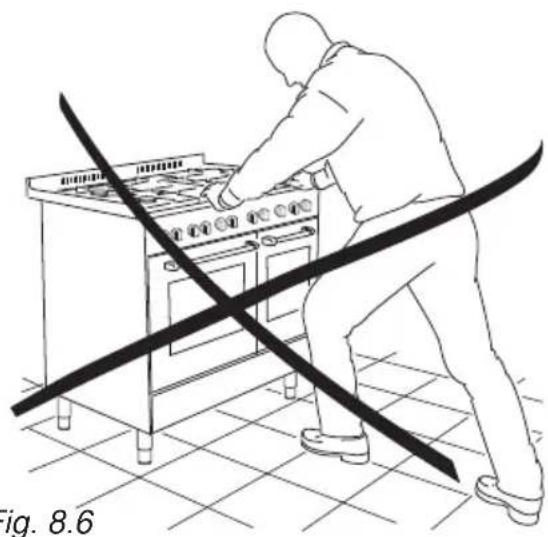
natural_image
Line drawing of a person using a portable stove with diagonal lines indicating crossed equipment (no text or symbols)MOVING THE COOKER
WARNING
When raising cooker to upright position always ensure two people carry out this manoeuvre to prevent damage to the adjustable feet (fig. 8.4).
WARNING
Be careful: DO NOT LIFT the cooker by the door handle when raising to the upright position (fig. 8.5).
WARNING
When moving cooker to its final position DO NOT DRAG (fig. 8.6).
Lift feet clear of floor (fig. 8.4).
The cooker may be levelled by screwing the lower ends of the feet IN or OUT (fig. 8.7)
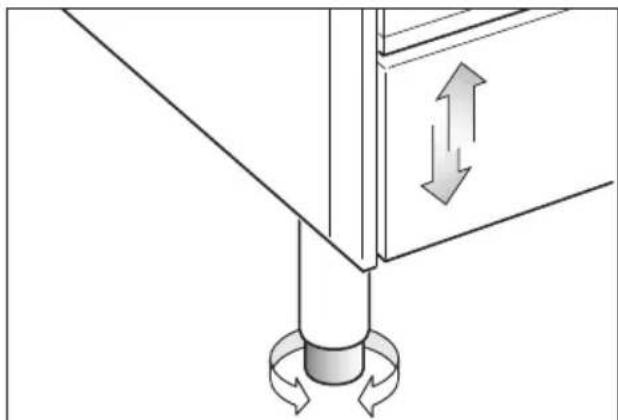
natural_image
Pure mechanical diagram showing a lever and rotating base with directional arrows (no text or symbols)Fig. 8.7
ANTI-TILT BRACKET
Warning: This appliance must be restrained to prevent accidental tipping by fitting a bracket to the rear of the appliance and securely fixing it to the wall.
To fit the anti-tilt bracket:
- After you have located where the cooker is to be positioned, mark on the wall the place where the 2 screws of the anti-tilt bracket have to be fitted. Please follow the indications given in fig. 8.8.
- Drill two 8 mm diameter holes in the wall and insert the plastic plugs supplied. Important! Before drilling the holes, check that you will not damage any pipes or electrical wires.
- Loosely attach the anti-tilt bracket with the 2 screws supplied.
- Move the cooker to the wall and adjust the height of the anti-tilt bracket so that it can engage in the slot on the cooker's back, as shown in fig. 8.8.
- Tighten the screws attaching the anti-tilt bracket.
- Push the cooker against the wall so that the anti-tilt bracket is fully inserted in the slot on the cooker's back.
Attention!
When sliding the cooker into place pay special attention not to trap the power supply cable in the stability bracket.

natural_image
Line drawing of a server rack unit with a door and switch, showing internal components and a directional arrow (no text or symbols)IMPORTANT: The cooker must be installed in accordance with the manufacturer's instructions.
Incorrect installation, for which the manufacturer accepts no responsibility, may cause injury to persons or animals etc.
GENERAL
- Connection to the mains must be carried out by qualified personnel in accordance with current regulations.
- The appliance must be connected to the mains checking that the voltage corresponds to the value given in the rating plate and that the electrical cable sections can withstand the load specified on the plate.
- The appliance can be connected directly to the mains placing an omnipolar switch with minimum opening between the contacts of 3 mm between the appliance and the mains.
- The power supply cable must not touch the hot parts and must be positioned so that it does not exceed 75°C at any point.
- Once the appliance has been installed, the switch must always be accessible.
Before effecting any intervention on the electrical parts of the appliance, the connection to the network must be interrupted.
N.B. For connection to the mains, do not use adapters, reducers or branching devices as they can cause overheating and burning.
If the installation requires alterations to the domestic electrical system call an expert. He should also check that the cable section is suitable for the power absorbed by the appliance.
IMPORTANT: this cooker must be connected to a suitable double pole control unit adjacent to the cooker.
WARNING!
This appliance must be earthed.
The connection of the appliance to earth is mandatory.
The manufacturer declines all responsibility for any inconvenience resulting from the none observance of this condition.
CONNECTING THE FEEDER CABLE
WARNING: If the power supply cable is damaged, it must be replaced only by an authorised service agent in order to avoid a hazard.
To connect the feeder cable to the cooker it is necessary to:
- Remove the two screws that hold shield "A" behind the cooker.
- Open completely the cable clamp "D".
- Position the U bolts onto terminal block "B" (fig. 9.1) according to the diagram in figs. 9.2, 9.3.
- Insert the feeder cable into the cable clamp "D". The supply cable must be of a suitable size (see the section "Feeder cable section").
- Connect the phase and earth cables to terminal "B" according figures 9.2, 9.3.
- Pull the feeder cable and block it with the cable clamp "D".
- Re-mount shield "A".
N.B. The earth conductor must be left about 3 cm longer than the others.

text_image
B D A Fig. 9.1FEEDER CABLE SECTION "TYPE H05RR-F"
$$ \begin{array}{l} 2 3 0 \mathrm{V} \text {ac} 3 \times 6 \mathrm{mm} ^ {2} (^ { }) \ 4 0 0 \mathrm{V} 3 \mathrm{N} \text {ac} 5 \times 2, 5 \mathrm{mm} ^ {2} (^ { }) \ 4 0 0 \mathrm{V} 2 \mathrm{N} \text {ac} 4 \times 6 \mathrm{mm} ^ {2} (^ { }) \ \end{array} $$
(**) Connection with wall box connection.
– Diversity factor applied.
- A diversity factor may be applied to the total loading of the appliance only by a suitably qualified person.

text_image
230 V ac 1 2 3 4 5 ± N (L2)LPE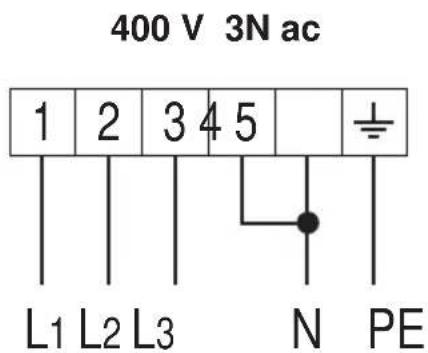
text_image
400 V 3N ac 1 2 3 4 5 ± L1 L2 L3 N PE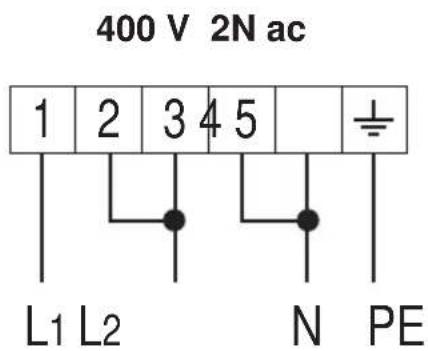
text_image
400 V 2N ac 1 2 3 4 5 ± L1 L2 N PEFig. 9.2

text_image
2 3 4 51 L1 N (L2) PE 230 V ac
text_image
2 3-4 51 L1 L2 L3 N PE 400 V 3N ac
text_image
2 3 4 51 L1 L2 N PE 400 V 2N acFig. 9.3

text_image
BORETTIPassione in Cucina