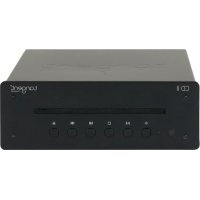
CD II - Cd player/recorder TANGENT - Free user manual and instructions
Find the device manual for free CD II TANGENT in PDF.


| Product type | CD Player/Recorder |
| Brand | Tangent |
| Model | CD II |
| Power supply | Mains 100-240 V AC, 50/60 Hz |
| Dimensions (approx.) | 430 x 95 x 300 mm (W x H x D) |
| Weight (approx.) | 2.5 kg |
| CD playback | Audio CD, CD-R/RW |
| Playback functions | Play, pause, stop, previous/next track, direct selection (keys 1-6) |
| Ejection | Eject button on the unit and remote control |
| Connectivity | Analog RCA output (L/R), optical output |
| Remote control | Yes, included |
| Included accessories | Remote control, optical cable, instruction manual |
| Standby | Standby button on the unit and remote control |
| LED indicator | White (power on), red (standby) |
| Maintenance | Clean with a dry cloth |
| Safety | Instructions: do not expose to moisture, do not block ventilation openings, etc. |
| Batteries for remote control | 2 AAA batteries (not included) |
| Repairability | Do not open, consult a qualified technician |
Frequently Asked Questions - CD II TANGENT
User questions about CD II TANGENT
0 question about this device. Answer the ones you know or ask your own.
Ask a new question about this device
Download the instructions for your Cd player/recorder in PDF format for free! Find your manual CD II - TANGENT and take your electronic device back in hand. On this page are published all the documents necessary for the use of your device. CD II by TANGENT.
USER MANUAL CD II TANGENT
Including in the package:
Remote Control
Optical Cable
Instruction Manual
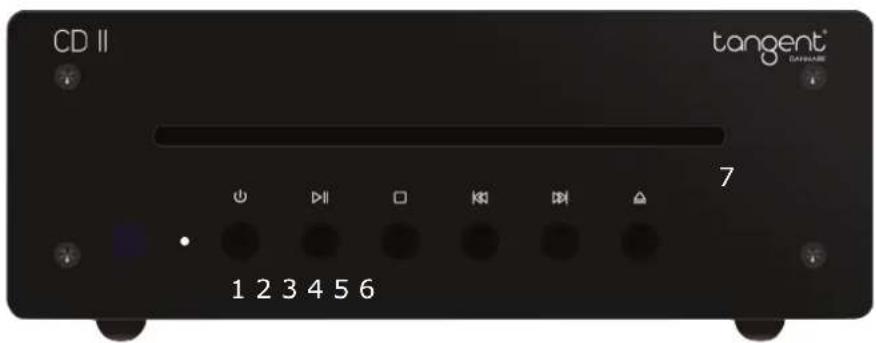
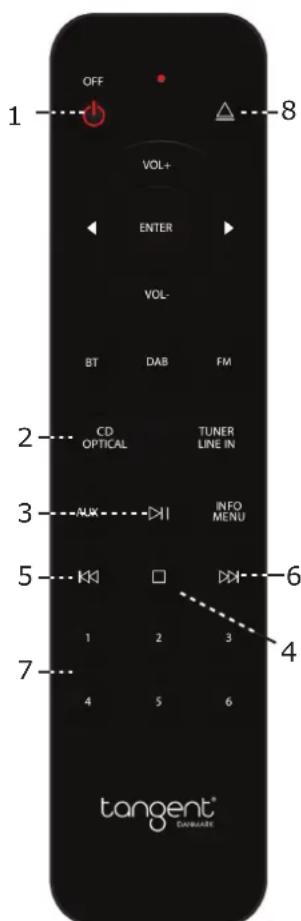
Remote control:
- Standby Button
- CD Button
- Play/Pause Button
- Stop Button
- Previous Button
- Next Button
- Button 1-6
- Eject Button
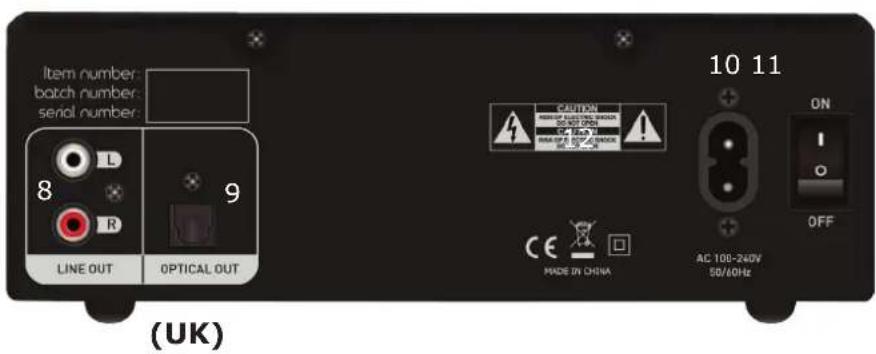
(UK)
- Standby button turns the CD II into Standby (If you have Ampster BT II or Tuner II, they will also go into Standby)
- CD Button turns the CD II on. And if you have the Ampster BT II, it will turn on and change into CD/Optical mode.
- Play/Pause button for pause or play. If you pause during playback and press play again it will resume from the point where you did pause.
- Stop button for stopping playback.
- Previous button is for selecting previous track.
- Next button is for selecting next track.
- Button 1-6 for selecting track 1-6
- Eject button for ejecting the compact disc
Indicator Function
Power/Standby indicator
Power: Power on the product in power off status, then push the power ON/OFF button on rear panel at "ON" position and the unit will power on, LED indicator will change into white.
Power off:
Push the power ON/OFF button at "OFF" position, and unit go into power off status.
Standby:
Press the standby button on the unit or remote control then the unit will go into standby, and the standby LED will be red color. The unit is in standby status.
Power on (from standby mode): Press standby on the unit or CD/Optical on the remote control, and the unit will start up, and begin to play after a few seconds.
UK)
Important Safety Instructions:
To reduce the risk of electrical shock, fire, etc.:
- Do not place unit near any heat source such as radiators, heat registers, stoves, or other apparatus (including amplifiers) that produce heat.
- Do not block any ventilation openings of unit.
- The unit shall not be exposed to dripping or splashing and no objects filled with liquids, such as vases, shall be placed on the unit.
- Do not place any heavy loads onto the unit, and do not step on it, the load may fall and cause serious injury to the unit.
- Never unplug your unit by pulling on the power cord. Always grap the plug firmly and pull straight out from the outlet.
- Repair or replace all electric service cords that have become frayed or otherwise damaged immediately. Do not use a cord that shows cracks or abrasion damage along its length, the plug, or the connector end.
- To prevent fire or shock hazard, do not expose unit to rain or moisture.
- During lightning or raining days, unplug the unit for additional protection during thunderstorms or when the unit is not used for prolonged periods. This will prevent damage to the unit from lightning and power surges.
- Do not attempt to carry out any service work yourself. By opening or removing the cabinet, you may be exposed to dangerous voltage or other hazards. Any service work should be carried out by qualified technicians.
- In the interests of safety and to avoid unnecessary energy consumption, never leave the unit switched on while unattended for long periods of time, e.g. overnight, while on holiday or while out of the house. Switch it off and disconnect the mains plug from the mains socket.
- Clean only with dry cloth
- Please pay attention to the environmental aspects of battery disposal. Battery must be recycled or disposed of properly. This product must not be disposed together with the domestic waste. This product has to be disposed at an authorized place for recycling of electrical and electronic appliances. By collecting and recycling waste, you help save natural resources, and make sure the product is disposed in an environmental friendly and healthy way.

This symbol on the product or in the instructions means that your electrical and electronic equipment should be disposed at the end of its life separately from your household waste. There are separate collection systems for recycling in the EU. For more information, please contact the local authority or your retailer where you purchased the product.
UK
CD II:
Product name: Tangent CD II
Power supply: AC 100V~240V/50Hz
Dimensions: 195 × 194 × 70 ~mm
Weight: 1.5 kg