
PNHW501 - Monitor SHARP - Free user manual and instructions
Find the device manual for free PNHW501 SHARP in PDF.




| Product type | Professional LCD Monitor |
| Brand | Sharp |
| Model | PN-HW501 |
| Dimensions (W x D x H) | 1124 x 68 x 646.5 mm |
| Weight | Approximately 13 kg |
| Power Supply | AC 100-240 V, 1.5 A, 50/60 Hz |
| Power Consumption | 130 W |
| Operating Temperature | 0°C to 40°C |
| Operating Humidity | 20% to 80% (non-condensing) |
| Connectivity | 3 x HDMI, 1 x D-Sub, 1 x RS-232C, 1 x LAN, 1 x USB, audio input/output |
| Main Features | Auto standby mode (OFF IF NO OPERATION), scheduling (SCHEDULE), date/time setting, portrait mode |
| Wall Mount Compatibility | VESA standard, M6 screws (8-10 mm longer than the thickness of the bracket) |
| Remote Control Batteries | 2 x R03 (AAA size) |
| Maintenance and Cleaning | Unplug the device, use a dry cloth, no liquid detergents |
| Warranty | Maximum continuous use of 16 hours per day |
| Electrical Class | Class I (mandatory grounding) |
Frequently Asked Questions - PNHW501 SHARP
User questions about PNHW501 SHARP
0 question about this device. Answer the ones you know or ask your own.
Ask a new question about this device
Download the instructions for your Monitor in PDF format for free! Find your manual PNHW501 - SHARP and take your electronic device back in hand. On this page are published all the documents necessary for the use of your device. PNHW501 by SHARP.
USER MANUAL PNHW501 SHARP
INSTALLATION MANUAL
[PN-HW861/PN-HW751/PN-HW651]
FOR CUSTOMERS IN U.K.
IMPORTANT
The wires in this mains lead are coloured in accordance with the following code:
GREEN-AND-YELLOW:
Earth
BLUE:
Neutral
BROWN:
Live
As the colours of the wires in the mains lead of this apparatus may not correspond with the coloured markings identifying the terminals in your plug proceed as follows:
- The wire which is coloured GREEN-AND-YELLOW must be connected to the terminal in the plug which is marked by the letter E or by the safety earth symbol or coloured green or green-and-yellow.
- The wire which is coloured BLUE must be connected to the terminal which is marked with the letter N or coloured black.
- The wire which is coloured BROWN must be connected to the terminal which is marked with the letter L or coloured red. Ensure that your equipment is connected correctly. If you are in any doubt consult a qualified electrician.
"WARNING: THIS APPARATUS MUST BE EARTHED."
[PN-HW551/PN-HW501/PN-HW431]
NOTE FOR USERS IN U.K.
IMPORTANT
The wires in this mains lead are coloured in accordance with the following code:
BLUE: "NEUTRAL"
BROWN: "LIVE"
CONNECTING PLUG TO MAINS LEAD:
As the colours of the wires in the mains lead of this apparatus may not correspond with the coloured markings identifying the terminals in your plugs, proceed as follows:
The wire which is coloured BLUE must be connected to the terminal which is marked with the letter N or coloured BLACK. The wire which is coloured BROWN must be connected to the terminal which is marked with the letter L or coloured RED.
CAUTION:
Do not connect the Live (BROWN) wire or the neutral (BLUE) wire to the earth terminal of your 3 pin mains plug.
Contents
[ENGLISH]
IMPORTANT INFORMATION. 1 DEAR SHARP CUSTOMER. 1 SAFETY PRECAUTIONS. 2 SAFETY INSTRUCTION 3 MOUNTING PRECAUTIONS 4 Supplied Components. 5 Specifications 5
Preparing the Remote Control Unit. 5 Connections 6 Turning Power On/Off. 7 Mounting Precautions (For SHARP dealers and service engineers) 8
Read the manuals in the provided CD-ROM. (Adobe Acrobat Reader is required to view the manuals.)
IMPORTANT INFORMATION
WARNING: TO REDUCE THE RISK OF FIRE OR ELECTRIC SHOCK, DO NOT EXPOSE THIS PRODUCT TO RAIN OR MOISTURE.
CAUTION
RISK OF ELECTRIC
SHOCK
DO NOT OPEN

CAUTION: TO REDUCE THE RISK OF ELECTRIC
SHOCK, DO NOT REMOVE COVER.
NO USER-SERVICEABLE PARTS
INSIDE:
REFER SERVICING TO QUALIFIED
SERVICE PERSONNEL.
The lightning flash with arrowhead symbol, within a triangle, is intended to alert the user to the presence of uninsulated "dangerous voltage" within the product's enclosure that may be of sufficient magnitude to constitute a risk of electric shock to persons.

The exclamation point within a triangle is intended to alert the user to the presence of important operating and maintenance (servicing) instructions in the literature accompanying the product.
To maintain compliance with EMC regulations, use shielded cables to connect to the following terminals: HDMI input terminal,
D-sub input terminal and RS-232C input terminal.
DEAR SHARP CUSTOMER
Thank you for your purchase of a SHARP LCD product. To ensure safety and many years of trouble-free operation of your
product, please read the Safety Precautions carefully before using this product.
SAFETY PRECAUTIONS
Electricity is used to perform many useful functions, but it can also cause personal injuries and property damage if improperly handled. This product has been engineered and manufactured with the highest priority on safety. However, improper use can result in electric shock and/or fire. In order to prevent potential danger, please observe the following instructions when installing, operating and cleaning the product. To ensure your safety and prolong the service life of your LCD product, please read the following precautions carefully before using the product.
- Read instructions — All operating instructions must be read and understood before the product is operated.
- Keep this manual in a safe place — These safety and operating instructions must be kept in a safe place for future reference.
- Observe warnings - All warnings on the product and in the instructions must be observed closely.
- Follow instructions - All operating instructions must be followed
- Cleaning — Unplug the power cord from the power outlet before cleaning the product. Use a dry cloth to clean the product. Do not use liquid cleaners or aerosol cleaners. Do not use dirty cloths. Doing so may damage the product.
- Attachments — Do not use attachments not recommended by the manufacturer. Use of inadequate attachments can result in accidents.
- Water and moisture - Do not use the product near water. Do not install the product in a place where water may splash onto it. Be careful of equipment which drains water such as an air-conditioner.
- Ventilation — The vents and other openings in the cabinet are designed for ventilation.
Do not cover or block these vents and openings since insufficient ventilation can cause overheating and/or shorten the life of the product. Do not place the product on a sofa, rug or other similar surface, since they can block ventilation openings. Do not place the product in an enclosed place such as a bookcase or rack, unless proper ventilation is provided or the manufacturer's instructions are followed.
- Power cord protection — The power cords must be routed properly to prevent people from stepping on them or objects from resting on them.
- The LCD panel used in this product is made of glass. Therefore, it can break when the product is dropped or applied with impact. Be careful not to be injured by broken glass pieces in case the LCD panel breaks.
- Overloading — Do not overload power outlets or extension cords. Overloading can cause fire or electric shock.
- Entering of objects and liquids — Never insert an object into the product through vents or openings. High voltage flows in the product, and inserting an object can cause electric shock and/or short internal parts.
For the same reason, do not spill water or liquid on the product.
- Servicing — Do not attempt to service the product yourself. Removing covers can expose you to high voltage and other dangerous conditions. Request a qualified service person to perform servicing.
- Repair — If any of the following conditions occurs, unplug the power cord from the power outlet, and request a qualified service person to perform repairs.
a. When the power cord or plug is damaged. b. When a liquid was spilled on the product or when objects have fallen into the product. c. When the product has been exposed to rain or water.
d. When the product does not operate properly as described in the operating instructions.
Do not touch the controls other than those described in the operating instructions. Improper adjustment of controls not described in the instructions can cause damage, which often requires extensive adjustment work by a qualified technician.
e. When the product has been dropped or damaged. f. When the product displays an abnormal condition. Any noticeable abnormality in the product indicates that the product needs servicing. 15. Replacement parts — In case the product needs replacement parts, make sure that the service person uses replacement parts specified by the manufacturer, or those with the same characteristics and performance as the original parts. Use of unauthorized parts can result in fire, electric shock and/or other danger. 16. Safety checks - Upon completion of service or repair work, request the service technician to perform safety checks to ensure that the product is in proper operating condition. 17. Wall mounting — When mounting the product on a wall, be sure to install the product according to the method recommended by the manufacturer. 18. Heat sources - Keep the product away from heat sources such as radiators, heaters, stoves and other heat-generating products (including amplifiers). 19. Batteries — Incorrect use of batteries may cause the batteries to burst or ignite. A leaky battery may corrode the equipment, dirty your hands or spoil your clothing. In order to avoid these problems, make sure to observe the precautions below: - Use the specified batteries only. Install the batteries with due attention to the plus (+) and minus (-) sides of the batteries according to the instructions in the compartment. - Do not mix old and new batteries. - Do not mix batteries of different types. Voltage specifications of batteries of the same shape may vary. - Replace an exhausted battery with a new one promptly. If you will not use the remote control for a long time, remove the batteries. - If leaked battery fluid gets on your skin or clothing, rinse immediately and thoroughly. If it gets into your eye, bathe your eye well rather than rubbing and seek medical treatment immediately. Leaked battery fluid that gets into your eye or your clothing may cause a skin irritation or damage your eye. 20. Usage of the monitor must not be accompanied by fatal risks or dangers that could lead directly to death, personal injury, severe physical damage or other loss, including nuclear reaction control in nuclear facility, medical life support system, and missile launch control in a weapon system.
- Do not stay in contact with the parts of the product that become hot for long periods of time. Doing so may result in low-temperature burns.
- Do not modify this product.
WARNING:
This is a Class A product. In a domestic environment this product may cause radio interference in which case the user may be required to take adequate measures.
An apparatus with CLASS I construction shall be connected to a MAIN socket outlet with a protective earthing connection.
STABILITY HAZARD
If a monitor is not positioned in a sufficiently stable location, it can be potentially hazardous due to falling. Many injuries, particularly to children, can be avoided by taking simple precautions such as:
- Using fixing devices like wall mount brackets recommended by the manufacturer.
- Only using furniture that can safely support the monitor.
- Ensuring the monitor is not overhanging the edge of the supporting furniture.
- Not placing the monitor on tall furniture (for example, cupboards or bookcases) without anchoring both the furniture and the monitor to a suitable support.
- Not standing the monitors on cloth or other materials placed between the monitor and supporting furniture.
- Educating children about the dangers of climbing on furniture to reach the monitor or its controls.
- This equipment is not suitable for use in locations where children are likely to be present unsupervised.
Especially for child safety
- Don't allow children to climb on or play with the monitor.
- Don't place the monitor on furniture that can easily be used as steps, such as a chest of drawers.
- Remember that children can become excited while watching a program, especially on a "larger than life" monitor. Care should be taken to place or install the monitor where it cannot be pushed, pulled over, or knocked down.
- Care should be taken to route all cords and cables connected to the monitor so that they cannot be pulled or grabbed by curious children.
SAFETY INSTRUCTION
- Do not use the monitor where there is a lot of dust, where humidity is high, or where the monitor may come into contact with oil or steam. Do not use in an environment where there are corrosive gases (sulfur dioxide, hydrogen sulfide, nitrogen dioxide, chlorine, ammonia, ozone, etc.). As this could lead to fire.
- Ensure that the monitor does not come into contact with water or other fluids. Ensure that no objects such as paper clips or pins enter the monitor as this could lead to fire or electric shock.
- Do not place the monitor on top of unstable objects or in unsafe places. Do not allow the monitor to receive strong shocks or to strongly vibrate. Causing the monitor to fall or topple over may damage it.
- Do not use the monitor near heating equipment or in places where there is likelihood of high temperature, as this may lead to generation of excessive heat and outbreak of fire.
- Do not use the monitor in places where it may be exposed to direct sunlight. Risk of cabinet deformation and failure if the monitor is used in direct sunlight.
- Please be sure to constantly remove dust and garbage that has attached to the ventilation opening. If dust collects in the ventilation opening or the inside of the monitor, it may lead to excessive heat, outbreak of fire, or malfunction. Please request a cleaning of the inside of the monitor from an authorized SHARP servicing dealer or service center.
- The power outlet shall be installed near the equipment and shall be easily accessible.
- Continuous operating time and warranty. This product is designed for a maximum daily use of 16 hours. Continual use in excess of 16 hours per day is not covered by the warranty.
The Power Cord
- Use only the power cord supplied with the monitor.
- Do not damage the power cord nor place heavy objects on it, stretch it or over bend it. Also, do not add extension cords. Damage to the cord may result in fire or electric shock.
- Do not use the power cord with a power tap. Adding an extension cord may lead to fire as a result of overheating.
- Do not remove or insert the power plug with wet hands. Doing so could result in electric shock.
- Unplug the power cord if it is not used for a long time.
- Do not attempt to repair the power cord if it is broken or malfunctioning. Refer the servicing to the service representative.
MOUNTING PRECAUTIONS
- This product is for indoor use only.
- A VESA-compliant mounting bracket is required.
- Because the monitor is heavy, consult your dealer before installing, removing, or moving it.
- Wall mounting requires special expertise and must be performed by an authorized SHARP dealer. Never attempt to do this yourself. We assume no responsibility for accidents or injuries caused by improper mounting or mishandling.
- Use the monitor with its surface perpendicular to a level surface. If necessary, the monitor may be tilted up to 20 degrees upward or downward.
- This monitor should be used at an ambient temperature between 32°F (0°C) and 104°F (40°C). Provide sufficient space around the monitor to prevent heat accumulation inside.
For the monitor in landscape orientation: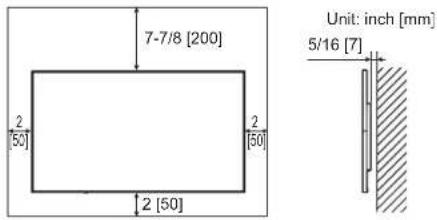
For the monitor in portrait orientation: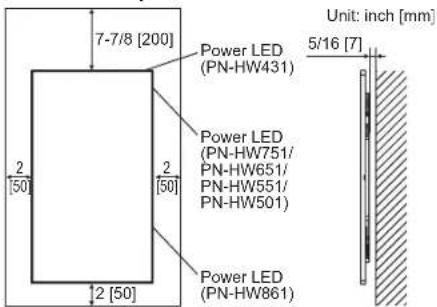
- If it is difficult to provide sufficient space for any reason (e.g., installation inside a housing) or if the ambient temperature may fall outside the range of 32°F (0°C) to 104°F (40°C), install a fan or take other measures to keep the ambient temperature within the required range.
- Do not block any ventilation openings. If the temperature inside the monitor rises, this could lead to malfunction.
- Do not place the monitor on a device that generates heat.
- Adhere to the following when installing the monitor in portrait orientation. Failure to do so may cause malfunctions. Install the monitor so that the power LED is on the right side (PN-HW861/PN-HW751/PN-HW651/PN-HW551/PN-HW501) or on the top side (PN-HW431).
- Set the THERMAL SENSOR SETTING on the SETUP menu to PORTrait. (See OPERATION MANUAL.)
- Be sure to clamp the power cord (supplied) by using the supplied cable clamp (affixing type). When clamping the power cord, take care not to stress the terminal of the power cord. Do not bend the power cord excessively.
[PN-HW861/PN-HW751/PN-HW651]
[PN-HW551/PN-HW501/PN-HW431]![SHARP PNHW501 - [PN-HW861/PN-HW751/PN-HW651] - 1](/content/2026/03/569716/images/6b97e6b4623ec2a589410363e6eecce5b3ba3b0fb7685558ad413af3a2b9ac34.jpg)
![SHARP PNHW501 - [PN-HW861/PN-HW751/PN-HW651] - 2](/content/2026/03/569716/images/16cd0a417ccca4584f6b0268c81e28477b0f0c77cecdfa887798569c1b6d0bdd.jpg)
Supplied Components
If any component should be missing, please contact your dealer.
Liquid Crystal Display Monitor: 1 Remote control unit: 1 Power cord R03 battery ("AAA" size): 2 CD-ROM (Utility Disk for Windows): 1
□ Setup Manual (this manual): 1 Cable clamp: 2 Logo sticker: 1 USB flash drive cover: 1 USB flash drive cover fixing screw: 1
- SHARP Corporation holds authorship rights to the Utility Disk program. Do not reproduce it without permission.
- For environmental protection!
Do not dispose of batteries in household waste. Follow the disposal instructions for your area.
Specifications
| Model PN-HW861 PN-HW751 PN-HW651 | |||
| Power requirement AC 100 - 240 V | 3.7 A,50/60 Hz | AC 100 - 240 V, 2.9 A,50/60 Hz | AC 100 - 240 V, 2.3 A,50/60 Hz |
| Operating temperature * 32°F to 104°F (0°C to 40°C) | |||
| Operating humidity 20% to 80% (no condensation) | |||
| Power consumption 330 W 255 W 205 W | |||
| Dimensions inch (mm)(excluding protrusions) | Approx. 75-7/8 (W) x3 (D) x 43-1/4 (H)(1928 x 76 x 1099) | Approx. 66-1/8 (W) x2-9/16 (D) x 37-3/4 (H)(1680 x 65.5 x 959) | Approx. 57-3/8 (W) x3-1/4 (D) x 32-7/8 (H)(1458 x 82 x 835) |
| Weight lbs. (kg) Approx. 141.1 (64) | Approx. 121.3 (55) Approx. 57.3 (26) | ||
| Model PN-HW551 PN-HW501 PN-HW431 | |||
| Power requirement AC 100 - 240 V | 1.7 A,50/60 Hz | AC 100 - 240 V, 1.5 A,50/60 Hz | AC 100 - 240 V, 1.3 A,50/60 Hz |
| Operating temperature * 32°F to 104°F (0°C to 40°C) | |||
| Operating humidity 20% to 80% (no condensation) | |||
| Power consumption 150 W 15 W | |||
| Dimensions inch (mm)(excluding protrusions) | Approx. 48-3/4 (W) x2-3/8 (D) x 28 (H)(1239 x 60 x 711.5) | Approx. 44-1/4 (W) x2-11/16 (D) x 25-7/16 (H)(1124 x 68 x 646.5) | Approx. 38-1/8 (W) x2-3/8 (D) x 22 (H)(968 x 60 x 559) |
| Weight lbs. (kg) Approx. 35.3 (16) | Approx. 28.7 (13) Approx. 19.8 (9) | ||
- Temperature condition may change when using the monitor together with the optional equipments recommended by SHARP. In such cases, please check the temperature condition specified by the optional equipments.
As a part of our policy of continuous improvement, SHARP reserves the right to make design and specification changes for product improvement without prior notice. The performance specification figures indicated are nominal values of production units. There may be some deviations from these values in individual units.
Preparing the Remote Control Unit
- Place your finger on the part marked with the triangle, and then pull the cover off.
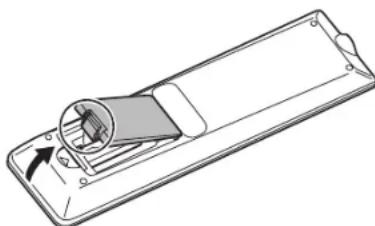
- See the instructions in the compartment and put in the supplied batteries (R03 ("AAA" size) x 2) with their plus (+) and minus (-) sides oriented correctly.
- Close the cover.
Connections
Caution
- Be sure to turn off the main power switch and disconnect the plug from the power outlet before connecting/disconnecting cables. Also, read the manual of the equipment to be connected.
- Be careful not to confuse the input terminal with the output terminal when connecting cables. Accidentally reversing cables connected to the input and output terminals may cause malfunctions and the other problems.
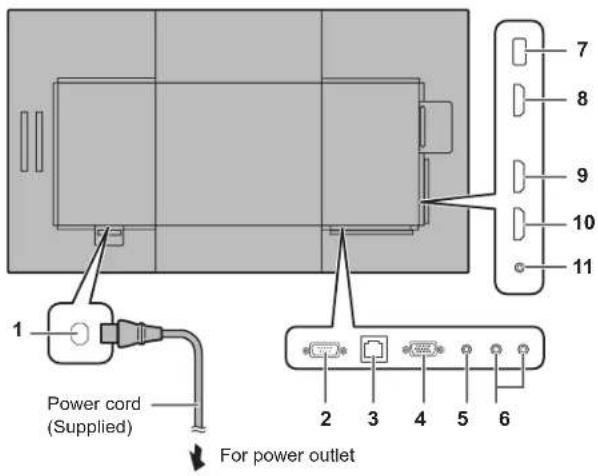
- AC input terminal
- RS-232C input terminal
- LAN terminal
- D-sub input terminal
- Audio input terminal
- Audio output terminals
- USB port 8. HDMI1 input terminal 9. HDMI2 input terminal 10. HDMI3 input terminal
- IR output terminal
TIPS
The audio input terminals used in each input mode are as follows.
| Input mode Audio input terminal | |
| HDMI1 HDMI1 input terminal | |
| HDMI2 HDMI2 input terminal | |
| HDMI3 HDMI3 input terminal | |
| D-SUB Audio input terminal | |
| USB USB port | |
The terms HDMI, HDMI High-Definition Multimedia Interface, and the HDMI Logo are trademarks or registered trademarks of HDMI Licensing Administrator, Inc. Adobe, Acrobat, and Acrobat Reader are either registered trademarks or trademarks of Adobe Systems Incorporated in the United States and/or other countries. VESA is either registered trademark or trademark of Video Electronics Standards Association in the United States and/or other countries. All other brand and product names are trademarks or registered trademarks of their respective holders.
Turning Power On/Off
Caution
- Turn on the monitor first before turning on the computer or playback device.
- When switching the main power switch or the POWER button off and back on, always wait for at least 5 seconds. A short interval may result in a malfunction.
Turning on the main power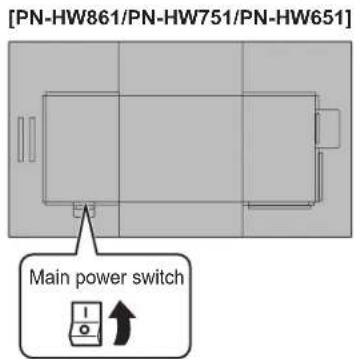
[PN-HW551/PN-HW501/PN-HW431]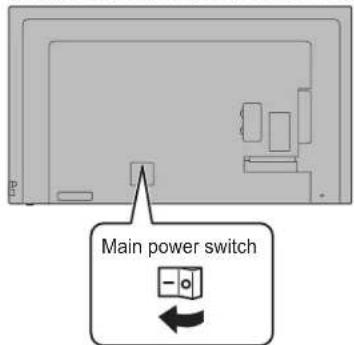
Caution
- The main power must be turned on/off with the main power switch. Do not connect/disconnect the power cord or turn the breaker on/off while the main power switch is on.
- For a complete electrical disconnection, pull out the main plug.
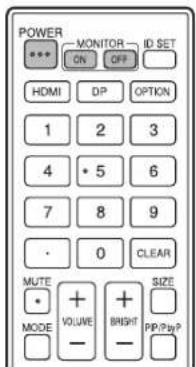
Turning power on/off
Press the POWER button to turn the power ON/OFF. You can also turn the power ON/OFF by pressing the MONITOR ON button/MONITOR OFF button on the remote control unit.
[PN-HW861]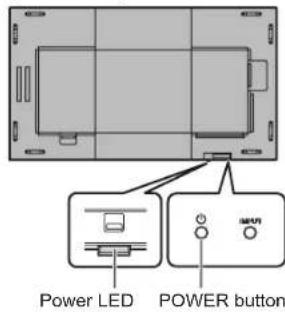
[PN-HW751/PN-HW651/PN-HW551/PN-HW501]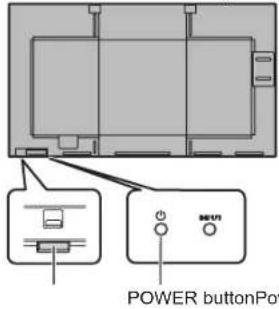
[PN-HW431]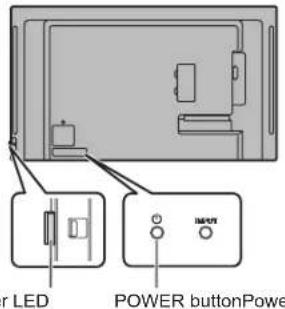
| Status Status of the monitor | |
| Green lit Power on | |
| Orange lit Power off (Standby mode) | |
| Green flashing Input signal waiting mode | |
- Setting the SCHEDULE flashes the power LED alternately in red and orange in standby mode.
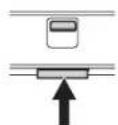
■How to pull out the power LED/remote control sensor
Pull out Store Power LED / Remote control sensor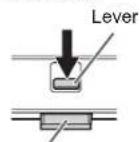
Operation mode
When the monitor is turned on for the first time after being shipped from the factory, the operation mode setting screen will be displayed. Set it to MODE1 or MODE2.
MODE1....OFF IF NO OPERATION is set to ON, and POWER SAVE MODE is set to ON. (These settings can not be changed.) If there is no operation for 4 hours or more, the monitor automatically enters standby mode. Power consumption in standby mode is also minimized.
MODE2....Will perform standard operation. OFF IF NO OPERATION is set to OFF, and POWER SAVE MODE is set to OFF. These settings can be changed.
Even after being set, changes can be made using OPERATION MODE, located in the menu of the monitor. (See OPERATION MANUAL.)
Date/time setting
- If the time has yet to be set when the monitor is first turned on, the date/time setting screen appears. Set the date and time.
- Be sure to set the date and time.
TIPS
- Set the time on a 24-hour basis.
Mounting Precautions (For SHARP dealers and service engineers)
- When installing, removing or moving the monitor, ensure that this is carried out by at least 2 people. (PN-HW861/PN-HW751: at least 3 people.)
- Be sure to use a wall-mount bracket designed or designated for mounting the monitor. This monitor is designed to be installed on a concrete wall or pillar. Reinforced work might be necessary for some materials such as plaster / thin plastic board / wood before starting installation. This monitor and bracket must be installed on a wall which can endure at least 4 times or more the weight of the monitor. Install by the most suitable method for the material and the structure.
- To attach a VESA-compliant mounting bracket, use M6 screws that are 5/16 inch (8 mm) to 3/8 inch (10 mm) longer than the thickness of the mounting bracket.
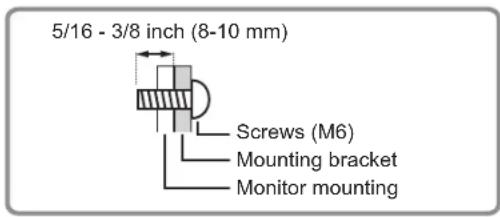
- Do not use an impact driver.
- When moving the monitor, be sure to hold it with the handles [PN-HW861/PN-HW751] or hold the parts marked by below [PN-HW651/PN-HW551/PN-HW501/PN-HW431]. Do not grasp the screen. This may cause product damage, failure, or injury.
[PN-HW651/PN-HW551/PN-HW501][PN-HW431]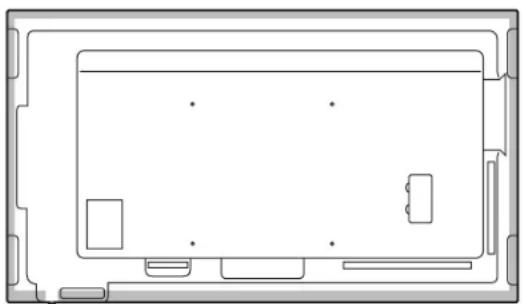
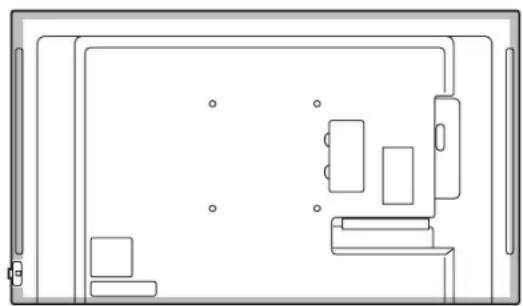
After mounting, please carefully ensure the monitor is secure, and not able to come loose from the wall or mount. - Do not use any screw holes other than those for mounting brackets, located on the rear of the monitor, for installation.
Supplied components 5
Characteristics 5
[PN-HW861/PN-HW751/PN-HW651]
[PN-HW551/PN-HW501/PN-HW431]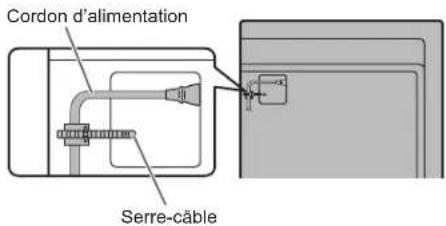
Supplied components
[PN-HW861/PN-HW751/PN-HW651]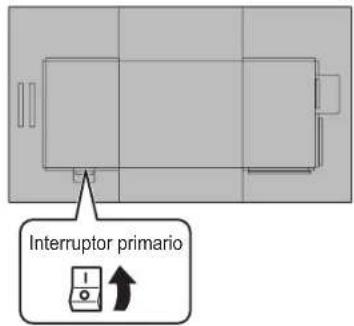
[PN-HW551/PN-HW501/PN-HW431]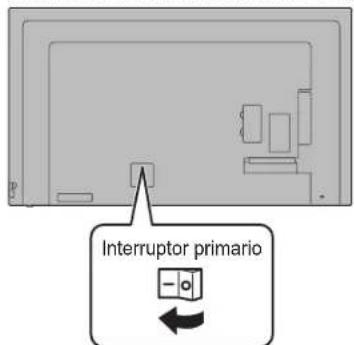
Caution
[PN-HW861/PN-HW751/PN-HW651]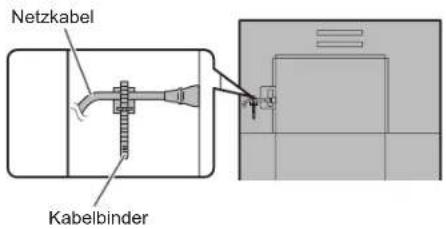
[PN-HW551/PN-HW501/PN-HW431]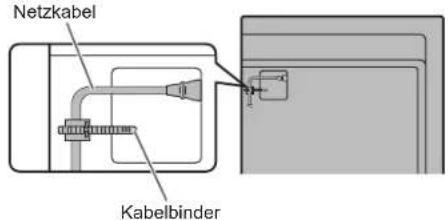
[PN-HW861/PN-HW751/PN-HW651]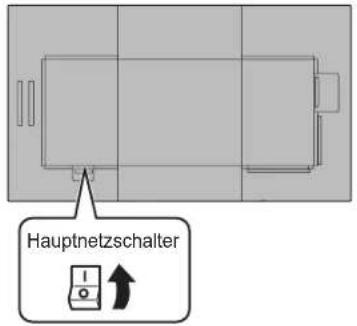
[PN-HW551/PN-HW501/PN-HW431]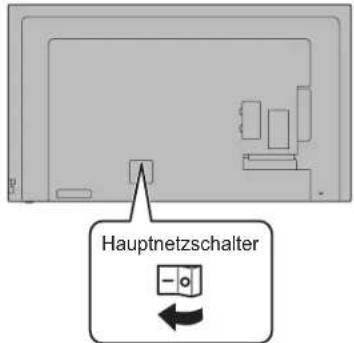
Caution
DANGER OF ELECTRIC SHOCK
ELECTRIC SHOCK
THE DETAILS ARE SHOWN IN THE FIGURE,
WHICH MAY BE EXPLAINED
BY THE USER.
FOR SERVICE, CONTACT
QUALIFIED
SERVICE CENTER PERSONNEL.
The warning symbol with an arrow on the end
inside the triangle warns
the user of the presence of uninsulated
"dangerous voltage" inside the enclosure. Such voltage
may constitute a risk of electric shock
to persons.

The exclamation mark inside a triangle
warns the user of the presence
of important instructions for operation and
Referenced in the literature,
which is supplied with the
product.
To comply with electromagnetic compatibility (EMC) requirements, use shielded cables for
connection to the following connectors: HDMI input connector, D-sub input connector, and RS-232C input connector.
In accordance with the Law of the Russian Federation "On Protection of Consumer Rights" and the Decree of the Government of the Russian Federation
No. 720 of November 16, 1997, the service life of this model is set at 5 years from the date of manufacture, provided that
it is used in accordance with the operating instructions and applicable technical standards.
Protection class against electric shock I (PN-HW861/PN-HW751/PN-HW651)

Protection class against electric shock II (PN-HW551/PN-HW501/PN-HW431)
The date of manufacture is indicated in the serial number:
SERIAL No.
01234567
Year
8:2018
9:2019
0:2020
1:2021
:
Meca 1:RHBapb : 9:CeHTa6pb 0:OKTABpb X:H0a6b Y:Декабpb
- I3dennne cneDyET nepeBo3nTB yynakOBke. Co6nIouaIte MaHInyIpyIcIOHbIe 3HaKn, yka3aHHbIe Ha ynakOBke.
- PpaBnHa y cNoBna peaJIn3aun He yCTaHOJIeHbI N3ROTOBNTeMeM I DOnXHbI COOTBeTCTBOBaTb HaUNOHbHOMy HINMECTHOMy 3aKoHOdaTeJIbCTBy CTpaHbI peaJIn3aun N3dEInr.
- PpN yTnIn3aunn H3dennr co6nOdaIte COOTBeTCTByIOUne npaBUNa, ycTaHOBJIeHHbIe dJyTnIN3aUN 3JNEKtpoobopdyoBaHn3aKOHOdaTeNbCTBOMBaWei CTPaHbI.
YBAJXAEMbI KJIneHT KOMnAHn SHARP
Blaorapm Bac 3a npno6pehene KK moHtopa SHARP. Ira oecneueenna 6eonachoctn m HMOroJeTHei 6ecnpo6JemHOI 3KcNpyataun npno6peTeHHOR BaMn N3dEINRA BHIMaTeNbHO npOHTe npaBnA NO TEXHKe 6eONacHoCTn nepeD TeM, KaK Naatb erO 3KcNpyatauio.
ПРавILA TEXHиКи БE3ОпАСHOCTN
3NeKTPnueCTBO NcNOB3yeTcra nBbINONHeHmNHOxNoe3bIX FyHKuH, HO OHO TaKKe MOKet PnUHNrT TpABMbI NepCOHaNy 6bItb npUHNO nobpeJxHn HmUeCTBa B cnyae HnpabInbHoro obaeHn C hM. DaHoe N3dEne CnpoeKtnPBOHO n npOn3BeHcO bc6ecneHem MaKcNMaBHO beOcnacOCTN. ODAKO HnpaBnBHa 3KnPnAutaMQeT NPBEcTN K npOaxHeH 3NEKTPnueckIM TokOM INB03NHKNOBHeHIO NoXapa. B cJeXn pTeObTaWeHn NotEnuHaBHO yPo3b Co5NDaTe CneDyUme HNCTpyKcuN IOYCTAHOBK, 3KnPnAYataHn YNCtke DaHHOR N3dEeHn. DnB oceNeHuaBAeW b63onachOHTN yBvEeHn CPOKa 3KnPnAYatauBAwero KK MOHITOPA BHIMATEbHO pOcTuTe CneDyUme PpaBnA, PpeJe CEm PnCtynbK EKnPnAYatau DAHHOR N3dEeN.
- PpOHTnTe HhCTpyKuH -Pepkde Yem Haatb 3KcNpyaTaUHO 3dEINr, Heo6xOIMNO pOueCTb I NOHrTb BCE hHCTpyKuH No erO 3KcNpyaTaUIN.
- XpaHHTe daHHoe pykoBocTBo B haDexKHom MecTe - DaHHbe IHCTpyKunno 630nacOcTn n EKcnnyatauCneNyET xpAHHTb BAeXHOM MecTe, YTO6bl MoKHO 6blIO o6paTntbcr K Hm BnOcNeIcTBnn.
- IopunHraTeCpneOctepReJHnA-Bce npedocteperaIOUme HADNcI IN 3aKIN, IMeIOUcec Ha n3dennn B IHCTpykUIM, DOnXhbl CTPOR o6bHDaTbc.
- According to the instructions - it is necessary to follow all operating instructions.
- Cleaning - Before cleaning the device, it is necessary to unplug it from the power outlet. For cleaning, use a soft cloth. It is forbidden to use any cleaning agents or aerosol sprays. Do not use a damp cloth. This may damage the device.
- Accessories - It is forbidden to use accessories not recommended by the manufacturer of this device. Using other accessories may lead to accidents.
- Water and moisture - It is forbidden to use the device near sources of water. Do not place the monitor in a place where water may get on it. Pay attention to equipment that uses water in operation, for example, a coffee maker.
- Ventilation - The ventilation openings and other openings in the device housing are intended for ventilation. It is forbidden to cover or block these ventilation openings or other openings, as insufficient ventilation may lead to overheating or a reduction in the service life of the device. It is forbidden to install the device on a bed, sofa, or other similar surfaces, as they may block the ventilation openings. It is forbidden to install the device in enclosed spaces, such as a bookcase or cabinet, unless proper ventilation is provided, except when this is provided for in the manufacturer's instructions.
- Power cord protection - The power cord should be routed so that no one steps on it and no objects are placed on it.
- The screen, which is used in this device, is made of glass. Therefore, it may break if dropped or hit. Be careful not to be injured by fragments of broken glass in case the screen is broken.
- Overload - It is forbidden to overload the power outlet or extension cords. Overload may lead to fire or electric shock.
- Insertion of objects and liquids inside the housing - It is strictly forbidden to insert any objects inside the device through the ventilation or other openings. High voltage is present inside the device, so pushing any object through the openings may lead to electric shock and/or short circuit of some parts. For the same reason, it is forbidden to allow water or other liquids to get inside the device.
- Service - It is forbidden to service the device yourself. If you remove the covers, you may be exposed to dangerous high voltage or other hazards. Contact qualified service personnel to perform servicing.
- Warning - If any of the following occurs, unplug the device from the power outlet and contact qualified service personnel to perform necessary repairs: a. Damage to the power cord or plug. b. If liquid or any foreign objects have entered the device. c. If the device has been exposed to rain or water. d. If the device does not operate as described in the operating instructions. Adjusting the controls in ways not described in the instructions may lead to damage, the repair of which often requires qualified specialists to perform a large amount of work. e. If the device has been dropped or damaged. f. If any deviations are observed in the operation of the device. Obvious deviations in the operation of the device indicate that it requires servicing.
- Replacement Parts - If replacement parts are required, ensure that the person performing the servicing uses replacement parts specified by the manufacturer or equivalent parts with the same characteristics and performance as the original. Use of unauthorized parts may result in fire, electric shock, or other hazards.
- Safety Check - After completing servicing or repairs, ask the service technician to perform a safety check to ensure that the device is in proper working condition.
- Mounting on a Wall - When mounting the device on a wall, ensure that it is installed using a method recommended by the manufacturer.
- Heat Sources - Keep the device away from heat sources such as radiators, heaters, stoves, and other equipment that generates heat (including amplifiers).
- Batteries - Improper use of batteries may lead to explosion or fire. Leaking batteries may cause corrosion of equipment, damage to hands, or injury. To avoid such problems, strictly follow the safety requirements listed below:
- Use only recommended batteries. Insert the supplied batteries into the battery compartment according to the instructions, correctly orienting them with the (+) and (-) signs. Do not mix old and new batteries.
- Do not use batteries of different types. The voltage of batteries of the same shape may differ. - Replace the discharged battery with a new one.
- If you do not intend to use the remote control for a long time, remove the batteries from it.
- If the cleaning liquid gets on your clothes, immediately and thoroughly rinse them. If the amount of liquid that gets on you is not significant, immediately consult a doctor. Contact of the liquid with the skin can cause irritation or damage to the eyes.
- The use of the monitor should not be associated with the creation of global threats or dangers that could directly lead to death, injury, serious physical damage, or loss, including control of nuclear reactions in nuclear installations, medical life support systems, or control of rocket launches in weapons systems.
- Do not stay near the heating parts of the product for a long time. This can lead to low-temperature burns.
- Do not modify this product.
DISPOSAL:
The new product complies with Class "A" standards. In domestic conditions, it may cause interference, in which case appropriate measures may be required.
The device with Class I construction should be connected to a main outlet with a protective earth connection.
RISK OF INSTABILITY
If the monitor is placed on an insufficiently stable surface, it can be dangerous as it may fall. Many injuries, especially to children, can be prevented with the following simple precautions.
- Use of wall mount brackets or stands recommended by the monitor manufacturer.
- Use only furniture that can support the weight of the monitor. The monitor should not overhang the edge of the furniture on which it is placed. The monitor should not be placed on high furniture (e.g., cabinets or shelves) without securing both the furniture and the monitor to a suitable base.
- The monitor should not be placed on cloth or other materials between the monitor and the furniture.
- Explain to children that climbing on furniture to reach the monitor or its parts can be dangerous. This equipment is not intended for use in places where children are likely to be present without supervision.
Special safety measures for children
- Do not allow children to climb on the monitor or play near it. - Do not place the monitor on furniture that can be used as steps (e.g., a dresser). - Remember that children may have strong emotions while watching programs, especially on a large monitor. The monitor should be placed in a location where children cannot move, pull, or drop it. All cables should be arranged in such a way that curious children cannot pull or trip over them.
Safety instructions
- It is forbidden to use the monitor in dusty places, places with high humidity, or where the monitor may come into contact with oils or steam. It is also forbidden to use it in the presence of flammable gases (chlorine, sulfur dioxide, nitrogen dioxide, ammonia, ozone, etc.), as this may become a fire hazard. Make sure that the monitor does not come into contact with water or other liquids. Make sure that no objects, such as paper clips or paper, pins, or staples, get inside the monitor housing, as this may become a cause of fire or lead to electric shock.
- It is forbidden to install the monitor on unstable surfaces or in places where its safety is not guaranteed. It is forbidden to subject the monitor to strong impacts or vibrations. If the monitor falls or tips over, it may be damaged.
- It is forbidden to use the monitor near heating equipment or in places where it may be exposed to high temperatures, as this may lead to its excessive heating and, as a result, to fire.
- Do not use the monitor in places where direct sunlight may fall on it. Operating under direct sunlight carries the risk of deformation of the monitor housing and its malfunction.
- Be sure to completely remove all dust and debris accumulated in the ventilation opening. Accumulation of dust in the ventilation opening or inside the monitor may lead to excessive heating, fire, or malfunctions. It is recommended to contact an authorized representative or the service center of SHARP for cleaning the internal parts of the monitor.
The power outlet must be located near the equipment in such a way that unobstructed access is ensured. Time of continuous operation and warranty. This product is intended for operation for no more than 16 hours per day. Continuous operation for more than 16 hours per day is not covered by the warranty.
Power cord
- Use only the power cord that is supplied with the monitor. It is forbidden to damage the power cord or place heavy objects on it, stretch it, or bend it strongly. It also must not be extended. Damage to the cord may lead to fire or electric shock.
- Do not use the power cord with a power strip. Extending the power cord may lead to fire due to its overheating.
- It is forbidden to insert or remove the power cord plug from the outlet with wet hands. This may lead to electric shock. - Remove the power cord plug from the outlet if the device is not used for an extended period. It is forbidden to use the power cord in case of its damage or malfunction. Contact service personnel for assistance.
PRECAUTIONS FOR MOUNTING
- The monitor is intended for indoor use. A mounting bracket that complies with the VESA specification is required.
- The monitor has a heavy weight, so be careful when moving it. Mounting the monitor to the wall requires special skills, so this work should be done by SHARP company specialists. You should not attempt to do this work yourself. Our company is not responsible for any accidents or injuries caused by improper mounting or handling.
- The monitor should be used perpendicular to the surface on which it is installed. If necessary, the monitor can be tilted 20 degrees up or down. - The monitor must be operated at an ambient temperature of 0°C to 40°C. Provide enough space around the monitor to prevent heat buildup inside its cabinet.
Monitor in horizontal orientation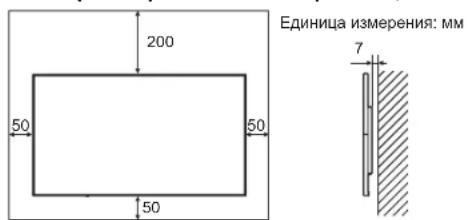
Monitor in vertical orientation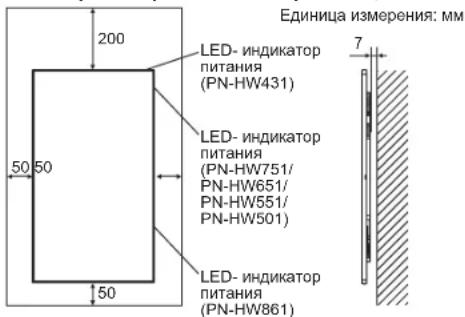
- If it is difficult to provide enough space above or below, for example, because the monitor is installed inside a cabinet, or because the ambient temperature goes out of the range of 0°C to 40°C, install a fan or take other measures to keep the ambient temperature within the required range. Do not block the ventilation holes of the monitor. Rising temperature inside the monitor cabinet may lead to malfunction. Do not place the monitor on devices that generate heat.
- When installing the monitor in vertical orientation, follow the recommendations below. Failure to follow these recommendations may cause malfunctions.
- Install the monitor so that the power LED indicator is on the right (PN-HW861/ PN-HW751/PN-HW651/PN-HW551/PN-HW501) or on the top (PN-HW431).
- Set THERMAL SENSOR SETTING in the SETUP menu to PORTRAIT. (See the operation manual.)
- Be sure to secure the power cord (included) with the appropriate cable clamp (with fastener). When clamping the power cord, try not to subject the power cord to excessive force. Do not bend the power cord excessively.
[PN-HW861/PN-HW751/PN-HW651]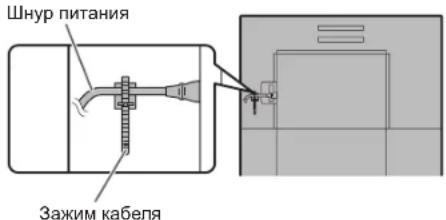
[PN-HW551/PN-HW501/PN-HW431]
Included accessories
If any component is missing, contact your dealer.
MoHITOp C XnDOKKpNCTaJIINueckm DnCJIeEM:1 NytB DnCTaHcIOHO HOrO ynpabHeHrA:1 UHyp nHTAHN BatapeKn R03 (TIN "AAA"):2 KOMnKaT-DnCK (KOMnKaT-DnCK C cepBnCHbIMn npoPamMaMn DnA Windows):1
PykoBoCTBO no yctaHOBke (3TO pykoBoCTBO): 1 3aKIMKa6eJr:2 HakneJaC nOrToTnOM:1 KpbuWkaΦn3w-HaKaONITeIg USB:1 ΦNkCnpyUoIuBnHT KpbIuKn ΦIaH-NaKoNtTeIa USB:1
* Ppaba co6ctbeHHocTn Ha nporpaMMbI, codepjkaunecsHa KOMNAKT-dnCke C yTNNTAMN, npHnAdneKAT Kopnpaun SHARP Corporation. 3anpeaaetcBocnpo3BOOHTb nx 6e ee pa3peuHna. *Дязштб Okужаншсреь!
3anpeaetcBbIbpacbIbTa6TapeKn B DOMaHm Mycop. CneyTe HCTpyKzmaNo yTIN3aun, DeCTByUcIm TaM, rDe BblnpoxNbaete.
Cneunfkaun
[PN-HW861/PN-HW751/PN-HW651]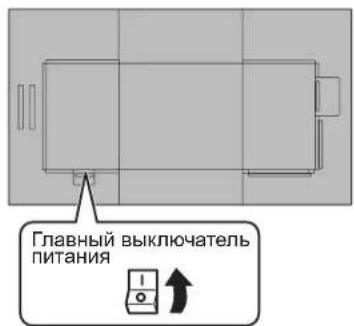
[PN-HW551/PN-HW501/PN-HW431]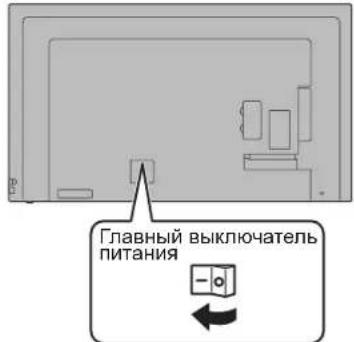
BHHMaHHe
ПитатипдОлгнб ВькючыбсЯ NБИКИЧУСВС NOMOДБ Глав Horв ВькючATEЯ ПИТАНЯ. He nOДcoeДИНЯte/ OTCOeДИНЯTE WHyp ПИТАНЯ N He MeHЯITE NOLOXHEH БькючATEЯ, KOrDa rIaNbHbI BvKIOUчATEл bNtAHN HAXODITcBO BvKIOUChHOM NOLOXEHIN. -ДЯ NOJHOrO OTKIIOyeHnI NITAHN BbIDepHIne WHyP NITAHN.
BkJIOyehn/BBKJIIOyehn nNTAHN
HaKMTe KhoNky POWER nBKnIOueHn nn BbIKIOueHn nHTaHn.
BknOHTb nnn BblKnIOHaTb NITaHHe MOXHO TAKKe KNAbuIeM MONITOR ON/MONITOR OFF Ha nDcTaHcUHHom nyJIte ynpabNeHn.
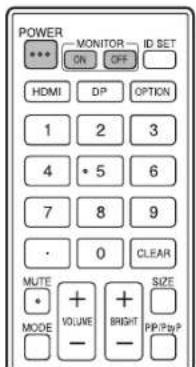
[PN-HW861]
LED- INДИКATOP NITAHN Khonka POWER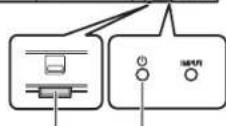
[PN-HW751/PN-HW651/ PN-HW551/PN-HW501] LED- INHINKAtOP KhoNkA NHTAHNA POWER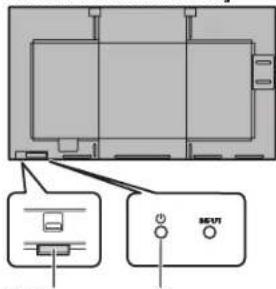
[PN-HW431] LED - Power Supply Connector Indicator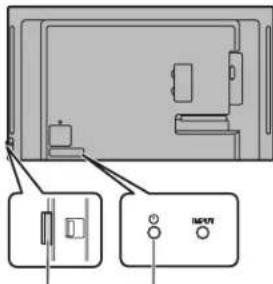

- [PN-HW861/PN-HW751/PN-HW651]
- FOR CUSTOMERS IN U.K
- IMPORTANT
- GREEN-AND-YELLOW
- [PN-HW551/PN-HW501/PN-HW431]
- NOTE FOR USERS IN U.K
- BLUE: "NEUTRAL
- BROWN: "LIVE
- CONNECTING PLUG TO MAINS LEAD
- CAUTION
- CONTENTS
- [ENGLISH]
- IMPORTANT INFORMATION
- DEAR SHARP CUSTOMER
- SAFETY PRECAUTIONS
- WARNING
- STABILITY HAZARD
- ESPECIALLY FOR CHILD SAFETY
- SAFETY INSTRUCTION
- THE POWER CORD
- MOUNTING PRECAUTIONS
- SUPPLIED COMPONENTS
- SPECIFICATIONS
- PREPARING THE REMOTE CONTROL UNIT
- CONNECTIONS
- TIPS
- TURNING POWER ON/OFF
- HOW TO PULL OUT THE POWER LED/REMOTE CONTROL SENSOR
- OPERATION MODE
- DATE/TIME SETTING
- MOUNTING PRECAUTIONS (FOR SHARP DEALERS AND SERVICE ENGINEERS)
- YBAJXAEMBI KJINEHT KOMNAHN SHARP
- ПРАВILA TEXHИКИ БE3ОПАСHOCTN
- DISPOSAL
- RISK OF INSTABILITY
- SPECIAL SAFETY MEASURES FOR CHILDREN
- SAFETY INSTRUCTIONS
- POWER CORD
- PRECAUTIONS FOR MOUNTING
- INCLUDED ACCESSORIES
- BHHMAHHE
- BKJIOYEHN/BBKJIIOYEHN NNTAHN
Brand : SHARP
Model : PNHW501
Category : Monitor