
DFG58D1BSS - Herb grower DANBY - Free user manual and instructions
Find the device manual for free DFG58D1BSS DANBY in PDF.
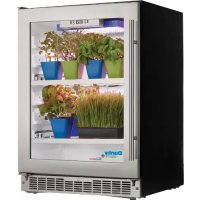


| Product Type | Indoor Herb Cultivator |
| Brand | Danby |
| Model | DFG58D1BSS |
| Dimensions (W x H x D) | 60.5 x 87.5 x 65 cm |
| Power Supply | 120 V, 60 Hz |
| Lighting Type | LED panel and light strips |
| Number of Trays | 6 seed trays with humidity domes |
| Shelves | 3 adjustable wire shelves |
| Recommended Ambient Temperature | 13°C to 23°C (55°F to 73°F) |
| Recommended Ambient Humidity | Below 80% |
| Ventilation | Front exhaust |
| Control Panel | With display, programmable day/night timer |
| Preset Light Cycles | Growth (18h/6h), Bloom (12h/12h) |
| Thermal Protection | Alarm and HI/LO error code for extreme temperatures |
| Grounding | Yes, 3-prong plug |
| Door Reversal | Possible |
| Cleaning | Soft cloth, baking soda or mild detergent |
| Warranty | 18 months functional parts |
| Usage | Indoor residential only |
Frequently Asked Questions - DFG58D1BSS DANBY
User questions about DFG58D1BSS DANBY
0 question about this device. Answer the ones you know or ask your own.
Ask a new question about this device
Download the instructions for your Herb grower in PDF format for free! Find your manual DFG58D1BSS - DANBY and take your electronic device back in hand. On this page are published all the documents necessary for the use of your device. DFG58D1BSS by DANBY.
USER MANUAL DFG58D1BSS DANBY
Owner's Manual....1 - 10
HOME GRASS CULTIVATOR
Welcome to the Danby family. We are proud of our quality products and we believe in dependable service. We suggest that you read this owner's manual before plugging in your new appliance as it contains important operation information, safety information, troubleshooting and maintenance tips to ensure the reliability and longevity of your appliance.
Visit www.Danby.com to access self service tools, FAQs and much more. For additional assistance call 1-800-263-2629.
Note the information below; you will need this information to obtain service under warranty.
You must provide the original purchase receipt to validate your warranty and receive service.
Model Number: ____
Serial Number: ____
Date of Purchase: ____
Need Help?
Before you call for service, here are a few things you can do to help us serve you better.
Read this owner's manual:
It contains instructions to help you use and maintain your appliance properly.
If you receive a damaged appliance:
Immediately contact the retailer or builder that sold you the appliance.
Save time and money:
Check the troubleshooting section at the end of this manual before calling. This section will help you solve common problems that may occur.

1-800-26- Danby
(1-800-263-2629)

Important Safety Information READ AND FOLLOW ALL SAFETY INSTRUCTIONS
SAFETY REQUIREMENTS
This appliance is not intended for use by persons (including children) whose physical, sensory or mental capabilities may be different or reduced, or who lack experience or knowledge, unless such persons receive supervision or training to operate the appliance by a person responsible for their safety.
Children should be supervised to ensure that they do not play with the appliance.
To avoid risk of electric shock, do not operate this appliance in an area that is likely to accumulate standing water. If this condition develops, disconnect the power supply before stepping into the water.
Do not store or use combustible materials such as gasoline or other flammable vapors or liquids in the vicinity of this or any other appliance.
Do not cover or block the intake and exhaust openings.
This appliance is intended for indoor, residential applications only. Do not use this appliance outdoors. Do not use this appliance for commercial or industrial applications.
DANGER: Risk of child entrapment. Before throwing away an old appliance:
- Remove the door or lid.
- Leave shelves in place so that children may not easily climb inside.
GROUNDING INSTRUCTIONS
This appliance must be grounded. Grounding reduces the risk of electrical shock by providing an escape wire for the electrical current.
This appliance has a cord that has a grounding wire with a 3-prong plug. The power cord must be plugged into an outlet that is properly grounded. If the outlet is a 2-prong wall outlet, it must be replaced with a properly grounded 3-prong wall outlet. The serial rating plate indicates the voltage and frequency the appliance is designed for.
WARNING - Improper use of the grounding plug can result in a risk of electric shock. Consult a qualified electrician or service agent if the grounding instructions are not completely understood, or if doubt exists as to whether the appliance is properly grounded.
Do not connect the appliance to extension cords, adapters or together with another appliance in the same wall outlet.
Do not splice the power cord. Do not under any circumstances cut or remove the third ground prong from the power cord.
If the power supply cord is damaged, it must be replaced by the manufacturer, its service agent or similar qualified person in order to avoid hazard.
For lighting equipment with cords please ensure that the cords:
- Are not concealed or extended through a wall, floor, ceiling, or other parts of the building structure,
- Are not located above a suspended ceiling or dropped ceiling,
- Are not permanently affixed to the building structure,
- Are routed so that they are not subject to strain and are protected from physical damage,
- Are visible over their entire length, and
- Are used within their rated capacity as determined for the maximum temperature of the installed environment specified in the instructions.
INSTALLATION INSTRUCTIONS
LOCATION
Two people should be used when moving the appliance.
Select a location with a strong level floor that can support the weight of the appliance and the plants grown inside.
Avoid direct sunlight and heat. Direct sunlight may affect the acrylic coating of the appliance or the growing cycle of the plants. Nearby heat sources can overheat the unit and cause high internal temperatures that may harm the plants.
Ensure that the appliance is turned off and unplugged before any changes are made to the light system.
The LED light panel is not waterproof. Do not spray water on the surface, sides, or back of the light panel.
Do not look directly at the LED light with the naked eye as this can cause retinal damage.
The LED panel cannot be exposed to corrosive materials.
The LED panel is for indoor growing only. This appliance is intended for household use only. It is not designed for outside installation including anywhere that is not temperature controlled.
Do not touch the surface of the light system while the power is connected as it can get hot.
Do not use the LED panel during a thunderstorm to avoid a surge that could damage the light system.
Keep the door closed during operation.
Only use genuine spare parts from Danby or those that have been CSA, UL, or CE approved.
Recommended ambient operating temperature is between 13°C - 23°C (55°F - 73°F).
Recommended operating humidity is below 80%.
This appliance is 60.5 cm (23.8 inches) wide by 87.5 cm (34.4 inches) high by 65 cm (25.6 inches) deep.
FRONT VENT
This appliance is front breathing. Do not block the front air vent as this will result in high operating temperatures, higher energy usage and possible system overheating and failure.
LEVELING INSTRUCTIONS
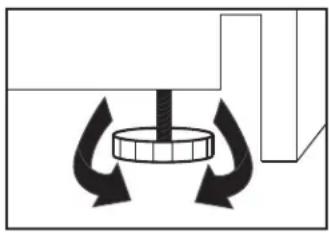
There is an adjustable foot on the bottom of the appliance that can be turned up or down to ensure that the appliance is level. To level the appliance:
- Turn the leveling foot counter-clockwise until the top of the foot is touching the bottom of the chassis.
- Slowly turn the leveling leg clockwise until the appliance is level.
INSTALLATION INSTRUCTIONS
SHELF INSTRUCTIONS
Do not cover the shelves with aluminum foil or other material as this will impede air flow inside the cabinet and can adversely affect internal temperature.
Before removing a shelf, make sure that the light system is unplugged.
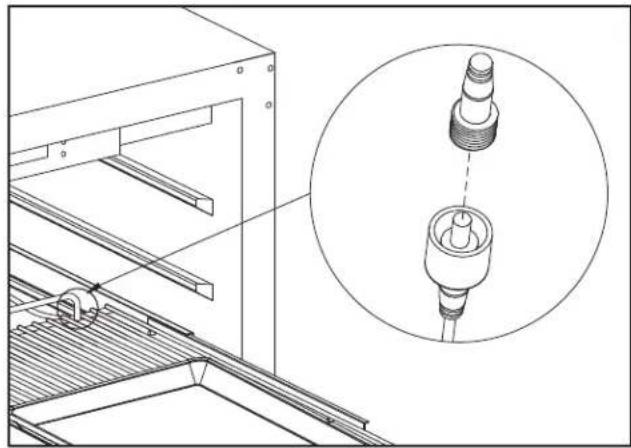
To remove the shelves:
- Fully extend the shelf.
- Lift the front of the shelf.
- Hold the shelf track, push the shelf in and then up to release it from the rear dampers.
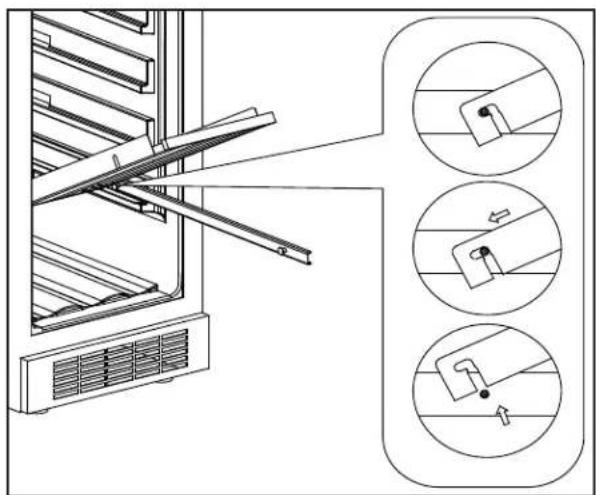
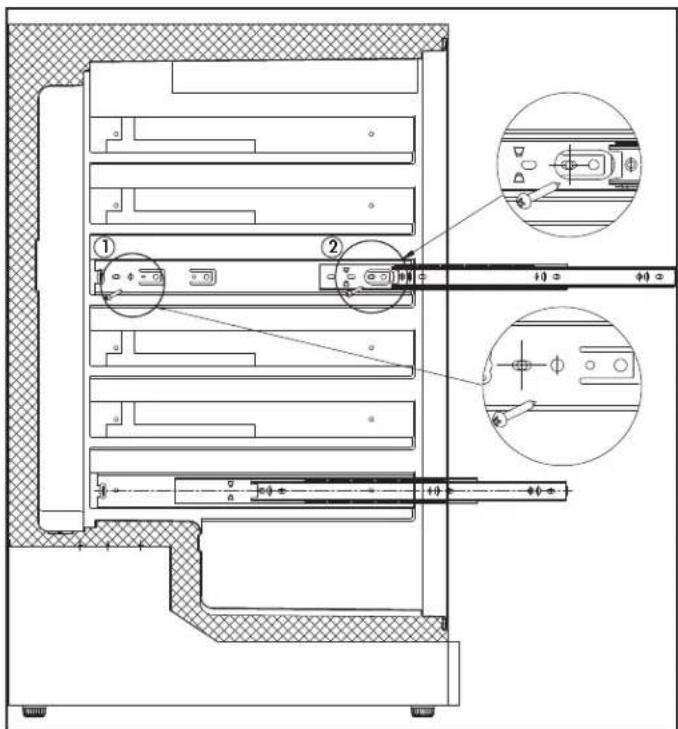
To change the position of the shelf glides:
- Remove the shelf as per the above instructions.
- Extend the shelf glide fully.
- Remove the rear screw first, then remove the front screw.
- Install the shelf glide in a new position by installing the screws in the pre-drilled holes. Do the same for the glide on the other side of the appliance.
- Reinstall the shelf and plug in the light system.
INSTALLATION INSTRUCTIONS
PREPARING THE ENCLOSURE
Gloves and safety goggles should be worn during installation.
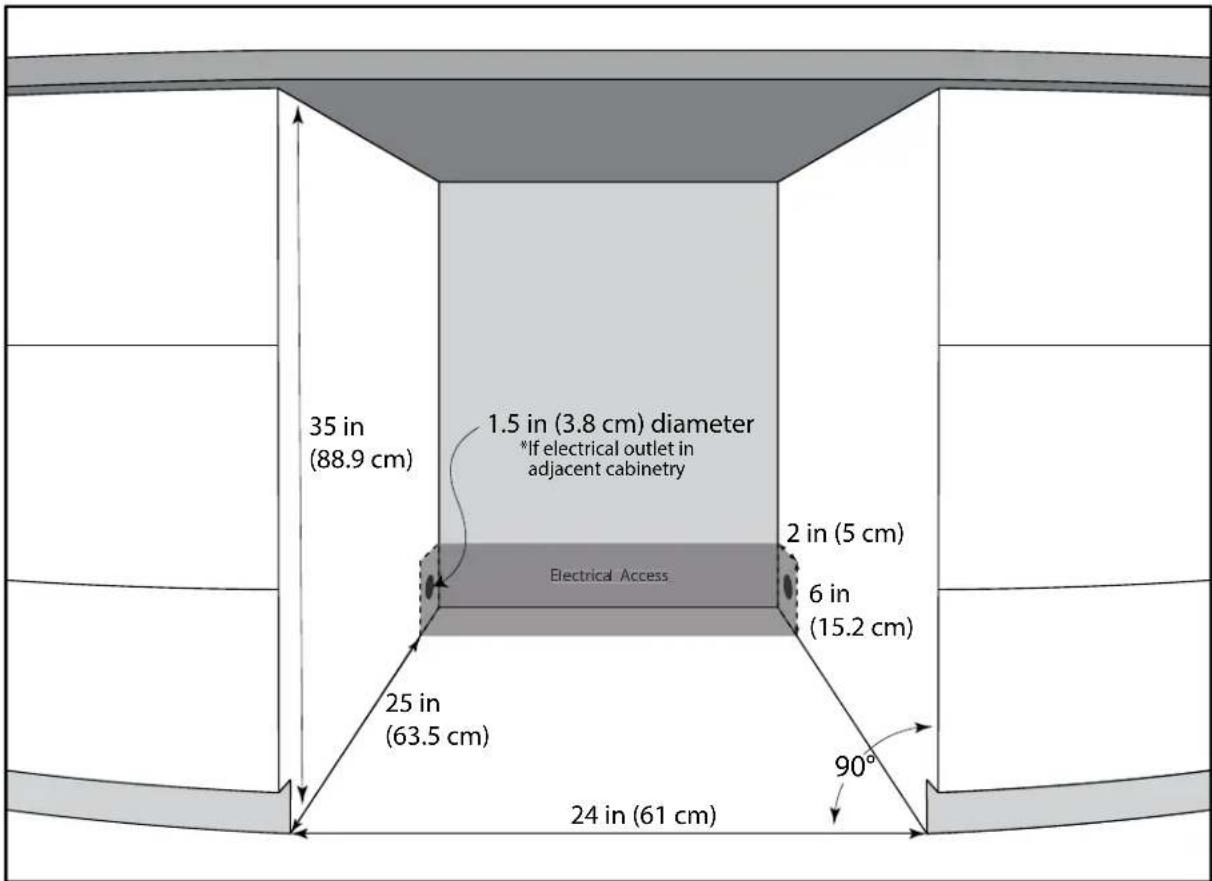
It is not recommended to install the appliance into a corner or directly beside a wall. The door will need to be opened more than 90° to allow full extension of the shelves. If it is necessary to place the unit next to a wall or in a corner, leave at least 2-4 inches (5-10 cm) of space between the wall and the appliance to allow for the door opening.
The cabinet opening must be at least 24 inches (61 cm) wide by 35 inches (88.9 cm) high by 25 inches (63.5 cm) deep.
Note: The listed depth requirement is assuming that the electrical outlet is located in the adjacent cabinetry or flush mounted in the rear wall, not surface mounted inside the enclosure.
If the electrical outlet is located inside adjacent cabinetry, cut a 1.5 inch (3.8 cm) diameter hole to admit the power cord. If the cabinet wall is metal, the hole edge must be covered with a bushing or grommet.
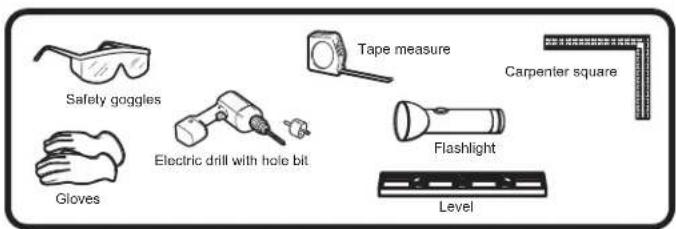
REQUIRED TOOLS
- Safety goggles
- Gloves
- Tape measure
- Carpenter square • Level
- Flashlight • Electric drill with hole bit
OPERATING INSTRUCTIONS
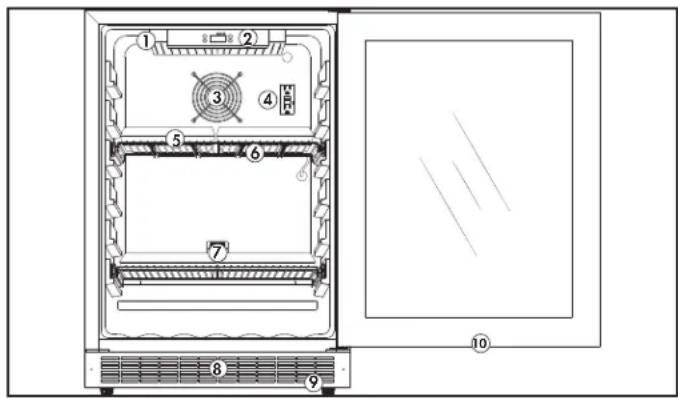
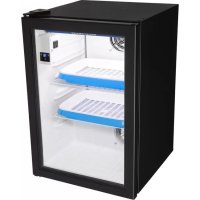
FEATURES
- LED light box
- Control panel
- Air outlet / Fan
- GFCI outlet
- Wire shelves
- LED light strip (on bottom of shelf)
- Seed trays and humidity domes (x6)
- Front mounted exhaust
- Adjustable foot
- Air inlets (top and bottom of door)
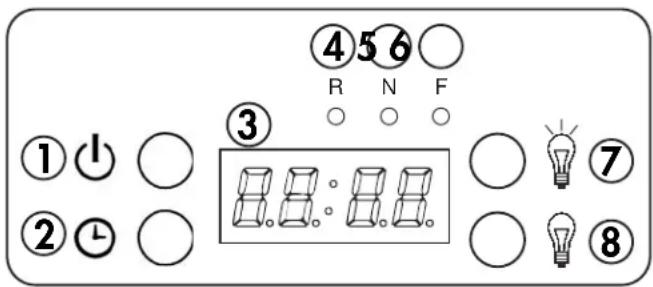
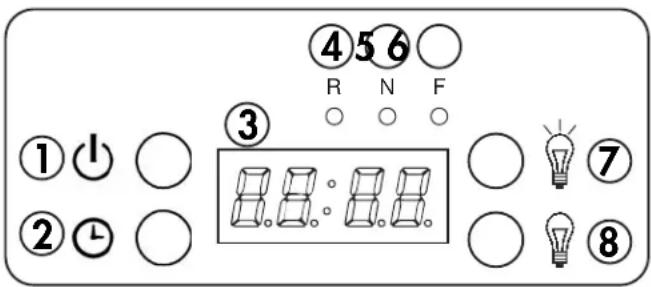
CONTROL PANEL
1. Power button
• Used to turn the appliance on or off. - Powering off the appliance clears all light programming.
2. Clock button
- Press once to check the running cycle time.
- Press and hold for 3 seconds to set the clock.
3. Display screen
• Time display screen.
- R indicator: Light will flash when setting the running cycle time.
- N indicator: Light will flash when setting the light on time.
- F indicator: Light will flash when setting the light off time.
7. Light on button
- Press once to check the light on time.
- Press and hold for 3 seconds to set the light on time.
- Use to increase the number when setting a function.
8. Light off button
- Press once to check the light off time.
- Press and hold for 3 seconds to set the light off time.
- Use to decrease the number when setting a function.
R N F indicator: illuminated to signify that light running mode is in operation.
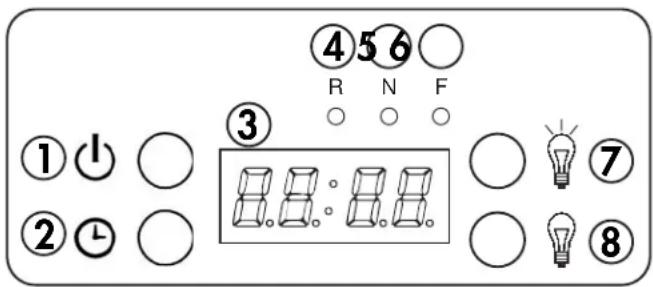
The light box on the ceiling of the cabinet and the light strips on the under side of the shelf are connected to the same control panel. Setting light on and light off times in the control panel will control both sets of lights.
If you only wish to run the light box on the ceiling of the cabinet, unplug the wire leading to the lights on the shelf.
If you only wish to run the lights on the shelf, unplug the wire leading to the light box.
Always ensure that the light system you wish to run is plugged into the control panel.
OPERATING INSTRUCTIONS
SETTING THE CLOCK
When the appliance is first plugged in, the display will flash until the clock is set with the current local time.
The first two digits on the display screen will flash. Press the light on or light off buttons to set the correct hour. Press the clock button to confirm the selection.
The second two digits on the display screen will flash. Press the light on or light off buttons to set the correct minute. Press the clock button to confirm the selection.
To change the current time, press and hold the clock button for 3 seconds. When the first two digits on the display start to flash, use the steps above to reset the current time.
The hour range can be set between 0 - 23. The minute range can be set between 0 - 59.
SETTING THE LIGHT TURN ON TIME
Press and hold the light on button for three seconds until the N indicator light is flashing.
The first two digits on the display screen will flash. Press the light on or light off buttons to set the desired hour that the lights should turn on. Press the clock button to confirm the selection.
The second two digits on the display screen will flash. Press the light on or light off buttons to set the desired minute that the lights should turn on. Press the clock button to confirm the selection.
Press the light on button once to display the current light on setting. The display will return to the current time after 3 seconds.
The hour range can be set between 0 - 23. The minute range can be set between 0 - 59.
SETTING THE LIGHT TURN OFF TIME
Press and hold the light off button for three seconds until the F indicator light is flashing.
The first two digits on the display screen will flash. Press the light on or light off buttons to set the desired hour that the lights should turn off. Press the clock button to confirm the selection.
The second two digits on the display screen will flash. Press the light on or light off buttons to set the desired minute that the lights should turn off. Press the clock button to confirm the selection.
Press the light off button once to display the current light off setting. The display will return to the current time after 3 seconds.
The hour range can be set between 0 - 23. The minute range can be set between 0 - 59.
When finished setting the light turn off time, the R N F indicator lights illuminate to signify that light running mode is currently in operation.
SETTING THE RUNNING CYCLE
The running cycle determines how many days the lights will cycle on and off once they are programmed. The default value is 0, meaning the lights will only complete the programming cycle once.
Press and hold the light on and light off buttons at the same time for three seconds until the R indicator light is flashing.
The first two digits on the display screen will flash. Press the light on or light off buttons to set the desired number of days that the cycle should run. Press the clock button to confirm the selection.
The running cycle can be set between 1 - 60 days.
After a maximum of 60 days, the lights will return to default programming and the running cycle must be reset.
When finished setting the running cycle, "End" will show on the display screen.
OPERATING INSTRUCTIONS
GROWING TIPS
- Keep pots or planters in the provided drip tray to avoid water spillage.
- Plants grow best when the ambient room temperature is between 13°C - 23°C (55°F - 73°F).
- Keep the growing environment clean. Clean the drip tray and the inside of the cabinet at least once a month to avoid the growth of mold and mildew.
- If powdery, white mildew forms on plants they can be sprayed with a solution of hydrogen peroxide and water. Use 1 teaspoon of 17% - 35% food-grade hydrogen peroxide to 1 liter of water and only spray the soil as this can cause rot if sprayed on leaves or flowers.
- Do not overwater plants, especially seedlings as they can drown. There is space between the particles of soil that is filled with oxygen. Soil that is constantly wet will not carry enough oxygen and the plants will not be able to breathe.
- As a general rule, soil should be damp but not wet. Check the seed packet for specific information on watering instructions.
- In general, for most herbs and vegetables, the following light cycles are recommended:
• Growth Cycle: 18 hours on / 6 hours off for approximately 20 - 30 days.
- Bloom Cycle: 12 hours on / 12 hours off for approximately 20 - 30 days.
- Most herbs and vegetables have a maturity date between 45 - 90 days. How long the plants take to mature will depend on the type of plants being grown. Check the seed packet for specific information on growth cycles, germination and flowering times.
GROWING TIPS
Seeds must be germinated before they will grow and bloom. For best results in germination, consult the tips below.
- Spread potting soil evenly in a pot or tray.
- Spread seeds evenly over the surface of the soil.
- Add enough water so that the soil is damp but not sodden. Using a spray bottle to add water is recommended to avoid over-watering seeds.
- The use of a humidity dome over the seeds is recommended to trap heat and humidity around the seeds.
- Place the pot or tray in a dark place. The bottom of the Danby Fresh Grower is ideal for this purpose.
- Leave the humidity dome in place for 2 - 3 days or until sprouts are visible.
- Remove the humidity dome and place the pot or tray on the wire shelf in the Danby Fresh Grower.
- Set the desired light cycle based on the information on the seed packet using the instructions on page 6. • Water your plants as required based on the information on the seed packet.
- Most microgreens reach maturity within 1 - 2 weeks.
Note: Danby Products Ltd. will accept no liability for lost plants or weak harvests based on inappropriate use of the light cycle system.
OPERATING INSTRUCTIONS
DOOR REVERSAL INSTRUCTIONS
If the default door opening on the appliance is inconvenient, follow the steps below to change the direction of the door swing.
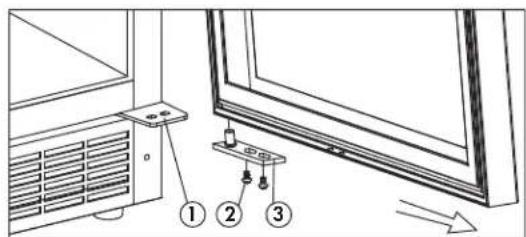
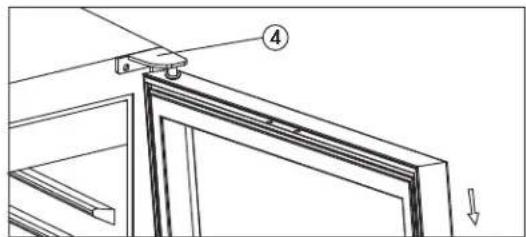
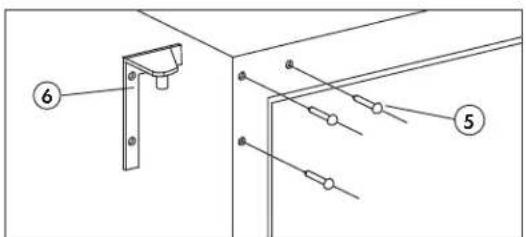
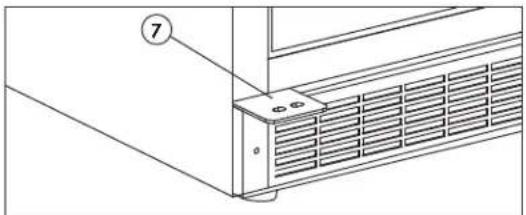
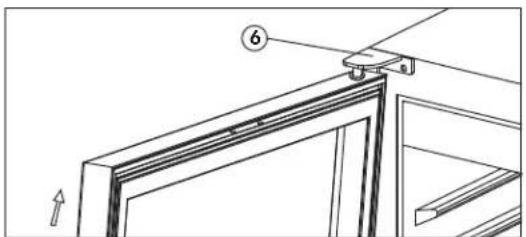
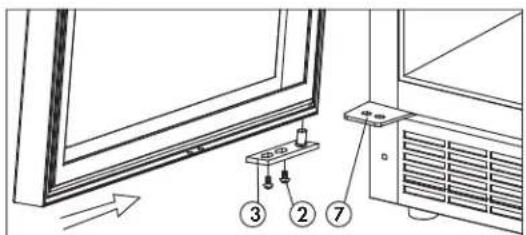
- Remove the two screws that secure the hinge axis to the lower right hinge. Slide the door outward from the bottom to remove it from the upper right hinge.
- Remove the upper right hinge from the cabinet.
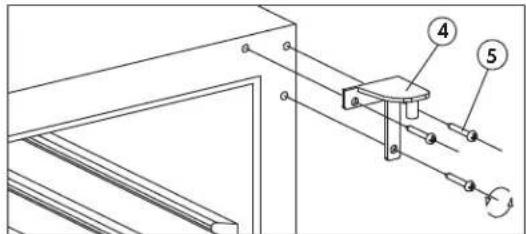
- Remove the screw hole covers from the upper left side of the cabinet and install the upper left hinge. Place the screw hole covers in the screw holes on the upper right side of the cabinet.
- The lower left hinge is pre-installed on the cabinet. The lower right hinge does not need to be removed.
- To reinstall the door, it must be flipped 180° from its original position. Install the door by sliding it onto the top hinge pin, then replace the door axis by placing the hinge pin in the bottom of the door and securing it to the lower left hinge.
- Lower right hinge
- Axis screws
- Hinge axis
- Upper right hinge
- Hinge screws
- Upper left hinge
- Lower left hinge
CARE & MAINTENANCE
CLEANING
Ensure the appliance is unplugged before cleaning.
- To clean the inside of the appliance, use a soft cloth and a solution of a tablespoon of baking soda to one quart of water or some mild detergent.
- Clean the outside with a soft, damp cloth and some mild detergent.
Note: Do not use cleaners containing ammonia or alcohol on the appliance. Ammonia or alcohol can damage the appearance of the appliance. Never use any commercial or abrasive cleaners or sharp objects on any part of the appliance.
VACATION
It is not advisable to leave the appliance running during a vacation. Plants require daily watering and monitoring to ensure they do not overheat or dehydrate. Be sure to empty, turn off and unplug the appliance before leaving for vacation.
ERROR CODES
The appliance may emit an alarm and display an error code on the display screen. This is generally due to temperatures inside the cabinet being too high or too low. High temperatures can dehydrate and burn plants. Low temperatures can freeze plants and stunt growth.
Error Code "HI"
An alarm will sound and the error code "HI" will appear on the display when the internal temperature of the appliance is higher than 32°C (90°F) for more than 10 minutes. If the temperature inside the cabinet drops below 30°C (86°F) for more than 5 minutes, the alarm and error will stop and the appliance will resume normal functioning. Press any key on the control panel to silence the alarm.
Error Code "LO"
An alarm will sound and the error code "LO" will appear on the display when the internal temperature of the appliance is lower than 17°C (63°F) for more than 10 minutes. If the temperature inside the cabinet rises above 19°C (66°F) for more than 5 minutes, the alarm and error will stop and the appliance will resume normal functioning. Press any key on the control panel to silence the alarm.
TROUBLESHOOTING
Danby Consumer Care: 1-800-263-2629
Hours of operation:
Monday to Thursday 8:30 am - 6:00 pm Eastern Standard Time Friday 8:30 am - 4:00 pm Eastern Standard Time
Information in this manual is subject to change without notice.
PROBLEM POSSIBLE CAUSE
| No power • A fuse may be blown or the circuit breaker tripped• Plug not fully inserted into the wall outlet |
| Alarm sounding and “HI” on the display• Internal temperature is higher than 32°C (90°F) |
| Alarm sounding and “LO” on the display• Internal temperature is lower than 17°C (63°F) |
LIMITED "IN HOME" WARRANTY
This quality product is warranted to be free from manufacturer's defects in material and workmanship, provided that the unit is used under the normal operating conditions intended by the manufacturer.
This warranty is available only to the person to whom the unit was originally sold by Danby Products Limited (Canada) or Danby Products Inc. (U.S.A.) (hereafter "Danby") or by an authorized distributor of Danby, and is non-transferable.
TERMS OF WARRANTY
Plastic parts are warranted for thirty (30) days from the date of purchase, with no extensions provided.
First 18 months: During the first eighteen (18) months, any functional parts of this product found to be defective will be repaired or replaced, at warrantor's option, at no charge to the original purchaser.
To obtain service: Contact the dealer where the unit was purchased, or contact the nearest authorized Danby service depot, where service must be performed by a qualified service technician. If service is performed on the unit by anyone other than an authorized service depot, all obligations of Danby under this warranty shall be void.
Boundaries of in-home service: Danby reserves the right to limit the boundaries of "In Home Service" to the proximity of an authorized service depot. Any appliance requiring service outside the limited boundaries of "In Home Service" will be the consumer's responsibility to transport at their own expense to the original point of purchase or a service depot for repair. If the appliance is installed in a location that is 100 kilometers (62 miles) or more from the nearest service center, it must be delivered to the nearest authorized Danby Service Depot by the purchaser.
Transportation charges to and from the service location are not protected by this warranty and are the responsibility of the purchaser.
Nothing within this warranty shall imply that Danby will be responsible or liable for any spoilage or damage to food or other contents of this appliance, whether due to any defect of the appliance, or its use, whether proper or improper.
EXCLUSIONS
Save as herein provided, by Danby, there are no other warranties, conditions, representations or guarantees, express or implied, made or intended by Danby or its authorized distributors and all other warranties, conditions, representations or guarantees, including any warranties, conditions, representations or guarantees under any Sale of Goods Act or like legislation or statute is hereby expressly excluded. Save as herein provided, Danby shall not be responsible for any damages to persons or property, including the unit itself, howsoever caused or any consequential damages arising from the malfunction of the unit and by the purchase of the unit, the purchaser does hereby agree to indemnify and hold harmless Danby from any claim for damages to persons or property caused by the unit.
GENERAL PROVISIONS
No warranty or insurance herein contained or set out shall apply when damage or repair is caused by any of the following:
1) Power failure. 2) Damage in transit or when moving the appliance. 3) Improper power supply such as low voltage, defective house wiring or inadequate fuses. 4) Accident, alteration, abuse or misuse of the appliance such as inadequate air circulation in the room or abnormal operating conditions (i.e. extremely high or low room temperature). 5) Use for commercial or industrial purposes (i.e. If the appliance is not installed in a domestic residence). 6) Fire, water damage, theft, war, riot, hostility, acts of God such as hurricanes, floods etc. 7) Service calls resulting in customer education. 8) Improper Installation (i.e. Building-in of a free standing appliance or using an appliance outdoors that is not approved for outdoor application, including but not limited to: garages, patios, porches or anywhere that is not properly insulated or climate controlled).
Proof of purchase date will be required for warranty claims; retain bills of sale. In the event that warranty service is required, present the proof of purchase to our authorized service depot.
Warranty Service
In Home
Danby Products Limited
PO Box 1778, Guelph, Ontario, Canada NIH 629
Telephone: (519) 837-0920 FAX: (519) 837-0449
1-800-263-2629
04/17
Danby Products Inc
PO Box 669, Findlay, Ohio, U.S.A. 45840
Telephone: (419) 425-8627 FAX: (419) 425-8629
Welcome
1-800-26-Danby
(1-800-263-2629)

INSTALLATION INSTRUCTIONS
SHELF INSTRUCTIONS
INSTALLATION INSTRUCTIONS
PREPARE THE ENCLOSURE
PROBLEM POSSIBLE CAUSE
1-800-26-Danby (1-800-263-2629)

PROBLEM POSSIBLE CAUSE
Danby Products Limited
PO Box 1778, Guelph, Ontario, Canada N1H 6Z9
Telephone: (519) 837-0920 FAX: (519) 837-0449
1-800-263-2629
04/17
Danby Products Inc.
PO Box 669, Findlay, Ohio, U.S.A. 45840
Telephone: (419) 425-8627 FAX: (419) 425-8629
NOTES / REMARKS / NOTAS:
Danby® FRESH
MODEL • MODÈLE • MODELO
DFG58D1BSS
Danby Products Limited, Guelph, ON, Canada N1H 6Z9
Danby Products Inc., Findlay, Ohio, USA 45840
Printed in China
Printed in China
Printed in China
- NEED HELP
- READ THIS OWNER'S MANUAL
- IF YOU RECEIVE A DAMAGED APPLIANCE
- SAVE TIME AND MONEY
- IMPORTANT SAFETY INFORMATION READ AND FOLLOW ALL SAFETY INSTRUCTIONS
- SAFETY REQUIREMENTS
- GROUNDING INSTRUCTIONS
- INSTALLATION INSTRUCTIONS
- LOCATION
- FRONT VENT
- LEVELING INSTRUCTIONS
- SHELF INSTRUCTIONS
- TO REMOVE THE SHELVES
- TO CHANGE THE POSITION OF THE SHELF GLIDES
- PREPARING THE ENCLOSURE
- REQUIRED TOOLS
- OPERATING INSTRUCTIONS
- FEATURES
- CONTROL PANEL
- POWER BUTTON
- CLOCK BUTTON
- DISPLAY SCREEN
- LIGHT ON BUTTON
- LIGHT OFF BUTTON
- SETTING THE CLOCK
- SETTING THE LIGHT TURN ON TIME
- SETTING THE LIGHT TURN OFF TIME
- SETTING THE RUNNING CYCLE
- GROWING TIPS
- DOOR REVERSAL INSTRUCTIONS
- CARE & MAINTENANCE
- CLEANING
- VACATION
- ERROR CODES
- ERROR CODE "HI
- ERROR CODE "LO
- TROUBLESHOOTING
- DANBY CONSUMER CARE
- HOURS OF OPERATION
- LIMITED "IN HOME" WARRANTY
- TERMS OF WARRANTY
- EXCLUSIONS
- GENERAL PROVISIONS
- WARRANTY SERVICE
- IN HOME
- WELCOME
- PREPARE THE ENCLOSURE
- DANBY® FRESH
Brand : DANBY
Model : DFG58D1BSS
Category : Herb grower