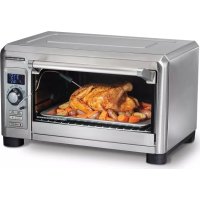
31240 - Oven HAMILTON BEACH - Free user manual and instructions
Find the device manual for free 31240 HAMILTON BEACH in PDF.


| Product Type | Toaster Oven |
| Brand | Hamilton Beach |
| Model | 31240 |
| Cooking Capacity | Chicken up to 5 lb (2.3 kg), pizza 12 in (30.5 cm) |
| Maximum Pan | 13 x 9 in (33 x 22.9 cm) without handle |
| Cooking Modes | Convection, Bake, Broil, Reheat, Keep Warm, Toast, Bagel |
| Temperature Ranges | Bake 200–450 °F (93–232 °C), Broil High fixed, Reheat 300–400 °F (149–205 °C), Keep Warm 150–200 °F (65–93 °C) |
| Timer | Up to 2 hours (Broil 1–30 min), auto shutoff |
| Stay On Function | Yes (up to 4 hours) |
| Shade Levels | 7 levels for Toast and Bagel |
| Temperature Probe | Integrated, range 100–200 °F (38–93 °C) |
| Display | Backlit LCD |
| Rack Positions | 3 positions (high, middle, low) |
| Power | 120 V~, 60 Hz |
| Exterior Material | Stainless Steel |
| Interior Coating | Non-Stick |
| Safety | Auto shutoff, polarized plug, tempered glass door |
| Included Accessories | Oven rack, drip tray, baking pan, removable crumb tray, temperature probe |
| Care | Clean with damp cloth, no metal pads |
| Warranty | 5 years (Canada), 3 years (United States) |
| Customer Service | Canada 1.800.267.2826 / U.S. 1.800.851.8900 |
Frequently Asked Questions - 31240 HAMILTON BEACH
User questions about 31240 HAMILTON BEACH
0 question about this device. Answer the ones you know or ask your own.
Ask a new question about this device
Download the instructions for your Oven in PDF format for free! Find your manual 31240 - HAMILTON BEACH and take your electronic device back in hand. On this page are published all the documents necessary for the use of your device. 31240 by HAMILTON BEACH.
USER MANUAL 31240 HAMILTON BEACH
Visit www.hamiltonbeach.com for our complete line of products and Use and Care Guides – as well as delicious recipes, tips, and to register your product online.
Questions Please call us – our friendly associates are ready to help. USA: 1.800.851.8900
Digital Countertop Oven
Four grille-pain numérique Horno Digital para Mostrador
English 2
Français.... 13
Español 24
natural_image
Modern kitchen toaster oven with roasted chicken on a tray, no visible text or symbolsIMPORTANT SAFEGUARDS
When using electrical appliances, basic safety precautions should always be followed to reduce the risk of fire, electric shock, and/or injury to persons, including the following:
- Read all instructions.
- This appliance is not intended for use by persons (including children) with reduced physical, sensory, or mental capabilities, or lack of experience and knowledge, unless they are closely supervised and instructed concerning use of the appliance by a person responsible for their safety.
- Close supervision is necessary when any appliance is used by or near children. Children should be supervised to ensure that they do not play with the appliance.
- Do not touch hot surfaces. Use handles or knobs.
- To protect against electrical shock, do not immerse cord, plug, or oven in water or other liquid.
- Unplug from outlet when not in use and before cleaning. Allow to cool before cleaning appliance and putting on or taking off parts.
- Do not operate any appliance with a damaged supply cord or plug, or after the appliance malfunctions or has been dropped or damaged in any manner. Supply cord replacement and repairs must be conducted by the manufacturer, its service agent, or similarly qualified persons in order to avoid a hazard. Call the provided customer service number for information on examination, repair, or adjustment.
- The use of accessory attachments not recommended by the appliance manufacturer may cause injuries.
- Do not use outdoors.
- Do not let cord hang over edge of table or counter or touch hot surfaces.
- Do not place on or near a hot gas or electric burner or in a heated oven.
- Extreme caution must be used when moving an appliance containing hot oil or other hot liquids.
-
To disconnect, turn all controls to OFF ( ) then remove plug from wall outlet.
-
Use extreme caution when removing pan or disposing of hot grease.
- Do not clean with metal scouring pads. Pieces can break off the pad and touch electrical parts, creating a risk of electrical shock.
- Oversize foods or metal utensils must not be inserted in an oven as they may create a fire or risk of electric shock.
- The bread may burn. A fire may occur if toaster is covered or touching flammable material, including curtains, draperies, walls, overhead cabinets, paper or plastic products, cloth towels, and the like, when in operation.
- Extreme caution should be exercised when using containers constructed of materials other than metal or glass.
- Do not store any materials, other than manufacturer-recommended accessories, in this oven when not in use.
- Do not place any of the following materials in the oven: paper, cardboard, plastic, and the like.
- Do not cover crumb tray or any part of the oven with metal foil. This will cause overheating of the oven.
- To turn oven off, turn Timer to OFF (position. See "Parts and Features" section.
- Do not place eyes or face in close proximity with tempered safety glass door, in the event that the safety glass breaks.
- Always use appliance with crumb tray securely in place.
- Do not use appliance for other than intended use.
- Clean oven interior carefully. Do not scratch or damage heating element tube.
- Do not operate unattended.
- Do not operate the appliance by means of an external timer or separate remote-control system.
SAVE THESE INSTRUCTIONS
WARNING Fire Hazard.
• If contents ignite, do not open oven door. Unplug oven and allow contents to stop burning and cool before opening door.
- Do not operate oven unattended.
- Do not use with oven cooking bags.
- Do not heat foods in plastic containers.
- Do not heat taco shells in countertop oven. Always use full-size conventional oven.
• Always allow at least 1 inch (2.5 cm) between food and heating element.
• Follow food manufacturer's instructions.
• Always unplug oven when not in use.
• Regular cleaning reduces risk of fire hazard.
Other Consumer Safety Information
This appliance is intended for household use only.
This appliance is only intended for the preparation, cooking, and serving of foods. This appliance is not intended for use with any nonfood materials or products.
⚠ WARNING Electrical Shock Hazard: This appliance is provided with a polarized plug (one wide blade) to reduce the risk of electric shock. The plug fits only one way into a polarized outlet. Do not defeat the safety purpose of the plug by modifying the plug in any way or by using an adapter. If the plug does not fit fully into the outlet, reverse the plug. If it still does not fit, have an electrician replace the outlet.
The length of the cord used on this appliance was selected to reduce the hazards of becoming tangled in or tripping over a longer cord. If a longer cord is necessary, an approved extension cord may be used. The electrical rating of the extension cord must be equal to or greater than the rating of the appliance. Care must be taken to arrange the extension cord so that it will not drape over the countertop or tabletop where it can be pulled on by children or accidentally tripped over.
To avoid an electrical circuit overload, do not use another high-wattage appliance on the same circuit with this appliance.
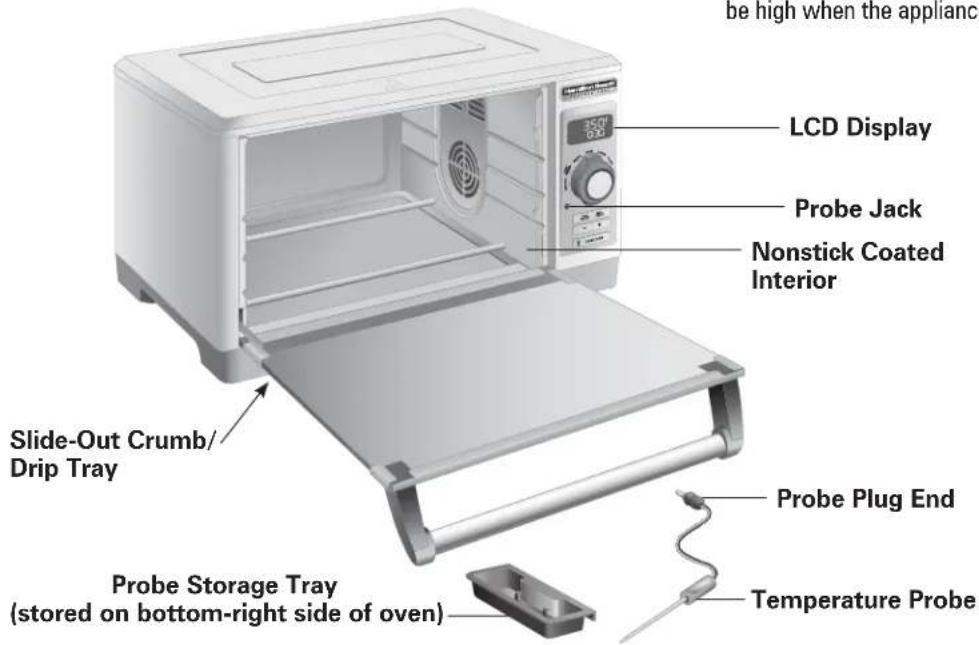
Parts and Features
To order parts:
US: 1.800.851.8900
www.hamiltonbeach.com
Canada: 1.800.267.2826
Mexico: 800 71 16 100
BEFORE FIRST USE: Most heating appliances produce an odor and/or smoke when used for the first time. Plug into outlet. Turn function dial to BAKE. Press TEMP button and use + button to set temperature to 450°F (232°C). Press TIME button and use + button to set TIMER for 5 minutes. The odor should not be present after this initial preheating. Wash baking pan, broil rack, and oven rack in hot, soapy water before using.

UTION: HOT SURFACE. The
temperature of accessible surfaces may be high when the appliance is operating.
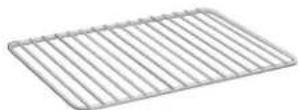
Oven Rack
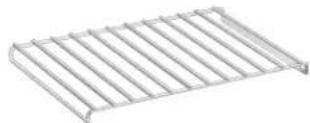
Broil Rack
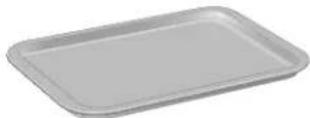
Baking Pan With Broil Rack
natural_image
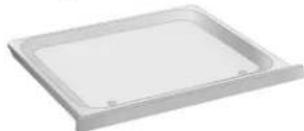
White rectangular plastic tray with rounded corners and small holes (no text or symbols)Slide-Out Crumb/Drip Tray
Getting to Know Your Display
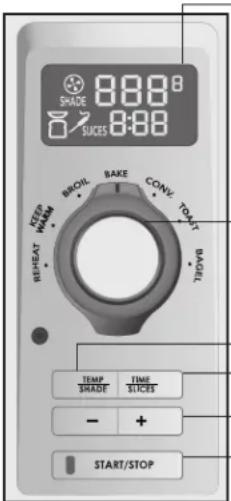
LCD Display – The easy-to-read digital LCD screen illuminates after any control is pressed. It will go into sleep mode after 30 seconds if START button is not pressed. In REHEAT, KEEP WARM, BAKE, and CONV modes, temperature and cooking time are displayed. In BROIL, "HI" and time are displayed. On TOAST and BAGEL, the shade setting and number of slices are displayed.
When probe is in use, a probe icon will be displayed on bottom left of screen. On bottom right, temperature setting will be displayed.
Function Dial - Use dial to select cooking mode.
TEMP/SHADE Button – Press when adjusting temperature or shade for TOAST or BAGEL. Temperature display can be switched between Fahrenheit and Celsius by pressing and holding for 5 seconds.
TIME/SLICES Button – Press when adjusting cook time or number of slices. Press +/- buttons to decrease or increase setting.
Decrease (-)/Increase (+) Buttons
START/STOP Button With Red Power Indicator Light – Press to illuminate display and to start or end cooking mode.
Special Features
Probe - Integrated temperature probe with auto shutoff cooks to desired internal temperature for precise results. The display will show Lo until temperature of the food reaches 100^ (38°C), then will toggle between actual temperature and set temperature.
Display - Toggles between actual oven temperature and set temperature during preheat, and chimes once preheated. Arrow up will show until set temperature is reached.
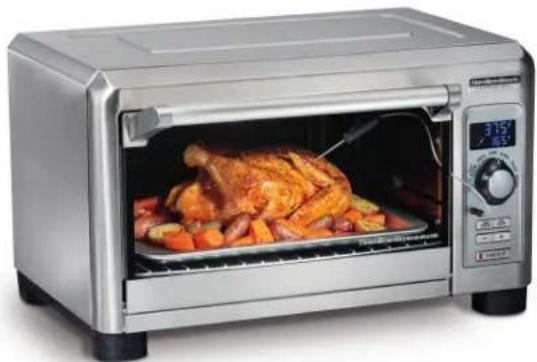
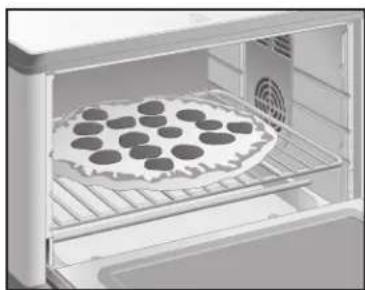
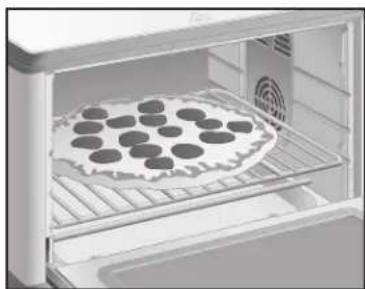
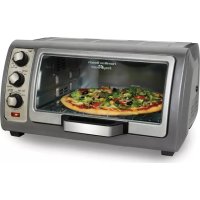
NOTE: The oven can hold a 5-lb (2.3-kg) chicken or 12-in. (30.5-cm) pizza and fits a 13-x 9-in. (33-x 22.9-cm) baking pan without handles.
Flexible Oven Rack Positions – Three positions allow for optimal cooking. Slots on both sides of the oven make it easy to slide the tray in and out of position.
- The top rack position is perfect for broiling fish or hamburgers.
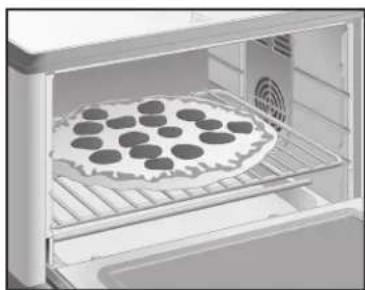
- Use middle rack for toasting or baking pizza.
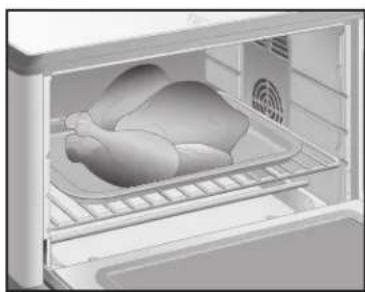
- The bottom rack is great for baking a large chicken.
Timer with Auto Shutoff – Oven turns off automatically when timer reaches 00:00 and chimes 3 times.
Stay On Function – The oven can be set to stay on by pressing the minus button just past 1. It can be used in any cooking mode except BROIL. Oven will turn off automatically after 4 hours of cooking.
How to Use
Place oven rack in desired position with crumb tray in place. Plug into outlet. If display is blank, press any button to illuminate display. Rack can be in middle or bottom position for convection or baking mode, depending on size of food.
Convection Mode
Circulates forced hot air to speed baking/roasting process for faster, more even cooking. When using convection baking, reduce cooking time or reduce recipe temperature by 25^ F.
- Turn function dial to CONV. Convection icon displays. Select temperature between 200°F (93°C) and 450°F (232°C) by pressing TEMP/SHADE button and increasing or decreasing temperature using + or - buttons. If using probe, set probe temperature between 100°F (38°C) and 200°F (93°C).
- Set time for up to 2 hours by pressing TIME/SLICES button, using + or - buttons to adjust. Default temperature is 350°F.
Bake Mode
Use as a normal kitchen oven for foods such as roasts, potatoes, or cakes.
- Turn function dial to BAKE. Select temperature between 200°F (93°C) and 450°F (232°C) by pressing TEMP/SHADE button and increasing or decreasing temperature using + or - buttons. If using probe, set probe temperature between 100°F (38°C) and 200°F (93°C). Default temperature is 350°F.
- Set time for up to 2 hours by pressing TIME/SLICES button, using + or - buttons to adjust.
Stay On Function – The oven can be set to stay on by pressing the minus button just past 1, and ON will be displayed in Convection or Bake modes.
natural_image
Interior view of a refrigerator with a roasted chicken inside (no text or symbols visible)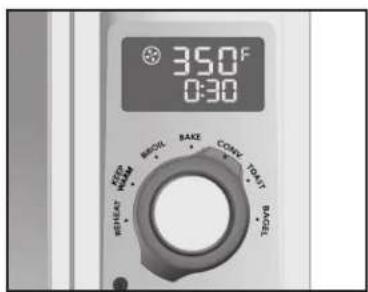
natural_image
Interior view of a refrigerator with a tray holding a baked die (no text or symbols visible)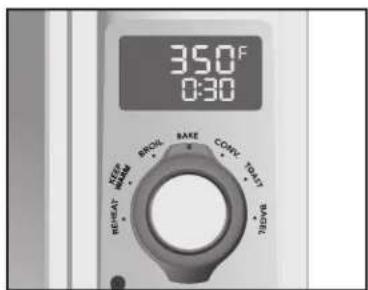
How to Use (cont.)
Broil Mode
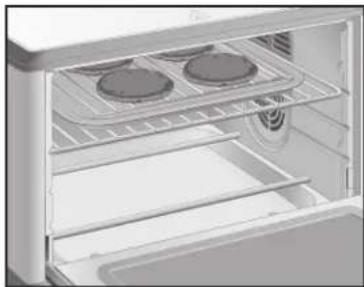
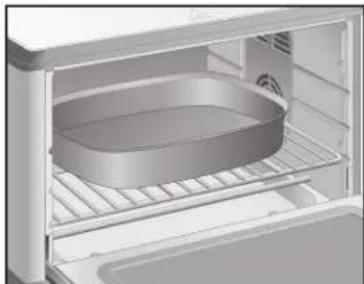
Use to brown foods such as beef, chicken, fish, pork, and casseroles. Broil food on broil rack in baking pan in top or middle rack position. Food must be a minimum of 1 inch (2.5 cm) from the heating elements.
- Turn function dial to BROIL. "HI" shows in the display and time default is 30 minutes. Oven broils on HIGH temperature and may not be adjusted.
- Adjust cooking time by pressing TIME/SLICES button, using + or - buttons to adjust. Broiling time can be set from 1 minute to 30 minutes.
- Special feature allows door to hold open slightly during broiling without shutting off.
Reheat Mode
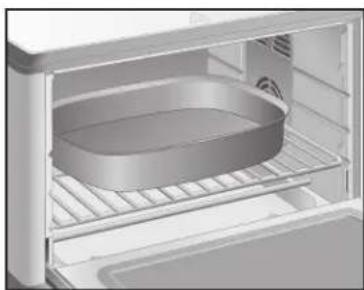
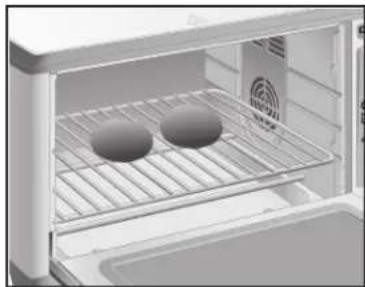
Use to quickly warm cooked foods. Reheat food with rack in middle or bottom position.
- Turn function dial to REHEAT.
- Temperature will default to 325°F (163°C) with 15 minutes of cooking time.
- Temperature can be set from 300°F (149°C) to 400°F (205°C) and can be changed by pressing TEMP/SHADE button and using + or - button to adjust.
- Time can be set from 1 minute to 2 hours and can be changed at any time during cycle by using TIME/SLICES button, using + or - button to adjust.
Stay On Function – The oven can be set to stay on by pressing the minus button just past 1, and ON will be displayed in Reheat mode.
natural_image
Interior view of a refrigerator with two circular food items on the top tray (no text or symbols visible)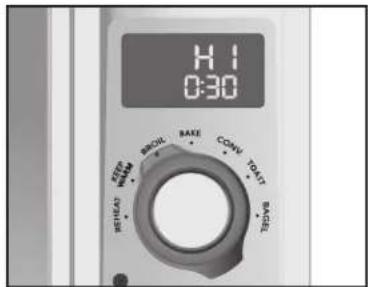
natural_image
Interior view of a refrigerator showing a circular baking pan on the rack (no text or symbols visible)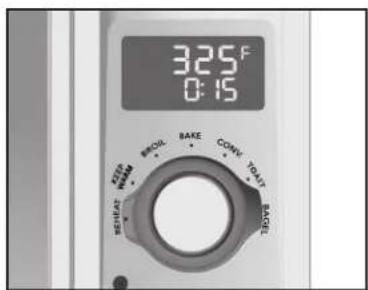
How to Use (cont.)
Keep Warm Mode
Use to hold cooked foods at temperature for up to 2 hours. Place rack in bottom.
- Turn function dial to KEEP WARM. Temperature will default to 175^ F ( 80^ C) for 30 minutes but can be changed by pressing TEMP/SHADE button and using + or - button to adjust. Temperature range is 150^ F ( 65^ C) to 200^ F ( 93^ C).
- Time can be set from 1 minute to 2 hours and can be changed at any time during cycle by pressing TIME/SLICES button, using + or - button to adjust.
Stay On Function – The oven can be set to stay on by pressing the minus button just past 1, and ON will be displayed in Keep Warm mode.
Toast Mode
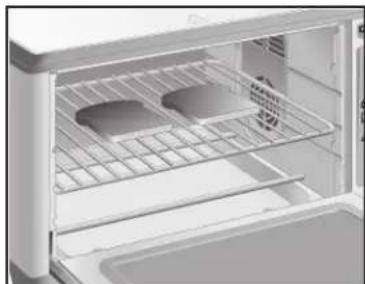
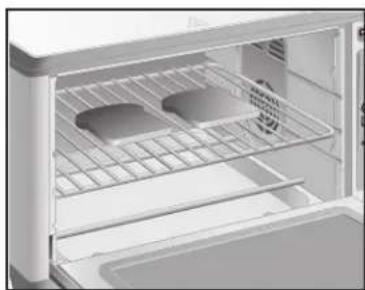
Use for browning and toasting breads. Rack should be in middle position.
- Turn function dial to TOAST.
-
Select one of 7 shades of browning by pressing TEMP/SHADE button and adjust setting using + or - buttons. Default shade setting is 4.
-
Select the number of slices by pressing the TIME/SLICES button and adjust setting using + or - buttons. Default number of slices is 4. Adjust to 1 through 6 slices.
natural_image
Interior view of a refrigerator with two circular objects on a rack (no visible text or symbols)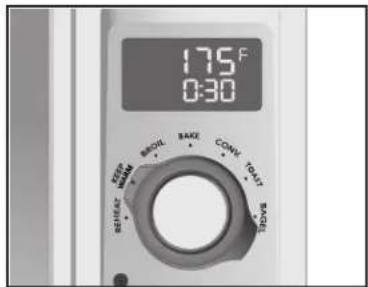
natural_image
Interior view of a refrigerator with open door and side panel (no visible text or symbols)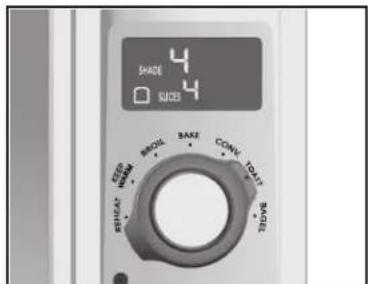
How to Use (cont.)
Bagel Mode
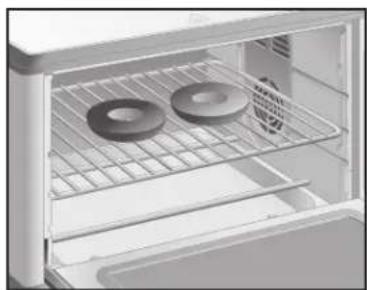
Use for browning and toasting bagels. Bagel mode toasts the top cut side and warms the round bottom of bagels. Bagels should be placed on middle rack with cut side facing up.
- Turn function dial to BAGEL.
- Select one of 7 shades of browning by pressing TEMP/SHADE button and adjust setting using + or - buttons. Default shade setting is 4.
- Select the number of slices by pressing the TIME/SLICES button and adjust setting using + or - buttons. Default number of slices is 4. Adjust to 1 through 6 slices.
natural_image
Interior view of an open refrigerator with two circular rings on the rack (no text or symbols visible)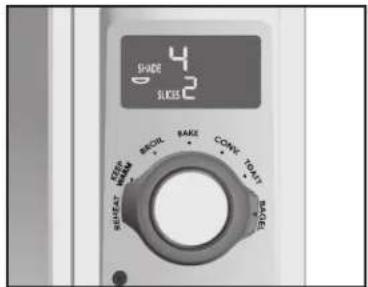
Probe Mode
To use probe, slide out removable probe storage tray located on the bottom-right side of oven and remove probe.
- Set function dial to BAKE or CONV. Probe does not work in other cooking modes.
- Plug probe into probe jack located on control panel under LCD display. Probe icon will illuminate on display.
- Blinking temperature lights indicate probe temperature is ready to be set. If probe light is solid, press TEMP/SHADE button once to activate the cavity temperature setting; then press it again to activate probe temperature setting.
- Oven will chime 3 times once probe temperature reaches desired setting, and oven turns off.
Cleaning Your Oven
⚠ WARNING Electrical Shock Hazard: Do not clean with metal scouring pads. Pieces can break off pad and touch electrical parts, causing a risk of electric shock.
- Unplug oven and let cool completely.
- Wipe control panel display with a slightly damp sponge and dry. Protect display when cleaning any other surfaces.
- Use a nonabrasive stainless steel cleaner to clean the exterior stainless steel areas. Apply cleaner with a soft, lint-free cloth. To bring out the natural luster, lightly wipe surface with a water-dampened, lint-free cloth followed by a dry polishing cloth. Always follow the grain of stainless steel. Signature Polish can be ordered via their website at www.signaturepolishonline.com.
- Wipe oven walls and bottom of oven with a damp, soapy cloth. Repeat with a damp, clean cloth. For stubborn stains, use a plastic scouring pad.
- Carefully use a razor blade to gently lift baked-on foods from the glass window. Spray glass cleaner on cloth to clean. Wipe with a damp sponge to rinse and dry.
- Clean oven racks with a mild abrasive cleaner and rinse. Dry with clean cloth.
- Slide out crumb/drip tray. Hand wash crumb/drip tray and baking pan with broil rack in hot, soapy water. Rinse and dry.
- Wipe control knobs with a damp, soapy cloth. Repeat with a damp, clean cloth and dry.
- Clean both ends of probe with soapy water. Rinse and dry.
- When window is cool, use a razor blade to gently lift baked-on foods. Spray glass cleaner on cloth to clean. Wipe with a damp sponge to rinse. Dry thoroughly with a clean cloth.
Troubleshooting
In case of power interruption:
- If power is out for less than 15 seconds, oven will go back to previous setting. If more than 15 seconds, oven switches to standby mode once power returns.
How large a bake pan will the oven hold?
- The oven will hold most 13" x 9" (33 cm x 23 cm) bake pans without handles.
How big a chicken will the oven handle?
• The oven will hold a 5-pound (2.3-kg) chicken.
When should I choose BAKE or BROIL?
- Choose BAKE for foods such as roasts, potatoes, or cakes.
- Choose BROIL to brown foods such as beef, chicken, fish, pork, and casseroles.
Error Messages
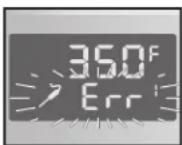
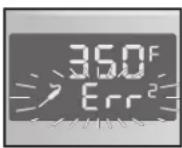
- "Err 1" and a flashing probe icon. Temperature probe is broken. Call a Customer Service Representative.
- "Err 2" and a flashing probe icon. Clean both ends of temperature probe.
If I want to toast bread, what setting is best?
- The TOAST mode is best for toasting both sides of sliced breads, or use the BROIL mode for open-faced sandwiches, baguettes, and crostini. The BROIL mode activates the top heating element and is great when toasting is required on one side only, or the breads can be "flipped" when the desired level of browning is reached.
Where is the slide-out crumb/drip tray?
- The slide-out crumb/drip tray is located in the front of the unit under the oven door.
- "Err 3" and a flashing probe icon. Wrong mode was selected. Probe only works with Convection and Bake modes.
- "Err 4" and a flashing probe icon. Oven temperature sensor is broken. Do not use oven. Call a Customer Service Representative.
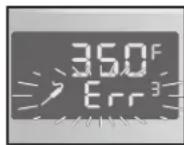
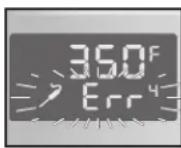
Hamilton Beach Limited Warranty
This warranty applies to products purchased and used in the U.S. and Canada. This is the only express warranty for this product and is in lieu of any other warranty or condition.
This product is warranted to be free from defects in material and workmanship for a period of five (5) years from the date of original purchase in Canada and three (3) years from the date of original purchase in the U.S. During this period, your exclusive remedy is repair or replacement of this product or any component found to be defective, at our option; however, you are responsible for all costs associated with returning the product to us and our returning a product or component under this warranty to you. If the product or component is no longer available, we will replace with a similar one of equal or greater value.
This warranty does not cover glass, filters, wear from normal use, use not in conformity with the printed directions, or damage to the product resulting from accident, alteration, abuse, or misuse. This warranty extends only to the original consumer purchaser or gift recipient. Keep the original sales receipt, as proof of purchase is required to make a warranty claim. This warranty is void if the product is used for other than single-family household use or subjected to any voltage and waveform other than as specified on the rating label (e.g., 120 V \~ 60 Hz).
We exclude all claims for special, incidental, and consequential damages caused by breach of express or implied warranty. All liability is limited to the amount of the purchase price. Every implied warranty, including any statutory warranty or condition of merchantability or fitness for a particular purpose, is disclaimed except to the extent prohibited by law, in which case such warranty or condition is limited to the duration of this written warranty. This warranty gives you specific legal rights. You may have other legal rights that vary depending on where you live. Some states or provinces do not allow limitations on implied warranties or special, incidental, or consequential damages, so the foregoing limitations may not apply to you.
To make a warranty claim, do not return this appliance to the store. Please call 1.800.851.8900 in the U.S. or 1.800.267.2826 in Canada or visit hamiltonbeach.com in the U.S. or hamiltonbeach.ca in Canada. For faster service, locate the model, type, and series numbers on your appliance.
Hamilton Beach Brands, Inc.
4421 Waterfront Drive
Glen Allen
Virginia 23060
USA
PRÉCAUTIONS IMPORTANTES
natural_image
Interior view of a refrigerator with a single chicken inside (no visible text or symbols)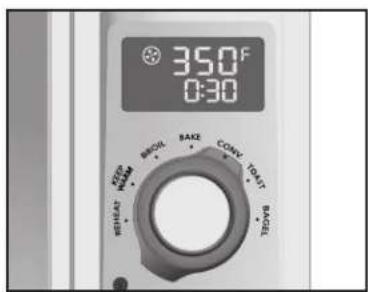
natural_image
Interior view of a refrigerator with a baked pie on the tray (no text or symbols visible)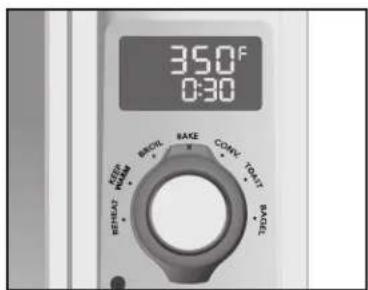
Utilisation (suite)
Mod Broil (griller)
natural_image
Interior view of a refrigerator showing two circular appliances on the top shelf (no text or symbols visible)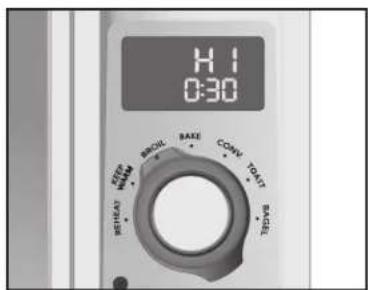
natural_image
Interior view of a refrigerator showing a circular baking pan on the rack (no text or symbols visible)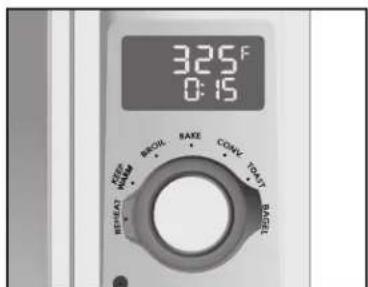
Utilisation (suite)
natural_image
Interior view of a refrigerator with two circular objects on the rack (no visible text or symbols)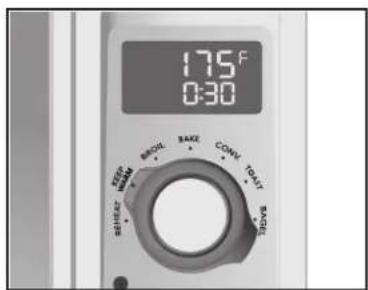
natural_image
Interior view of a refrigerator showing the oven, rack, and door (no text or symbols visible)
Utilisation (suite)
Mode Bagel (bagel)
natural_image
Interior view of an open refrigerator with two circular objects on the rack (no text or symbols visible)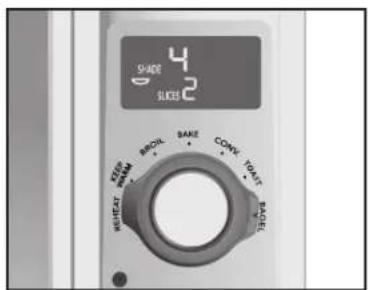
Mode Sonde
Hamilton Beach Brands, Inc.
4421 Waterfront Drive
Glen Allen
Virginia 23060
USA
natural_image
White rectangular plastic tray with rounded corners and a small hole at the bottom (no text or symbols visible)natural_image
Interior view of a refrigerator with a single chicken inside (no visible text or symbols)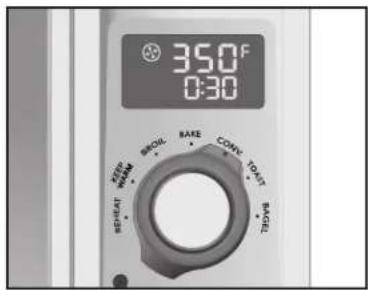
natural_image
Interior view of a refrigerator with a tray holding a baked die (no text or symbols visible)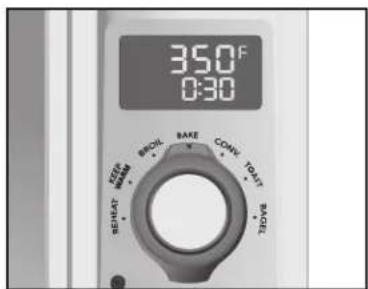
Modo de Uso (cont.)
natural_image
Interior view of a refrigerator with two circular food items on the upper shelves (no text or symbols visible)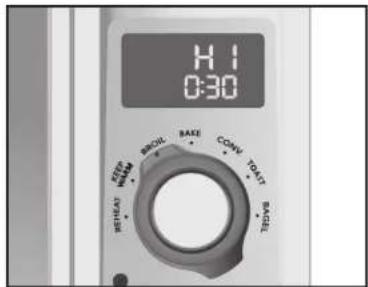
natural_image
Interior view of a refrigerator with a circular baking pan on the rack (no text or symbols visible)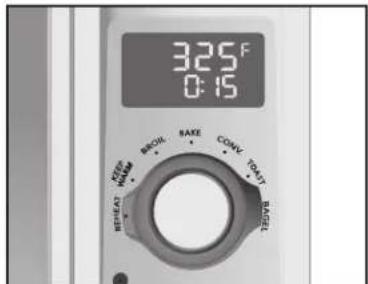
Modo de Uso (cont.)
natural_image
Interior view of a refrigerator with two round food items on a rack (no visible text or symbols)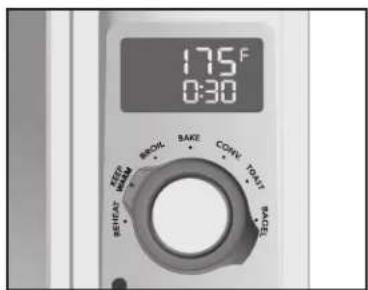
Modo Toast (Tostar)
natural_image
Interior view of a refrigerator showing the oven, rack, and storage compartments (no text or symbols visible)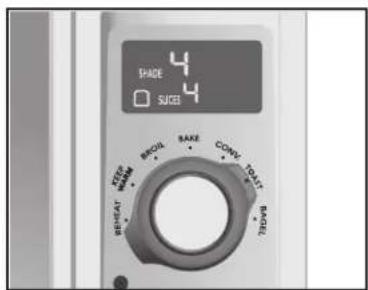
Modo de Uso (cont.)
Modo Bagel (Roscas)
natural_image
Interior view of a refrigerator with two circular objects on the rack (no text or symbols visible)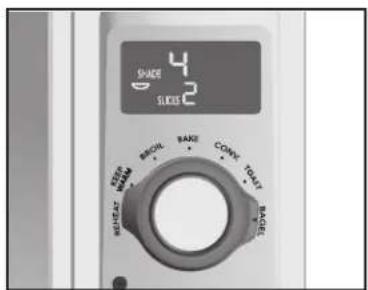
Modo Sonda
- Digital Countertop Oven
- Four grille-pain numérique Horno Digital para Mostrador
- IMPORTANT SAFEGUARDS
- SAVE THESE INSTRUCTIONS
- WARNING Fire Hazard.
- Other Consumer Safety Information
- This appliance is intended for household use only.
- Parts and Features
- Getting to Know Your Display
- Special Features
- How to Use
- Convection Mode
- Bake Mode
- How to Use (cont.)
- Broil Mode
- Reheat Mode
- Keep Warm Mode
- Toast Mode
- Bagel Mode
- Probe Mode
- Cleaning Your Oven
- Troubleshooting
- In case of power interruption:
- How large a bake pan will the oven hold?
- How big a chicken will the oven handle?
- When should I choose BAKE or BROIL?
- Error Messages
- If I want to toast bread, what setting is best?
- Where is the slide-out crumb/drip tray?
- Hamilton Beach Limited Warranty
- PRÉCAUTIONS IMPORTANTES
- Utilisation (suite)
- Mod Broil (griller)
- Mode Bagel (bagel)
- Mode Sonde
- Modo de Uso (cont.)
- Modo Toast (Tostar)
- Modo Bagel (Roscas)
- Modo Sonda
Brand : HAMILTON BEACH
Model : 31240
Category : Oven