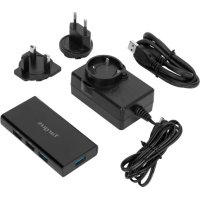
ACH225EU - USB hub TARGUS - Free user manual and instructions
Find the device manual for free ACH225EU TARGUS in PDF.



| Brand | Targus |
| Model | ACH225EU |
| Product type | USB 3.0 7-port hub with fast charging |
| Number of USB ports | 7 USB 3.0 ports (including 2 fast charging ports) |
| Maximum transfer rate | Up to 5 Gbit/s (SuperSpeed) |
| Backward compatibility | USB 2.0 and USB 1.1 |
| Fast charging | Yes, ports with maximum output of 1.5 A |
| Power supply | Included AC adapter: input 100-240 V ~ 50/60 Hz, output 5 V / 4 A |
| Protection | Overcurrent protection per port |
| Supported operating systems | Windows 10, 8.1, 8, 7; Mac OS X v10.15.1 to 10.12.4 |
| Plug and Play | Yes |
| Package contents | 7-port USB 3.0 hub, USB cable, AC adapter |
| Care and cleaning | Clean with a dry, soft cloth. Do not use liquid or abrasive products. |
| Safety | Use only the supplied AC adapter. Do not expose to water or moisture. |
| Spare parts and repairability | Not applicable (no user-serviceable parts) |
| General information | Compliant with EU directives EMC 2014/30/EU and RoHS 2011/65/EU |
Frequently Asked Questions - ACH225EU TARGUS
User questions about ACH225EU TARGUS
0 question about this device. Answer the ones you know or ask your own.
Ask a new question about this device
Download the instructions for your USB hub in PDF format for free! Find your manual ACH225EU - TARGUS and take your electronic device back in hand. On this page are published all the documents necessary for the use of your device. ACH225EU by TARGUS.
USER MANUAL ACH225EU TARGUS
2 YEAR LIMITED WARRANTY: We pride ourselves on the quality of our products. For complete warranty details and a list of our worldwide offices, please visit www.targus.com
Features and specifications are subject to change without notice. All trademarks and registered trademarks are the property of their respective owners. All rights reserved. ©2020 Manufactured or Imported by Targus Europe Ltd., Feltham, Middlesex TW14 8HA, UK


Product Name: USB 3.0 7-Port Hub
Model No.: ACH225 SKU No.: ACH225EU
Table of Contents
GB – English 3
DE – Deutsch 9
FR – Français 14
CZ – Ceština 19
DK – Dansk 23
FI – Suomi 27
Targus 7-Port USB 3.0 Powered Hub with Fast Charging
Targus 7-Port USB 3.0 Powered Hub with Fast Charging
GB
Introduction
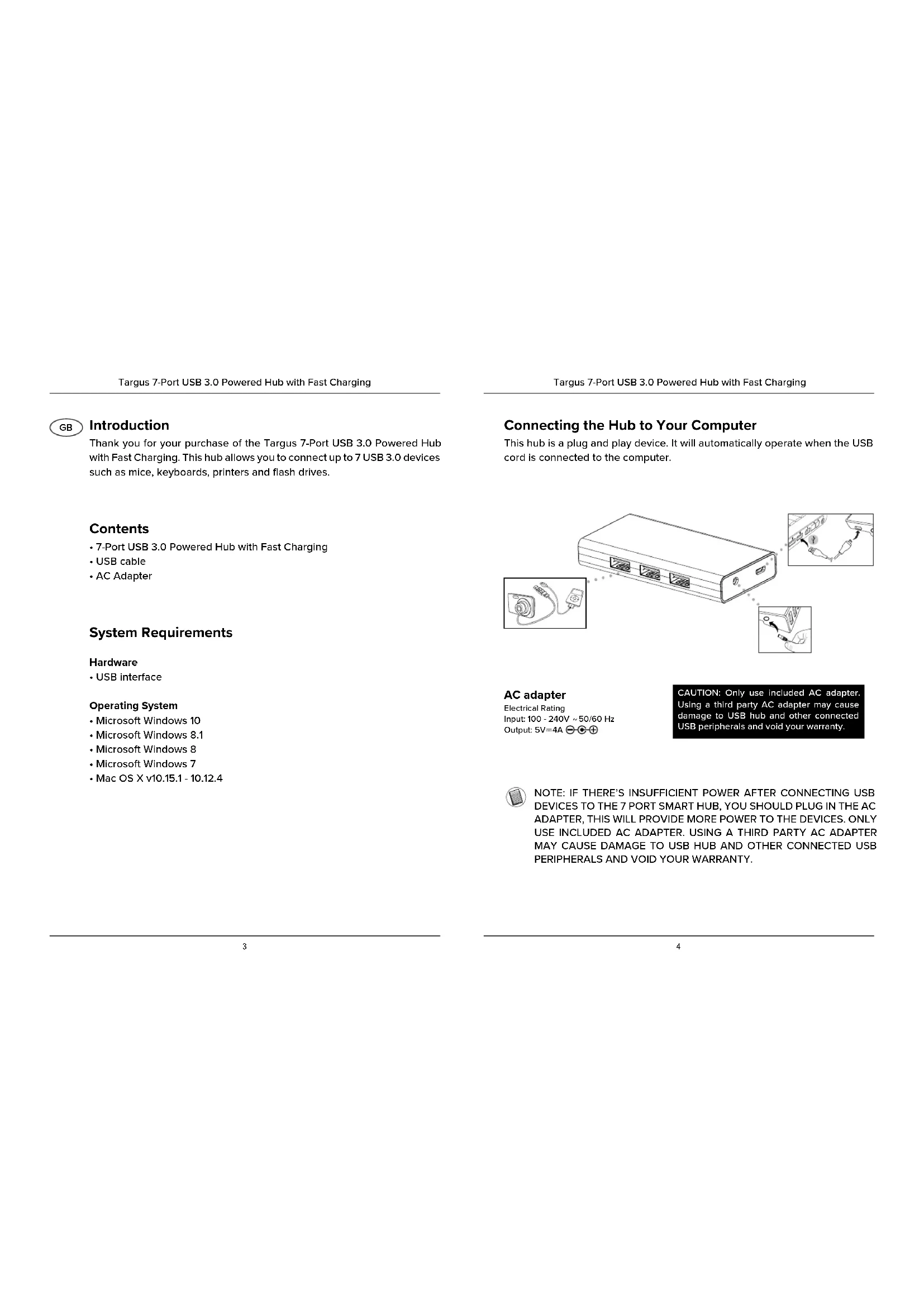
Thank you for your purchase of the Targus 7-Port USB 3.0 Powered Hub with Fast Charging. This hub allows you to connect up to 7 USB 3.0 devices such as mice, keyboards, printers and flash drives.
Contents
• 7-Port USB 3.0 Powered Hub with Fast Charging
- USB cable
- AC Adapter
System Requirements
Hardware
- USB interface
Operating System
- Microsoft Windows 10
- Microsoft Windows 8.1
- Microsoft Windows 8
- Microsoft Windows 7
• Mac OS X v10.15.1 - 10.12.4
Connecting the Hub to Your Computer
This hub is a plug and play device. It will automatically operate when the USB cord is connected to the computer.
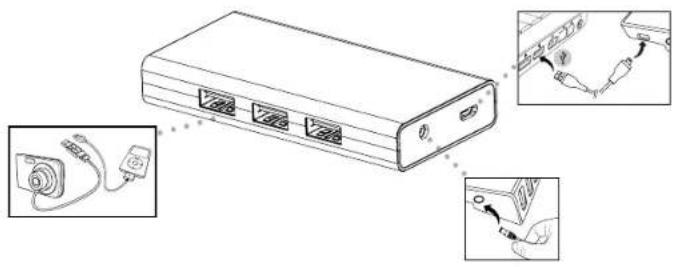
AC adapter
Electrical Rating Input: 100 - 240V \~ 50/60 Hz Output: 5V=4A ⊖ ⊙ ⊕
CAUTION: Only use included AC adapter. Using a third party AC adapter may cause damage to USB hub and other connected USB peripherals and void your warranty.

NOTE: IF THERE'S INSUFFICIENT POWER AFTER CONNECTING USB DEVICES TO THE 7 PORT SMART HUB, YOU SHOULD PLUG IN THE AC ADAPTER, THIS WILL PROVIDE MORE POWER TO THE DEVICES. ONLY USE INCLUDED AC ADAPTER. USING A THIRD PARTY AC ADAPTER MAY CAUSE DAMAGE TO USB HUB AND OTHER CONNECTED USB PERIPHERALS AND VOID YOUR WARRANTY.
Features Description
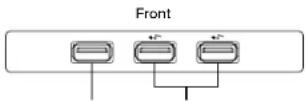
USB 3.0 Fast Charging PortsUSB 3.0 Port
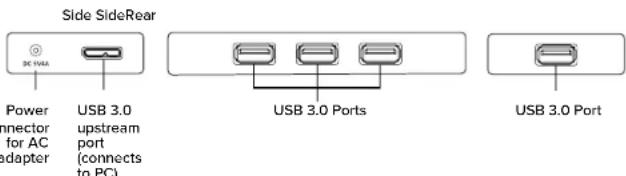
USB 3.0 Ports
- SuperSpeed™ transfer rates up to 5Gbps
- Outputs up to 900mA to power more devices (when AC adapter is used)
- Backward compatible with USB 2.0/1.1 devices
USB 3.0 Fast Charging Ports
- SuperSpeed™ transfer rates up to 5Gbps
- Fast charging ports output up to 1.5A to power/charge phone and tablet devices (when AC adapter is used)*
- Fast charging ports support battery charging specification v1.2
- Backward compatible with USB 2.0/1.1 devices
* if two tablets are connected charging time may increase
Troubleshooting
Device Not Working
- Make sure that the device is fully inserted into the correct port on the 7-Port USB 3.0 Hub.
- Plug the device into a different port on the USB Hub. If it still doesn't work, test the device by connecting it directly to your computer.
- Make sure that the device appears in Device Manager.
- Disconnect all devices from the hub and reconnect them, one at a time. Check that each device works before plugging in the next one.
- Each USB port is equipped with over-current protection. When a USB device draw more current than the USB port can supply, the port will shut down.
To re-enable the port, unplug the device and go to Device Manager or to the message in the system tray and choose the Reset option. You can then plug the device back into the USB port. If a shut down reoccurs, check the power requirements of the device.
Verifying Devices are Installed
You can view the devices installed on the 7-Port USB 3.0 Hub from the Device Manager window in System Properties.
Right-click My Computer, Properties, then click the Hardware tab, and then the Device Manager button.
Targus 7-Port USB 3.0 Powered Hub with Fast Charging
| Manufacturer's name or trade mark, commercial registration number and address | Dongguan City Gangqi Electronics co., Ltd Address: Shiyong Private Industrial Park, Hengli Town, Dongguan City, Guangdong Province, China. Commercial Registration: 914419007929512928 |
| Model | GQ36-050400-AX |
| Input voltage | 100~240V |
| Input AC frequency | 50/60Hz |
| Output voltage | DC 5.0V |
| Output current | 4.0A |
| Output power | 20.0W |
| Average active efficiency | 83.68% |
| Efficiency at low load (10 %) | 74.24% |
| No-load power consumption | 0.08W |
| Above information have free access websites www.targus.com of importer. | |
Targus 7-Port USB 3.0 Powered Hub with Fast Charging
Targus
Declaration of Conformity

| Manufacturer: | Targus International LLC | Tel: | 1-714-765-5555 |
| Address : | 1211 North Miller Street, Anaheim, CA 92806 USA | Fax: | 1-714-765-5599 |
| Internet: | www.targus.com | ||
| Importer: | Targus Europe Ltd. | Tel: | +44 (0)20 8831 2013 |
| Address: | 5 New Square, Bedford Lakes Business Park, Feltham, Middlesex, TW14 8HA, UK |
We herewith confirm the following designated product USB3.0 7-Port hub. Model No. ACH225, SKU: ACH225EU, Brand name "TARGUS", complices with EMC directive 2014/30/EU, EU/RoHS Directive 2011/65/EU.
For the evaluation regarding the above: Directives, the following standards were applied: EMC directive 2014/30/EU
EN 55012:2015, CLASS B
EN 6100-3-2:2014
EN 6100-3-3:2013
EN 55015:2017
RoHS Directive: 2011/65EU
EN 50581:2012
Year to begin CE marking: 2019
| Director, Targus - Global Sourcing Group | CF Njcoh | |
| Function Title | Name | |
| 21-Nov-2019 | / Hong Kong | ### |
| Date | / Place of Issue | Signed for and on behalf of Targus |
AC-Netzadapter
Adresse: 1211 North Miller Street,
Fax: 1-714-765-3599
Anaheim, CA 92806 USA
Internet: www.targas.com
Adresse: 5 New Square, Bedfont Lakes Business Park,
Feltham, Middlesex.
TW14 8HA, UK
RoHS Directive: 2011/65/EU
EN 50581:2012
Director, Targus - Global Sourcing Group
CF Ngoh
Funktion
Name
21-Nov-2019
Hongkeng

Daimin
/Ansetellungsort
Adaptateur CA
Notation électrique
natural_image
Three schematic diagrams showing connection points of electronic devices (no text or symbols)Napájecí AC adaptér
Strømforsyning
Elektrisk vurdering Input: 100 - 240V \~ 50/60 Hz Output: 5V=4A ⊖ ⊕ ⊕
Virtajohto
Προσαρμογέας
Adattatore CA
RoHS Directive: 2011/65/EU
EN 50581:2012
AC-adapter
RoHS Directive: 2011/65/EU
EN 505812012
Jaren tot begin E-markering: 2019
AC-adapter
Zasilacz sieciowy
Adaptador CA
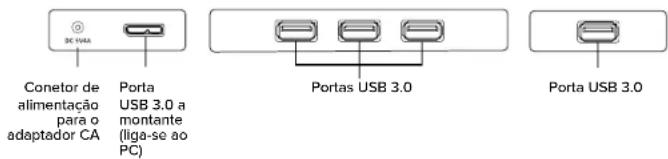
Lateral Lateral Traseira
RoHS Directive: 2011/65/EU
EN 30581:2012
Nätadapter
AC adaptörü
RoHS Directive: 2011/65/EU
EN 50581:2012
Adaptador de CA
RoHS Directive: 2011/65/EU
EN 50581:2012
AC адаптер
Adapter izmjeničnog napona (AC)
Električna nazivna vrijednost Ulazna snaga: 100 – 240 V \~ 50/60 Hz Izlazna snaga: 5V = 4A ⊙ ⊙ ⊕
OPREZ: Upotrebljavajte samo isporučeni adapter izmjeničnog napona. Upotreba adaptera izmjeničnog napona treće strane može oštetiti USB koncentrator i druge spojene USB periferijske uredaje te poništiti vaše jamstvo.

NAPOMENA: AKO NEMA DOVOLJNO NAPAJANJA NAKON SPAJANJA USB UREĐAJA NA SMART KONCENTRATOR SA 7 PRIKLJUČAKA, TREBALI BISTE SPOJITI ADAPTER IZMJENICIČNOG NAPONA KOJI ČE OMOGUĆITI VIŠE NAPAJANJA ZA UREĐAJE. UPOTREBLJAVAJTE SAMO ISPORUČENI ADAPTER IZMJENICIČNOG NAPONA. UPOTREBA ADAPTERA IZMJENICIČNOG NAPONA TREĆE STRANE MOŽE OŠTETITI USB KONCENTRATOR I DRUGE SPOJENE PERIFERIJSKE USB UREĐAJE TE PONIŠTITI VAŠE JAMSTVO.
Hálózati adapter
Villamossági besorolás Bemenet: 100 - 240 V \~ 50/60 Hz Kimenet: 5V=4A ⊖ ⊙ ⊕
Adaptor CA
Sietový adaptér
Mainstrāvas adapteris
Nominälie elektriskie parametri levade: 100–240 V \~ 50/60 Hz Izvade: 5V = 4A ⊖ ⊙ ⊕
Vahelduvvooluadapter
Targus 7-Port USB 3.0 Powered Hub with Fast Charging
Warranty
2 YEAR LIMITED WARRANTY: We pride ourselves on the quality of our products. For complete warranty details and a list of our worldwide offices, please visit www.targus.com
Features and specifications are subject to change without notice. All trademarks and registered trademarks are the property of their respective owners. All rights reserved. ©2020 Manufactured or Imported by Targus Europe Ltd., Feltham, Middlesex TW14 8HA, UK
Regulatory Compliance
(applicable to products with electronic circuitry / parts only)
This device complies with Part 15 of the FCC Rules. Operation is subject to the following two conditions: (1) This device may not cause harmful interference, and (2) this device must accept any interference received, including interference that may cause undesired operation.
Targus 7-Port USB 3.0 Powered Hub with Fast Charging
FCC Statement
Tested to Comply
This equipment has been tested and found to comply with the limits of a Class B digital device, pursuant to Part 15 of the FCC Rules. These limits are designed to provide reasonable protection against harmful interference in a residential installation. This equipment generates, uses, and can radiate radio frequency energy, and if not installed and used in accordance with the instructions may cause harmful interference to radio communications. However, there is no guarantee that interference will not occur in a particular installation. If this equipment does cause harmful interference to radio or television reception, which can be determined by turning the equipment off and on, the user is encouraged to try to correct the interference by one or more of the following measures:
- Reorient or relocate the receiving antenna;
- Increase the separation between the equipment and receiver;
- Connect the equipment into an outlet on a circuit different from that to which the receiver is connected;
- Consult the dealer or an experienced radio/TV technician for help
Changes or modifications not authorized by the party responsible for compliance could void the user's authority to operate this product.
Declaration of Conformity
Targus hereby declares that this device is in compliance with the essential requirements and other relevant provisions of Directive 2014/30/EU.
Targus Recycling Directive
At the end of this product's useful life please dispose at an appropriate recycling collection point provided in your country.
Targus 7-Port USB 3.0 Powered Hub with Fast Charging
Technical Support
For technical questions, please visit:
Internet
| English | http://www.targus.com/uk/support |
| French | http://www.targus.com/fr/support |
| German | http://www.targus.com/de/support |
| Spanish | http://www.targus.com/es/support |
Telephone
| Austria | +43 1-795-676-42 | Norway | +47 022577729 |
| Belgium | +32 (0)2-717-2451 | Portugal | +351 21-415-4123 |
| Denmark | +45 35-25-87-51 | Spain | +34 91-745-6221 |
| Finland | +358 (0)922948016 | Sweden | +46 (0)8-751-4058 |
| France | +33 (0)1-6453-9151 | Switzerland | +41 44-212-0007 |
| Germany | +49 (0)211-6579-1151 | United Kingdom | +44 (0)20-7744-0330 |
| Netherlands | +31 (0)20-504671 | Eastern Europe & others | +44 (0)20-7744-0330 |

- Table of Contents
- GB
- Introduction
- Contents
- System Requirements
- Hardware
- Operating System
- Connecting the Hub to Your Computer
- AC adapter
- Features Description
- USB 3.0 Ports
- USB 3.0 Fast Charging Ports
- Troubleshooting
- Device Not Working
- Verifying Devices are Installed
- Targus
- Declaration of Conformity
- AC-Netzadapter
- Adaptateur CA
- Napájecí AC adaptér
- Strømforsyning
- Virtajohto
- Προσαρμογέας
- Adattatore CA
- AC-adapter
- Zasilacz sieciowy
- Adaptador CA
- Nätadapter
- AC adaptörü
- Adaptador de CA
- AC адаптер
- Adapter izmjeničnog napona (AC)
- Hálózati adapter
- Adaptor CA
- Sietový adaptér
- Mainstrāvas adapteris
- Vahelduvvooluadapter
- Warranty
- Regulatory Compliance
- (applicable to products with electronic circuitry / parts only)
- FCC Statement
- Tested to Comply
- Targus Recycling Directive
- Technical Support
- Internet
- Telephone
Brand : TARGUS
Model : ACH225EU
Category : USB hub