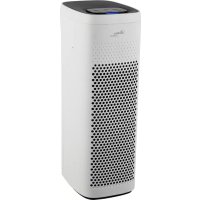
ARM8P03 - Air purifier ARDES - Free user manual and instructions
Find the device manual for free ARM8P03 ARDES in PDF.


| Brand | Ardes |
| Model | ARM8P03 |
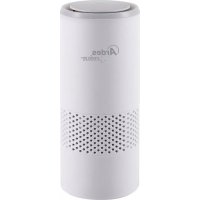
| Product Type | Air purifier with UV-C lamp and ionizer |
| Power supply | 220-240 V ~ 50 Hz |
| Filters | Activated carbon pre-filter + HEPA filter |
| Functions | 3 speeds, timer 2/4/8 h, auto mode, night mode, ionizer, UV-C lamp |
| Air quality sensor | Blue (good), yellow (moderate), red (poor) indicators |
| Pre-filter replacement | Every 1500 operating hours (red light) |
| HEPA filter replacement | Every 3000 operating hours (red light) |
| Reset indicators | Press and hold ⏻ and ⚙️ buttons for 3 seconds |
| Maintenance | Clean with a soft dry cloth. Do not immerse. |
| Safety | Do not look directly at the UV-C lamp. Disconnect before maintenance. |
| Warranty | 24 months from date of purchase |
| Usage | Household use only. Place on a flat surface, away from heat sources and liquids. |
| Minimum distance | 60 cm in front, 50 cm sides and back |
Frequently Asked Questions - ARM8P03 ARDES
User questions about ARM8P03 ARDES
0 question about this device. Answer the ones you know or ask your own.
Ask a new question about this device
Download the instructions for your Air purifier in PDF format for free! Find your manual ARM8P03 - ARDES and take your electronic device back in hand. On this page are published all the documents necessary for the use of your device. ARM8P03 by ARDES.
USER MANUAL ARM8P03 ARDES
ISTRUZIONI PERL'USO INSTRUCTIONS FOR USE MODE D'EMPLOI INSTRUCCIONES DE USO GEBRAUCHSANWEISUNG
PURIFICATORE D'ARIA
AIR PURIFIER
PURIFICATEUR D'AIR
PURIFICADOR DE AIRE
RAUMLUFTREINIGER
ARM8P03
This appliance can be used by children aged from 8 years and above and persons with reduced physical, sensory or mental capabilities or lack of experience and knowledge if they have been given supervision or instruction concerning use of the appliance in a safe way and understand the hazards involved.
Children shall not play with the appliance.
Cleaning and user maintenance shall not be made by children without supervision.
If the power cable gets damaged, it has to be replaced only at a service centre approved by the manufacturer in order to prevent any risks.
Ensure that the appliance is switched off from the supply mains before removing detachable parts or before maintenance.

Warnings and safety of the UV lamp
Only use the appliance with the lamp correctly positioned in its housing. Do not use the UV-C lamp outside of the appliance.
Warning: never directly connect the UV lamp (mod.388L) when it is lit; it could damage the skin, or cause temporary loss of and / or decreased vision.
Any repairs and / or replacements (first remove the plug from the socket) must only be done by professionally qualified person.
Warnings
GB
ATTENTION : read this booklet carefully it contains important instructions for a safe installation, use and maintenance. Important instructions to be kept for future reference.
Keep handy the guarantee, receipt of payment and these instructions for future use and reference.
After removing the packaging, check the appliance for any signs of damage.
In case of visible damage, do not use it and contact a qualified technician. Do not leave parts of the packaging with in the reach of children. This appliance is not a children's toy: it is an electrical device and must be treated with the necessary caution.
Before connecting the appliance, make sure that the power supply
voltage matches the indication on the data plate.
If the plug and socket are not compatible, the socket has to be replaced with a suitable type by skilled persons.
Do not use adapters or extension cables which do not meet current safety standards or that exceed the current carrying capacity limits.
When you don't use the appliance disconnect it from the power supply. Before each use, check that the appliance (especially the HEPA filter) is in good condition and that the power cord is not damaged. If any doubts consult a qualified professional.
Do not tug on the power cable or on the appliance itself to remove the plug from the socket.
The use of any electrical appliance requires that a number of basic rules are observed, namely:
- Never touch the appliance with wet or humid hands.
- Do not leave the appliance exposed to weathering (rain, sunlight).
- Do not subject it to rough handling.
In case of a breakdown or malfunctioning of the appliance, disconnect it at once.
Do not attempt to repair it, but take it to a service centre approved by the manufacturer.
If you decide you do not want to use this appliance any longer, disable it by cutting the power cable - of course, after disconnecting it from the socket.
The power cable should be extended to its full lenght to avoid over heating.
For safety reasons, the appliance should never be opened.
The appliance has been designed and manufactured to operate in the home.
Any other use is considered inappropriate and dangerous.
Do not insert objects through the safety grill or the air inlets.
Stand the appliance on a flat, horizontal and stable surface, and keep it away from:
- fans
- heat sources (e.g. open flames, gas stoves, fire places etc.), flammable gasses or explosive materials
- liquids (e.g. from bathtubs, showers, sinks etc.) to avoid splashing water and to prevent it from falling into them (the appliance should be kept a minimum of 2 metres away).
- fabrics (curtains, etc.) or floating materials/particles that may block the aspiration grid.
Be sure that there will be 60 cm free space in the front of air purifier and 50 cm on the sides and back.
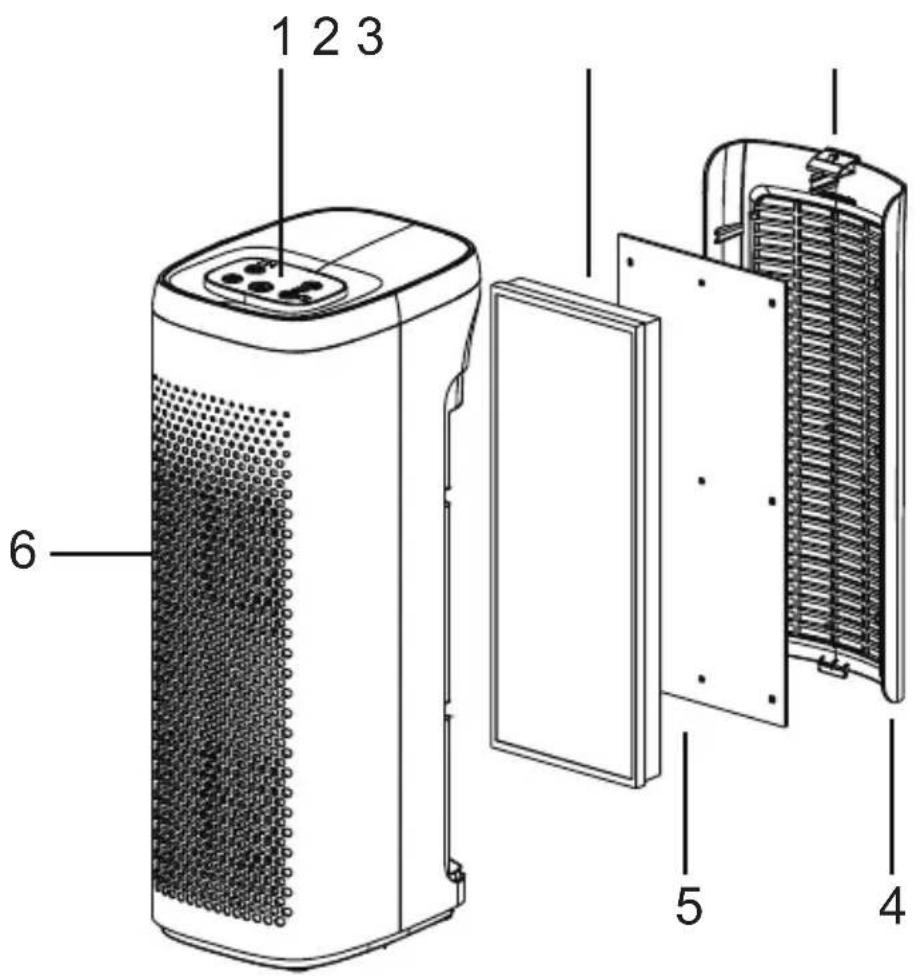
1 - Control panel
2 - HEPA filter
3 - Lock/Open
4 - Air inlet grille
5 - Carbon pre-filter
6 - Air outlet grille
Control panel
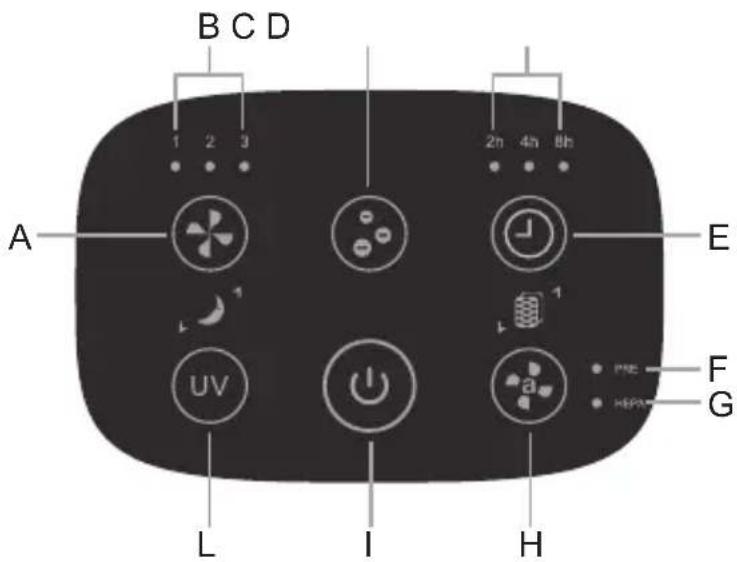
A. Speed button
B. Speed indicator lights
C. Negative ion button
D. Timer indicator lights
E. Timer button
F. Pre-filter change indicator light
G. HEPA filter change indicator light
H. Auto mode button
I. On/Off button
L. UV light button
1. On/Off button ⏻
Press the power button to switch on the appliance and press again to switch off the unit.
2. Speed button
On the power on state, press the button to adjust the wind speed. Press the wind speed button to select minimum speed (1 indicator light will turn on in the control panel), medium speed (2 indicator light will turn on in the control panel), maximum speed (3 indicator light will turn on in the control panel).
3. Negative ION button

In the power state, press the button to start the anion function, and the icon will brighten. Press this button again to turn off the anion function.
4. Timer button Ⓤ
In the power state, press the timer button to set the running time, after which the unit will stop. Press the button repeatedly: each time it is pressed the time period changes (from 2h, 4h or 8h) and the selected time will light up on the control panel. To deactivate the timer, press the button until all times disappear.
5. Sleep mode
In the power state, press the button and together to enter the sleep mode, and the machine will enter in sleep mode: the machine will run at Speed 1, and other indicator will be turned off except the power light; press those buttons again and the machine will exit from the Sleep Mode.
6. AUTO mode
This product is equipped with automatic cleaning mode. Press the button enter AUTO mode, and then press the button them together to exit AUTO mode. If AUTO mode is activated, the machine determines the wind speed based on the air quality detected by the sensor. Air quality indicator light when the air quality is poor, it will be displayed in red. The wind speed will be automatically adjusted to high grade. When the air quality is medium, the light will be yellow. The wind speed will be automatically adjusted to mid-range. When the air quality is good, the wind speed is automatically adjusted to low and the light will be blue.
7. Filter change
When the cumulative working time of the machine reaches 1500 hours,
the pre-filter indicator light will be lit up (red) to remind you to replace the pre-filter; when the cumulative working time of the machine reaches 3000 hours, HEPA filter indicator light will be lit up (red) to remind you to replace the HEPA filter.
Replace the prefilter/HEPA filter following the instruction on "MAINTENANCE". Once the pre-filter/HEPA filter has been replaced press and together for 3 seconds to reset the timing of the filters.
The related indicators light will be off in the control panel.
8. UV light button (uv)
The unit is provided with UV light and photocatalyst that help to remove germs and bacterias. Press the button to activate this function; the related indicator light will turn on in the control panel. Press again this button to deactivate this function: the related indicator light will turn off in the control panel.
Maintenance
GB
Disconnect the plug from the socket and let the appliance cool down well before cleaning it.
This appliance does not require any special maintenance.
In order to clean the appliance, use a soft and dry cloth.
To clean the bottom cover frm the dust, use a soft and slight damp cloth.
Never use abrasives or chemical solvents.
Do not use very wet substances, liquids or cloths to prevent water from entering into the appliance and irreparably damaging it.
NEVER IMMERSE THE APPLIANCE INTO THE WATER.
Pre-filter/HEPA filter replacement:
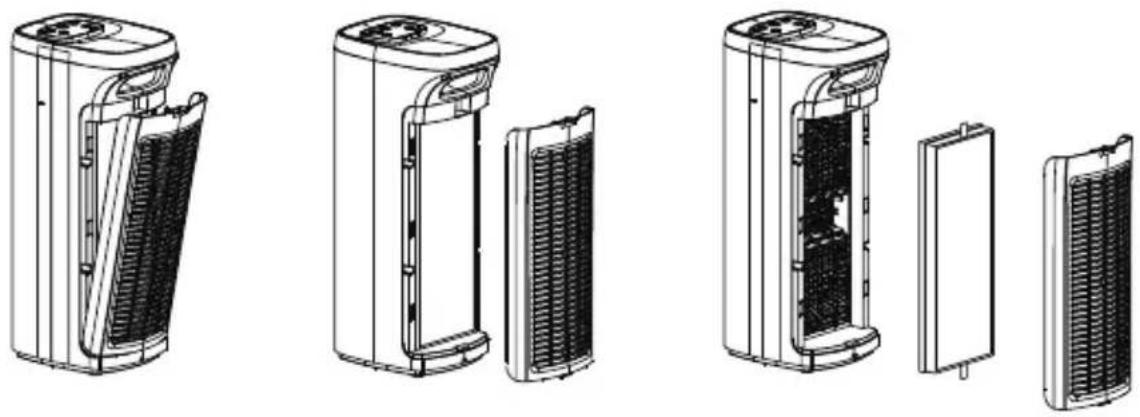
this operation is necessary every time the filter indicator light turns on in the control panel (approximately every 1500 hours of use for pre-filter and about 3000 hours of use for HEPA filter).
Pull out the air inlet grid by pushing the closing/open clip.
Take out the HEPA filter and or pre-filter and replace with new one.
Replace the inlet grid.
Follow the instruction in "INSTRUCTION FOR USE - Filter change" to reset the pre-filter/HEPA filter time.
Warning: use only original spare parts to avoid compromising the effectiveness of the product.
Do not wash and reuse the filter. Always wash hands carefully after replacing or cleaning the filter.
Warning: please carefully identify the front and rear direction of the filter assembly to avoid wrong installation.
natural_image
Technical line drawings of various air purifiers and heat exchangers (no text or labels)Terms and Conditions
The guarantee is valid for 24 months.
This guarantee applies only if it has been duly filled in and is submitted with the receipt showing the date of purchase.
The guarantee covers the replacement or repair of parts making up the appliance which were faulty at source due to manufacturing faults.
After the guarantee has expired, the appliance will be repaired against payment. The manufacturer declines any responsibility for damage to persons, animals or property due to misuse of the appliance and failure to observe the directions contained in the instructions.
Limits
All rights under this guarantee and any responsibility on our part will be voided if the appliance has been:
- mishandled by unauthorized persons
- improperly used, stored or transported.
The guarantee does not cover damage to the outward appearance or any other that does not prevent regular operation.
If any faults should be found despite the care taken in selecting the materials and in creating the product, or if any information or advice are required, please contact your local dealer.
DISPOSAL
USER INFORMATION
"Implementation of Directive 2012/19/EU on Waste Electrical and Electronic Equipment (WEEE)", pertaining to reduced use of hazardous substances in electrical and electronic equipment, as well as to waste disposal".
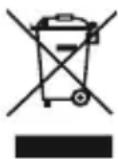
The symbol of the crossed-out wheelie bin on the equipment or on its packaging indicates that the product must be disposed of separately from other waste at the end of its service life.
The user must therefore take the dismissed equipment to suitable separate collection centres for electrical and electronic waste.
For more details, please contact the appropriate local authority.
Suitable segregated collection of the equipment for subsequent recycling, treatment or environmentally-friendly disposal helps prevent damage to the environment and to human health, and encourages the re-use and/or recycling of the materials that make up the equipment.
Abusive disposal of the product by the user shall result in the application of administrative fines in accordance with the laws in force.
Conditions

- Warnings and safety of the UV lamp
- Warnings
- On/Off button ⏻
- Speed button
- Negative ION button
- Timer button Ⓤ
- Sleep mode
- AUTO mode
- Filter change
- UV light button (uv)
- Maintenance
- Disconnect the plug from the socket and let the appliance cool down well before cleaning it.
- Pre-filter/HEPA filter replacement:
- Terms and Conditions
- The guarantee is valid for 24 months.
- Limits
- DISPOSAL
- USER INFORMATION
- Conditions
Brand : ARDES
Model : ARM8P03
Category : Air purifier