
DMP-BDT381 - Blu-ray player PANASONIC - Free user manual and instructions
Find the device manual for free DMP-BDT381 PANASONIC in PDF.




| Product Type | Blu-ray Player |
| Brand | Panasonic |
| Model | DMP-BDT381 |
| Dimensions (W × H × D) | 415 mm × 43 mm × 182 mm |
| Weight | 1.2 kg |
| Power Supply | 220 V to 240 V, 50 Hz |
| Power Consumption (Operating) | Approx. 17 W |
| Power Consumption (Standby) | 0.5 W (Quick Start disabled) |
| Power Consumption (Standby with Quick Start) | 5.5 W |
| Compatible Disc Formats | BD-Video, BD-RE, BD-R, DVD-Video, DVD-R/RW/+R/+RW, Audio CD, CD-R/RW |
| USB File Formats | MKV, MP4, MPEG2, Xvid, JPEG, MPO, AAC, ALAC, DSD, FLAC, MP3, WAV, WMA |
| Network Connectivity | 2.4 GHz Wireless LAN (Wi-Fi), Ethernet port |
| Main Features | Miracast, Netflix, firmware update, Panasonic TV control |
| BD Region Code | B (Europe) or Universal |
| DVD Region Code | 2 (Europe) or 0 (All) |
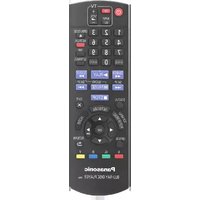
| Included Accessories | Remote control (N2QAYB001031), 2 batteries, power cord |
| Maintenance and Cleaning | Clean with a soft dry cloth; do not use solvents |
| Safety | Do not expose to moisture, do not obstruct ventilation openings, use only recommended accessories |
| Repairability | Possibility to reset to factory settings via the remote control |
| General Information | Warranty: consult the dealer; disposal: follow local regulations |
Frequently Asked Questions - DMP-BDT381 PANASONIC
User questions about DMP-BDT381 PANASONIC
0 question about this device. Answer the ones you know or ask your own.
Ask a new question about this device
Download the instructions for your Blu-ray player in PDF format for free! Find your manual DMP-BDT381 - PANASONIC and take your electronic device back in hand. On this page are published all the documents necessary for the use of your device. DMP-BDT381 by PANASONIC.
USER MANUAL DMP-BDT381 PANASONIC
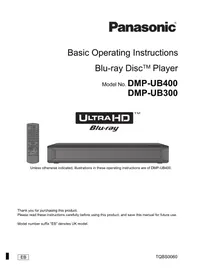
Basic Operating Instructions
Blu-ray Disc™ Player
Thank you for purchasing this product. Please read these instructions carefully before using this product, and save this manual for future use.
Precautions
WARNING
Unit
To reduce the risk of fire, electric shock or product damage,
- Do not expose this unit to rain, moisture, dripping or splashing.
- Do not place objects filled with liquids, such as vases, on this unit.
- Use only the recommended accessories.
- Do not remove covers.
- Do not repair this unit by yourself. Refer servicing to qualified service personnel.
- Do not let metal objects fall inside this unit.
- Do not place heavy items on this unit.
AC mains lead
To reduce the risk of fire, electric shock or product damage, ensure that the power supply voltage corresponds to the voltage printed on this unit. Insert the mains plug fully into the socket outlet. Do not pull, bend, or place heavy items on the lead. Do not handle the plug with wet hands. Hold onto the mains plug body when disconnecting the plug. Do not use a damaged mains plug or socket outlet.
The mains plug is the disconnecting device. Install this unit so that the mains plug can be unplugged from the socket outlet immediately.
CAUTION
Unit
- This unit utilizes a laser. Use of controls or adjustments or performance of procedures other than those specified herein may result in hazardous radiation exposure.
- Do not place sources of naked flames, such as lighted candles, on this unit.
- This unit may receive radio interference caused by mobile telephones during use. If such interference occurs, please increase separation between this unit and the mobile telephone.
- This unit is intended for use in moderate climates.
Placement
Place this unit on an even surface.
To reduce the risk of fire, electric shock or product damage, do not install or place this unit in a bookcase, built-in cabinet or in another confined space. Ensure this unit is well ventilated. Do not obstruct this unit's ventilation openings with newspapers, tablecloths, curtains, and similar items. Do not place the unit on amplifiers/receivers or equipment that may become hot. The heat can damage the unit. Do not expose this unit to direct sunlight, high temperatures, high humidity, and excessive vibration.
Batteries
Mishandling of batteries can cause electrolyte leakage and may cause a fire.
- Danger of explosion if battery is incorrectly replaced. Replace only with the type recommended by the manufacturer.
- When disposing of the batteries, please contact your local authorities or dealer and ask for the correct method of disposal.
- Do not mix old and new batteries or different types at the same time.
- Do not heat or expose to flame.
- Do not leave the battery(ies) in a car exposed to direct sunlight for a long period of time with doors and windows closed.
- Do not take apart or short circuit.
- Do not recharge alkaline or manganese batteries.
- Do not use batteries if the covering has been peeled off.
Remove batteries if you do not intend to use the remote control for a long period of time. Store in a cool, dark place.
Wireless LAN connection
The following limits are in place regarding the usage of this unit. You must be aware of these limits before using this unit. Panasonic will in no way be responsible for any incidental damage which may arise due to a failure to obey these limits, or to any condition of use or disuse of this unit.
Data transmitted and received over radio waves may be intercepted and monitored. - This unit contains delicate electronic components.
Please use this unit in the manner in which it was intended and follow the following points:
- Do not expose this unit to high temperatures or direct sunlight.
- Do not bend, or subject this unit to strong impacts.
- Keep this unit away from moisture.
- Do not disassemble or alter this unit in any way.
Declaration of Conformity (DoC)
C€1731
Hereby, "Panasonic
Corporation" declares that this product is in compliance with the
essential requirements and other relevant provisions of Directive 1999/5/EC.
Customers can download a copy of the original DoC to our R&TTE products from our DoC server:
http://www.doc.panasonic.de
Contact to Authorised Representative:
Panasonic Marketing Europe GmbH, Panasonic Testing Centre, Winsberging 11, 22525 Hamburg, Germany
This product is in compliance with the radio standards of the following countries.
Austria, Belgium, Bulgaria, Cyprus, Czech Republic, Denmark, Finland, France, Germany, Greece, Hungary, Ireland, Italy, Iceland, Liechtenstein, Luxembourg, Malta, Netherlands.
Norway, Poland, Portugal, Romania, Slovakia, Slovenia, Spain, Sweden, United Kingdom, Switzerland
This product is intended to connect to access points of 2.4 GHz WLAN.
To dispose or transfer this unit
The unit may keep the user settings information in the unit. If you discard this unit either by disposal or transfer, then follow the procedure to return all the settings to the factory presets to delete the user settings.
① Turn the unit on. ② Press and hold [OK], the yellow button and the blue button on the remote control at the same time for more than 5 seconds.
- "00 RET" is displayed on the unit's display.
③ Press [▶] (right) repeatedly on the remote control until "08 FIN" is displayed on the unit's display. ④ Press and hold [OK] for more than 5 seconds. - The operation history may be recorded in the memory of this unit.
Disposal of Old Equipment and Batteries Only for European Union and countries with recycling systems

These symbols on the products, packaging, and/or accompanying documents mean that used electrical and electronic products and batteries must not be mixed with general household waste.
For proper treatment, recovery and recycling of old products and used batteries, please take them to applicable collection points in accordance with your national legislation.
By disposing of them correctly, you will help to save valuable resources and prevent any potential negative effects on human health and the environment.
For more information about collection and recycling, please contact your local municipality.
Penalties may be applicable for incorrect disposal of this waste, in accordance with national legislation.

Note for the battery symbol (bottom symbol):
This symbol might be used in combination with a chemical symbol. In this case it complies with the requirement set by the Directive for the chemical involved.
NORSK
ADVARSEL
Produkt
For a redusere faren to brann, elektrisk stot ell er skade pa apparatuse:
Copyrights and Trademarks. 9
A more detailed operating instruction is available in "Operating Instructions (PDF format)". To read it, download it from the website.
http://av.jpn.support.panasonic.com/support/ global/cs/bd/oi/index.html
You will need Adobe Reader to browse or print the Operating Instructions (PDF format).
You can download and install a version of Adobe Reader that you can use with your OS from the following website.
http://www.adobe.com/products/acrobat/readstep2.html
Accessories
Check the supplied accessories before using this unit.
1 Remote control (N2QAYB001031)
2 Batteries for remote control
1 AC mains lead

- Product numbers are provided in these operating instructions correct as of December 2015. These may be subject to change.
- Do not use AC mains lead with other equipment.
Using the remote control
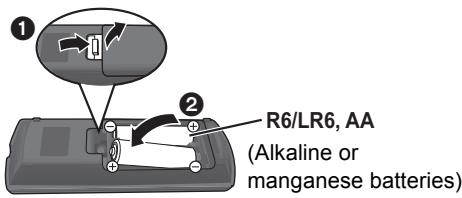
- Insert the batteries to the terminal so that it (+ and -) matches those in the remote control.

Firmware updates
Panasonic is constantly improving the unit's firmware to ensure that our customers are enjoying the latest technology.
Panasonic recommends updating your firmware as soon as you are notified.
Control reference guide
When other Panasonic devices respond to the remote control of the unit, change the remote control code.
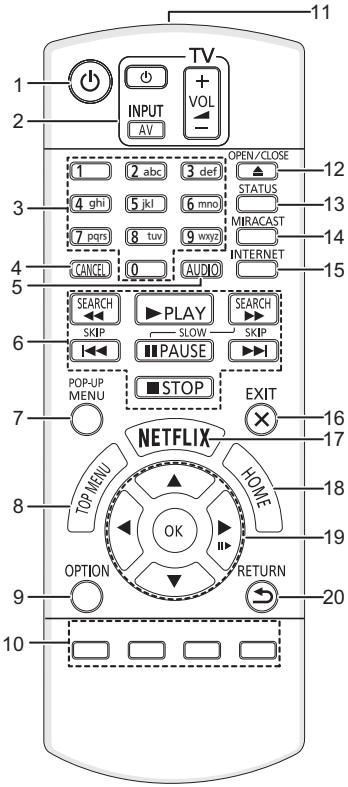
1 Turn the unit on and off 2 TV operation buttons
You can operate the Panasonic TV using this unit's remote control. Some buttons may not work depending on the TV. [TV]: Turn the TV on and off AV: Change input [+/-VOL]: Adjust the volume 3 Select title numbers, etc./Enter numbers or characters 4 Cancel 5 Change soundtrack 6 Basic playback control buttons 7 Show Pop-up menu 8 Show Top menu 9 Show Option menu 10 Coloured buttons (red, green, yellow, blue) Used for various purposes depending on the display 11 Transmit the remote control signal 12 Open or close the disc tray 13 Show the status messages 14 Show MiracastTM screen 15 Show the Home Screen of Network Service 16 Exit the Menu screen 17 Show Netflix screen 18 Show HOME menu 19 [▲,▼,▲,▼]: Move the highlight for selection
[OK]: Confirm the selection
(II▶): Frame-by-frame
20 Return to previous screen
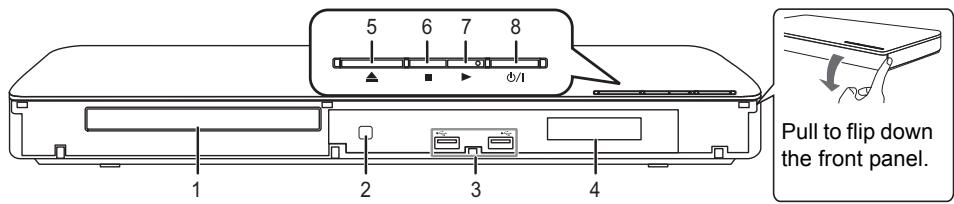
1 Disc tray 2 Remote control signal sensor
Distance: Within approx. 7 m
Angle: Approx. 20° up and down, 30° left and right
3 USB ports 4 Display 5 Open or close the disc tray
6 Stop 7 Start play 8 Standby/on switch (1/1)
Press to switch the unit from on to standby mode or vice versa. In standby mode, the unit still consumes a small amount of power.
STEP 1: Connecting to a TV
AC mains lead (supplied)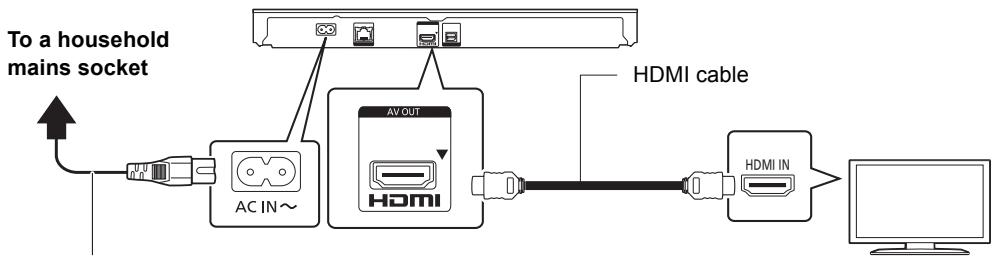
- This unit consumes a small amount of AC power (see 8) even when turned off in standby mode. For energy conservation, the unit should be disconnected if you will not be using it for an extended period of time.
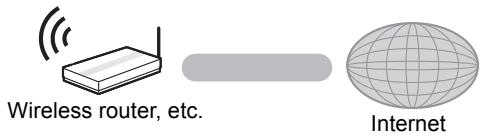
STEP 2: Connecting to the network
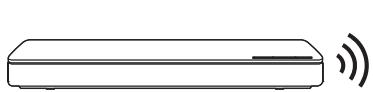
Wireless LAN connection
LAN cable connection
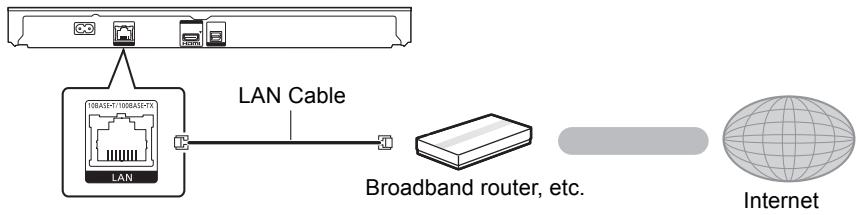
Use category 5 or above straight LAN cables (STP) when connecting to peripheral devices.
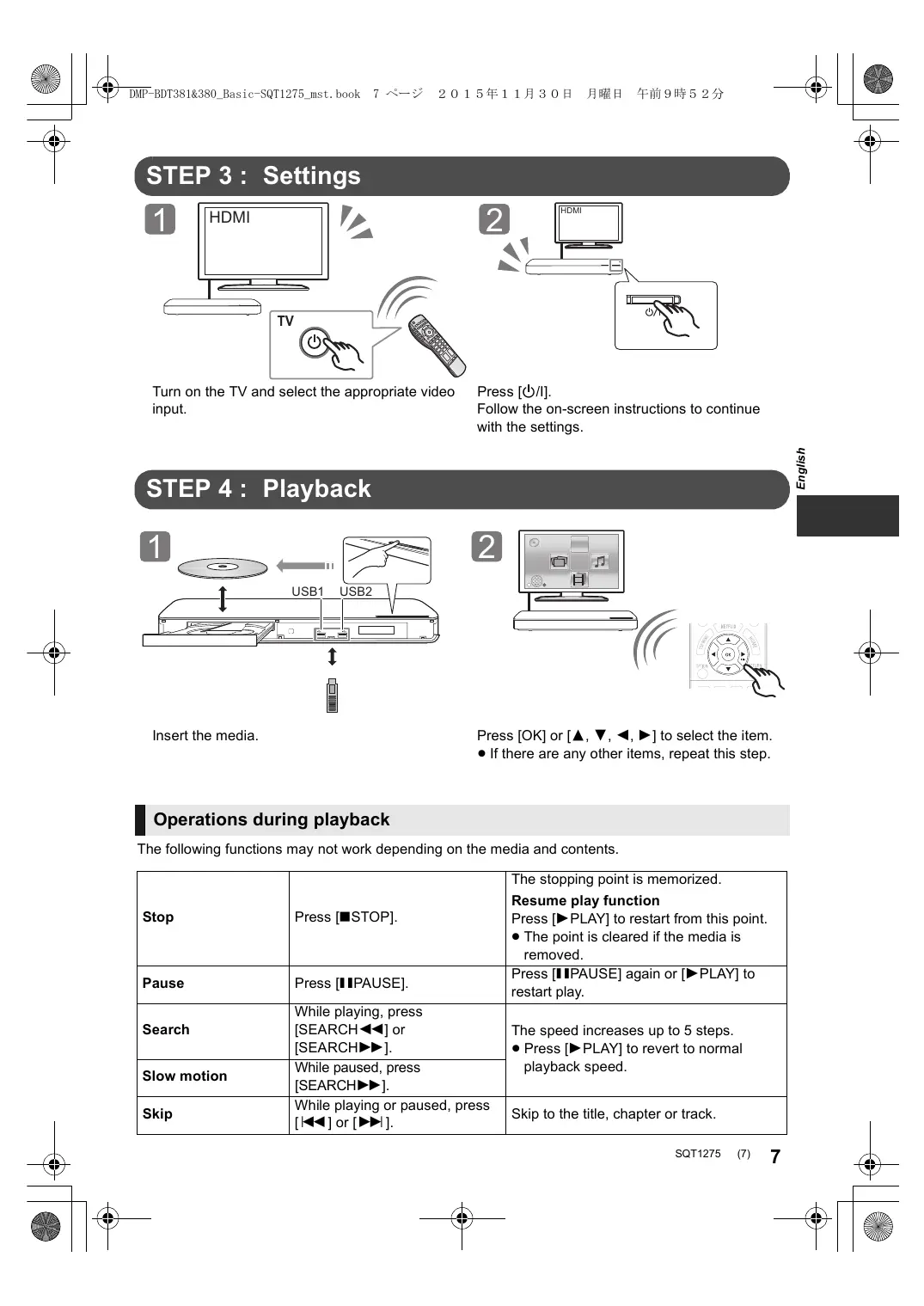
STEP 3: Settings
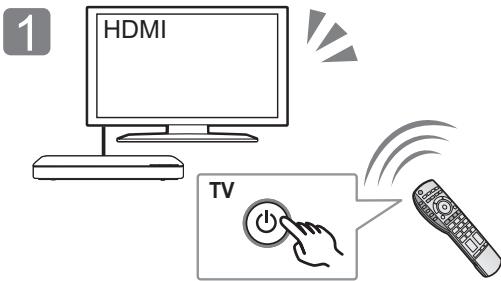
Turn on the TV and select the appropriate video input.
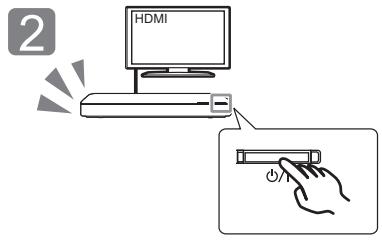
Press [O/I].
Follow the on-screen instructions to continue with the settings.
STEP 4: Playback
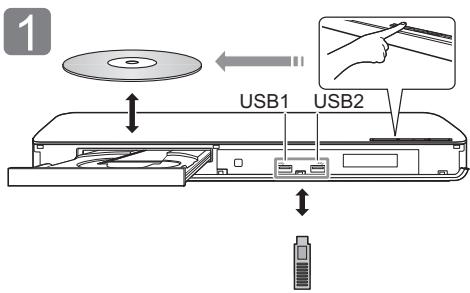
Insert the media.
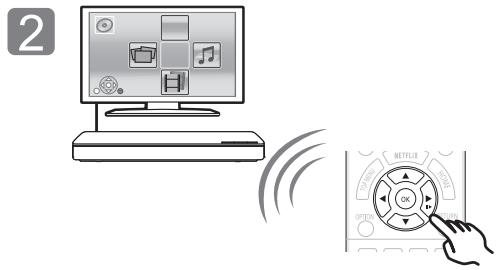
Press [OK] or [triangle, nabla, triangleleft, triangleright] to select the item.
- If there are any other items, repeat this step.
Operations during playback
The following functions may not work depending on the media and contents.
| Stop | Press [■STOP]. | The stopping point is memorized. Resume play function Press [▶PLAY] to restart from this point. ·The point is cleared if the media is removed. |
| Pause | Press [■IPAUSE]. | Press [■IPAUSE] again or [▶PLAY] to restart play. |
| Search | While playing, press [SEARCH←] or [SEARCH►]. | The speed increases up to 5 steps. ·Press [▶PLAY] to revert to normal playback speed. |
| Slow motion | While paused, press [SEARCH►]. | |
| Skip | While playing or paused, press [↓←] or [▶→]. | Skip to the title, chapter or track. |
Playable media
BD-Video: Video
BD-RE: Video, JPEG, MPO, AAC, ALAC, DSD, FLAC, MP3, WAV, WMA
BD-R: Video, MKV, Xvid, AAC, ALAC, DSD, FLAC, MP3, WAV, WMA
DVD-Video: Video
DVD-R/DVD-R DL: Video, AVCHD, MKV, Xvid, JPEG, MPO, AAC, ALAC, DSD, FLAC, MP3, WAV, WMA
DVD-RW/+R/+RW/+R DL: Video, AVCHD Music CD: Music [CD-DA]
CD-R/CD-RW: MKV, Xvid, JPEG, MPO, AAC, ALAC, FLAC, MP3, Music [CD-DA], WAV, WMA
USB devices (up to 4 TB): MKV, MP4, MPEG2, Xvid, JPEG, MPO, AAC, ALAC, DSD, FLAC, MP3, WAV, WMA
Region management information
The unit can play back BD-Video/DVD-Video discs of the following regions codes, including "ALL":
Example:
BD-Video
DVD-Video


Firmware updates
Occasionally, Panasonic may release updated firmware for this unit that may add or improve the way a feature operates. These updates are available free of charge.
This unit is capable of checking the firmware automatically when connected to the Internet via a broadband connection.
When a new firmware version is available, the following message is displayed.
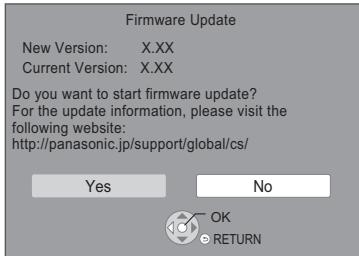
You can also download the latest firmware from the following website and store it to a USB device to update the firmware.
http://panasonic.jp/support/global/cs/ (This site is in English only.)
DO NOT DISCONNECT the unit from the AC power or perform any operation while the update takes place.
After the firmware is installed, unit will restart and the following screen will be displayed.
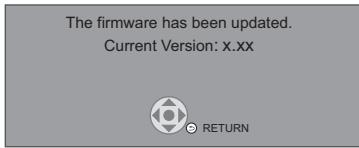

To show the firmware version on this unit; [HOME] ⇒ "Setup" ⇒ "Player Settings" ⇒ "System" ⇒ "System Information" ⇒ "Firmware Version Information" - Downloading will require several minutes. It may take longer or may not work properly depending on the connection environment. - If you do not want to check for the latest firmware version, set "Automatic Update Check" to "Off". [HOME] ⇒ "Setup" ⇒ "Player Settings" ⇒ "System" ⇒ "Firmware Update"
Specifications
| Power supply | AC 220 V to 240 V, 50 Hz |
| Power consumption | Approx. 17 W |
| Power consumption in standby mode | Approx. 0.5 W (Quick Start: Off) |
| Power consumption in quick start standby mode | Approx. 5.5 W (Quick Start: On) |
| Dimensions (W×H×D) | 415 mm×43 mm×182 mm |
| Mass | Approx. 1.2 kg |
- Specifications are subject to change without notice.
Copyrights and Trademarks
This product uses Cinavia technology to limit the use of unauthorized copies of some commercially-produced film and videos and their soundtracks. For details, refer to the operating instructions (PDF format).
"AVCHD" is a trademark of Panasonic Corporation and Sony Corporation.
Java is a registered trademark of Oracle and/or its affiliates.
Dolby, Dolby Audio, and the double-D symbol are trademarks of Dolby Laboratories.
For DTS patents, see http://patents.dts.com. Manufactured under license from DTS Licensing Limited. DTS, DTS-HD, the Symbol, & DTS and the Symbol together are registered trademarks, and DTS-HD Master Audio is a trademark of DTS, Inc. © DTS, Inc. All Rights Reserved.
The terms HDMI and HDMI High-Definition Multimedia Interface, and the HDMI Logo are trademarks or registered trademarks of HDMI Licensing, LLC in the United States and other countries.
This product is licensed under the AVC Patent Portfolio License for the personal use of a consumer or other uses in which it does not receive remuneration to (i) encode video in compliance with the AVC Standard ("AVC Video") and/or (ii) decode AVC Video that was encoded by a consumer engaged in a personal activity and/or was obtained from a video provider licensed to provide AVC Video. No license is granted or shall be implied for any other use. Additional information may be obtained from MPEG LA, L.L.C. See http://www.mpegla.com
This product is licensed under the VC-1 Patent Portfolio License for the personal and non-commercial use of a consumer to (i) encode video in compliance with the VC-1 Standard ("VC-1 Video") and/or (ii) decode VC-1 Video that was encoded by a consumer engaged in a personal and non-commercial activity and/or was obtained from a video provider licensed to provide VC-1 Video. No license is granted or shall be implied for any other use. Additional information may be obtained from MPEG LA, L.L.C. See http://www.mpegl.com
MPEG Layer-3 audio coding technology licensed from Fraunhofer IIS and Thomson.
"DVD Logo" is a trademark of DVD Format/Logo Licensing Corporation.
The Wi-Fi CERTIFIED™ Logo is a certification mark of the Wi-Fi Alliance®.
The Wi-Fi Protected SetupTM Identifier mark is a certification mark of Wi-Fi Alliance®.
"Wi-Fi®" and "Wi-Fi Direct®" are registered trademarks of Wi-Fi Alliance®.
"Wi-Fi Protected SetupTM", "MiracastTM", "WPA™", and "WPA2TM, are trademarks of Wi-Fi Alliance®.
DLNA, the DLNA Logo and DLNA CERTIFIED are trademarks, service marks, or certification marks of the Digital Living Network Alliance.
Windows is a trademark or a registered trademark of Microsoft Corporation in the United States and other countries.
Android is a trademark of Google Inc.
Copyright 2004-2014 Verance Corporation. Cinavia™ is a Verance Corporation trademark. Protected by U.S. Patent 7,369,677 and worldwide patents issued and pending under license from Verance Corporation. All rights reserved.
This product incorporates the following software:
(1) the software developed independently by or for Panasonic Corporation,
(2) the software owned by third party and licensed to Panasonic Corporation,
(3) the software licensed under the GNU General Public License, Version 2.0 (GPL V2.0),
(4) the software licensed under the GNU LESSER General Public License, Version 2.1 (LGPL V2.1), and/or
(5) open source software other than the software licensed under the GPL V2.0 and/or LGPL V2.1.
The software categorized as (3) - (5) are distributed in the hope that it will be useful, but WITHOUT ANY WARRANTY, without even the implied warranty of MERCHANTABILITY or FITNESS FOR A PARTICULAR PURPOSE. Please refer to the detailed terms and conditions thereof shown in the Player Settings menu.
At least three (3) years from delivery of this product, Panasonic will give to any third party who contacts us at the contact information provided below, for a charge no more than our cost of physically performing source code distribution, a complete machine-readable copy of the corresponding source code covered under GPL V2.0, LGPL V2.1 or the other licenses with the obligation to do so, as well as the respective copyright notice thereof.
Contact Information: oss-cd-request@gg.jp.panasonic.com
The source code and the copyright notice are also available for free in our website below.
http://panasonic.net/avc/oss/
David M. Gay's dtoa and strtod license
The author of this software is David M. Gay.
Copyright (c) 1991, 2000, 2001 by Lucent Technologies.
Permission to use, copy, modify, and distribute this software for any purpose without fee is hereby granted, provided that this entire notice is included in all copies of any software which is or includes a copy or modification of this software and in all copies of the supporting documentation for such software.
THIS SOFTWARE IS BEING PROVIDED "AS IS", WITHOUT ANY EXPRESS OR IMPLIED WARRANTY. IN PARTICULAR, NEITHER THE AUTHOR NOR LUCENT MAKES ANY REPRESENTATION OR WARRANTY OF ANY KIND CONCERNING THE
MERCHANTABILITY OF THIS SOFTWARE OR ITS FITNESS FOR ANY PARTICULAR PURPOSE.
"UNICODE, INC. LICENSE AGREEMENT - DATA FILES AND SOFTWARE
Unicode Data Files include all data files under the directories http://www.unicode.org/Public/, http://www.unicode.org/reports/, and http://www.unicode.org/cldr/data/.
Unicode Software includes any source code published in the Unicode Standard or under the directories
http://www.unicode.org/Public/,
http://www.unicode.org/reports/, and http://www.unicode.org/cldr/data/.
NOTICE TO USER: Carefully read the following legal agreement. BY DOWNLOADING, INSTALLING, COPYING OR OTHERWISE USING UNICODE INC.'S DATA FILES ("DATA FILES"), AND/OR SOFTWARE ("SOFTWARE"), YOU UNEQUIVOCALLY ACCEPT, AND AGREE TO BE BOUND BY, ALL OF THE TERMS AND CONDITIONS OF THIS AGREEMENT. IF YOU DO NOT AGREE, DO NOT DOWNLOAD, INSTALL, COPY, DISTRIBUTE OR USE THE DATA FILES OR SOFTWARE.
COPYRIGHT AND PERMISSION NOTICE
Copyright (c) 1991-2009 Unicode, Inc. All rights reserved.
Distributed under the Terms of Use in
http://www.unicode.org/copyright.html.
Permission is hereby granted, free of charge, to any person obtaining a copy of the Unicode data files and any associated documentation (the "Data Files") or Unicode software and any associated documentation (the "Software") to deal in the Data Files or Software without restriction, including without limitation the rights to use, copy, modify, merge, publish, distribute, and/or sell copies of the Data Files or Software, and to permit persons to whom the Data Files or Software are furnished to do so, provided that (a) the above copyright notice(s) and this permission notice appear with all copies of the Data Files or Software, (b) both the above copyright notice(s) and this permission notice appear in associated documentation, and (c) there is clear notice in each modified Data File or in the Software as well as in the documentation associated with the Data File(s) or Software that the data or software has been modified.
THE DATA FILES AND SOFTWARE ARE PROVIDED "AS IS", WITHOUT WARRANTY OF ANY KIND, EXPRESS OR IMPLIED, INCLUDING BUT NOT LIMITED TO THE WARRANTIES OF MERCHANTABILITY, FITNESS FOR A PARTICULAR PURPOSE AND NONINFRINGEMENT OF THIRD PARTY RIGHTS. IN NO EVENT SHALL THE COPYRIGHT HOLDER OR HOLDERS INCLUDED IN THIS NOTICE BE LIABLE FOR ANY CLAIM, OR ANY SPECIAL INDIRECT OR CONSEQUENTIAL DAMAGES, OR ANY DAMAGES WHATSOEVER RESULTING FROM LOSS OF USE, DATA OR PROFITS, WHETHER IN AN ACTION OF CONTRACT, NEGLIGENCE OR OTHER TORTIOUS ACTION, ARISING OUT OF OR IN CONNECTION WITH THE USE OR PERFORMANCE OF THE DATA FILES OR SOFTWARE.
Except as contained in this notice, the name of a copyright holder shall not be used in advertising or otherwise to promote the sale, use or other dealings in these Data Files or Software without prior written authorization of the copyright holder.
(1) MS/WMA
This product is protected by certain intellectual property rights of Microsoft Corporation and third parties. Use or distribution of such technology outside of this product is prohibited without a license from Microsoft or an authorized Microsoft subsidiary and third parties.
(2) MS/PlayReady/Final Product Labeling
This product contains technology subject to certain intellectual property rights of Microsoft. Use or distribution of this technology outside of this product is prohibited without the appropriate license(s) from Microsoft.
(3) MS/PlayReady/End User Notices
Content owners use Microsoft PlayReady™ content access technology to protect their intellectual property, including copyrighted content. This device uses PlayReady technology to access PlayReady-protected content and/or WMDRM-protected content. If the device fails to properly enforce restrictions on content usage, content owners may require Microsoft to revoke the device's ability to consume PlayReady-protected content. Revocation should not affect unprotected content or content protected by other content access technologies. Content owners may require you to upgrade PlayReady to access their content. If you decline an upgrade, you will not be able to access content that requires the upgrade.
(4) FLAC, WPA Suppliant
The software licenses are displayed when "Software Licence" in the Setup menu is selected.*
- [HOME] => "Setup" => "Player Settings" => "System" => "System Information"
http://www.adobe.com/products/acrobat/readstep2.html
Accessories
DLNA, the DLNA Logo and DLNA CERTIFIED are trademarks, service marks, or certification marks of the Digital Living Network Alliance.
(4) FLAC, WPA Suppliant
http://www.adobe.com/products/acrobat/readstep2.html
Accessories
DLNA, the DLNA Logo and DLNA CERTIFIED are trademarks, service marks, or certification marks of the Digital Living Network Alliance.
(4) FLAC, WPA Suppliant
Directive 1999/5/EC.
http://www.adobe.com/products/acrobat/readstep2.html
Accessories
"Wi-Fi Protected SetupTM," "MiracastTM," "WPA™," and "WPA2TM" are trademarks of Wi-Fi Alliance®.
DLNA, the DLNA Logo and DLNA CERTIFIED are trademarks, service marks, or certification marks of the Digital Living Network Alliance.
DLNA, the DLNA Logo and DLNA CERTIFIED are trademarks, service marks, or certification marks of the Digital Living Network Alliance.
Copyright (c) 1991, 2000, 2001 by Lucent Technologies.
(4) FLAC, WPA Suppliant
http://www.adobe.com/products/acrobat/readstep2.html
Accessories
Check the supplied accessories before using this unit.
1 Remote control
(N2QAYB001031)
2 Batteries for the remote control
1 AC power cord

DLNA, the DLNA Logo and DLNA CERTIFIED are trademarks, service marks, or certification marks of the Digital Living Network Alliance.
http://www.adobe.com/products/acrobat/readstep2.html

Firmware updates
Panasonic continually improves this unit's firmware to ensure that our customers can always enjoy the latest technology.
Panasonic recommends that you update the firmware as soon as you receive notification about it.
Accessories
The firmware has been updated.
Current Version: x.xx

RETURN

- The firmware version is displayed on this unit. [HOME] → "Setup" → "Player Settings" → "System" → "System Information" → "Firmware Version Information" Downloading takes several minutes. It may take longer or may not work correctly, depending on the connection environment.
- If you do not want to check for the latest firmware revision, set "Automatic Update Check" to "Off". [HOME] => "Setup" => "Player Settings" => "System" => "Firmware Update"
Specifications
| Strømforsyning | AC 220 V til 240 V, 50 Hz |
| Strømforbrug | Ca. 17 W |
| Strømforbrug i standby | Ca. 0,5 W (Quick Start: Off) |
| Stromforbrug i hurtigstart-standby- mode | Ca. 5,5 W (Quick Start: On) |
| Dimensioner (W×H×D) | 415 mm×43 mm×182 mm |
| Masse | Ca. 1,2 kg |
DLNA, the DLNA Logo and DLNA CERTIFIED are trademarks, service marks, or certification marks of the Digital Living Network Alliance.
(3) The software is licensed under the GNU General Public License, Version 2.0 (GPL V2.0).
(4) The software is licensed under the GNU Lesser General Public License, Version 2.1 (LGPL V2.1) and/or.
(5) Other open source software is licensed under GPL V2.0 and/or LGPL V2.1.
The software categorized as (3) - (5) is distributed in the hope that it will be useful, but WITHOUT ANY WARRANTY; without even the implied warranty of MERCHANTABILITY or FITNESS FOR A PARTICULAR PURPOSE. Refer to the detailed terms and conditions as specified in the Player Settings menu.
(4) FLAC, WPA Supplicant
The software licenses are displayed when "Software Licence" is selected in the settings menu.*
- [HOME] => "Setup" => "Player Settings" => "System" => "System Information"
Thank you for purchasing this product. Before using this product, please read these instructions carefully and keep this manual for future reference.
Precautions
WARNING
Device
http://www.adobe.com/products/acrobat/readstep2.html
Accessories
DLNA, the DLNA Logo and DLNA CERTIFIED are trademarks, service marks, or certification marks of the Digital Living Network Alliance.
Copyright (c) 1991, 2000, 2001 Lucent Technologies.
(4) FLAC, WPA Suppliant
Software license is displayed after selecting the "Software Licence" option in the Settings menu.*
- [HOME] ⇒ "Setup" ⇒ "Player Settings" ⇒ "System" ⇒ "System information"
http://www.adobe.com/products/acrobat/readstep2.html
Accessories
Do you want to start firmware update?
For the update information, please visit the
following website:
http://panasonic.jp/support/global/cs/
Yes

No
The firmware has been updated.
Current Version: x.xx

RETURN

"Wi-Fi Protected Setup™," "Miracast™," "WPA™," and "WPA2™" are trademarks of the Wi-Fi Alliance®.
DLNA, the DLNA Logo and DLNA CERTIFIED are trademarks, service marks, or certification marks of the Digital Living Network Alliance.
Copyright (c) 1991, 2000, 2001 by Lucent Technologies.
(4) FLAC, WPA Suppliant
DLNA, the DLNA Logo and DLNA CERTIFIED are trademarks, service marks, or certification marks of the Digital Living Network Alliance.
Copyright (c) 1991, 2000, 2001 by Lucent Technologies.
The firmware has been updated.
Current Version: x.xx

RETURN
"Wi-Fi Protected Setup™," "Miracast™," "WPA™," and "WPA2™" are trademarks of the Wi-Fi Alliance®.
DLNA, the DLNA Logo and DLNA CERTIFIED are trademarks, service marks, or certification marks of the Digital Living Network Alliance.
(4) FLAC, WPA Suppliant
Importer for Europe:
Kadoma, Osaka, Japan
Panasonic Marketing Europe GmbH
Panasonic Testing Centre
Winsberging 11, 22525 Hamburg, Germany

Panasonic Corporation
Web Site: http://www.panasonic.com
En Fr It Sp
Du Sw Da Cz
HuPoFi

- BASIC OPERATING INSTRUCTIONS
- PRECAUTIONS
- WARNING
- UNIT
- AC MAINS LEAD
- CAUTION
- PLACEMENT
- BATTERIES
- WIRELESS LAN CONNECTION
- DECLARATION OF CONFORMITY (DOC)
- C€
- TO DISPOSE OR TRANSFER THIS UNIT
- DISPOSAL OF OLD EQUIPMENT AND BATTERIES ONLY FOR EUROPEAN UNION AND COUNTRIES WITH RECYCLING SYSTEMS
- NOTE FOR THE BATTERY SYMBOL (BOTTOM SYMBOL)
- NORSK
- ADVARSEL
- PRODUKT
- ACCESSORIES
- USING THE REMOTE CONTROL
- FIRMWARE UPDATES
- CONTROL REFERENCE GUIDE
- STEP 1: CONNECTING TO A TV
- STEP 2: CONNECTING TO THE NETWORK
- LAN CABLE CONNECTION
- STEP 3: SETTINGS
- STEP 4: PLAYBACK
- OPERATIONS DURING PLAYBACK
- PLAYABLE MEDIA
- REGION MANAGEMENT INFORMATION
- SPECIFICATIONS
- COPYRIGHTS AND TRADEMARKS
- MS/WMA
- MS/PLAYREADY/FINAL PRODUCT LABELING
- MS/PLAYREADY/END USER NOTICES
- FLAC, WPA SUPPLIANT
- FLAC, WPA SUPPLICANT
- DEVICE
Brand : PANASONIC
Model : DMP-BDT381
Category : Blu-ray player