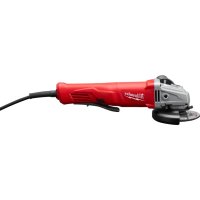
614131 - Sander MILWAUKEE - Free user manual and instructions
Find the device manual for free 614131 MILWAUKEE in PDF.


| Brand | Milwaukee |
| Model | 614131 |
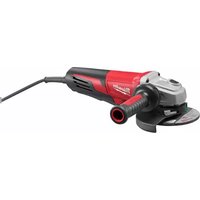
| Product type | Sander-grinder |
| Power supply voltage | 120 V AC/DC |
| Rated current | 5.5 A |
| No-load speed | 10,000 rpm |
| Grinding wheel dimensions | 115 mm (4-1/2") or 127 mm (5") depending on version |
| Spindle type | 5/8"-11 or 1/2"-13 depending on version |
| Double insulation | Yes |
| Approximate weight | 2 kg (4.4 lb) |
| Power source | Mains with power cord |
| Main functions | Sanding, grinding, cutting, brushing |
| Safety | Adjustable guard, spindle lock, double insulation |
| Maintenance | Regular cleaning of vents, lubrication, brush replacement |
| Warranty | 5 years (subject to conditions) |
| Compatible accessories | Abrasive discs, grinding wheels, wire brushes |
| Repairability | Authorized Milwaukee service center |
Frequently Asked Questions - 614131 MILWAUKEE
User questions about 614131 MILWAUKEE
0 question about this device. Answer the ones you know or ask your own.
Ask a new question about this device
Download the instructions for your Sander in PDF format for free! Find your manual 614131 - MILWAUKEE and take your electronic device back in hand. On this page are published all the documents necessary for the use of your device. 614131 by MILWAUKEE.
USER MANUAL 614131 MILWAUKEE
natural_image
Exterior view of a gray and white industrial power tool with a circular base (no visible text or symbols)HEAVY-DUTY SANDERS/GRINDERS
EXTRA ROBUSTE PONCEUSE-RECTIFIEUSE
LIJADORAS/ESMERILADORAS HEAVY-DUTY
TO REDUCE THE RISK OF INJURY, USER MUST READ OPERATOR'S MANUAL. AFIN DE RÉDUIRE LE RISQUE DE BLESSURES, L'UTILISATEUR DOIT LIRE LE MANUEL DE L'UTILISATEUR.
Failure to follow all instructions listed below may result in electric shock, fire and/or serious injury. The term "power tool" in all of the warnings listed below refers to your malns-operated (corded) power tool or battery-operated (cordless) power tool.
SAVE THESE INSTRUCTIONS
WORK AREA SAFETY
- Keep work area clean and well lit. Cluttered or dark areas invite accidents.
- Do not operate power tools in explosive atmospheres, such as In the presence of ammable liquids, gases, or dust. Power tools create sparks which may ignite the dust or fumes.
- Keep children and bystanders away while operating a power tool. Distractions can cause you to lose control.
ELECTRICAL SAFETY
- Power tool plugs must match the outlet. Never modify the plug in any way. Do not use any adapter plugs with earthed (grounded) power tools. Unmodified plugs and matching outlets will reduce risk of electric shock.
- Avoid body contact with earthed or grounded surfaces such as pipes, radiators, ranges and refrigerators. There is an increased risk of electric shock if your body is earthed or grounded.
- Do not expose power tools to rain or wet conditions. Water entering a power tool will increase the risk of electric shock.
- Do not abuse the cord. Never use the cord for carrying, pulling, or unplugging the power tool. Keep cord away from heat, oil, sharp edges, or moving parts. Damaged or entangled cords increase the risk of electric shock.
- When operating a power tool outdoors, use an extension cord suitable for outdoor use. Use of a cord suitable for outdoor use reduces the risk of electric shock.
PERSONAL SAFETY
- Stay alert, watch what you are doing and use common sense when operating a power tool. Do not use a power tool while you are tired or under the influence of drugs, alcohol or medication. A moment of inattention while operating power tools may result in serious personal injury.
- Use safety equipment. Always wear eye protection. Safety equipment such as dust mask, non-skid safety shoes, hard hat, or hearing protection used for appropriate conditions will reduce personal injuries.
- Avoid accidental starting. Ensure the switch is in the off-position before plugging in. Carrying tools with your finger on the switch or plugging in power tools that have the switch on invites accidents.
- Remove any adjusting key or wrench before turning the power tool on. A wrench or a key left attached to a rotating part of the power tool may result in personal injury.
- Do not overreach. Keep proper footing and balance at all times. This enables better control of the power tool in unexpected situations.
- Dress properly. Do not wear loose clothing or jewellery. Keep your hair, clothing and gloves away from moving parts. Loose clothes, jewellery, or long hair can be caught in moving parts.
- If devices are provided for the connection of dust extraction and collection facilities, ensure these are connected and properly used. Use of these devices can reduce dust-related hazards.
POWER TOOL USE AND CARE
- Do not force the power tool. Use the correct power tool for your application. The correct power tool will do the job better and safer at the rate for which it was designed.
- Do not use the power tool if the switch does not turn it on and off. Any power tool that cannot be controlled with the switch is dangerous and must be repaired.
- Disconnect the plug from the power source and/or the battery pack from the power tool before making any adjustments, changing accessories, or storing power tools. Such preventive safety measures reduce the risk of starting the tool accidentally.
- Store idle power tools out of the reach of children and do not allow persons unfamiliar with the power tools or these instructions to operate power tools. Power tools are dangerous in the hands of untrained users.
- Maintain power tools. Check for misalignment or binding of moving parts, breakage of parts and any other condition that may affect the power tool's operation. If damaged, have the power tool repaired before use. Many accidents are caused by poorly maintained power tools.
- Keep cutting tools sharp and clean. Properly maintained cutting tools with sharp cutting edges are less likely to bind and are easier to control.
- Use the power tool, accessories and tool bits etc., in accordance with these instructions and in the manner intended for the particular type of power tool, taking into account the working conditions and the work to be performed. Use of the power tool for operations different from those intended could result in a hazardous situation.
SERVICE
- Have your power tool serviced by a qualified repair person using only identical replacement parts. This will ensure that the safety of the power tool is maintained.
SPECIFIC SAFETY RULES
- Always use proper guard with grinding wheel. A guard protects operator from broken wheel fragments.
- Accessories must be rated for at least the speed recommended on the tool warning label. Wheels and other accessories running over rated speed can fly apart and cause injury.
- Make sure all wheel ranges and other mounting hardware are in good condition and are always used properly. Defective or missing parts may damage the wheels and other accessories. Always use mounting hardware supplied with the tool.
- Hold tools by insulated gripping surfaces when performing an operation where the cutting tool may contact hidden wiring or its own cord. Contact with a "live" wire will make exposed metal parts of the tool "live" and shock the operator.
- Keep hands away from all cutting edges and moving parts.
- Maintain labels and nameplates. These carry important information. If unreadable or missing, contact a MILWAUKEE service facility for a free replacement.
- WARNING: Some dust created by power sanding, sawing, grinding, drilling, and other construction activities contains chemicals known to cause cancer, birth defects or other reproductive harm. Some examples of these chemicals are:
• lead from lead-based paint
• crystalline silica from bricks and cement and other masonry products, and
• arsenic and chromium from chemically-treated lumber.
Your risk from these exposures varies, depending on how often you do this type of work. To reduce your exposure to these chemicals: work in a well-ventilated area, and work with approved safety equipment, such as those dust masks that are specially designed to filter out microscopic particles.
FUNCTIONAL DESCRIPTION
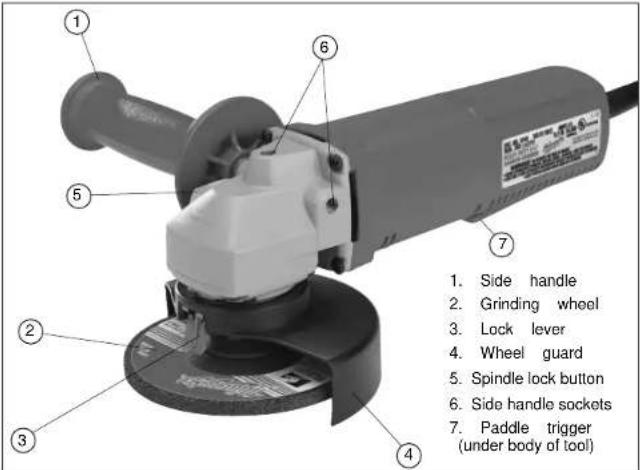
Specifications
| Cat. No. | Volts AC/DC | Amps | RPM | Spindle Size | Wheel Size | Min. Wheel RPM Rating |
| 6140 | 120 | 5.5 | 10,000 | 5/8" - 11 | 4 - 1/2" | 12,000 |
| 6141 | 120 | 5.5 | 10,000 | 5/8" - 11 | 5" | 12,000 |
| 6145 | 120 | 5.5 | 10,000 | 1/2" - 13 | 4 - 1/2" | 12,000 |
Symbology
| Double Insulated | V≈ | Volts Alternating Current/ Direct Current | |
| Underwriters Laboratories, Inc., United States and Canada | noxxxx/min. | No Load Revolutions per Minute (RPM) | |
| Amps |
GROUNDING

WARNING
Improperly connecting the grounding wire can result in the risk of electric shock. Check with a qualin ed electrician if you are in doubt as to whether the outlet is properly grounded. Do not modify the plug provided with the tool. Never remove the grounding prong from the plug. Do not use the tool if the cord or plug is damaged. If damaged, have it repaired by a MILWAUKEE service facility before use. If the plug will not at the outlet, have a proper outlet installed by a qualin ed electrician.
Grounded Tools:
Tools with Three Prong Plugs
Tools marked "Grounding Required" have a three wire cord and three prong grounding plug. The plug must be connected to a properly grounded outlet (See Figure A). If the tool should electrically malfunction or break down, grounding provides a low resistance path to carry electricity away from the user, reducing the risk of electric shock.
The grounding prong in the plug is connected through the green wire inside the cord to the grounding system in the tool. The green wire in the cord must be the only wire connected to the tool's grounding system and must never be attached to an electrically "live" terminal.
Your tool must be plugged into an appropriate outlet, properly installed and grounded in accordance with all codes and ordinances. The plug and outlet should look like those in Figure A.
Double Insulated Tools:
Tools with Two Prong Plugs
Tools marked "Double Insulated" do not require grounding. They have a special double insulation system which satisfies OSHA requirements and complies with the applicable standards of Underwriters Laboratories, Inc., the Canadian Standard Association and the National Electrical Code. Double Insulated tools may be used in either of the 120 volt outlets shown in Figures B and C.
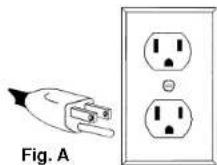
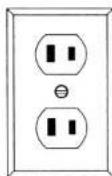
Fig. B
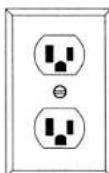
Fig. C
EXTENSION CORDS
Grounded tools require a three wire extension cord. Double insulated tools can use either a two or three wire extension cord. As the distance from the supply outlet increases, you must use a heavier gauge extension cord. Using extension cords with inadequately sized wire causes a serious drop in voltage, resulting in loss of power and possible tool damage. Refer to the table shown to determine the required minimum wire size.
The smaller the gauge number of the wire, the greater the capacity of the cord. For example, a 14 gauge cord can carry a higher current than a 16 gauge cord. When using more than one extension cord to make up the total length, be sure each cord contains at least the minimum wire size required. If you are using one extension cord for more than one tool, add the nameplate amperes and use the sum to determine the required minimum wire size.
Guidelines for Using Extension Cords
- If you are using an extension cord outdoors, be sure it is marked with the suffix "W-A" ("W" in Canada) to indicate that it is acceptable for outdoor use.
- Be sure your extension cord is properly wired and in good electrical condition. Always replace a damaged extension cord or have it repaired by a qualified person before using it.
- Protect your extension cords from sharp objects, excessive heat and damp or wet areas.
Recommended Minimum Wire Gauge for Extension Cords*
| Nameplate Amperes | Extension Cord Length | ||||
| 25' | 50' | 75' | 100' | 150' | |
| 0 - 2.0 | 18 | 18 | 18 | 18 | 16 |
| 2.1 - 3.4 | 18 | 18 | 18 | 16 | 14 |
| 3.5 - 5.0 | 18 | 18 | 16 | 14 | 12 |
| 5.1 - 7.0 | 18 | 16 | 14 | 12 | 12 |
| 7.1 - 12.0 | 16 | 14 | 12 | 10 | |
| 12.1 - 16.0 | 14 | 12 | 10 | ||
| 16.1 - 20.0 | 12 | 10 | |||
* Based on limiting the line voltage drop to five volts at 150% of the rated amperes.
READ AND SAVE ALL INSTRUCTIONS FOR FUTURE USE.
TOOL ASSEMBLY

WARNING
To reduce the risk of injury, always unplug tool before attaching or removing accessories or making adjustments. Use only specifically recommended accessories. Others may be hazardous.
Installing Side Handle
The side handle may be installed on the top of the gear case or on either side of gear case for right or left handed use. Position side handle in the location which offers best control and guard protection. To install, thread side handle into side handle socket on desired side of gear case and tighten securely.
OPERATION

WARNING
To reduce the risk of injury, wear safety goggles or glasses with side shields. Unplug the tool before changing accessories or making adjustments.
Starting and Stopping the Motor
Plug in the tool. To start the tool, squeeze the paddle trigger. Release the paddle trigger to stop tool.
- To start the tool, squeeze the paddle trigger.
- To stop the tool, release the paddle trigger.
Sanding Disc/Grinding Wheel Selection
Use sanding discs and grinding wheels that are:
- correct size as written on tool's name-plate.
• correct wheel type and grit for the job.
- rated at or above the RPM listed in the "WARNING" section on the tool's nameplate.
Use backing pads, adapters, and other accessories that are:
- correct size for tool and for sanding disc or grinding wheel.
- rated at or above the RPM listed in the "WARNING" section on the tool's nameplate.
• the proper accessory for the job.

WARNING
To reduce the risk of personal injury and damage to the tool, use ONLY accessories rated at or above the RPM listed on the "WARNING" section of the tool's nameplate.
Sanding Disc/Grinding Wheel Material
Sanding discs and grinding wheels are made of various materials and are designed for different jobs. Be sure that you choose the proper sanding disc or grinding wheel for the job you plan to do.
Selecting Sanding Discs & Grit
Refer to the table below to select the correct type of sanding disc for your job. Generally, use 24 or 36 grit for heavy stock removal; 50, 60, or 80 grit for medium stock removal and 120 grit for nishing. Always begin with a coarse grit, using successively ner grits to obtain the desired nish. See Catalogor a complete list of MILWAUKEE sanding discs.
Aluminum Oxide: For fast cutting, general purpose discs for most metal jobs. Best for cold-rolled steel, stainless steel or metals requiring tough, fast cutting, long lasting abrasives.
Aluminum Zirconia Bi-Cut: Unique grit pattern is arranged in clusters for faster stock removal and cleaning. Ideal for removing paint from cars, boats, etc. without clogging.
Ceramic: Lasts up to 3 times longer than aluminum oxide discs. For general metal working. Ideal for tough jobs.
Installing Backing Pad and Sanding Discs
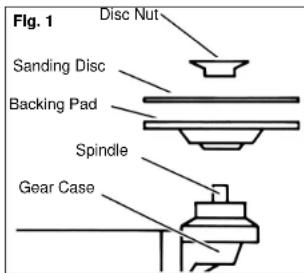
- Unplug tool and place it upside down on a level surface as shown. Remove any accessories from spindle.
- Slip backing pad onto spindle with a at side away from gear case. Place sanding disc on backing pad and secure assembly to spindle with disc nut.
- To tighten, press the spindle lock button while turning disc nut clockwise.
- To remove backing pad and sanding disc, unplug tool and reverse procedure.
Sanding
- Use a clamp, vise or other practical means to hold your work, freeing both hands to control your tool. Firmly grasp body of tool and side handle before starting and while tool is in operation. Allow sanding disc to come to full speed before beginning to sand.
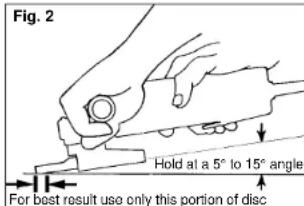
- Hold Sander/Grinder at 5° to 15° angle as shown to ensure proper sanding pressure and control. Too great an angle will result in too much pressure and could cause excessive wear to the disc and workpiece. Too small an angle will reduce control.
- Use long, sweeping, side to side strokes, advancing forward to produce the desired finish.
Removing Welds or Hammer Marks
When removing welds or hammer marks, limit coarse sanding to the immediate area. Use successively inner grits to smooth surface.
Cross Sanding
When finishing a surface that has been prepared by a coarse disc or wheel, sand at right angles to the strokes made by the coarser disc. Finishing marks left from previous sanding are easily seen and removed for a uniform nish. Failure to cross sand when changing from a coarse disc to a nishing disc may result in deep scratches and circular marks.
Finishing Metal
Constantly move across the surface. Work faster on curved surfaces where contact areas are smaller and pressure is greater. Flat areas may appear at the end of the stroke when pressure is too heavy. Ease up on pressure at end of each stroke and when reversing strokes.
Troubleshooting
Deep scratches and circular marks can result from:
• Using too coarse a grit
• Using a partially glazed disc
- Dirt or loose metal on the workpiece
- Failure to sand across the grain when changing from coarse to finishing discs
- Failure to use closed coated discs to reduce the problem of grains working loose and scratching the workpiece
Bluish discoloration of metal surface indicates:
• Excessive heat caused by circular motion in a small area
- Excessive pressure
• Use of worn out or glazed discs

Only use wheels with Maximum Safe Operating Speed rated at or above the RPM listed on the "WARNING" section of the tool's nameplate. This speed is based on the strength of the wheel, allowing for a reasonable measure of safety. It is not meant to imply a best or most efficient operating speed. Do not exceed the Maximum Safe Operating Speed.
Inspecting Wheels
Always handle wheels carefully to avoid damage. Before installing any wheel, always inspect it for cracks. If wheel is cracked, discard it to prevent others from using it.
Care of Grinding & Cut-Off Wheels

To reduce the risk of injury, the operator should be Instructed in the use, care and protection of grinding wheels.
Grinding and cut-off wheels should be protected from:
- wetness and extreme humidity.
- any type of solvent.
• extreme changes in temperature. - dropping and bumping.
Grinding and cut-off wheels should be stored:
• in an organized way so wheels can be removed without disturbing or damaging other wheels.
• with their safety information.
Grinding and cut-off wheels should NOT be:
- dropped.
- rolled.
- bumped.
If any wheel is dropped, rolled, bumped, subjected to extreme changes in temperature, or has come into contact with solvents or wetness, discard wheel immediately.

To reduce the risk of injury:
• ALWAYS use the proper guard.
• ALWAYS properly install the guard.
- ALWAYS hold the tool firmly with both hands before beginning grinding.
- NEVER use a wheel that has been dropped.
- NEVER bang grinding disc onto work.
- NEVER grind without proper safety equipment.
Installing, Removing and Adjusting the Guard
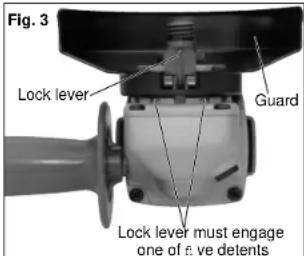
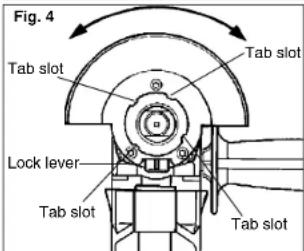
The guard must be used when using the tool as a grinder. The guard should be removed when using tool as a sander.
- To install the guard, unplug the tool and place it upside down on a level surface.
- Remove any accessories from the spindle.
- Line up the four tabs with the four slots (Fig. 4) and then press the guard down onto the tool.
- Press in the lock lever and rotate the guard to one of the five detent slots. The lock lever must engage with one of the detents. (Fig. 3)
- To remove the guard, unplug tool and place it upside down on a level surface. Remove any accessories from spindle.
- Press in the lock lever and rotate the guard to line up the four tabs with the four slots as shown in (Fig. 4).
- Lift the guard straight up and away from the tool.
- To adjust the guard, press in the lock lever and rotate the guard to one of the five detents (Fig. 3).
Grinding

WARNING
A Type "27" guard must be installed when using a grinding wheel to provide maximum protection for the operator if the wheel should break.
Selecting Wheels
Grinding is the cutting action of thousands of abrasive grains on the face of a grinding wheel. When grinding metals such as steel and iron, choose an aluminum oxide grinding wheel. Select a silicon carbide grinding wheel for stone and concrete. Use cotton reinforced wheels for non-ferrous metals.
Type 27 reinforced 1/8" cut-off wheels are suited for small cut-off and shallow notching operations only.
Installing Grinding Wheels
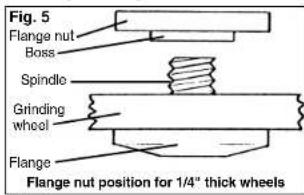
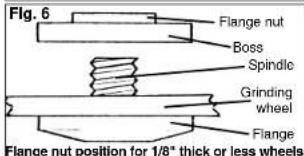
- When guard is properly positioned, place flange on spindle with flange facing away from tool.

WARNING
To reduce the risk of injury, do not use the spindle lock button to stop the spindle while the tool is in use or is coasting after shut-off. This will result in tool damage.
-
Place selected wheel on spindle and align with flange. Position flange nut according to wheel thickness as shown (Fig. 5 & 6).
-
Press the spindle lock button while turning a angle nut clockwise. Tighten securely with the spanner wrench provided.
- To remove wheel, unplug tool and reverse procedure.
Grinding
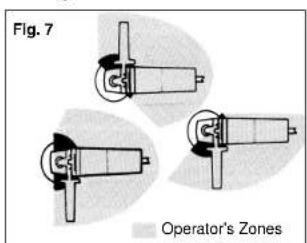
- Depending on your job, position the guard to provide maximum protection for the operator (Fig. 7).
- If you have just installed a grinding wheel or are just beginning a period of work, test wheel by letting it spin for one minute before applying it to the workpiece.
NOTE: Out-of-balance wheels can mar workpiece, damage the tool, and cause stress to wheel that may cause wheel failure.
- Firmly grasp body of tool and side handle before starting and while using tool. Allow wheel to come to full speed before starting to grind.
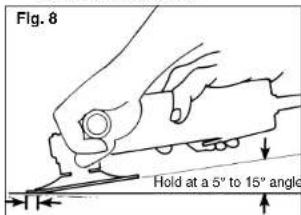
- When grinding, hold sander/grinder at a 5° to 15° angle as shown, using constant pressure for a uniform finish. Too great an angle causes concentrated pressure on small areas which may gouge or burn work surface.
- Control pressure and surface contact between disc and workpiece. Too much pressure slows cutting speed.
Using Cut-Off Wheels
Type "1" cut-off wheels are suited for small cut-off and shallow notching operations only.

WARNING
A Type "1" guard must be installed when using a cut-off wheel to provide maximum protection for the operator if the wheel should break.
- Firmly grasp body of tool and side handle before starting and while using tool. Allow wheel to come to full speed before starting.
- When using a cut-off wheel, hold sander/grinder as shown, using only the edge of the wheel.
- Control pressure and surface contact between disc and workpiece. Too much pressure slows cutting speed.
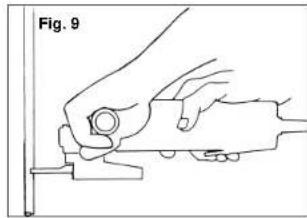
natural_image
Line drawing of a hand using a tool to cut or adjust a component, labeled 'Fig. 9' (no text or symbols on the diagram itself)
WARNING
Using the face of a cut-off wheel (as in grinding) will cause the wheel to crack and break, resulting in serious personal injury.

WARNING
Everyone in the area must wear protective clothing and safety goggles or face shields. Fatigued wires and residue will only off the brush with considerable force, causing the potential for serious injuries.
Installing Wire Cup Brushes
- Unplug tool and place it upside down on a level surface as shown. Remove any accessories from spindle.
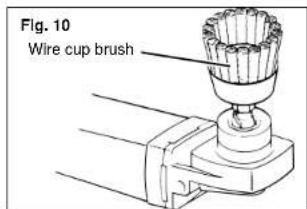
- To install, thread wire cup brush onto spindle. Press the spindle lock button while tightening brush with a 7/8" open end wrench (not provided with tool).
- To remove wire cup brush, unplug tool and reverse procedure.

WARNING
Because the wires on wire wheel brushes are directed towards the operator, a guard must be used to protect the operator when fatigued wires break.
Using Wire Wheel Brushes
Wire wheel brushes are useful for removing rust, scale, burrs, weld slag, etc. A wide variety of wire brushes are available for many applications.
Test wire wheel brush for balance and loose or damaged wires by running tool at no load speed for at least one minute before applying it to your work. During this time, no one should stand in front of or in line with it. When applying brush to work, avoid using too much pressure. This causes over-bending of wires and heat build-up resulting in premature wire breakage, rapid dulling and reduced brush life. Instead of using more pressure, try a wire wheel brush with more aggressive cutting action (increased wire size, decreased wire length or different brush type, i.e., knot type instead of crimped wire type).
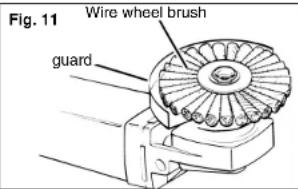

Because the wires on wire wheel brushes are directed towards the operator, a guard must be used to protect the operator when fatigued wires break.
MAINTENANCE

WARNING
To reduce the risk of injury, always unplug your tool before performing any maintenance. Never disassemble the tool or try to do any rewiring on the tool's electrical system. Contact a MILWAUKEE service facility for ALL repairs.
Maintaining Tools
Keep your tool in good repair by adopting a regular maintenance program. Before use, examine the general condition of your tool. Inspect guards, switches, tool cord set and extension cord for damage. Check for loose screws; misalignment, binding of moving parts, improper mounting, broken parts and any other condition that may affect its safe operation. If abnormal noise or vibration occurs, turn the tool off immediately and have the problem corrected before further use. Do not use a damaged tool. Tag damaged tools "DO NOT USE" until repaired (see "Repairs").
Under normal conditions, relubrication is not necessary until the motor brushes need to be replaced. After six months to one year, depending on use, return your tool to the nearest MILWAUKEE service facility for the following:
- Lubrication
- Brush inspection and replacement
- Mechanical inspection and cleaning (gears, spindles, bearings, housing, etc.)
• Electrical inspection (switch, cord, armature, etc.) - Testing to assure proper mechanical and electrical operation

To reduce the risk of injury, electric shock and damage to the tool, never immerse your tool in liquid or allow a liquid to £1 ow inside the tool.
Cleaning
Clean dust and debris from vents. Keep the tool handles clean, dry and free of oil or grease. Use only mild soap and a damp cloth to clean your tool since certain cleaning agents and solvents are harmful to plastics and other insulated parts. Some of these include: gasoline, turpentine, lacquer thinner, paint thinner, chlorinated cleaning solvents, ammonia and household detergents containing ammonia. Never use an ammable or combustible solvents around tools.
Repairs
If your tool is damaged, return the entire tool to the nearest service center.
ACCESSORIES

To reduce the risk of injury, always unplug the tool before attaching or removing accessories. Use only specifically recommended accessories. Others may be hazardous.
For a complete listing of accessories refer to your MILWAUKEE Electric Tool catalog or go on-line to www.milwaukeeetool.com. To obtain a catalog, contact your local distributor or a service center.
FIVE YEAR TOOL LIMITED WARRANTY
Every MILWAUKEE electric power tool (including battery charger) is warranted to the original purchaser only to be free from defects in material and workmanship. Subject to certain exceptions, MILWAUKEE will repair or replace any part on an electric power tool which, after examination, is determined by MILWAUKEE to be defective in material or workmanship for a period of five (5) years ^4 after the date of purchase. Return the electric power tool and a copy of proof of purchase to a MILWAUKEE factory Service/Sales Support Branch location or MILWAUKEE Authorized Service Station, freight prepaid and insured. This warranty does not apply to damage that MILWAUKEE determines to be from repairs made or attempted by anyone other than MILWAUKEE authorized personnel, misuse, alterations, abuse, normal wear and tear, lack of maintenance, or accidents.
* The warranty period for Hoists (lever, hand chain, & electric chain hoists), Ni-Cd battery packs, Work Lights (cordless flashlights), Job Site Radios, and Trade Titan™ Industrial Work Carts is one (1) year from the date of purchase.
*There is a separate warranty for V™-technology Li-Ion Battery Packs 18 volts or above that accompany the power tools:
*Every MILWAUKEE V™-technology Li-Ion Battery Pack 18 volts or above is covered by an initial 1000 Charges/2 Years free replacement warranty. This means that for the earlier of the first 1000 charges or two (2) years from the date of purchase/first charge, a replacement battery will be provided to the customer for any defective battery free of charge. Thereafter, customers will also receive an additional warranty on a pro rata basis up to the earlier of the first 2000 charges or live (5) years from the date of purchase/first charge. This means that every customer gets an additional 1000 charges or three (3) years of pro rata warranty on the V™-technology Li-Ion Battery Pack 18 volts or above depending upon the amount of use. During this additional warranty period, the customer pays for only the useable service received over and above the first 1000 Charges/2 years, based on the date of first charge and number of charges found on the battery pack via Milwaukee's V™-technology Service Reader.
Warranty Registration is not necessary to obtain the applicable warranty on a MILWAUKEE product. However, proof of purchase in the form of a sales receipt or other information deemed sufficient by MILWAUKEE is requested.
ACCEPTANCE OF THE EXCLUSIVE REPAIR AND REPLACEMENT REMEDIES DESCRIBED HEREIN IS A CONDITION OF THE CONTRACT FOR THE PURCHASE OF EVERY MILWAUKEE PRODUCT. IF YOU DO NOT AGREE TO THIS CONDITION, YOU SHOULD NOT PURCHASE THE PRODUCT. IN NO EVENT SHALL MILWAUKEE BE LIABLE FOR ANY INCIDENTAL, SPECIAL, CONSEQUENTIAL OR PUNITIVE DAMAGES, OR FOR ANY COSTS, ATTORNEY FEES, EXPENSES, LOSSES OR DELAYS ALLEGED TO BE AS A CONSEQUENCE OF ANY DAMAGE TO, FAILURE OF, OR DEFECT IN ANY PRODUCT INCLUDING, BUT NOT LIMITED TO, ANY CLAIMS FOR LOSS OF PROFITS. THIS WARRANTY IS EXCLUSIVE AND IN LIEU OF ALL OTHER WARRANTIES OR CONDITIONS. WRITTEN OR ORAL. EXPRESSED OR IMPLIED. WITHOUT LIMITING THE GENERALITY OF THE FOREGOING, MILWAUKEE DISCLAIMS ANY IMPLIED WARRANTY OF MERCHANTABILITY OR FITNESS FOR A PARTICULAR USE OR PURPOSE, AND ALL OTHER WARRANTIES.
This warranty applies to product sold in the U.S.A., Canada and Mexico only.
RÈGLES GÉNÉRALES DE SÉCURITÉ POUR LES OUTILS ÉLECTRIQUE

AVERTISSEMENT
LIRE SOIGNEUSEMENT TOUTES LES INSTRUCTIONS
natural_image
Line drawing of a hand using a tool to cut or adjust a component, labeled 'Fig. 9' (no text or symbols on the diagram itself)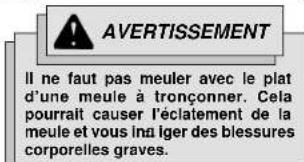
natural_image
Line drawing of a hand using a tool on a cutting board (no text or symbols)UNITED STATES - MILWAUKEE Service
MILWAUKEE prides itself in producing a premium quality product that is NOTHING BUT HEAVY DUTY®. Your satisfaction with our products is very important to us! If you encounter any problems with the operation of this tool, or you would like to locate the factory Service/Sales Support Branch or authorized service station
nearest you, please call.
1-800-SAWDUST
(1.800.729.3878)
NATIONWIDE TOLL FREE
Monday-Friday • 8:00 AM - 4:30 PM • Central Time
or visit our website at
www.milwaukeetool.com
For service information, use the 'Service Center Search' icon found in the 'Parts & Service' section. Additionally, we have a nationwide network of authorized Distributors ready to assist you with your tool and accessory needs. Check your "Yellow Pages" phone directory under "Tools-Electric" for the names & addresses of those nearest you or see the 'Where To Buy' section of our website.
Corporate After Sales Service - Technical Support
Brookfield, Wisconsin USA
•Technical Questions •Service/Repair Questions •Warranty
1-800-SAWDUST
(1.800.729.3878) fax: 1.800.638.9582
email: metproductsupport@milwaukeeetool.com
Monday-Friday • 8:00 AM - 4:30 PM • Central Time
Canada - Service MILWAUKEE
Milwaukee Electric Tool (Canada) Ltd
755 Progress Avenue
Scarborough, Ontario M1H 2W7
Milwaukee Electric Tool, S.A. de C.V.
Blvd. Abraham Lincoln no. 13
Colonia Los Reyes Zona Industrial
Hainepantla, Edo. Mexico C.P. 54073
Tel. (55) 5565-1414 Fax: (55) 5565-6874
MILWAUKEE ELECTRIC TOOL CORPORATION
13135 West Lisbon Road • Brookeld, Wisconsin, U.S.A. 53005
58-14-3350d6
04/07
Printed in USA
- HEAVY-DUTY SANDERS/GRINDERS
- EXTRA ROBUSTE PONCEUSE-RECTIFIEUSE
- LIJADORAS/ESMERILADORAS HEAVY-DUTY
- SAVE THESE INSTRUCTIONS
- WORK AREA SAFETY
- ELECTRICAL SAFETY
- PERSONAL SAFETY
- POWER TOOL USE AND CARE
- SERVICE
- SPECIFIC SAFETY RULES
- GROUNDING
- WARNING
- Grounded Tools:
- Tools with Three Prong Plugs
- Double Insulated Tools:
- Tools with Two Prong Plugs
- EXTENSION CORDS
- Guidelines for Using Extension Cords
- READ AND SAVE ALL INSTRUCTIONS FOR FUTURE USE.
- TOOL ASSEMBLY
- Installing Side Handle
- OPERATION
- Starting and Stopping the Motor
- Sanding Disc/Grinding Wheel Selection
- Sanding Disc/Grinding Wheel Material
- Selecting Sanding Discs & Grit
- Installing Backing Pad and Sanding Discs
- Sanding
- Removing Welds or Hammer Marks
- Cross Sanding
- Finishing Metal
- Troubleshooting
- Inspecting Wheels
- Grinding
- Selecting Wheels
- Using Cut-Off Wheels
- Installing Wire Cup Brushes
- Using Wire Wheel Brushes
- MAINTENANCE
- Maintaining Tools
- Cleaning
- Repairs
- ACCESSORIES
- FIVE YEAR TOOL LIMITED WARRANTY
- RÈGLES GÉNÉRALES DE SÉCURITÉ POUR LES OUTILS ÉLECTRIQUE
- AVERTISSEMENT
- LIRE SOIGNEUSEMENT TOUTES LES INSTRUCTIONS
- UNITED STATES - MILWAUKEE Service
- 1-800-SAWDUST
- www.milwaukeetool.com
- Canada - Service MILWAUKEE
- Milwaukee Electric Tool (Canada) Ltd
- MILWAUKEE ELECTRIC TOOL CORPORATION
Brand : MILWAUKEE
Model : 614131
Category : Sander