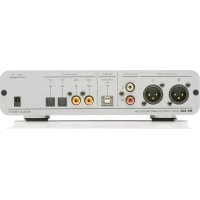
MXDAC - Digital to analog converter Musical Fidelity - Free user manual and instructions
Find the device manual for free MXDAC Musical Fidelity in PDF.


| Product type | Digital-to-analog audio converter (DAC) |
| Brand | Musical Fidelity |
| Model | MXDAC |
| Dimensions (W x D x H) | 220 x 220 x 50 mm |
| Weight | 2.5 kg |
| Power supply | External, 15 V DC / 1.5 A |
| Digital inputs | USB (type B), Toslink optical, coaxial S/PDIF |
| Analog outputs | Unbalanced RCA, balanced XLR |
| Maximum sampling frequency | 24-bit / 192 kHz (USB and optical/coaxial) |
| DAC chip | ESS Sabre ES9028Q2M |
| Frequency response | 20 Hz - 20 kHz ± 0.5 dB |
| Signal-to-noise ratio (SNR) | > 120 dB |
| Total harmonic distortion (THD+N) | < 0.005% |
| Output impedance | < 10 ohms (RCA), < 100 ohms (XLR) |
| Power consumption | 15 W operating, < 1 W standby |
| Care and cleaning | Disconnect the device before cleaning. Use a soft, dry cloth. Do not use chemicals. |
| Safety | Do not expose to moisture or extreme temperatures. Ensure adequate ventilation. |
| Spare parts and repairability | Contact an authorized Musical Fidelity dealer for any repairs. |
| Disposal | Do not dispose of with household waste. Recycle in accordance with the WEEE directive. |
Frequently Asked Questions - MXDAC Musical Fidelity
User questions about MXDAC Musical Fidelity
0 question about this device. Answer the ones you know or ask your own.
Ask a new question about this device
Download the instructions for your Digital to analog converter in PDF format for free! Find your manual MXDAC - Musical Fidelity and take your electronic device back in hand. On this page are published all the documents necessary for the use of your device. MXDAC by Musical Fidelity.
USER MANUAL MXDAC Musical Fidelity
MX-DAC 32 bit 192KHz upsampling
Digital to Analogue Converter with DSD USB
text_image
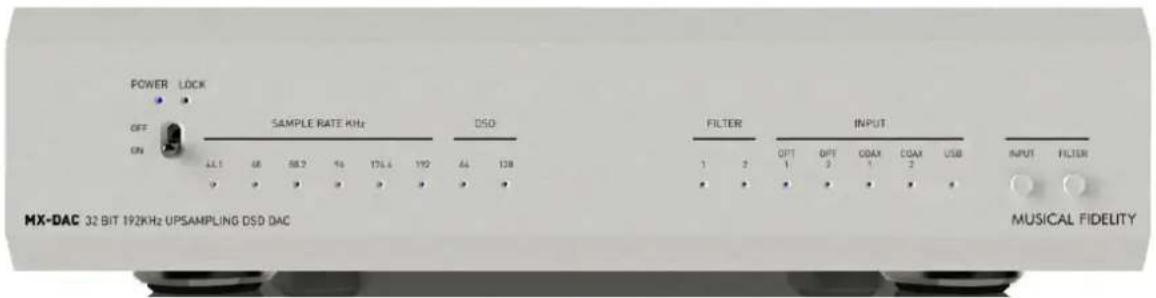
POWER LOCK OFF ON SAMPLE RATE KHz DSD ALL 68 58.2 % 175.4 110 44 128 V V V V V FILTER INPUT OPT OPT COM COM USB 1 2 • • • • • • • • MUSICAL FIDELITYThe ultimate in digital listening.
The MX-DAC is a very high performance, fully balanced, Digital to Analogue Convertor in a beautifully designed and executed casework.
The unit features two optical and two coax S/PDIF inputs as well as an asynchronous PCM/DSD USB input. These are separate and an input select button allows choice between up to five different sources. Selectable filtering is provided to allow for different filter roll-offs, gradual and sharp to suit individual tastes.
MX-DAC 32 bit 192KHz upsampling Digital to Analogue Converter with DSD USB
Safety instructions

Warning of a hazard for the user, the unit or possible misuse.
Important notice.

AC outlet voltages vary from country to country. Before connecting to the mains, make sure that the voltage in your area meets the voltage requirements printed on the power supply.
The power supply is used to connect/disconnect the unit from the mains. Make sure that the power supply is easily accessible at all times. Never handle the device, the power supply while your hands are wet or damp. Avoid letting liquids enter the device or the power supply. Never place any item containing liquid, such as a flower vase on or near the device. Never spill any liquid on the device or the power supply. Never place any naked flame sources, such as lighted candles on or near the device. The product shall not be used in damp or wet locations, next to a bathtub, sink, swimming pool or any other similar conditions.

Make all connections except the connection to the USB whilst the unit is disconnected from the mains.
Never connect or disconnect power supply to or from the unit whilst the power supply is connected to the mains. Never use any other power supply than the one supplied with the unit.
Take care to connect the left and right channels correctly. The right channel is usually marked red, the left channel white.
MUSICAL FIDELITY
MX-DAC 32 bit 192KHz upsampling Digital to Analogue Converter with DSD USB
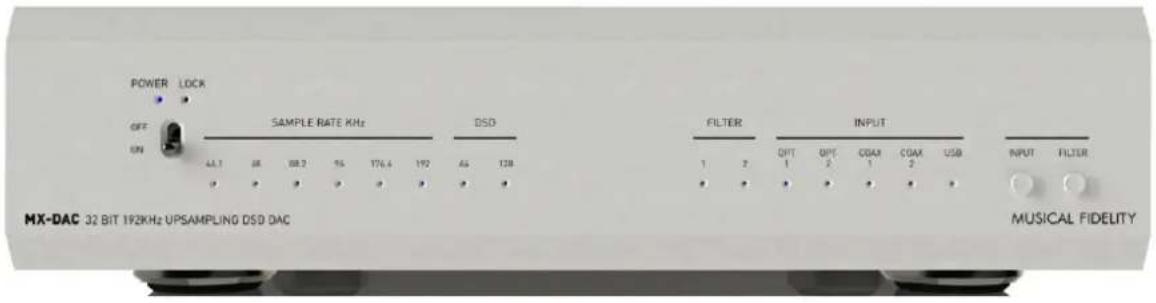
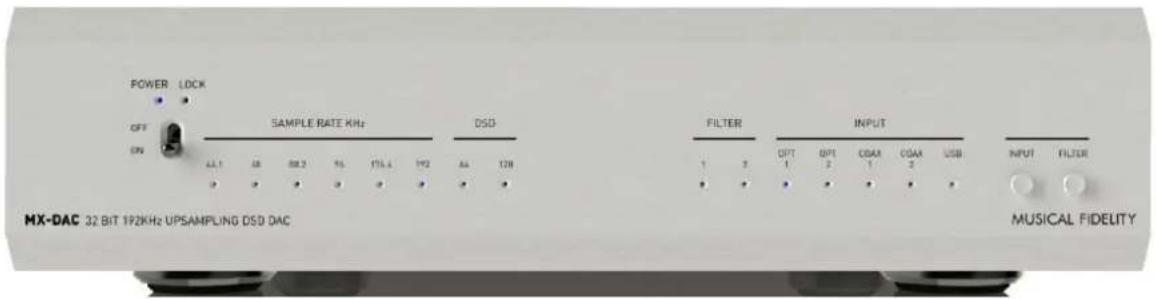
FRONT VIEW
POWER Incoming DSD Filter Selected Selector
ON = ⚙ sample rate rate Input Buttons
text_image
POWER LOCK OFF UN SAMPLE RATE KHz DSD 44.1 48 68.2 55 176.6 192 46 128 P P P P P P FILTER INPUT 1 2 OPT OPT COAX COAX USB 1 2 1 2 2 USB MUSICAL FIDELITYREAR VIEW
OUTPUTS RCA USB S/PDIF INPUTS Power IN
RIGHT XLR LEFT XLR LEFT & RIGHT TYPE "B" 2 COAX 1 2 OPT 1 5VDC 2A

text_image
BALANCED OUTPUT R L L R RGA OUTPUT USB INPUT ASYNC/PCM DSD DIGITAL INPUTS COAX 2 COAX 1 OPT 2 OPT 1 5V DC - 2A MX-DAC 32 BIT 192KHz UPSAMPLING DSD DAC MUSICAL FIDELITYXLR SOCKET PINOUTS
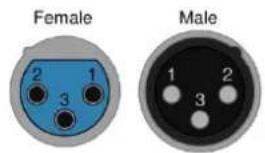
XLR Balanced input and output lead connections:
text_image
Female Male 2 1 3 1 2 3(for reference only, no XLR signal leads supplied)
EIA Standard RS-297-A
| Pin: | Functions: (line output) |
| 1 | Ground (cable shielding) |
| 2 | Normal polarity ("hot" or "+" |
| 3 | Inverted polarity ("cold" or "-" |
MUSICAL FIDELITY
MX-DAC 32 bit 192KHz upsampling Digital to Analogue Converter with DSD USB
Balanced XLR and unbalanced RCA outputs
A preamplifier can be connected to the output sockets.
Digital inputs
Sources with a digital output such as CD player, TV satellite/cable receiver or a game console can be connected to the coaxial or optical digital inputs.
Connecting to a Computer
Connect the USB-input of the MX DAC to a free USB-socket on your computer and make sure the MX DAC is powered on.
Windows® operating systems require a USB Class 2 driver to be installed. This is included on the supplied CD. This driver supports Windows XP, Vista, 7 and 8.
Mac OS ^® operating systems do not need an additional driver or setup.
Linux operating systems include an USB Audio Class 2 driver from Linux Kernel 2.6.35 and higher.

Please note: For best and most reliable results, connection should be made directly to a spare USB socket on host computer. Connecting to USB "hubs" or "switches" can cause problems.
After installing the driver, some settings have to be checked:
For example - Windows 7 ^® operating system:
□ Control Panel □ Hardware and Sound □ Sound □ Playback:
- select Speaker/MX DAC USB 2.0 Audio
□ Properties □ Supported formats:
- make sure nothing is assigned
□ Level □ Sound:
- setting must be 100 for best results.
□ Enhancements: disable all enhancements □ Advanced □ Default Format:
- set to 32/192
☐ For DSD playback kindly refer to the audio player software documents.
MUSICAL FIDELITY
MX-DAC 32 bit 192KHz upsampling Digital to Analogue Converter with DSD USB
Mains power connection
Connect the low voltage plug from the power supply to the Power socket before connecting the power supply to the mains.
Front panel controls
text_image
POWER LOCK OFF ON SAMPLE RATE KHz DSD FILTER INPUT 1 2 OPT 1 OPT 2 COAM 1 COAM 2 USB INPUT FILTER MX-DAC 32 BIT 192KHz UPSAMPLING DSD DAC MUSICAL FIDELITYTo switch on from standby or to standby
The switch button on the left side of the front panel turns the unit on or back into standby. The blue LED above the stand-by switch button shows that the unit is switched on and the green LED above switch button shows that the unit has locked PLL to digital input sample rate.
Input selector
After the unit is powered on, pressing the INPUT button will cycle through all five inputs.
Filter selector
Press the FILTER button to select desired filter choice.
S/PDIF or USB PCM:
Filter 1: Digital Sharp roll-off filter
Filter 2: Digital Slow roll-off filter
USB DSD:
Filter 1: Analogue FIR-3 filter
Filter 2: Analogue FIR-1 filter

Warranty
The manufacturer accepts no responsibility for damage caused by not adhering to these instructions for use. Modification or changes to any part of the product by unauthorized persons release the manufacturer from any liability over and above the lawful rights of the customer.
Should a problem be encountered which cannot be identified or resolved, please contact point of purchase/dealer for further advice. Only if the problem cannot be resolved there, the unit should be sent to the responsible distributor in your country.
Warranty is valid in country of purchase and for original purchaser only and is not internationally nor personally transferable.
MUSICAL FIDELITY
MX-DAC 32 bit 192KHz upsampling Digital to Analogue Converter with DSD USB
Technical specifications
| Sample rate converter: | SRC4392 up-sampling data to 192 kHz |
| Digital to Analogue converter: | PCM1795 32 bit/192 kHz Multi-bit Sigma-Delta type |
Output
| Output voltage | 2 Volts RMS single ended from RCA sockets4 Volts RMS balanced from XLR sockets |
| Frequency response: | PCM (2Hz, 90kHz)@-3dB DSD (2Hz, 40kHz)@-3dB |
| Channel separation: | <-110dB |
| SNR A-wtd: | <-115dB |
| PCM THD: | <0.002% |
| PCM THD+N: | <0.003% |
| DSD THD: | <0.003% |
| DSD THD+N: | <0.006% |
| Coaxial inputs: | S/PDIF up to 24 bit and 192 kHz |
| Optical inputs: | S/PDIF up to 24 bit and 192 kHz |
| USB input: | USB Audio Class 2 requires USB 2.0 or higher |
| USB data transfer: | Asynchronous with DSD DOP 64/128 support |
Connections
| Inputs | POWER | 1.7mm pin, 4mm hole DC power jack |
| OPT1 | TOSLINK optical socket | |
| OPT2 | TOSLINK optical socket | |
| COAX 1 | RCA socket | |
| COAX 2 | RCA socket | |
| USB | Type "B" | |
| Outputs | RCA | 1 pair RCA sockets |
| Balanced | XLR male sockets EIA Standard RS-297-A |
Power requirement
| Outboard power supply: | 5V/2A DC | |
| Mains voltages 90-250VAC 50-60Hz universal worldwide supply | ||
| Consumption | <0.25 Watts | standby |
| <1 Watt | maximum (Blue LED lit) | |
Weight
Unit only, unboxed 1.9 kg (4 14 lbs)
In shipping carton 2.4 kg (5 14 lbs)
Dimensions
Width 220 mm (8 ^2/3 ")
Height (including feet) 53 mm (2")
Depth (front to back) inc. terminals 215 mm (8½")
Standard accessories
Mains adaptor
Windows Driver CD
Manual
Musical Fidelity reserves the right to make improvements which may result in specification or feature changes without notice. E+OE.

MX-DAC 32 bit 192KHz upsampling Digital to Analogue Converter with DSD USB

DISPOSAL
The crossed out wheeled bin label that appears on the back panel of the product indicates that the product must not be disposed of as normal household waste. To prevent possible harm to the environment please separate the product from other waste to ensure that it can be recycled in an environmentally safe manner. Please contact local government office or retailer for available collection facilities.

DISPOSITION
text_image
Warning sign with crossed-out trash bin and no text, indicating no waste or dischargeMUSICAL FIDELITY
MX-DAC 32 bit 192KHz upsampling Digital to Analogue Converter with DSD USB