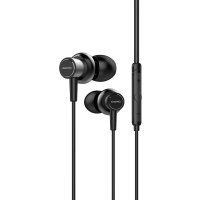
ESTM500 - Headphones AIWA - Free user manual and instructions
Find the device manual for free ESTM500 AIWA in PDF.


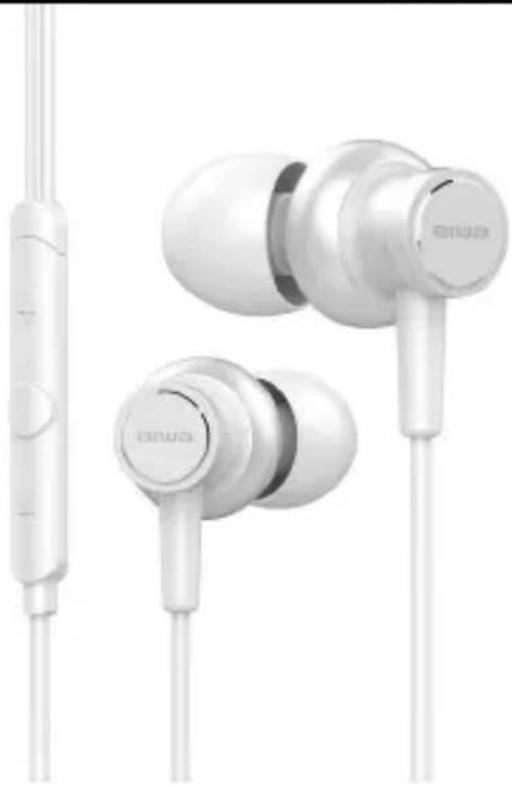
| Product type | In-ear headset |
| Brand | Aiwa |
| Model | ESTM500 |
| Connectivity | Wired, 3.5 mm jack plug |
| Cable length | 1.2 m |
| Weight | 15 g |
| Microphone | Built-in with remote control |
| Controls | Multifunction button (play/pause, call, Siri), volume +/- |
| Compatibility | Devices with 3.5 mm jack, iOS (Siri) |
| Included accessories | Silicone ear tips (multiple sizes) |
| Frequency response | 20 Hz – 20 kHz |
| Impedance | 32 Ω |
| Sensitivity | 100 dB |
| Power supply | None (passive) |
| Maintenance | Clean with a soft, dry cloth |
| Safety | Do not use while driving; respect listening levels to avoid hearing damage |
| Repairability | Spare parts available upon request; contact customer service |
| Warranty | 2 years |
| Origin | Japanese design |
Frequently Asked Questions - ESTM500 AIWA
User questions about ESTM500 AIWA
0 question about this device. Answer the ones you know or ask your own.
Ask a new question about this device
Download the instructions for your Headphones in PDF format for free! Find your manual ESTM500 - AIWA and take your electronic device back in hand. On this page are published all the documents necessary for the use of your device. ESTM500 by AIWA.
USER MANUAL ESTM500 AIWA
natural_image
White audio earbuds with charging case and external microphone (no visible text or symbols)WHITE DIAMOND
USER MANUAL
MANUAL DE USUARIO
MODE D'EMPLOI
BEDIENUNGSANLEITUNG
MANUALE DELL'UTENTE
MANUAL DO USUÁRIO
EN
Page
2-4
ES
Página
5-8
FR
Page
9-12
DE
Seite
13-16
IT
Pagina
17-20
PT
Pagina
21-24
aiwa
JAPANESE ENGINEERING SINCE 1951
ESTM-500WT
natural_image
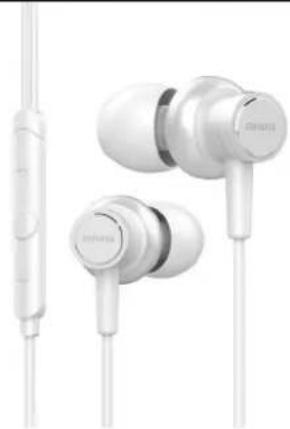
White Siemens audio jack with earbuds and microphone (no visible text or symbols)USER MANUAL

WHITE DIAMOND
LISTEN RESPONSIBLY
To avoid hearing damage, make sure that the volume on your music player is tuned down before connecting your headphones. After placing headphones in your ears, gradually turn up the volume until you reach a comfortable listening level.
Noise level are measured in the decibels (dB), exposure to any noise at the or above 85dB can cause gradual hearing loss.
Monitor your use; hearing loss is a function of loudness versus time. The louder it is, the less time you can be exposed to it. The softer it is, the more time you can listen to it.
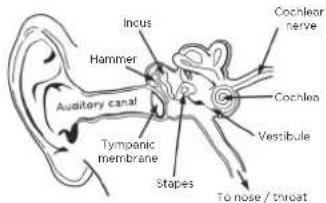
Do not use headphones when it's unsafe to do so - while operating a vehicle, riding a bike, crossing streets, or during any activity or in an environment where your full attention to your surroundings is required. It's dangerous to drive while wearing headphones, and in many places, illegal because it decreases your chances of hearing life-saving sounds outside of your vehicle, such as another car's horn and emergency vehicle sirens. Please avoid wearing your headphones while driving.

FAQ
Q: How to connect to my music players (Phones, tablets, PCs, etc.) A: Plug the ESTM-500 cable into the 1/8" (3.5 mm) stereo plug of your music player.
Q: Why is it no bass or weak bass output from the earphone? A: ESTM-500 is an In-ear type earphone, you have to put the silicone ear tips into your ear tight, otherwise it will lead to leakage.
Q: Why is it uncomfortable to wear the earphone? Why does it fall out of the ear frequently? A: ESTM-500 in-ear headphones feature multiple pairs of ear tips, designed to fit securely and block out external sound. Choose the pair which fits most comfortably and best seals out noise.
Q: Left and Right earphones are not the same volume or noise comes out while rotating the phone jack to the players? A: Please clean the phone jack's dust or oxide layer, and make sure the earphone's plug is completely into the socket.
Q: Why is there no vocal but only accompaniment? A: Usually the phone is not compatible with the earphone (phone jack is not an international standard compatible) please contact customer service.

MULTI-FUNCTION BUTTON (FRIENDLY SUPPORTS IOS)

Microphone
Volume up
Center button
Volume down
Multifunction BottonVolume +
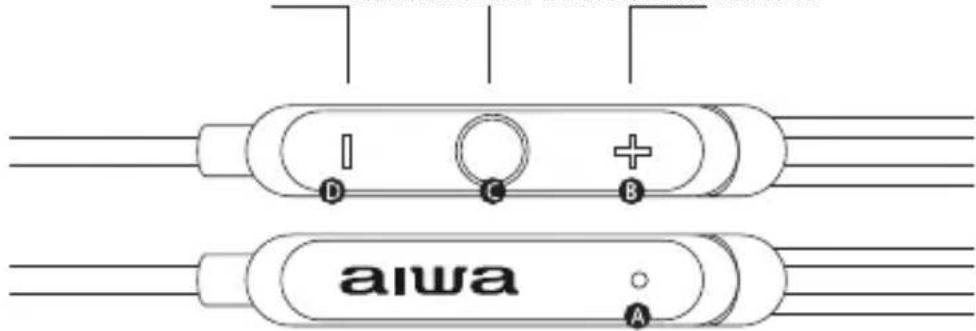
| ACTION | RESULT |
| Short Click C | Play & Pause music play or Answer a call |
| Double Click C | Next Track in music playing or Reject a call |
| Triple Click C | Previous Track in music playing |
| Long press (2-3 sec.) | Summon IOS unlock screen or reject an incoming call |
| Press "+" | Volume up or mute incoming call alarm or take a photo |
| Press "-" | Volume down or mute incoming call alarm or take a photo |
This button has been functional tested in the factory over 100,000 times. To prolong it's life, please do not click/press this button when it's unnecessary.
aiwa
JAPANESE ENGINEERING SINCE 1951
ESTM-500WT
natural_image
White audio earbuds with charging case and external microphone (no visible text or symbols)MANUAL DE USUARIO
WHITE DIAMOND
USO RESPONSABLE
aiwa
natural_image
Exterior view of a white audio earch with external microphone (no text or symbols visible)WHITE DIAMOND
MODE D'EMPLOI
FR
Page
9-12
ECOUTE DE MUSIQUE EN TOUTE SÉCURITE ET DE FAÇON RESPONSABLE
natural_image
White audio earbuds with charging case and external microphone (no visible text or symbols)BEDIENUNGSANLEITUNG
DE
Seite
13-16
WHITE DIAMOND
HÖREN SIE VERANTWORTUNGSVOLL
natural_image
White audio earchairs with charging case and external microphone (no visible text or symbols)WHITE DIAMOND
MANUALE DELL'UTENTE
IT
Pagina
17-20
ASCOLTARE RESPONSABILMENTE
natural_image
White audio earchairs with charging case and external microphone (no visible text or symbols)MANUAL DO USUÁRIO

WHITE DIAMOND
OUÇA COM RESPONSABILIDADE

Brand : AIWA
Model : ESTM500
Category : Headphones