HP-VH50 - Headphones AIWA - Free user manual and instructions
Find the device manual for free HP-VH50 AIWA in PDF.


Pick your language and provide your email: we'll send you a specifically translated version.
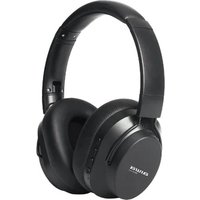
| Product Type | Over-Ear Headphones |
| Brand | AIWA |
| Model | HP-VH50 |
| Connectivity | Wired 3.5mm jack |
| Cable Length | 1.2 meters |
| Plug Type | 3.5mm stereo minijack |
| Driver Diameter | 40mm |
| Frequency Response | 20 Hz - 20 kHz |
| Impedance | 32 ohms |
| Sensitivity | 105 dB ± 3 dB |
| Maximum Power | 500 mW |
| Weight | 210 g |
| Cable Type | Single-sided, OFC copper |
| Ear Cushion Material | Synthetic leather |
| Adjustable Headband | Yes |
| Foldable Design | Yes |
| Compatibility | Smartphones, tablets, PCs, audio players |
| Controls | Inline volume control |
| Color | Black |
| What's in the Box | HP-VH50 headphones, user manual |
| Cleaning | Wipe with soft dry cloth |
| Safety | Avoid high volume to prevent hearing damage |
| Spare Parts | Ear cushions and cable may be replaced |
| Warranty | 1 year |
Frequently Asked Questions - HP-VH50 AIWA
How do I connect the AIWA HP-VH50 to my device?
Insert the 3.5mm stereo plug into the headphone jack of your device. Ensure the plug is firmly pushed in. For devices with a separate microphone port, this headphone works best with a single combo jack.
Why is there no sound from one side?
First, check that the cable is fully inserted. If the issue persists, try wiggling the cable near the earcup or the plug. A damaged internal wire can cause sound loss. If under warranty, contact the retailer; otherwise, a replacement cable may be required.
How should I clean the headphones?
Use a soft, dry, lint-free cloth to gently wipe the ear cushions and headband. Do not use water, chemicals, or abrasive cleaners. For stubborn dirt, slightly dampen the cloth with water and wring it thoroughly before wiping. Always let the ear cushions air dry completely.
Can I use these headphones with my gaming console?
Yes, if your console has a 3.5mm audio jack (e.g., newer Xbox controllers or PlayStation DualSense). For consoles without a headphone jack, you may need a USB audio adapter or a controller accessory with a 3.5mm port. Note that the HP-VH50 does not have a microphone.
How can I adjust the headband for a comfortable fit?
Hold both earcups and gently slide the headband extensions up or down until the headphones rest comfortably over your ears. The headband should sit snugly but not press too hard. Make sure both sides are adjusted to the same length for even pressure.
Can I replace the ear cushions?
Yes, the ear cushions are replaceable. To remove them, gently pull the cushion away from the earcup rim. When installing a new pair, align the grooves or clips and press firmly until they snap into place. Replacement cushions can be purchased from authorized parts suppliers.
Are these headphones suitable for studio monitoring?
While the HP-VH50 delivers decent audio for everyday listening, it has a consumer-oriented frequency response with slightly boosted bass. Professional studio monitoring typically requires a flatter response. For critical mixing or mastering, dedicated studio headphones are recommended.
How do I store the headphones properly?
Fold the headphones inward and store them in a cool, dry place away from direct sunlight. Avoid wrapping the cable tightly around the headband, as this can damage the wires. Using a padded pouch or the original packaging helps protect them from dust and impacts.
Is there a microphone in the HP-VH50?
No, the AIWA HP-VH50 is a pure stereo headphone without a built-in microphone. To use voice features on smartphones or computers, you will need a separate external microphone.
What should I do if the cable gets damaged?
If you experience intermittent sound or bare wires, stop using the headphones to avoid electric shock. Check if the cable is detachable; if so, replace it with a compatible 3.5mm cable. If the cable is attached permanently, contact a professional repair service or authorized service center.
User questions about HP-VH50 AIWA
0 question about this device. Answer the ones you know or ask your own.
Ask a new question about this device
No questions yet. Be the first to ask one.
Download the instructions for your Headphones in PDF format for free! Find your manual HP-VH50 - AIWA and take your electronic device back in hand. On this page are published all the documents necessary for the use of your device. HP-VH50 by AIWA.
USER MANUAL HP-VH50 AIWA

Manual assistant
Powered by Anthropic
Waiting for your message
Product information
Brand : AIWA
Model : HP-VH50
Category : Headphones