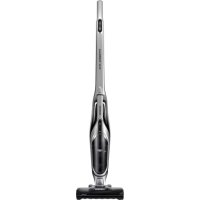
SS60K6080KC - Broom SAMSUNG - Free user manual and instructions
Find the device manual for free SS60K6080KC SAMSUNG in PDF.



| Product type | Stick vacuum |
| Brand | Samsung |
| Model | SS60K6080KC (SS60K60 series) |
| Power supply | Lithium-ion battery 21.6 V, 1800 mAh (6 cells) |
| Charger | Specific charger supplied, rated voltage according to country |
| Operating modes | Normal and Turbo (Turbo button) |
| LED display | Battery level and Turbo mode indicator |
| Removable portable vacuum | Yes, for spot cleaning (unlock button) |
| Supplied accessories | Crevice tool, Dusting brush, Battery, Charger |
| Optional accessory | Long reach tool (not included) |
| Dust tank capacity | Not specified (approx. 0.5 L) |
| Filter | Washable sponge filter (clean regularly) |
| Cleaning of parts | Tank and filter washable with water, dry in the shade |
| Air inlet maintenance | Clean regularly to avoid blockages |
| Safety indicators | Do not vacuum water, hot or sharp objects |
| Indoor use only | Yes |
| Unplug before maintenance | Yes |
| Warranty | See Samsung conditions |
Frequently Asked Questions - SS60K6080KC SAMSUNG
User questions about SS60K6080KC SAMSUNG
0 question about this device. Answer the ones you know or ask your own.
Ask a new question about this device
Download the instructions for your Broom in PDF format for free! Find your manual SS60K6080KC - SAMSUNG and take your electronic device back in hand. On this page are published all the documents necessary for the use of your device. SS60K6080KC by SAMSUNG.
USER MANUAL SS60K6080KC SAMSUNG
SS60K60*** Series / SS60M60*** Series
Before operating this unit, please read the instructions carefully.
For indoor use only.
PREPARATION
Safety information 3
INSTALLATION
Name of the parts 11
OPERATIONS
Using the vacuum cleaner 12
Charging the stick vacuum cleaner 12
Assembling and Disassembling a battery 12
Using the stick vacuum cleaner 13
Using the handy vacuum cleaner 13
Using the crevice tool and dusting brush 14
Using the Long Reach Tool (option) 14
MAINTENANCE
Maintaining the vacuum cleaner 15
Disassembling / Assembling the dustbin 15
Cleaning the dustbin 15
Cleaning the sponge filter 15
Cleaning the air intake 15
APPENDICES
Notes and cautions 16
Battery usage 16
Operation 16
Maintenance 17
Troubleshooting 18
Accessories
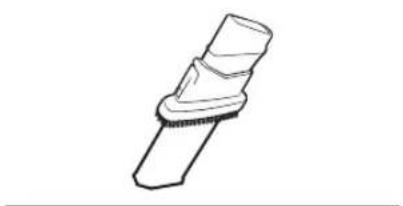
Crevice tool / Dusting brush
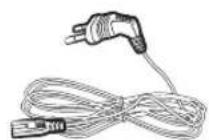
Power cord
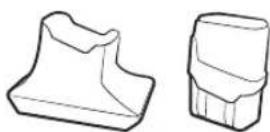
Charger / battery

User manual
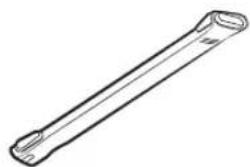
Long Reach Tool (option)
Safety information
- Before operating the appliance, please read this manual thoroughly and retain it for your reference.
- Because these following operating instructions cover various models, the characteristics of your vacuum cleaner may differ slightly from those described in this manual.
Caution/Warning symbols used
WARNING
Indicates that a danger of death or serious injury exists.
CAUTION
Indicates that a risk of personal injury or material damage exists.
Other symbols used

NOTE
Indicates that the following text contains additional important information.
- For information on Samsung's environmental commitments and product specific regulatory obligations e.g. REACH (WEEE, Batteries) visit: samsung.com/uk/aboutsamsung/samsungelectronics/corporatecitizenship/data-corner.html
Failure to meet these requirements could cause damage to the internal parts and void your warranty.
General
- Read all instructions carefully. Before switching on, make sure that the voltage of your electricity supply is the same as that indicated on the rating plate on the bottom of the cleaner.
WARNING : Do not use the vacuum cleaner when rug or floor is wet. - Close supervision is necessary when any appliance is used by or near children. Do not allow the vacuum cleaner to be used as a toy. Do not allow the vacuum cleaner to run unattended at any time. Use the vacuum cleaner only for its intended use as described in these instructions.
- Do not use the vacuum cleaner without a dustbin.
- Empty the dustbin before it is full in order to maintain the best efficiency.
- Do not use the vacuum cleaner to pick up matches, live ashes or cigarette butts. Keep the vacuum cleaner away from stoves and other heat sources. Heat can deform and discolour the plastic parts of the unit.
- Avoid picking up hard, sharp objects with the vacuum cleaner as they may damage the cleaner parts.
- Do not block the suction or the exhaust port.
- Switch the vacuum cleaner off on the body of the machine before unplugging from the electrical outlet. Disconnect the plug from the electrical outlet before emptying the dustbin. To avoid damage, please remove the plug by grasping the plug itself, not by pulling on the cord.
- This appliance can be used by children aged from 8 years and above and persons with reduced physical, sensory or mental capabilities or lack of experience and knowledge if they have been given supervision or instruction concerning use of the appliance in a safe way and understand the hazards involved. Children shall not play with the appliance. Cleaning and user maintenance shall not be made by children without supervision.
- Children should be supervised to ensure that they do not play with the appliance.
-
The plug must be removed from the socket outlet before cleaning or maintaining the appliance.
-
The use of an extension cord is not recommended.
- If your vacuum cleaner is not operating correctly, switch off the power supply and consult an authorized service agent.
- If the supply cord is damaged, it must be replaced by the manufacturer or its service agent or a similarly qualified person in order to avoid a hazard.
- Unplug the cleaner when not in use. Turn off the power switch before unplugging.
- Do not use to suck up water.
- Do not immerse in water for cleaning.
- Please contact the manufacturer or service agent for a replacement.
Battery charger
- Do not modify the polarized plug to fit a non-polarized outlet or extension cord.
- Do not use outdoors or on wet surfaces.
- Unplug the charger from the outlet when not in use and before servicing.
- Use only the charger supplied by the manufacturer to recharge.
- Do not use with a damaged cord or plug.
- Do not pull or carry by the cord, use the cord as a handle, close the door on the cord, or pull the cord around sharp edges or corners. Keep the cord away from heated surfaces.
- Do not use extension cords or outlets with inadequate current carrying capacity.
- Do not unplug by pulling on the cord. To unplug, grasp the plug, not the cord.
- Do not mutilate or incinerate batteries as they will explode at high temperatures.
-
Do not attempt to open the charger. Repairs should only be carried out by a qualified customer care centre.
-
Do not expose the charger to high temperatures or allow moisture or humidity of any kind to come into contact with the charger.
Stick vacuum cleaner
- Do not pick up hard or sharp objects such as glass, nails, screws, coins, and etc.
- Do not use without a filter in place. When servicing the unit, never put fingers or other objects into the fan chamber in case the unit accidentally turns on.
- Do not put any objects into openings. Do not use with any openings blocked; keep openings free of dust, lint, hair, and anything that may reduce air flow.
- Do not pick up toxic materials (chlorine bleach, ammonia, drain cleaner, etc.).
- Do not pick up anything that is burning or smoking, such as cigarettes, matches, or hot ashes.
- Do not use to pick up flammable or combustible liquids such as gasoline, nor use on areas where they may be present.
- Do not use STICK vacuum cleaner in an enclosed space filled with vapours given off by oil based paint, paint thinner, moth proofing substances, flammable dust, or other explosive or toxic vapours.
- Leaks from battery cells can occur under extreme usage or temperature conditions. If the liquid gets on skin, wash quickly with water. If the liquid gets into the eyes, flush them immediately with clean water for a minimum of 10 minutes. Seek medical attention.
Power related
WARNING
-
Do not bend the power cord with excessive force or do not put heavy object on the power cord.
-
Otherwise, electric shock or fire may occur.
-
If there is dust, water, etc. on the pin or contact point of the power plug, wipe them carefully.
-
Otherwise, abnormal operation or electric shock may occur.
-
Do not use a power source other than national rated voltage, do not use a multi outlet to supply power for multiple electronic appliances and do not leave the power cord carelessly on the floor.
-
Otherwise, electric shock or fire may occur.
-
Do not use a damaged power plug, power cord or loose power outlet.
-
Otherwise, electric shock or fire may occur.
-
If the power cord is damaged, replace the power cord with a new one by a certified repairman.
-
Otherwise, electric shock or fire may occur.
Operation
WARNING
-
Do not touch the terminal of a charger with chop sticks, driver, etc.
-
Otherwise, fatal damage to the charger may occur.
-
Make sure that the terminal of a charger should not come into contact with a conductor such as a bracelet, watch, metal rod, nail, etc.
-
Make sure that any liquid such as water or juice is not allowed to enter the charger.
-
Otherwise, electric shock or fire may occur.
-
Do not use a charger for other purposes.
-
Otherwise, fatal damage to the charger or fire may occur.
-
Do not vacuum liquid, blade, pin, Ember, etc. during the cleaning.
-
Otherwise, abnormal operation or product damage may occur.
-
Do not step on the product body or do not give a shock to the product.
-
Otherwise, an injury or product damage may occur.
-
The air intake and air outlet should not be blocked during the cleaning.
-
Otherwise, product malfunction or fire may occur due to overheating of the product.
-
This product is intended for household use, so do not use this product for a heavy duty.
-
Otherwise, abnormal operation or product damage may occur.
- Outdoor cleaning: stone and cement
- Billiards: chalk powder
-
Hospital aseptic room
-
Do not use the product near a heating appliance such as a heater, combustible spray and flammable materials.
-
Otherwise, fire or product deformation may occur.
-
Before using the product, the sponge filter should be inserted.
-
Otherwise, dust can enter the motor inside the main body and it may cause product damage.
-
When there is gas leakage or combustible spray is used, do not touch the power outlet with with hands and open the window for ventilation.
-
Otherwise, explosion or fire may occur.
-
When a strange sound, smell, smoke arises, turn off the product immediately and contact a service center.
-
Otherwise, electric shock or fire may occur.

CAUTION
-
Before using the stick vacuum cleaner, check that the handy vacuum cleaner is assembled to the main body correctly.
-
When the handy vacuum cleaner is not assembled to the main body, the stick vacuum cleaner does not work.
-
Do not use the product near a combustible material.
-
In a place where candlelight or desk lamp is placed on the floor.
-
In a place where heating is turned on without supervision or an embryo exists.
-
In a place where combustible materials such as gasoline, alcohol, thinner, ashtray with unextinguished cigarette, etc. exist.
-
Make sure a child does not step onto the charger or sit on the charger.
-
Otherwise, the child may fall and be injured or fatal product damage may occur.
-
Before plugging or unplugging the charger, turn off the main body and handy vacuum cleaner and make sure that the pin of power plug should not come into contact with your hands.
-
Otherwise, fire or electric shock may occur.
Maintenance

WARNING
-
Do not use the vacuum cleaner for other than cleaning purpose.
-
Otherwise, an injury or product damage may occur.
-
When removing foreign matters inside the product, you should turn off the the vacuum cleaner first and use a tool to remove the foreign matters.
-
If the product operates while you are removing the foreign matters, an injury or product damage may occur.
-
When cleaning the exterior of the product, turn off the product first and then wipe it with dry towel. Do not spray water directly onto the product or wipe it with volatile materials such as benzene, thinner or alcohol.
- If water gets into the product and an error occurs, turn off the product and contact a service center.
- After unplugging the product, clean the charger.
- When cleaning the washable parts, do not use alkaline detergent, acid, industrial detergent, air freshener, acetic acid, etc.
- Otherwise, product damages such as plastic breakage, deformation, discoloration, printing deterioration, etc. may occur.
| Washable Parts Dustbin, sponge | ||
| Available detergent | Neutral Dish washing | detergent |
| Prohibited detergent | Alkaline Lox, mold cleaner, etc. | |
| Acid Paraffin | oil, an emulsifier, etc. | |
| Industrial cleaners | NV-I, PB-I, Opti, alcohol, acetone, benzene, thinner, etc. | |
| Air freshener | Jet spray air fresheners (coffee flavor, herb, etc.) | |
| Oils Animal oils, vegetable oils | ||
| Etc. | Edible acetic acid, vinegar, glacial acetic acid, etc. | |
CAUTION
- Do not push the stick vacuum cleaner while it stands as it may fall.
- Otherwise, an injury, product damage, or floor damage may occur.
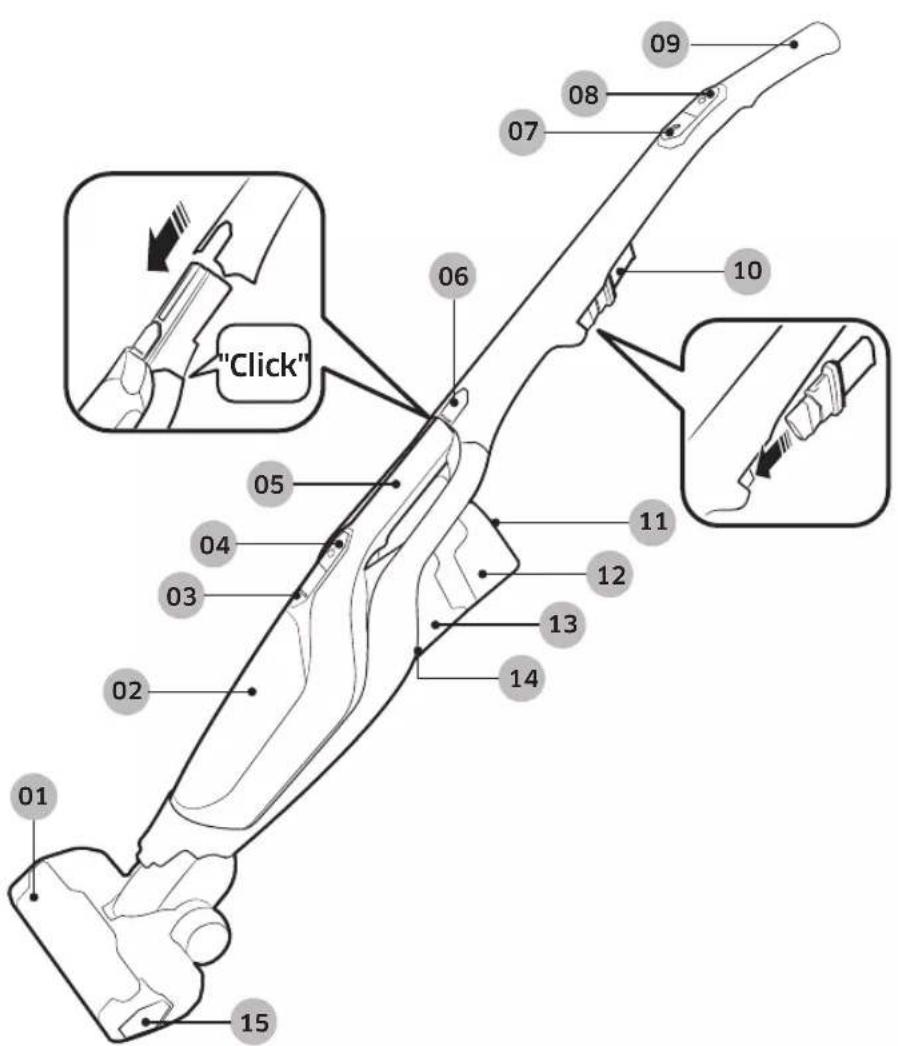
01 Air intake
02 Dustbin
03Dustbin release button
04 Handy vacuum cleaner power button
05 Handy vacuum cleaner
06 Handy vacuum cleaner release button
07 Turbo button
08 Power button
09 Handle
10 Crevice tool / Dusting brush
11 LED display
12 Battery
13 Air outlet
14 Battery release button
15 Air intake release button
- Battery Spec
SS60K60*** series : Lithium-ion 21.6 V , 1800 mAh, 6 cell
SS60M60*** series : Lithium-ion 18.0 V , 1800 mAh, 5 cell
- Those two batteries are not compatible with each other.
Using the vacuum cleaner
Charging the stick vacuum cleaner
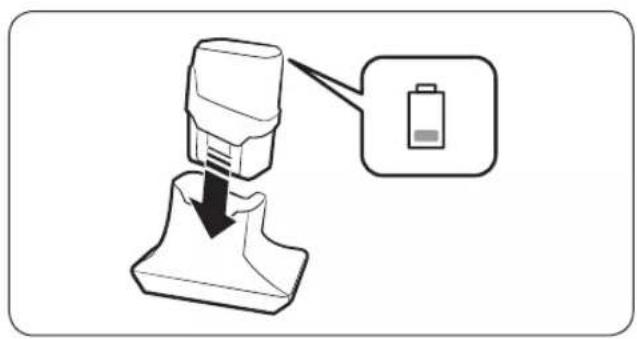
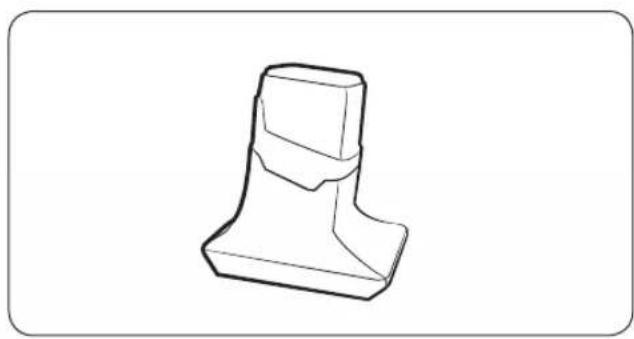
NOTE
- Assemble the battery into the charger completely.
- Battery level indicator blinks while the battery is charging.
LED display
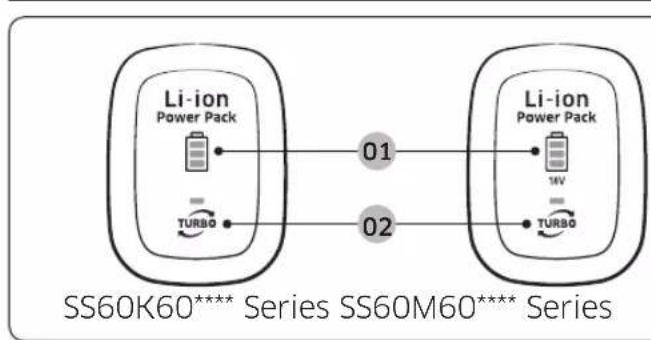
01 Battery level indicator
02 Turbo mode indicator
Assembling and Disassembling a battery
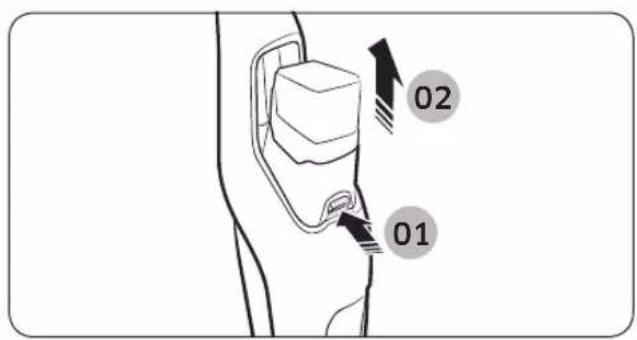
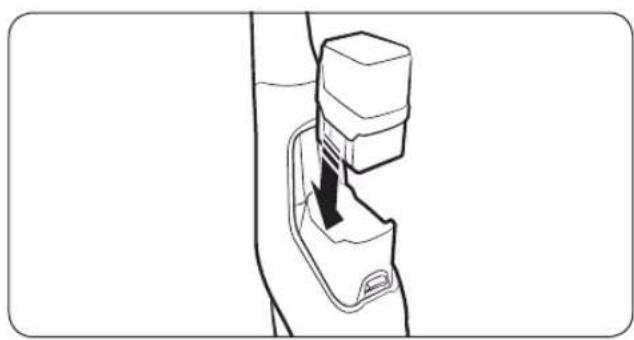
CAUTION
- Before disassembling the battery from a charger, turn off the stick vacuum cleaner.
Using the stick vacuum cleaner
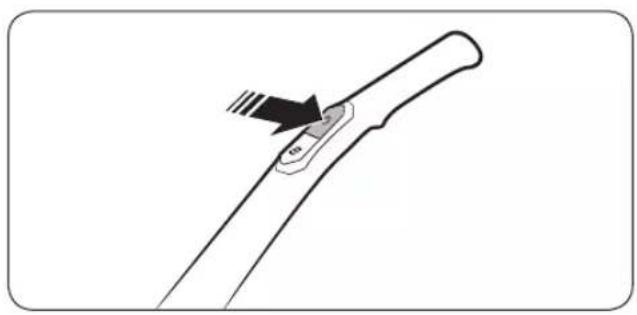
Power on/off
The stick vacuum cleaner starts operating in Turbo mode.
Press the Turbo button to convert operation mode. (Normal/Turbo)
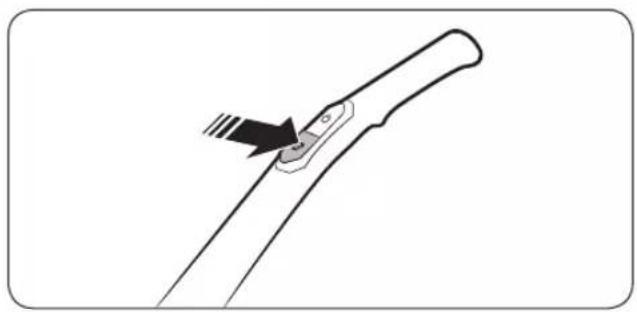
Using the Turbo mode
Using the handy vacuum cleaner
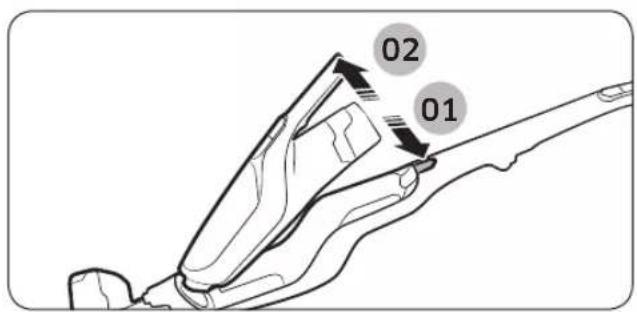
Disassembling the handy vacuum cleaner from the main body
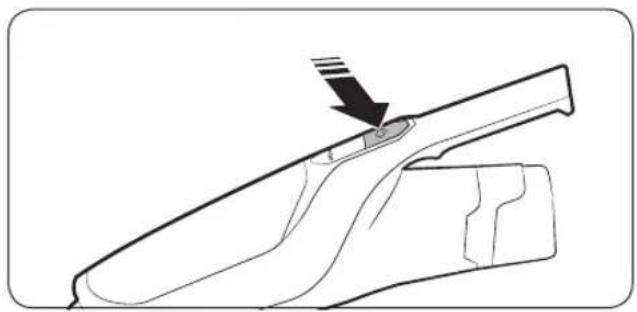
Power on/off
The handy vacuum cleaner starts operating in Turbo mode. The operation mode cannot be changed.
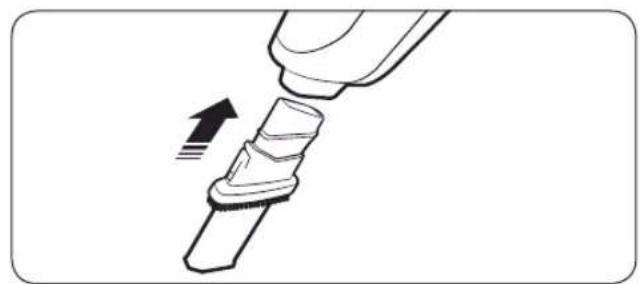
Using the crevice tool and dusting brush
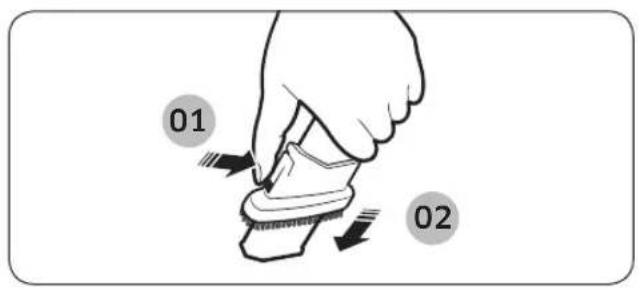
Dusting brush
When removing fine dust on curtain, furniture, sofa etc.
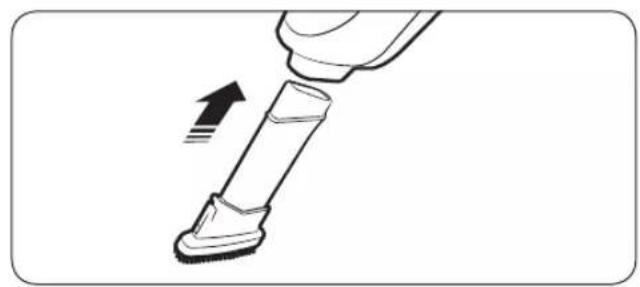
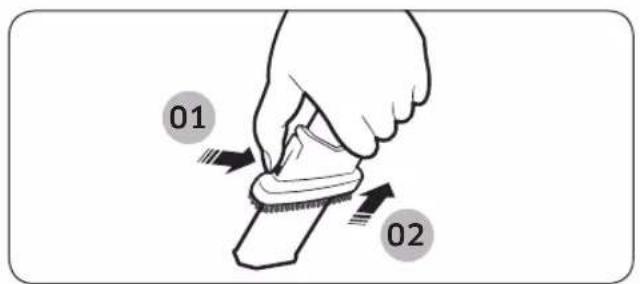
Crevice tool
When removing fine dust on groove of window frames, chink, corner etc.
Using the Long Reach Tool (option)
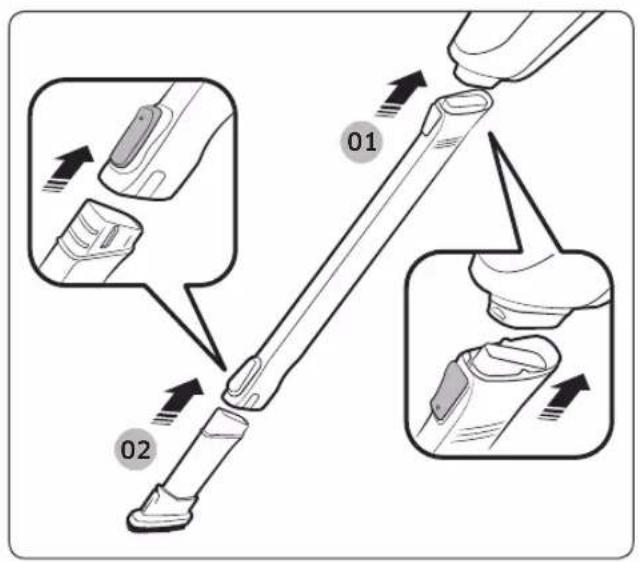
When cleaning a place which is narrow and deep or hard to reach by hand such as under furniture or a ceiling
Maintaining the vacuum cleaner
CAUTION
- Before cleaning the stick vacuum cleaner, turn off the vacuum cleaner.
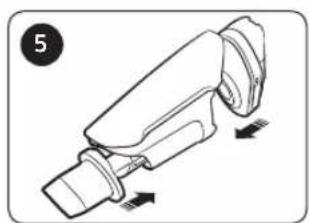
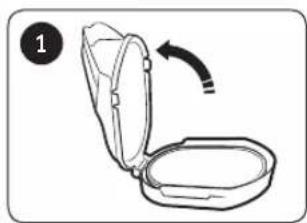
Disassembling / Assembling the dustbin
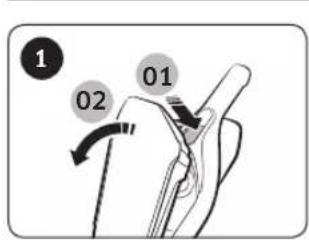
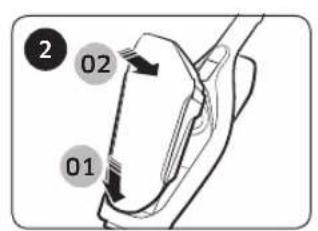
Cleaning the dustbin
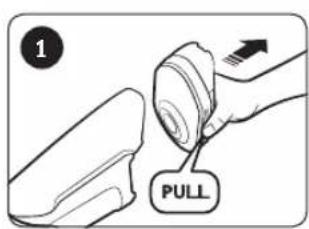
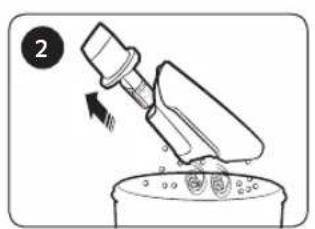
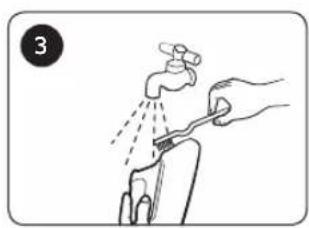
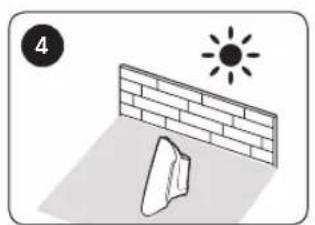
NOTE
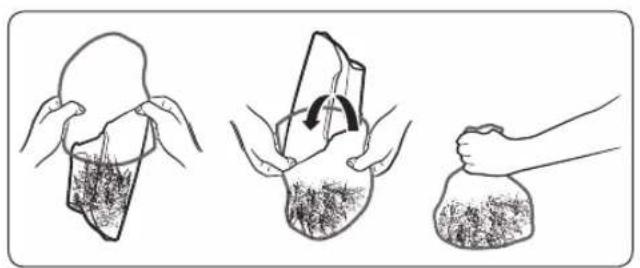
- Emptying the dustbin in a simple way
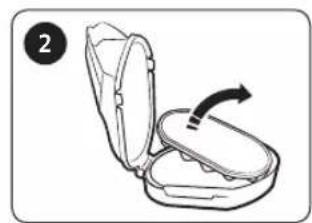
Cleaning the sponge filter
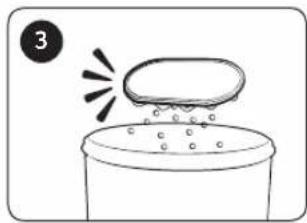
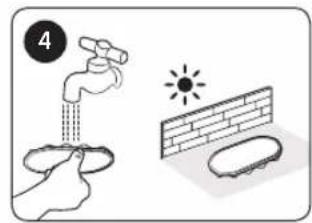
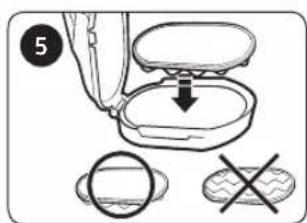
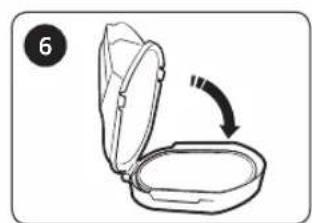
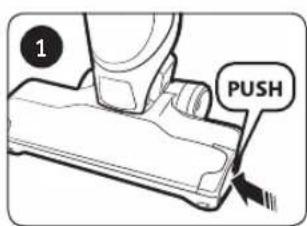
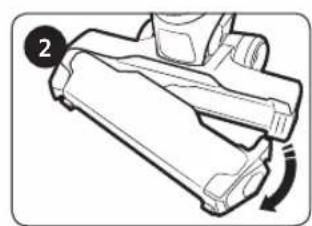
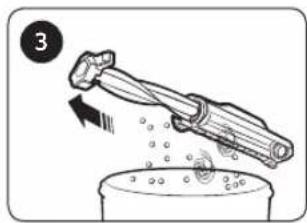
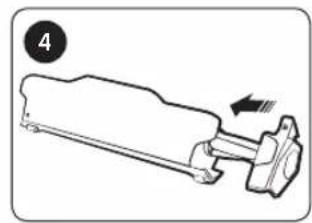
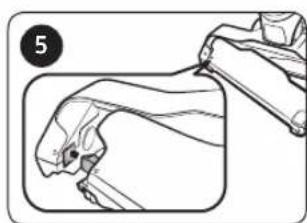
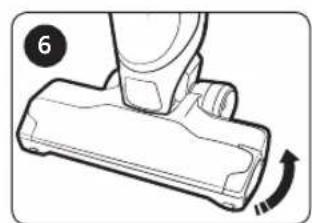
Cleaning the air intake
Battery usage

NOTE
- When a vacuum cleaner does not work after charging a battery, change the battery. If it still does not work with the new battery, contact a service center.

CAUTION
- Do not disassemble a battery or a charger.
- Do not apply heat to a battery and do not put a battery on the fire.
- As the battery is manufactured only for this product, do not use the battery for other electronic appliances or other purposes.
- Removing a battery during operation may cause product malfunction.
- If the battery is removed while vacuum cleaner motor is operating, the battery may not work for 30 seconds after being replaced due to safety reasons.
-
If battery charging time and battery usage time are reduced with battery use, replace the exhausted battery with a new one.
-
Use a battery with genuine logo (SAMSUNG
- Before assembling the battery into a charger or a vacuum cleaner, check that the battery is placed in the correct direction.
- When discarding a dead battery, put it into the battery collection box.
- When a vacuum cleaner is not going to be used for a long time, disassemble the battery from a vacuum cleaner.
Operation

NOTE
-
Please charge the battery for the following cases.
-
When a battery is used for the first time after purchase or the battery is not used for a long time.
-
When battery level indicator is on the lowest indication.
-
When you are away from home for a long period of time, unplug the battery charger and disassemble the battery from the charger. When a battery is not being charged, it will be discharged.

CAUTION
- After the handy vacuum cleaner is assembled to the main body, the stick vacuum cleaner operates.
After using the handy vacuum cleaner, assemble it to the main body. - Before assembling the handy vacuum cleaner to the main body, the handy vacuum cleaner should be turned off.
-
After assembling the handle to the vacuum cleaner, do not disassemble the handle again.
-
Otherwise, it may cause an injury to you.
-
When the brush is rotating, do not touch the brush.
-
Otherwise, your hand can be caught and it may cause an injury.
Maintenance

NOTE
-
Sometimes the wheel of air intake may scratch floor. Therefore, before using the stick vacuum cleaner, check the wheel status of air intake.
-
When there are foreign matters which cannot be removed easily on the wheel of air intake, contact a service center.

CAUTION
- Drying the parts of the stick vacuum cleaner in the sun for long hours may cause deformation or discoloration.
Therefore, after cleaning the parts of the stick vacuum cleaner, dry them in the shade.
- Do not clean the air intake of the stick vacuum cleaner with water as it may cause deformation or discoloration of parts.
Troubleshooting
If the requested service is proved as not product malfunction, the service fee will be charged. Therefore, please read the user manual carefully.
| Problem Solutions | |
| The stick vacuum cleaner does not work. | ·Check the battery level and charge the battery. ·Check that the product is turned off and press the power button to turn on. ·If the product has not been used for a long time, charge the product. |
| The stick vacuum cleaner does not stop even though I pressed the power button. | ·Check whether the handy vacuum cleaner is turned on. If so, press the power button of the handy vacuum cleaner first and then press the power button of the stick vacuum cleaner. |
| Suction force decreases suddenly and vibrating sound is generated from the stick vacuum cleaner. | ·Check whether the air intake is clogged with foreign matters or dustbin is fully filled. If so, remove them. ·Check whether the filter is dirty and clean the filter by referring to the 'Maintaining the stick vacuum cleaner' section of this manual. ·Check the battery level and charge the battery. |
| The vacuum cleaner cannot be charged. | ·Check current power voltage of the stick vacuum cleaner. It should be national rated voltage. ·Check that the stick vacuum cleaner is turned on and then check the LED of the battery level indicator is turned on. ·Check the status of charger terminal and remove the foreign matters (dust) on the charger terminal with a cotton swab or soft cloth. |
| The brush inside the air intake does not rotate. | ·Check whether the air intake is clogged with foreign matters and remove them. ·Check the stick vacuum cleaner is turned on and then turn off and turn on the vacuum cleaner again. |
| Odor is generated from the air outlet of the stick vacuum cleaner. | ·Frequently empty the dustbin and clean the filter. ·As your stick vacuum cleaner is a new product, it may have slight odor for the first 3 months from the purchase. ·Accumulated dirt in the dustbin or dust on the filter may generate an odor. |
-
This vacuum cleaner is compliant with the following regulations:
-
Electromagnetic Compatibility Directive : 2004/108/EEC
- Low Voltage Directive : 2006/95/EC
If you have any questions or comments relating to Samsung products, please contact the SAMSUNG customer care center.
| Country Customer Care Center Web Site | ||
| SWITZERLAND | 0800 726 78 64 (0800-SAMSUNG) | www.samsung.com/ch/support (German) www.samsung.com/ch_fr/support (French) |
| AUSTRIA 08 | 00 72 67 864 (0800-SAMSUNG) www.samsung.com/at/support | |
Staubsauger
Benutzerhandbuch
Serie SS60K60*/Serie SS60M60*

- PREPARATION
- INSTALLATION
- OPERATIONS
- MAINTENANCE
- APPENDICES
- Accessories
- Safety information
- Caution/Warning symbols used
- WARNING
- CAUTION
- Other symbols used
- NOTE
- General
- Battery charger
- Stick vacuum cleaner
- Power related
- WARNING
- Operation
- Using the vacuum cleaner
- Charging the stick vacuum cleaner
- LED display
- Assembling and Disassembling a battery
- Using the stick vacuum cleaner
- Power on/off
- Using the Turbo mode
- Using the handy vacuum cleaner
- Disassembling the handy vacuum cleaner from the main body
- Using the crevice tool and dusting brush
- Dusting brush
- Crevice tool
- Using the Long Reach Tool (option)
- Maintaining the vacuum cleaner
- Disassembling / Assembling the dustbin
- Cleaning the dustbin
- Cleaning the sponge filter
- Cleaning the air intake
- Battery usage
- Troubleshooting
- Staubsauger
- Benutzerhandbuch
Brand : SAMSUNG
Model : SS60K6080KC
Category : Broom