
Sharq VM 7011 - Vacuum Cleaner AMICA - Free user manual and instructions
Find the device manual for free Sharq VM 7011 AMICA in PDF.



| Brand | Amica |
| Model | Sharq VM 7011 |
| Device type | Canister vacuum cleaner |
| Power supply | 230 V ~ 50 Hz |
| Rated power | 700 W |
| Maximum power | 720 W |
| Weight (without accessories) | 8.6 kg |
| Dust bag capacity | Disposable bag (standard reference) |
| Filters | Washable pre-motor filter, washable exhaust filter |
| Noise level | Not specified |
| Cable length | Automatic rewinder (length not specified) |
| Operating radius | Approximately 8 m (estimate) |
| Included accessories | Turbo brush, parquet brush, 2-in-1 universal brush, crevice tool, upholstery tool, dusting brush, telescopic tube, hose with handle, accessory holder |
| Remote control batteries | 2 AAA batteries (not included) |
| Functions | Wrist control (hose) and on body, power adjustment (4 levels), bag full indicator |
| Maintenance | Replace bag, washable filters, regular cleaning of turbo brush |
| Safety | Do not vacuum flammable materials, do not immerse, do not use without bag/filters |
| Usage | Domestic, hard floors and carpets |
Frequently Asked Questions - Sharq VM 7011 AMICA
User questions about Sharq VM 7011 AMICA
0 question about this device. Answer the ones you know or ask your own.
Ask a new question about this device
Download the instructions for your Vacuum Cleaner in PDF format for free! Find your manual Sharq VM 7011 - AMICA and take your electronic device back in hand. On this page are published all the documents necessary for the use of your device. Sharq VM 7011 by AMICA.
USER MANUAL Sharq VM 7011 AMICA
natural_image
Front view of a white AMica Sharp vacuum cleaner with control panel and buttons (no readable text or symbols)PL INSTRUKCJA OBSŁUGI 2
EN USER MANUAL 6
CS NÁVOD K OBSLUZE 10
SK NÁVOD NA OBSLUHU 14
OBSŁUGA:
natural_image
Two views of a white smartwatch with black display screens and red circular annotations highlighting features (no readable text or symbols)natural_image
Close-up of a black handheld device with a red circular button on the left side (no visible text or symbols)natural_image
Close-up of a black mechanical component with red circular annotations highlighting specific points (no text or symbols present)Złożenie urządzenia
natural_image
Close-up of a mechanical component with a red arrow pointing to a circular opening (no text or symbols visible)natural_image
Close-up of a white mechanical component with a threaded bolt and red arrows pointing to it, no visible text or symbols.natural_image
Close-up of a metallic cylindrical device with red directional arrows indicating motion or force (no text or symbols)natural_image
Close-up of a black vacuum cleaner's head with red arrows indicating airflow direction (no text or symbols)natural_image
Close-up of a black handheld device with a red arrow pointing to the button (no visible text or symbols)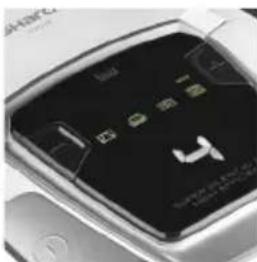
natural_image
Close-up of a car's front panel showing illuminated buttons and a logo (no readable text or symbols)natural_image
Front view of a white car with a digital dashboard and directional arrows pointing to the front panel (no readable text or symbols)natural_image
Hand inserting a grid into a white and black vacuum cleaner (no visible text or symbols)- If the power cord or plug is damaged, it should be replaced by a professional repair shop in order to avoid hazard.
- This appliance is not intended for use by persons (including children) with physical, mental or sensory handicaps, or by persons inexperienced or unfamiliar with the appliance, unless under supervision or in accordance with the instructions as communicated to them by persons responsible for their safety. Children shall not play with the appliance.
- This appliance can be used by children aged 8 years and older or by persons with physical, mental or sensory handicaps, or by those who are inexperienced or unfamiliar with the appliance, provided they are supervised or have been instructed how to safely use the appliance and are familiar with risks associated with the use of the appliance. Ensure that children do not play with the appliance. Do not allow children to clean and maintain the appliance unless they are 8 years or older and are supervised by a competent person.
- Do not use the appliance if it shows any signs of damage to the power cord, or if the appliance has been dropped on the floor.
- Do not expose the appliance to rain or humidity, and do not
use it outdoors. Do not operate the appliance with wet hands.
- This appliance is not intended for use at altitude greater than 2000 metres above sea level
- If you want to turn off the appliance completely, pull the plug out of the wall outlet.
In accordance with European Directive 2012/19/EU and Polish legislation regarding used electrical and electronic goods, this appliance is marked with the symbol of the crossed-out waste container. This marking indicates that the appliance must not be disposed of together with other household waste after it has been used. The user
is obliged to hand it over to waste collection centre collecting used electrical and electronic goods. The collectors, including local collection points, shops and local authority departments provide recycling schemes. Proper handling of used electrical and electronic goods helps avoid environmental and health hazards resulting from the presence of dangerous components and the inappropriate storage and processing of such goods.
Carefully read this instruction before using the appliance.
This appliance is for household use only.
Note! Packaging materials (bags, polyethylene, polystyrene, etc.) should be kept away from children during unpacking.
Children do not realize the dangers that can arise when using electrical appliances; therefore keep the appliance out of reach of children.
Do not immerse the body of the appliance in water or other liquids. Immersing in water may cause an electric shock.
If water spills on the external components of the appliance, dry it thoroughly before switching back on. Do not touch wet surfaces in contact with the appliance connected to power supply, immediately disconnect it from the mains.
When pulling out the plug from the wall outlet, never pull by the cord, only the plug, holding the socket with your other hand.
Do not attempt to remove any parts of the housing.
Using attachments that were not supplied with the product may cause damage to the appliance.
Never place the appliance on hot surfaces.
Do not place the cord over sharp edges or near hot surfaces.
Before you put the plug into the wall outlet, make sure your hands are dry.
Do not put any objects inside the appliance.
Make sure that the voltage indicated on the nameplate corresponds to that of your home electrical mains. Alternating current must be used, typically marked \~.
This appliance is intended for use at home or in facilities, such as kitchen for employees; in shops, offices and other working environments, use by the customers of hotels, motels and other residential facilities, in rural residential buildings, in the accommodation facilities.
Pull the plug from the wall outlet before replacing accessories.
Do not pull the vacuum cleaner or move it by the cord, do not use the cord as a handle, do not close the door squeezing the cord, do not place the cord over sharp edges or near hot surfaces. Be careful not to move the vacuum cleaner on the cord.
Do not insert any objects into the openings in the vacuum cleaner. Do not use the vacuum cleaner when any opening is blocked, dispose of dust, lint, hair and anything that may restrict air flow. Keep hair, loose clothing parts, fingers and other body parts away from the openings and moving parts.
Do not use the vacuum cleaner to collect flammable substances such as petrol, and do not use it in places where similar substances may be present.
If the appliance has a winder, hold the plug while winding up the cord. Do not let the plug was left loose during retracting.
Do not collect any items that burn or smoke, such as cigarettes, matches or hot ashes.
Do not use the vacuum cleaner without a dust bag and/or filters. If the opening, which sucks air, hose or telescopic tube are clogged, you should immediately turn off the vacuum cleaner Before restarting the vacuum cleaner, first remove the blocking item. Do not use the vacuum cleaner too close to heaters, radiators, cigarette butts, etc. Before using the vacuum cleaner, remove sharp objects from the floor to avoid damaging the dust bag. Do not collect fine particles such as: flour, gypsum, printer toners, etc., as this may clog filters and damage the vacuum cleaner. Make sure that extension tube is fully withdrawn before you put away your vacuum cleaner either in vertical or horizontal position.
SPECIFICATION:
| Power specification: AC 230 V / $0Hz | |
| Nominal power: 700W | |
| Maximum power: 720W | |
| Weight (without accessories) 8.6 kg | |
YOUR APPLIANCE:
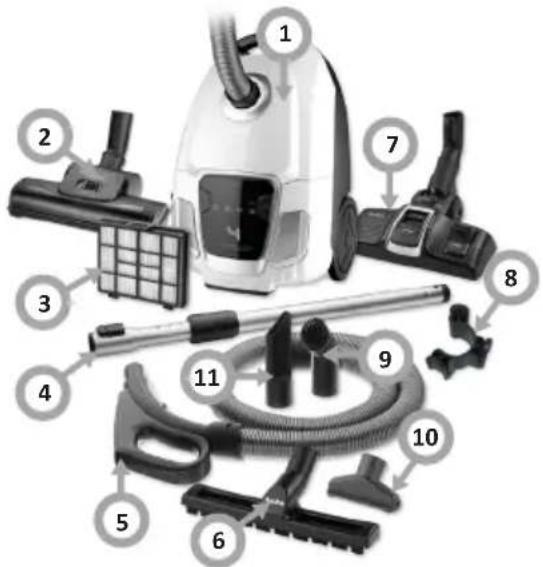
- Motor unit
- Turbo brush
- Exhaust filter
- Telescopic tube
- Hose with a handle
- Parquet brush
- Universal 2-in-1 brush
- Accessory holder
- Bookshelf suction attachment
- Upholstery nozzle
- Crevice nozzle
OPERATE THE APPLIANCE:
Pair the hose with the vacuum cleaner
- Insert the plug of the power cord into the power socket, press the ON/OFF button to turn on the appliance, then simultaneously press and hold the plus and minus buttons until the display flashes.
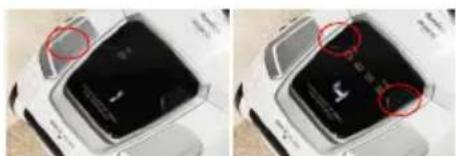
natural_image
Two views of a white smartwatch with a black display screen and red circular annotations highlighting features (no readable text or symbols)- Then take the hose (ensure that batteries are installed in the vacuum tube handle) and press the ON/OFF switch. If the appliance turns off, pairing is successful.
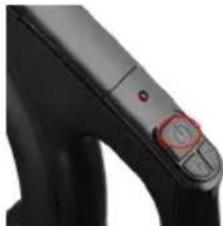
natural_image
Close-up of a black handheld device with a red circular button and control knob (no visible text or symbols)- After successful pairing, use the handle to make sure that it operates properly. Press the ON/OFF switch to turn off the appliance.
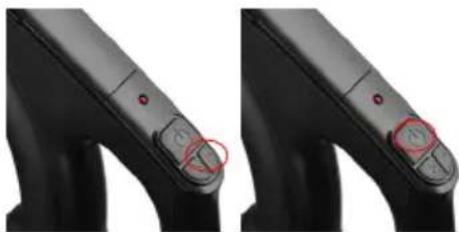
natural_image
Close-up of a black mechanical component with red circular annotations highlighting specific points (no text or symbols present)Assemble the appliance
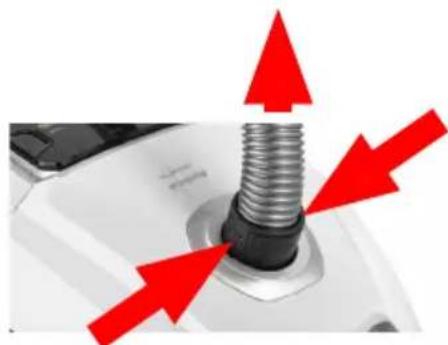
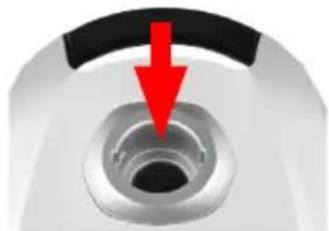
- Insert the hose into to the vacuum cleaner body.
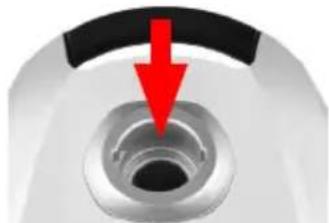
natural_image
Close-up of a mechanical component with a red arrow pointing to a circular feature (no text or symbols visible)- To pull the hose out of the vacuum cleaner body, press the two tabs on both sides and pull out the hose.
natural_image
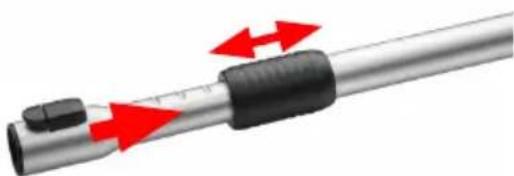
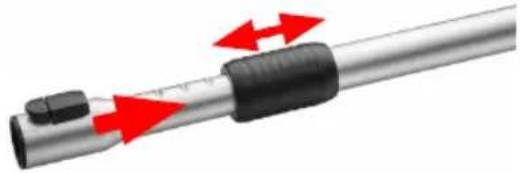
Close-up of a white mechanical component with a metallic threaded bolt and red arrows pointing upward (no text or symbols)- Extend the telescopic tube to the desired length.
natural_image
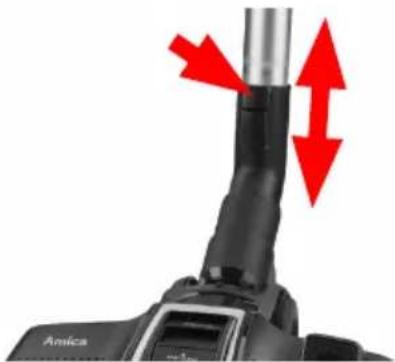
Close-up of a metallic cylindrical device with red directional arrows indicating motion or force (no text or symbols)- Connect the telescopic tube to the hose handle. Insert the brush into the other end of the hose.
natural_image
Close-up of a black mechanical component with red arrows pointing to a vertical cylindrical feature, labeled 'Amica' at bottom left (no other text or symbols)Install or replace the handle batteries
- The handle control panel is powered by batteries. Open the cover and insert the batteries according to the markings. The handle control panel is powered by 2 AAA batteries. The appliance is delivered without batteries, so you need to purchase the batteries. You do not need to use the control panel on the hose handle to operate the appliance as you can also use the buttons on the body.
Operate the appliance
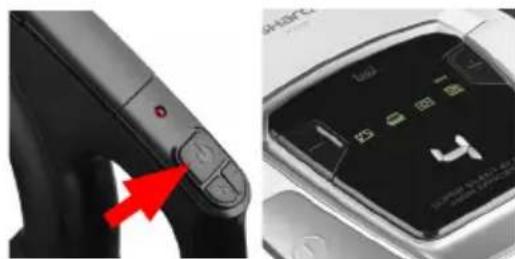
- Press the ON/OFF button to turn the appliance on or off.
natural_image
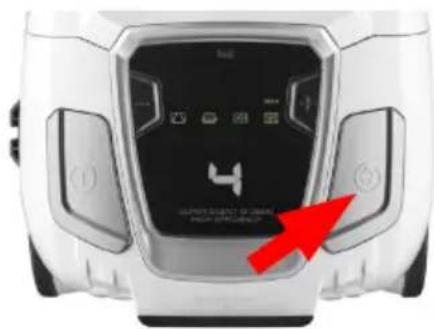
Close-up of a black handheld device with a red arrow pointing to its control panel, alongside a smartphone screen showing app icons (no readable text or symbols)• After use, disconnect the appliance from the power supply and wind up the cord using the appropriate button.
natural_image
Front view of a white smart air purifier device with control panel and red arrow pointing to the bottom panel (no visible text or symbols on main body)- When winding up the power cord hold the plug so that it does not swing around or hit the furniture or the vacuum cleaner.
Appliance indicators
-
Dust bag full indicator: When the suction power of the vacuum cleaner significantly decreases, the red dust bag full indicator will light up. You need to replace the dust bag. If the dust bag full indicator goes on, check whether the suction brush, hose or tube is blocked with large items stopping the air flow. After removing the items, if present, restart the vacuum cleaner - if the dust bag full indicator is still red, replace the dust bag with a new one.
-
Each time you change the speed, another symbol appears on the control panel: curtains -> sofa -> carpet -> parquet.
CLEANING AND CARE
Replace the dust bag
- Open the appliance lid and pull out the handle together with the full bag.
- Slide the new bag into the holder and replace it in its original place. If the bag is not installed correctly, the lid will not close.
Clean the dust bag cavity filter
- Clean the dust bag cavity filter when replacing the dust bag.
- Slide the filter out of the guides and clean it. You can wash the filter in warm water with a mild detergent.
- Reinstall the filter when it is completely dry.
Clean the turbo brush
- Before cleaning the turbo brush, disconnect it from the appliance.
- Open the roller lock and thoroughly clean the seat and the roller itself. Do not rinse the roller with water. If there is a lot of hair on the roller, remove the hair carefully with scissors.
Clean the exhaust filter
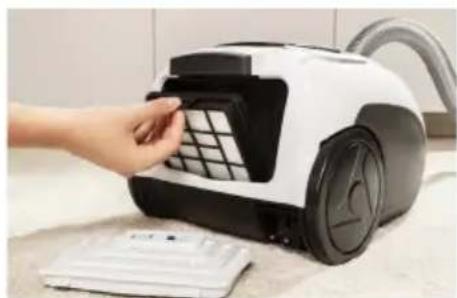
- Clean the exhaust filter at least once every 5-6 months. To do this, remove the filter cover and clean the exhaust filter.
natural_image
Hand inserting a grid into a white vacuum cleaner on a kitchen keyboard (no visible text or symbols)- Shake dirt off the filter and then brush it with a soft bristle brush. Then rinse the filter in lukewarm water and do not use any detergent.
- Do not direct strong jet of water onto the filter. Use it only when completely dry.
- If the filter is too dirty or damaged replace the filter with a new one.
- Dry the filter thoroughly before replacing it.
CLEANING AND CARE
In the event of any fault:
- Turn off the appliance:
- Unplug the appliance from power
- By following the instructions given in the table below, you can correct some minor issues. Please check all points in the table before you refer the repair to customer service.
Problem Reason Remedy
| 1. The appliance does not work | No power Check the circuit breaker, reset if tripped, replace a blown fuse | |
| 2. Reduced suction power of the vacuum cleaner | Dust bag full You need to replace the dust bag | |
| Vacuum cleaner hose clogged | Remove dust, hair, and other obstructions that may reduce airflow. | |
If the problem is not solved, unplug the appliance from power and report the fault to the nearest service centre. Note! All repairs must be performed by qualified service technicians.
OBSLUHA:
natural_image
Two views of a smartwatch with illuminated display screens and red circular annotations (no readable text or symbols)natural_image
Close-up of a black handheld device with a red circular button and control knob (no visible text or symbols)natural_image
Close-up of a black mechanical component with two circular red annotations highlighting specific points (no text or symbols present)Sestavení zařízení
natural_image
Close-up of a mechanical component with a red arrow pointing to a circular opening (no text or symbols visible)natural_image
Close-up of a mechanical component with red arrows pointing to three metallic bolts (no text or symbols visible)natural_image
Close-up of a metallic cylindrical device with red directional arrows indicating motion or force (no text or symbols)natural_image
Close-up of a black mechanical component with red arrows pointing to a vertical cylindrical feature, labeled 'Amica' at bottom left (no other text or symbols)natural_image
Close-up of a black handheld device with a red arrow pointing to its control panel, next to a smartphone display showing app icons (no readable text)natural_image
Hand inserting a grid into a white vacuum cleaner's air vent (no text or symbols visible)POUŽÍVANIE:
natural_image
Two views of a white smartwatch with black display screens and red circular annotations highlighting features (no readable text or symbols)natural_image
Close-up of a black handheld device with a red button and control knob (no visible text or symbols)natural_image
Close-up of a black mechanical component with two circular red markers highlighting features (no text or symbols visible)Zloženie zariadenia
- Zastrčte jeden koniec trubice do otvoru v korpuse.
natural_image
Close-up of a mechanical component with a red arrow pointing to a circular feature (no text or symbols visible)natural_image
Close-up of a white mechanical component with a threaded bolt and red arrows pointing to it, no visible text or symbols.- Roztiahnite teleskopickú trubicu na požadovanú dížku.
natural_image
Close-up of a metallic cylindrical device with red directional arrows indicating motion or force (no text or symbols)natural_image
Close-up of a black mechanical component with red arrows pointing to a vertical cylindrical feature, labeled 'Amica' at bottom left (no other text or symbols)natural_image
Close-up of a black electronic device's control panel with a red arrow pointing to the button (no visible text or symbols)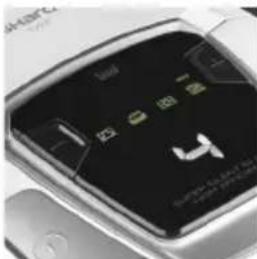
natural_image
Close-up of a smartphone display showing illuminated buttons and a logo (no readable text or symbols)natural_image
Top-down view of a white car front panel with control buttons and a red arrow pointing to the bottom panel (no readable text or symbols)natural_image
Hand inserting a grid into a white vacuum cleaner (no text or symbols visible)HANDHABUNG:
natural_image
Two views of a smartwatch with visible display screens and control buttons (no text or symbols)natural_image
Close-up of a black handheld device with a red control knob (no visible text or symbols)natural_image
Close-up of a black mechanical component with red circular annotations highlighting specific points (no text or symbols present)natural_image
Close-up of a mechanical component with a red arrow pointing to a circular feature (no text or symbols visible)natural_image
Close-up of a white mechanical component with a metallic threaded shaft and red arrows pointing upward (no text or symbols)natural_image
Close-up of a metallic cylindrical device with red directional arrows indicating motion or force (no text or symbols)natural_image
Close-up of a black mechanical component with red arrows pointing to a cylindrical feature, labeled 'Annica' at bottom left (no other text or symbols)natural_image
Close-up of a black handheld device with a red arrow pointing to its control panel, alongside a close-up of its smartphone display (no visible text or symbols)natural_image
Top-down view of a white car with a black door panel and red arrow pointing to the front panel (no readable text or symbols)natural_image
Hand inserting a grid into a white vacuum cleaner on a kitchen counter (no visible text or symbols)FONCTIONNEMENT :
natural_image
Two-panel image showing a smartwatch with a display screen and control buttons, no visible text or symbols.natural_image
Close-up of a black handheld device with a red circular button and control knob (no visible text or symbols)natural_image
Close-up of a black mechanical component with red circular annotations highlighting specific points (no text or symbols visible)natural_image
Close-up of a mechanical component with a red arrow pointing to a circular opening (no text or symbols visible)natural_image
Close-up of a white mechanical component with a metallic threaded bolt and red arrows pointing upward (no text or symbols)natural_image
Close-up of a metallic cylindrical device with red directional arrows indicating motion or force (no text or symbols)natural_image
Close-up of a black vacuum cleaner's head with red arrows indicating airflow direction (no text or symbols)natural_image
Close-up of a black handheld device with control buttons and a close-up of its screen showing app icons (no readable text or symbols)natural_image
Front view of a white smart car with a digital display and red arrow pointing to the front panel (no readable text or symbols)natural_image
Hand inserting a grid into a white vacuum cleaner on a kitchen counter (no visible text or symbols)USO:
natural_image
Two side-by-side images of a smartwatch with illuminated display screens and red circles highlighting features (no visible text or symbols)natural_image
Close-up of a black handheld device with a circular button and control buttons (no visible text or symbols)natural_image
Close-up of a black mechanical component with circular red highlights, showing no text or symbolsnatural_image
Close-up of a mechanical component with a red arrow pointing to a circular opening (no text or symbols visible)natural_image
Close-up of a mechanical component with red arrows pointing to its threaded body (no text or symbols visible)natural_image
Close-up of a metallic cylindrical device with red directional arrows indicating motion or force (no text or symbols)natural_image
Close-up of a black mechanical component with red arrows pointing to a vertical cylindrical feature, labeled 'Amica' at bottom left (no other text or symbols)natural_image
Close-up of a black handheld device with a red arrow pointing to a button (no visible text or symbols)
natural_image
Close-up of a smartphone display showing app icons and status bar (no readable text or symbols)natural_image
Front view of a white car with a digital dashboard and red arrow pointing to the front panel (no readable text or symbols)natural_image
Hand inserting a grid into a white vacuum cleaner on a kitchen keyboard (no visible text or symbols)ОБСЛУЖВАНЕ:
natural_image
Two-panel image showing a smartwatch with a display screen and control buttons, no visible text or symbols.natural_image
Close-up of a black handheld device with a red circular button and control knob (no visible text or symbols)natural_image
Close-up of a black mechanical component with red circular annotations highlighting specific points (no text or symbols visible)natural_image
Close-up of a mechanical component with a red arrow pointing to a circular feature (no text or symbols visible)natural_image
Close-up of a mechanical component with red arrows pointing to a threaded bolt (no text or symbols visible)natural_image
Close-up of a metallic cylindrical device with red directional arrows indicating motion or force (no text or symbols)natural_image
Close-up of a black vacuum cleaner with red arrows indicating airflow direction (no text or symbols)natural_image
Close-up of a black handheld device with a red arrow pointing to its control panel, alongside a close-up of its smartphone display (no visible text or symbols)natural_image
Front view of a white car with a black digital display and red arrow pointing to the bottom panel (no readable text or symbols)natural_image
Hand inserting a grid into a white vacuum cleaner on a kitchen counter (no visible text or symbols)KEZELÉS:
natural_image
Two views of a white smartwatch with black display screens and red circular annotations highlighting features (no readable text or symbols)natural_image
Close-up of a black handheld device with a circular button and control knob (no visible text or symbols)natural_image
Close-up of a black mechanical component with circular red annotations highlighting specific features (no text or symbols visible)natural_image
Close-up of a mechanical component with a red arrow pointing to a circular feature (no text or symbols visible)natural_image
Close-up of a white mechanical component with a metallic threaded bolt and red arrows pointing outward (no text or symbols)natural_image
Close-up of a metallic cylindrical device with red directional arrows indicating motion or force (no text or symbols)natural_image
Close-up of a black mechanical component with red arrows pointing to a vertical cylindrical feature, labeled 'Amica' at bottom left (no other text or symbols)natural_image
Close-up of a black handheld device with a red arrow pointing to its control panel, next to a close-up of the device's screen (no visible text or symbols)natural_image
Top-down view of a white car with a digital display and red arrow pointing to the front panel (no readable text or symbols)natural_image
Hand inserting a grid into a white vacuum cleaner's air vent (no text or symbols visible)ЕКСПЛУАТАЦІЯ:
natural_image
Two identical photos of a white mobile phone with a black LCD screen and red circular annotations highlighting the screen area (no visible text or symbols)natural_image
Close-up of a black handheld device with a red circular button on the left side (no visible text or symbols)natural_image
Close-up of a black mechanical component with red circular annotations highlighting key points (no text or symbols present)Збірка пристрою
natural_image
Close-up of a mechanical component with a red arrow pointing to a circular feature (no text or symbols visible)natural_image
Close-up of a white mechanical component with a metallic threaded bolt and red arrows pointing outward (no text or symbols)natural_image
Close-up of a metallic cylindrical device with red arrows indicating motion or force direction (no text or symbols)natural_image
Close-up of a black vacuum cleaner's head with red arrows indicating movement or force, no visible text or symbols.natural_image
Close-up of a black handheld device with a red arrow pointing to its control panel, alongside a close-up of its smartphone display (no visible text or symbols)natural_image
Front view of a white electronic device with control buttons and a red arrow pointing to the bottom panel (no visible text or symbols)natural_image
Hand inserting a grid into a white and black vacuum cleaner on a kitchen surface (no text or symbols visible)OPERARE:
natural_image
Two side-by-side images of a smartwatch with illuminated display screens and red circles highlighting features (no visible text or symbols)natural_image
Close-up of a black handheld device with a circular button and control buttons (no visible text or symbols)natural_image
Close-up of a black mechanical component with red circular annotations highlighting a specific area (no text or symbols present)natural_image
Close-up of a mechanical component with a red arrow pointing to a circular opening (no text or symbols visible)natural_image
Close-up of a white mechanical component with a metallic threaded shaft and red arrows pointing upward (no text or symbols)natural_image
Close-up of a metallic cylindrical device with red directional arrows indicating motion or force (no text or symbols)natural_image
Close-up of a black mechanical component with red arrows pointing to a vertical pipe or tube, labeled 'Amica' at bottom left (no other text or symbols)natural_image
Close-up of a black handheld device with a red arrow pointing to the button (no visible text or symbols)
natural_image
Close-up of a car's front panel showing illuminated buttons and a logo (no readable text or symbols)natural_image
Top-down view of a white car interior with digital display and a red arrow pointing to the front panel (no readable text or symbols)natural_image
Hand inserting a grid into a white vacuum cleaner on a kitchen surface (no text or symbols visible)- OBSŁUGA:
- Złożenie urządzenia
- YOUR APPLIANCE:
- OPERATE THE APPLIANCE:
- Pair the hose with the vacuum cleaner
- Assemble the appliance
- Install or replace the handle batteries
- Operate the appliance
- Appliance indicators
- CLEANING AND CARE
- Replace the dust bag
- Clean the dust bag cavity filter
- Clean the turbo brush
- Clean the exhaust filter
- OBSLUHA:
- Sestavení zařízení
- POUŽÍVANIE:
- Zloženie zariadenia
- HANDHABUNG:
- FONCTIONNEMENT :
- ОБСЛУЖВАНЕ:
- KEZELÉS:
- ЕКСПЛУАТАЦІЯ:
- Збірка пристрою
- OPERARE:
Brand : AMICA
Model : Sharq VM 7011
Category : Vacuum Cleaner