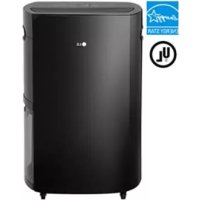
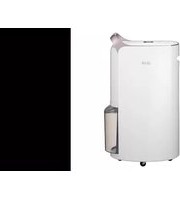
UD701KOG3 - Dehumidifier LG - Free user manual and instructions
Find the device manual for free UD701KOG3 LG in PDF.



| Product Type | Dehumidifier |
| Brand | LG |
| Model | UD701KOG3 |
| Display | Current humidity level (25-90%) and set (30-80%) |
| Humidity setting | 30-80% in 5% increments |
| Timer | Adjustable auto shut-off from 1 to 12 hours |
| Fan speed | 2 speeds: Low and High |
| Auto-defrost | Yes, automatic |
| Full tank indicator | Yes, with auto shut-off after 3 minutes |
| Filter check indicator | Lights up after 350 hours of operation |
| Continuous drain | Possible with 3/4 in. hose (outer diameter) |
| Operating temperature range | 5 °C to 32 °C |
| Compressor protection | 3-minute delay before restart |
| Safety sleep | Automatic shut-off after 23 hours of continuous operation |
| Air filter | Washable, monthly cleaning recommended |
| Exterior maintenance | Soft cloth, do not spray water |
| Tank cleaning | Once a week, with a soft cloth |
| Warranty | 1 year parts and labor (Canada) |
| Country of manufacture | Not specified |
| Dimensions (approx.) | Not specified |
Frequently Asked Questions - UD701KOG3 LG
User questions about UD701KOG3 LG
0 question about this device. Answer the ones you know or ask your own.
Ask a new question about this device
Download the instructions for your Dehumidifier in PDF format for free! Find your manual UD701KOG3 - LG and take your electronic device back in hand. On this page are published all the documents necessary for the use of your device. UD701KOG3 by LG.
USER MANUAL UD701KOG3 LG
Read this manual carefully before operating the appliance and retain it for future reference.
Model: UD701KOG1, UD701KOG3
TABLE OF CONTENTS
1 SAFETY INSTRUCTIONS
1 IMPORTANT SAFETY INSTRUCTIONS
4 PRODUCT OVERVIEW
4 Front
4 Back
5 BEFORE USE
6 OPERATION
6 Control Panel and Display
7 Dehumidifying
7 Setting the Timer
7 Safety Standby Light
7 Bucket Full Light
8 Checking the Filter
8 Auto Defrosting
8 Continuous Drainage Setup
9 Emptying the Water Bucket
10 MAINTENANCE
10 Cleaning the Exterior
10 Cleaning the Water Bucket
11 Cleaning the Air Filter
12 Storing the Product
13 TROUBLESHOOTING
SAFETY INSTRUCTIONS
READ ALL INSTRUCTIONS BEFORE USE
Your safety and the safety of others are very important.
We have provided many important safety messages in this manual and on the appliance. Always read and follow all safety messages.
This is the safety alert symbol.

This symbol alerts you to potential hazards that can kill or injure you and others. All safety messages will follow the safety alert symbol and either the word WARNING or CAUTION.
These words mean:

WARNING
Failure to follow the instructions could result in death or serious injury.

CAUTION
Failure to follow the instructions could result in personal injury or property damage.
IMPORTANT SAFETY INSTRUCTIONS

WARNING
To reduce the risk of explosion, fire, death, electric shock, scalding, or injury to persons when using this appliance, follow basic precautions, including the following:
INSTALLATION
- Adhere to all industry recommended safety procedures including the use of long-sleeved gloves and safety glasses.
- Never attempt to operate this appliance if it is damaged, malfunctioning, partially disassembled, or has missing or broken parts, including a damaged cord or plug.
- Do not, under any circumstances, cut or remove the third (ground) prong from the power cord.
- When installing or moving the appliance, be careful not to pinch, crush, or damage the power cord.
- Keep packing materials out of the reach of children. Packaging material can be dangerous for children. There is a risk of suffocation.
- Destroy the carton, plastic bag, and other packing materials after the appliance is unpacked. Children might use them for play. Cartons covered with rugs, bedspreads, or plastic sheets can become airtight chambers.
- Store and install the appliance where it will not be exposed to temperatures below freezing or exposed to outdoor weather conditions.
- Do not damage, alter, excessively bend, twist, pull, pinch or heat the power cord.
- Call an authorized service technician to repair or immediately replace all power cords that have become damaged. Do not use a cord that shows cracks or abrasion damage along its length or at either end.
- Do not use multiple-outlet adaptors with this dehumidifier.
-
Do not use the product if the outlet is damaged or loose.
-
In the event of a gas leak (propane gas, LP gas, etc.) do not operate this or any other appliance. Open a window or door to ventilate the area immediately.
- Do not disassemble, repair or modify the product.
- Do not store or use flammable gases or materials near the dehumidifier.
- This appliance is not intended for use by persons (including children) with reduced physical, sensory or mental capabilities, or lack of experience and knowledge, unless they have been given supervision or instruction concerning use of the appliance by person responsible for their safety.
Do not allow children to play on or with the appliance. Close supervision of children is necessary when the appliance is used near children.
OPERATION
- Read all instructions before using the appliance and save these instructions.
- Do not tamper with controls.
- If the product has been submerged, contact an LG Electronics customer information center for instructions before resuming use.
- Push the power plug all the way into the wall outlet so that it is not loose.
- Do not grasp the power cord or touch the appliance controls with wet hands.
- Do not modify or extend the power cord.
- If the product makes a strange noise or emits a smell or smoke, pull the power plug out and contact an LG Electronics customer information center.
- Avoid placing the dehumidifier or other heavy objects on top of the power cord.
- Do not use water to clean the dehumidifier.
- Keep the air inlet and outlet free from obstructions.
- Do not cover the power cord with a rug or carpeting. Placing heavy objects on top of the cord could damage it.
- Do not place combustion appliances directly in the path of the dehumidifier's airway. Doing so could result in incomplete combustion or deformation by heat.
- Keep the product away from fire.
- Do not use the product in places where it could be splashed by water.
- Do not insert fingers, sticks etc. into the air inlet or outlet. The fan is running at high speeds and could cause personal injuries.
- Do not repair or replace any part of the appliance. All repairs and servicing must be performed by qualified service personnel unless specifically recommended in this owner's manual. Use only authorized factory parts.
- California Safe Drinking Water and Toxic Enforcement Act This product contains chemicals known to the State of California to cause cancer and birth defects or other reproductive harm. Wash hands after handling.
- Connect to a properly rated, protected, and sized power circuit to avoid electrical overload.

CAUTION
To reduce the risk of injury to persons, malfunction, or damage to the product or property when using the appliance, follow basic safety precautions, including the following:
INSTALLATION
- Use this appliance only for its intended purpose.
This product is not designed for preserving precision instruments, tableware or art works. - Use the appliance only in a well-ventilated area.
Keep the area well ventilated, especially if also using a combustion appliance. Inadequate ventilation reduces the oxygen level in the air. - Never unplug the appliance by pulling on the power cord. Always grip the plug firmly and pull straight out from the outlet.
- Do not use the product in places where chemicals are used.
Chemicals and solvents dissolved in the air in places such as hospitals, factories, laboratories and hair salons could cause product deformation and leaking, resulting in property damage. - Turn off the dehumidifier and pull out the power plug before cleaning.
Wait for the fan to stop moving. - Do not operate the dehumidifier without a filter.
Using the product without a filter could result in a reduced product lifespan, electric shock or injury.
OPERATION
- Do not use the product for preserving animals/plants, precision instruments, art works etc.
- Do not place vases or water jars on the dehumidifier.
- Turn off the dehumidifier and empty the water bucket before moving the dehumidifier.
- Pull out the power plug if you will not be using the product for an extended period.
- Do not use the product in a very small space such as a closet.
Poor ventilation could result in overheating or fire. - Do not use wax, thinner or a strong detergent when cleaning. Wipe the product using a soft cloth.
Using inappropriate cleaning products could cause the product to become discolored or develop surface flaws. - Do not use the product in direct sunlight or rain.
- Do not touch the product with wet hands.
- Position the product on a firm, stable surface.
- Remove cable ties and extend power cord before use.
- Do not spray foreign substances or water on the product.
PRODUCT OVERVIEW
Front

Back
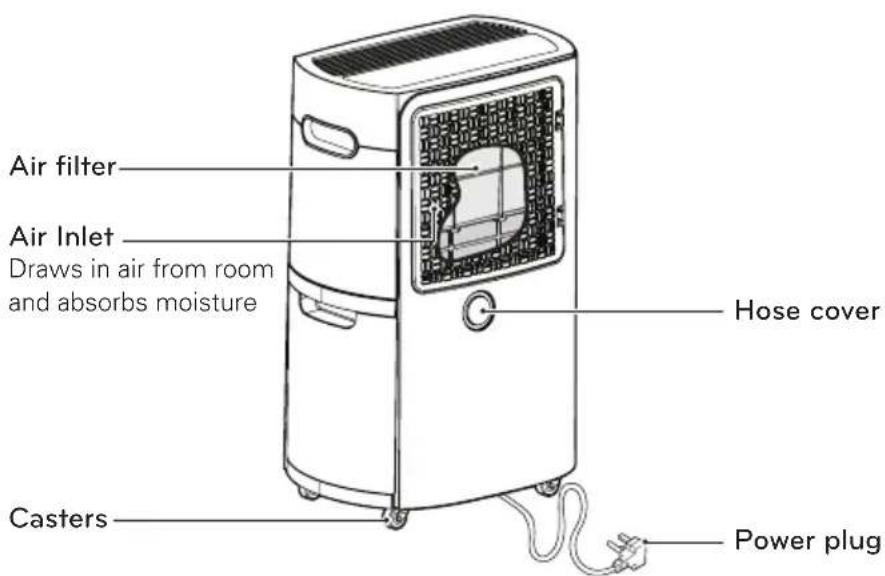
Power cord and plug may differ depending on the country where the product is purchased.
BEFORE USE
Indoor temperature and relative humidity affect dehumidification.
- Dehumidification is decreased if the temperature or relative humidity is low.
- The product does not operate unless the desired humidity level is lower than the current humidity level.
This product operates at temperatures from 41 ° F - 90 ° F (5 ° C - 32 ° C).
- At temperatures of 32^ F ( 0^ C) or less, water freezes inside the product.
- At temperatures over 90^ F ( 32^ C), the internal temperature of the product trips a protective device which deactivates the product to avoid product damage.
When the dehumidifier is operating, the indoor temperature will rise.
- The dehumidifier does not have a cooling/heating function.
- Heat is generated during operation, so the room temperature may be increased by about 37^ F ( 3^ C) depending on the usage conditions (indoor temperature, size of the room).
The compressor has a 3-minute delay before restarting.
- If the product is stopped and immediately restarted, to protect the compressor there is a 3-minute delay until the compressor restarts.
The product cannot be operated continuously for more than 23 hours.
After 23 hours of continuous operation, the compressor automatically shuts off for one hour to prevent product damage. The compressor will restart after one hour. This Safety Standby function is normal.
Install the product at least 11^13/_16 " (30 cm) from walls or other obstacles.
The product needs clearance for air intake and exhaust purposes.
There may be water in the drain water bucket before first use.
Water may remain in the drain water bucket from the product's outgoing inspection to check operation. This is normal.
OPERATION
Control Panel and Display
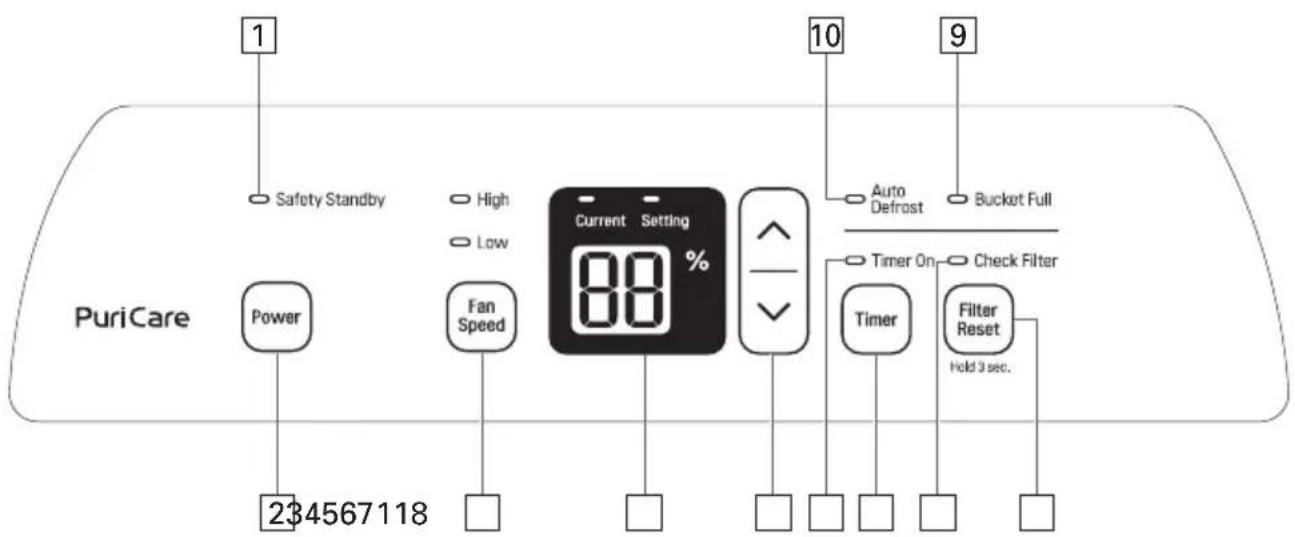
| 1 Safety Standby light (red) | After 23 hours of continuous operation, the red lamp lights up for 1 hour. | |
| 2 Power button | Starts and stops the product. | |
| 3 Fan Speed control button | Adjusts the fan speed and air volume. | |
| 4 Humidity display | Displays the current humidity (25-90%) and the humidity setting (30-80%). | |
| 5 Humidity control button | Adjusts the humidity setting. Desired humidity levels can be set in 5-percent increments from 30-80%. | |
| 6 Timer button | Sets a time for the product to automatically turn off. Press the button repeatedly to increase the time until shutoff in 1-hour increments up to 12 hours. | |
| 7 Check Filter light | Lights up after 350 hours of operation. Check and clean the filter. | |
| 8 Filter Reset button | After cleaning the filter, press for three seconds to reset operating time. | |
| 9 Bucket Full light | Lights up when drain water bucket is full. | |
| 10 Auto Defrost light | Lights up when the product is defrosting. | |
| 11 Timer On light | Lights up when the Timer function is set. | |
Dehumidifying
1 Press to turn on the power.
- It takes 30 minutes of continuous operation to reach the desired humidity level the first time the product is used.
- The display shows the current humidity level.
2 Press / to change humidity.
- The desired humidity level can be set in 5-percent increments from 30-80%.
- The display shows the desired humidity level while it is being set, then reverts to the current humidity level after 5 seconds.
- The current humidity level is displayed in 5-percent increments from 25-90%. If the humidity level is outside the range, the display continues to show either 25% or 90%.
3 Press to change the fan speed.
The fan speed has two levels: low or high.
4 Press to turn off the product.
NOTE
- If the product is restarted immediately after being shut down, to protect the compressor there is a 3-minute delay until the compressor begins operating.
- It is normal for the compressor to cause the product to vibrate while starting or stopping.
Setting the Timer
1 Press to turn on the power.
2 Press to set the automatic shut off time.
- Press the button repeatedly to increase the time until shut off in 1-hour increments up to 12 hours.
3 Press to cancel the Timer function.
- Press the Timer button repeatedly until the Timer light turns off.
NOTE
Empty the drain water bucket before setting the Timer function.
If the water bucket becomes full during the Timer function, the Bucket Full light goes on and dehumidification stops.
Safety Standby Light
- After 23 hours of continuous operation, the red Safety Standby light turns on for one hour and the fan and compressor shut off to prevent product malfunction.
- After an hour with the fan and compressor shut off, the Safety Standby light turns off and the fan and compressor automatically restart.
Bucket Full Light
- Empty the water bucket within three minutes of the Bucket Full light turning on.
- After the light turns on, the fan operates for an additional three minutes to remove remaining condensed water and then the product shuts off.
- See Emptying the Water Bucket for further instructions.
Checking the Filter
Check and clean the filter when the Check Filter light turns on.
1 After 350 hours of operation, the Check Filter light turns on. Check the filter and clean it if necessary or wait 24 hours for the light to go off automatically.
2 After cleaning the filter, press and hold Filter Reset for three seconds to reset the operating time.
Auto Defrosting
The Auto Defrost function automatically removes any frost in the heat exchanger caused by low indoor temperatures.
- The Auto Defrost light turns on while the product automatically defrosts the heat exchanger.
- The compressor stops during the automatic defrost function.
Auto Defrost
Continuous Drainage Setup
Items Needed: 3/4" (outer diameter) threaded garden hose nearby sink or drain.
1 Unplug the product. Turn the hose cover at the back of the product counterclockwise to open it.
2 Remove the water bucket.

natural_image
Illustration of a portable air purifier with hand positioning and assembly steps (no text or symbols)3 Insert the garden hose in the drain hole at the rear of the case.

4 Turn the end of the garden hose clockwise to attach it to the male connection behind the water bucket. Firmly attach the hose to avoid leaks. Hand tighten; then make an additional 1/8 turn with pliers.

natural_image
Line drawing of a refrigerator with an inset showing hand positioning and cleaning components (no text or symbols)! CAUTION
Take care not to injure hands while connecting drainage hose.
5 Reinstall the water bucket.

natural_image
Diagram showing two steps of a hand holding a device, with the second step showing a close-up of the device's handle (no text or symbols present)NOTE
- The product does not work without the water bucket installed.
- A hose for continuous drainage can be purchased through the LG customer information center.
Emptying the Water Bucket
1 Gently pull the top handle of the water bucket to remove the bucket from the product.
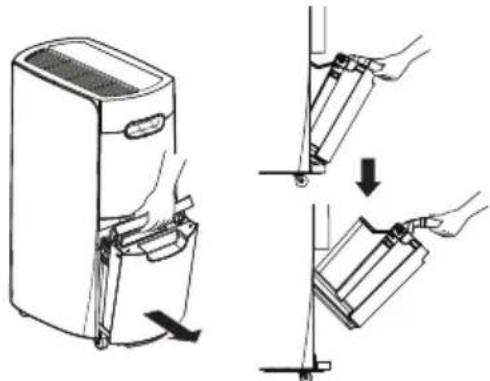
2 Lift off the cover of the water bucket.

3 Pour out the water inside the water bucket.
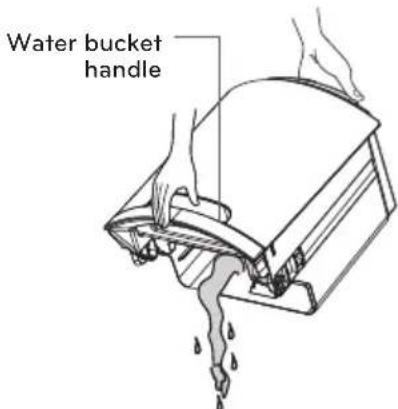
4 Put the cover back on the water bucket.

5 Angle the bottom of the water bucket into place first, then push the top into place.

natural_image
Diagram showing two steps of a device being inserted into a rack, with no visible text or symbols.NOTE
- If the water bucket is removed immediately after turning off the dehumidifier, the water remaining in the heat exchanger may drip inside the water bucket storage area. Remove the water with a soft cloth.
- While cleaning, do not touch the water detection device on the inside top of the water bucket storage area.
- Clean the water bucket once a week during use.
- If the ambient temperature is low, there is less moisture in the air for the product to remove.
- Unplug the product before removing the water bucket. If the bucket is removed while the product is operating, the compressor stops. The fan operates for another three minutes to clear the remaining water inside the heat exchanger and then also stops.
! CAUTION
Watch pinch points to avoid injuring fingers when installing the water bucket.

MAINTENANCE
Cleaning the Exterior
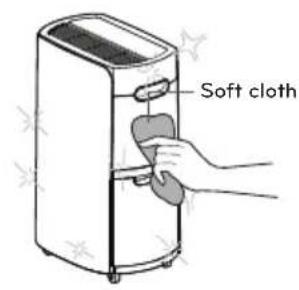
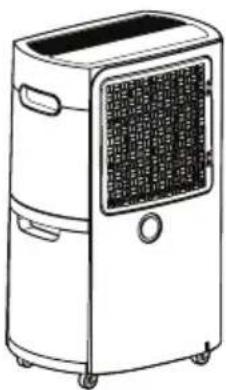
Wipe the exterior of the dehumidifier with a soft, damp cloth.
- Do not spray water directly on the product. Doing so may cause damage to the insulation or stains on the surface of the product.
Use a vacuum cleaner or soft brush to remove dust from the filter case.

natural_image
Illustration of hands using a tool to clean or manage a device with a magnifying glass (no text or symbols)
natural_image
Line drawing of a hand holding a device next to a portable air purifier (no text or symbols)Cleaning the Water Bucket
1 Lift off the cover of the bucket.

natural_image
Line drawing of a mechanical device with an upward arrow indicating force or direction (no text or symbols)2 Empty the water bucket and use a soft cloth to remove any remaining moisture inside it.

natural_image
Line drawing of a hand cleaning a cylindrical appliance (no text or symbols)
CAUTION
Operating the product with the cover of the water bucket missing or assembled improperly may result in leaking.

CAUTION
Do not use materials such as thinners, benzene, acid, or sponges to clean the product. They may damage the surface of the product.
Cleaning the Air Filter

CAUTION
- Unplug the unit before cleaning it.
- Allow the filter to dry completely, out of direct sunlight, before reinserting it in the product. Operating the product with a damp filter may cause product failure.
1 Release the two hooks at the right of the filter case and swing it open to remove it.

natural_image
Illustration of two different air purifiers with internal mesh patterns, showing exterior and interior views (no text or symbols)2 Pull the center tab on the air filter to remove it from the filter case.

natural_image
Diagram showing two rectangular panels with internal grid structures, one with an arrow pointing left (no text or symbols)3 Clean the air filter with a vacuum cleaner or soft brush.
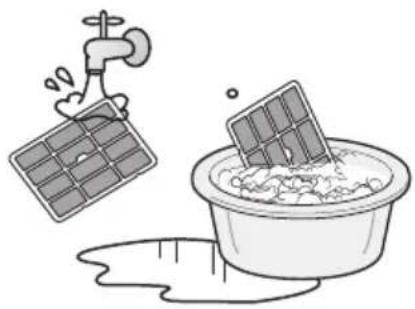
- If the filter is very dirty, wash it in water and a neutral detergent.
- Clean the air filter once a month.
natural_image
Illustration of a faucet spraying into a solar panel above a bowl of water, with a pipe partially submerged below (no text or symbols)4 Bend the sides of the air filter inward slightly to reinsert it. Make sure the filter is seated under the tabs inside the filter case.
5 Align the hinges on the filter case with the hinge openings on the product and then swing the case to the right to reattach the two hooks.
natural_image
Line drawing of a portable air conditioner unit with front panel and side buttons (no text or symbols)
NOTE
Service calls to clean the air filter are not covered under the product warranty.
Storing the Product
1 Unplug the product.
2 Empty the water bucket completely.
- Remove the lid from the water bucket and use a soft cloth to wipe up any remaining water in the bucket.
3 Clean the filter.
- Let the filter thoroughly dry for several hours in a shaded, well-ventilated area before reinstalling it.
- Placing the filter in direct sunlight or near a fire may cause product deformation.
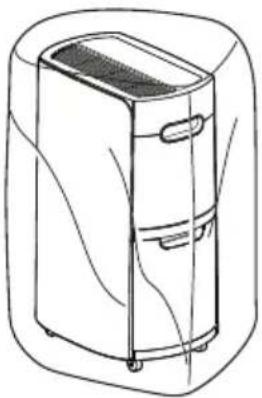
4 While the filter is drying, place the dehumidifier out of direct sunlight in a well-ventilated area and allow it to thoroughly dry for several hours. Reinstall the filter and cover the dehumidifier before storing it in an upright position.
(A dust cover for storing the dehumidifier is not included.)
natural_image
Line drawing of a refrigerated air conditioner unit with cooling fins and wheels (no text or symbols)TROUBLESHOOTING
If the product does not function properly or does not function at all, check the following before calling for service.
| Problem Possible Cause Solutions | ||
| The product is not running. | - Power plug not inserted correctly.- Power outage.- Water bucket not installed properly.- Bucket Full light is on.- Auto Defrost light is on.- Set humidity level is higher than room humidity level. | - Insert the power plug.- Check other appliances.- Install the water bucket correctly.- Empty the water bucket.- Press the Power button when Auto Defrost ends.- Set the desired humidity level below the current humidity level of the room. |
| There is little dehumidification. | - Room temperature or humidity level is too low.- Air inlet or outlet is blocked. | - Check the target humidity.- It is normal for less dehumidification to take place in the winter and in dry areas.- Remove the obstruction.- Clean the filter. |
| Humidity does not seem to decrease much even though the product is running. | - Door or window is open.- Room is too large for capacity of dehumidifier.- Product is placed near a steam-producing appliance. | - Close the door/window.- Use the dehumidifier in an adequately sized room.- Do not use the dehumidifier near appliances which produce steam. |
| The displayed humidity level is incorrect. | - The air intake and exhaust of the dehumidifier are obstructed.- The dehumidifier is placed too far from the humid area. | - Keep the dehumidifier away from walls or other large obstructions.- The dehumidifier's display shows the humidity level in its current position, which may be different from the level in other positions. |
| Water is dripping from within the product when water bucket is removed. | - Water bucket was removed while the product was in operation. | - Turn off the product before removing the water bucket.Clean off any drips with a soft cloth. |
Call for service immediately in the following situations.
- Power cord is too hot or damaged.
- The product continues to operate when the water bucket is full, overflowing the bucket.
LG DEHUMIDIFIER LIMITED WARRANTY - USA
WHAT THIS WARRANTY COVERS:
LG Electronics U.S.A., Inc. ("LG") warrants your LG Dehumidifier ("product") against defect in materials or workmanship under normal household use, during the warranty period set forth below, LG will, at its option, repair or replace the product. This limited warranty is valid only to the original retail purchaser of the product, is not assignable or transferrable to any subsequent purchaser or user, and applies only when the product is purchased through an LG authorized dealer or distributor and used within the United States ("U.S.") including U.S. Territories.
Note: Replacement products and repair parts may be new or factory-remanufactured and are warranted for the remaining portion of the original unit's warranty period or ninety (90) days, whichever is longer. Please retain dated receipt or delivery ticket as evidence of the Date of Purchase for proof of warranty (you may be required to submit a copy to LG or authorized representative).
WARRANTY PERIOD:
1 years from the Date of Purchase: Any internal/ functional Parts and Labor.
HOW SERVICE IS HANDLED: In-Home Service
In-home service will be provided during the warranty period subject to availability within the United States. In-home service may not be available in all areas. To receive in-home service, the product must be unobstructed and accessible to service personnel. If during in-home service repair cannot be completed, it may be necessary to remove, repair and return the product. If in-home service is unavailable, LG may elect, at our option, to provide for transportation of our choice to and from a LG authorized service center.
THIS LIMITED WARRANTY DOES NOT COVER:
- Service trips to deliver, pick up, or install the product or for instruction on product use.
- Replacing house fuses or resetting of circuit breakers, correction of house wiring or plumbing, or correction of product installation.
- Damage or failure caused by leaky/ broken/ frozen water pipes, restricted drain lines, inadequate or interrupted water supply or inadequate supply of air.
- Damage or failure caused by accidents, pests and vermin, lightning, wind, fire, floods or acts of God.
- Damage or failure resulting from misuse, abuse, improper installation, repair or maintenance. Improper repair includes use of parts not approved or specified by LG.
- Damage or failure caused by unauthorized modification or alteration to the product.
-
Damage or failure caused by incorrect electrical current, voltage, or plumbing codes.
-
Cosmetic damage, including scratches, dents, chips or other damage to the finish of the product, unless such damage results from defects in materials or workmanship and is reported to LG within seven (7) calendar days from the date of delivery.
- Damage or missing items to any display, open box, discounted, or refurbished product.
- Product where the original factory serial numbers have been removed, defaced or changed in any way.
- Repairs when product is used in other than normal and usual household use (e.g. rental, commercial use, offices, or recreational facilities) or contrary to the instructions outlined in the owner's manual.
- The removal and reinstallation of the Product if it is installed in an inaccessible location.
THIS WARRANTY IS IN LIEU OF ANY OTHER WARRANTY, EXPRESS OR IMPLIED, INCLUDING AND WITHOUT LIMITATION TO, ANY WARRANTY OF MERCHANTABILITY OR FITNESS FOR A PARTICULAR PURPOSE. TO THE EXTENT ANY IMPLIED WARRANTY IS REQUIRED BY LAW, THIS WARRANTY IS LIMITED IN DURATION TO THE TERM PERIOD EXPRESSED ABOVE. REPAIR OR REPLACEMENT AS PROVIDED UNDER THIS WARRANTY IS THE EXCLUSIVE REMEDY FOR THE CUSTOMER. NEITHER THE MANUFACTURER NOR ITS U.S. DISTRIBUTOR SHALL BE LIABLE FOR ANY INCIDENTAL, CONSEQUENTIAL, INDIRECT, SPECIAL, OR PUNITIVE DAMAGES OF ANY NATURE, INCLUDING AND WITHOUT LIMITATION TO, LOST REVENUES OR PROFITS, OR ANY OTHER DAMAGE, WHETHER BASED IN CONTRACT, TORT, OR OTHERWISE.
SOME STATES DO NOT ALLOW THE EXCLUSION OR LIMITATION OF INCIDENTAL OR CONSEQUENTIAL DAMAGES OR LIMITATIONS ON HOW LONG AN IMPLIED WARRANTY LASTS, SO THE ABOVE EXCLUSION OR LIMITATION MAY NOT APPLY TO YOU. THIS WARRANTY GIVES YOU SPECIFIC LEGAL RIGHTS AND YOU MAY ALSO HAVE OTHER RIGHTS THAT VARY FROM STATE TO STATE.
HOW TO OBTAIN WARRANTY SERVICE & ADDITIONAL INFORMATION:
Call 1-800-243-0000 or visit our website at www.lg.com.
Mail to: LG Customer Information Center (ATTN: CIC)
201 James Record Road, Huntsville, AL 35824
201 James Record Road, Huntsville, AL 35824
MANUAL DEL PROPIETARIO
DESHUMIDIFICADOR
natural_image
Illustration of a portable air purifier with hand positioning and mounting mechanism (no text or symbols)natural_image
Line drawing of a refrigerator with an inset showing hand positioning and cleaning steps (no text or symbols)! PRECAUCIÓN
natural_image
Illustration of a hand holding a device with a right-hand rule, showing step-by-step assembly (no text or symbols)NOTA
natural_image
Illustration of a hand holding a device with a right-hand rule, showing step-by-step assembly (no text or symbols)NOTA
natural_image
Line drawing of a refrigerator with warning symbol (no text or labels)MANTENIMIENTO
natural_image
Illustration of hands using a tool to clean or manage a device with a circular symbol (no text or symbols present)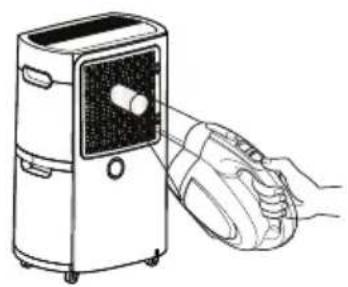
natural_image
Line drawing of a hand holding a device next to a portable air purifier (no text or symbols)natural_image
Technical line drawing of a mechanical device with an upward arrow indicating force or movement (no text or symbols present)natural_image
Line drawing of a hand holding a small object near a cylindrical container (no text or symbols)
PRECAUCIÓN
natural_image
Diagram showing two rectangular panels with internal grid patterns, one with an arrow pointing left (no text or symbols)natural_image
Illustration of a solar panel being washed in a basin with a pipe, no text or symbols presentnatural_image
Line drawing of a portable air conditioner unit with control panel and wheels (no text or symbols)
NOTA
natural_image
Line drawing of a refrigerated air conditioner unit with cooling fins and wheels (no text or symbols)natural_image
Illustration of a portable air purifier with hand positioning and mounting mechanism (no text or symbols)natural_image
Line drawing of a refrigerator with a close-up inset showing hand positioning (no text or symbols)! MISE EN GARDE
natural_image
Diagram showing two steps of a hand holding a device, one being folded and the other assembled (no text or symbols present)! REMARQUE
natural_image
Illustration of a hand holding a device with a right-hand rule, showing step-by-step assembly (no text or symbols)! REMARQUE
ENTRETIEN
natural_image
Illustration of a hand holding a magnifying glass over a device with a warning symbol (no text or labels)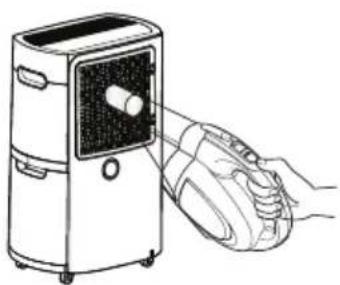
natural_image
Line drawing of a hand holding a device next to a portable air purifier (no text or symbols)natural_image
Line drawing of a mechanical device with an upward arrow indicating force or direction (no text or symbols)natural_image
Line drawing of a hand holding a small object inside a cylindrical container (no text or symbols)
MISE EN GARDE
natural_image
Illustration of two different air purifiers with internal components, showing front and side views (no text or symbols)natural_image
Diagram showing two rectangular panels with internal grid structures, one with an arrow pointing left (no text or symbols)natural_image
Illustration of a faucet pouring solar panels into a bowl with liquid, symbolizing water pollution (no text or symbols present)natural_image
Line drawing of a portable air conditioner unit with front panel and wheels (no text or symbols)
REMARQUE
natural_image
Line drawing of a refrigerant appliance with lid and wheels (no text or symbols)DÉPANNAGE
WHAT THIS WARRANTY COVERS:
LG Electronics Canada, Inc. ("LG") warrants your LG Dehumidifier ("product") against defect in materials or workmanship under normal household use, during the warranty period set forth below, LG will, at its option, repair or replace the product. This limited warranty is (except to some extent in Quebec and where otherwise prohibited) valid only to the original retail purchaser of the product, is not assignable or transferrable to any subsequent purchaser or user, and applies only when the product is purchased through an LG authorized dealer or distributor and used within Canada.
Note: Replacement products and repair parts may be new or factory-remanufactured at LG's option and are warranted for the remaining portion of the original unit's warranty period or ninety (90) days, whichever is longer. Please retain dated receipt or delivery ticket as evidence of the Date of Purchase for proof of warranty (you may be required to submit a copy to LG or authorized representative). If the Date of Purchase cannot be verified, the warranty period will begin 15 months from the date of manufacture.
WARRANTY PERIOD:
1 year from the Date of Purchase: Any internal/ functional Parts and Labor.
HOW SERVICE IS HANDLED: In-Home Service or Swap SVC
LG may elect, at our option, to provide Swap or In home Service. To receive in-home service, the product must be unobstructed and accessible to service personnel. If during in-home service repair cannot be completed, it may be necessary to remove, repair and return the product. OR LG may elect, at our option, to provide Swap Service by providing an authorized service exchange through the distribution center you originally purchased the product from.
THIS LIMITED WARRANTY DOES NOT COVER:
- Service trips to deliver, pick up, or install or set up the Product; Instruction on Product use.
- Adjustments of user controls.
- Products that have had a serial number or any part thereof altered, defaced or removed.
- Property damages, malfunction or failure of the product, or personal injury caused by or resulting from:
(a) accident, abuse, negligence or misuse;
(b) operating the Product in a corrosive or wet environment containing chlorine, fluorine or any other hazardous chemicals;
(c) installation, alteration, repair or service by anyone other than a licensed, authorized LG contractor or other than pursuant to the manufacturer's instructions, including installation not in accordance with applicable laws, codes and standards applying in the province in which the Product is installed;
(d) improper matching of Product components;
(e) improper sizing or design of the Product;
(f) improper or deferred maintenance contrary to the manufacturer's instructions;
(g) physical abuse to or misuse of the Product (including failure to perform any maintenance as described in the Operation Manual such as air filter cleaning, or any Product damaged by excessive physical or electrical stress);
(h) Product used in other than normal use or in any manner contrary to the Operation Manual;
(i) freight damage or damage caused by force majeure or other factors such as power surge damage caused by lightning and fluctuations in or interruptions of electrical power.
THIS LIMITED WARRANTY SHALL NOT BE ENLARGED, EXTENDED OR AFFECTED BY, AND NO OBLIGATION OR LIABILITY SHALL ARISE OR GROW OUT OF, LG PROVIDING, DIRECTLY OR INDIRECTLY, ANY TECHNICAL ADVICE, INFORMATION AND/OR SERVICE TO OWNER IN CONNECTION WITH THE PRODUCT. EXCEPT AS OTHERWISE PROVIDED IN THIS LIMITED WARRANTY, LG MAKES NO OTHER WARRANTIES OR CONDITIONS OF ANY KIND WHATSOEVER REGARDING THE PRODUCT. LG DISCLAIMS AND EXCLUDES ALL WARRANTIES AND CONDITIONS NOT EXPRESSLY PROVIDED HEREIN AND ALL REMEDIES WHICH, BUT FOR THIS PROVISION, MIGHT ARISE BY IMPLICATION OR OPERATION OF LAW, INCLUDING, WITHOUT LIMITATION, THE IMPLIED WARRANTIES AND CONDITIONS OF MERCHANTABILITY AND (EXCEPT IN QUEBEC AND WHERE OTHERWISE PROHIBITED) OF FITNESS FOR ANY PARTICULAR PURPOSE. NO ONE IS AUTHORIZED TO CHANGE THIS LIMITED WARRANTY IN ANY RESPECT OR TO CREATE ANY OTHER OBLIGATION OR LIABILITY FOR LG IN CONNECTION WITH THE PRODUCT. LG DISCLAIMS ALL LIABILITY FOR THE ACTS, OMISSIONS AND CONDUCT OF ALL THIRD PARTIES (including, without limitation, the installing contractor) IN CONNECTION WITH OR RELATED TO THE PRODUCT. UNDER NO CIRCUMSTANCES SHALL LG BE LIABLE FOR ANY INCIDENTAL, SPECIAL, PUNITIVE, EXEMPLARY OR CONSEQUENTIAL DAMAGES INCLUDING, WITHOUT LIMITATION, LOST GOODWILL, LOST REVENUES OR PROFITS, WORK STOPPAGE, PRODUCT FAILURE, IMPAIRMENT OF OTHER GOODS, COSTS OF REMOVAL AND REINSTALLATION OF THE PRODUCT, LOSS OF USE, INJURY TO PERSONS OR PROPERTY ARISING OUT OR RELATED TO THE PRODUCT WHETHER BASED ON BREACH OF WARRANTY, BREACH OF CONTRACT, TORT OR OTHERWISE, EVEN IF LG HAS BEEN ADVISED OF THE POSSIBILITY OF SUCH DAMAGE. IN NO EVENT SHALL LG'S LIABILITY EXCEED THE ACTUAL PURCHASE PRICE OF THE PRODUCT WITH RESPECT TO WHICH ANY CLAIM IS MADE.
SOME PROVINCES (INCLUDING QUEBEC) DO NOT ALLOW LIMITATIONS ON WARRANTIES OR EXCLUSIONS OR LIMITATION OF DAMAGES, SO THE ABOVE LIMITATIONS OR EXCLUSIONS MAY NOT APPLY. Where any term of this warranty is prohibited by such laws, it shall be null and void, but the remainder of this warranty shall remain in effect. THIS LIMITED WARRANTY GIVES THE OWNER SPECIFIC LEGAL RIGHTS AND THE OWNER MAY ALSO HAVE OTHER RIGHTS THAT VARY FROM PROVINCE TO PROVINCE.
HOW TO OBTAIN WARRANTY SERVICE & ADDITIONAL INFORMATION:
Call 1-888-LG-CANADA(542 2623)or visit our website at www.lg.com
Mail to: LG Electronics Canada Inc.
20 Norelco Drive
North York, ON M9L 2X6
GARANTIE LIMITÉE DE DÉSHUMIDIFICATEUR LG
CE QUI EST COUVERT PAR LA GARANTIE
- TABLE OF CONTENTS
- SAFETY INSTRUCTIONS
- PRODUCT OVERVIEW
- BEFORE USE
- OPERATION
- MAINTENANCE
- TROUBLESHOOTING
- SAFETY INSTRUCTIONS
- READ ALL INSTRUCTIONS BEFORE USE
- WARNING
- CAUTION
- IMPORTANT SAFETY INSTRUCTIONS
- INSTALLATION
- OPERATION
- PRODUCT OVERVIEW
- Front
- Back
- BEFORE USE
- Control Panel and Display
- Dehumidifying
- NOTE
- Setting the Timer
- Safety Standby Light
- Bucket Full Light
- Checking the Filter
- Auto Defrosting
- Auto Defrost
- Continuous Drainage Setup
- ! CAUTION
- Emptying the Water Bucket
- MAINTENANCE
- Cleaning the Exterior
- Cleaning the Water Bucket
- Cleaning the Air Filter
- Storing the Product
- TROUBLESHOOTING
- LG DEHUMIDIFIER LIMITED WARRANTY - USA
- WHAT THIS WARRANTY COVERS:
- WARRANTY PERIOD:
- HOW SERVICE IS HANDLED: In-Home Service
- THIS LIMITED WARRANTY DOES NOT COVER:
- HOW TO OBTAIN WARRANTY SERVICE & ADDITIONAL INFORMATION:
- MANUAL DEL PROPIETARIO
- DESHUMIDIFICADOR
- ! PRECAUCIÓN
- NOTA
- MANTENIMIENTO
- PRECAUCIÓN
- ! REMARQUE
- ENTRETIEN
- MISE EN GARDE
- REMARQUE
- DÉPANNAGE
- HOW SERVICE IS HANDLED: In-Home Service or Swap SVC
- GARANTIE LIMITÉE DE DÉSHUMIDIFICATEUR LG
- CE QUI EST COUVERT PAR LA GARANTIE
Brand : LG
Model : UD701KOG3
Category : Dehumidifier