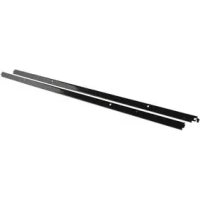
W10536162 - Oven MAYTAG - Free user manual and instructions
Find the device manual for free W10536162 MAYTAG in PDF.


| Product Type | Side Trim Kit for Built-In Oven |
| Brand | Maytag |
| Model | W10536162 |
| Category | Built-In Microwave/Conventional Combination Oven |
| Compatibility | UL Listed Models: WOC54EC7A, WOC54EC0A, WOC95EC0A, MMW9730A |
| Product Dimensions (Width) | 93.6 cm (36 5/8 in) |
| Parts Provided | Left Decorative Trim, Right Decorative Trim |
| Required Tools | Phillips screwdriver, level, tape measure, flat-blade screwdriver |
| Installation Requirements | Follow all applicable codes and regulations |
| Electrical Supply | Disconnect power source before installation |
| Safety Instructions | Risk of electric shock; use two people to move the oven |
| Use | Side decorative trim for built-in oven |
| Maintenance | Clean with a soft cloth and non-abrasive cleaner |
| Cleaning | Avoid harsh chemicals |
| Weight (estimated) | 1.5 kg (not specified, reasonable estimate) |
| Warranty | Refer to the Use and Care Guide |
| Repairability | Replacement parts available from dealer |
| Support | Contact Maytag after-sales service |
Frequently Asked Questions - W10536162 MAYTAG
User questions about W10536162 MAYTAG
0 question about this device. Answer the ones you know or ask your own.
Ask a new question about this device
Download the instructions for your Oven in PDF format for free! Find your manual W10536162 - MAYTAG and take your electronic device back in hand. On this page are published all the documents necessary for the use of your device. W10536162 by MAYTAG.
USER MANUAL W10536162 MAYTAG
INSTALLATION INSTRUCTIONS
SIDE TRIM COVER KIT FOR
ELECTRIC BUILT-IN SINGLE OVEN, DOUBLE OVEN AND
Built-In Single Oven Side Trim Cover Kit W10536160
UL listed for use with models: WOS51EC7A, WOS92EC7A, MEW7527A, MEW9527A, WOS51EC0A, WOS92EC0A, MEW7530A, and MEW9530A
Built-In Double Oven Side Trim Cover Kit W10536161
UL listed for use with models: WOD51EC7A, WOD93EC7A, MEW7627A, MEW9627A, WOD51EC0A, WOD93EC0A, MEW7630A, and MEW9630A
Built-In Microwave/Oven Combination Side Trim Cover Kit W10536162
UL listed for use with models: WOC54EC7A, WOC54EC0A, WOC95EC0A, and MMW9730A
INSTRUCTIONS D'INSTALLATION
ENSEMBLE DE GARNITURES DÉCORATIVES LATERALES
POUR FOUR ELECTRIQUE ENCASTRE SIMPLE, DOUBLE ET
COMBINED MICRO-ONDES/CONVENTIONNEL
BUILT-IN SINGLE OVEN, DOUBLE OVEN AND
Location Requirements. 2
INSTALLATION INSTRUCTIONS.
Install Side Trim Cover Kit. 3
Install Electric Built-in Single Oven, Double Oven and
MWO/Combination Oven. 4
Complete Installation 4
SECURITE DU FOUR ENCASTRE SIMPLE, DOUBLE ET
COMBINE MICRO-ONDES/CONVENTIONNEL. 5
EXIGENCES D'INSTALLATION.
Your safety and the safety of others are very important.
We have provided many important safety messages in this manual and on your appliance. Always read and obey all safety messages.

This is the safety alert symbol.
This symbol alerts you to potential hazards that can kill or hurt you and others.
All safety messages will follow the safety alert symbol and either the word "DANGER" or "WARNING."
These words mean:
ADANGER
WARNING
You can be killed or seriously injured if you don't immediately follow instructions.
You can be killed or seriously injured if you don't follow instructions.
All safety messages will tell you what the potential hazard is, tell you how to reduce the chance of injury, and tell you what can happen if the instructions are not followed.
INSTALLATION REQUIREMENTS
Tools and Parts
Gather the required tools and parts before starting installation. Read and follow the instructions provided with any tools listed here.
Tools needed
Phillips screwdriver
Level
Measuring tape
Flat-blade screwdriver
Parts supplied
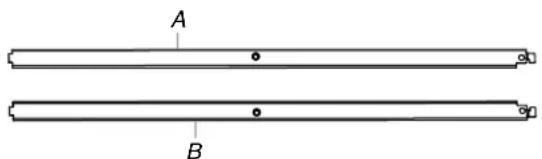
A. Left side trim cover
B. Right side trim cover
Location Requirements
IMPORTANT: Observe all governing codes and ordinances.
- Follow the instructions below along with the instructions in the Electric Built-In Single Oven, Double Oven and Microwave/Oven Combination Installation Instructions.
Product Dimensions
Side Trim Cover Kits
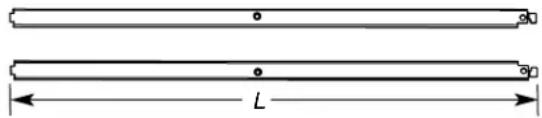
Single Built-In Oven L = 23 16 (58.5 cm)
Double Built-In Oven L = 45^13 / 16 (116.4 cm)
MWO/Combination Built-In Oven L = 36% (93.6 cm)
INSTALLATION INSTRUCTIONS
Install Side Trim Cover Kit
Follow the instructions below to install the Side Trim Cover Kit on a built-in oven.
WARNING

Electrical Shock Hazard
Disconnect power before servicing.
Replace all parts and panels before operating.
Failure to do so can result in death or electrical shock.
- Disconnect power.
- Remove the oven door(s). For more information, see the "Remove Oven Door" section in the oven Installation Instructions. If the built-in oven is already installed in the cabinet, continue with Step 3. If the built-in oven is not installed into the cabinet, go to Step 5.
- Use a Philips screwdriver to remove the #8-14 x1" screws fastening the oven to the cabinet. Use a flat-blade screwdriver to remove the grommets from the mounting rail hole by inserting the screwdriver into the grommet and giving a clockwise 1/4 turn.
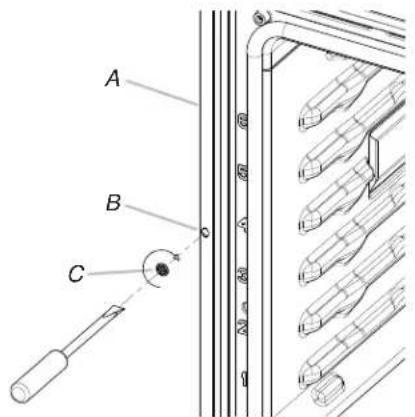
A. Mounting rail
B. Mounting rail hole
C.Grommet
WARNING
Excessive Weight Hazard
Use two or more people to move and install oven.
Failure to do so can result in back or other injury.
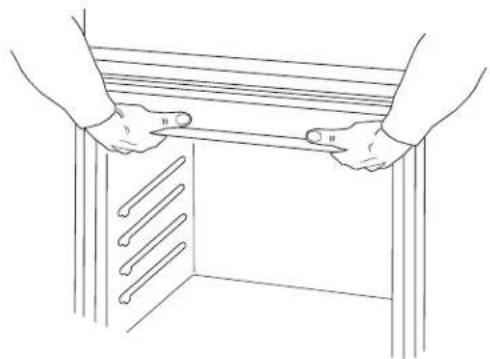
- Using 2 or more people, pull the oven 1^ (2.5 cm) out of the cabinet cutout. Use the oven opening as an area to grip. NOTE: Pull against the seal area of the oven front frame when lifting the oven out of the cabinet. Do not pull against the outside edges.
- Remove the lower screw from each side of the control panel. Tilt the control panel out enough to insert the left and right side trim covers behind the control panel. Align the side trim cover to the top and side of the mounting rail.
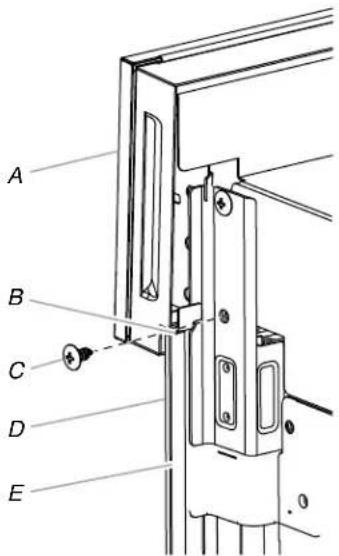
Right side rear view shown
A. Control panel
B. Mounting rail top
C. Lower screw
D. Right side trim cover
E. Mounting rail side
- Insert the bottom of the side trim covers behind the oven vent.
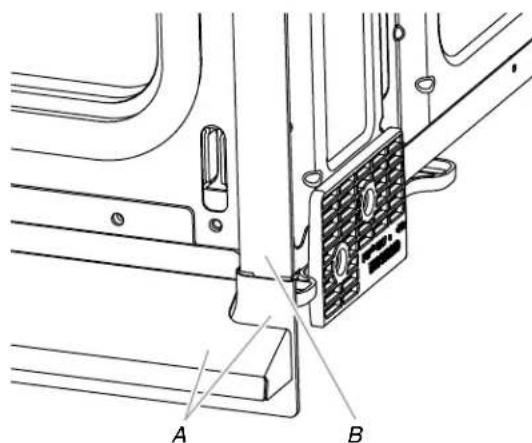
Right side front view shown
A.Oven vent
B. Right side trim cover
- Tilt in the control panel against the side trim cover and replace the lower screw on each side of the control panel. Do not overtighten screws.
Install Electric Built-in Single Oven, Double Oven and MWO/Combination Oven
- Using 2 or more people, push against the seal area of the front frame to push the oven into the cabinet until the back surface of the front frame touches the front wall of the cabinet.
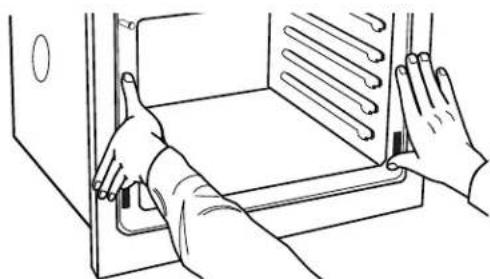
- Securely fasten oven to cabinet using the #8-14 x 1" screws provided. Insert the screws through hole in the side trim cover. Do not overtighten screws.
- Follow the oven Installation Instructions to complete installation.
NOTE: If the built-in oven was not installed into the cabinet, read the "Electrical Requirements" and "Electrical Connection" sections, along with all other sections of the Installation Instructions, before installing the oven.
- Reconnect power.
- The display panel will light briefly, and "PF" should appear in the display.
- If the display panel does not light, reference the "Assistance or Service" section of the Use and Care Guide, or contact the dealer from whom you purchased your oven.
Complete Installation
- Check that all parts are now installed. If there is an extra part, go back through the steps to see which step was skipped.
- Check that you have all of your tools.
- Dispose of/recycle all packaging materials.
If you need Assistance or Service:
Please reference the "Assistance or Service" section of the Use and Care Guide or contact the dealer from whom you purchased your built-in microwave oven spacer kit.
SECURITE DU FOUR ENCASTRÉ SIMPLE, DOUBLE ET COMBINED MICRO-ONDES/CONVENTIONNEL
Ensemble de garnitures decoratives laterales
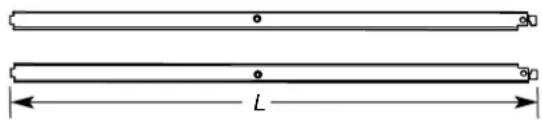
Four encastre simple L = 23% (58,5 cm)
Four encastré double L = 45^13 / 16 (116,4 cm)

- INSTALLATION INSTRUCTIONS
- SIDE TRIM COVER KIT FOR
- ELECTRIC BUILT-IN SINGLE OVEN, DOUBLE OVEN AND
- INSTRUCTIONS D'INSTALLATION
- ENSEMBLE DE GARNITURES DÉCORATIVES LATERALES
- POUR FOUR ELECTRIQUE ENCASTRE SIMPLE, DOUBLE ET
- COMBINED MICRO-ONDES/CONVENTIONNEL
- Your safety and the safety of others are very important.
- ADANGER
- WARNING
- INSTALLATION REQUIREMENTS
- Tools and Parts
- Tools needed
- Parts supplied
- Location Requirements
- Product Dimensions
- Side Trim Cover Kits
- Install Side Trim Cover Kit
- Install Electric Built-in Single Oven, Double Oven and MWO/Combination Oven
- Complete Installation
- If you need Assistance or Service:
- SECURITE DU FOUR ENCASTRÉ SIMPLE, DOUBLE ET COMBINED MICRO-ONDES/CONVENTIONNEL
- Ensemble de garnitures decoratives laterales
Brand : MAYTAG
Model : W10536162
Category : Oven