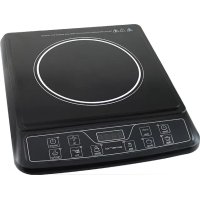
IP111233 - Cooker Emerio - Free user manual and instructions
Find the device manual for free IP111233 Emerio in PDF.



| Product type | Induction plate |
| Brand | Emerio |
| Model | IP111233 |
| Power supply | 230 V ~ 50 Hz, 2000 W |
| Maximum power | 2000 W |
| Cooking modes | Fondue, Soup, Milk, Water, Fry, Rice |
| Power setting (fondue mode) | 200-400-800-1000-1300-1600-1800-2000 W |
| Temperature setting (fry mode) | 80-100-120-160-180-200-240-270 °C |
| Timer function | Up to 3 hours, for fondue and fry modes |
| Programmer function | Up to 24 hours, for water, milk, soup, rice modes |
| Diameter of compatible utensils | 12 to 22 cm |
| Materials of compatible utensils | Steel, cast iron, enameled iron, stainless steel |
| Overheat protection | Yes, automatic shutdown if excessive temperature |
| Digital display | Yes, screen for power, temperature, timer |
| Cleaning | Damp cloth with dish soap, vacuum cleaner for the vents |
| Warranty | 2 years |
| After-sales service | POCO Service AG, Industriestraße 17, 59192 Bergkamen, Germany |
Frequently Asked Questions - IP111233 Emerio
User questions about IP111233 Emerio
0 question about this device. Answer the ones you know or ask your own.
Ask a new question about this device
Download the instructions for your Cooker in PDF format for free! Find your manual IP111233 - Emerio and take your electronic device back in hand. On this page are published all the documents necessary for the use of your device. IP111233 by Emerio.
USER MANUAL IP111233 Emerio
Induction Cooker (EN)
- This appliance can be used by children aged from 8 years and above and persons with reduced physical, sensory or mental capabilities or lack of experience and knowledge if they have been given supervision or instruction concerning use of the appliance in a safe way and understand the hazards involved.
- Children shall not play with the appliance.
- Cleaning and user maintenance shall not be made by children unless they are older than 8 and supervised.
- Keep the appliance and its cord out of reach of children less than 8 years.
- If the supply cord is damaged, it must be replaced by the manufacturer, its service agent or similarly qualified persons in order to avoid a hazard.
- This appliance is intended to be used in household and similar applications such as: Staff kitchen areas in shop, offices and other working environment; Farm houses; By clients in hotels, motels and other residential type environments; Bed and breakfast type environments.
- The machine should not be operated by means of an external timer-switch or by means of a separate system with remote control.
- Incorrect operation and improper use can damage the appliance and cause injury to the user.
- The appliance may be used only for its intended purpose. No responsibility can be taken for any possible damage caused through incorrect use or improper handling.
- Before plugging in the appliance, check that the current and power match those given on the rating plate.
- Do not put the appliance or the plug in water or any other liquid. This could cause a fatal electric shock. If the appliance or plug should accidentally become wet,
unplug the appliance immediately and have it checked by an electrician before using it again. Never attempt to open the appliance yourself.
- Do not use the appliance with wet hands, on a damp floor or when the appliance itself is wet.
- Do not touch the plug with wet or damp hands.
- Do not use the appliance if it is dropped or otherwise damaged or if the cable or plug are damaged. In the case of damage, take the appliance to an electrical repair shop for examination and repair if necessary.
- Never attempt to repair the appliance yourself. This could cause an electric shock.
- Do not allow the cable to hang over sharp edges and keep it well away from hot objects and naked flames. Remove the plug from the socket only by holding the plug.
- Do not use the wall outlet when it is loose.
- Plug the appliance into a single electrical outlet only.
- Use the socket independently. If the cooker is used along with other electric appliance, abnormal heat may happen to the socket and fire may occur.
- Make sure that there is no danger that the cable or extension cable may inadvertently be pulled or cause anyone to trip when in use.
- Stand the appliance on a firm, level and heatproof surface away from naked flame (e.g. gas oven) and out of reach of children.
- Do not expose this product to moisture. It is easy to cause the risk of short circuit and electric shock.
- Never leave the appliance unattended while it is in use.
- Always remove the plug from the socket when the appliance is not in use and each time before it is cleaned.
-
Switch the appliance off before disconnecting from the mains.
-
Never use the cable to carry the appliance.
- Do not heat the pot empty or overheat the pot.
- Do not place metallic objects such as knives, forks, spoons, lids, cans, and aluminum foils on the top plate.
- Do not place a sheet of paper between the pot or the pan and the appliance. The paper may get burnt.
- Do not place the appliance near to the objects which are affected by magnet, such as: radios, televisions, automatic-banking cards and cassette tapes.
- WARNING: If the surface is cracked, switch off the appliance to avoid the possibility of electric shock.
- WARNING!!

Please do not touch surface while in use. The temperature of accessible surfaces may be high when the appliance is operating.
- Regarding the instructions for cleaning, please refer to the below paragraph of the manual.
PARTS DESCRIPTION
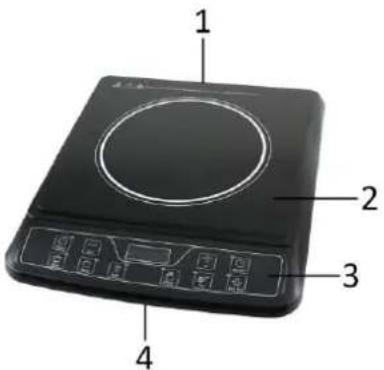
- Air vent
- Crystal plate
- Control panel
- Air entry
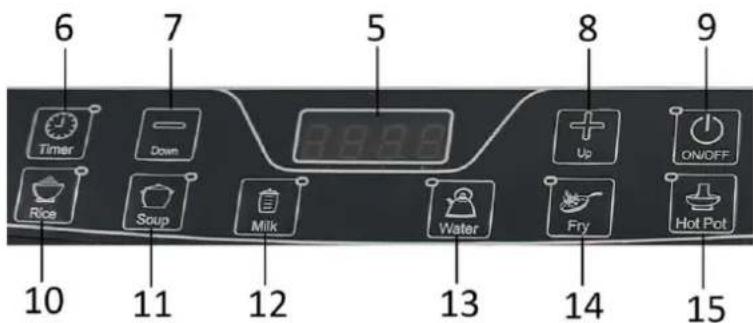
- Digital display
- Timer button (also for Preset)
- “-” button (Down)
- “+” button (Up)
- ON/OFF button
- Rice mode
- Soup mode
- Milk mode
- Water mode
- Fry mode
- Hot pot mode
OPERATION
- Place the suitable cooking utensil in the center of the plate.
- Put the plug in the socket, the appliance has a beep sound, indicators and digital display light up and turn off, and then only the LED of "On/off" is twinkling, the appliance is awaiting the order.
- Press the On/off switch to switch on the appliance. The display screen shows "1300", and the appliance enters into the hot pot mode.
- Select different modes according to your desire.
- After use, turn off the appliance. The fan on the bottom will keep working for about 1 minute to help the appliance cool down. After this, unplug the appliance. If you don't take the plug out, the indicator for ON/OFF button will keep twinkling and the appliance is awaiting the order.
Note:
- Only hot pot mode and Fry mode are adjustable. The rest of modes are automatic and you cannot adjust the set power. Do not use the automatic modes for small amount of food.
- In hot pot mode, you can press the "+" & "-" buttons to select the power between 200-400-800-1000-1300-1600-1800-2000W.
- In Fry mode, you can press the "+" & "-" buttons to select the temperature between 80-100-120-160-180-200-240-270°C.
The digital display will show "2000", "800", "1600", and "1000" respectively for telling the set power when appliance is working in water mode, milk mode, soup mode and rice mode.
TIMER/RESET FUNCTION
Timer (3 hours) - only for hot pot mode and fry mode:
Press the Timer button and then the buttons “+” & “—” to increase or reduce one minute at a time. Long
press the “+” or “—” to adjust the time 10 minutes at a time. Press the “+”, timer increases from 0 hour; press the “—”, timer reduces from 3 hours. After the setting, time flashes on the display screen for several seconds, the appliance will confirm your time setting and the digital display switches between the power/temperature and count-down time. To cancel the timer, press the Timer button again. The indicator on the Timer button will go out.
Preset (24 hours) - only for water mode, milk mode, soup mode and rice mode:
Press the Timer button to set the start time. Press "+" time increases by one minute; press "—", time increases by one hour. You can set the appliance to start working in your set time (from 0:01 to 23:59). After the setting, time flashes on the display screen for several seconds, the appliance will confirm your time setting and the digital display switches between the power and count-down time. To cancel the preset, press the "Timer" button and its indicator goes out, then the appliance starts to work immediately.
Note: Only when the "Timer" indicator illuminates, the timer or preset function can be set. Only when the time flashes on the screen, you can adjust the time. If the appliance confirmed the set time or you changed the operation mode, you need to reset the timer or preset.
Overheat Protection:
The appliance is equipped with overheat protection. If the pot or pan gets too hot, the appliance will switch off automatically, the Buzzer can give out an alarm. Should this happen, wait for some minutes and cool it down. After that, the appliance will work without problem.
USE OF CONTAINERS
1. Usable Pans/Pots
Steel, cast iron, enameled iron, stainless steel, flat-bottom pans/pots with diameter from 12 to 22cm
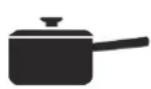
Enameled Iron Pot

Iron or Enameled Iron Pot

Cast Iron Pan
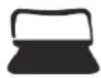
Iron Pot
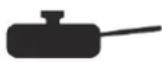
Deep-Fry Pan
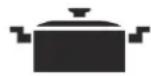
Stainless Steel Pot

Iron Plate
2. Non-usable Pans/Pots
Heating-resistant glass, ceramic containers, copper, aluminum pans/pots, Rounded-bottom pans/pots with bottom measuring less than 12cm .
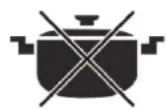
Rounded Bottom Pot

Aluminum Copper Pot

Bottom Measuring Less than 12cm

Pot with Stands

Ceramic Pot

Heat-Resistant Glass Pot
CLEANING AND MAINTENANCE
- Disconnect plug and wait until the appliance is cooled down completely. Clean after using every time.
- If the pots/pans are used without being cleaned, discoloration or cooked on stains may be caused.
- Do not use benzine, thinner, scrubbing brush or polishing powder to clean the induction cooker.
- Wipe using dish washing agent and damp cloth.
- Use vacuum cleaner to suck up dirt from the air intake and exhaust vent.
- Never run water over the appliance (Water gets inside may cause malfunction).
TROUBLE SHOOTING
Please check below table for reference once the trouble code appears on the digital display.
| Trouble Code | Possible Reasons | Solution |
| E0 | No pot/pan on the plate. Unsuitable pot/pan on the plate. | Place a suitable pot/pan on the plate. |
| E1 | Supply voltage is too low (less than 85V). | Check the power supply. Power on after the power supply is back to normal. |
| E2 | Supply voltage is too high (more than 275V). | Check the power supply. Power on after the power supply is back to normal. |
| E3 | Plate surface temperature sensor is not connected well, or short circuited. Please check it after one minute. | Please find qualified persons to solve the problem. |
| E4 | The heat sensor of radiator (IGBT) is not connected well, or short-circuited. Please check it after one minute. | Please find qualified persons to solve the problem. |
| E5 | The temperature of plate surface is too high (more than 280 °C). | Please wait for some minutes until the unit cools down. Please check if the pot/pan is suitable for use and if it is properly placed. |
| E6 | The heat sensor of radiator temperature is over heat (more than 105 °C). | Check if the air exhaust is blocked or the fan gets stuck. |
TECHNICAL DATA
Operating voltage: 230V 50Hz
Power consumption: 2000W
GUARANTEE AND CUSTOMER SERVICE
Before delivery our devices are subjected to rigorous quality control. If, despite all care, damage has occurred during production or transportation, please return the device to your dealer. In addition to statutory legal rights, the purchaser has an option to claim under the terms of the following guarantee:
For the purchased device we provide 2 years guarantee, commencing from the day of sale. If you have a defective product, you can directly go back to the point of purchase.
Defects which arise due to improper handling of the device and malfunctions due to interventions and repairs by third parties or the fitting of non-original parts are not covered by this guarantee. Always keep your receipt, without the receipt you can't claim any form of warranty. Damage caused by not following the instruction manual, will lead to a void of warranty, if this results in consequential damages then we will not be liable. Neither can we hold responsible for material damage or personal injury caused by improper use if the instruction manual is not properly executed. Damage to accessories does not mean free replacement of the whole appliance. In such case please contact our service department. Broken glass or breakage of plastic parts is always subject to a charge. Defects to consumables or parts subjected to wearing, as well as cleaning, maintenance or the replacement of said parts are not covered by the warranty and are to be paid.
ENVIRONMENT FRIENDLY DISPOSAL
Recycling - European Directive 2012/19/EU
This marking indicates that this product should not be disposed with other household wastes. To prevent possible harm to the environment or human health from uncontrolled waste disposal, recycle it responsibly to promote the sustainable reuse of material resources. To return your used device, please use the return and collection systems or contact the retailer
where the product was purchased. They can take this product for environmental safe recycling.
POCO Service AG
Industriestraße 17
59192 Bergkamen
Germany
SICHERHEITSHINWEISE
AJASTIN/ESIASETUStOIMINTO

- PARTS DESCRIPTION
- OPERATION
- Note:
- TIMER/RESET FUNCTION
- Preset (24 hours) - only for water mode, milk mode, soup mode and rice mode:
- Overheat Protection:
- USE OF CONTAINERS
- Usable Pans/Pots
- Non-usable Pans/Pots
- CLEANING AND MAINTENANCE
- TROUBLE SHOOTING
- TECHNICAL DATA
- GUARANTEE AND CUSTOMER SERVICE
- ENVIRONMENT FRIENDLY DISPOSAL
- SICHERHEITSHINWEISE
- AJASTIN/ESIASETUStOIMINTO
Brand : Emerio
Model : IP111233
Category : Cooker