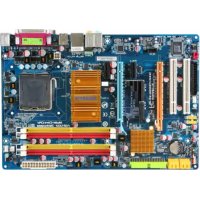
GAN650SLIDS4L - Motherboard GIGABYTE - Free user manual and instructions
Find the device manual for free GAN650SLIDS4L GIGABYTE in PDF.


User questions about GAN650SLIDS4L GIGABYTE
0 question about this device. Answer the ones you know or ask your own.
Ask a new question about this device
Download the instructions for your Motherboard in PDF format for free! Find your manual GAN650SLIDS4L - GIGABYTE and take your electronic device back in hand. On this page are published all the documents necessary for the use of your device. GAN650SLIDS4L by GIGABYTE.
USER MANUAL GAN650SLIDS4L GIGABYTE
5-3-1 91
5-3-2 故障排除 92
管理聲明 94
清點配件
1-6 SL建Sable Link Interface)
,可擴充連結介面系統
| Standard CMOS Features Advanced BIOS Features Integrated Peripherals Power Management Setup PnP/PCI Configurations PC Health Status MB Intelligent Tweaker(M.I.T.) | Load Fail-Safe Defaults Load Optimized Defaults Set Supervisor Password Set User Password Save & Exit Setup Exit Without Saving | |
| ESC: Quit F8: Q-Flash | ↑↓→←: Select Item F10: Save & Exit Setup | F11: Save CMOS to BIOS F12: Load CMOS from BIOS |
| Time, Date, Hard Disk Type... | ||
F12 Load CMOS from BIOS
Integrated Peripherals (整合週邊設定)
| CMOS Setup Utility-Copyright (C) 1984-2007 Award Software Standard CMOS Features | |||
| Date (mm:dd:yy) Time (hh:mm:ss) | Fri, Apr 22 2007 22:31:24 | Item Help Menu Level | |
| IDE Channel 0 Master | [None] | ||
| IDE Channel 0 Slave | [None] | ||
| IDE Channel 2 Master | [None] | ||
| IDE Channel 3 Master | [None] | ||
| IDE Channel 4 Master | [None] | ||
| IDE Channel 5 Master | [None] | ||
| Drive A | [1.44M, 3.5"] | ||
| Floppy 3 Mode Support | [Disabled] | ||
| Halt On | [All, But Keyboard] | ||
| Base Memory | 640K | ||
| Extended Memory | 239M | ||
| ↑↓→←: Move Enter: Select +/-/PU/PD: Value F10: Save ESC: Exit F1: General Help F5: Previous Values F6: Fail-Safe Default F7: Optimized Defaults | |||
Date (mm:dd:yy) (日期設定)
IDE Channel 0 Master/Slave
CPU Multi-Threading (多核心技術)
CPU Enhanced Halt (C1E) (Intel® C1E 功能)
SATA-II 1 Primary RAID
SATA-II 1 Secondary RAID
SATA-II 2 Primary RAID
例:Pair1-2 Status = Short / Length = 1.6m
Onboard Parallel Port (内建並列埠
Power-On by Alarm (定時開機
Power On By Keyboard (鍵盤開機功能
3,4,5,7,9,10,11,12,14,15
3,4,5,7,9,10,11,12,14,15
Current CPU/SYSTEM/POWER FAN Speed (RPM) (偵測風扇轉速
自動偵測CPU/系統電源風扇的轉速。
CPU Warning Temperature (CPU 温度警告
此選項提供您選擇設定CPU過溫警告的溫度。當溫度超過此選項所設定的數值時,系統將會發出警告聲。CPU Disable 選項 CPU預設值,關閉溫度警告)60 ^ C / 140^70 ^ C / 158^80 ^ C / 176^90 ^ C / 194^
CPU/SYSTEM/POWER FAN Fail Warning (CPU/系统/電源風扇故障警告功能)
System Clock Setting [Press Enter]
CPU Clock Ratio [16X]
********** System Voltage Optimized
System Voltage Control [Manual]
DDR2 Voltage Control [Normal]
NB/IT-Link Voltage [Normal]
FSB Voltage [Normal]
South Bridge Voltage [Normal]
VCC12_DL Voltage [Normal]
CPU Voltage Control [Normal]
Normal CPU Vcore 1.40000V
Item Help Menu Level

System Clock Setting
| CMOS Setup Utility-Copyright (C) 1984-2007 Award Software System Clock Setting | ||||
| FSB-Memory Clock Mode | [Auto] | Item Help | ||
| x FSB-Memory Ratio | Auto | Menu Level | ||
| x CPU Host Frequency (Mhz) | Auto | 133.3 | ||
| Actual CPU Clock (Mhz) | 133.3 | |||
| x Memory Frequency (Mhz) | Auto | 800.0 | ||
| Actual Memory Clock (Mhz) | 800.0 | |||
| PCIe Bus, Slot 1, MHz | [100] | |||
| ↑↓→←: Move Enter: Select F5: Previous Values | +/-/PU/PD: Value F6: Fail-Safe Defaults | F10: Save | ESC: Exit F1: General Help F7: Optimized Defaults | |
CPU Host Frequency (Mhz) (CPU 外頻調整
Standard CMOS Features
Advanced BIOS Features
Integrated Peripherals
Power Management Setup
PnP/PCI C
PC Health Status
MB Intelligent Tweaker(M.I.T.)
ESC:Quit
F8:Q-Flash F10:Save & Exit Setup
↑↓→←: Select Item
Load Fail-Safe Defaults
Load Optimized Defaults
Set Supervisor Password
SetUserPassword
Load Fail-Safe Defaults (Y/N)? N
Exit Without Saving
Load Fail-Safe Defaults
F11: Save CMOS to BIOS
F12: Load CMOS from BIOS
Standard CMOS Features
Advanced BIOS Features
Integrated Peripherals
Power Management Setup
PnP/PCIC
PC Health Status
MB Intelligent Tweaker(M.I.T.)
Load Fail-Safe Defaults
Load Optimized Defaults
Set Supervisor Password
SetUserPassword
Load Optimized Defaults (Y/N)? N
Exit Without Saving
ESC:Quit
F8:Q-Flash F10:Save & Exit Setup
↑↓→←: Select Item
Load Optimized Defaults
Standard CMOS Features
Advanced BIOS Features
Integrated Peripherals
Power Management Setup
PnP/PCIC Enter Password:
PC Health Status
MB Intelligent Tweaker(M.I.T.)
Load Fail-Safe Defaults
Load Optimized Defaults
Set Supervisor Password
SetUserPassword
Exit Without Saving
ESC:Out
: Select Item
F11: Save CMOS to BIOS
F8: Q-Flash F10: Save & Exit Setup F12: Load CMOS from BIOS
Change/Set/Disable Password
"Xpress Install " is now analyzing your computer...99%
用上下键移動光棒至「Update BIOS from Drive<Enter並且按

Integrated Peripherals NV Serial-ATA Controller
」為開啟狀態。若要啟動所有的
Press F10 to enter RAID setup utility ...
圖3
步骤二:
Setup will load support for the following mass storage device(s):
NVIDIA RAID CLASS Driver (required)
NVIDIA nForce Storage Controller (required)
- To specify additional SCSI adapters, CD-ROM drives, or special disk controllers for use with Windows, including those for which you have a device support disk from a mass storage device manufacturer, press S.
- If you do not have any device support disks from a mass storage device manufacturer, or do not want to specify additional mass storage devices for use with Windows, press ENTER.
S=Specify Additional Device ENTER=Continue F3=Exit
图5
步骤四:
Management Methods on Control of Pollution from Electronic Information Products
(China RoHS Declaration)
产品中有毒有害物质或元素的名称及含量
| 部件名称(Parts) | 有毒有害物质或元素(Hazardous Substances) | |||||
| 铅(Pb) | 汞(Hg) | 镉(Cd) | 六价铬(Cr(VI)) | 多溴联苯(PBB) | 多溴二苯醚(PBDE) | |
| PCB板PCB | ○ | ○ | ○ | ○ | ○ | ○ |
| 结构件及风扇Mechanical parts and Fan | × | ○ | ○ | ○ | ○ | ○ |
| 芯片及其他主动零件Chip and other Active components | × | ○ | ○ | ○ | ○ | ○ |
| 连接器Connectors | × | ○ | ○ | ○ | ○ | ○ |
| 被动电子元器件Passive Components | × | ○ | ○ | ○ | ○ | ○ |
| 线材Cables | ○ | ○ | ○ | ○ | ○ | ○ |
| 焊接金属Soldering metal | ○ | ○ | ○ | ○ | ○ | ○ |
| 助焊剂,散热膏,标签及其他耗材Flux, Solder Paste, Label and other Consumable Materials | ○ | ○ | ○ | ○ | ○ | ○ |
| ○:表示该有毒有害物质在该部件所有均质材料中的含量均在SJ/T11363-2006标准规定的限量要求以下。Indicates that this hazardous substance contained in all homogenous materials of this part is below the limit requirement SJ/T 11363-2006 | ||||||
| ×:表示该有毒有害物质至少在该部件的某一均质材料中的含量超出SJ/T11363-2006标准规定的限量要求。Indicates that this hazardous substance contained in at least one of the homogenous materials of this part is above the limit requirement in SJ/T 11363-2006 | ||||||
| 对销售之日的所售产品,本表显示我公司供应链的电子信息产品可能包含这些物质。注意:在所售产品中可能会也可能不会含有所有所列的部件。This table shows where these substances may be found in the supply chain of our electronic information products, as of the date of the sale of the enclosed products. Note that some of the component types listed above may or may not be a part of the enclosed product. | ||||||
主機板保固條款
G.B.T. INC. (U.S.A.)
G.B.T Inc (USA)
電話:+1-626-854-9338 x 215 (Sopportedehablahispano)
傅真:+1-626-854-9339
Correo: soporte@gigabyte-usa.com
技術支援:
http://rma.gigabyte-usa.com
G.B.T. TECHNOLOGY TRADING GMBH
Representative Office Of GIGA-BYTE Technology Co., Ltd. in CZECH REPUBLIC
網址:http://www.gigabyte.cz
土耳其
Representative Office Of GIGA-BYTE Technology Co., Ltd. in TURKEY
Moscow Representative Office Of GIGA-BYTE Technology Co., Ltd.
Office of GIGA-BYTE TECHNOLOGY Co., Ltd. in POLAND
Representative Office Of GIGA-BYTE Technology Co., Ltd. in Romania
Representative Office Of GIGA-BYTE Technology Co., Ltd. in SERBIA & MONTENEGRO