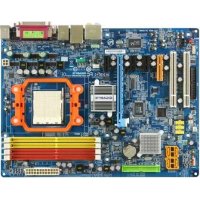
GAMA69GS3H - Motherboard GIGABYTE - Free user manual and instructions
Find the device manual for free GAMA69GS3H GIGABYTE in PDF.


User questions about GAMA69GS3H GIGABYTE
0 question about this device. Answer the ones you know or ask your own.
Ask a new question about this device
Download the instructions for your Motherboard in PDF format for free! Find your manual GAMA69GS3H - GIGABYTE and take your electronic device back in hand. On this page are published all the documents necessary for the use of your device. GAMA69GS3H by GIGABYTE.
USER MANUAL GAMA69GS3H GIGABYTE
| Declaration of Conformity We, Manufacturer/Importer (ful address) G.B.T. Technology Trading GMbHAusschlager Weg 41, 1F 20537 Hamburg, Germany declare that the product (description of the apparatus, system, installation to which it refers) Motherboard GA-MA69G-S3H is in conformity with (reference to the specification under which conformity is declared) in accordance with 89/336 EEC-EMC Directive | |||
| □ EN 55011 | Limits and methods of measurement of radio disturbance characteristics of industrial, scientific and medical (ISM) high frequency equipment | □ EN 61000-3-2 | Disturbances in supply systems caused |
| □ EN 61000-3-3 | Disturbances in supply systems caused by household appliances and similar electrical equipment "Voltage fluctuations" | ||
| □ EN 55013 | Limits and methods of measurement of radio disturbance characteristics of broadcast receivers and associated equipment | □ EN 55024 | Information Technology equipment-immetry characteristics-Limits and methods of measurement |
| □ EN 55014-1 | Limits and methods of measurement of radio disturbance characteristics of household electrical appliances, portable tools and similar electrical apparatus | □ EN 500E2-1 | Generic immunity standard Part 1: Residual commercial and light industry |
| □ EN 500E2-2 | Generic immunity standard Part 2: Industrial environment | ||
| □ EN 55015 | Limits and methods of measurement of radio disturbance characteristics of fluorescent lamps and luminaries | □ EN 55014-2 | Immunity requirements for household appliances tools and similar apparatus |
| □ EN 55020 | Immunity from radio interference of broadcast receivers and associated equipment | □ EN 500E1-2 | EMC requirements for uninterruptible power systems (UPS) |
| □ EN 55022 | Limits and methods of measurement of radio disturbance characteristics of information technology equipment | ||
| □ DIN VDE 0855 | Cabled distribution systems: Equipment for receiving and/or distribution from scund and television signals | ||
| □ CE marking | CE (EC conformity marking) | ||
| The manufacturer also declares the conformity of above mentioned product with the actual required safety standards in accordance with LVD 2006/95/EC | |||
| □ EN 50065 | Safety requirements for mains operated electronic and related apparatus for household and similar general use | □ EN 50950 | Safety for information technology equipment including electrical business equipment |
| □ EN 60335 | Safety of household and similar electrical appliances | □ EN 500E1-1 | General and Safety requirements for uninterruptible power systems (UPS) |
| Manufacturer/Importer Signature :Timmy Huang (Stamp) Date May 16, 2007 Name :Timmy Huang | |||
| DECLARATION OF CONFORMITY Per FCC Part 2 Section 2.1077(a) FC Responsible Party Name: G.B.T. INC. (U.S.A.) Address: 17358 Railroad Street City of Industry, CA 91748 Phone/Fax No: (818) 854-9338/ (818) 854-9339 hereby declares that the product Product Name: Motherboard Model Number: GA-MA69G-S3H Conforms to the following specifications: FCC Part 15, Subpart B, Section 15.107(a) and Section 15.109 (a), Class B Digital Device Supplementary Information: This device complies with part 15 of the FCC Rules. Operation is subject to the following two conditions: (1) This device may not cause harmful and (2) this device must accept any inference received, including that may cause undesired operation. Representative Person's Name: ERIC LU Signature: Eric Lu Date: May 16, 2007 |
版權
text_image
N3 IdS MD REV 1.1目錄
選購配件 6
清點配件 6
2-5 Integrated Peripherals (整合週邊設定) 41
2-6 Power Management Setup ( 省電功能設定) 44
2-7 PnP/PCI Configurations ( 隨插即用與 PCI 組態設定) 46
2-8 PC Health Status (電腦健康狀態) 47
2-9 MB Intelligent Tweaker(M.I.T.) ( 頻率/電壓控制) 49
2-10 Load Fail-Safe Defaults (載入最安全預設值) 51
2-11 Load Optimized Defaults (载入最佳化預設值) 51
2-12 Set Supervisor/User Password (設定管理者 /使用者密碼) 52
2-13 Save & Exit Setup (儲存設定值並結束設定程式) 53
2-14 Exit Without Saving (結束設定程式但不儲存設定值)....53
第三章 驅動程式安裝 55
natural_image
Top-down view of a computer motherboard showing CPU socket, RAM slots, and various ports (no readable text or symbols)text_image
Diagram of a computer motherboard with labeled components and an arrow indicating a specific area or connection point.
natural_image
Close-up of an Intel CPU processor with a highlighted green circular area (no text or symbols visible)步驟二:
natural_image
Close-up of a microchip mounted on a circuit board (no visible text or symbols)步驟一:
natural_image
Close-up of a train engine inside a vehicle's center, showing orange and blue components (no visible text or symbols)步驟二:
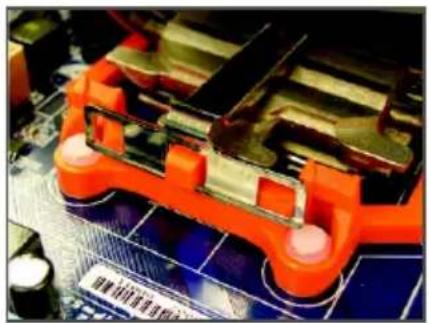
將散熱風扇放在上。
natural_image
Close-up of an orange robotic gripper on a circuit board (no visible text or symbols)步驟三:
natural_image
Close-up of an electronic device with a red circuit board and mechanical components, no visible text or symbols.步驟四:
natural_image
Close-up of a computer motherboard with visible CPU fan and soldering tools (no readable text or symbols)步驟五:
text_image
Diagram of a computer motherboard with an inset showing a memory card and its corresponding DDRII rack layout.▶ 可啟動雙通道記憶體的組合如下表:
natural_image
Close-up of a computer motherboard with a stack of RAM chips and a blue tool in action (no visible text or symbols)步驟一:
natural_image
Close-up of a computer motherboard with visible slots and connectors, no text or symbols present.步驟二:
natural_image
Close-up of hands installing a computer motherboard with visible CPU socket, RAM slots, and motherboard components (no text or symbols)- 安裝顯示卡:
natural_image
Close-up of hands installing a CD-ROM drive into a motherboard (no visible text or symbols)步驟二:
將連結器安裝至兩張顯示卡的上方。
natural_image
Close-up of hands assembling a blue and black electronic component (no visible text or symbols)步驟三:
natural_image
Close-up of a hand inserting a white USB into a computer motherboard (no visible text or symbols)顯示卡驅動程式設定:
text_image
Diagram of electronic device rear panel with labeled ports and connectorsPS/2 PS/2及 滑鼠插座
連接 PS/2 鍵盤及滑鼠至此插座。
natural_image
Top-down view of a computer motherboard showing CPU socket, RAM slots, and memory card (no text or labels visible)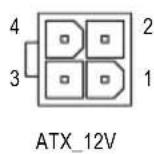
ATX 12V :
natural_image
Top-down schematic of a computer motherboard showing CPU socket, RAM slots, and memory drive (no text or labels)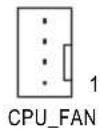
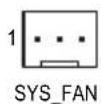
CPU_FAN :
natural_image
Top-down view of a computer motherboard showing CPU socket, RAM slots, and memory card (no text or labels visible)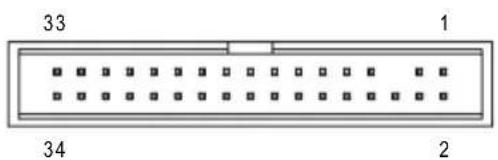
text_image
33 1 34 26) IDE (IDE) 插座
natural_image
Top-down schematic of a computer motherboard showing CPU socket, RAM slots, and memory card (no text or labels)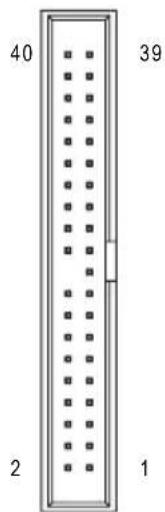
text_image
40 39 2 17) SATAII0 / 1 / 2 / 3 (SATA 3Gb/s) 插座
natural_image
Top-down view of a computer motherboard showing CPU socket, RAM slots, and memory drive (no text or labels visible)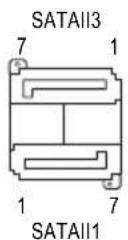
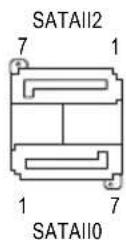
natural_image
Top-down schematic of a computer motherboard showing CPU socket, RAM slots, and memory drive components (no text or labels)
1
natural_image
Top-down schematic of a computer motherboard showing CPU socket, RAM slots, and memory drive (no text or labels)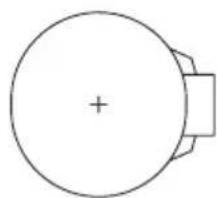
natural_image
Simple line drawing of a circular object with a plus sign at center and a rectangular base (no text or symbols)natural_image
Top-down schematic of a computer motherboard showing CPU socket, RAM slots, and memory drive (no text or labels)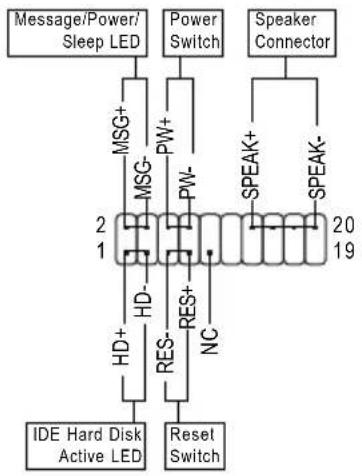
flowchart
graph TD
    A["Message/Power/Sleep LED"] --> B["MSG+"]
    B --> C["MSG-"]
    C --> D["HD-"]
    D --> E["RES-"]
    E --> F["Reset Switch"]
    G["Power Switch"] --> H["PW+"]
    H --> I["PW-"]
    I --> J["2"]
    J --> K["IDE Hard Disk Active LED"]
    L["Speaker Connector"] --> M["SPEAK+"]
    M --> N["SPEAK-"]
    N --> O["20"]
    O --> P["19"]
-MSG (Message/Power/Sleep LED) —訊息指示燈:
natural_image
Top-down view of a computer motherboard showing CPU socket, RAM slots, and memory chips (no text or labels visible)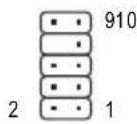
HD 接頭定義:
| 接腳 | 定義 |
| 1 MIC2_L | |
| 2 | 接地腳 |
| 3 MIC2_R | |
| 4 -ACZ_DET | |
| 5 LINE2_R | |
| 6 FSENSE1 | |
| 7 FAUDIO_JD | |
| 8 | 無接腳 |
| 9 LINE2_L | |
| 10 FSENSE2 | |
AC'97 接頭定義:
natural_image
Top-down schematic of a computer motherboard showing CPU socket, RAM slots, and memory card (no text or labels)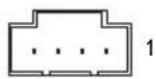
natural_image
Top-down schematic of a computer motherboard showing CPU socket, RAM slots, and memory card (no text or labels)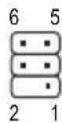
natural_image
Top-down schematic of a computer motherboard showing CPU socket, RAM slots, and memory drive components (no text or labels)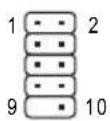
natural_image
Top-down schematic of a computer motherboard showing CPU socket, RAM slots, and memory components (no text or labels)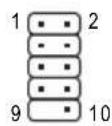
natural_image
Top-down schematic of a computer motherboard showing CPU socket, RAM slots, and memory card (no text or labels)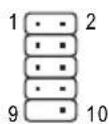
natural_image
Top-down view of a computer motherboard showing CPU socket, RAM slots, and memory card (no text or labels visible)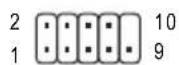
| 接腳 | 定義 |
| 1 NDOD- | |
| 2 NSIN | |
| 3 NSOUT | |
| 4 NDTR- | |
| 5 | 接地腳 |
| 6 NDSR- | |
| 7 NRTS- | |
| 8 NCTS- | |
| 9NRI- | |
| 10 | 無接腳 |
natural_image
Top-down schematic of a computer motherboard showing CPU socket, RAM slots, and memory card (no text or labels)8 開路:一般運作
8 短路:清除 CMOS 資料

natural_image
Top-down schematic of a computer motherboard showing CPU socket, RAM slots, and various connectors (no text or labels)1
| 接腳 | 定義 |
| 1 | 訊號腳 |
| 2 | 接地腳 |
第二章 BIOS 組態設定
| Date (mm:dd:yy) Fri, Apr 22 2007 Item Help Time (hh:mm:ss) 22:31:24 Menu Level▶ IDE Channel 0 Master [None] IDE Channel 0 Slave [None] IDE Channel 2 Master [None] IDE Channel 2 Slave [None] IDE Channel 3 Master [None] IDE Channel 3 Slave [None] Drive A [1.44M, 3.5"] Floppy 3 Mode Support [Disabled] Halt On [All Errors] Base Memory 640K Extended Memory 239M ↑↓→←: Move Enter: Select +/-/PU/PD: Value F10: Save ESC: Exit F1: General Help F5: Previous Values F6: Fail-Safe Default F7: Optimized Defaults |
Surroundview (啟動 SurroundView 功能)
Onboard Parallel Port (內建並列埠
| ACPI Suspend Type Soft-Off by Power button Modem Ring Resume USB Wake Up from S3 PME Event Wake Up HPET Support (##) Power On By Mouse Power On By Keyboard x KB Power ON Password AC Back Function Power-On by Alarm x Date (of Month) x Resume Time (hh:mm:ss) | [S1(POS)] [Instant-off] [Disabled] [Enabled] [Disabled] [Disabled] Enter [Soft-Off] [Disabled] Everyday 0:0:0 | Item Help |
| Menu Level▶ | ||
| ↑↓→←: Move Enter: Select +/-/PU/PD: Value F10: Save ESC: Exit F1: General Help F5: Previous Values F6: Fail-Safe Defaults F7: Optimized Defaults | ||
Power On By Keyboard (鍵盤開機功能
Power-On by Alarm (定時開機)
| PCI1 IRQ Assignment [Auto] PCI2 IRQ Assignment [Auto] | Item Help |
| Menu Level▶ | |
| ↑↓→←: Move Enter: Select +/-/PU/PD: Value F10: Save ESC: Exit F1: General Help F5: Previous Values F6: Fail-Safe Defaults F7: Optimized Defaults | |
| Reset Case Open Status [Disabled] | Item Help | |
| Case Opened Yes | Menu Level▶ | |
| Vcore OK | ||
| DDR2 1.8V OK | ||
| +3.3V OK | ||
| +12V OK | ||
| Current System Temperature 32°C | ||
| Current CPU Temperature 45°C | ||
| Current CPU FAN Speed 3245 RPM | ||
| Current SYSTEM FAN Speed 0 RPM | ||
| System Warning Temperature [Disabled] | ||
| CPU Warning Temperature [Disabled] | ||
| CPU FAN Fail Warning [Disabled] | ||
| SYSTEM FAN Fail Warning [Disabled] | ||
| CPU Smart FAN Control [Enabled] | ||
| CPU Smart FAN Mode [Auto] | ||
| ↑↓→←: Move Enter: Select +/-/PU/PD: Value F10: Save ESC: Exit F1: General HelpF5: Previous Values F6: Fail-Safe Defaults F7: Optimized Defaults | ||
Reset Case Open Status (重置機殼狀況
▶ Disabled () 保留之前機殼被開啟狀況的紀錄。預設值
▶ Enabled 清除之前機殼被開啟狀況的紀錄。
Case Opened (機殼被開啟狀況
Current CPU/SYSTEM FAN Speed (RPM) (偵測風扇轉速
自動偵測 CPU/系統風扇的轉速。
System/CPU Warning Temperature (東RU) 温度警告
| CPU Clock Ratio [Auto] CPU Host Clock Control [Auto] x CPU Frequency (MHz) 200 PCIE Clock (MHz) [Auto] NB/SB Voltage [Normal] DDR2 Voltage Control [Auto] CPU Voltage Control [Normal] Normal CPU Vcore 1.3500V | Item Help |
| Menu Level▶ | |
| ↑↓→←: Move Enter: Select +/-/PU/PD: Value F10: Save ESC: Exit F1: General Help F5: Previous Values F6: Fail-Safe Defaults F7: Optimized Defaults | |

CPU Clock Ratio (CPU) 倍頻調整
CPU Frequency (MHz) (CPU)內頻調整
text_image
AMD 680 Series Utility CD GIGABYTE™ TECHNOLOGY AMD 680 Series Utility CD 宏裝品片類 幫助程式 軟體應用程式 軟體應用程式 啟動應用程式 連接一下來以下列出應用程式安裝* Nortoe Internet Security(ABS) Size 0KB Norton Internet Security provides essential protection from viruses hackers and privacy threats. It includes: -Norton AntiVirus -Norton Personal Firewall -Norton Privacy Control -Norton AntiSpasm -Norton Parental Control Kaspersky antivirus Size 0KB Kaspersky antivirus Accrbot Reader Size 15.9MB Utility for viewing or printing Adobe Portable Document Format (PDF) file. ATI Road Utility Size 47.4MB ATI Road Utility GIGABYTE C.O.M. (Corporate Online Manager) Size 9.0MB A web-based system management tool that allows client system hardware information such as CPU and memory and graphics card and much more be manipulated or controlled via a host. 本頁於於Gigabte及其企業操作文件所有說明的數據資訊。3-3 驅動程式光碟資訊
text_image
. . Boot from CD/DVD: Press any key to startup XpressRecovery2.....圖 8
text_image
Q-Flash Utility v2.02 Flash Type/Size............MXIC SPI Flash 512K Keep DMI Data Enable !! Copy BIOS completed - Pass!! Please press any key to continue步驟四:
text_image
Gigabyte xBIOS Writer Current Mainboard Info Flash Memory Type MNC.SPI Flash 400 Bits AMD P AWARD BIOS 請打勾"✓" Information 選 "Update New BIOS" Internet Update Clear DMI Data Pool Clear PhP Data Pool SMI Fair Support Update New BIOS Save Current BIOS Update @BIOS About this program Exit 100% Donetext_image
Please select @BOS server site Please select @BOS server site : Ogalys OBOC server 1 in Java Ogalys OBOC server 2 in Java Ogalys OBOC server in China Ogalys OBOC server in Japan Ogalys OBOC server in U.S.A OK Cancel步驟二:
text_image
Please select one file to update RABINDO: Ensure you select the model name from the list below, please select the existing model name on your keyboard. If you select the wrong model name to update the BXC, you complete would not boot Model Name: 6A-800051 RADC-800051, a RADC-800051, for F1 OK Cancel步驟三:
text_image
Message Do you want to Update BIOS ? 確定 取消步驟三:
text_image
CMOS Setup Utility-Copyright (C) 1984-2007 Award Software Integrated Peripherals IDE Configuration [Press Enter] OnChip SATA Controller [Enabled] OnChip SATA Type [RAID] Onboard Audio Function [Auto] Onboard 1394 Function [Enabled] Onboard LAN Function [Enabled] Onboard LAN Boot ROM [Disabled] OnChip USB Controller [Enabled] USB EHCI Controller [Enabled] USB Keyboard Support [Disabled] USB Mouse Support [Disabled] Legacy USB storage detect [Enabled] Onboard Serial Port [2F8/IRQ3] Onboard Parallel Port [378/IRQ7] Parallel Port Mode [SPP] x ECP Mode Use DMA 3 ↑↓→←: Move Enter: Select +/-/PU/PD: Value F10: Save ESC: Exit F1: General Help F5: Previous Values F6: Fail-Safe Defaults F7: Optimized Defaults圖 1
步驟二:
RAID BIOS Version 2.5.1540.32
(c) 2006 ATI Technology, Inc. All rights reserved.
No Array is defined..
Press <Ctrl-F> to enter FastBuild (tm) Utility...
圖 2
步驟2:
text_image
FastBuild (tm) Utility (c) 2006 ATI Technology, Inc. [ Main Menu ] View Drive Assignments......[ 1 ] Define LD......[ 2 ] Delete LD......[ 3 ] Controller Configuration......[ 4 ] [ Keys Available ] Press 1..4 to Select Option [ESC] Exit圖 3
建立磁碟陣列
text_image
FastBuild (tm) Utility (c) 2006 ATI Technology, Inc. [ Define LD Menu ] LD No RAID Mode Total Drv LD 1 RAID 0 0 Stripe Block: 64 KB Fast Init: OFF Gigabyte Boundary: ON Cache Mode: WriteThru [ Drives Assignments ] Channel:ID Drive Model Capacity (MB) Assignment 1:Mas WDC WD800JD-22LSA0 80026 N 2:Mas WDC WD800JD-22LSA0 80026 N [ Keys Available ] [↑] Up [↓] Down [ESC] Exit [Space] Change Option [Ctrl-Y] Save圖 5
Press Ctrl-Y to Modify Array Capacity or press any other key to use maximum capacity...
圖6
View Drive Assignments AMD SB600接至
控制器的磁碟是否被指定為磁碟陣
text_image
FastBuild (tm) Utility (c) 2006 ATI Technology, Inc. [ View Drives Assignments ] Channel:ID Drive Model Capacity (MB) Assignment 1:Mas WDC WD800JD-22LSA0 80026 Extent 1 79959 LD 1-1 1:Mas WDC WD800JD-22LSA0 80026 Extent 1 79959 LD 1-2 [ Keys Available ] [↑] Up [↓] Down [ESC] Exit圖 7
删除磁碟陣列
您可以使用此選項刪除已建立的磁碟陣列

- <3>主畫 Delete LID>Menu
畫面後,使用方向鍵上下鍵移動至欲刪除的
磁碟陣列並按
text_image
FastBuild (tm) Utility (c) 2006 ATI Technology, Inc. [ View LD Definition Menu ] LD No RAID Mode Total Drv Capacity (MB) Status LD 1 RAID 0 2 158000 Functional Stripe Block: 64KB Cache Mode: WriteThru [ Drives Assignments ] Channel:ID Drive Model Capacity (MB) 1:Mas WDC WD800JD-22LSA0 80026 2:Mas WDC WD800JD-22LSA0 80026 Are you sure you want to delete this array? Press Ctrl-Y to Delete, or others to abort...圖 8
5-1-2 S製作製品作業系統時所需的
驅動程式磁片
(AHCI RAID及 模式需安装)
text_image
A:\>dir Volume in drive A has no label Directory of A:\ AHCIX86S CAT 17,858 01-20-07 1:50 AHCIX86S INF 6,647 01-03-07 9:35 AHCIX86S MSI 71,680 02-08-07 7:27 AHCIX86S SYS 110,592 12-28-06 18:51 4 file(s) 206,777 bytes 0 dir(s) 1,250,816 bytes free A:\>圖 5
text_image
Windows Setup Press F6 if you need to install a third party SCSI or RAID driver.圖 1
步驟二:
text_image
Windows Setup Setup could not determine the type of one or more mass storage devices installed in your system, or you have chosen to manually specify an adapter. Currently, Setup will load support for the following mass storage devices(s)圖2
步驟三:
text_image
Windows Setup You have chosen to configure a SCSI Adapter for use with Windows, using a device support disk provided by an adapter manufacturer. Select the SCSI Adapter you want from the following list, or press ESC to return to the previous screen. AT1 AHCI Compatible RAID Controller-x86 platform AT1 AHCI Compatible RAID Controller-x64 platform ENTER=Select F3=Exit圖 3

text_image
Windows Setup Setup will load support for the following mass storage device(s): ATI AHCI Compatible RAID Controller-x86 platform * To specify additional SCSI adapters, CD-ROM drives, or special disk controllers for use with Windows, including those for which you have a device support disk from a mass storage device manufacturer, press S. * If you do not have any device support disks from a mass storage device manufacturer, or do not want to specify additional mass storage devices for use with Windows, press ENTER. S=Specify Additional Device ENTER=Continue F3=Exit圖 4
步驟四:
natural_image
Close-up of a finger pressing a red electronic component on a circuit board (no visible text or symbols)輸入 輸出 」:
步驟一:
natural_image
Close-up of an electronic circuit board with a white plastic plug inserted, showing internal components and wiring (no visible text or symbols)步驟二:
natural_image
Close-up of a hand inserting a USB cable into an internal computer drive (no visible text or symbols)S/PDIF 同軸輸出線
步驟三:
natural_image
Hand inserting a gold coin into an open computer interface (no text or symbols visible)S/PDIF 光纖輸出線
B. S/PDIF 音效輸出設定:
natural_image
Computer desktop wallpaper showing a green hill under a blue sky with clouds, no visible text or symbols.步驟二:
natural_image
Windows XP desktop wallpaper showing a green hill under a blue sky with clouds, no visible text or symbols on the screen.步驟四:
natural_image
Close-up of a computer motherboard with visible CPU socket and circuit board (no text or symbols)步驟一:
natural_image
Close-up of a hand holding a small electronic circuit board with visible traces and components (no readable text or symbols)步驟二:
natural_image
Close-up of a green industrial control panel with four vertical buttons (black, green, red, blue) mounted on a metal frame (no visible text or symbols)
text_image
Windows XP desktop screenshot showing a context menu open over a green hill against a blue sky with clouds.步驟二:
G.B.T. INC. (U.S.A.)
G.B.T Inc (USA)
G.B.T. TECHNOLOGY TRADING GMBH
Representative Office Of GIGA-BYTE Technology Co., Ltd. in CZECH REPUBLIC
網址:http://www.gigabyte.cz
- 土耳其
Representative Office Of GIGA-BYTE Technology Co., Ltd. in TURKEY
Moscow Representative Office Of GIGA-BYTE Technology Co., Ltd.
Office of GIGA-BYTE TECHNOLOGY Co., Ltd. in POLAND
Representative Office Of GIGA-BYTE Technology Co., Ltd. in Romania
Representative Office Of GIGA-BYTE Technology Co., Ltd. in SERBIA & MONTENEGRO
text_image
GIGABYTE™ GTS Global Technical Service Welcome to GIGABYTE Service system. If you want to submit new question or check our response, please enter your E- mail address and press the button to log on. You Email 繁體中文 Deutsch 國本中文 Français Polski EnglishManagement Methods on Control of Pollution from Electronic Information Products
(China RoHS Declaration)