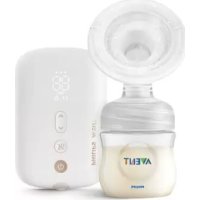
Avent SCF392 - Breast Pump PHILIPS - Free user manual and instructions
Find the device manual for free Avent SCF392 PHILIPS in PDF.

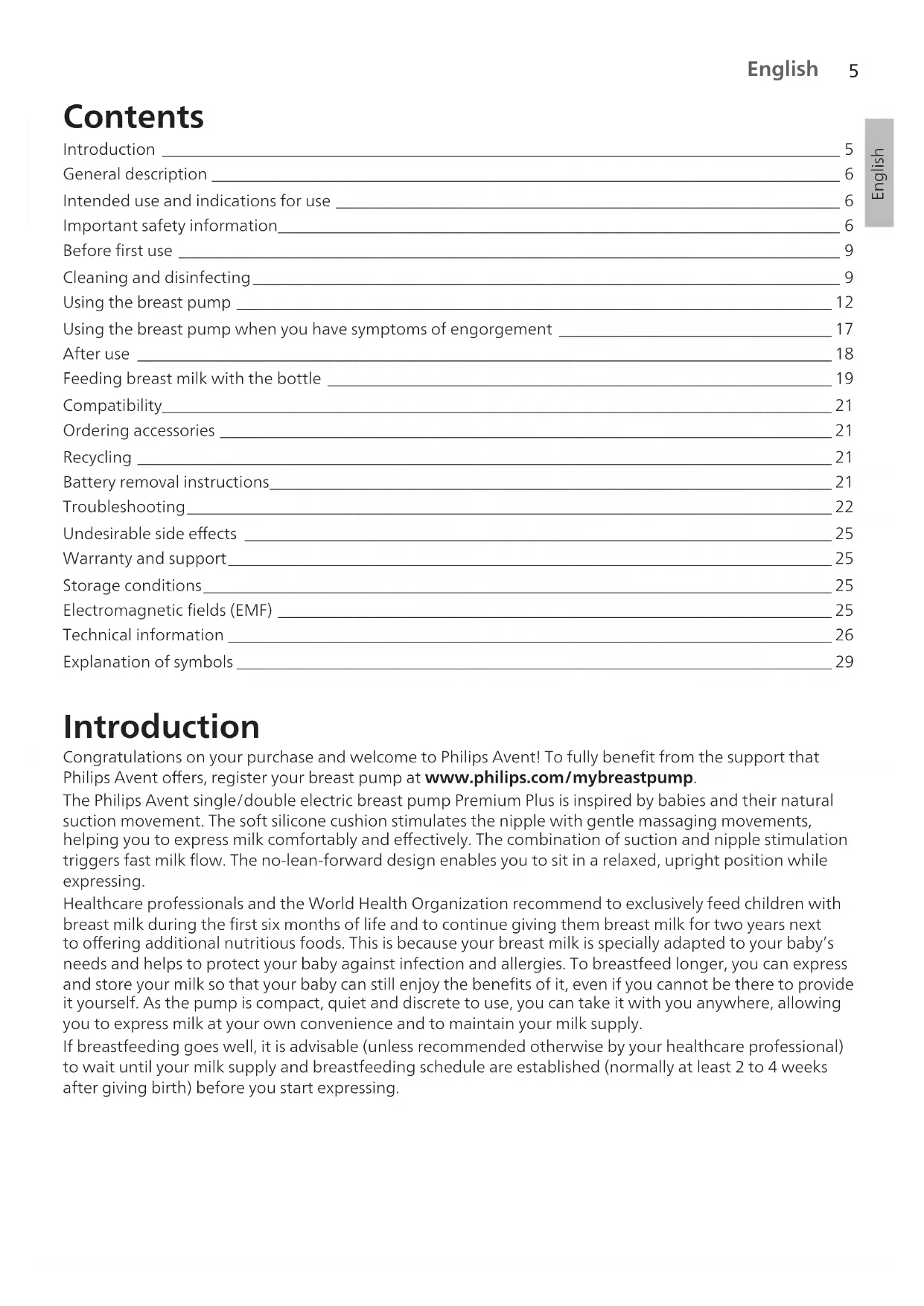

| Product type | Premium Plus single/double electric breast pump |
| Brand | Philips Avent |
| Model | SCF392 |
| Motor unit dimensions | 145 mm x 95 mm x 45 mm |
| Weight (single) | 230 g |
| Weight (double) | 310 g |
| Power supply | Mains adapter 100-240 V ~ 50/60 Hz, output 5 V DC / 1.1 A (single) or 1.8 A (double); rechargeable battery 3.6 V 2600 mAh |
| Battery life | Approximately 3 sessions (one session lasts about 20-30 minutes) |
| Charging time | Up to 4 hours |
| Operating modes | Stimulation mode (8 suction levels) and expression mode (16 suction levels) |
| Maximum suction levels | Stimulation: -200 mbar; Expression: -360 mbar |
| Cushion size | One size, fits nipples up to 30 mm |
| Materials | ABS, silicone (motor unit); polypropylene, silicone (other parts) |
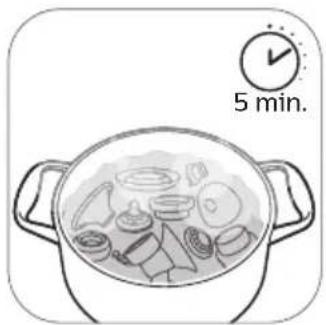
| Care and cleaning | Full disassembly, hand or dishwasher cleaning, disinfection in boiling water for 5 minutes |
| Safety | Automatic shutdown in case of error, EMC protection, battery cannot be replaced by user |
| Spare parts and accessories | Available at www.philips.com/support: teats, bottles, valves, cushions, etc. |
| Warranty | 2 years (international warranty) |
| Service life | 500 operating hours |
| Operating conditions | Temperature: 5°C to 40°C; humidity: 15 to 90% (non-condensing) |
| Usage | For breastfeeding mothers, single user, not for pregnant women |
Frequently Asked Questions - Avent SCF392 PHILIPS
User questions about Avent SCF392 PHILIPS
0 question about this device. Answer the ones you know or ask your own.
Ask a new question about this device
Download the instructions for your Breast Pump in PDF format for free! Find your manual Avent SCF392 - PHILIPS and take your electronic device back in hand. On this page are published all the documents necessary for the use of your device. Avent SCF392 by PHILIPS.
USER MANUAL Avent SCF392 PHILIPS
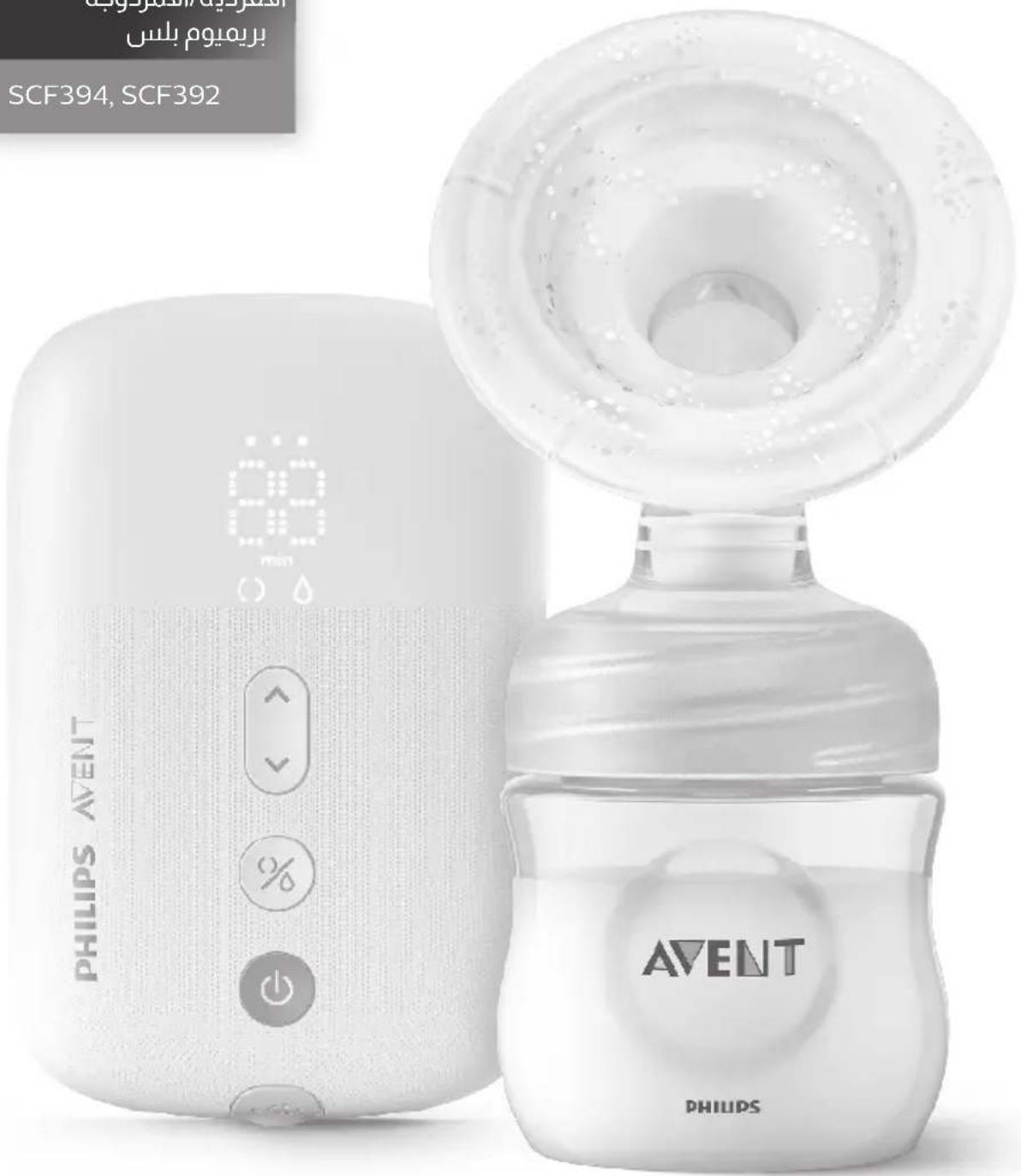
Electric Breast Pump
Premium Plus
شافطة طيب الأم
الأ Keysرباتية
الأفردية/الأمزدوبة
بريميوم بلس
SCF394, SCF392

natural_image
Simple line drawing of an open book with a grid layout and an arrow pointing to the page (no text or symbols)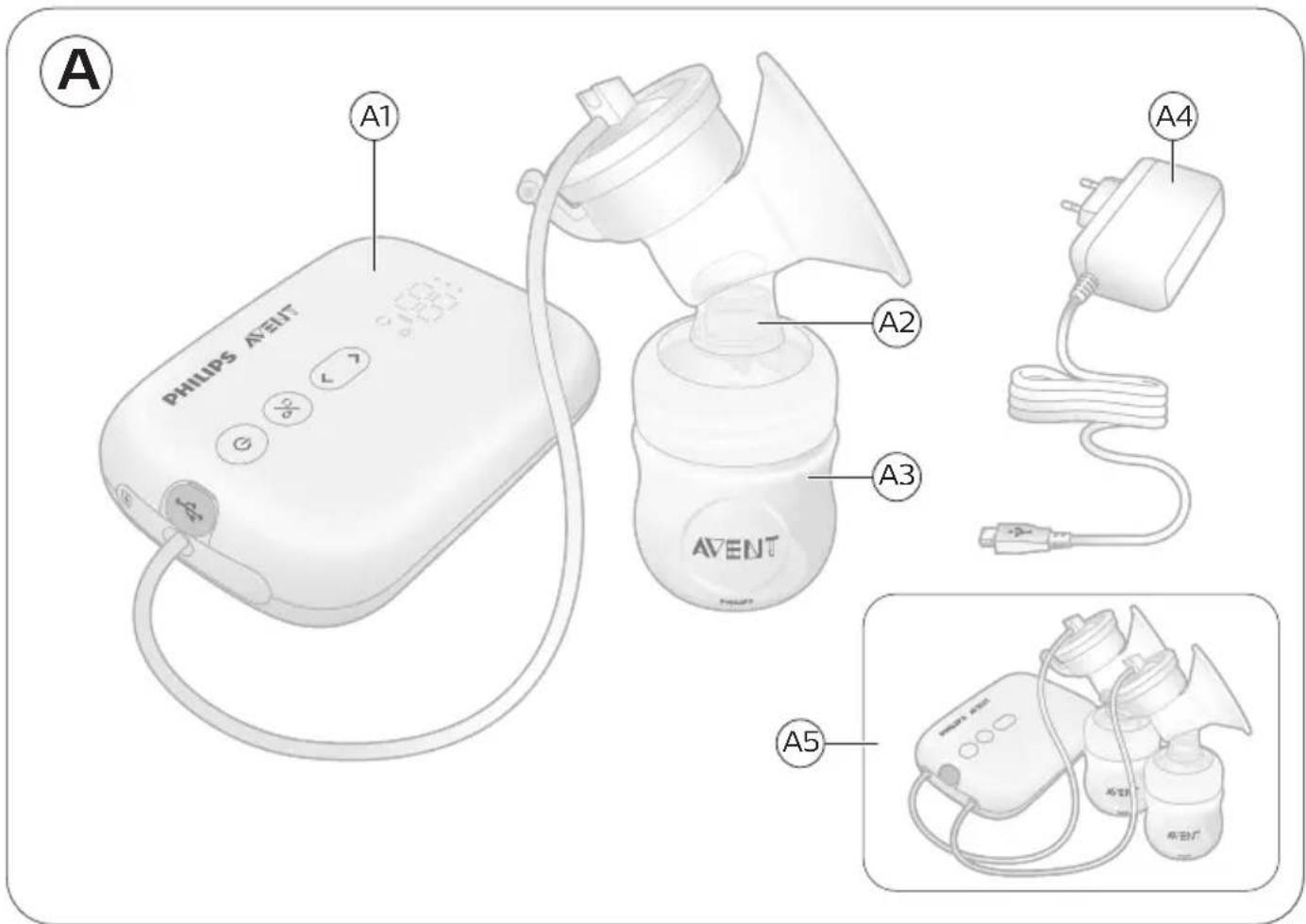
Contents
Introduction 5
General description 6
Intended use and indications for use 6
Important safety information 6
Before first use 9
Cleaning and disinfecting 9
Using the breast pump 12
Using the breast pump when you have symptoms of engorgement 17
After use 18
Feeding breast milk with the bottle 19
Compatibility 21
Ordering accessories 21
Recycling 21
Battery removal instructions 21
Troubleshooting 22
Undesirable side effects 25
Warranty and support 25
Storage conditions 25
Electromagnetic fields (EMF) 25
Technical information 26
Explanation of symbols 29
Introduction
Congratulations on your purchase and welcome to Philips Avent! To fully benefit from the support that Philips Avent offers, register your breast pump at www.philips.com/mybreastpump.
The Philips Avent single/double electric breast pump Premium Plus is inspired by babies and their natural suction movement. The soft silicone cushion stimulates the nipple with gentle massaging movements, helping you to express milk comfortably and effectively. The combination of suction and nipple stimulation triggers fast milk flow. The no-lean-forward design enables you to sit in a relaxed, upright position while expressing.
Healthcare professionals and the World Health Organization recommend to exclusively feed children with breast milk during the first six months of life and to continue giving them breast milk for two years next to offering additional nutritious foods. This is because your breast milk is specially adapted to your baby's needs and helps to protect your baby against infection and allergies. To breastfeed longer, you can express and store your milk so that your baby can still enjoy the benefits of it, even if you cannot be there to provide it yourself. As the pump is compact, quiet and discrete to use, you can take it with you anywhere, allowing you to express milk at your own convenience and to maintain your milk supply.
If breastfeeding goes well, it is advisable (unless recommended otherwise by your healthcare professional) to wait until your milk supply and breastfeeding schedule are established (normally at least 2 to 4 weeks after giving birth) before you start expressing.
General description
Note: The numbers mentioned below refer to the numbers in the figure on the front foldout page of this user manual.
① Note: The double breast pump comes with two pieces of the items shown in Figures B and C.
Product description (Fig. A)
A1 Motor unit
A4 Adapter*
A2 Breast pump kit
A5 Double breast pump
A3 Bottle
* The adapter supplied may vary for different countries.
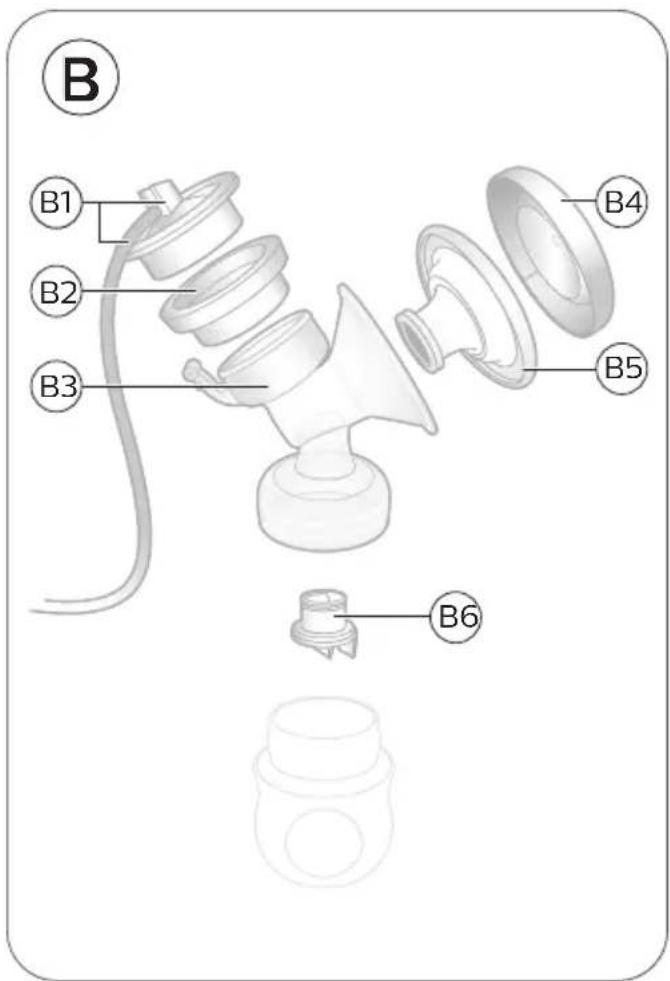
Breast pump kit (Fig. B)
B1 Silicone tube and cap
B4 Cover
B2 Silicone diaphragm
B5 Cushion
B3 Pump body
B6 White valve
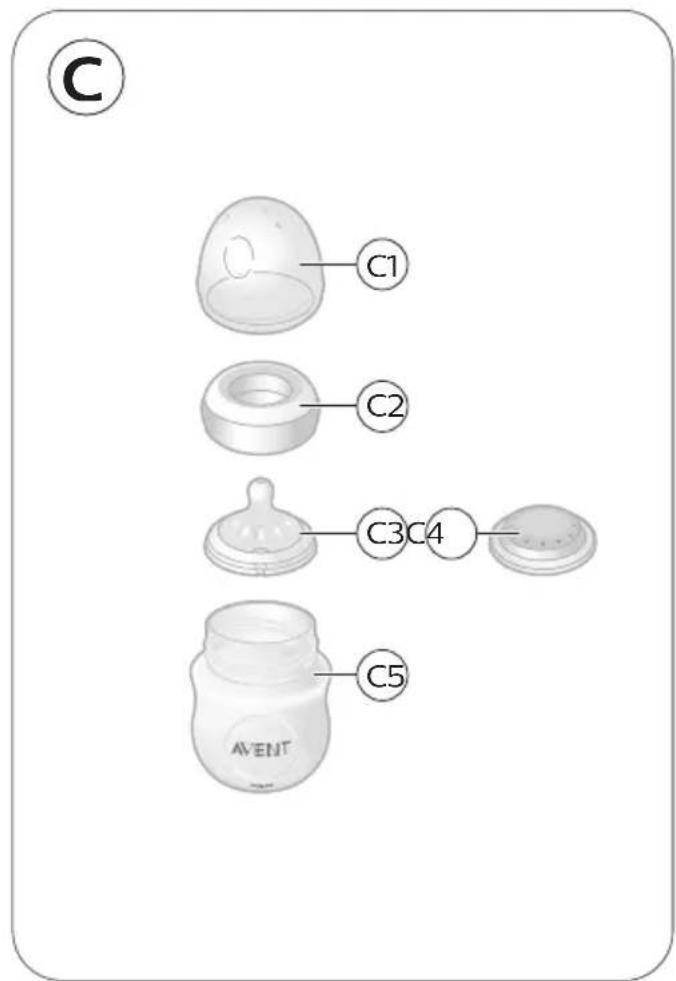
Philips Avent Natural bottle (Fig. C)
C1 Bottle cap
C4 Sealing disc
C2 Screw ring
C5 Bottle
C3 Teat
Accessories
There are multiple versions of this breast pump package, which all come with a different combination of the following Philips Avent accessories:
- Breast pads
- Storage cups with adapter*
- Travel bag
- Breast milk storage bags*
- Insulation pouch
- Natural bottles
- Cleaning brush
* For these accessories, a separate user manual is provided.
Intended use and indications for use
The Philips Avent single/double electric breast pump Premium Plus is intended to express and collect milk from the breast of a lactating woman, and indicated to alleviate the symptoms of engorgement. The device is intended for a single user.
Important safety information
Read this user manual carefully before you use the breast pump and save it for future reference.
This user manual can also be found online at: www.philips.com/support.
This product is operated by the lactating woman herself.
You can use this breast pump in an everyday environment.
Contraindications

- Never use the breast pump while you are pregnant, as pumping can induce labor.
Warnings

Warnings to avoid choking, strangulation and injury:
- Do not allow children or pets to play with the motor unit, the adapter, packaging materials or accessories.
- Always unplug the breast pump after use and when fully charged. Store the breast pump when not in use.
- This breast pump is not intended for use by persons (including children) with reduced physical, sensory or mental capabilities, or lack of experience and knowledge. Such persons can only use this breast pump if they are supervised by or have received proper instruction concerning use of the appliance by a person responsible for their safety.
Warning to prevent transmitting infectious diseases:
- If you are a mother who is infected with Hepatitis B, Hepatitis C or Human Immunodeficiency Virus (HIV), expressing breast milk will not reduce or remove the risk of transmitting the virus to your baby through your breast milk.
Warnings to avoid electric shock:
- Inspect the breast pump, including the adapter, for signs of damage before each use. Do not use the breast pump if the adapter or plug is damaged, if it does not work properly or if it has been dropped or submerged in water.
- Only use the adapter (S009AHz050yyyy) provided with this breast pump.
- Always ensure that it is easy to disconnect the device from the mains in case of malfunction. The adapter is considered the disconnection device.
Warnings to avoid contamination and to ensure hygiene:
- For hygienic reasons, the breast pump is only intended for repeated use by a single user.
- Clean and disinfect all parts before first use and after each use.
- Do not use antibacterial or abrasive cleaning agents to clean the breast pump parts as this may cause damage.
- Wash your hands thoroughly with soap and water before you touch breast pump parts and breasts to prevent contamination. Avoid touching the inside of containers or lids.
Warnings to avoid breast and nipple issues including pain:
- Do not use the breast pump if the silicone diaphragm appears to be damaged or broken. See chapter 'Ordering accessories' for information on how to obtain replacement parts.
- Only use accessories and parts recommended by Philips Avent.
- There are no user serviceable parts inside the motor unit of the breast pump.
- No modification of the breast pump is allowed. If you do so, your warranty becomes invalid.
- Never use the breast pump while you are sleepy or drowsy to avoid lack of attention during use.
- Always switch off the breast pump before you remove the pump body from your breast, in order to release the vacuum.
- If the vacuum is uncomfortable or causes pain, switch off and remove the breast pump from your breast.
- Do not continue pumping for more than five minutes at a time if you do not succeed in expressing any milk. Try to express at another time during the day.
- If the process becomes very uncomfortable or painful, stop using the pump and consult your healthcare professional.
Warnings to prevent damage and malfunction of the breast pump:
- Portable radio frequency (RF) communications equipment (including mobile phones and peripherals such as antenna cables and external antennas) should not be used closer than 30 cm (12 in) to any part of the breast pump, including adapter. This could have a negative effect on the performance of the breast pump.
- Use of this equipment adjacent to or stacked with other equipment should be avoided because it could result in improper operation.
Warning to avoid increased electromagnetic emissions or decreased electromagnetic immunity of this device, resulting in improper operation:
- Do not use any other adapter or charging cable than supplied with the device.
Warning

Battery safety instructions
- Only use the product for its intended purpose. Read this important information carefully before you use the product and its batteries and accessories, and save it for future reference. Misuse can lead to hazards or serious injuries. Accessories supplied may vary for different products.
- To charge the battery, only use the detachable adapter (S009AHz050yyyy) provided with the product. Do not use an extension cord.
- Charge, use and store the product at the temperature ranges indicated in the technical specifications table in this user manual.
- Keep product and batteries away from fire and do not expose them to direct sunlight or high temperatures.
- If the product becomes abnormally hot or smelly, changes color or if charging takes longer than usual, stop using and charging the product and contact Philips.
- Do not place products and their batteries in microwave ovens or on induction cookers.
- Do not open, modify, pierce, damage or dismantle the product or battery to prevent batteries from heating up or releasing toxic or hazardous substances. Do not short-circuit, overcharge or reverse charge batteries.
- If batteries are damaged or leaking, avoid contact with the skin or eyes. If this occurs, immediately rinse well with water and seek medical care.
Cautions

Cautions to prevent damage to and malfunctioning of the breast pump:
- Prevent the adapter and motor unit from coming into contact with water.
- Never put the motor unit or the adapter in water or in a dishwasher, as this causes permanent damage to these parts.
- Keep the adapter and the silicone tubes away from heated surfaces to avoid overheating and deformation of these parts.
Before first use
Disassemble, clean and disinfect all parts that come into contact with breast milk before you use the breast pump for the first time and after every use.
Fully charge the device before you use it for the first time or after a long period of non-use.
Cleaning and disinfecting
Overview
Clean and disinfect the parts that come into contact with the breast and breast milk as described below:
| When How | ||
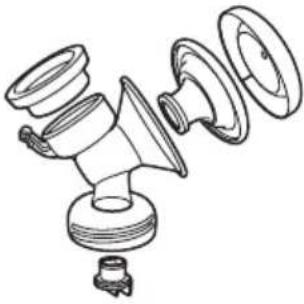 | Clean and disinfect before first use and after every use. | Disassemble all parts and then clean them as described in chapter 'Cleaning' and disinfect them as described in chapter 'Disinfecting'. |
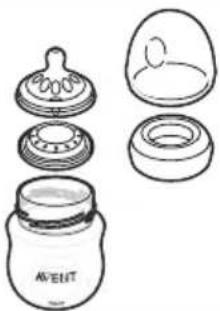 |
The following parts do not come into contact with the breast and breast milk; clean them as described below:
| When How | ||
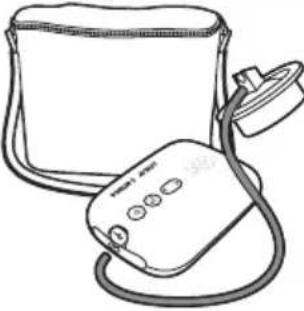 | Clean when needed. | Wipe with a clean, damp cloth with water and mild detergent. |
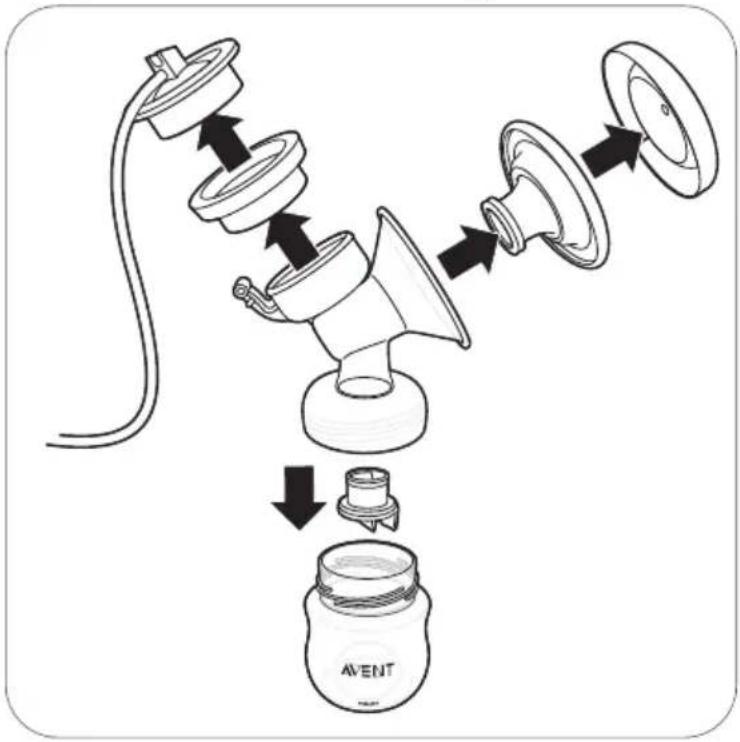
Step 1: Disassembling
flowchart
graph TD
    A["Birth"] --> B["Washing"]
    B --> C["Cut"]
    C --> D["Screening"]
    D --> E["Packaging"]
    E --> F["Product"]
    style A fill:#f9f,stroke:#333
    style F fill:#ccf,stroke:#333
Disassemble the breast pump, bottle and storage cup completely.
Also remove the white valve from the breast pump.
Step 2: Cleaning
The parts that come in contact with milk can be cleaned manually or in the dishwasher.
⚠ Warning: Do not use antibacterial or abrasive cleaning agents to clean the breast pump parts as this may cause damage.
Caution: Never put the motor unit or the adapter in water or in a dishwasher, as this causes permanent damage to these parts.
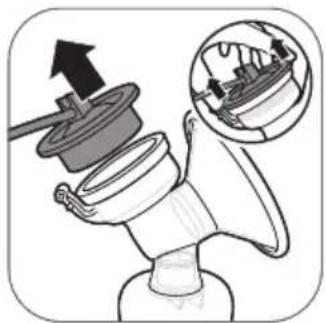
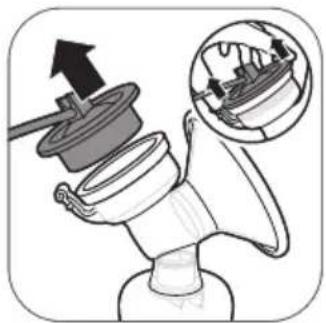
Caution: Be careful when you remove and clean the white valve. If it gets damaged, your breast pump does not function properly. To remove the white valve, gently pull at the ribbed tab on the side of the valve. To clean the white valve, rub it gently between your fingers in warm water with some dishwashing liquid. Do not insert objects into the white valve, as this may cause damage.
Step 2A: Manual cleaning
Supplies needed:
- Mild dishwashing liquid
- Drinking-quality water
-
Soft, clean brush
-
Clean tea towel or drying rack
- Clean sink or bowl
natural_image
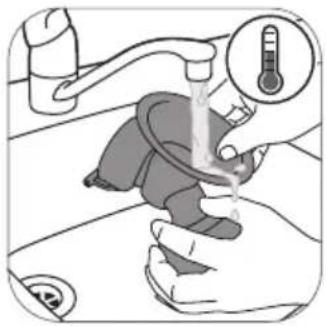
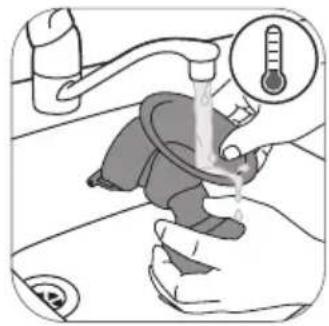
Illustration of a hand washing a baby's mouth with a thermometer gauge (no text or symbols)- Rinse all parts under a running tap with lukewarm water.
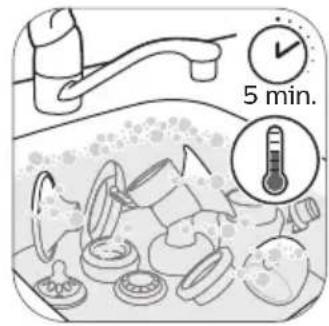
- Soak all parts for 5 minutes in warm water with some mild dishwashing liquid.
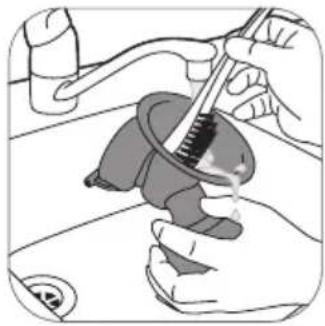
natural_image
Illustration of hands using a tool to adjust or install a mechanical component (no text or symbols visible)- Clean all parts with a cleaning brush.
natural_image
Illustration of a hand washing a shower with a thermometer above (no text or symbols)- Thoroughly rinse all parts under a running tap with cold clear water.
natural_image
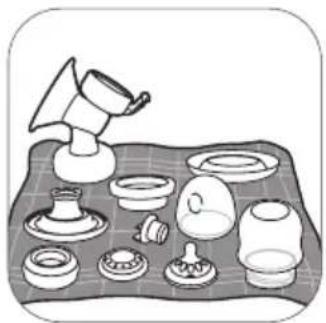
Illustration of various kitchen utensils arranged on a tray (no text or symbols)- Leave all parts to air-dry on a clean tea towel or drying rack.
Step 2B: Cleaning in the dishwasher
Supplies needed:
- Mild dishwashing liquid or a dishwashing tablet
- Drinking-quality water
(i) Note: Food colorings may discolor parts.
natural_image
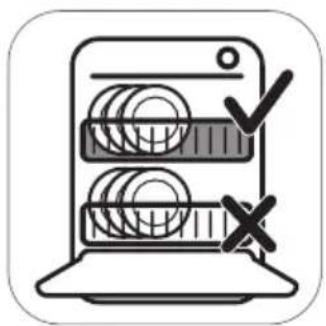
Illustration of a laptop with coins and checkmark symbols (no text or labels)- Place all parts on the top rack of the dishwasher.
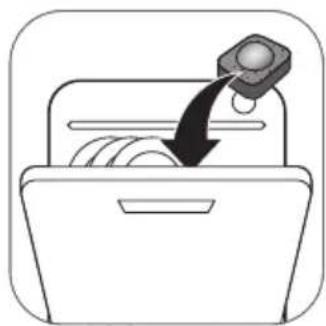
natural_image
Simple line drawing of a box with a hand inserting a coin into it, no text or symbols present.- Put dishwashing liquid or a tablet in the machine and run a standard program.
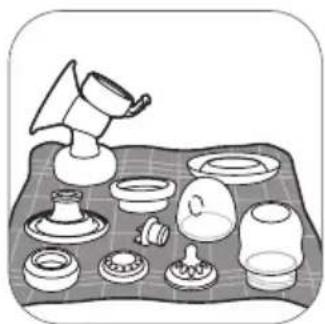
natural_image
Illustration of various kitchen utensils arranged on a tray (no text or symbols)- Leave all parts to air-dry on a clean tea towel or drying rack.
Step 3: Disinfecting
Supplies needed:
- A household pot
- Drinking-quality water
Caution: During disinfection with boiling water, prevent the bottle or other parts from touching the side of the pot. This can cause irreversible product deformation or damage that Philips cannot be held liable for.
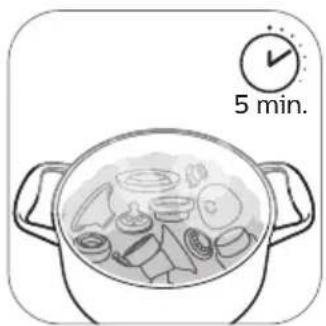
natural_image
Illustration of a cooking pot with ingredients and a 5-minute timer (no text or symbols on the pot itself)- Fill a household pot with enough water to cover all parts and place all parts in the pot. Let the water boil for 5 minutes. Make sure the parts do not touch the side of the pot.
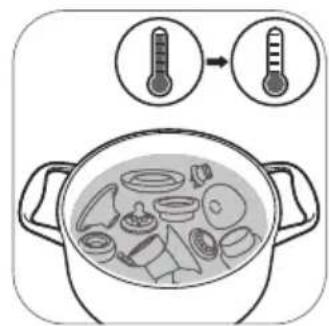
- Allow the water to cool down.
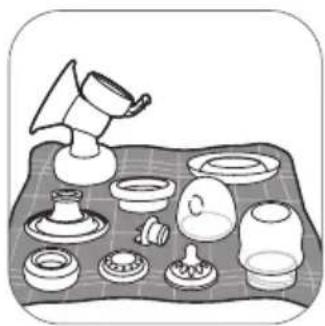
natural_image
Illustration of a table with various kitchen utensils and a funnel (no text or symbols)- Gently remove the parts from the water. Place the parts on a clean surface/tea towel or drying rack to air-dry.
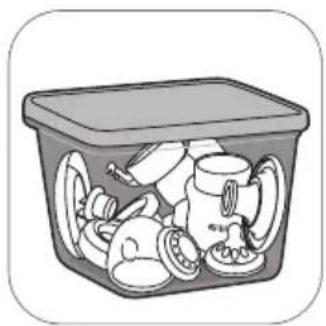
natural_image
Illustration of a plastic waste container filled with plastic waste (no text or symbols)- Store the dry items safely in a clean, protected area until needed. Ensure that the clean parts have air-dried completely before storing them to help prevent germs and mold from growing.
Using the breast pump
Cushion size
The Philips Avent single/double electric breast pump Premium Plus has a soft, active cushion. There is only one cushion size. It gently stimulates your nipple to trigger milk flow. The cushion is made of flexible silicone, fitting nipple sizes up to 30 mm/1.18 in.
Charging the breast pump
Fully charge the battery before you use the breast pump for the first time and when the battery is low. Fully charging the battery takes up to 4 hours.
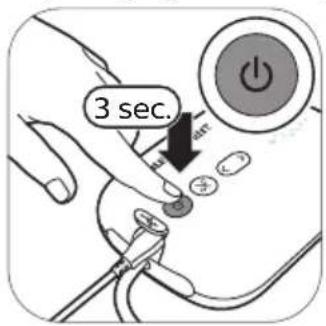
- Switch off the device.
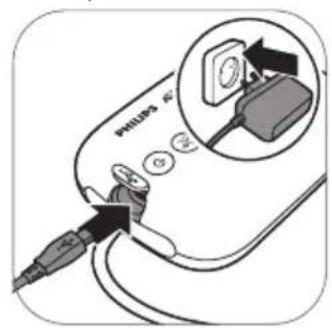
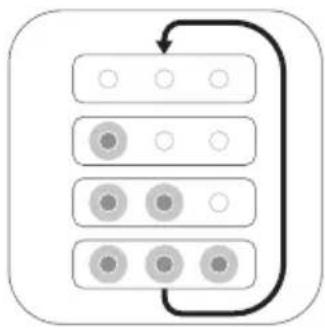
- Insert the adapter into the wall socket and insert the small plug at the other end into the motor unit.
flowchart
graph TD
    A[" "] --> B[" "]
    B --> C[" "]
    C --> D[" "]
    D --> E[" "]
    E --> F[" "]
    F --> G[" "]
    G --> H[" "]
    H --> I[" "]
    I --> J[" "]
    J --> K[" "]
    K --> L[" "]
    L --> M[" "]
    M --> N[" "]
    N --> O[" "]
    O --> P[" "]
    P --> Q[" "]
    Q --> R[" "]
    R --> S[" "]
    S --> T[" "]
    T --> U[" "]
    U --> V[" "]
    V --> W[" "]
    W --> X[" "]
    X --> Y[" "]
- The battery is charging.
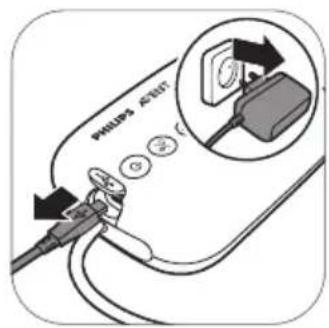
- When the battery is fully charged, remove the adapter from the wall socket and pull the small plug out of the motor unit.
Battery indicator light description

flowchart
graph TD
    A[" "] --> B[" "]
    B --> C[" "]
    C --> D[" "]
    D --> E[" "]
    E --> F[" "]
    F --> G[" "]
    G --> H[" "]
    H --> I[" "]
    I --> J[" "]
    J --> K[" "]
    K --> L[" "]
    L --> M[" "]
    M --> N[" "]
    N --> O[" "]
    O --> P[" "]
    P --> Q[" "]
    Q --> R[" "]
    R --> S[" "]
    S --> T[" "]
    T --> U[" "]
    U --> V[" "]
    V --> W[" "]
    W --> X[" "]
    X --> Y[" "]
    Y --> Z[" "]
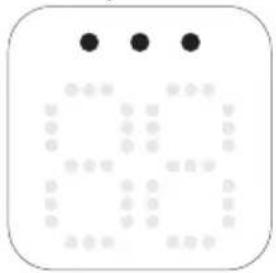
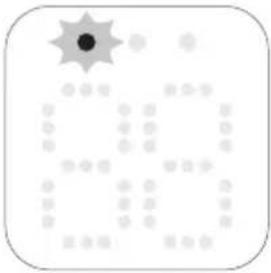
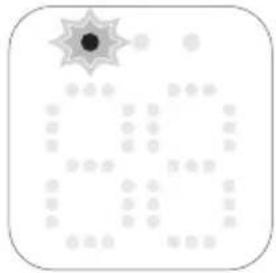
All lights are steady on. The battery is fully charged.
Charged battery operates approximately 3 pumping
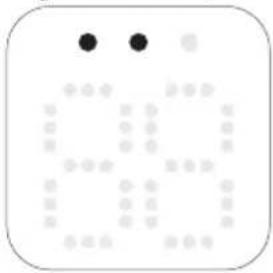
Two lights are steady on.
The battery is charged sufficiently for maximum two sessions.*
First light flashes slowly.
The battery is charged sufficiently for maximum one session.*
First light flashes quickly.
The battery is very low, the device will soon stop operating, charging is needed.
Battery lights light up one by one and go out all together.
The battery is charging.
* One session is the equivalent of 15 minutes (double electric breast pump) or 30 minutes (single electric breast pump).
Assembling the breast pump
Make sure you have cleaned and disinfected the parts of the breast pump that come into contact with milk.
Warning: Be careful, when you have disinfected the breast pump parts by boiling them, they can be very hot. To prevent burns, only start assembling the breast pump when disinfected parts have cooled down.
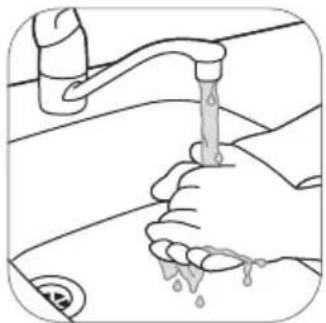
⚠ Warning: Wash your hands thoroughly with soap and water before you touch breast pump parts and breasts to prevent contamination. Avoid touching the inside of containers or lids.
Check the breast pump kit parts for wear or damage before use and replace them if necessary.
① Note: Correct placement of the cushion, silicone diaphragm and silicone tube is essential for the breast pump to form a proper vacuum.
natural_image
Illustration of hands using a faucet to clean water, showing liquid drops (no text or symbols)- Wash your hands thoroughly with soap and water.
natural_image
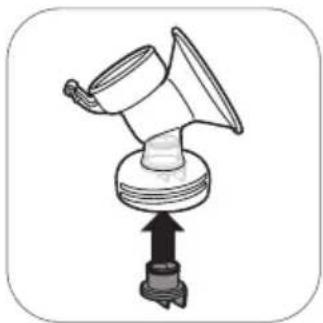
Diagram of a mechanical device with a central component and an upward arrow, no text or symbols present.- Push the white valve in the pump body as far as possible.
natural_image
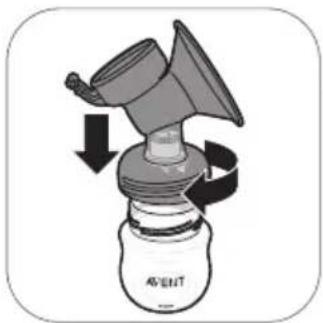
Diagram of a device with a funnel and rotating arrow, labeled 'AVENT' (no text or symbols beyond label)- Screw the pump body onto the bottle.
natural_image
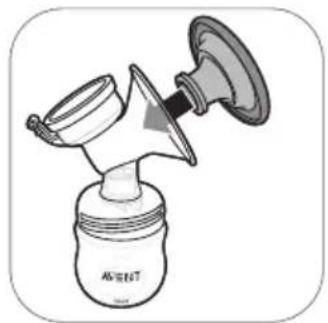
Illustration of a spray can with a funnel and spool, no text or symbols present- Place the cushion in the pump body and make sure that the rim covers the pump body.
natural_image
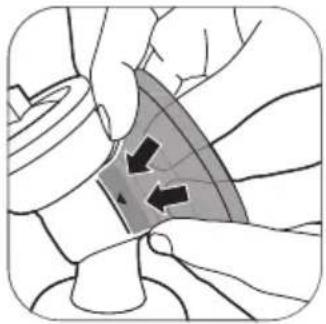
Illustration of hands performing a medical or therapeutic procedure on a curved surface, with arrows indicating direction (no text or symbols present)4A. Push the inner part of the cushion into the funnel against the line (indicated with an arrow).
natural_image
Line drawing of a baby washing machine (no text or symbols)- Place the silicone diaphragm in the pump body.
natural_image
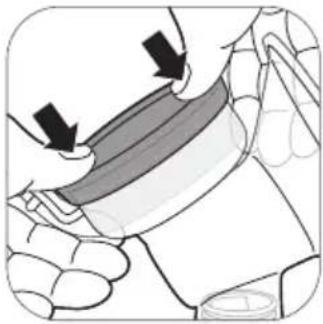
Illustration of a hand holding a curved object with arrows indicating motion or force (no text or symbols)5A. Make sure that the silicone diaphragm fits securely around the rim by pressing it down with your thumbs.
natural_image
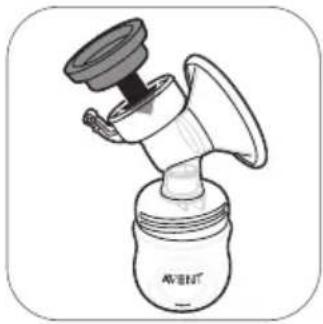
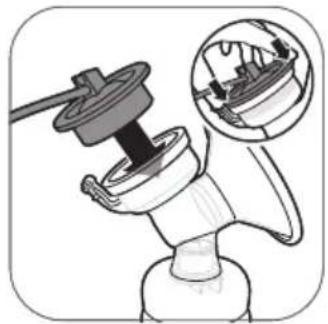
Illustration of a mechanical device with a magnified inset showing internal components (no text or symbols)- Attach the silicone tube and cap onto the silicone diaphragm. Push down the cap until it is securely in place.
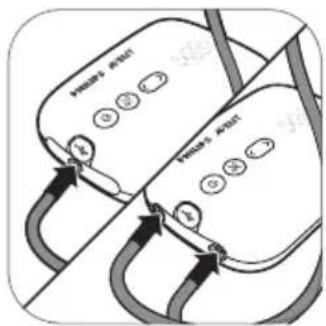
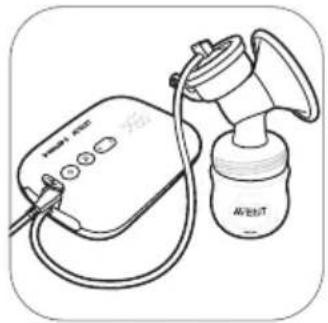
- Connect the tube(s) to the motor unit.
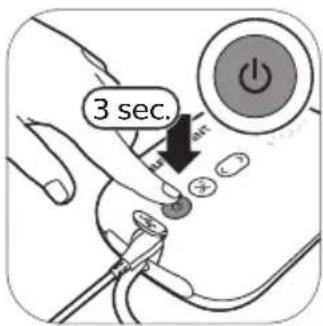
8A. When the breast pump is charged, you can use it cordless. Press and hold the on/off button until the device switches on.
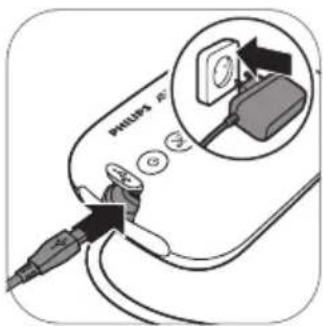
8B. You can also use the breast pump connected to the wall socket. If the battery is low, insert the adapter into the wall socket and insert the small plug at the other end into the motor unit.
natural_image
Line drawing of a medical device with a pressure monitor and tubing (no text or symbols)- The breast pump is now ready for use.
natural_image
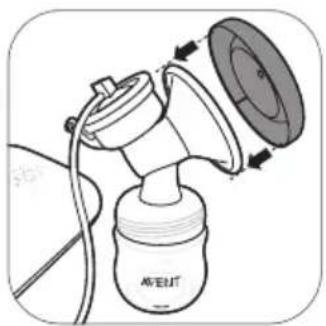
Diagram of a spray gun with attached device and lid, showing internal components (no text or symbols)① Note: You can place the cover over the cushion to keep the breast pump clean when you take it with you and while you are preparing for expressing.
Motor unit part description
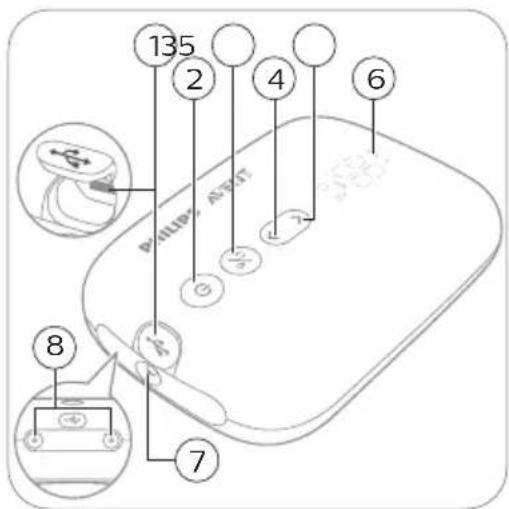
1 USB power inlet
2 On/off button with pause/play function
3 Mode selection button
4 'Level down' button
5 'Level up' button
6 LED display
7 Tubing port for single breast pump
8 Tubing ports for double breast pump
LED display description
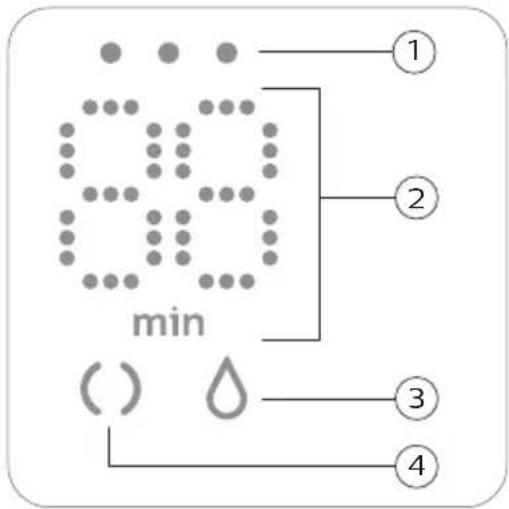
1 Battery indicator lights
2 Timer (minutes) and vacuum level indication
3 Expression icon
4 Stimulation icon
Explanation of modes
The breast pump has two modes. Below you find an explanation of these modes.
| Mode icons M | Mode Explanation | No. of suction levels | |
 | Stimulation mode M | Mode to stimulate the breast to start up the milk flow. | 8 suction levels |
 | Expression mode M | Mode for efficient milk removal after milk has started flowing. After 90 sec. of stimulation, the device automatically switches to the expression mode. | 16 suction levels |
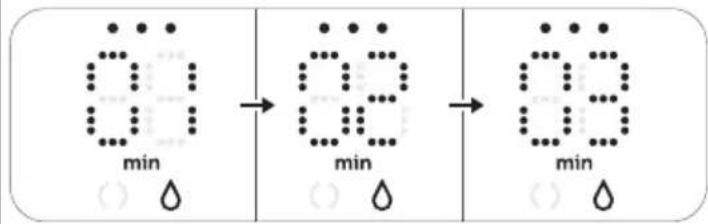 | The number on the display shows the running time in minutes. |
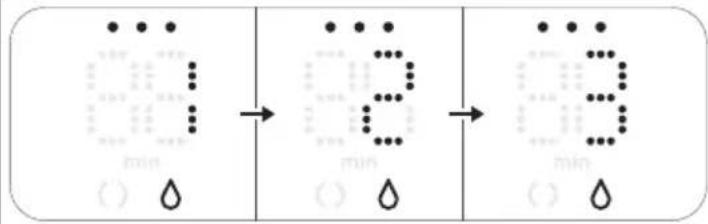 | When you change the suction level, the display shows the selected suction level for a few seconds and then shows the running time again. |
Pumping instructions
⚠ Warning: Before you remove the pump body from your breast, always switch off the breast pump to release the vacuum.
⚠ Warning: Do not continue pumping for more than 5 minutes at a time if you do not succeed in expressing any milk. Try to express at another time during the day.
⚠ Warning: If the process becomes very uncomfortable or painful, stop using the pump and consult your healthcare professional.
Note: If you regularly express more than 125 ml/4 fl oz per session, you can purchase and use a 260 ml/9 fl oz Philips Avent Natural bottle to prevent overfilling and spillage.
① Note: The breast pump can be used cordless if it is sufficiently charged, but you can also use it connected to the wall socket.
natural_image
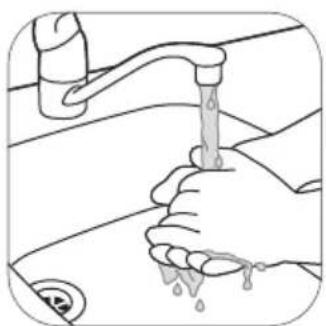
Illustration of hands using a faucet to clean water, showing liquid drops (no text or symbols)- Wash your hands thoroughly with soap and water and make sure that your breast is clean.
natural_image
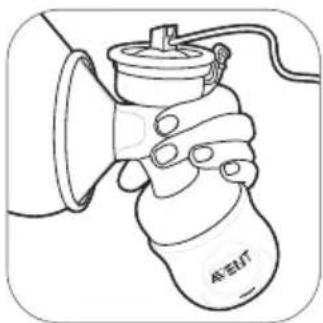
Line drawing of a hand holding a device labeled 'AET' with a bell, no text or symbols present- Place the breast pump kit onto your breast. Make sure that you center your nipple.
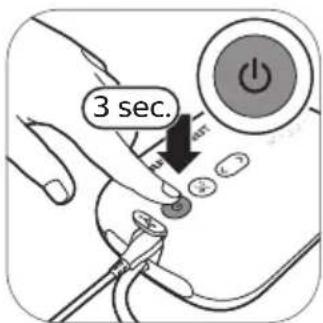
- Press and hold the on/off button until the device switches on. The indicator lights go on to indicate that the device is in stimulation mode.
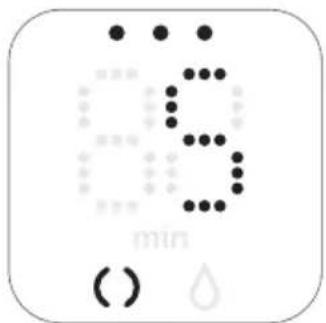
- The breast pump starts in stimulation mode and slowly increases its vacuum to the last used stimulation suction level (or level 5 when used for the first time).
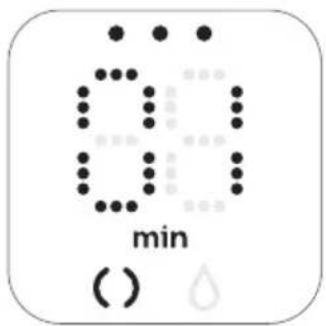
- The display shows the running time.
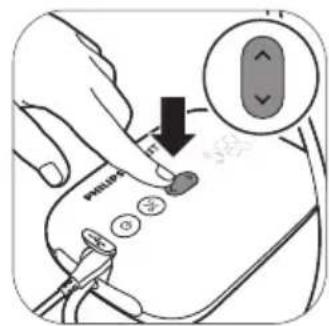
- Use the 'level up' and 'level down' buttons to change the suction level to your preference.
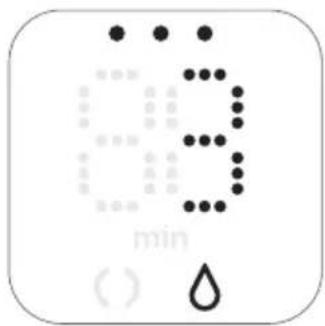
- After 90 seconds the breast pump will switch smoothly to expression mode and slowly increase its vacuum to the last used expression suction level (or level 11 when used for the first time).
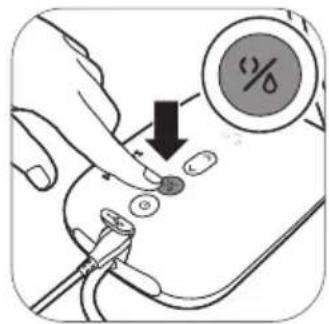
- If your milk starts flowing earlier or if you want to switch from expression to stimulation mode, you can switch modes with the mode selection button.
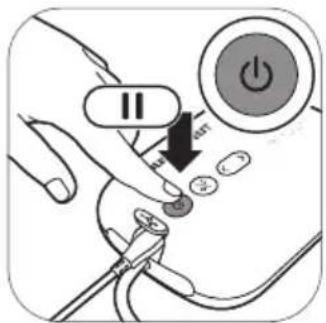
- Briefly press the on/off button if you want to pause. To continue, briefly press the on/off button again.
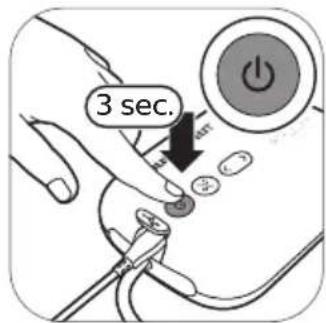
- Press and hold the on/off button to switch off.
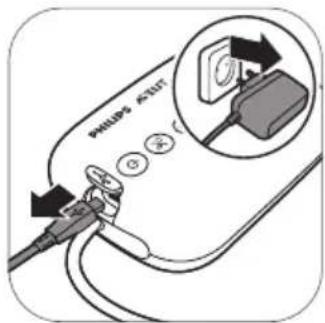
- Unplug the adapter from the wall socket and pull the small plug out of the motor unit.
① Tip: For optimal expression, choose the highest setting that still feels comfortable. This setting may differ across different sessions.
① Tip: You can use the double breast pump as a single breast pump by connecting only the tube of one pump kit to the motor unit.
Using the breast pump when you have symptoms of engorgement
Breast engorgement means your breasts are overfilled with milk. This is a painful and unpleasant condition. Frequent extraction of milk and completely emptying the breasts of milk can reduce engorgement. When you have symptoms of engorgement, make sure you use a lower vacuum level to minimize stretching of breast tissue.
(i) Note: When symptoms of engorgement are present, make sure you empty your breasts completely during each expression session.
After use
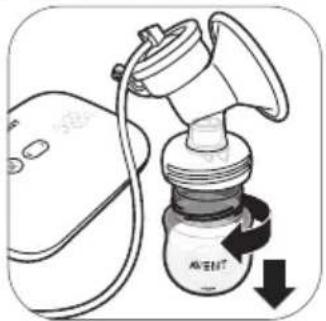
natural_image
Illustration of a portable air purifier with a digital device and black arrow indicating rotation (no text or symbols)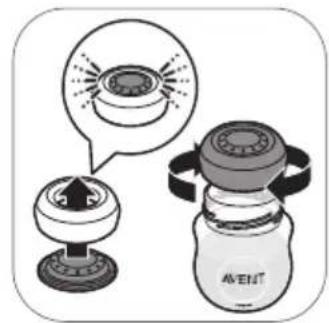
natural_image
Illustration of a water droper with a magnified view showing its internal structure (no text or symbols)- Unscrew the bottle. 2A.
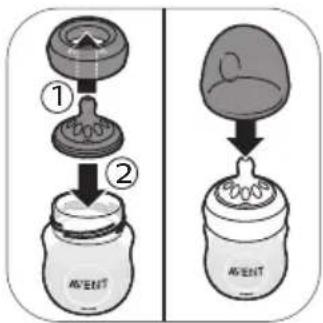
To store the breast milk: close the bottle with the sealing disc and screw ring.
natural_image
Illustration of a megaphone with an arrow indicating upward motion, showing internal components (no text or symbols)2B. To prepare the bottle for feeding your baby: place a teat in a screw ring and screw the assembled screw ring onto the bottle. Seal the teat with the bottle cap (see 'Assembling the bottle').
- Remove the silicone tube and cap from the breast pump kit.
natural_image
Illustration of a hand washing a shower with a thermometer icon (no text or symbols)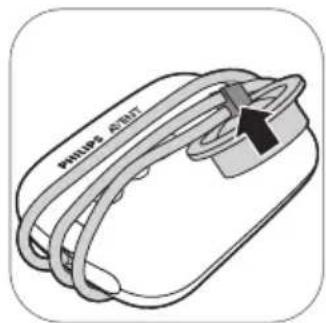
-
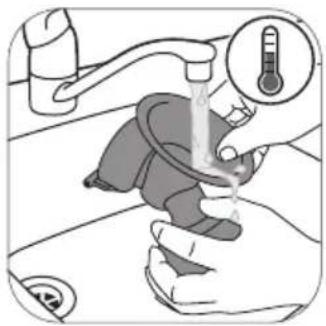
Disassemble and clean all parts that have been in contact with breast milk (see 'Cleaning and disinfecting').
-
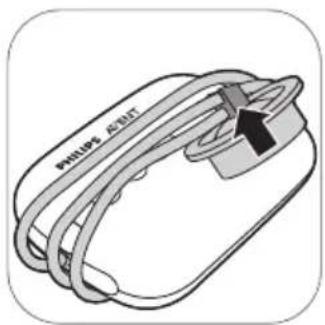
For easy storage, wrap the silicone tube around the motor unit and clip the cap onto the tube.
Warning: Refrigerate or freeze expressed milk immediately or keep it at a temperature of 16-29 °C (60-85 °F) for a maximum of 4 hours before you feed your baby.
For more information about the breast pump and tips for expressing milk, visit www.philips.com/avent.
Storing breast milk
Below you find guidelines for storing breast milk:
Storage location Temperature Max. storage duration
Room 16-29 °C (60-85 °F) 4 hours
Refrigerator 4 °C (39 °F) 4 days
Freezer < -4 °C (25 °F) 6 months
Warning: Never refreeze thawed breast milk to avoid a decrease in milk quality.
⚠ Warning: Never add fresh breast milk to frozen breast milk to avoid a decrease in milk quality and unintended thawing of the frozen milk.
Feeding breast milk with the bottle
For your child's safety and health
WARNING!

- Continuous and prolonged sucking of fluids will cause tooth decay.
- Always check food temperature before feeding.
- Throw away at the first signs of damage or weakness.
- Keep components not in use out of the reach of children.
- Never attach to cords, ribbons, laces or loose parts of clothing. The child can be strangled.
- Never use feeding teats as a soother.
- Always use this product with adult supervision.
- Keep the bottle cap away from children to avoid suffocation.
- Do not allow children to play with small parts or walk/run while using bottles.
- Inspect all parts before use and pull the feeding teat in all directions. Throw away any part at the first signs of damage or weakness.
- Always discard any breast milk that is left over at the end of a feed.
Caution: To avoid damage to the bottle

- Do not place in a heated oven, plastic can melt.
- Plastic material properties may be affected by disinfection and high temperatures. This can affect the fit of the bottle cap.
- Do not leave a feeding teat in direct sunlight or heat, or leave in disinfectant for longer than recommended because this may damage the product.
Before using the bottle
- Inspect the bottle and feeding teat before each use and pull the feeding teat in all directions to prevent a choking hazard. Throw away at the first signs of damage or weakness.
- Clean and disinfect the bottle before first use and after every use (see 'Cleaning and disinfecting').
Assembling the bottle
natural_image
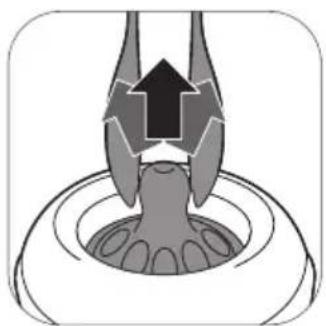
Diagram of a biological structure with a central arrow and surrounding circular elements (no text or symbols)- The teat is easier to assemble if you move it back-and-forth while pulling it upwards instead of pulling it up in a straight line.
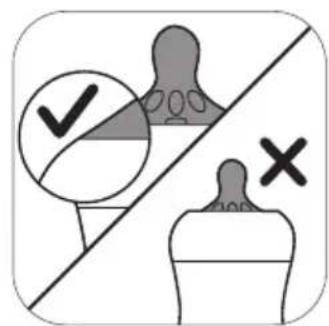
- Make sure you pull the teat through until its lower part is aligned with the screw ring.

natural_image
Two identical dome-shaped objects with checkmarks and crosses, separated by a diagonal line (no text or symbols)- Make sure you place the cap vertically onto the bottle so that the teat sits upright.
natural_image
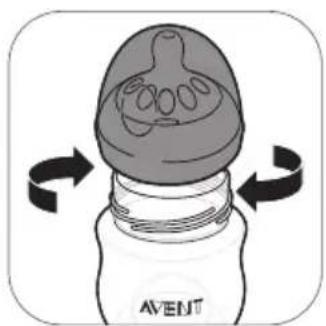
Illustration of a baby bottle with internal structure and rotation arrows (no text or symbols)- Screw the screw ring with teat and cap on the bottle.
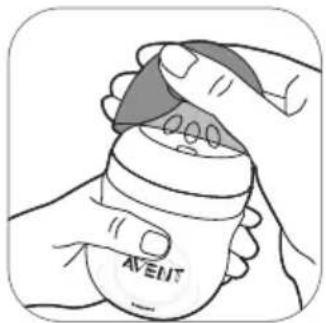
- To remove the cap, place your hand over the cap and your thumb in the dent of the cap.
Heating breast milk
If you use frozen breast milk, let it defrost completely before you heat it.
① Note: If you need to feed your baby quickly, you can defrost the milk in a bowl of hot water.
Heat the bottle with defrosted or refrigerated breast milk in a bowl of hot water or in a bottle warmer. Remove the screw ring and sealing disc from the bottle.
⚠ Warning: It is not recommended to use a microwave to warm up breast milk. Microwaves might alter the quality of breast milk and destroy some valuable nutrients and may produce localized high temperatures. If you heat up breast milk in the microwave, only place the container without screw ring, teat and cap in microwave. Always stir heated breast milk to ensure even heat distribution and check the temperature before serving.
Choosing the right teat for your baby
natural_image
Diagram of a biological cell with internal organelles and a labeled arrow pointing to a specific cell (no text or symbols present)Philips Avent Natural teats are available with different flow rates. The breast pump comes with teat number 1. This is a 0m+ teat, ideal for newborn and breastfed babies of all ages.
Use a lower flow rate if your baby chokes often, if milk drips out of its mouth during feeding or if it has trouble adjusting to the drinking speed. Use a higher flow rate if your baby falls asleep during feeding, gets frustrated or if feeding takes very long.
Philips Avent Natural teats are clearly numbered on the side, to indicate flow rate. For more information, see www.philips.com/avent.
Storing the bottles
- Store all parts in a dry, clean and covered container.
- Do not leave a feeding teat in direct sunlight or heat, or leave in disinfectant for longer than recommended because this may damage the product.
- For hygiene reasons, we recommend replacing the teats after 3 months.
Compatibility
The Philips Avent single/double electric breast pump Premium Plus is compatible with all baby bottles in the Philips Avent Natural range and Philips Avent Storage cups with adapter. We do not recommend using the Philips Avent Natural Glass bottles with the breast pump.
Ordering accessories
To buy accessories or spare parts, visit www.philips.com/support or go to your Philips dealer. You can also contact the Philips Consumer Care Center in your country. When you order spare teats, make sure that you use a teat with the correct flow rate for your baby (see 'Choosing the right teat for your baby').
Recycling
- Do not throw away the product with the normal household waste at the end of its life, but hand it in at an official collection point for recycling. By doing this, you help to preserve the environment.
- This product contains a built-in rechargeable battery which shall not be disposed of with normal household waste. Please take your product to an official collection point or a Philips service center to have a professional remove the rechargeable battery.
- Follow your country's rules for the separate collection of electrical and electronic products and rechargeable batteries. Correct disposal helps prevent negative consequences for the environment and human health.
Battery removal instructions
- When you handle batteries, make sure that your hands, the product and the batteries are dry.
-
To prevent batteries from heating up or releasing toxic or hazardous substances, do not modify, pierce or damage products and batteries and do not disassemble, short-circuit, overcharge or reverse charge batteries.
-
To avoid accidental short-circuiting of batteries after removal, do not let battery terminals come into contact with metal objects (e.g. coins, hairpins, rings). Do not wrap batteries in aluminum foil. Tape battery terminals or put batteries in a plastic bag before you discard them.
- If batteries are damaged or leaking, avoid contact with the skin or eyes. If this occurs, immediately rinse well with water and seek medical care.
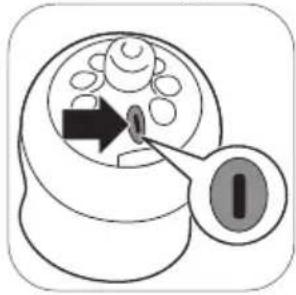
Note: Only remove the rechargeable battery when you discard the product. Before you remove the battery, make sure that the product is disconnected from the wall socket and that the battery is completely empty.
Note: Take any necessary safety precautions when you handle tools to open the product and when you dispose of the rechargeable battery.
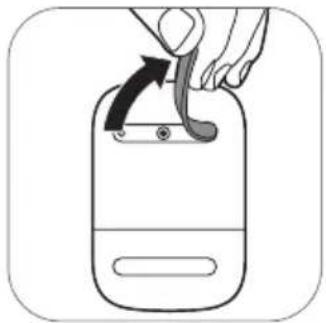
natural_image
Illustration of a hand using a tool to lift a device (no text or symbols visible)- Remove the rubber feet from the bottom of the motor unit.
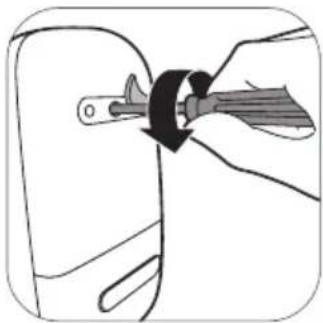
natural_image
Diagram of a hand holding a tool inside a car door, showing a circular motion around the handle (no text or symbols)- Remove the screw with a torx screwdriver.
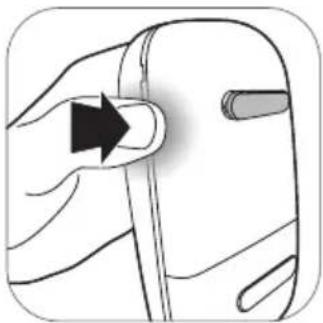
natural_image
Illustration of a hand holding a pen with an arrow indicating direction (no text or symbols)- Open the motor unit by pressing at the sides of the device.
natural_image
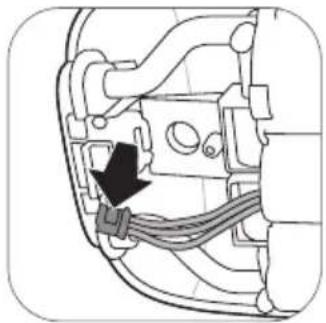
Diagram of a car engine component with a black arrow pointing to a cable or connector (no text or symbols present)- Disconnect the connectors from the printed circuit board.
natural_image
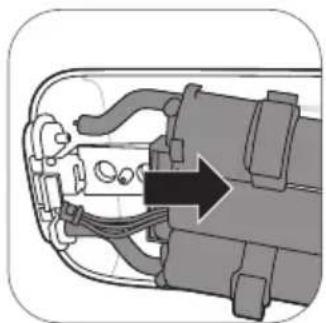
Cross-sectional diagram of a mechanical device showing internal components and a directional arrow (no text or symbols)- Remove the frame from the motor unit.
natural_image
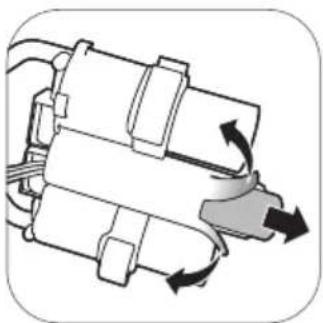
Mechanical component diagram showing rotational and linear motion arrows (no text or symbols)- Cut or fold the edges of the plastic battery frame. Remove the battery from the plastic battery frame.
① Note: Dispose of the rechargeable battery at a separate local collection point. Other parts can be disposed at a specific place for disposal of electric equipment.
Troubleshooting
This chapter summarizes the most common problems you could encounter with the breast pump. If you are unable to solve the problem with the information below, visit www.philips.com/support for a list of frequently asked questions or contact the Consumer Care Center in your country.
| Problem Solution | |
| I experience pain when I use the breast pump. | - Choose a suction level that is comfortable for you.- Check if the silicone diaphragm is not damaged (does not have small cracks, holes etc.).- Make sure that your nipple is placed in the center of the cushion.- If the pain persists, stop using the breast pump and consult your healthcare professional. |
| The breast pump does not switch on while it is connected to the wall socket. | - Only use the adapter supplied.- Make sure that the adapter has been inserted correctly into the wall socket and that the small plug has been inserted correctly into the motor unit.- Connect the adapter to another wall socket. Then press and hold the on/off button to check if the breast pump can be switched on.- If the problem persists, contact the Consumer Care Center via www.philips.com/support. |
| The breast pump does not switch on (indicator lights do not go on). | - Make sure that the battery is charged (see 'Charging the breast pump') or connect the breast pump to the wall socket. |
| The breast pump is not charging. | - Only use the adapter supplied.- Make sure that the adapter has been inserted correctly into the wall socket and that the small plug has been inserted correctly into the motor unit.- The breast pump is too cold or too hot for charging. Let the breast pump acclimatize to room temperature for 30 minutes.- If the problem persists, contact the Consumer Care Center via www.philips.com/support. |
| Charging the breast pump takes a very long time. | - Only use the adapter supplied.- Make sure that the adapter has been inserted correctly into the wall socket and that the small plug has been inserted correctly into the motor unit.- The breast pump is too cold or too hot. It is recommended to charge the breast pump at room temperature.- If the problem persists, contact the Consumer Care Center via www.philips.com/support. |
| I do not feel any suction/the suction level is too low. | - If possible, try a higher suction level.- Check if the silicone diaphragm is assembled correctly (see 'Assembling the breast pump').- Check if the white valve is not damaged and assembled correctly (see 'Assembling the breast pump').- Check if the other parts of breast pump are intact and assembled correctly (see 'Assembling the breast pump').- Make sure that the pump is positioned correctly on the breast to allow a seal between breast pump and breast.- If you still do not feel any suction, please contact the Consumer Care Center via www.philips.com/support. |
| The suction of the breast pump is too strong. | - If possible, try a lower suction level. When you express for the first time, start with the default suction level (level 5 in stimulation mode, level 11 in expression mode) and increase/decrease the level when needed. During different expression sessions, different levels may feel most comfortable for you.- Make sure that you only use the breast pump parts provided with this breast pump.- Check if the silicone diaphragm is not damaged (does not have small cracks, holes etc.).- If the problem persists, contact the Consumer Care Center via www.philips.com/support. |
| I express little/no milk when I use my breast pump. | - If you do not feel enough suction, please check Troubleshooting item 'I do not feel any suction/the suction level is too low'.- If you are using the Philips Avent breast pump for the first time, you may need some practice before you are able to express any milk. More expressing tips can be found on the Philips website www.philips.com/mybreastpump. |
| When I switch on the breast pump after storage, it does not start working immediately. | - Make sure that the battery is fully charged (see 'Charging the breast pump') or connect the breast pump to the wall socket.- Perhaps you stored the breast pump at a temperature below the minimum storage temperature or above the maximum storage temperature. Let the breast pump acclimatize in a room of 20 °C/68 °F for 30 minutes to adjust its temperature to the operating range (5 °C/41 °F to 40 °C/104 °F). |
| The display shows 'Er' and the device switches off automatically. | - If you are operating the breast pump on battery power, let it cool down for 30 minutes and try to switch it on again.- If you are operating the breast pump with the adapter connected to the wall socket, check if you are using the adapter that was supplied with the device.- If the problem persists, contact the Consumer Care Center via www.philips.com/support. |
Undesirable side effects
Any serious incident that has occurred in relation to this device should be reported to Philips via www.philips.com/support and to the competent authority of the Member State in which the user and/or patient is established.
When using the breast pump, the below undesirable side effects may occur. If you experience any of these symptoms, contact a healthcare professional or breastfeeding specialist.
| Undesirable side effect | Description |
| Pain sensation Pain felt on | the breast or nipple, or felt as a response to the suction being above a comfortable level. |
| Sore nipples Persistent pain | in the nipples at the beginning of the pumping session, or that lasts throughout the entire pumping session, or pain between sessions. |
| Erythema (redness) Redness | of the skin of the breast. |
| Bruise A reddish-purple discoloration that does not fade when pressed. When a bruise fades, it may become green and brown. | |
| Thrombus Thrombus can result into tenderness, pain, redness, swelling and/or heat. | |
| Injured tissue on nipple (nipple trauma) | - Fissures or cracked nipples.- Skin tissue peeling off the nipple. Normally occurs in combination with cracked nipples and/or blisters.- Nipple tear.- Blister. Looks like small bubbles on the surface of the skin.- Bleeding. Cracked or torn nipples can lead to bleeding of the affected |
Warranty and support
If you need information or support, please visit www.philips.com/support or read the international warranty leaflet.
Storage conditions
Keep the breast pump out of direct sunlight as prolonged exposure may cause discoloration. Store the breast pump and its accessories in a safe, clean and dry place.
If the device has been stored in a hot or cold environment, place it in an environment with a temperature of 20 °C ( 68 °F ) for 30 minutes to let it reach a temperature within the usage conditions ( 5 °C to 40 °C/41 °F to 104 °F ) before you use it.
Fully charge the battery before storing your breast pump for an extended period of time.
Electromagnetic fields (EMF)
This Philips device complies with all applicable standards and regulations regarding exposure to electromagnetic fields.
Technical information
| Single electric breast pump Double electric breast pump | ||
| Vacuum level Stimulation: | -60 to -200 mbar (-45 to -150 mmHg)Expression: -60 to -360 mbar (-45 to -270 mmHg)Adjustable in steps of 20 mbarIntermittent vacuum | |
| Cycle speed Stimulation: | 105-120 cycles/min, depending on vacuum levelExpression: 53-85 cycles/min, depending on vacuum level | |
| Motor unit rated input 5 V | d.c. / 1.1 A 5 V d.c. / 1.8 A | |
| Mains adapter rated input | External mains adapter 100-240 V a.c.50/60 Hz400 mA | |
| Mains adapter rated output | 5 V d.c. / 1.1 A 5 V d.c. / 1.8 A | |
| Adapter type number | S009AHz050yyyy The letters "yyyy" represent the output current from 0100 (1000 mA) to 0180 (1800 mA), increments in steps of 100 mA. The letter "z" denotes type of plug, it can be: U, V, B, S, C, A, D, K, T, I, E, F. | |
| Battery Rechargeable battery: | 3.6 V 2600 mAh (non-replaceable) | |
| Power port Micro-USB | ||
| Operating conditions Temperature: | 5 °C to 40 °C (41 °F to 104 °F)Relative humidity: 15 to 90 % (non-condensing) | |
| Storage and transportation conditions | Temperature: -25 °C to 70 °C (-13 °F to 158 °F)Relative humidity: up to 90 % (non-condensing)For optimal performance of the built-in rechargeable battery, it is recommended to store the device at room temperature. | |
| Operating and storage pressure | 700-1060 hPa (<3000 m altitude) | |
| Net weight 230 g 310 g | ||
| External dimensions Motor unit: | 145 mm x 95 mm x 45 mm (LxWxH) | |
| Device classification Applicable classifications:Degree of protection against electric shock:- Class II ME equipment-Type BF applied partThe breast pump and the adapter are specified as medical electrical system according to IEC 60601-1. | ||
| Materials ABS, silicone (motor unit)Polypropylene, silicone (other parts) | ||
| Service life 500 hours | ||
| Mode of operation Continuous operation Non-continuous operation | 55 min on, 180 min off at 22 °C (72 °F)(duty cycle 23 %)20 min on, 90 min off at 40 °C (104 °F)(duty cycle 18 %) | |
| Ingress protection IP22 (motor unit), IP20 (adapter) | ||
Electromagnetic compatibility - compliance information
This device has been tested and found to comply with IEC 60601-1-2:2014 Ed 4.0 for electromagnetic compatibility (EMC) as Class B according to CISPR 11:2009. Tests levels are listed in the accompanying tables. Only use this Philips Avent single/double electric breast pump Premium Plus in combination with the adapter supplied.
Emissions Compliance Electromagnetic environment – guidance
| RF emissionsCISPR 11 | Group 1 The device does not use RF energy for its intended function. Therefore, its RF emissions are very low and are not likely to cause any interference in nearby electronic equipment. | |
| RF emissionsCISPR 11 | Class B The device is suitable for use in locations in residential environments and in establishments directly connected to a low voltage power supply network which supplies buildings used for domestic purposes. | |
| Harmonic emissionsIEC 61000-3-2 | CompliesClass A Category | |
| Voltage fluctuations / flicker emissionsIEC 61000-3-3 | Complies | |
Guidance and manufacturer's declaration – electromagnetic immunity
The Philips Avent single/double electric breast pump Premium Plus is intended for use in the electromagnetic environment listed below. The user of the device should ensure that it is used in such an environment to prevent improper operation.
Immunity test Immunity test level Electromagnetic environment - guidance
| Electrostatic discharge (ESD)IEC 61000-4-2 | ±8 kV contact±15 kV air | Floors can be a source of static electricity.When the air is very dry (<20 % RH) the user is advised to prefer to use the device in a room with concrete or wooden floors (instead of using it in a room with a synthetic floor). |
| Radiated RF EM fieldsIEC 61000-4-3 | 10 V/m80 MHz – 2.7 GHz80 % AM at 1 kHz | |
| Proximity fields from RF wireless communications equipmentIEC 61000-4-3 | 385 (27), 450 (28), 710 (9), 745 (9), 780 (9), 810 (28), 870 (28), 930 (28), 1720 (28), 1845 (28), 1970 (28), 2450 (28), 5240 (9), 5500 (9), 5785 (9) MHz (V/m) | The device is immune against any RF wireless communication device such as smart phone, Wi-Fi or Bluetooth device at a distance of 30 cm or more. Avoid a closer distance as this may result in improper operation. |
| Rated power frequency magnetic fields IEC 61000-4-8 | 30 A/m50 Hz or 60 Hz | |
| Electrical fast transient/ burstIEC 61000-4-4 | ±2 kV100 kHz repetition frequency | Mains power quality expected of a typical commercial or residential environment. |
| SurgesIEC 61000-4-5 | ±1 kV Line-to-line±2 kV Line-to-ground | Mains power quality expected of a typical commercial or residential environment. |
| Conducted disturbances induced by RF fieldsIEC 61000-4-6 | 3 Vrms, before modulation is applied0.15 MHz – 80 MHz6 Vrms, before modulation is applied, in ISM and amateur radio bands between 0.15 MHz and 80 MHz80 % AM at 1 kHz | |
| Voltage dips, short interruptions and voltage variations on power supply input linesIEC 61000-4-11 | 0 % UT; 0.5 cycle at 0°, 45°, 90°, 135°, 180°, 225°, 270° and 315°0 % UT; 1 cycle and 70 % UT; 25/30 cycles single phase at 0°0 % UT; 250/300 cycle | Mains power quality expected of a typical commercial or residential environment. At power interruptions the breast pump will automatically switch-over to battery mode without interruption of the function. |
Note: UT is the AC mains voltage prior to application of the test level. If in the unlikely event the Philips Avent single/double electric breast pump Premium Plus is locked inoperative in a function by disturbances from other devices beyond the levels stated in the table above, the device will shut-off completely and restart. In that case make sure the distance to the other device causing this disturbance is enlarged.
Explanation of symbols
The warning signs and symbols are essential to ensure that you use this device safely and correctly and to protect you and others from injury. Below you find the meaning of the warning signs and symbols on the label and in the user manual.
| Symbol Explanation | |
 | Indicates to follow the instructions for use. |
 | Indicates important information such as warnings and cautions. |
 | Indicates usage tips, additional information or a note. |
 | Indicates the serial number of the breast pump. |
 | Indicates the manufacturer. |
 | Indicates the manufacturing date. |
 344 344 | Indicates the compliance with the essential requirements of the Council Directive 93/42/EEC of 14 June 1993 concerning medical devices. |
 | Indicates that the device is a medical device. |
 | Indicates that the part of the appliance that comes into physical contact with the user (also known as the applied part) is of type BF (Body Floating) according to IEC 60601-1. The applied part is the breast pump kit. |
 | Indicates 'Class II Equipment'. The adapter is double-insulated (Class II). |
 | Indicates manufacturer's catalog number of the breast pump. |
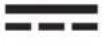 | Indicates 'direct current'. |
 | Indicates 'alternating current'. |
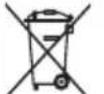 | Indicates that this product contains a built-in rechargeable battery which shall not be disposed of with normal household waste (2006/66/EC). See chapter 'Recycling' for more information. |
| IP22 | Indicates the protection against ingress of solid foreign objects greater than 12.5 mm and against harmful effects due to the ingress of dripping water when tilted at 15 degrees. |
| IP20 | Indicates the protection against ingress of solid foreign objects greater than 12.5 mm and no protection against ingress of water. |
 | Indicates the batch number of the medical device. |
| SN | Indicates the manufacturer's serial number of the medical device. |
 | Indicates USB. |
 | Indicates the relative humidity upper limits to which the device can be safely exposed: up to 90 %. |
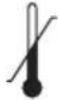 | Indicates the storage and transportation temperature limits to which the medical device can be safely exposed: -25 °C to 70 °C (-13 °F to 158 °F). |
 | Indicates Forest Stewardship Council. The FSC trademarks enable consumers to choose products that support forest conservation, offer social benefits, and enable the market to provide an incentive for better forest management. |
 | Indicates that an object is capable of being recycled - not that the object has been recycled or will be accepted in all recycling collection systems. |
 | Indicates 2-year Philips worldwide guarantee. |
 | Indicates that the breast pump must be kept out of direct sunlight. |
| [BTCH] | Indicates that the breast pump must be kept dry. |
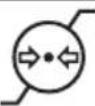 | Indicates the operating pressure range: 700 to 1060 hPa. |
 | Indicates that the material used in the product is safe for food contact. |
Sommaire
Introduction 31
natural_image
Illustration of a hand washing a baby's mouth with a thermometer icon (no text or symbols)natural_image
Illustration of hands using a tool to adjust or repair a mechanical component (no text or symbols visible)natural_image
Illustration of various kitchen utensils arranged on a tray (no text or symbols)natural_image
Illustration of a laptop with coins inside, marked by checkmarks and an 'X' symbol (no text or labels)natural_image
Simple line drawing of a kitchen drawer with a bag being inserted (no text or symbols)natural_image
Illustration of various kitchen utensils arranged on a tray (no text or symbols)natural_image
Illustration of a cooking pot with ingredients and a 5-minute timer (no text or symbols on the pot itself)natural_image
Illustration of various kitchen utensils arranged on a patterned tray (no text or symbols)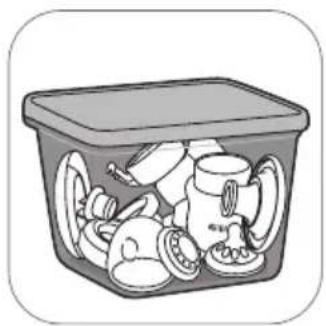
natural_image
Illustration of a plastic waste bin filled with plastic waste and plastic cups (no text or symbols)flowchart
graph TD
    A[" "] --> B[" "]
    B --> C[" "]
    C --> D[" "]
    D --> E[" "]
    E --> F[" "]
    style A fill:#fff,stroke:#000
    style B fill:#fff,stroke:#000
    style C fill:#fff,stroke:#000
    style D fill:#fff,stroke:#000
    style E fill:#fff,stroke:#000
    style F fill:#fff,stroke:#000
natural_image
Illustration of hands using a faucet to clean water, no text or symbols presentnatural_image
Diagram of a mechanical device with a central component and an upward arrow, no text or symbols present.natural_image
Diagram of a bottle with a funnel and rotating arrow, no text or symbols presentnatural_image
Illustration of a spray canister with a funnel and base (no text or symbols)natural_image
Illustration of hands performing a medical or therapeutic procedure on a curved object, with arrows indicating direction (no text or symbols present)natural_image
Line drawing of a baby water dispenser with a black cap and label 'AVENT' (no text or symbols on the device itself)natural_image
Illustration of a hand holding a curved object with arrows indicating motion or force (no text or symbols)natural_image
Illustration of a spray gun with a magnified inset showing internal components (no text or symbols)natural_image
Line drawing of a medical device with a pressure monitor and tubing (no text or symbols)natural_image
Diagram of a spray gun with attached device and bulb (no text or symbols)natural_image
Illustration of hands washing a faucet with water droplets (no text or symbols)natural_image
Line drawing of a hand holding a device labeled 'AS-ENT' (no other text or symbols)natural_image
Illustration of a baby pump device with a bottle and tubing, showing internal components and a downward arrow (no text or symbols)natural_image
Illustration of a paintbrush with a rose and a paint jar labeled 'AVENT' (no text or symbols on the diagram itself)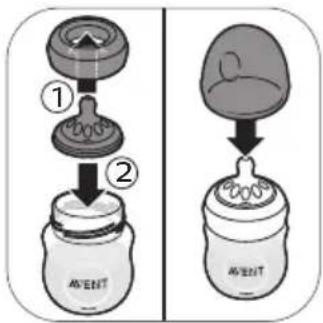
natural_image
Illustration of a megaphone with an arrow indicating upward motion, alongside its magnified view showing internal components (no text or symbols)natural_image
Diagram of a mechanical or anatomical structure with a central arrow indicating direction (no text or symbols present)natural_image
Two identical dome-shaped objects with checkmarks and crosses, separated by a diagonal line (no text or symbols)natural_image
Illustration of a baby bottle with a curved arrow indicating rotation around the cap (no text or symbols)natural_image
Illustration of hands holding a bottle labeled 'AVEN' (no other text or symbols)natural_image
Diagram of a biological cell with internal organelles and a labeled arrow pointing to a specific cell (no text or symbols present)natural_image
Illustration of a hand using a spoon to lift a device (no text or symbols)natural_image
Illustration of a hand holding a tool inside a car door, with no visible text or symbolsnatural_image
Illustration of a hand holding a pen or tool with an arrow indicating direction (no text or symbols)natural_image
Diagram of a mechanical component with wires and a black arrow indicating a specific connection point (no text or symbols present)natural_image
Cross-sectional diagram of a mechanical device showing internal components and a directional arrow (no text or symbols)natural_image
Mechanical component diagram showing rotational and linear motion arrows (no text or symbols)natural_image
Diagram of a mechanical component with a black arrow pointing to a cable or wire (no text or symbols present)natural_image
Line drawing of a hand holding a small object with an arrow indicating direction (no text or symbols)natural_image
Illustration of a hand holding a tool inside a car door, with no visible text or symbolsnatural_image
Illustration of a hand using a tool to lift a device (no text or symbols visible)natural_image
Mechanical component diagram showing rotational and linear motion arrows (no text or symbols)natural_image
Cross-sectional diagram of a mechanical device showing internal components and a directional arrow (no text or symbols)natural_image
Illustration of a baby bottle with a rose and arrow indicating rotation (no text or symbols)natural_image
Two identical dome-shaped objects with checkmarks and X marks, separated by a diagonal line (no text or symbols)natural_image
Diagram of a biological structure with a central arrow and surrounding circular elements (no text or symbols)natural_image
Illustration of a funnel pouring liquid into a bottle, with an inset showing internal components (no text or symbols)natural_image
Illustration of a paintbrush and its internal components, showing a magnified view of the brush tip (no text or symbols present)natural_image
Illustration of a medical device with a label 'AVERT' and directional arrow, no readable text or symbols beyond the label.- فك الرضťاعة.
natural_image
Illustration of a hand washing clothes with a thermometer icon (no text or symbols)natural_image
Line drawing of a hand holding a device labeled 'AV-EBIT' (no other text or symbols)natural_image
Illustration of hands washing a faucet with water droplets (no text or symbols)natural_image
Illustration of a mechanical device with a magnified inset showing internal components (no text or symbols)natural_image
Illustration of a hand holding a curved object with arrows indicating motion or force (no text or symbols)natural_image
Line drawing of a medical or laboratory device with a cap and handle (no text or symbols)natural_image
Illustration of hands performing a mechanical or ergonomic task with directional arrows indicating movement (no text or symbols present)natural_image
Line drawing of a portable ear pump connected to a digital device (no text or symbols)natural_image
Diagram of a medical device with labeled components and directional arrows indicating movement (no text or symbols beyond label)natural_image
Illustration of a spray canister with a funnel and base (no text or symbols)natural_image
Diagram of a mechanical device with directional arrows indicating motion (no text or symbols)natural_image
Diagram of a mechanical component with a central shaft and base, showing upward motion (no text or symbols)natural_image
Illustration of hands using a faucet to clean water, showing liquid dripping from the faucet (no text or symbols)natural_image
Illustration of a plastic waste container filled with various items (no text or symbols)natural_image
Illustration of various kitchen utensils arranged on a tray (no text or symbols)- دعي الماء ي_BRد.
natural_image
Illustration of a cooking pot with ingredients and a 5-minute clock (no text or symbols on the pot itself)natural_image
Illustration of a hand using a tool to adjust a small object, possibly a valve or bulb (no text or symbols visible)natural_image
Illustration of a hand washing a shower with a thermometer and magnified view of the water (no text or symbols)natural_image
Illustration of various kitchen utensils and containers arranged on a tray (no text or symbols)natural_image
Illustration of various household items arranged on a tray with no visible text or symbolsnatural_image
Simple line drawing of a box with a download arrow and a sphere on top (no text or symbols)natural_image
Illustration of a laptop with coins inside, marked by checkmarks and an 'X' symbol (no text or labels)flowchart
graph TD
    A["External Cable"] --> B["Add Outer Cable"]
    B --> C["Add Inner Cable"]
    C --> D["Add Outer Cable"]
    D --> E["Add Inner Cable"]
    E --> F["Add Outer Cable"]
    F --> G["Final Bag with AVENT label"]
3000.044.9558.2 (2021-11-01)


- Contents
- Introduction
- General description
- Product description (Fig. A)
- Breast pump kit (Fig. B)
- Philips Avent Natural bottle (Fig. C)
- Accessories
- Intended use and indications for use
- Important safety information
- Contraindications
- Warnings
- Warning to prevent transmitting infectious diseases:
- Warnings to avoid electric shock:
- Warnings to avoid contamination and to ensure hygiene:
- Warnings to avoid breast and nipple issues including pain:
- Warnings to prevent damage and malfunction of the breast pump:
- Warning to avoid increased electromagnetic emissions or decreased electromagnetic immunity of this device, resulting in improper operation:
- Warning
- Battery safety instructions
- Cautions
- Cautions to prevent damage to and malfunctioning of the breast pump:
- Before first use
- Cleaning and disinfecting
- Overview
- Step 1: Disassembling
- Step 2: Cleaning
- Step 2A: Manual cleaning
- Step 2B: Cleaning in the dishwasher
- Supplies needed:
- Step 3: Disinfecting
- Using the breast pump
- Cushion size
- Charging the breast pump
- Battery indicator light description
- Assembling the breast pump
- Motor unit part description
- LED display description
- Explanation of modes
- Pumping instructions
- Using the breast pump when you have symptoms of engorgement
- After use
- Storing breast milk
- Storage location Temperature Max. storage duration
- Feeding breast milk with the bottle
- For your child's safety and health
- WARNING!
- Caution: To avoid damage to the bottle
- Before using the bottle
- Assembling the bottle
- Heating breast milk
- Choosing the right teat for your baby
- Storing the bottles
- Compatibility
- Ordering accessories
- Recycling
- Battery removal instructions
- Troubleshooting
- Undesirable side effects
- Warranty and support
- Storage conditions
- Electromagnetic fields (EMF)
- Electromagnetic compatibility - compliance information
- Guidance and manufacturer's declaration – electromagnetic immunity
- Explanation of symbols
- Sommaire
Brand : PHILIPS
Model : Avent SCF392
Category : Breast Pump