Spark Dubstep - Electronic musical instrument Arturia - Free user manual and instructions
Find the device manual for free Spark Dubstep Arturia in PDF.


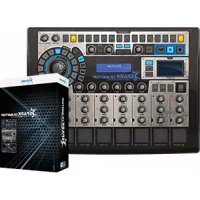
| Product type | Electronic musical instrument (hybrid drum machine) |
| Brand | Arturia |
| Model | Spark Dubstep |
| Dimensions (estimated) | 32 x 22 x 5 cm |
| Weight (estimated) | 1.2 kg |
| Power supply | USB bus power or 9 V DC / 800 mA adapter (center positive) |
| Display | LCD digital display |
| Pads | 8 velocity-sensitive pads with aftertouch |
| Sequencer | 16 steps, up to 64 steps per pattern, default resolution 1/16 |
| Effects | Filter (LP/BP/HP), Slicer (Repeat, Tape, Reverse, Strobe, Pan, Bit Crush), Roller (roll with swing) |
| Connectivity | USB 2.0, MIDI In/Out (on Spark Creative), Kensington lock (SparkLE) |
| Included software | Spark Creative Drum Machine (VST/AU/RTAS plug-in) |
| Sound engines | Analog synthesis, sampling, physical modeling |
| Main functions | Looper, Song mode, automation, MIDI control, real-time XY pad |
| Maintenance and cleaning | Dry soft cloth, do not use liquids (alcohol, gasoline, acetone) |
| Safety | Do not open the device, avoid water and moisture, use only the recommended adapter |
| Spare parts and repairability | USB cable supplied, optional adapter; repairs by qualified center (warranty void if opened) |
| General information | Manual available for download, registration required for activation |
Frequently Asked Questions - Spark Dubstep Arturia
User questions about Spark Dubstep Arturia
0 question about this device. Answer the ones you know or ask your own.
Ask a new question about this device
Download the instructions for your Electronic musical instrument in PDF format for free! Find your manual Spark Dubstep - Arturia and take your electronic device back in hand. On this page are published all the documents necessary for the use of your device. Spark Dubstep by Arturia.
USER MANUAL Spark Dubstep Arturia
natural_image
Abstract black logo design resembling a stylized bird or flame with a 'S' character, no text or symbols present.SPARK
Creative Drum Machine
TAE®
True Analog Emulation
Kevin Molcard (Lead Developer)
Emilie de Fouchecour
Bruno Pillet
Adrien Courdavault
Philippe Wicker
Vincent Travaglini
Niccolo Comin
Guillaume Piolat
ELECTRONIQUE
Laurent Baret
Bruno Pillet
DESIGN
Thomas & Wolfgang Merkle (Bitplant)
Axel Hartmann (Design Box)
Morgan Perrier
Daniel Vester
DESIGN SONORE
Noritaka Ubukata
Jean-Michel Blanchet
Christian Lafitte (Cigale Prod)
Mike Hosker
Kevin Shröder
Greg Savage
Glen Darcey
Hernan Velasco
Stéphane Schott
INDUSTRIALISATION
Nicolas Dubois
Richard Phan
Gerard Buracchini
MANUEL (REDACTION)
William Talgorn
Randy Lee
MANUEL (TRADUCTION)
Tomoya Fukuchi
Niccolo Comin
Jérome Parrod
Pierce Warnecke
Antoine Back
Sébastien Rochard
REMERCIEMENTS
Sean Weitzmann, Gérard Buracchini, Cedric Pallier, Elodie Cao, Denis Frouin, Philippe Girard-Buttoz, Yannick Bonnefoy, Peter Gelhaus (acoustic drum kit photo), Kevin Lamb, Patrick Kunz, Frank Orlich, Miguel Silva, Houston Haynes, Cristian Kreindler, Paul Steinway Sébastien Rochard, Tobias Carpenter, Hung Lee, Jason Huang, Wenyu Huang, Matty Yuan, Chen Xiaomai
ECHANTILLONS SONORES
MODERNBEATS

UltimateSoundBank


ueberschall
1 INTRODUCTION....10
1.1 BIENVENUE DANS LE MONDE DE SPARK.... 10
1.2 HISTORIQUE.... 11
2 INSTALLATION 13
2.1 INSTALLATION WINDOWS (7/XP/VISTA) 13
2.2 INSTALLATION MAC OSX (10.5 ET VERSIONS ULTERIEURES) 18
3 ENREGISTREMENT ET AUTORISATION 19
3.1 ENREGISTREMENT....19
3.2 AUTORISATION 22
4 LE CONTROLEUR SPARK CREATIVE : PRESENTATION ^2 23
4.1 LE PANNEAU CENTRAL....23
4.2 LE PANNEAU ARRIERE.... 26
5 LE CONTRÔLEUR SPARKLE : PRÉSENTATION....27
5.1 LE PANNEAU SUPERIEUR 27
5.2 LE PANNEAU LATERAL....29
6 UTILISER SPARK 30
6.1 LA BARRE D'OUTILS....30
6.2 LE PANNEAU CENTRAL (SPARK CREATIVE) 31
6.3 LE PANNEAU CENTRAL (SPARKLE)....50
6.4 LE PANNEAU INFÉRIEUR 67
6.5 LE PANNEAU SUPÉRIEUR 97
6.6 LE NAVIGATEUR (BROWSER) 108
7 MODE D'OPERATION 110
7.1 MODE STANDALONE....110
7.2 MODE PLUG-IN 112
7.3 VST....114
7.4 AUDIO UNIT (MAC OS X UNIQUEMENT)....116
7.5 PRO TOOLS 120
7.6 ENREGISTREMENT DE DONNEES MIDI EMISES PAR SPARK DANS VOTRE HOST VST.... 122
7.7 CONTRÔLER SPARK AVEC UN CONTRÔLEUR MIDI EXTERNE.... 124
8 LES CONTRÔLEURS SPARK 127
8.1 UTILISATION DU CONTROLEUR SPARK AVEC SON SOFTWARE 127
8.2 UTILISATION DU CONTROLEUR AVEC DES APPLICATIONS HOST OU DES DISPOSITIFS MIDI 129
8.3 LE LOGICIEL « SPARK MIDI CONTROLLER »...... 129
8.4 MIDI CONTROL CENTER SPARKLE 138
9 SPARK LEGAL INFORMATION....144
9.1 SOFTWARE LICENSE AGREEMENT.... 144
9.2 FCC INFORMATION (USA)....146
9.3 CANADA 147
9.4 EUROPE 147
10 NOTES....148
1 INTRODUCTION
1.1 BIENVENUE DANS LE MONDE DE SPARK


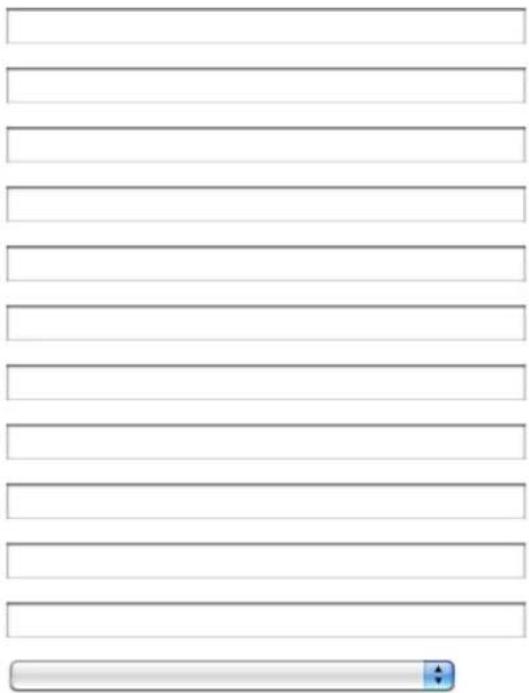
Create your account here
* Indicates required fields
Firstname:
Lastname: *
Email address: *
Confirm email: *
Password: *
Confirm password:
Address:
City:
State:
Zip/Postal code:
Country:
I wish to receive the Arturia newsletter:


natural_image
Close-up of a device panel with two labeled ports (1 and 2), no visible text or symbols beyond labelsnatural_image
Three gray square icons with black, gold, and white squares on a blue background: circle, square, and play button (no text or symbols)6.2.3 La zone Song/Pattern
natural_image
Dram with multiple drums and a large drum under dramatic lighting, displayed within a software interface window (no readable text or symbols on the main subject)6.4.1 Présentation
Click on "Library" to display the Library panel.
7.4 AUDIO UNIT (MAC OS X UNIQUEMENT)
7.4.1 Installation
7.4.4 Stereo Mode and Multi Output Mode
7.4.4.1 Mode Stéréo
7.6.2 Recording MIDI out to an audio units host (AU)
In consideration of payment of the Licensee fee, which is a portion of the price you paid, Arturia, as Licensor, grants to you (hereinafter termed "Licensee") a nonexclusive right to use this copy of the Spark Creative Drum Software (hereinafter the "SOFTWARE").
All intellectual property rights in the software belong to Arturia SA (hereinafter: "Arturia"). Arturia permits you only to copy, download, install and use the software in accordance with the terms and conditions of this Agreement.
The product contains product activation for protection against unlawful copying. The OEM software can be used only following registration.
Internet access is required for the activation process. The terms and conditions for use of the software by you, the end-user, appear below. By installing the software on your computer you agree to these terms and conditions. Please read the following text carefully in its entirety. If you do not approve these terms and conditions, you must not install this software. In this event give the product back to where you have purchased it (including all written material, the complete undamaged packing as well as the enclosed hardware) immediately but at the latest within 30 days in return for a refund of the purchase price.
1. Software Ownership
Arturia shall retain full and complete title to the SOFTWARE recorded on the enclosed disks and all subsequent copies of the SOFTWARE, regardless of the media or form on or in which the original disks or copies may exist. The License is not a sale of the original SOFTWARE.
2. Grant of License
Arturia grants you a non-exclusive license for the use of the software according to the terms and conditions of this Agreement. You may not lease, loan or sub-license the software.
The use of the software within a network is illegal where there is the possibility of a contemporaneous multiple use of the program.
You are entitled to prepare a backup copy of the software which will not be used for purposes other than storage purposes.
You shall have no further right or interest to use the software other than the limited rights as specified in this Agreement. Arturia reserves all rights not expressly granted.
3. Activation of the Software
Arturia may use a compulsory activation of the software and a compulsory registration of the OEM software for license control to protect the software against unlawful copying. If you do not accept the terms and conditions of this Agreement, the software will not work.
In such a case the product including the software may only be returned within 30 days following acquisition of the product. Upon return a claim according to § 11 shall not apply.
4. Support, Upgrades and Updates after Product Registration
You can only receive support, upgrades and updates following the personal product registration. Support is provided only for the current version and for the previous version during one year after publication of the new version. Arturia can modify and partly or completely adjust the nature of the support (hotline, forum on the website etc.), upgrades and updates at any time.
The product registration is possible during the activation process or at any time later through the Internet. In such a process you are asked to agree to the storage and use of your personal data (name, address, contact, email-address, and license data) for the purposes specified above. Arturia may also forward these data to engaged third parties, in particular distributors, for support purposes and for the verification of the upgrade or update right.
5. No Unbundling
The software usually contains a variety of different files which in its configuration ensure the complete functionality of the software. The software may be used as one product only. It is not required that you use or install all components of the software. You must not arrange components of the software in a new way and develop a modified version of the software or a new product as a result. The configuration of the software may not be modified for the purpose of distribution, assignment or resale.
6. Assignment of Rights
You may assign all your rights to use the software to another person subject to the conditions that (a) you assign to this other person (i) this Agreement and (ii) the software or hardware provided with the software, packed or preinstalled thereon, including all copies, upgrades, updates, backup copies and previous versions, which granted a right to an update or upgrade on this software, (b) you do not retain upgrades, updates, backup copies and previous versions of this software and (c) the recipient accepts the terms and conditions of this Agreement as well as other regulations pursuant to which you acquired a valid software license.
A return of the product due to a failure to accept the terms and conditions of this Agreement, e.g. the product activation, shall not be possible following the assignment of rights.
7. Upgrades and Updates
You must have a valid license for the previous or more inferior version of the software in order to be allowed to use an upgrade or update for the software. Upon transferring this previous or more inferior version of the software to third parties the right to use the upgrade or update of the software shall expire.
The acquisition of an upgrade or update does not in itself confer any right to use the software.
The right of support for the previous or inferior version of the software expires upon the installation of an upgrade or update.
8. Limited Warranty
Arturia warrants that the disks on which the software is furnished is free from defects in materials and workmanship under normal use for a period of thirty (30) days from the
date of purchase. Your receipt shall be evidence of the date of purchase. Any implied warranties on the software are limited to thirty (30) days from the date of purchase. Some states do not allow limitations on duration of an implied warranty, so the above limitation may not apply to you. All programs and accompanying materials are provided "as is" without warranty of any kind. The complete risk as to the quality and performance of the programs is with you. Should the program prove defective, you assume the entire cost of all necessary servicing, repair or correction.
9. Remedies
Arturia's entire liability and your exclusive remedy shall be at Arturia's option either (a) return of the purchase price or (b) replacement of the disk that does not meet the Limited Warranty and which is returned to Arturia with a copy of your receipt. This limited Warranty is void if failure of the software has resulted from accident, abuse, modification, or misapplication. Any replacement software will be warranted for the remainder of the original warranty period or thirty (30) days, whichever is longer.
10. No other Warranties
The above warranties are in lieu of all other warranties, expressed or implied, including but not limited to, the implied warranties of merchantability and fitness for a particular purpose. No oral or written information or advice given by Arturia, its dealers, distributors, agents or employees shall create a warranty or in any way increase the scope of this limited warranty.
11. No Liability for Consequential Damages
Neither Arturia nor anyone else involved in the creation, production, or delivery of this product shall be liable for any direct, indirect, consequential, or incidental damages arising out of the use of, or inability to use this product (including without limitation, damages for loss of business profits, business interruption, loss of business information and the like) even if Arturia was previously advised of the possibility of such damages. Some states do not allow limitations on the length of an implied warranty or the exclusion or limitation of incidental or consequential damages, so the above limitation or exclusions may not apply to you. This warranty gives you specific legal rights, and you may also have other rights which vary from state to state.
9.2 FCC INFORMATION (USA)
Important notice: DO NOT MODIFY THE UNIT!
This product, when installed as indicated in the instructions contained in this manual, meets FCC requirement. Modifications not expressly approved by Arturia may void your authority, granted by the FCC, to use the product.
IMPORTANT: When connecting this product to accessories and/or another product, use only high quality shielded cables. Cable (s) supplied with this product MUST be used. Follow all installation instructions. Failure to follow instructions could void your FFC authorization to use this product in the USA.
NOTE: This product has been tested and found to comply with the limit for a Class B Digital device, pursuant to Part 15 of the FCC rules. These limits are designed to provide a reasonable protection against harmful interference in a residential environment. This equipment generate, use and radiate radio frequency energy and, if not installed and used according to the instructions found in the user's manual, may cause interferences
harmful to the operation to other electronic devices. Compliance with FCC regulations does not guarantee that interferences will not occur in all the installations. If this product is found to be the source of interferences, which can be determined by turning the unit "OFF" and "ON", please try to eliminate the problem by using one of the following measures:
- Relocate either this product or the device that is affected by the interference.
- Use power outlets that are on different branch (circuit breaker or fuse) circuits or install AC line filter(s).
- In the case of radio or TV interferences, relocate/ reorient the antenna. If the antenna lead-in is 300 ohm ribbon lead, change the lead-in to coaxial cable.
- If these corrective measures do not bring any satisfied results, please the local retailer authorized to distribute this type of product. If you cannot locate the appropriate retailer, please contact Arturia.
The above statements apply ONLY to those products distributed in the USA.
9.3 CANADA
NOTICE: This class B digital apparatus meets all of the Canadian Interference-Causing Equipment Regulations.
CE This product complies with the requirements of European Directive89/336/EEC.
This product may not work correctly by the influence of electro-static discharge; if it happens, simply restart the product.
10 NOTES

- SPARK
- ELECTRONIQUE
- DESIGN
- DESIGN SONORE
- INDUSTRIALISATION
- MANUEL (REDACTION)
- MANUEL (TRADUCTION)
- REMERCIEMENTS
- ECHANTILLONS SONORES
- INTRODUCTION....10
- INSTALLATION 13
- ENREGISTREMENT ET AUTORISATION 19
- LE CONTROLEUR SPARK CREATIVE : PRESENTATION 2 23
- LE CONTRÔLEUR SPARKLE : PRÉSENTATION....27
- UTILISER SPARK 30
- MODE D'OPERATION 110
- LES CONTRÔLEURS SPARK 127
- SPARK LEGAL INFORMATION....144
- NOTES....148
- INTRODUCTION
- BIENVENUE DANS LE MONDE DE SPARK
- Create your account here
- La zone Song/Pattern
- Présentation
- AUDIO UNIT (MAC OS X UNIQUEMENT)
- Installation
- Stereo Mode and Multi Output Mode
- Mode Stéréo
- Recording MIDI out to an audio units host (AU)
- Software Ownership
- Grant of License
- Activation of the Software
- Support, Upgrades and Updates after Product Registration
- No Unbundling
- Assignment of Rights
- Upgrades and Updates
- Limited Warranty
- Remedies
- No other Warranties
- No Liability for Consequential Damages
- FCC INFORMATION (USA)
- Important notice: DO NOT MODIFY THE UNIT!
- CANADA
- NOTES
Brand : Arturia
Model : Spark Dubstep
Category : Electronic musical instrument