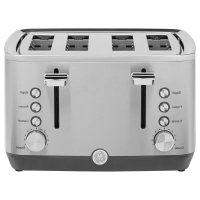
G9TMA4SSPSS - Toaster GE - Free user manual and instructions
Find the device manual for free G9TMA4SSPSS GE in PDF.


| Product Type | Toaster |
| Brand | GE |
| Model | G9TMA4SSPSS |
| Capacity | 4 slices |
| Browning Settings | 7 levels (1 = light, 7 = dark) |
| Special Functions | Bagel, Frozen, Cancel |
| Controls | Toast lever, push buttons, control knob |
| Power | 120 V, 60 Hz, polarized plug |
| Crumb Tray | Removable, two (one on each side) |
| Cord Storage | Yes, wrap under base |
| Housing Material | Stainless steel (estimated) |
| Care and Cleaning | Clean with damp cloth; do not immerse; wash crumb tray by hand |
| Safety | Polarized plug, non-removable screw, auto shut-off at end of cycle, cancel button |
| Warranty | 1 year limited (parts and labor) |
| Repairability | No user-serviceable parts; contact authorized technician |
| Dimensions (approx.) | 30 x 20 x 20 cm (estimated for 4 slices) |
Frequently Asked Questions - G9TMA4SSPSS GE
User questions about G9TMA4SSPSS GE
0 question about this device. Answer the ones you know or ask your own.
Ask a new question about this device
Download the instructions for your Toaster in PDF format for free! Find your manual G9TMA4SSPSS - GE and take your electronic device back in hand. On this page are published all the documents necessary for the use of your device. G9TMA4SSPSS by GE.
USER MANUAL G9TMA4SSPSS GE
SAFETY INFORMATION ....3
CONTROLS 4
USING THE TOASTER....5
TROUBLESHOOTING....6
LIMITED WARRANTY....7
CONSUMER SUPPORT ....8
OWNER'S MANUAL
G9TMA2SSPSS
G9TMA4SSPSS
ENGLISH/FRANÇAIS/ ESPAÑOL
Write the model and serial numbers here:
Model # ____
Serial # ____
Find these numbers on a label on the back of the unit.
THANK YOU FOR MAKING GE APPLIANCES A PART OF YOUR HOME.
Whether you grew up with GE Appliances, or this is your first, we're happy to have you in the family.
We take pride in the craftsmanship, innovation and design that goes into every GE Appliances product, and we think you will too. Among other things, registration of your appliance ensures that we can deliver important product information and warranty details when you need them.

GE APPLIANCES
IMPORTANT SAFETY INFORMATION READ ALL INSTRUCTIONS BEFORE USING THE APPLIANCE
WARNING
Read all safety instructions before using the product. Failure to follow these instructions may be theatrical shock, serious injury, or death.
IMPORTANT SAFEGUARDS
- Read all instructions.
- Use this appliance only for its intended purpose as described in the Owner's Manual.
To prevent electrical shock, unplug
before cleaning.
To reduce the risk of fire or electric h crumb tray in place. - A fire may occur if the toaster is covered or touching flammable material, including curtains, draperies or walls, when in operation.
• Before performing any service, unplug the toaster. - Do not leave children alone–children should not be left alone or unattended in an area where an appliance is in use.
- Do not touch the heating elements or the interior surface of the toaster. These surfaces may be hot enough to burn. During and after use, do not touch interior area of the toaster; allow sufficient time for cooling first. Other surfaces of the appliance may become hot enough to cause burns. Potentially hot surfaces include the internal heating elements, the top, the back, and the crevices around the toaster opening.
WARNING
WARNING
- Do not touch hot surfaces. Use lever or knobs.
• To protect against fire, electric shock and injury to persons do not immerse cords, plugs or appliance in water or other liquid. - Unplug from outlet when not in use and before cleaning. Allow to cool before putting on or taking off parts, and before cleaning the appliance.
- Do not operate any appliance with a damaged cord or plug, or after the appliance malfunctions or has been damaged in any manner. Contact Consumer Support.
• The use of accessory attachments not recommended by the appliance manufacturer may cause injuries.
• Do not use outdoors. - Do not let cord hang over edge of table or counter, or touch hot surfaces.
- Do not place on or near a hot gas or electric burner, or in a heated oven.
• Do not use this appliance for anything other than intended use. - Oversized foods, metal foil packages, or utensils must not be inserted in a toaster, as they may create a risk of fire or electric shock.
• Do not attempt to dislodge food when toaster is plugged in.
WARNING
KEEP FLAMMABLE MATERIALS AWAY FROM THE TOASTER
Failure to do so may result in fire or personal injury.
- Do not store or use flammable materials in a toaster or near the toaster opening, including paper, plastic, pot holders, linens, wall coverings, curtains, drapes and gasoline or other flammable vapors and liquids.
- Never wear loose-fitting or hanging garments while using the appliance. These garments may ignite if they contact hot surfaces causing severe burns.
WARNING
TAMPER-RESISTANT SCREW
This appliance is equipped with a tamper-resistant screw to prevent removal of the outer cover. To reduce the risk of fire or electric shock, do not attempt to remove the outer cover. There are no user-serviceable parts inside. Repair should be done only by an authorized service personnel.
POLARIZED PLUG
This appliance has a polarized plug (one blade is wider than the other). To reduce the risk of electric shock, this plug is intended to fit into a polarized outlet only one way. If the plug does not fit fully into the outlet, reverse the plug. If it still does not fit, contact a qualified electrician. Do not attempt to modify the plug in any way.
ELECTRICAL CORD
NOTE: If the power cord is damaged, please contact the warrantor listed in the back of this manual.
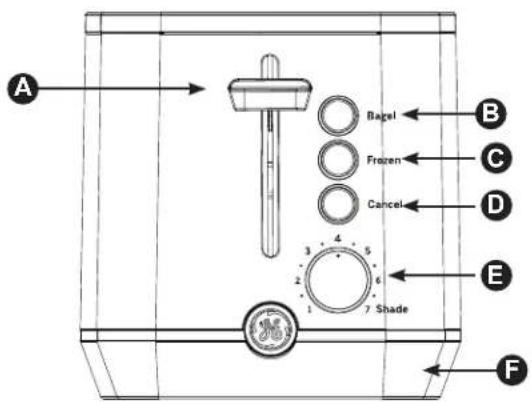
Controls
2 Slice Toaster
4 Slice Toaster
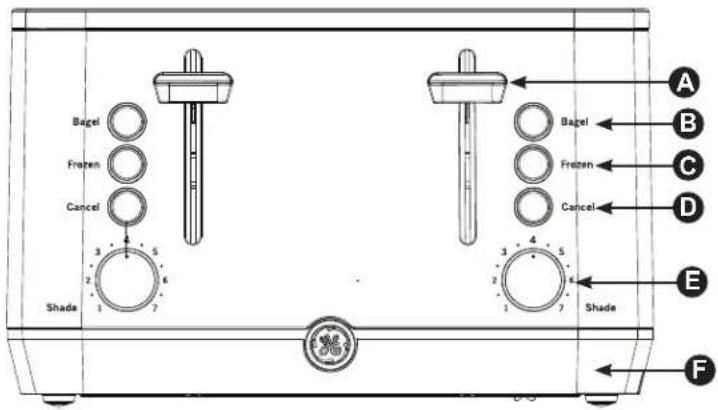
Appearance will vary by model
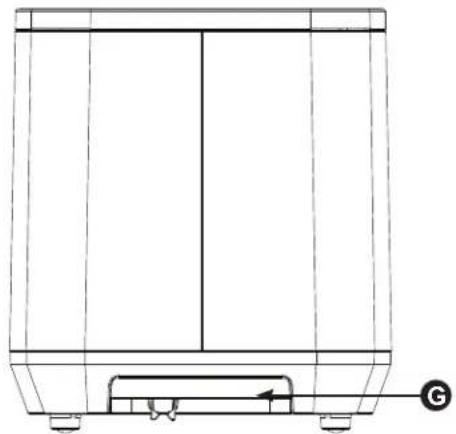
NOTE: The 4 slice toaster has crumb trays on each side of the unit.
natural_image
Technical line drawing of a mechanical component or enclosure with no visible text or symbolsRight side of unit
natural_image
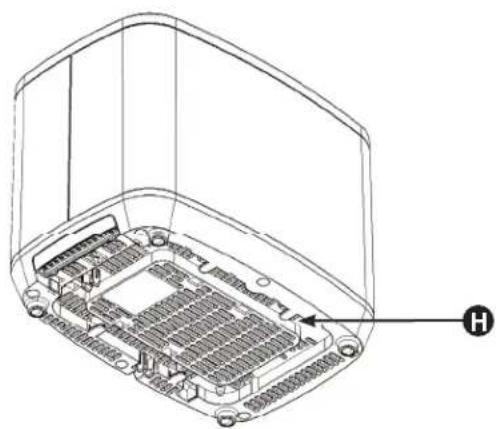
Isometric line drawing of an electronic device casing with internal components and a labeled component 'H' (no text or symbols beyond label)Bottom of unit
A Lever
B Bagel Button
© Frozen Button
D Cancel Button
E Control Knob
F Base
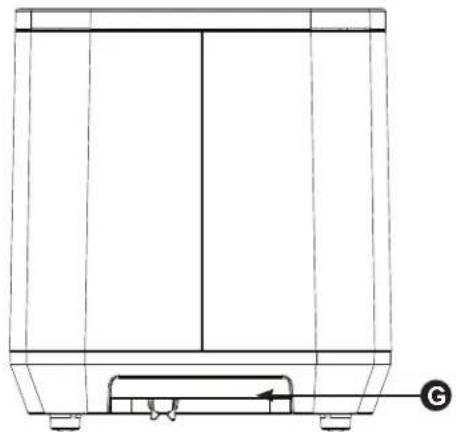
G Crumb Tray
NOTE: The 4 slice toaster has crumb trays on each side of the unit.
H Cord Wrap
NOTE: Cord wrap is located in the same location on the 4 slice toaster
Getting Started
This appliance is for household use only.
- Remove all packing materials, any stickers and the plastic band around the power plug.
• To register your product, go to GEAppliances.com. - Wash all parts as instructed in Care and Cleaning section.
- Select a level surface where this unit is to be used allowing enough space for steam to escape without damage to counters, cabinets and walls. Recommended 4 inch clearance on all sides.
- Before first use, set the browning level to maximum (7) and operate the appliance empty in a well ventilated room to cure the new elements. This may produce a slight odor as the element cures.
Toasting Bread
- Set the toaster upright on a firm, level, heat-resistant surface.
- Put the plug into the power socket.
- Turn the browning control to the required setting (1 = light, 7 = dark).
- Press the lever down fully. It won't lock down unless the toaster is connected to the electricity supply.
- If you need to stop the toasting while the cycle is still in process, press the 'Cancel' button to eject any contents in the toaster.
Frozen Bread
- Leave the browning control at your preferred setting, insert the frozen bread, lower the lever, then press the "Frozen" button.
- The light will come on.
- The toast will pop up when ready.
Bagels
- Insert sliced bagel into the slots with cut side toward the inside of the toaster.
- Leave the browning control at your preferred setting, lower the lever, then press the "Bagel" button.
- The bagel will pop up when ready.
Cancel
- Pressing the "Cancel" button will stop toasting.
Care and Cleaning
Follow these guidelines for cleaning and caring for your Toaster:
- Unplug the appliance and let it cool down before attempting to clean or remove any toast stuck in the unit.
- To remove crumbs from the appliance, gently slide out the crumb tray from the appliance and empty it. Replace tray when finished.
- Do not insert foreign objects into slots.
CAUTION
• ACAUTION Do not hold the appliance upside down and do not shake it to remove the crumbs, bread or other toasting articles.
- Clean the body of the appliance with a damp cloth.
- DANGER: Never immerse the appliance in water or a dishwasher.
- ACAUTION Never use scouring pads, abrasive cleaning agents or aggressive liquids such as petrol or acetone to clean the appliance.
CAUTION
Troubleshooting
Save time and money! Review the charts on the following pages first and you may not need to call for service.
| Problem Solution | |
| The toaster does not work Make sure | plug is properly inserted into the wall. |
| Bread gets stuck in appliance | Unplug the appliance and let it cool down. Carefully remove the bread from the toaster. Take care not to damage the heating elements when you remove the bread. Never use a metal object for this purpose |
| Toast is too light/too dark | Check the browning setting selected for toasting. Select a lower setting next time if your toast is too dark and a higher setting if your toast is too light. Also check that the Frozen button is not selected |
| The bread pops up almost immediately without having been toasted. | Make sure you push down the toasting lever all the way. |
| Smoke comes out of the toaster. | Push the cancel button to stop the toasting process. Empty crumb tray if it is full and clean if needed. |
| The cord is damaged. | If the cord to this appliance is damaged, it must always be replaced by a service center |
GE Appliances Limited Warranty
GEAppliances.com
Please have your serial number and your model number available when calling for service.
Call 1.800.GE.CARES (1-800-432-2737) for service questions.
For the Period of: GE Appliances Covers
| One YearFrom the date of the original purchase | If the toaster fails due to a defect in materials or workmanship, during the limited one-year warranty, GE Appliances will either repair your product or replace your product with a new or remanufactured product, or refund the purchase price of the product at GE Appliances sole discretion. |
What GE Appliances Will Not Cover:
■ Failure of the product if it is abused, misused, or used for other than the intended purpose or used commercially.
■ Replacement of house fuses or resetting of circuit breakers.
■ Damage caused after delivery.
■ Damage to the product caused by accident, fire, floods or acts of God.
■ Incidental or consequential damage caused by possible defects with this appliance.
EXCLUSION OF IMPLIED WARRANTIES
Your sole and exclusive remedies are product exchange or refund as provided in this Limited Warranty. Any implied warranties, including the implied warranties of merchantability or fitness for a particular purpose, are limited to one year or the shortest period allowed by law.
For sale in the 50 United States and the District of Columbia only: For US Customers: This limited warranty is extended to the original purchaser for products purchased for home use within the USA.
Some states do not allow the exclusion or limitation of incidental or consequential damages. This warranty gives you specific legal rights, and you may also have other rights which vary from state to state. To know what your legal rights are, consult your local or state consumer affairs office or your state's Attorney General.
Warrantor: GE Appliances, a Haier company Louisville, KY 40225
For Customers in Canada: This limited warranty is extended to the original purchaser and any succeeding owner for products purchased in Canada for home use within Canada. In-home warrant service will be provided in areas where it is available and deemed reasonable by Mabe to provide.
Warrantor Canada: MC Commercial, Burlington, Ontario, L7R 5B6
Consumer Support
Service and Registration
Register your new appliance on-line at your convenience! Timely product registration will allow for enhanced communication and prompt service under the terms of your warranty, should the need arise.
Register your appliance at GEAppliances.com/register.
Contact Us
If you are not satisfied with the service you receive from GE Appliances, contact us on our Website with all the details including your phone number, or write to:
In the US: General Manager, Customer Relations | GE Appliances, Appliance Park | Louisville, KY 40225 GEAppliances.com/contact
In Canada: Director, Consumer Relations, Mabe Canada Inc. | Suite 310, 1 Factory Lane | Moncton, N.B. E1C 9M3 GEAppliances.ca/en/contact-us
CONSIGNES DE SÉCURITÉ IMPORTANTES .... 3
PIÈCES....4
UTILISATION DU GRILLE-PAIN .5
ENTRETIEN ET NETTOYAGE....5
DÉPANNAGE....6
GARANTIE LIMITÉE ...... 7
SOUTIEN AU CONSOMMATEUR....8
MANUEL D'UTILISATION
G9TMA2SSPSS G9TMA4SSPSS
ENGLISH/FRANÇAIS/ ESPAÑOL
Appearance will vary by model
NOTE: The 4 slice toaster has crumb trays on each side of the unit.
natural_image
Technical line drawing of a mechanical component with no visible text or symbolsnatural_image
Technical line drawing of an electronic device casing with internal components and a labeled component 'H' (no text or symbols beyond label)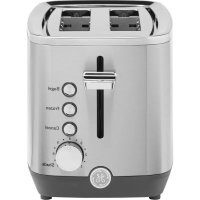
- OWNER'S MANUAL
- ENGLISH/FRANÇAIS/ ESPAÑOL
- THANK YOU FOR MAKING GE APPLIANCES A PART OF YOUR HOME.
- IMPORTANT SAFETY INFORMATION READ ALL INSTRUCTIONS BEFORE USING THE APPLIANCE
- WARNING
- IMPORTANT SAFEGUARDS
- KEEP FLAMMABLE MATERIALS AWAY FROM THE TOASTER
- TAMPER-RESISTANT SCREW
- POLARIZED PLUG
- ELECTRICAL CORD
- Controls
- Getting Started
- This appliance is for household use only.
- Toasting Bread
- Frozen Bread
- Bagels
- Cancel
- Care and Cleaning
- CAUTION
- Troubleshooting
- GE Appliances Limited Warranty
- GEAppliances.com
- What GE Appliances Will Not Cover:
- EXCLUSION OF IMPLIED WARRANTIES
- Warrantor: GE Appliances, a Haier company Louisville, KY 40225
- Consumer Support
- Service and Registration
- Contact Us
- MANUEL D'UTILISATION
Brand : GE
Model : G9TMA4SSPSS
Category : Toaster