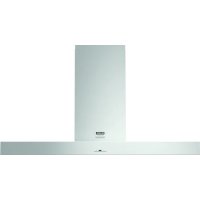
CW4176S - Range hood ASKO - Free user manual and instructions
Find the device manual for free CW4176S ASKO in PDF.



| Product type | Extractor hood |
| Brand | ASKO |
| Model | CW4176S |
| Category | Built-in decorative hood |
| Electrical supply | 220-240 V, 50/60 Hz |
| Insulation class | II (double insulation) |
| Number of speeds | 4 or 9 (selectable) + Turbo |
| Functions | LED lighting with dimmer, Timer (10 min), Clean Air function (12 h), Turbo speed (10 min) |
| Filters | Metal grease filters (dishwasher-safe), Regenerating activated carbon filter (optional) |
| Connection diameter | 120/125/150 mm |
| Minimum installation height | 65 cm (gas cooking) / 55 cm (electric, ceramic, induction cooking) |
| Lighting | LED bulbs (replacement by a qualified installer) |
| Maintenance of grease filters | Clean monthly or when indicator flashes (30 hours of operation) |
| Maintenance of charcoal filter | Clean every 2 months or when indicator flashes (120 h); replace after 3 years |
| Reset indicators | Button '-' for grease filter; buttons '-' and '+' simultaneously for charcoal filter |
| Safety | Double insulation; all-pole disconnection switch (3 mm) required for fixed connection |
| Material | Stainless steel (mentioned for cleaning) |
| Operating mode | Extraction or recirculation (with charcoal filter) |
| Cut-out dimensions | See diagram in the manual |
Frequently Asked Questions - CW4176S ASKO
User questions about CW4176S ASKO
0 question about this device. Answer the ones you know or ask your own.
Ask a new question about this device
Download the instructions for your Range hood in PDF format for free! Find your manual CW4176S - ASKO and take your electronic device back in hand. On this page are published all the documents necessary for the use of your device. CW4176S by ASKO.
USER MANUAL CW4176S ASKO
Swedish quality since 1950

natural_image
Black-and-white collage of kitchen utensils including cutlery, fork, and cup (no text or symbols)Instructions for use
Mode d'emploi
Anleitung
Anvendelse
CW4176S
WS12AAKBA / WS12AIKBA
CW4976S
WS90AAKAA / WS90AIKAA
ASKO
Swedish quality since 1950
700005625000
EN
Manual EN 3 - EN 22
FR
Notice dûtilisation FR 3 - FR 22
DE
On reading these user manuals you will soon become familiar with the features of this appliance. Please read the appliance's safety and maintenance instructions.
Please retain the operating and installation instructions as these may be useful for future reference.

Please read the separate safety instructions prior to use.
Description
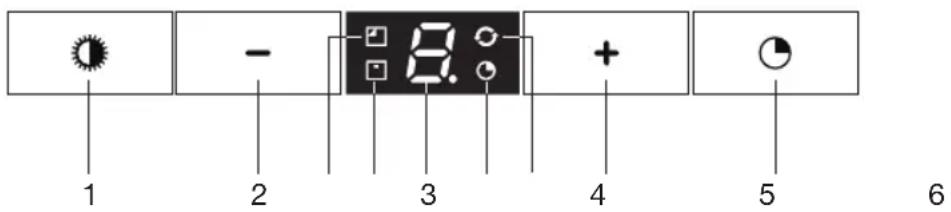
- Switching on/off and dimming the lighting
- Reducing air extraction capacity and switching off
- Cleaning carbon filter indicator
- Cleaning grease filter indicator
- Display status
- Timer function indicator
- Clean Air function indicator
- Switching on and increasing air extraction capacity
- Switching on timer function

Note!
- Prior to activating or deactivating a function, the motor and lighting should be switched off.
- If you have a cooker hood with a carbon filter, you should activate the carbon filter indicator as described in the ‘Cleaning filters’ paragraph.
Operation
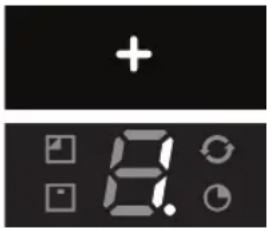
Switching extraction on and off
- Press the '+' button (8).
The cooker hood will switch on at the lowest setting. - Press the ‘+’ button (8) again to set a higher extraction setting.
Press and hold the '+' button (8) for 2 seconds to select the highest setting (boost) (see switching on intensive setting).
The extraction setting can be set between speeds 1 to 4 or 9 (depending on the model). - Press the ‘-’ button (2) to select a lower setting. The extraction setting is indicated in the display (5).
- If the extraction setting is set at 1, you can switch off the cooker hood by quickly pressing and releasing the '-' button (2).
- To switch off the cooker hood from whatever setting press and hold the ‘-’ button (2) for at least 2 seconds.
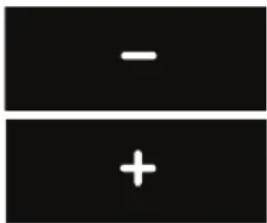
Alter the number of speed-settings (models with 9 speed-settings)
You can choose between 9 speed-settings (standard) or 5 speed-settings.
- Press and hold the ‘-’ button (2) and ‘+’ button (8) for at least 5 seconds.
This selects the 5 speed-setting option. Press and hold the '-' button (2) and '+' button (8) again for at least 5 seconds to select the 9 speed-setting option.

Switching the lighting on and off
- Quickly press and release the lighting button (1).
The light switches on at maximum strength. - Press and hold the lighting button (1) to set the lighting strength. The lighting changes from maximum to minimum strength and vice versa.
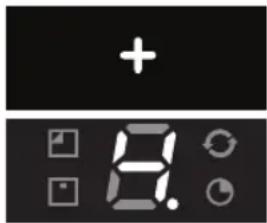
Switch on intensive setting:
- Press and hold the ‘+’ button (8) for approximately 2 seconds. The intensive setting (setting ‘P’) is switched on for ten minutes (depending on the model). The display will flash (5) during this period. The original extraction setting will be reactivated after this period.

- Quickly press and release the ‘+’ (8) button to switch off the intensive setting.
Switching on the timer
- Press the timer button (9).
The timer indicator will light up.
The cooker hood will switch off automatically after 10 minutes.
- Switch off the timer function by pressing the '-' button '2'.
If the lighting is lit its strength will be reduced automatically by 30-40% once the timer has finished.

Note!
If the intensive setting has been selected you cannot activate the timer function.
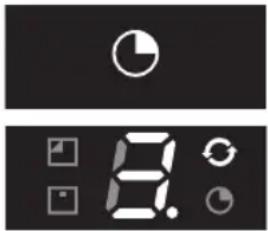
Clean Air function
The Clean Air function allows you to freshen the air in your kitchen for a maximum of 12 hours.
- Switch off the cooker hood.
- Press and hold the timer button (9) for approximately 4 seconds. The cooker hood will switch on automatically for 10 minutes every hour at the lowest speed setting. During extraction the Clean Air indicator will flash (6). When the hood switches off after 10 minutes, the Clean Air indicator (6) will be lit continuously until the hood switches on again after 50 minutes.
- Switch off the Clean Air function in the meantime by pressing a random button (except the one for the lighting).
Cleaning filters
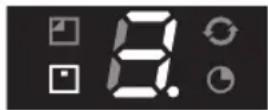
Saturation grease and carbon filters
The filters should be replaced or cleaned when the grease filter indicator (4) or the carbon filter indicator (3) are lit.
Grease filter
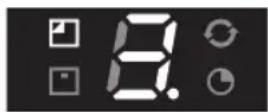
The grease filter indicator (4) will flash after 30 operating hours.
- The grease filters should then be cleaned.
- Reset the memory by pressing and holding the '-' button (2) until the grease filter indicator (4) stops flashing.
Carbon filter
The carbon filter indicator (3) will flash after 120 operating hours.
- The carbon filter should then be cleaned or replaced.
- Reset the memory by simultaneously pressing and holding the ‘-’ (2) and ‘+’ (8) buttons until the carbon filter indicator (3) stops flashing.

Switching on carbon filter indicator
- Simultaneously press and hold the ‘+’ (8) button and the lighting button (1) until the carbon filter indicator (3) flashes twice. The carbon filter indicator is activated.



Switching off carbon filter indicator
- Simultaneously press and hold the ‘+’ (8) button and the lighting button (1) until the carbon filter indicator (3) flashes once.
The carbon filter indicator is switched on:
- The carbon filter indicator (3) lights up for 3 seconds.
The carbon filter indicator is switched off:
- The carbon filter indicator (3) flashes for 3 seconds.
Cleaning

Important!
For all maintenance first switch off the mains power to the cooker hood by pulling the plug out of the socket or by turning off the home's master switch. The hood needs to be cleaned regularly, both inside as well as outside (at least in the same frequency as the grease filter cleaning). Do not use abrasive cleaning products. Do not use alcohol!
Important!
If the instructions regarding cleaning the appliance or replacing the filters are not followed, this can cause a fire. These instructions should be followed! The manufacturer is not liable for damage to the hood or fire damage resulting from incompetent maintenance or from non-adherence to the above safety instructions.
Cooker hood
Clean the cooker hood with soapy water and a soft cloth.
Then wash off with clean water. Do not use aggressive cleaning agents such as caustic soda. The cooker hood finish stays in good condition if it is buffed periodically following the application of wax.

Stainless steel cooker hoods
Do not use scouring pads or other abrasive cleaners on stainless steel cooker hoods. Finish with a non-abrasive, non-polishing agent and buff the stainless steel in the direction of the grain.
Metal grease filters
Metal grease filters should be cleaned once a month (or when indicated by the filter cleaning indicator – if present on the model) using a neutral cleaning agent, either by hand or in the dishwasher on a short, low-temperature program. Place the grease filters with the openings facing downwards in the dishwasher so the water can drain out of the filter. Aluminium grease filters become dull as a result of dishwasher cleaning agents. This is normal and does not effect the working.
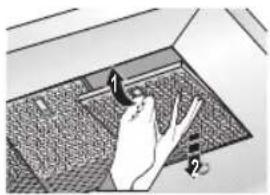
Removing cassette filter
1 Switch off the motor and lighting.
2 Open the access hatch.
3 Remove the filter from the hood.
Cleaning
The filters can be cleaned in the dishwasher. Allow the filters to drain well before replacing.
The filters can also be cleaned by hand.
Clean the filters in soapy water with washing up liquid and rinse.
Allow the filters to drain well. The underside of the cooker hood can be cleaned with a mild cleaning agent and a damp cloth. Dry off with kitchen paper or a dry tea towel.
Replacing cassette filter
The filter should be placed with the locking mechanism on the side. Open the filter access hatch. The notches at the side of the filter will then slot in. Hold the access hatch in this position when placing the filters.
1 Slot the notches at the back of the filter in the specially designed opening to the side of the cooker hood.
2 Tilt the filter upwards.
3 Release the filter access hatch. The notches at the back of the filter will extend outwards and slot into the specially designed openings of the cooker hood.
The filter is now in position again.
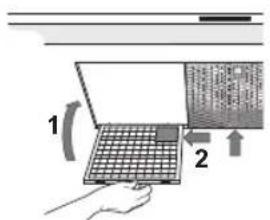
Please note!
Replace the grease filters in their original assembled position (see figure).
Positioning the grease filters correctly ensures the most efficient extraction.
Active carbon filters:
The regenerable active carbon filter must be washed by hand with neutral cleaning products, or in the dishwasher at a maximum temperature of 65 °C (the washing should be done without any plates, dishes, cups, etc. in the machine).
Remove the excess water without damaging the filter, remove the holder and let the filter dry in the oven for at least 15 minutes at a maximum temperature of 100 °C .
To keep the regenerable carbon filter efficient, this action should be repeated every 2 months or when indicated by the filter indicator. The filter must be replaced after no more than 3 years, or if it has been damaged.

It is important that the grease filters and the regenerable active carbon filter are thoroughly dry before repositioning.
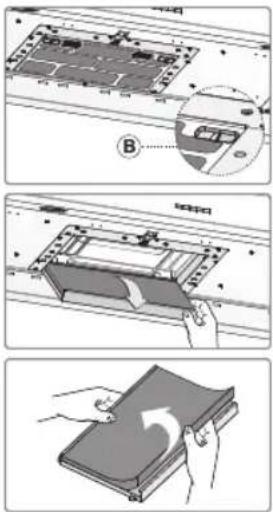
Replacing the carbon filter:
The grease filters should first be removed before replacing the carbon filter.
- Press the two 'B' buttons on the carbon filter inwards.
- Tilt the carbon filter downwards to remove it.

Operation:
• Using a carbon filter creates more sound than when using the cooker hood with an outlet.
- The carbon filter's operation is optimal at a lower motor speed. You should, therefore, avoid using the boost function.

Attention!
This hood is fitted with LED bulbs! These have to be replaced by a specialized technician. Do not attempt to replace LED bulbs yourself.
General
This appliance should be connected to the mains power by a registered installer, who knows and applies the correct safety specifications.
We hereby declare that our products satisfy the applicable European directives, orders and regulations, as well as the requirements stated in the referenced standards.
Important information:
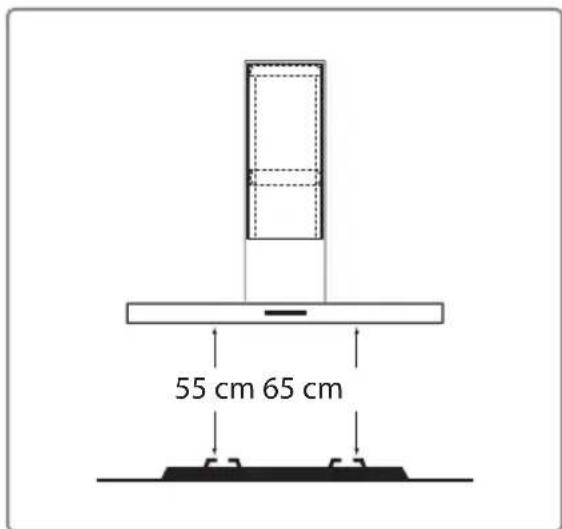
- The distance between the lowest point of the cooker hood and a gas hob should be at least 65 cm. With an electric, ceramic or induction hob this distance should be at least 55 cm.
- Follow the applicable local regulations regarding the ventilation of gas appliances.
- The cooker hood will work better with a short outlet pipe and the fewest bends possible.
- Prior to drilling check that there are no pipes or cables present.
- The cooker hood connection pipe is 120 mm, 125 mm or 150 mm in diameter. Use the largest possible (150 mm) flue of the same diameter.
- The installation material provided with this cooker hood is suitable for reinforced concrete and brick walls. You will need special plugs and screws for certain walls.
Connection
Electrical connection
This is an insulation class II (double insulated) appliance. The cable does not need to be connected to an earthed socket.
Check whether the voltage mentioned on the type plate corresponds with the voltage of the domestic electric installation.
Connection to the mains power should be carried out as follows:
BROWN= L phase
BLUE = N zero.
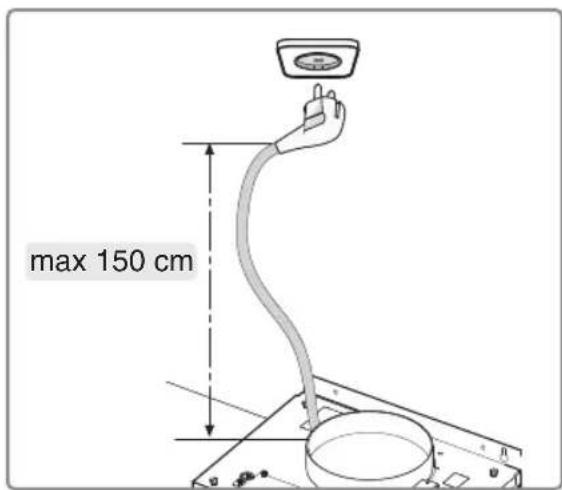
Each cooker hood is equipped with a connection plug. Install the cooker hood in such a way that the plug is accessible.

Please note!
If you want to make a fixed connection, make sure that an omnipolar switch with a contact separation of at least 3 mm is fitted in the supply line.
Build-in dimensions
Installation height:
The minimum distance between a gas hob's pan supports and the lower edge of the hood should be 65 cm. For use with an electric, ceramic or induction hob this distance should be at least 55 cm.
Assembly

It is best that two people install this cooker hood.
natural_image
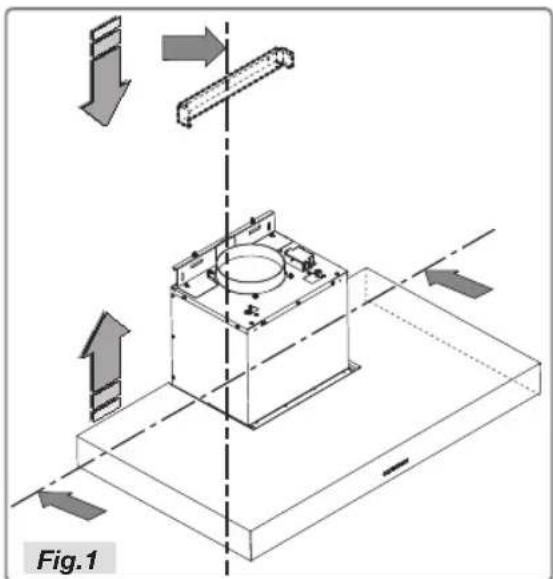
Technical diagram of a mechanical assembly with directional arrows and labeled Fig.1 (no readable text or symbols)- Outline the underside of the hood on the wall, taking into account the minimum distance between the hood and the hob.
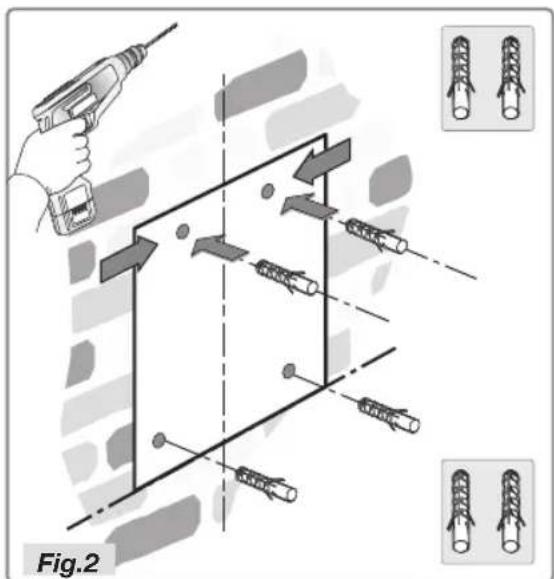
- Place the template on the wall and ensure that the line corresponds to the line previously drawn on the wall. Mark the position of the holes and drill these (Fig.2).
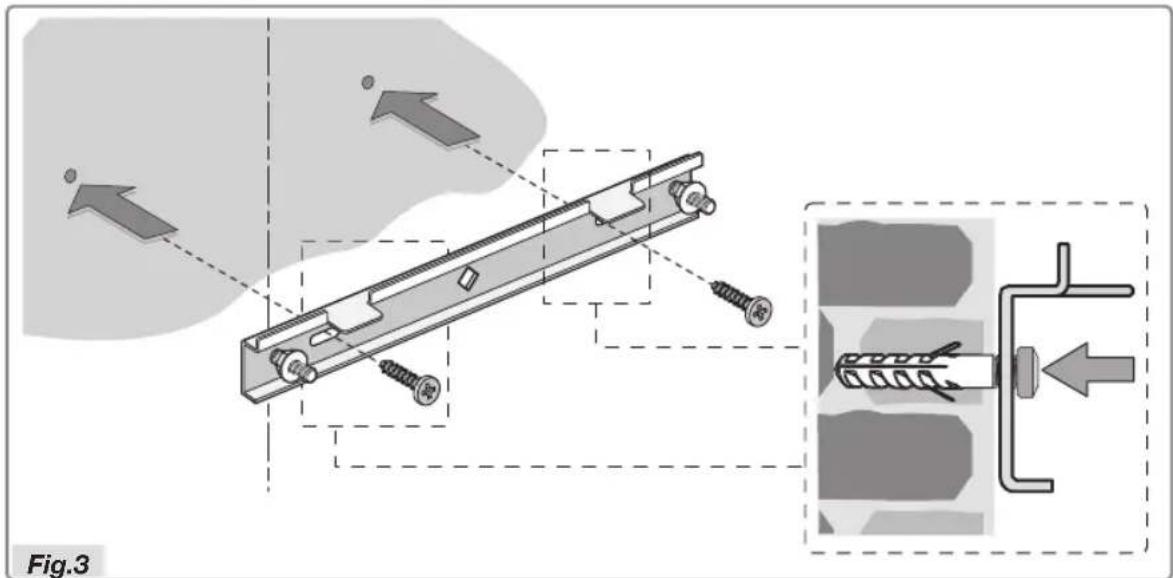
- Place the bracket against the wall and secure with the two screws (supplied). For assembly, screws and expansion plugs should be used that are suitable for the wall type (for example reinforced concrete, plasterboard, etc.). If screws and plugs are supplied with the hood, make sure in advance that these are suitable for the wall on which the hood is to be installed.
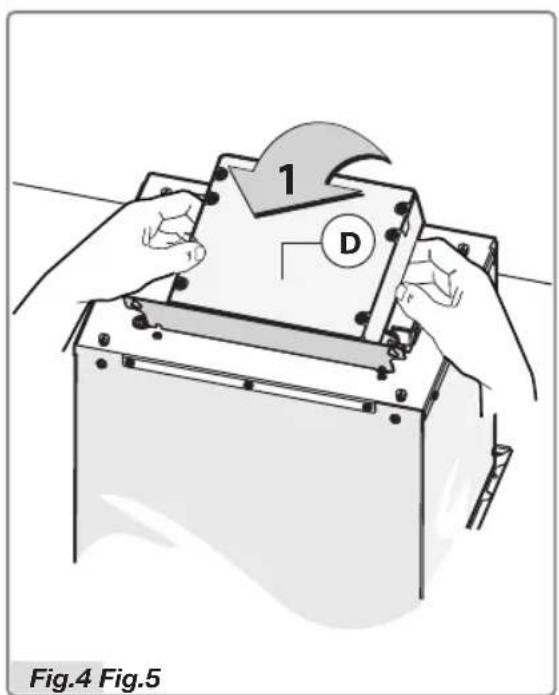
- To install the cooker hood fit the electric unit upright (Fig.4).
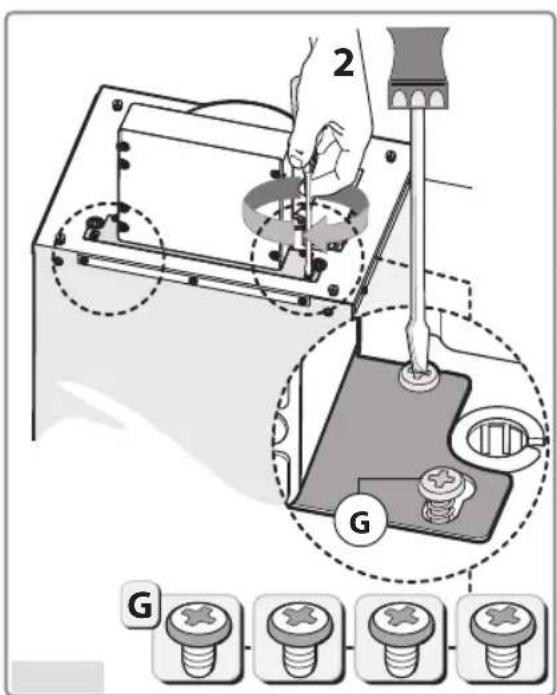
Secure the bracket with the four screws G, as indicated in Figure 5.
natural_image
Illustration of hands using a tool to adjust or install a mechanical component, labeled '3' and 'Fig.6' (no text or symbols on the diagram itself)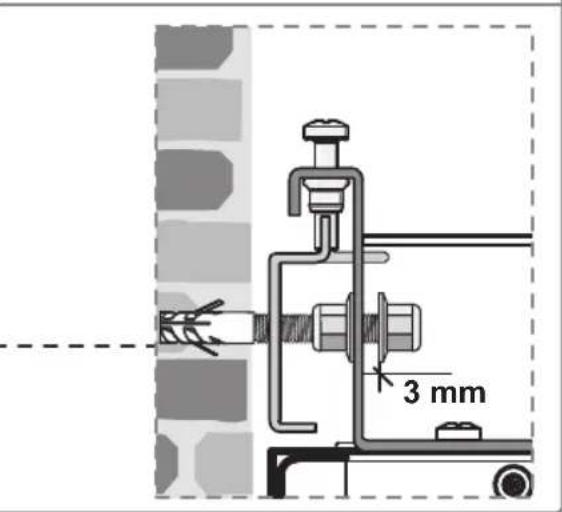
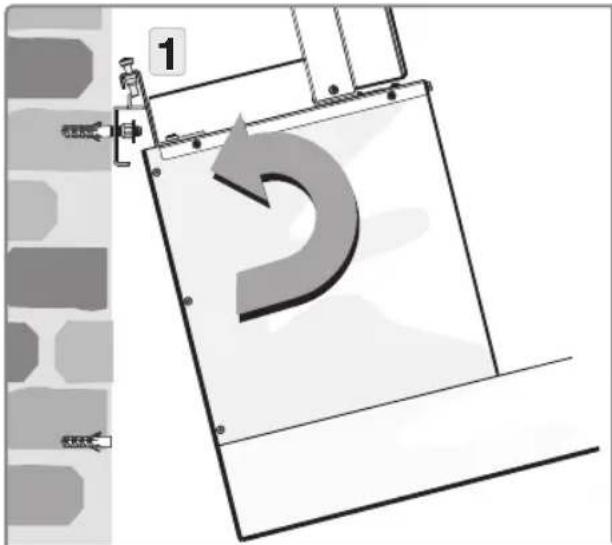
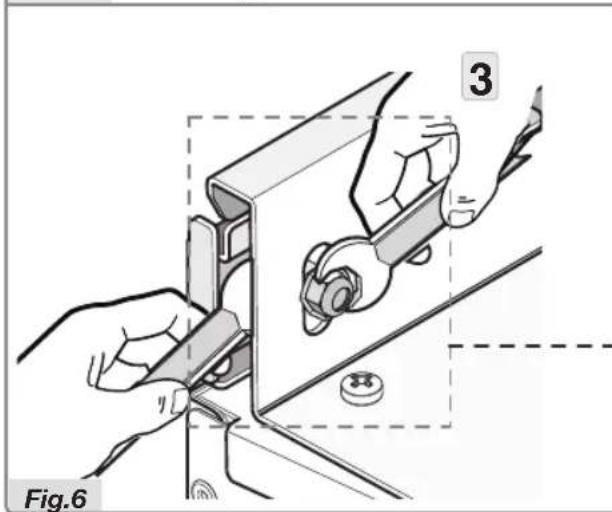
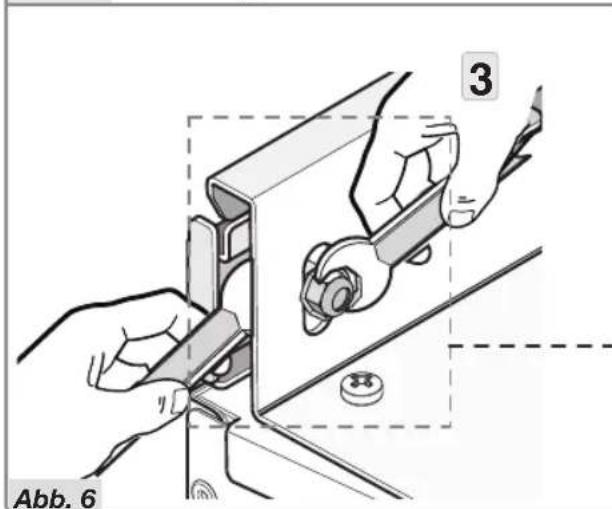
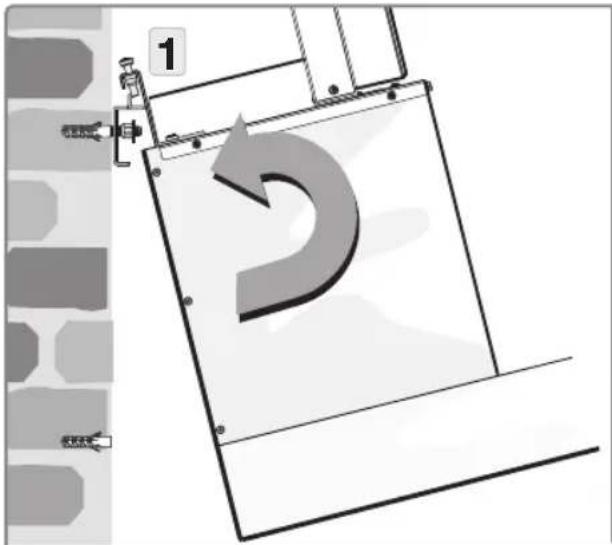
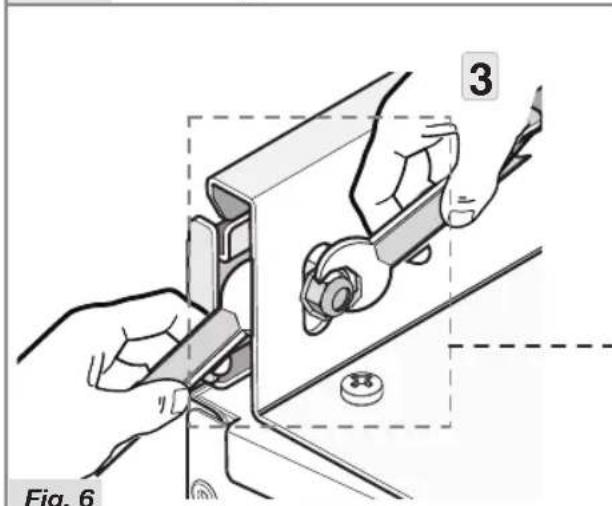
- Tilt the hood slightly and hook it securely to the bracket, as illustrated (Fig.6 step 1).
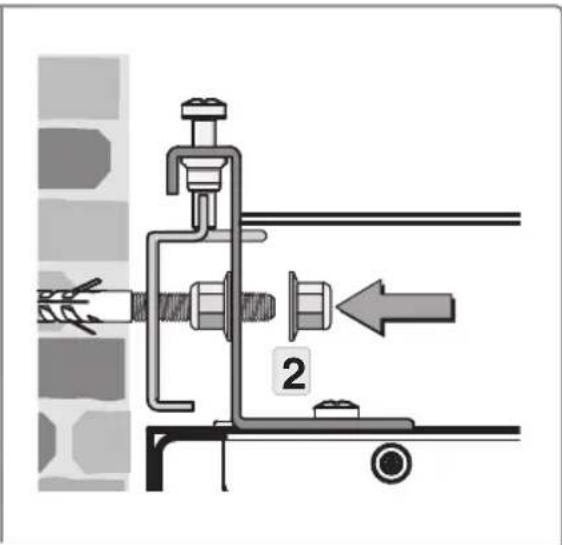
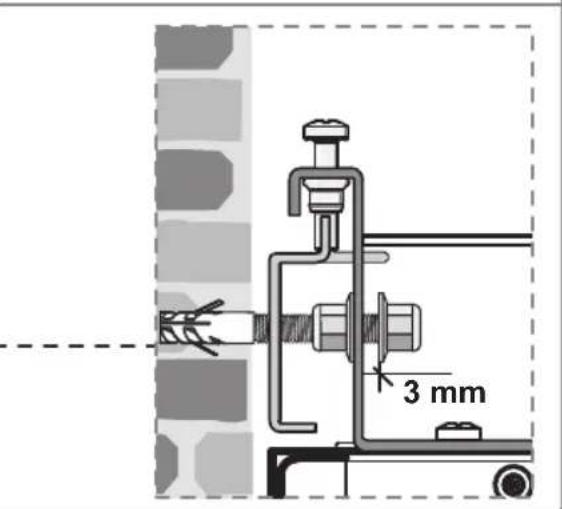
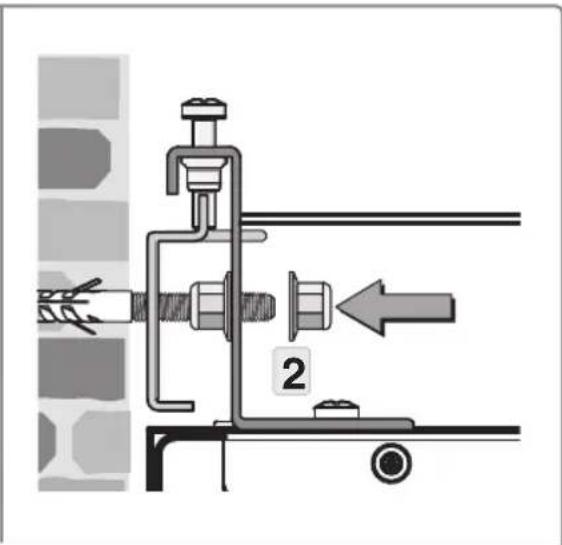
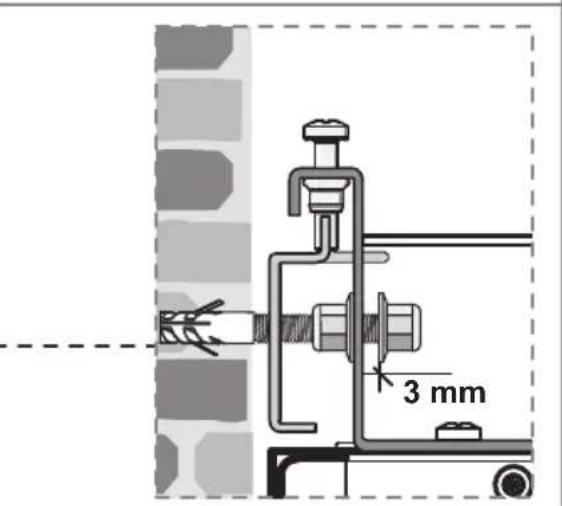
- Position the cooker hood and secure it to the bracket by applying the nut to the screw (Fig.6 step 2).
- Hold an appropriate spanner in one hand and use a second spanner in the other hand to counter the nut (Fig.6 step 3). The distance between the nut and the bracket should be at least 3 mm.
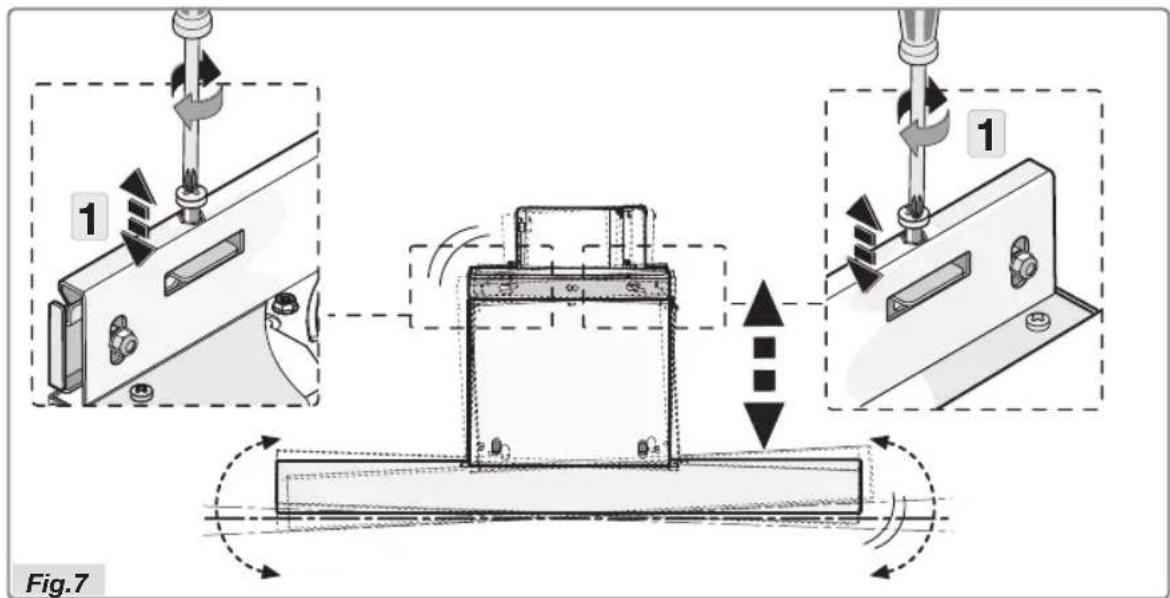
- Align the cooker hood horizontally using the two levelling screws (Figure 7 step 1).
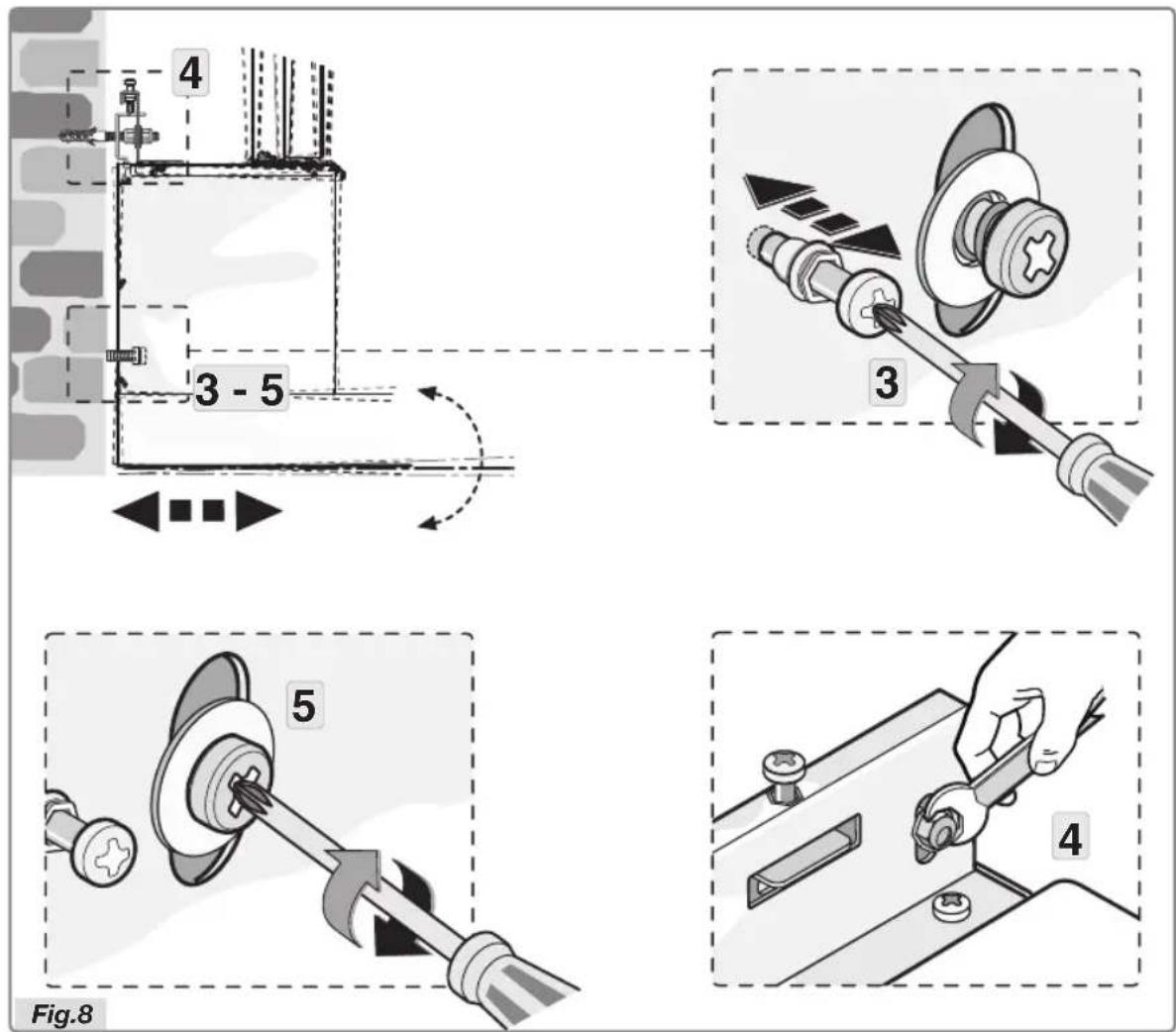
- Align the cooker hood vertically using the two set screws in the motor housing (Fig. 8 step 3).
- After levelling the hood, you should secure the screws completely as indicated in Figure 8 step 4, and do the same with the safety screws (Fig. 8 step 5).
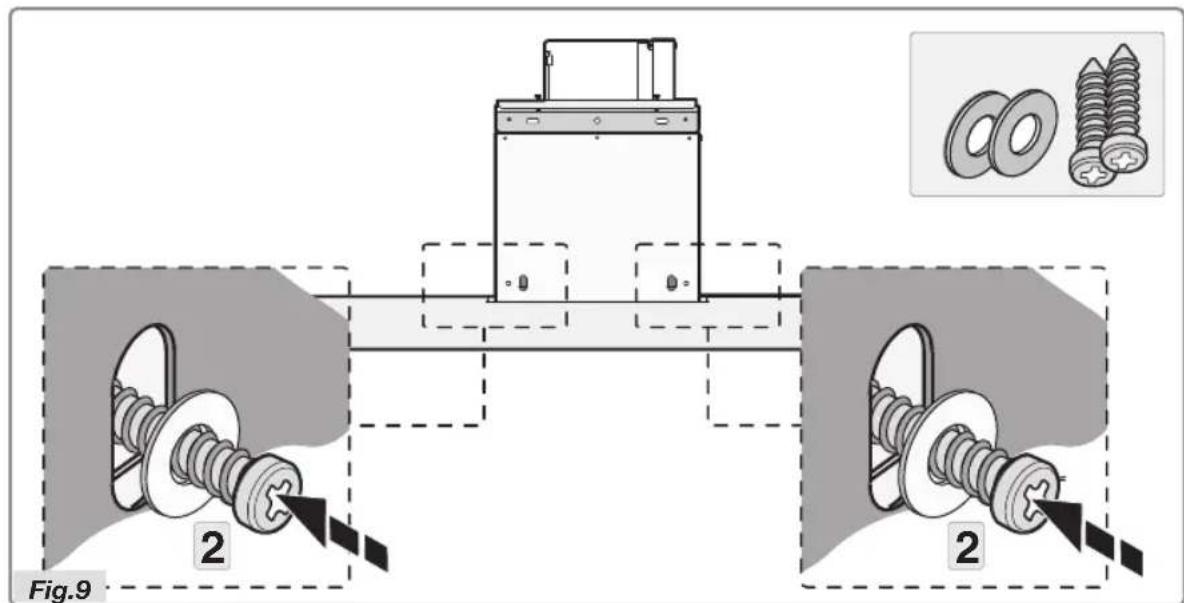
- Secure the cooker hood definitively with the two supplied screws and rings (Figure 9 step 2).
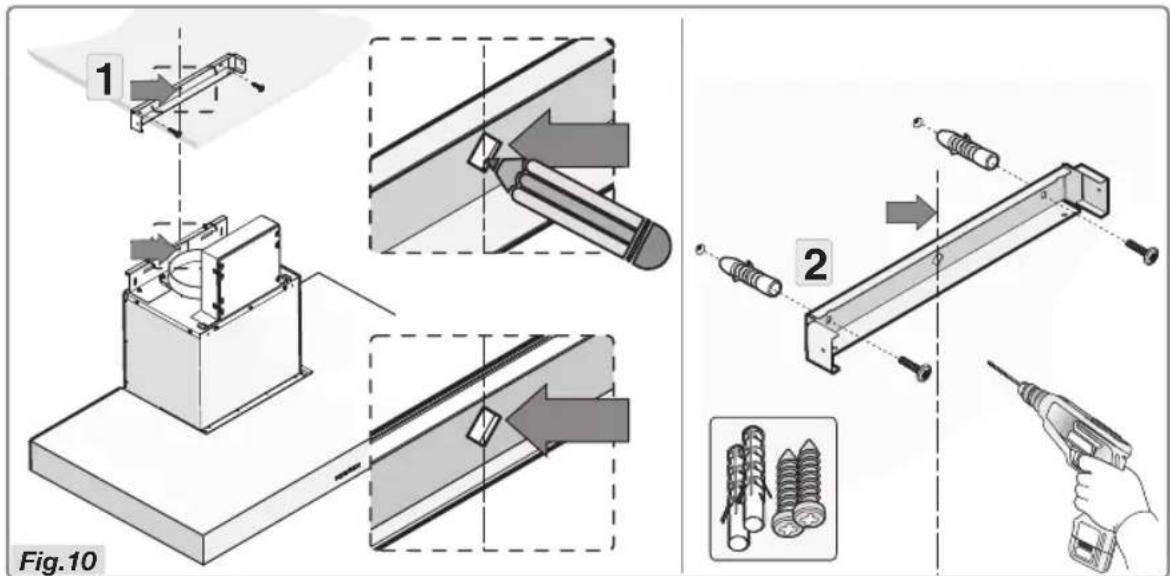
- Position the bracket referring to the sizes in Figure 1 and secure this with the supplied screws and plugs (Fig.10).
natural_image
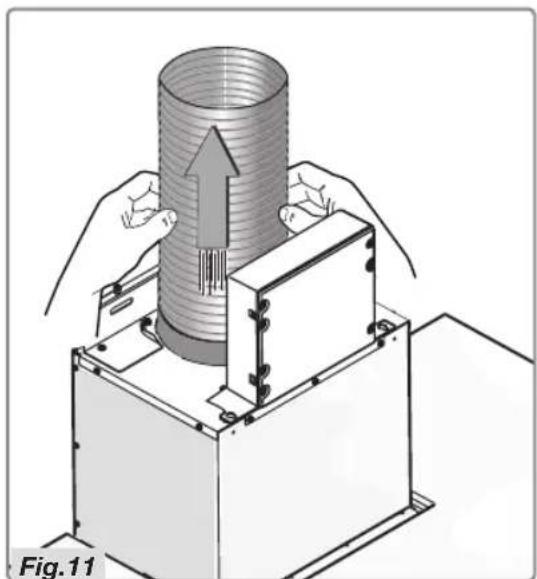
Illustration of a mechanical assembly with hands operating a cylindrical component and a base unit, labeled Fig.11 (no text or symbols on the diagram itself)- Connect the fl ange to the air outlet using a tube (Fig.11).
natural_image
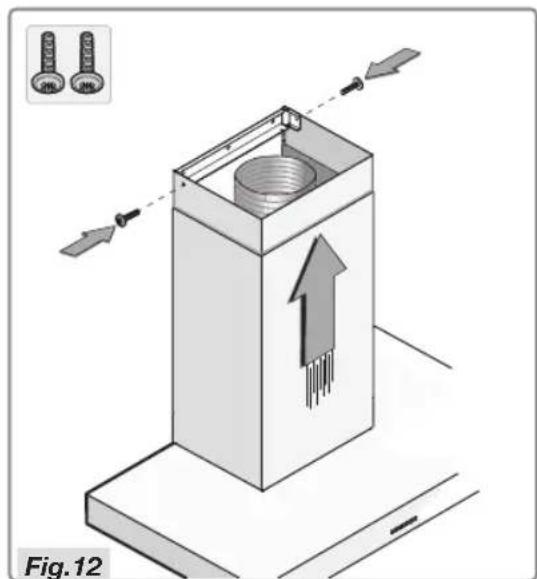
Isometric illustration of a mechanical component with arrows indicating motion, labeled Fig.12 (no text or symbols on the diagram itself)- Place the top shaft in the bottom shaft and put this on the hood's casing. Slide the top shaft against the bracket and secure this with the two screws (Fig.12).
Disposal
Disposal of packaging and appliance
Sustainable materials have been used during manufacture of this appliance. This appliance must be disposed of responsibly at the end of its service life. Ask your local authorities for more information about how to do this.
The appliance packaging is recyclable. The following materials may have been used:
- cardboard;
• polyethylene film (PE);
• CFC-free polystyrene (PS-rigid foam);
Dispose of these materials in a responsible manner and in accordance with government regulations.
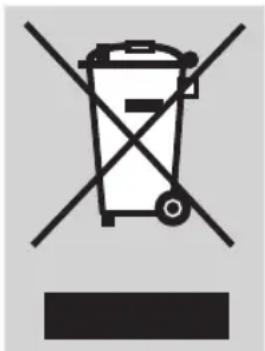
The product has been marked with a crossed-out dustbin symbol to remind you of the obligation to dispose of electrical household appliances separately. This means that the appliance may not be included with normal domestic refuse at the end of its service life. The appliance must be taken to a special municipal centre for separated waste collection or to a dealer providing this service.
Separate processing of household appliances prevents the potentially negative consequences for the environment and health that can arise as a result of inappropriate processing. It ensures that the materials of which the appliance is composed can be recovered to obtain significant savings in energy and raw materials.
SOMMAIRE
Votre hotte aspirante
Activation de la minuterie
natural_image
Two black rectangular panels: top shows a horizontal line with a minus sign, bottom shows a sunburst icon with a half-circle and radiating lines (no text or symbols)natural_image
Two black rectangular blocks with white symbols: one horizontal line and one circular icon (no text or labels)natural_image
Technical diagram of a mechanical assembly with directional arrows and labeled Fig.1 (no readable text or symbols)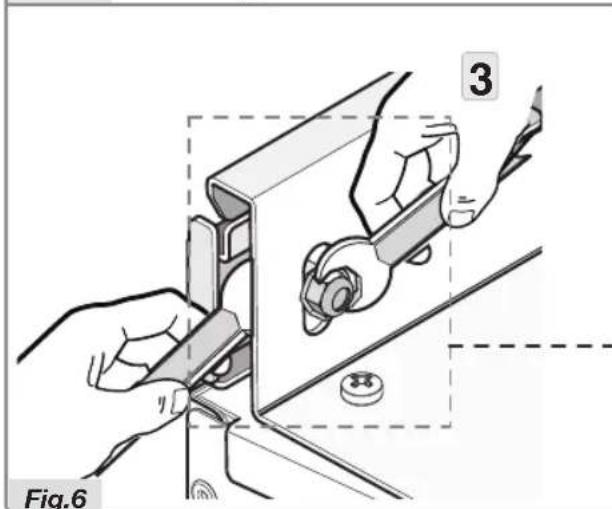
natural_image
Illustration of hands installing or adjusting a mechanical component, labeled with number 3 and figure label Fig.6 (no text or symbols on the diagram itself)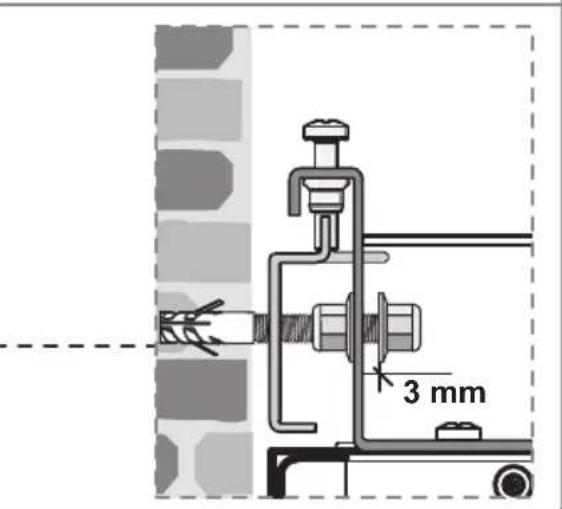
natural_image
Illustration of a mechanical assembly with hands operating a cylindrical component and a base unit, labeled Fig.11 (no text or symbols on the diagram itself)natural_image
Isometric illustration of a mechanical component with arrows indicating motion, labeled Fig.12 (no text or symbols on the diagram itself)Aktivkohlefilter:
natural_image
Technical illustration of a mechanical assembly with hands operating a cylindrical component and a base unit, labeled Abb. 11 (no text or symbols on the diagram itself)Slå timeren til
natural_image
Two black rectangular blocks with white symbols: a horizontal line and a gear-like shape inside, both on a dark background (no text or labels)Tænde for kulfilterindikatoren
natural_image
Two black rectangular blocks with white symbols: one horizontal line and one circular icon (no text or labels)Slukke for kulfilterindikatoren
Fjerne filterkassette
natural_image
Technical diagram of a mechanical assembly with directional arrows and labeled Fig. 1 (no text or symbols on the diagram itself)- Gør beslaget fast med de fire skruer G, som vist i fi gur 5.
natural_image
Illustration of a mechanical assembly with hands operating a cylindrical component and a base unit, labeled Fig. 13 (no text or symbols on the diagram itself)natural_image
Symbol of a trash bin crossed with no visible text or labels- EN
- FR
- DE
- Description
- Note!
- Operation
- Switching extraction on and off
- Alter the number of speed-settings (models with 9 speed-settings)
- Switching the lighting on and off
- Switch on intensive setting:
- Switching on the timer
- Clean Air function
- Cleaning filters
- Saturation grease and carbon filters
- Grease filter
- Carbon filter
- Switching on carbon filter indicator
- Switching off carbon filter indicator
- Cleaning
- Important!
- Cooker hood
- Stainless steel cooker hoods
- Metal grease filters
- Removing cassette filter
- Replacing cassette filter
- Please note!
- Active carbon filters:
- Replacing the carbon filter:
- Operation:
- Attention!
- General
- Important information:
- Connection
- Electrical connection
- Build-in dimensions
- Installation height:
- Assembly
- Disposal
- Disposal of packaging and appliance
- SOMMAIRE
- Activation de la minuterie
- Aktivkohlefilter:
- Slå timeren til
- Tænde for kulfilterindikatoren
- Slukke for kulfilterindikatoren
- Fjerne filterkassette
Brand : ASKO
Model : CW4176S
Category : Range hood