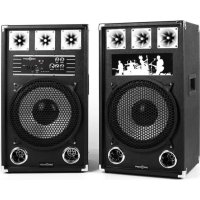
BSX12A - Loudspeaker OneConcept - Free user manual and instructions
Find the device manual for free BSX12A OneConcept in PDF.


| Product type | Active speaker |
| Brand | OneConcept |
| Model | BSX12A |
| Article numbers | 10021706, 10021707, 10021708 |
| Power supply | 230 V ~ 50 Hz (power supply unit) |
| Microphone inputs | 2 x 6.35 mm jack (microphone input 1&2) |
| AUX input | 1 x 3.5 mm jack |
| RCA input | 1 x RCA (RCA-AUX input) |
| USB / SD playback | USB port and SD card slot |
| Speaker output | 1 x speaker output |
| Audio controls | Bass, treble, microphone volume, music volume, microphone echo |
| Playback modes | USB, SD, AUX, RCA (selection via Mode button) |
| Playback controls | Play/Pause, Previous/Next, fast forward/rewind, repeat |
| LED indicator | Yes |
| On/Off switch | Yes (rear) |
| Intended use | Music playback and amplification |
| Safety | Do not expose to water, do not open the housing, use recommended accessories |
| Cleaning | Do not use volatile liquids, avoid prolonged contact with rubber or plastic |
| Recycling | Do not dispose of with household waste, follow directive 2002/96/EC |
| Manufacturer | Chal-Tec GmbH, Wallstraße 16, 10179 Berlin, Germany |
| Compliance | 2014/30/EU (EMC), 2014/35/EU (LVD), 2011/65/EU (RoHS) |
Frequently Asked Questions - BSX12A OneConcept
User questions about BSX12A OneConcept
0 question about this device. Answer the ones you know or ask your own.
Ask a new question about this device
Download the instructions for your Loudspeaker in PDF format for free! Find your manual BSX12A - OneConcept and take your electronic device back in hand. On this page are published all the documents necessary for the use of your device. BSX12A by OneConcept.
USER MANUAL BSX12A OneConcept
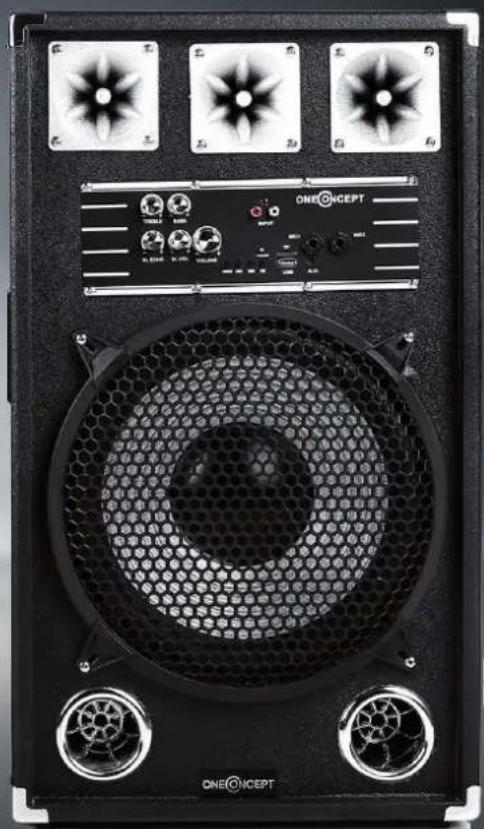
Congratulations on purchasing this equipment. Please read this manual carefully and take care of the following hints to avoid damages. Any failure caused by ignoring the mentioned items and cautions mentioned in the instruction manual are not covered by our warranty and any liability.
Technical Data
Item number 10021706, 10021707, 10021708
Power supply (adaptor) 230 V \~ 50 Hz
Safety Instructions
To reduce the risk of fire, electric shock and damage:
- Do not expose this device to rain.
- Do not playe objects on the unit filled with liquids, such as vases.
- Use recommended accessories only.
- Do not repair this device yourself. Refer repairs to qualified service personnel.
- Do not drop any metal objects into this unit.
- Do not place heavy objects on top of this unit.
Power cord / power supply
- Make sure that the power supply voltage corresponds to the specifications on this unit.
- Plug the power cord into the outlet securely.
- Do not pull the cable, do not bend it and do not place heavy objects on it.
- Do not handle the plug with wet hands.
- Grasp the plug when pulling out of the electrical outlet.
- Do not use a damaged power plug or a damaged electrical outlet.
• Install this unit so that the power cord can be unplugged immediately when a problem occurs.
Small objects / Packaging Parts
Store small objects (eg screws and other mounting hardware, memory cards) and packaging parts out of the reach of children. Do not let you play with the film. Risk of suffocation!
Location
- Set the appliance on a dry, flat, waterproof and heat-resistant surface.
- The socket must be readily accessible to disconnect the unit quickly in an emergency from the electrical circuit.
- Do not install or position this unit in a bookcase, built-in wardrobe or any other confined space. Ensure good ventilation of the unit.
- Do not place near to an amplifier or other equipment that may be hot. The heat can damage the unit.
- Do not expose this unit to direct sunlight, high temperatures, excessive moisture and excessive vibration.
Power Supply
- The power adapter can operate on AC 220-240 V only. Use a suitable plug adapter if the plug does not fit into the power outlet.
Intended Use
- This device is used for listening and enhance music. It is exclusively meant for this purpose and must only be used for this purpose. It may only be used in the manner as described in this manual.
- This product is not designed for use by persons (including children) who have reduced physical, sensory or mental capacities or persons with no experience or knowledge, unless they are instructed and supervised in the use of the appliance by a person responsible for their safety.
Transport
- Please keep the original packaging. To an adequate protection during transport of the device, pack the unit in its original packaging.
Cleaning
Do not use volatile liquids, such as insecticide spray. Dont clean the surface with strong pressure otherwise it could get damaged. Rubber or plastic should not be in contact with the device over a longer period.
Repairs
• Repairs to the appliance should only be carried out by an authorized service center.
- A remodeling or modification of the affected product safety. Risk of injury!
- Open the product never arbitrarily and perform repairs never yourself!
- Incorrect reassembly may result in malfunction or total failure.
- Open in no case the unit. We assume no liability for consequential damages. The warranty expires at foreign interference with the device.
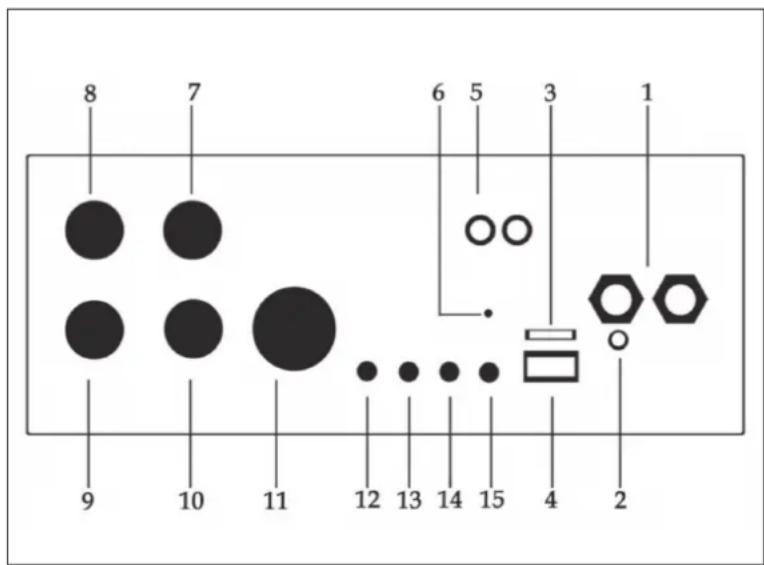
Connections and Controls
Front
1 Microphone input socket 1 & 2
2 3.5mm Aux-in socket
3 TF card socket
4 USB socket
5 RCA Aux-in socket
6 Power indicator
7 Music bass control
8 Music treble control
9 Microphone echo control
10 Microphone volume control
11 Music volume control
12 Mode (USB TF AUX RCA input)
13 Pre music/ long press fast-forward
14 Next music/ long press fast reverse
15 Play / Pause / Long press repeat one
Rear
1 Speaker music output sockets
2 Power cable
3 Power switch

Disposal and Declaration of Conformity
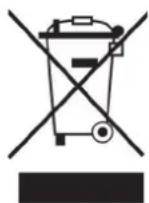
According to the European waste regulation 2002/96/EG this symbol on the product or on its packaging indicates that this product may not be treated as household waste. Instead it should be taken to the appropriate collection point for the recycling of electrical and electronic equipment. By ensuring this product is disposed of correctly, you will help prevent potential negative consequences for the environment and human health, which could otherwise be caused by inappropriate waste handling of this product. For more detailed information about recycling of this product, please contact your local council or your household waste disposal service.
Producer: Chal-Tec GmbH, Wallstraße 16, 10179 Berlin, Germany.

This product is conform to the following European Directives:
2014/30/EU (EMC)
2014/35/EU (LVD)
2011/65/EU (RoHS)
Chère cliente, cher client,

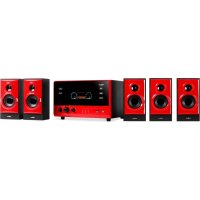


Brand : OneConcept
Model : BSX12A
Category : Loudspeaker