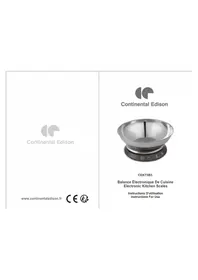
CEKT5B3 - Scale CONTINENTAL EDISON - Free user manual and instructions
Find the device manual for free CEKT5B3 CONTINENTAL EDISON in PDF.


| Product type | Electronic kitchen scale |
| Brand | Continental Edison |
| Model | CEKT5B3 |
| Maximum capacity | 5000 g |
| Accuracy | 1 g (estimated) |
| Measurement units | g, lb:oz, ml, fl.oz |
| Power supply | 3 AAA batteries 1.5 V (not included) |
| Display | LED |
| Load cell | High precision |
| Main functions | Weighing, tare, zero, water/milk volume measurement, auto-off, low battery indicator, overload protection |
| Material | ABS plastic (estimated) |
| Dimensions | Approximately 20 x 15 x 3 cm (estimated) |
| Net weight | Approximately 300 g (estimated) |
| Care and cleaning | Clean with a damp cloth; do not immerse in water; do not use abrasive products |
| Safety | Do not exceed maximum capacity; replace batteries when 'Lo' is displayed; use on a flat surface |
| Usage | Domestic only, not commercial |
Frequently Asked Questions - CEKT5B3 CONTINENTAL EDISON
User questions about CEKT5B3 CONTINENTAL EDISON
0 question about this device. Answer the ones you know or ask your own.
Ask a new question about this device
Download the instructions for your Scale in PDF format for free! Find your manual CEKT5B3 - CONTINENTAL EDISON and take your electronic device back in hand. On this page are published all the documents necessary for the use of your device. CEKT5B3 by CONTINENTAL EDISON.
USER MANUAL CEKT5B3 CONTINENTAL EDISON
- With high precision load cell
- Water & milk volume measuring function.
- Battery power low and over loaded warning function.
- Zero & tare function.
- Auto off function
TO INSTALL OR REPLACE BATTERY
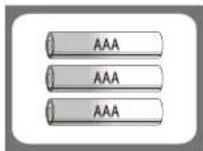
3 x 1.5V AAA batteries (excluded)
Open the battery cover.Install new batteries by
putting one side of the battery down first and
pressing down the other side.
(Pleases observe the polarity)
LED INCONS INDICATION
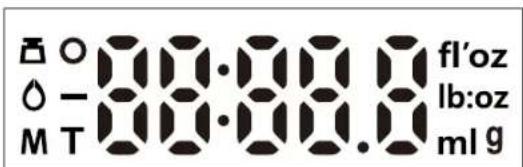
LED display differs from one to another, so the above picture is indicative only.
Weightmode
Water mode
M : Milk mode
Zero Weight
T: Tare Weight
Negative Value
lb:oz :Weight unit:Weighnt Volume unit
9
f'oz :Volume unit
■ BUTTONS FUNCTION
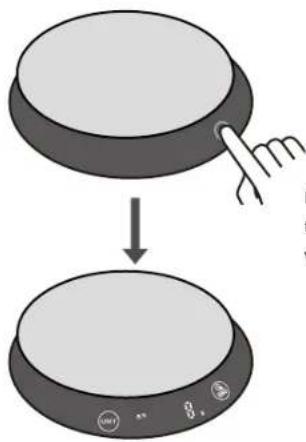
Press the circle button to trun on the scale. Once available, button would be lighted up and flicker.

Button in power off status
Press button to turn on

Button in power on status
Long press to tum off / Zero button

Mode conversion / Unit conversion
- Press the UNIT button to convert the mode and unit circularly
- Long press switch button to turn off or auto power-off after a few seconds
Note: The unit system of scale depends on scale destination or the requirement of distributor.
WEIGHING
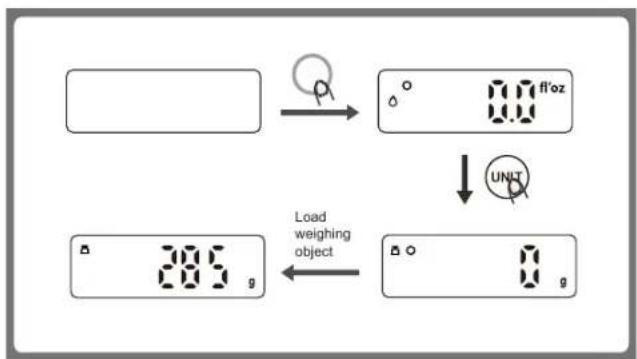
- Place the scale on a solid and flat surface.
- Place bowl (if any) on the scale.
- Press button to tum on the scale
- Start weighing when LED shows "0". Press (UNIT) button to convert to weighing mode.
- Load weighing object on scale(or bowl) to start weighing. LED will show the weight reading.
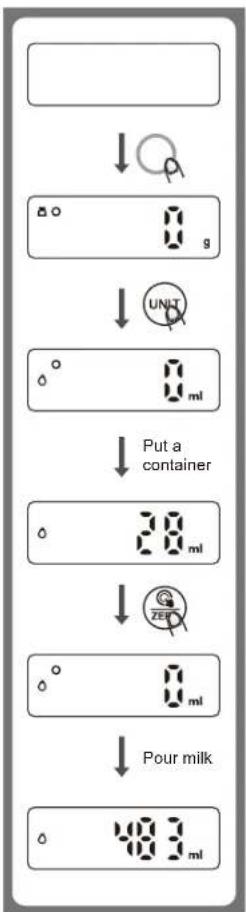
VOLUME MEASURING
- Place the scale on a solid and flat surface.
- Press button to turn on.
- Press (M) button to convert the mode to water or milk volume mode when LED shows "0".
- Put a container onto the scale platform, LED shows the weight of the container.
- Press button for Zero or Tare.
- Pour liquid (water or milk) into the container, LED shows the volume of the liquid.
ZERO & TARE FUNCTION
To weigh different loads consecutively without removing loads from the scale. Put first Load on the scale, get weight reading. Press ZEBO button to reset the LED reading to "0" before adding next load. You can repeat this operation.
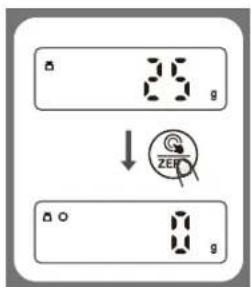
Condition 1: "ZERO" function
When total sum of all loads on scale
≤4% of scale's max.weight capacity:
LED will show Og each time is pressed.
Og and meanwhile an icon o on the LED mean ZERO function is activated. Max.weight capacity remains unchanged.
(For example:
When capacity is 5000g, 4% is 200g;
When capacity is 3000g, 4% is 120g)
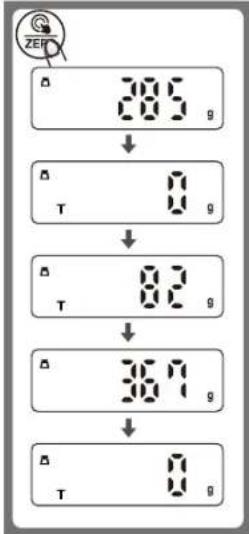
Condition 2: "TARE" function
When total sum of all loads on scale
4% of scale's max.weight capacity:
LED will show Og each time is pressed
Og and meanwhile an icon T on the LED mean TARE function is activated. Max.Weight capacity is reduced by total weight of all loads.
(For example:
When capacity is 5000g, 4% is 200g; When capacity is 3000g, 4% is 120g)
Under this condition:
By pressing , you can see the total weight of all loads on the scale. If you want to weigh more loads, just press to reset LED reading to '0' again.
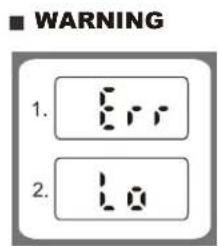
- OVER LOADING WARNING
When LED shows Err, it is over loaded (Max capacity is shown on product), please take off the object to prevent damage to the scale.
- LOW POWER WARNING
When LED shows Lo, battery power is low, please change new battery(ies).
ADVICE FOR USE & CARE
- Clean the scale with slightly damp cloth. DO NOT immerse the scale in water or use chemical/corrosive cleaner. Keep the scale in cool dry place.
- All plastics parts should be cleaned immediately after contact with fats, spices, vinegar and strongly flavored/colored foods. (Avoid contact with acids citrus juice.)
- Always use the scale on a solid, flat surface, keep the scale unmoved when weighing.
- This product is precision instrument, please handle with care; Do not strike, shake or drop the scale.
- Keep away from high temperature, do not strip the scale arbitrarily.
- If fail to turn on, please check whether battery(ies) are installed or battery power is low.
- Don't abandon as family garbage, please send this scale to electronic equipment recycle station.
- Designed for family use only, not for commercial use.
This marking indicates that this product should not be disposed with other household wastes throughout the EU.
To prevent possible harm to the environment or human health from uncontrolled waste disposal, recycle it responsibly to promote the sustainable reuse of material resources.
To return your used device, please use the return and collection systems or contact the retailer where the product was purchased.
They can take this product for environmental safe recycling.
CONTINENTAL EDISON
120-126 Quai de Bacalan
CS11584
33000 Bordeaux
IMPORTE PAR :
A.M.C.
Brand : CONTINENTAL EDISON
Model : CEKT5B3
Category : Scale