Solo IndoorCam C22 - Webcam eufy - Free user manual and instructions
Find the device manual for free Solo IndoorCam C22 eufy in PDF.



| Product Type | Connected Indoor Camera |
| Brand | Eufy |
| Model | Solo IndoorCam C22 (T8401) |
| Video Resolution | 1080p Full HD |
| Viewing Angle | 110° (diagonal) |
| Night Vision | Infrared (up to 8 m) |
| Audio | Built-in microphone and speaker (two-way audio) |
| Connectivity | Wi-Fi 2.4 GHz (802.11 b/g/n) |
| Power | USB adapter 5V / 1A (included) |
| Storage | microSD card (up to 128 GB, not included) or cloud (optional subscription) |
| Motion Detection | Yes, with push notifications |
| Sound Detection | Yes, with alerts |
| Mounting | On table, wall, or ceiling (mount and screws included) |
| Dimensions (W x D x H) | Approx. 6 x 6 x 10 cm |
| Weight | Approx. 200 g |
| Protection Rating | Indoor use only |
| Voice Assistant | Compatible with Amazon Alexa and Google Assistant |
| Operating Temperature | 0°C to 40°C |
| Certifications | FCC, IC, CE |
| Box Contents | Camera, mounting bracket, USB cable, USB adapter, mounting screws, user manual |
Frequently Asked Questions - Solo IndoorCam C22 eufy
Solid blue: normal operation.
Slow blinking red: disconnected from internet.
Fast blinking red: motion or sound detected.
Solid red: live stream or recording in progress.
Solid blue-purple: initializing.
Alternating blue and red: firmware update.
User questions about Solo IndoorCam C22 eufy
0 question about this device. Answer the ones you know or ask your own.
Ask a new question about this device
Download the instructions for your Webcam in PDF format for free! Find your manual Solo IndoorCam C22 - eufy and take your electronic device back in hand. On this page are published all the documents necessary for the use of your device. Solo IndoorCam C22 by eufy.
USER MANUAL Solo IndoorCam C22 eufy
Anker Innovations Limited. All rights reserved, eufy Security and eufy Security Logo are trademarks of Anker Innovations Limited, registered in the United States and other countries. All other trademarks are the property of their respective owners.
51005002530 V01

natural_image
Line drawing of a digital camera with a square head and stand (no text or symbols)
English
Deutsch
Español
Français
Italiano
Table of Contents
What's Included 02
Product Overview 03
Setting up the System 04
Mounting the Indoor Cam 05
Powering on the Indoor Cam 09
Notice
10
English 01
WHAT'S INCLUDED
Indoor Cam 1080p
Model: T8401
Mounting Plate
USB Cable
USB Adapter
Mounting Screw Pack
Quick Start Guide
02 English English
PRODUCT OVERVIEW
Indoor Cam 1080p
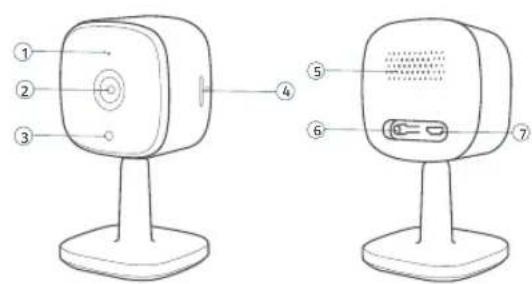
① Microphone
② Lens
③ Status LED
④ SD card slot
⑤ Speaker
⑥ SYNC button
⑦ Power input
03
SETTING UP THE SYSTEM
I. Download the eufy Security app from the App Store (iOS devices) or Google Play (Android devices).


- Sign up a eufy Security account. Go to the app homepage. Tap Add Device, and add the Indoor Cam to your system.
- Follow the on-screen instructions to complete the setup.
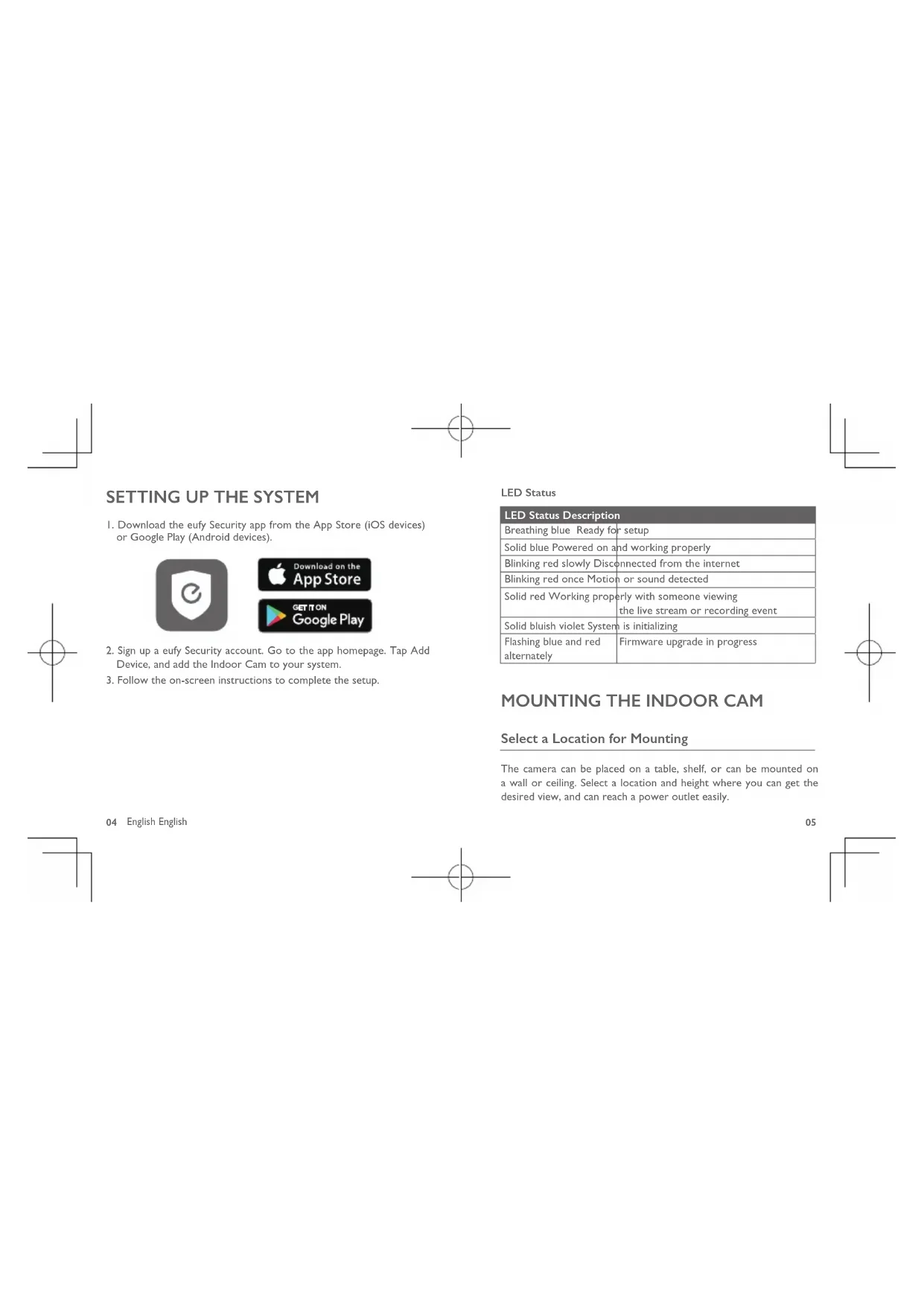
LED Status
| LED Status Description | |
| Breathing blue Ready for setup | |
| Solid blue Powered on and working properly | |
| Blinking red slowly Disconnected from the internet | |
| Blinking red once Motion or sound detected | |
| Solid red Working properly with someone viewingthe live stream or recording event | |
| Solid bluish violet System is initializing | |
| Flashing blue and redalternately | Firmware upgrade in progress |
MOUNTING THE INDOOR CAM
Select a Location for Mounting
The camera can be placed on a table, shelf, or can be mounted on a wall or ceiling. Select a location and height where you can get the desired view, and can reach a power outlet easily.
04 English English
05
natural_image
3D rendering of a digital camera with two measurement annotations (20CM) on a plain background, no text or symbols present.
- Disconnect the Indoor Cam from the power outlet before mounting.
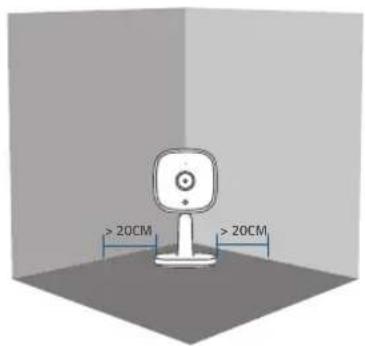
- Keep the Indoor Cam at least 0.7 ft / 20 cm away from walls or anything that may obstruct the view. Do this to avoid infrared reflection which can have a negative impact on the night vision performance.
Mount the Indoor Cam
The Indoor Cam can be mounted on the wall or ceiling.
To mount the Indoor Cam on the wall:
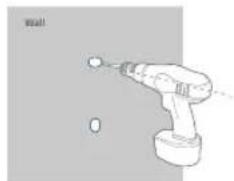
- Align the positioning card and then mark the points at which drilling will be required.
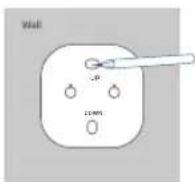
- Drill holes with a 15/64" (6 mm) drill bit.
natural_image
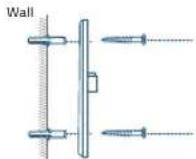
Line drawing of a handheld electric drill with a ball on top (no text or symbols)- Align the holes on the mounting plate with those on the wall, matching the direction as UP and Down indicates. Insert the anchors into the holes; anchors are necessary for walls that are made out of hard materials such as concrete, brick, or stucco. Fix the screws with a Phillips-head screwdriver to fasten the mounting plate onto the wall.
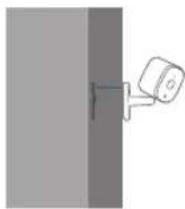
- Align the Indoor Cam's mounting slot with the mounting plate, and then push the camera down until it clicks into place.
08 English English
To mount the Indoor Cam on the ceiling, follow the steps 1-4 to secure the camera base onto the mounting plate.
POWERING ON THE INDOOR CAM
Connect the Indoor Cam to the power outlet using the provided USB cable and USB adapter. After powered on, the Indoor Cam will be connected to the system. When it is successfully connected, the status LED will turn solid blue.
Rotate the Indoor Cam to adjust the view by checking the live streams in the eufy Security app. You are all set to use the Indoor Cam.
For troubleshooting, check Help on the eufy Security app. Refer to the app page for LED indicator status.
09
NOTICE
FCC Statement
This device complies with Part 15 of the FCC Rules. Operation is subject to the following two conditions: (1) this device may not cause harmful interference, and (2) this device must accept any interference received, including interference that may cause undesired operation.
Warning: Changes or modifications not expressly approved by the party responsible for compliance could void the user's authority to operate the equipment.
Note: This equipment has been tested and found to comply with the limits for a Class B digital device, pursuant to Part 15 of the FCC Rules. These limits are designed to provide reasonable protection against harmful interference in a residential installation.
This equipment generates uses and can radiate radio frequency energy and, if not installed and used in accordance with the instructions, may cause harmful interference to radio communications. However, there is no guarantee that interference will not occur in a particular installation. If this equipment does cause harmful interference to radio or television reception, which can be determined by turning the equipment off and on, the user is encouraged to try to correct the interference by one or more of the following measures: (1) Reorient or relocate the receiving antenna. (2) Increase the separation between the equipment and receiver. (3) Connect the equipment into an outlet on a circuit different from that to which the receiver is connected. (4) Consult the dealer or an experienced radio/ TV technician for help.
FCC Radio Frequency Exposure Statement
The device has been evaluated to meet general RF exposure requirements. The device can be used in fixed/mobile exposure condition. The min separation distance is 20cm. Notice: Shielded cables
All connections to other computing devices must be made using shielded cables to maintain compliance with FCC regulations.
10 English English
The following importer is the responsible party
Company Name: POWER MOBILE LIFE, LLC
Address: 400 108th Ave NE Ste 400, Bellevue, WA 98004-5541
Telephone: 1-800-988-7973

This product complies with the radio interference requirements of the European Community.
Declaration of Conformity
Hereby, Anker Innovations Limited declares that this device is in compliance with the essential requirements and other relevant provisions of Directive 2014/53/EU. For the declaration of conformity, visit the Web site: https://www.eufylife.com/.
This product can be used across EU member states.
The adapter shall be installed near the equipment and shall be easily accessible.
Do not use the Device in the environment at too high or too low temperature, never expose the Device under strong sunshine or too wet environment.
The suitable temperature for T8400 and accessories is 0°C-40°C.
When charging, please place the device in an environment that has a normal room temperature and good ventilation.
It is recommended to charge the device in an environment with a temperature that ranges from 5^ C– 25^ C.
Please ensure to use only the charger offered by the manufacturer. Using unauthorized charger may cause danger and violate the authorization of the device and the guarantee article.
This charger is for indoor use only.
The charger type is TEKA006-0501000EU, output voltage/current is 5Vdc/1A. The plug considered as disconnect device of adapter.
RF exposure information: The Maximum Permissible Exposure (MPE) level has been calculated based on a distance of d = 20 cm between the device and the human body. To maintain compliance with RF exposure requirement, use product that maintains a 20cm distance between the device and human body.
Wi-Fi Operating Frequency Range:2412\~2472MHz; Wi-Fi Max Output Power: 17.20dBm (EIRP)
Bluetooth Operating Frequency Range: 2402\~2480MHz; Bluetooth Max Output Power: -4.01dBm (EIRP)
Anker Technology (UK) Ltd | Suite B, Fairgate House, 205 Kings Road, Tyseley, Birmingham, B11 2AA, United Kingdom

This product is designed and manufactured with high quality materials and components, which can be recycled and reused.

This symbol means the product must not be discarded as household waste, and should be delivered to an appropriate collection facility for recycling. Proper disposal and recycling helps protect natural resources, human health and the environment. For more information on disposal and recycling of this product, contact your local municipality, disposal service, or the shop where you bought this product.
12 English English
IC Statement
This device complies with Industry Canada licence-exempt RSS standard(s). Operation is subject to the following two conditions:
(1) this device may not cause interference, and
(2) this device must accept any interference, including interference that may cause undesired operation of the device."
This Class B digital apparatus complies with Canadian ICES-003.
When using the product, maintain a distance of 20cm from the body to ensure compliance with RF exposure requirements.
natural_image
3D rendering of a smart speaker with two measurement annotations (>20CM) on a plain background (no text or symbols on the device itself)
natural_image
Illustration of a handheld electric drill with a headlamp and screw, against a plain gray background (no text or symbols)Deutsch
natural_image
3D rendering of a camera with two measurement annotations showing >20CM (no text or symbols on the device itself)Español

natural_image
Illustration of a handheld electric drill with a ball and two holes, labeled 'Wall' (no text or symbols on the drill itself)natural_image
Technical diagram of a wall-mounted sensor or connector assembly with two screw-like components (no text or symbols)Español
natural_image
3D rendering of a digital camera with two measurement annotations (20CM) on a plain background, no text or symbols present.
natural_image
Line drawing of a handheld electric drill with a head and screw, no text or symbols presentFrançais 3938
natural_image
3D rendering of a camera with two measurement annotations (>20CM) on a plain background (no text or symbols on the device itself)Italiano
Italiano 4746

natural_image
Line drawing of a hand holding a tool with a wall marker, no text or symbols present12-month Limited Warranty
12 Monate eingeschränkte Garantie | Garantía limitada de 12 meses
Garantie limitée de 12 mois | Garanzia limitata di 12 mesi
- Call Us
Rufen Sie uns an | Contacto por teléfono | Par téléphone |
United States +1 (800) 988 7973 Mon-Fri 9AM-5PM (PT)
United Kingdom +44 (0) 1604 936 200 Mon-Fri 6AM-11AM (GMT)
Germany +49 (0) 69 9579 7960 Mon-Fri 6:00-11:00
- Email Us
support@cufylife.com

@EufyOfficial

@EufyOfficial

eufyofficial
Anker Innovations Limited
Room 1318-19, Hollywood Plaza, 610 Nathan
Road,Mongkok,Kowloon,Hong Kong