 ManualGo.com
CT-27SC14 - Television PANASONIC - Free user manual and instructions
Find the device manual for free CT-27SC14 PANASONIC in PDF.

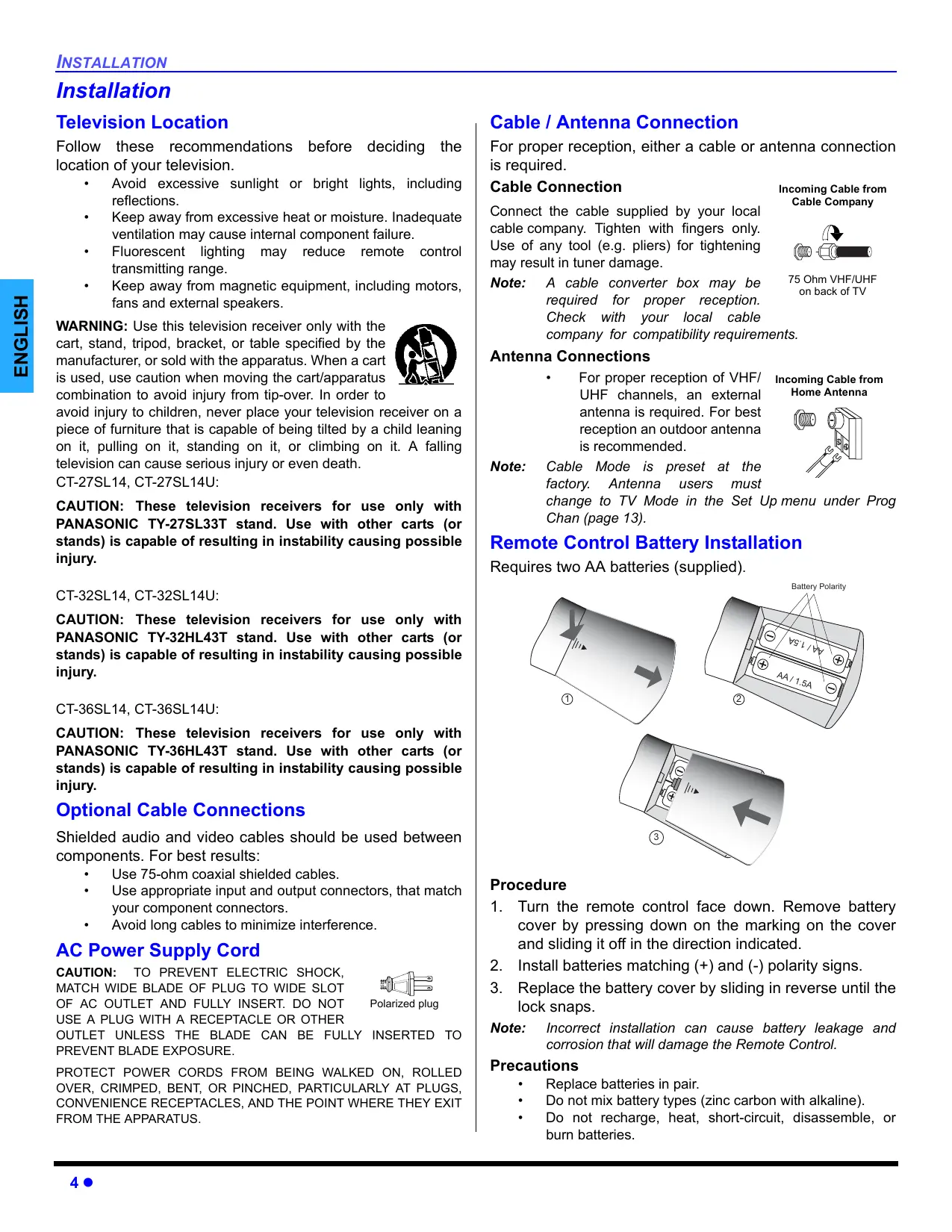


Download the instructions for your Television in PDF format for free! Find your manual CT-27SC14 - PANASONIC and take your electronic device back in hand. On this page are published all the documents necessary for the use of your device. CT-27SC14 by PANASONIC.
USER MANUAL CT-27SC14 PANASONIC
CT-F2124 CT-F2124L CT-F2134 CT-F2134L CT-F2524 CT-F2524L CT-F2924 CT-F2924L CT-27SC14 CT-32SC14 WARNING
RISK OF ELECTRIC SHOCK
DO NOT OPEN
WARNING:
ENGLISH The lightning flash with arrow head within a triangle is intended to tell the user that parts inside the product are a risk of electric shock to persons. The exclamation point within a triangle is intended to tell the user that important operating and servicing instructions are in the papers with the appliance. The Class II insulation symbol (square within a square) indicates that this product has been evaluated and tested to comply with Class II insulation requirements.
WARNING: TO REDUCE THE RISK OF FIRE OR ELECTRIC SHOCK, DO NOT EXPOSE THIS
APPARATUS TO RAIN OR MOISTURE AND OBJECTS FILLED WITH LIQUIDS, SUCH AS VASES, SHOULD NOT BE PLACED ON THIS APPARATUS. Read these instructions. Keep these instructions. Heed all warnings. Follow all instructions. Do not use this apparatus near water. Clean only with dry cloth. Do not block any ventilation openings. Install in accordance with the manufacturer’s instructions. Do not install near any heat sources such as radiators, heat registers, stoves, or other apparatus (including amplifiers) that produce heat. Do not defeat the safety purpose of the polarized or grounding type plug. A polarized plug has two blades with one wider than the other. A grounding type plug has two blades and a third grounding prong. The wide blade or the third prong are provided for your safety. If the provided plug does not fit into your outlet, consult an electrician for replacement of the obsolete outlet. Protect the power cord from being walked on or pinched particularly at plugs, convenience receptacles, and the point where they exit from the apparatus. Only use attachments/accessories specified by the manufacturer. Use only with the cart, stand, tripod, bracket or table specified by the manufacturer, or sold with the apparatus. When a cart is used, use caution when moving the cart/apparatus combination to avoid injury from tip-over. Unplug this apparatus during lighting storms or when unused for long periods of time. Refer all servicing to qualified service personnel. Servicing is required when the apparatus has been damaged in any way, such as power-supply cord or plug is damaged, liquid has been spilled or objects have fallen into the apparatus, the apparatus has been exposed to rain or moisture, does not operate normally, or has been dropped. Read these instructions completely before operating television. Contents are subject to change without notice or obligation. Copyright 2004 by Matsushita Electric Corporation of America. All rights reserved. Unauthorized copying and distribution is a violation of law. IMPORTANT INFORMATION Important Information FCC CAUTION: ANY CHANGES OR MODIFICATIONS TO THIS TV RECEIVER NOT EXPRESSLY APPROVED BY MATSUSHITA ELECTRIC CORPORATION OF AMERICA COULD CAUSE HARMFUL INTERFERENCE, WHICH WOULD VOID THE USER’S AUTHORITY TO OPERATE THIS EQUIPMENT. THIS PRODUCT UTILIZES CATHODE RAY TUBES (CRT) AND OTHER COMPONENTS THAT CONTAIN LEAD. DISPOSAL OF THESE MATERIALS MAY BE REGULATED IN YOUR COMMUNITY DUE TO ENVIRONMENTAL
CONSIDERATIONS. FOR DISPOSAL OR RECYCLING INFORMATION
PLEASE CONTACT YOUR LOCAL AUTHORITIES, OR THE ELECTRONICS
INDUSTRIES ALLIANCE: <HTTP://WWW.EIAE.ORG.>
ENGLISH ENVIRONMENTAL NOTICE: The Energy Star label, a symbol for energy efficiency, was created by the U.S. Environmental Protection Agency (EPA) and the U.S. Department of Energy (DOE) to help customers identify products that can save them money and protect the environment by saving energy. Energy Star compliant products generally consume less energy than similar standard products. High Definition Sound Manufactured under license from BBE Sound, Inc. Licensed by BBE Sound, Inc. under USP4638258, 5510752 and 5736897. BBE and BBE symbol are registered trademarks of BBE Sound, Inc. BBE High Definition Sound restores clarity and presence for better speech intelligibility and music realism. Important Information Regarding The Use Of Video Games, Computers, Or Other Fixed Image Displays
WARNING: The marking or retained image on the picture tube resulting from viewing fixed image is
not an operating defect and as such is not covered by Warranty. This television is designed to display constantly moving images on the screen. Continuous viewing of stationary images such as letterbox pictures on standard screen TVs (with top/bottom bars), nonexpanded standard (4:3) pictures on wide screen TVs (with side bars shown on each side of an image), stock market report bars (ticker running at the bottom of the screen), video game patterns, fixed scoreboards, bright station logos, on-line (Internet) or repetitive computer style patterns should be limited. The extended use of fixed image program material can cause permanent picture tube damage, shown as a “shadow image” viewable on normal programs. This type of irreversible picture tube deterioration can be limited by performing the following steps:
Do not display the fixed image for extended periods of time. Turn the power off when not in use.
TABLE OF CONTENTS
- Table of Contents Congratulations p. 3
- Remote Control Operation The warranty and service center information is located in the back of this manual. CONGRATULATIONS Congratulations Use a mild soap solution or window cleaner and a clean cloth. DO NOT USE ABRASIVE CLEANERS. Avoid excessive moisture and wipe dry. p. 8
Warning: Do not spray any type of cleaning fluid directly on the
screen. Specifications Specifications are subject to change without notice or obligation. Power Source CT-20SL14 CT-20SL14T CT-24SL14 CT-24SL14U CT-27SL14 CT-27SL14U CT-27SC14 CT-27SC14U CT-27SC14M CT-27SC14MU CT-32SL14 CT-32SL14U CT-32SC14 CT-32SC14U CT-36SL14 CT-36SL14U
Cabinet and Remote Control For cabinets and remote control, use a soft cloth dampened with water or a mild detergent solution. Avoid excessive moisture and wipe dry. Do not use benzene, thinner or other petroleum based products. Screen (Turn TV Off)
3 (2/1) 3 (2/1) 3 (2/1) Audio Output Jacks 75 Ohm, Phono Jack Type S-Video (Y-C) Connector Care and Cleaning
The model and serial number of this product are located on the back of the TV. You should note the model and serial number in the space provided and retain as a permanent record of your purchase. This will aid in identification in the event of theft or loss. Product registration for U.S. customers is available at: www.prodreg.com/panasonic. CT-27SL14 Customer Record CT-27SC14 MODELS CT-24SL14 Feature Chart CT-20SL14 Your new TV Monitor/Receiver features a solid state chassis that is designed to give you many years of enjoyment. It was thoroughly tested and tuned at the factory for best performance. INSTALLATION Installation Television Location Cable / Antenna Connection Follow these recommendations before deciding the location of your television. For proper reception, either a cable or antenna connection is required. Cable Connection Incoming Cable from
WARNING: Use this television receiver only with the
cart, stand, tripod, bracket, or table specified by the manufacturer, or sold with the apparatus. When a cart is used, use caution when moving the cart/apparatus combination to avoid injury from tip-over. In order to avoid injury to children, never place your television receiver on a piece of furniture that is capable of being tilted by a child leaning on it, pulling on it, standing on it, or climbing on it. A falling television can cause serious injury or even death. CT-27SL14, CT-27SL14U: CAUTION: These television receivers for use only with PANASONIC TY-27SL33T stand. Use with other carts (or stands) is capable of resulting in instability causing possible injury. Cable Company Connect the cable supplied by your local cable company. Tighten with fingers only. Use of any tool (e.g. pliers) for tightening may result in tuner damage. 75 Ohm VHF/UHF Note: A cable converter box may be on back of TV required for proper reception. Check with your local cable company for compatibility requirements. Antenna Connections
Note: For proper reception of VHF/ Incoming Cable from Home Antenna UHF channels, an external antenna is required. For best reception an outdoor antenna is recommended. Cable Mode is preset at the factory. Antenna users must change to TV Mode in the Set Up menu under Prog Chan (page 13). Remote Control Battery Installation Requires two AA batteries (supplied). Battery Polarity CT-32SL14, CT-32SL14U: CAUTION: These television receivers for use only with PANASONIC TY-32HL43T stand. Use with other carts (or stands) is capable of resulting in instability causing possible injury.
CT-36SL14, CT-36SL14U: CAUTION: These television receivers for use only with PANASONIC TY-36HL43T stand. Use with other carts (or stands) is capable of resulting in instability causing possible injury.
/ 1. Optional Cable Connections
Shielded audio and video cables should be used between components. For best results:
Use 75-ohm coaxial shielded cables. Use appropriate input and output connectors, that match your component connectors. Avoid long cables to minimize interference. AC Power Supply Cord CAUTION: TO PREVENT ELECTRIC SHOCK, MATCH WIDE BLADE OF PLUG TO WIDE SLOT Polarized plug OF AC OUTLET AND FULLY INSERT. DO NOT USE A PLUG WITH A RECEPTACLE OR OTHER OUTLET UNLESS THE BLADE CAN BE FULLY INSERTED TO PREVENT BLADE EXPOSURE. PROTECT POWER CORDS FROM BEING WALKED ON, ROLLED OVER, CRIMPED, BENT, OR PINCHED, PARTICULARLY AT PLUGS, CONVENIENCE RECEPTACLES, AND THE POINT WHERE THEY EXIT FROM THE APPARATUS.
Avoid excessive sunlight or bright lights, including reflections. Keep away from excessive heat or moisture. Inadequate ventilation may cause internal component failure. Fluorescent lighting may reduce remote control transmitting range. Keep away from magnetic equipment, including motors, fans and external speakers.
1. Turn the remote control face down. Remove battery
cover by pressing down on the marking on the cover and sliding it off in the direction indicated.
2. Install batteries matching (+) and (-) polarity signs.
3. Replace the battery cover by sliding in reverse until the
lock snaps. Note: Incorrect installation can cause battery leakage and corrosion that will damage the Remote Control. Precautions
Replace batteries in pair. Do not mix battery types (zinc carbon with alkaline). Do not recharge, heat, short-circuit, disassemble, or burn batteries. Initial Set Up Menu Menus may vary, depending on model. Please refer to the FEATURE CHART on page 3 for your model capabilities. For your convenience, Auto Set up menu will be displayed on screen when the set is turned on for the first time. If needed, follow the menus and procedures for setting up the features. IDIOMA/LANGUE GEOMAGNETIC CORRECTION (models CT-32SC14, CT-32SL14 and CT-36SL14 only) This feature is used to adjust discoloration of the picture due to the earth’s magnetic field in the area. Procedure
To change menu language to ENGLISH, SPANISH or FRENCH. Press VOL to display adjustment menu. Press VOL or VOL to adjust discoloration in picture. FIRST PLEASE
CONNECT THE ANTENNA
GEOMAGNETIC CORRECTION
AUTO SET UP
IDIOMA/LANGUE ENGLISH MODE Press VOL to select English, Spanish or French. CABLE AUTO PROGRAM GEOMAGNETIC CORRECTION TILT CORRECTION FIRST PLEASE
CONNECT THE ANTENNA
ENGLISH MODE CABLE AUTO PROGRAM GEOMAGNETIC CORRECTION TILT CORRECTION
This feature is used to adjust the tilt of the picture due to earth’s magnetic field in the area. To select TV (antenna) or CABLE mode depending on the signal source. Procedure Procedure
to select TV or CABLE. Press VOL to display adjustment menu. Press VOL or VOL to adjust picture tilt. FIRST PLEASE
CONNECT THE ANTENNA
AUTO SET UP
PRESS ACTION TO EXIT
PRESS ACTION TO EXIT
AUTO PROGRAM GEOMAGNETIC CORRECTION TILT CORRECTION IDIOMA/LANGUE ENGLISH MODE
CABLE AUTO PROGRAM GEOMAGNETIC CORRECTION TILT CORRECTION TILT CORRECTION
0- - - - - - - - - l- - - - - - - - -
PRESS ACTION TO EXIT
PRESS ACTION TO EXIT
AUTO PROGRAM To automatically program all available channels received through the RF input. Procedure
Press VOL to start Auto Programming. FIRST PLEASE
CONNECT THE ANTENNA
AUTO SET UP
IDIOMA/LANGUE ENGLISH MODE CABLE AUTO PROGRAM GEOMAGNETIC CORRECTION TILT CORRECTION
PRESS ACTION TO EXIT
OPTIONAL EQUIPMENT CONNECTIONS
Optional Equipment Connections Note: The remote control must be programmed with supplied codes to operate the optional equipment. VCR Connection VCRs, video disc players, video game equipment, and DSS equipment can also be connected to the video inputs. See the optional equipment manual for more information. ENGLISH Note: VIDEO 1 input is a dual-purpose input. It is primarily intended for connection with 480i devices such as a DVD player using the Y PB PR component video jacks and Audio L & R jacks. However, it can also be connected to conventional composite video sources such as a VCR, using only the Y/Video jack and Audio L & R jacks. The on-screen label will display Component or Video 1 depending on which source is connected. Procedure
Note: Connect equipment to front Audio/Video input jacks. Press TV/VIDEO button to select desired input mode. Operate optional equipment as instructed in equipment manual. Front A/V jacks diagram may vary, depending on model. Please refer to the FEATURE CHART on page 3 for your model’s capabilities. Cable Box Connection Follow this diagram when connecting your television to a Cable Box. CABLE BOX
TERMINALS ON BACK OF TELEVISION
ANT IN ANT OUT TO AUDIO AMP VCR
TERMINALS ON BACK OF TELEVISION
STOP INPUT 1 ANT R-AUDIO-L
CABLES NOT INCLUDED
ANT IN Procedure Use either the S-Video or Video Connection
HPJ VIDEO 3 L AUDIO IN R
CABLES NOT INCLUDED
FRONT A/V JACKS
for 1/8" headphone plug Note: Rear A/V jacks diagram may vary, depending on model. Please refer to the FEATURE CHART on page 3 for your model’s capabilities. Procedure
Connect equipment as shown to front or rear Audio/ Video input jacks. Select the Video mode by pressing TV/VIDEO button. Operate optional equipment as instructed in equipment manual.
Tune the television to channel 3 or 4 depending on the RF out setting of the cable box. Using the cable box, tune to the premium cable channel you want to view. Digital TV - Set-Top Box (DTV-STB) or DVD Player Connection Use this diagram to connect the Panasonic DTV-STB (Digital TV-Set-Top Box) to the back of your TV. Note: Rear A/V jacks diagram may vary, depending on model. Please refer to the FEATURE CHART on page 3 for your model’s capabilities.
CABLES NOT SUPPLIED
Do not connect S-VIDEO and VIDEO signal to INPUT 2 at the same time. If both are connected, signal interference will result. Use either the S-VIDEO or the Video signal only (models CT20SL14, CT-24SL14, CT-27SC14 and CT-27SL14 only). Front Control Panel R-AUDIO-L The front control panel can be used to access menus and switch video mode when the remote control is not available.
INPUT 1 TO AUDIO AMP R-AUDIO-L Front panel for CT-32SL14/CT-36SL14 POWER VOL
VOL Notes: TV / VIDEO
ON/OFF INDICATOR
Note: Model CT-27SC14 does not have ON/OFF Indicator. HPJ INPUT 3
Front panel for CT-27SC14/CT-32SC14 (may vary depending on model) Note:
The ON/OFF indicator LED (red) will light up (red) when the set is on. There are three video jacks, Y, PB, and PR. Separate component color inputs provide luminance and color separation. Use the L (left) and R (right) audio inputs. Select DTV-STB to 480i output mode. TV set can receive 480i signal only. Picture distortion will result if any other type of format is selected (i.e. 480p, 720p or 1080i). Connect to an external audio amplifier input for listening to a stereo system. Note: TO AUDIO AMP terminals cannot be connected directly to external speakers.
TERMINALS ON BACK OF TV
INPUT 1 INPUT 2 S-VIDEO (models CT-32SC14, CT-32SL14 and CT-36SL14 only.) To use the television audio and video with optional equipment. Connect the PROG OUT and TO AUDIO AMP connections on the back of the television. Notes: When a component input video signal is connected to VIDEO 1(Y, PB, PR) terminals, and the TV main picture is Component, the Program output video will be luminance signal (no color). When S-VIDEO input signal is used for TV main picture, the Program output video signal will be luminance signal (no color).
CABLES NOT SUPPLIED
Note: Rear A/V jacks diagram may vary, depending on model. Please refer to the FEATURE CHART on page 3 for your model’s capabilities. Audio Adjustments
Note: Select TV SPEAKERS ON from AUDIO menu. Set amplifier volume to minimum. Adjust television volume to desired level. Adjust amplifier volume to match the television. Select SPEAKERS OFF & VARIABLE AUDIO OUT from AUDIO menu. Volume, mute, bass, treble and balance are now controlled through the television. Select SPEAKERS OFF & FIXED AUDIO OUT to control audio functions through the external amplifier.
TERMINALS ON BACK OF TV
INPUT 1 INPUT 2 S-VIDEO
CABLES NOT SUPPLIED
Note: Rear A/V jacks diagram may vary, depending on model. Please refer to the FEATURE CHART on page 3 for your model’s capabilities. Procedure
Connect optional equipment to PROG OUT and TO AUDIO AMP R/L. PROG OUT terminal display is the same as on-screen display. See optional equipment manual for further instructions for recording and monitoring.
ENGLISH Amplifier Connection (TO AUDIO AMP)
OPTIONAL EQUIPMENT CONNECTIONS
Program Out Connection (PROG OUT) Remote Control Operation POWER SAP POWER Press to access second audio program. Press to turn ON and OFF. DBS/C VCR
Press to adjust TV sound and navigate in menus. Press to select remote operation. ACTION
Press to access menus. MUTE Press to select next or previous channel and navigate in menus. Press to mute sound. Press to display and cancel CC (Closed Caption). RECALL TV/VIDEO Press to display time, channel, sleep timer, and other options. Press to select TV or Video mode. GUIDE MENU Press to access DBS menus. PROG Press to enter the minor number in a compound channel number (DBS mode only).
EUR7613Z6A
Press numeric keypad to select any channel. REW PLAY
R-TUNE PAUSE STOP REC Press to switch to previously viewed channel or video mode. TV/VCR
VCR /DBS CH
REMOTE CONTROL OPERATION
Operating Components with Remote Control Refer to page 10 for programming Remote Control procedure. Operating a VCR Program the remote control to use with the VCR. TO DO THIS... TO DO THIS...
VCR/DBS CH
Change Channels up/down Select a Channel PLAY Play Program Infomation
REC Record Back to previous channel RECALL R-TUNE REW Rewind the Tape Select next page up/down
VCR DBS CH
PAUSE Pause Exit menus TV/VCR
Change to TV or VCR Mode Display program Guide EXIT GUIDE RECALL On screen VCR Display Minor channel numbers Operating a CABLE BOX Program the remote control to use with Cable Box. TO DO THIS... PRESS Turn on/off Turn on/off
R-TUNE PROG Operating a DVD Program the remote control to use with DVD TO DO THIS... POWER
Back to previous channel MENU TV/VIDEO Menu Navigation Change Channels Up/Down POWER Select TV Input mode for VCR Select a Channel PRESS Turn on/off PRESS Turn on/off Operating a DBS Program the remote control to use with DBS. ENGLISH Note: Next/Previous Chapter DVD Display Skip Search Reverse Skip Search Fast Forward Play Open/Close Stop Still Slow +/- PRESS POWER
PLAY TV/VCR STOP PAUSE
VCR/DBS CH
REMOTE CONTROL OPERATION
Programming The Remote Control The Universal Remote Control can be programmed to operate many manufacturers’ components, using the component function buttons for VCR, DVD, CABLE or DBS. Follow the procedures for programming your Remote Control with or without a code for the component. ENGLISH Device VCR DBS/CBL DVD Note: Operates Default TV (Panasonic Only) Panasonic Code VCR (Preset) Panasonic Code Determine the manufacturer of the component and look in the table for the code (found on page 11). Procedure
Confirm that the external component is plugged in and operating. Turn the component off.
Note: ACTION and POWER together, for at least 5 seconds. After 5 seconds, the illuminated mode (component) buttons will begin to flash. Release the ACTION and POWER buttons. Press appropriate component button on the Remote Control VCR, DVD, CABLE or DBS. The component button will illuminate steadily and all others will go out. Enter the 3-digit component code using the Remote Control numeric keypad (0 ~ 9 buttons). The component button will blink twice. Press the Remote Control POWER to test the component. If the procedure was successful, the component will turn on and the component key will blink twice and then go out. If the component does not operate with the Remote Control, repeat steps 3 through 6 using another code (some brands have multiple codes). If an incorrect code is entered, or if the procedure takes longer than 30 seconds, the programming will fail. Programming Without A Code This procedure searches all codes and is called the “sequence method.”
Confirm that the external component is plugged in and on. Turn the component off.
ACTION and POWER together, for at least 5 seconds. After 5 seconds, the illuminated mode (component) buttons will begin to flash. Release the ACTION and POWER buttons. Press the appropriate component button on the Remote Control. The component button will illuminate steadily and all others will go out.
the step and set mode. Point the remote control towards the component. 10 z POWER button to set the remote control into
Press VOL (the mode key will blink three times), then button to test the component. Continue this process until the proper code is found. If the procedure was successful, the component will turn on. Note: Each time you press the VOL button, make sure that the component key blinks twice before pressing the POWER button.
Note: ACTION Once the device responds, press to store the code. The mode (component) button will blink twice. It may take many attempts before the correct code is found. If you miss a code, press VOL, then press the POWER button to test the component. Component Codes The Universal Remote Control is capable of operating many component brands after entering a code. Some components may not operate because the codes are not available due to limited memory. The Universal Remote Control does not control all features found in each model. Write the code numbers from tables in this space. This will serve as a reference if you need to program your Remote Control. VCR DBS CABLE DVD Codes For Cable Box Brand Brand Code ABC
Archer 225, 232 Cableview 205, 232 Citizen 205, 222 Code Dish Network (Echostar) 105, 115, 116 Echo Star
Express VU 105, 115 G.E.
G.I. (General Instrument)
Hitachi 103, 111, 112 HNS (Hughes)
Magnavox 101, 102 Panasonic
Philips 101, 102 Primestar
Proscan 106, 109, 110,
Philips 323, 324, 331 Curtis 212, 213 Pioneer
Diamond 224, 225, 232 Proscan General Instrument/ Jerrold Codes For DVD Brand Code 301, 346 Samsung
Scientific Atlanta 211, 212, 213 Samsung
Wards 306, 309, 335, 336,
Slmark Sprucer 205, 210 Sony
305, 310, 311, 339 Stargate 205, 232 Technics
306,344 Teleview 201, 205 Thomson
Unika 225, 232 Universal 222, 232 Videoway
Viewstar 229, 230 Zenith 200, 217 Icon Menu Navigation Press to display the Icons. ENGLISH EXIT Press to select desired icon. EXIT PICTURE PIC MODE Press to display selected Icon features. VIVID VIDEO ADJ. COLOR -- -- -- I -- -- -- OTHER ADJ. TINT -- -- -- I -- -- -- BRIGHTNESS -- -- -- I -- -- -- PICTURE SHARPNESS -- -- -- -- -- -- I -- -- -- I -- -- -NO NORMAL
PICTURE PIC MODE Press to select feature, then press VOL . COLOR -- -- -- I -- -- -- OTHER ADJ. TINT -- -- -- I -- -- -- to adjust or activate feature. BRIGHTNESS 32 -- -- -- I -- -- -- Press repeatedly to exit menus. NORMAL PICTURE 12 z Icon Menu Operation
Some menus may vary depending on model. Refer to page 12 for Icon Menu Navigation procedures. SET UP
CC MODE - Activates the onscreen Closed Caption feature by selecting one of the following modes.
IDIOMA/LANGUE MODE - Select IDIOMA/LANGUE to change menu language to ENGLISH, ESPAÑOL (Spanish) or FRANÇAIS (French).
Note: Note: Note: While highlighted, press VOL Spanish or French. to select English, IDIOMA/ LANGUE
OTHER ADJ. PROG CHAN (Program Channels) Note: Use Remote numeric keypad to enter channel numbers in Manual Program sub menu. PROG CHAN MODE AUTO PROGRAM MANUAL PROGRAM CABLE
to select or activate GEOMAGNETIC CORR TILT CORRECTION OTHER ADJ.
GEOMAGNETIC CORR - This feature is used to adjust discoloration of the picture due to earth’s magnetic field in the area. Note: to select or activate MODE - To select TV (antenna) or CABLE mode depending on the signal source. AUTO PROGRAM - To automatically program all available channels received through the RF input. MANUAL PROGRAM - To manually add or delete channels. Note: OTHER ADJUSTMENTS AUTO POWER ON - Select SET to power up the TV at the same time as the Cable box or other components. When this feature is On, Timer functions will be disabled. CHAN BANNER - Select ON to display onscreen banner with channel information and program rating when changing channels or pressing RECALL button. SETUP MODE OFF - When Closed Caption is not desired. C1 - For video related information to be displayed, up to 4 lines onscreen at a time. (It does not block relevant parts of the picture). Text may be in any language. C2 - For other modes of video related information. C1 mode is recommended for viewing Closed Caption. This feature is only used in models CT-32SC14, CT-32SL14 and CT-36SL14).
SETUP GEOMAGNETIC CORRECTION
0- - - - - - - - - l- - - - - - - - -
OTHER ADJ. PROG CHAN
This television contains a built-in decoder that displays CC (Closed Captioned) text across the screen (white or colored letters on black background). It allows the viewer to read the dialogue of a television program or other information. The program viewed must include Closed Captioning for the feature to work. Note:
to select modes. CC ON MUTE - Activates the onscreen Closed Caption feature when the MUTE button on the remote control is pressed. To deactivate press MUTE button again. The recommended set up for Closed Caption On Mute is:
CC ON MUTE: C1
Note: Menus may vary, depending on model. Please refer to the FEATURE CHART on page 3 for your model capabilities. Procedure
Press VOL to display adjustment menu. Press VOL or VOL to adjust discoloration in picture. TILT CORRECTION - This feature is used to adjust tilt of the picture due to earth’s magnetic field in the area. SETUP
CC ON MUTE
Press VOL to display adjustment menu. Press VOL or VOL to adjust picture tilt. 13 z ENGLISH Notes: While the sub-menu features are highlighted, press VOL to adjust or activate. VIDEO ADJ. PIC MODE - Lets you choose one of three pre-set Picture Modes that best suit the program you are viewing. Note: ENGLISH
Each mode has its own picture settings (Color, Tint, Brightness, Picture, Sharpness and Color Temp). VIVID - This is the default mode. It provides enhanced picture contrast and sharpness for viewing in a welllighted room. STANDARD - Recommended for normal viewing conditions with subdued room lighting. CINEMA - Select this mode for watching movies in a darkened room. It provides a soft, film-like picture. COLOR - Adjusts desired color intensity. TINT - Adjusts natural flesh tones. BRIGHTNESS - Adjusts dark areas of picture. PICTURE - Adjusts white areas of picture. SHARPNESS - Adjusts clarity of outline detail. NORMAL - Reset adjustments to factory default settings. SLEEP How Long? - Select 30, 60 or 90 minutes for TV to turn off. Select NO to turn off Sleep timer. TIMER SLEEP TIMER Select timer to turn the television on and off at selected times, on selected channels, and on selected days. Time must be entered in CLOCK SET to operate the TIMER features. Procedure
Use the VOL and CH to set day, On Time, Off Time and Channel number, then use the VOL activate. TIMER SLEEP VIVID TIMER VIDEO ADJ. COLOR -- -- -- I -- -- -- OTHER ADJ. TINT -- -- -- I -- -- -- BRIGHTNESS -- -- -- I -- -- -- PICTURE SHARPNESS CLOCK SET
OTHER ADJ. Highlight OTHER ADJ. and then press VOL While highlighted, press VOL feature.
to select or activate PICTURE PIC MODE HOW LONG? TIMER NORMAL
OFF Notes: The television automatically turns OFF after 90 minutes when turned ON by the TIMER. If the OFF time is selected or if a key is pressed, the automatic OFF after 90 minutes will be cancelled. The TIMER is active when the television is OFF or ON. The television will switch to the selected channel at the selected time set in the TIMER. CLOCK SET TIME - Set the time of the day. Day - Set the day of the week. Procedure Note:
Note: 14 z COLOR TEMP (temperature) - To increase or decrease WARM (red) and COOL (blue) colors to suit personal preferences. VM (VELOCITY MODULATION) - Increase picture sharpness and provides crisp white to black transitions. VM is not available in model CT-20SL14. Use VOL , VOL and CH to set time and day. TIMER SLEEP TIMER CLOCK SET TIME - - : - - AM DAY SUN
ICON MENU OPERATION
CHANNELS CAPTION MANUAL CAPTION - To enter numbers and captions manually. AUDIO ADJ. BASS Use the remote numeric keypad to select desired channel (refer to your local TV guide).
F TO MOVE CURSOR G
J TO SELECT CHANNEL K
INPUT LABEL - To label video input connections for onscreen display. CHANNELS CHANNELS MANUAL CAPTION CAPTION BALANCE
CHANNELS OTHER ADJ. AI SOUND - Equalize overall volume levels across all channels. (AI sound is not available in VIDEO mode for models CT-32SC14, CT-32SL14, and CT-36SL14 only). BBE® - BBE High Definition Sound restores clarity and presence for better speech intelligibility and music realism. Note: BBE is not available in models CT-20SL14, CT-24SL14, CT-27SC14 and CT-27SL14. Procedure
Press VOL to select On or OFF. AUDIO Procedure
AUDIO ADJ. Press VOL to display next menu. Press CH or CH to move cursor. Press VOL or VOL to select desired preset input label (see chart below). Select when VCR is connected to video input. DVD Select when DVD is connected to video input. SKIP Select to skip unused video input when pressing TV/VIDEO button. CABLE Select when CABLE box is connected to video input. DBS DTV STB PVR (Personal Video Recorder) GAME AUX
OTHER ADJ. Select when a personal video recorder is connected to video input. Select when Video GAME is connected to video input. Select when other components are connected. Select to delete input label. AUDIO AUDIO ADJ. MODE - Select STEREO, SAP (Second Audio Program) or MONO. (Use MONO when stereo signal is weak). BASS - Increase or decrease the bass response. TREBLE - Increase or decrease the treble response. BALANCE - Emphasize the left/right speaker volume. NORMAL - Reset BASS, TREBLE and BALANCE adjustments to factory default settings.
SPEAKERS SURROUND MODE - Enhances audio response when listening to stereo. Procedure
Press VOL to select On or OFF. AUDIO Select when DBS is connected to video input. Select when digital TV set-top-box is connected to video input. AI SOUND SURROUND OFF
SPEAKERS SPEAKERS SPEAKERS - This feature is used when connecting to an external amplifier. Procedure
Press VOL to select. ON - TV speakers operate normally. OFF & Variable Audio Out - TV speakers off - audio adjustable by television. OFF & Fixed Audio Out - TV speakers off - audio adjustable by the external amplifier only. AUDIO Before selecting FAO, normalize AUDIO ADJ. for a better audio performance. 15 z ENGLISH Note: AUDIO MODE LOCK SET - To prevent video games, VCR tapes and all channels and video modes from being viewed. Notes: Use the remote numeric keypad to enter a four-digit secret code (Use a code that is easy to remember and record it in a safe place). If you do not remember your code, LOCK will unlock in 12, 24, or 48 hours, depending on the current setup. Be cautious when selecting ALWAYS. If ALWAYS is selected, and you forget your secret code, the TV must be serviced by a qualified technician to clear the LOCK setup. If you select CHANGE CODE, and you change your code from the one used in the LOCK menu, your new code becomes the controlling code. Procedure
Press VOL to select. OFF - Turns Lock function off. GAME - Lock CH 3, 4 and Video inputs. CHANNEL - Lock up to four channels. ALL - Locks all channels and video inputs. LOCK MODE HOW LONG?
Note: 16 z ACTION LOCK SET OFF BLOCK PROGRAMS:
U.S. TV PROGRAMS
STATUS OFF Press twice. Press CH to highlight HOW LONG? Press VOL to select 12 Hours, 24 Hours, 48 Hours or ALWAYS. If GAME, CHANNEL or ALL is selected, and if a blocked channel or video input is selected, the message LOCKED displays in the upper left corner of the TV screen. V-Chip Menu Operation Procedure
Use the numeric keypad to enter your four digit code. (Use a code that is easy to remember and record it in a safe place.) Press CH to enter the BLOCK PROGRAMS field. Press VOL or VOL to select desired option: U.S. TV Programs, U.S. Movies, Canadian English or Canadian French. Press CH to highlight STATUS. Press VOL or VOL to display desired rating chart: U.S. TV Programs, U.S. Movies, Canadian English or Canadian French. Press VOL to select ON or OFF. Press CH to select VIEW NR PROGRAMS? for U.S. TV Programs and U.S. Movies or VIEW E PROGRAMS for Canadian English and Canadian French. Press VOL to select YES or NO. Customer Caution The V-Chip system that is used in this set is capable of blocking “NR” programs (non rated, not applicable, and none) per FCC Rules Section 15.120(e)(2). If the option of blocking “NR” programs is chosen “unexpected and possibly confusing results may occur, and you may not receive emergency bulletins or any of the following types of programming:” Emergency Bulletins (Such as EAS messages, weather warnings and others) Locally originated programming News Political Public Service Announcements Religious Sports Weather
U.S. TV PROGRAMS
U.S. TV Programs Rating Chart Description This TV model features the “V-Chip technology” which allows you to use U.S. TV PROGRAMS Guide ratings to block various types of TV programs.
TV-Y All children. The themes and elements in this program are specifically designed for a very young audience, including children from ages 2-6. TV-Y7 Directed to older children. Themes and elements in this program may include mild physical or comedic violence, or may frighten children under the age of 7. TV-G General audience. It contains little or no violence, no strong language, and little or no sexual dialogue or situations. TV-PG Parental guidance suggested. The program may contain infrequent coarse language, limited violence, some suggestive sexual dialogue and situations. TV-14 Parents strongly cautioned. This program may contain sophisticated themes, sexual content, strong language and more intense violence. TV-MA Mature audiences only. This program may contain mature themes, profane language, graphic violence, and explicit sexual content. LOCK LOCK SET MODE HOW LONG? Note: OFF BLOCK PROGRAMS:
U.S. TV PROGRAMS
STATUS OFF Selecting “Yes”, NR programs will be received. Selecting “NO”, NR programs will be blocked (See Customer Caution on this page). LOCK
U.S. TV PROGRAMS
VIEW NR PROGRAMS? SETTING: TV-Y TV-Y7 -----------------TV-G TV-PG V S L D TV-14 V S L D TV-MA V S L
BASIC K OFF YES Procedure
Press CH to select SETTING. Press VOL to select BASIC or DETAILED. BASIC - Allows you to select only general ratings such as TV-Y, TV-PG, etc. DETAILED - Allows you to select both general ratings and content such as V, L, etc. Press CH or CH to move between different ratings. Use VOL or VOL to select ratings you want to block (RED) and unblock (GREEN). ACTION
Press CH to select HOW LONG?. Press VOL or VOL to select 12, 24, 48 hours or ALWAYS. twice to return to MODE in Lock menu. Not Rated. SEE CUSTOMER CAUTION.
FANTASY/CARTOON VIOLENCE
U.S. MOVIES
This TV model features the “V-Chip technology” which allows you to use Motion Picture Ratings when viewing movies or video tapes. This innovation allows parents to block various types of movies and video tapes at their discretion. 17 z ENGLISH
U.S. MOVIES (cont.) LOCK LOCK SET MODE OFF BLOCK PROGRAMS:
U.S. MOVIES
HOW LONG? STATUS LOCK OFF
VIEW E PROGRAMS? YES Procedure LOCK
U.S. MOVIES
Press CH or CH to move between different ratings. Use VOL or VOL to select ratings you want to block (RED) and unblock (GREEN).
Press twice to return to MODE in Lock menu. Press VOL or VOL to select 12, 24, 48 hours or ALWAYS. U.S. Movies Rating Chart Description
CONTAINS NO RATING (NOT RATED) AND NA (NOT APPLICABLE) PROGRAMS. Movie has not been rated or rating does not apply. GENERAL AUDIENCES. All ages admitted.
PARENTAL GUIDANCE SUGGESTED. Some material may not be suitable for children. PG-13 PARENTS STRONGLY CAUTIONED. Some material may be inappropriate for children under
RESTRICTED. Under 17 requires accompanying parent or adult guardian. NC-17
The V-CHIP used in this TV model allows you to block various types of movies and television programs based on the two rating systems used in Canada. 18 z
Programming intended for children under age
8. No offensive language, nudity or sexual
content. C8+ Programming generally considered acceptable for children 8 years and over. No profanity, nudity or sexual content. General programming, audiences. for all
Parental Guidance suggested. Some material may not be suitable for children. 14+ Programming contains themes or content which may not be suitable for viewers under the age of 14. Parents are strongly cautioned to exercise discretion in permitting viewing by pre-teens and early teens.
ADULTS ONLY LOCK MODE LOCK SET suitable The V-CHIP used in this TV model also lets you block or unblock Canadian French programs according to various ratings categories. LOCK HOW LONG?
Exempt - Exempt programming includes: news, sports, documentaries and other information programming, talk shows, music videos, and variety programming. CANADIAN FRENCH CANADIAN ENGLISH MODE ACTION Press twice to return to MODE in Lock menu. Press VOL or VOL to select 12, 24, 48 hours or ALWAYS. Canadian English Rating Description
Press CH or CH to move between different ratings. Use VOL or VOL to select ratings you want to block (RED) and unblock (GREEN).
14 + 18 + Some movies are not rated for a variety of reasons. Old movies and foreign films are usually not rated. ENGLISH Note: E (Exempt) programming includes: news, sports, documentaries and other information programming, talk shows, music videos, and variety programming. HOW LONG? OFF BLOCK PROGRAMS: CANADIAN ENGLISH STATUS OFF BLOCK PROGRAMS: CANADIAN FRENCH STATUS OFF E (Exempt) programming includes: news, sports, documentaries and other information programming, talk shows, music videos, and variety programming. LOCK CANADIAN FRENCH VIEW NR PROGRAMS?
YES K OFF If V-Chip is enabled and the program exceeds the rating limit set by you, the blocking message will appear and the audio will be muted. Enter your four-digit secret code if you wish to continue viewing the program. After entering your code, all locks and rating blocks are disabled until the TV is turned off or until all settings are off. Note: Procedure
Press CH or CH to move between different ratings. Use VOL or VOL to select ratings you want to block (RED) and unblock (GREEN).
Press twice to return to MODE in Lock menu. Press VOL or VOL to select 12, 24, 48 hours or ALWAYS. Canadian French Rating Description If you enter your four-digit secret code to override rating blocks, you must reset all rating blocks by either reprogramming or turning the TV off. ACTION
Exempt - Exempt programming.
General - Programming intended for audience of all ages. Contains no violence, or the violence content is minimal or is depicted appropriately. 8 ans + 8+ General - Not recommended for young children. Programming intended for a broad audience but contains light or occasional violence. Adult supervision recommended. 13 ans + Programming may not be suitable for children under the age of 13 Contains either a few violent scenes or one or more sufficiently violent scenes to affect them. Adult supervision strongly suggested. 16 ans + Programming may not be suitable for children under the age of 16 Contains frequent scenes of violence or intense violence. 18 ans + Programming restricted to adults. Contains constant violence or scenes of extreme violence.
PROGRAM RATING EXCEEDED
19 z ENGLISH Before calling for service, determine the symptoms and follow suggested solutions. AUDIO VIDEO Solutions Adjust Antenna Location and Connection Noisy Audio Snowy Video Check Cable Connection Adjust Antenna Location and Connection Check Antenna Lead-in Wire ENGLISH Noisy Audio Multiple Image Check Cable Connection Move television from Electrical Appliances, Lights, Noisy Audio Interference Vehicles and Medical Equipment Increase Volume Check Mute No Audio Normal Video Check television SPEAKERS on/off Change Channel Set TV or Cable Mode Properly Noisy Audio Check Antenna Cables No Video with Snow
No Audio No Video Check Power Cord is Plugged into Active Outlet Adjust Brightness and Audio Controls Change Channel Check Cable Connections Program the Remote Control Again Check Second Video Source Operation Adjust Color Settings Change Channel Normal Audio Normal Video Check the format of Component Video input. Change to 480i. Normal Audio Distorted Video Replace Remote Control Batteries Normal Video Normal Audio Intermittent Remote Control Operation For 32” and 36” models only No effect of TV front control panel keys For 32” and 36” models only Picture Menu is locked. For all models under 32’’ only No effect of TV front control panel keys For all models under 32’’ only Picture Menu is locked. 20 z Control panel may be locked. Press ACTION and VOL buttons on the TV front simultaneously, then quickly press ACTION and CH buttons simultaneously. Press ACTION and CH unlock. buttons on the TV front panel simultaneously to Control panel may be locked. Press ACTION and TV/VIDEO buttons on the TV front simultaneously, then quickly press ACTION and VOL buttons simultaneously. Press ACTION and TV/VIDEO buttons on the TV front simultaneously, then quickly press ACTION and VOL buttons simultaneously. INDEX Index
AC Power Supply Cord 4 AI Sound 15 Amplifier Connection (To Audio Amp) 7 Antenna Connections 4 Audio 15 Auto Power On 13 Auto Program 5, 13 Auto Set Up Menu 5 FCC Caution 1 Feature Chart 3 Front Control Panel 6 Remote Control Battery Installation 4 Remote Control Operation 8
Icon Menu Navigation 12 Icon Menu Operation 13 Idioma/langue 5 Input Label 15 Input Label Chart 15 Installation 4 SAP 15 Screen 3 Set Up 13 Sharpness 14 Sleep 14 Speakers 15 Specifications 3 Standard 14 Stereo 15 Surround 15
Balance 15 Bass 15 BBE 15 Blocking Message 19 Brightness 14
Cabinet and Remote Control 3 Cable / Antenna Connection 4 Cable Box Connection 6 Cable Connection 4 Canadian English 18 Canadian English Rating Description 18, 19 Canadian French 18 Caption 15 Care and Cleaning 3 Chan Banner 13 Channels 15 Cinema 14 Clock Set 14 Closed Captioning 13 Codes For Cable Box 11 Codes For DBS 11 Codes For DVD 11 Codes For VCR 11 Color 14 Color Temp 14 Component Codes 10, 11 Congratulations 3 Customer Record 3
Day 14 Digital TV - Set-Top Box (DTV-STB) or DVD Player Connection 6
Lock 15, 16 Lock Set 16
ON Mute 13 Operating a Cable Box 9 Operating a DBS 9 Operating a DVD 9 Operating a VCR 9 Operating Components with Remote Control 9 Optional Cable Connections 4 Optional Equipment Connections 6 ENGLISH
Geomagnetic Correction 5, 13
Television Location 4 Tilt Correction 5, 13 Time 14 Timer 14 Tint 14 Treble 15 Troubleshooting Chart 20
U.S. Movies 17 U.S. Movies Rating Chart Description 18 U.S. TV Programs 17 U.S. TV Programs Rating Chart Description 17
V-Chip Menu Operation 17 VCR Connection 6 Vivid 14 VM (Velocity Modulation) 14
PIC Mode 14 Picture 14 PROG CHAN (Program Channels) 13 Program Out Connection (Prog Out) 7 Programming The Remote 10 Programming Without A Code 10 21 z ENGLISH NOTES 22 z ENGLISH NOTES 23 z High Definition Sound ESPAÑOL CT-F2124L CT-F2134L CT-F2524L CT-F2924L MENU Press to access DBS or DVD menus.
VCR/DBS CH
Dish Network (Echostar) 105, 115, 116 Archer 225, 232 Echo Star
205, 232 Express VU 105, 115 205, 222 G.E.
Diamond 224, 225, 232 G.I. (General Instrument) Eagle
Hitachi 103, 111, 112 205, 232 HNS (Hughes)
Magnavox 101, 102 General Instrument/ Jerrold Instant Replay 323, 324 Tashiro
Tatung 310, 311, 339 Philips 206, 207, 228, 229, 230 JVC 310, 311, 334, 339 Teac 310, 311, 339 Pioneer 201, 216 Kenwood 306, 310, 311, 339 Technics 321, 322, 323, 324 Pulsar 205, 232 LXI 300, 305, 306, 307, 308, 309 Teknika
Toshiba 301, 346 Puser Magnavox 323, 324, 331 Marantz 310, 311, 339 Vector Research RCA
Wards 306, 309, 335, 336,
Yamaha 305, 310, 311, 339 Zenith 306,344 Marta
Memorex 309, 324 Samsung 302, 304, 333 Sansui 320, 326, 339, 352 Sanyo 305, 309, 313 Scott Eastern GC Brand IMAGEN AJ. IMAGEN MODO VIVIDO COLOR -- -- -- I -- -- -- TINTE -- -- -- I -- -- -- BRILLO -- -- -- I -- -- -- OTROS AJ. Presione IMAGEN AJ. IMAGEN MODO VIVIDO COLOR -- -- -- I -- -- -- TINTE -- -- -- I -- -- -- BRILLO -- -- -- I -- -- -- OTROS AJ. Presione MODO CABLE PROGRAMA AUTO PROGRAMA MANUAL Nota:
IMAGEN AJ. IMAGEN MODO VIVIDO COLOR -- -- -- I -- -- -- TINTE -- -- -- I -- -- -- BRILLO -- -- -- I -- -- -- OTROS AJ. CONTRASTE -- -- -- -- -- -- I NITIDEZ -- -- -- I -- -- -- NORMAL
IMAGEN AJ. IMAGEN OTROS AJ. TEMP COLOR
MANUAL PONGA TITULO MANUAL
Panel de Control Frontal 6 High Definition Sound 500 mV eff. 47 kilohms 0 – 2,0 V eff. 4,7 kilohms
TO AUDIO AMP
TO AUDIO AMP
Moniteur AUDIO Instant Replay 323, 324 Tashiro
Tatung JVC 310, 311, 334, 339 Teac Kenwood 306, 310, 311, 339 LXI Proscan Quasar 321, 322, 323, 324 General Instrument/ Jerrold Dish Network (Echostar) 105, 115, 116 Echo Star
Express VU 105, 115 G.E.
G.I. (General Instrument)
Hitachi 103, 111, 112 HNS (Hughes)
Magnavox 101, 102 Panasonic
Philips 101, 102 Primestar
Proscan 106, 109, 110,
Realistic 305, 309, 324, 336,
Samsung 302, 304, 333 Sansui 320, 326, 339, 352 Sanyo 305, 309, 313 Scott CANAUX SIGLE MANUEL IDENT. PRISES SIGLE
CANAUX SIGLE MANUEL IDENT. PRISES SIGLE
POUR SÉLECT. CARACT.
RÉGLAGE: DE BASE TV-Y TV-Y7 -----------------TV-G TV-PG V S L D TV-14 V S L D TV-MA V S L
TABLEAU DES COTES - FILMS USA
CLASSIFICATION REFUSÉE
CODE D'ACCÈS
Panasonic Color Television Limited Warranty Limited Warranty Coverage If your product does not work properly because of a defect in materials or workmanship, Panasonic Consumer Electronics Company or Panasonic Sales Company (collectively referred to as “the warrantor”) will, for the length of the period indicated on the chart below, which starts with the date of original purchase ("warranty period"), at its option either (a) repair your product with new or refurbished parts, or (b) replace it with a new or a refurbished product. The decision to repair or replace will be made by the warrantor. TV CATEGORIES
IN-HOME OR CARRY-IN
CARRY-IN 31”-36” diagonal 1 (ONE) YEAR 2 (TWO) YEARS 1 (ONE) YEAR
IN-HOME OR CARRY-IN
During the "Labor" warranty period there will be no charge for labor. During the "Parts" warranty period, there will be no charge for parts. You must carry-in your product or arrange for in-home service (in-home service available only for 22” [diagonal] and larger screen), as applicable, during the warranty period. If non-rechargeable batteries are included, they are not warranted. This warranty only applies to products purchased and serviced in the United States or Puerto Rico. This warranty is extended only to the original purchaser of a new product which was not sold "as is". A purchase receipt or other proof of the original purchase date is required for warranty service. Carry-in or In-Home Service For Carry-In or In-Home Service (as applicable) in the United States call 1-800-211-PANA(7262) or visit Panasonic Web Site: http://www.panasonic.com For assistance in Puerto Rico call Panasonic Sales Company (787)-750-4300 or fax (787)-768-2910. In-Home service, if applicable, requires clear, complete and easy access to the product by the authorized servicer and does not include removal or re-installation of an installed product. It is possible that certain in-home repairs will not be completed in-home, but will require that the product, or parts of the product, be removed for shop diagnosis and/or repair and then returned. Limited Warranty continued on next page (FOR MODELS SOLD IN USA ONLY) Limited Warranty continued from previous page LIMITED WARRANTY Limited Warranty Limits And Exclusions This warranty ONLY COVERS failures due to defects in materials or workmanship, and DOES NOT COVER normal wear and tear or cosmetic damage, nor does it cover markings or retained images on the picture tube resulting from viewing fixed images (including, among other things, letterbox pictures on standard 4:3 screen TVís, or non-expanded standard 4:3 pictures on wide screen TV’s, or onscreen data in a stationary and fixed location). The warranty ALSO DOES NOT COVER damages which occurred in shipment, or failures which are caused by products not supplied by the warrantor, or failures which result from accidents, misuse, abuse, neglect, mishandling, misapplication, alteration, faulty installation, set-up adjustments, misadjustment of consumer controls, improper maintenance, power line surge, lightning damage, modification, or commercial use (such as in a hotel, office, restaurant, or other business), rental use of the product, service by anyone other than a Factory Servicenter or other Authorized Servicer, or damage that is attributable to acts of God. THERE ARE NO EXPRESS WARRANTIES EXCEPT AS LISTED UNDER "LIMITED WARRANTY COVERAGE". THE WARRANTOR IS NOT LIABLE FOR INCIDENTAL OR CONSEQUENTIAL DAMAGES RESULTING FROM THE USE OF THIS PRODUCT, OR ARISING OUT OF ANY BREACH OF THIS WARRANTY. (As examples, this excludes damages for lost time, cost of having someone remove or re-install an installed unit if applicable, or travel to and from the servicer. The items listed are not exclusive, but are for illustration only.) ALL EXPRESS AND IMPLIED WARRANTIES, INCLUDING THE WARRANTY OF MERCHANTABILITY, ARE LIMITED TO THE PERIOD OF THE LIMITED WARRANTY. Some states do not allow the exclusion or limitation of incidental or consequential damages, or limitations on how long an implied warranty lasts, so the exclusions may not apply to you. This warranty gives you specific legal rights and you may also have others rights which vary from state to state. If a problem with this product develops during or after the warranty period, you may contact your dealer or Servicenter. If the problem is not handled to your satisfaction, then write to the warrantor's Consumer Affairs Department at the addresses listed for the warrantor. PARTS AND SERVICE (INCLUDING COST OF AN IN-HOME SERVICE CALL, WHERE APPLICABLE) WHICH ARE NOT COVERED BY THIS LIMITED WARRANTY ARE YOUR RESPONSIBILITY. Customer Services Directory Obtain Product Information and Operating Assistance; locate your nearest Dealer or Servicenter; purchase Parts and Accessories; or make Customer Service and Literature requests by visiting our Web Site at: http://www.panasonic.com/contactinfo You may also contact us directly at: 1-800-211-PANA (7262) Monday-Friday 9 am-9 pm; Saturday-Sunday 10 am-7 pm, EST. For hearing or speech impaired TTY users, TTY : 1-877-833-8855 Accessory Purchases Purchase Parts, Accessories and Instruction Books on line for all Panasonic Products by visiting our Web Site at: http://www.pasc.panasonic.com or, send your request by E-mail to: npcparts@panasonic.com You may also contact us directly at: 1-800-332-5368 (Phone) 1-800-237-9080 (Fax Only) (Monday - Friday 9 am to 8 pm, EST.) Panasonic Services Company 20421 84th Avenue South, Kent, WA 98032 (We Accept Visa, MasterCard, Discover Card, American Express, and Personal Checks) For hearing or speech impaired TTY users, TTY : 1-866-605-1277 Service in Puerto Rico Matsushita Electronic of Puerto Rico, Inc. Panasonic Sales Company Factory Servicenter: Ave. 65 de Infantería, Km. 9.5, San Gabriel Industrial Park, Carolina, Puerto Rico 00985 Phone (787)750-4300, Fax (787)768-2910 Matsushita Electric Phillipines Corp Bonaventure Plaza Garden Level and Ground Floor, Ortigas Avenue, Greenhills, San Juan Metro Manila LIMITED WARRANTY (FOR MODELS SOLD IN CANADA ONLY) Panasonic Canada Inc. 5770 Ambler Drive, Mississauga, Ontario L4W 2T3
PANASONIC PRODUCT - LIMITED WARRANTY
Panasonic Canada Inc. warrants this product to be free from defects in material and workmanship and agrees to remedy any such defect for a period as stated below from the date of original purchase. TELEVISION: 22” and over In-home Service One (1) year, parts (including Picture Tube) and labour In-home Service will be carried out only to locations accessible by roads and within 50 Km of an authorized Panasonic service facility.
LIMITATIONS AND EXCLUSIONS
This warranty does not apply to products purchased outside Canada or to any product which has been improperly installed, subjected to usage for which the product was not designed, misused or abused, damaged during shipping, or which has been altered or repaired in any way that affects the reliability or detracts from the performance, nor does it cover any product which is used commercially. Dry cell batteries are also excluded from coverage under this warranty. This warranty is extended to the original end user purchaser only. A purchase receipt or other proof of date of original purchase is required before warranty service is performed. THIS EXPRESS, LIMITED WARRANTY IS IN LIEU OF ALL OTHER WARRANTIES, EXPRESS OR IMPLIED, EXCLUDING ANY IMPLIED WARRANTIES OF MERCHANTABILITY OR FITNESS FOR A PARTICULAR PURPOSE. IN NO EVENT WILL PANASONIC CANADA INC. BE LIABLE FOR ANY SPECIAL, INDIRECT OR CONSEQUENTIAL DAMAGES. In certain instances, some jurisdictions do not allow the exclusion or limitation of incidental or consequential damages, or the exclusion of implied warranties, so the above limitations and exclusions may not be applicable. WARRANTY SERVICE For product operation and information assistance, please contact your Dealer or our Customer Care Centre at: Telephone #: (905) 624-5505 Fax #: (905) 238-2360 Web: www.panasonic.ca For product repairs, please contact one of the following:
- Your Dealer who will inform you of an authorized Servicentre nearest you.
- Our Customer Care Centre at (905) 624-5505 or www.panasonic.ca
- A Panasonic Factory Servicentre listed below: Richmond, British Columbia Calgary, Alberta Mississauga, Ontario Lachine, Québec Panasonic Canada Inc. 12111 Riverside Way Richmond, BC V6W 1K8 Tel: (604) 278-4211 Fax: (604) 278-5627 Panasonic Canada Inc. Panasonic Canada Inc. 5770 Ambler Dr. Mississauga, ON L4W 2T3 Tel: (905) 624-8447 Fax: (905) 238-2418 Panasonic Canada Inc. 3075, rue Louis A. Amos Lachine, QC H8T 1C4 Tel: (514) 633-8684 Fax: (514) 633-8020 6835-8th St. N. E. Calgary, AB T2E 7H7 Tel: (403) 295-3955 Fax: (403) 274-5493 IF YOU SHIP THE PRODUCT TO A SERVICENTRE Carefully pack and send prepaid, adequately insured and preferably in the original carton. Include details of the defect claimed, and proof of date of original purchase. Panasonic Canada Inc. Panasonic Consumer Electronics Company, Division of Matsushita Electric Corporation of America One Panasonic Way Secaucus, New Jersey 07094 www.panasonic.com Panasonic Sales Company, Division of Matsushita Electric of Puerto Rico Inc. (“PSC”) Ave. 65 de Infantería, Km 9.5 San Gabriel Industrial Park Carolina, Puerto Rico 00985 Tel. (787) 750-4300 Fax (787) 768-2910