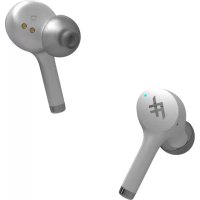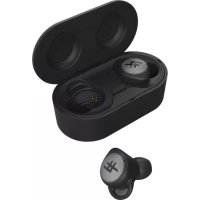
Airtime Premier - Earplug IFROGZ - Free user manual and instructions
Find the device manual for free Airtime Premier IFROGZ in PDF.


| Product Type | True Wireless Earbuds |
| Brand | IFROGZ |
| Model | Airtime Premier |
| Color | Not specified |
| Earbud dimensions | Approximately 2.3 x 1.6 x 2.0 cm (estimated) |
| Earbud weight (each) | Approximately 5 g (estimated) |
| Case dimensions | Approximately 6.0 x 4.0 x 2.5 cm (estimated) |
| Case weight | Approximately 40 g (estimated) |
| Connectivity | Bluetooth® (version unspecified, likely 5.0) |
| Bluetooth range | Up to 10 meters |
| Earbud battery life | Approximately 4 hours (depending on volume) |
| Total battery life (with case) | Up to 15 hours (4 additional charges) |
| Battery type | Rechargeable lithium-ion (built-in) |
| Case charging | Micro USB port (cable included) |
| Earbud charging time | Not specified (estimated 1-2 hours) |
| Case charging time | Not specified (estimated 2-3 hours) |
| LED indicator | White (connection), Red (low battery / power off), Battery indicators on case |
| Touch controls | Earbuds: play/pause, next/previous track, calls, equalizer |
| Listening modes | Signature Sound, Podcast, Bass Boost (switchable by long press 1-2 s) |
| Compatibility | Bluetooth® devices (smartphones, tablets, etc.) |
| Included accessories | Charging case, micro USB cable, ear tips (quantity not specified) |
| Care and cleaning | Clean with a soft dry cloth. Do not immerse in water. |
| Safety | Do not use at high volume for prolonged periods (risk of hearing damage). Keep out of reach of children. |
| Spare parts and repairability | Not user-repairable. Contact IFROGZ support for any repairs. |
Frequently Asked Questions - Airtime Premier IFROGZ
User questions about Airtime Premier IFROGZ
0 question about this device. Answer the ones you know or ask your own.
Ask a new question about this device
Download the instructions for your Earplug in PDF format for free! Find your manual Airtime Premier - IFROGZ and take your electronic device back in hand. On this page are published all the documents necessary for the use of your device. Airtime Premier by IFROGZ.
USER MANUAL Airtime Premier IFROGZ
Welcome to Truly Wireless Audio. Now, you never need to plug your earbuds in again. AIRTIME True Wireless earbuds free you to enjoy music without anything holding you back.
Pairing the Wireless Earbuds with Your Device
- Simply open the case and a pairing signal will be sent to your Bluetooth® device. The left earbud will flash white, indicating pairing mode.
- Ensure your device's Bluetooth® connection is on and select "IFROGZ AIRTIME."
- Complete any additional pairing steps based on your device. The earbuds' lights will turn off indicating that pairing was successful. Congrats, your wireless earbuds are now ready to use!
You can also turn on pairing mode by pressing the button in the charge case for 5 seconds.
Turning Earbuds On/Off
To turn the earbuds on, simply open the case and close the case.
If you'd like to turn an individual bud on, press and hold the button on it for 3 seconds. It will flash white until it's connected to a device. It will turn off if not paired within 60 seconds.
To turn earbuds off, simply return them to the case. You can also press and hold the button on the earbud for five seconds to turn it off; it will flash red indicating power is off.
The earbuds will go into hibernation mode if not used for 20 minutes.
Using the Earbuds
The circle on each bud is a button you can use to navigate music and calls. Here's how to use it.
Play/Pause = Quick press
Next Song = Double press the right earbud.
(Note: This only works when the music is playing.)
Previous Song = Double press the left earbud.
(Note: This only works when the music is playing.)
Answer Call = Quick press
End Call = Double press
Cancel Call = Press and hold for two seconds
Siri or Voice Command = Double press (Note: This only works when music is not playing and there's no
connection nearby.)
Switch EQ = Press for 1-2 seconds, a voice will indicate a new setting. (Note: This only works when music is playing.)
Third Party Calls:
End current call and answer new call = Quick press
Reject new call = Press for one second
Answer new call but hold current call = Double press
Switch between calls = Double press. A tone will sound.
How to Manage EQ
Your AIRTIME True Wireless Earbuds come with three listening settings: Signature Sound, Podcast, and Bass Boost. To switch your setting, press the button on the earbud for 1-2 seconds. A voice will indicate the new setting. The earbuds must be in music mode to change EQ.
Earbud Color Guide
Flashing White = Pairing
White = Paired
Red = Charging
Flashing Red = Low battery. Will flash every two minutes and a tone will sound
Charging the Wireless Earbuds
The case carries enough power to charge the earbuds up to 4 times.*
To charge them:
- Place them in the charge case.
- A red light on the earbuds will indicate charging. When the red light disappears, they are fully charged
- Recharge the case, if needed
*Based on 50% volume and 5 charges from the case to the earbuds of 3 hours of playtime.
Charging the Case
Your case comes charged and ready to go, but here's how to recharge it when you need to:
- Connect the included USB charging cable to the micro USB port on the back of your case.
- Connect the USB end of the included cable to your preferred 5V USB outlet.
- The Battery Indicator inside the case will flash according to its current battery level. This indicates your case is charging.
- Wait for the Battery Indicator lights to turn off, indicating your case is fully charged.
- Disconnect the charging cable and enjoy your new, portable power.
Checking the Battery Level
Your case carries enough power for you to enjoy your wireless earbuds up to 4 times, for a total of up to 15 hours. To check how much power it still carries:
- Open the top of the case.
- Press the battery button. The LED display will light according to how much battery remains:
a. The Battery Indicator inside the case will flash according to its current battery level. This indicates your case is charging.
b. Wait for the Battery Indicator lights to turn off, indicating your case is fully charged.
c. Disconnect the charging cable and enjoy your new, portable power.
- Recharge your case whenever you wish.
Troubleshooting
It's not likely you will have trouble connecting your buds, but due to interference with other wireless signals, sometimes an extra step is needed.
Please follow these steps to reset the buds and sync them with your device:
- When you open the case, the left earbud LED will flash indicating pairing mode. If the left earbud does not flash for auto-pairing, a manual connection needed.
- For a manual connection, take the earbuds from the case and hold both buttons for 5 seconds to turn them off.
- After waiting a moment, press and hold the buttons for 7 seconds or until the white LEDs begin to flash.
- Next, place the buds back in the case and wait a moment. The buds are nowynced to each other and ready to pair with your device. Please reference the quick start guide for the standard pairing procedure.
If you are still experiencing pairing issues, we suggest a full factory reset.
- Finally, open your device's Bluetooth® settings and turn off the Bluetooth® feature. Wait a moment, then turn it back on. Sometimes your device requires a restart. You can also restart your device by shutting it down then powering it back on.
This device complies with Part 15 of the FCC Rules.
Operation is subject to the following two conditions: (1) this device may not cause harmful interference, and (2) this device must accept any interference received, including interference that may cause undesired operation.
THE MANUFACTURER IS NOT RESPONSIBLE FOR ANY RADIO OR TV INTERFERENCE CAUSED BY UNAUTHORIZED MODIFICATIONS OR CHANGE TO THIS EQUIPMENT. SUCH MODIFICATIONS OR CHANGE COULD VOID THE USER'S AUTHORITY TO OPERATE THE EQUIPMENT.
This equipment has been tested and found to comply with the limits for a Class B digital device, pursuant to part 15 of the FCC Rules. These limits are designed to provide reasonable protection against harmful interference in a residential installation. This equipment generates, uses and can radiate radio frequency energy and, if not installed and used in accordance with the instructions, may cause harmful interference to radio communications. However, there is no guarantee that interference will not occur in a particular installation. If this equipment does cause harmful interference to radio or television reception, which can be determined by turning the equipment off and on, the user is encouraged to try to correct the interference by one or more of the following measures:
- Reorient or relocate the receiving antenna.
- Increase the separation between the equipment and receiver.
- Connect the equipment into an outlet on a circuit different from that to which the receiver is connected.
- Consult the dealer or an experienced radio/TV technician for help.
This equipment complies with FCC radiation exposure limits set forth for an uncontrolled environment. End user must follow the specific operating instructions for satisfying RF exposure compliance. This transmitter must not be co-located or operating in conjunction with any other antenna or transmitter.
Drivers / Pilotes / Conductores: 8mm | Resistance / Résistance/ Resistencia: 32 Ohms Sensitivity / Sensibilité / Sensibilitad: 96dB ± 3dB Frequency / Frequence / Frecuencia: 20Hz - 20KHz Working Time / Heures de travail continuous / Tiempo de trabajo: 15h Charging Time / Temps de charge / Tiempo de trabajo: 1.5-2h
©2019 ZAGG Inc All Rights Reserved / Tous Droits Reservés / Todos los derechos reservados | NASDAQ: ZAGG | MADE IN CHINA/ Fabrique en Chine / Hecho en China
The Bluetooth® word mark and logos are registered trademarks owned by Bluetooth SIG, Inc. and any use of such marks by ZAGG Inc is under license. Other trademarks and trade names are those of their respective owners. Trademarks are property of ZAGG IP Holding Co., Inc. La marque et le logo Bluetooth® sont des marques déposée de Bluetooth SIG, Inc. et toute utilisation de ces marques par ZAGG Inc est sous licence. Les marques commerciales sont la propriété de ZAGG IP Holding Co., Inc.
Introduction
Blanc clignotant = Jumelage
Blanc = Jumelé
Rouge = charge
*Based on 50% volume and 5 charges from the case to the earbuds of 3 hours of playtime.
Charge de l'affaire
Alternatively, you can use the way of using a portable device to carry all the items. This is a great way to help you get everything you need. It also makes it easy to carry all the items in your pocket and it's also a good idea to carry all the items in your handbag.