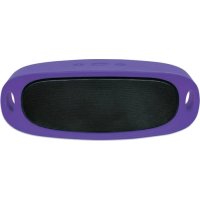
Orbit - Docking station MANHATTAN - Free user manual and instructions
Find the device manual for free Orbit MANHATTAN in PDF.


| Product type | Docking station / Bluetooth speaker |
| Brand | Manhattan |
| Model | Orbit |
| Wireless technology | Bluetooth |
| Supported audio formats | MP3, WAV |
| Maximum micro SD card capacity | 32 GB |
| USB port | Yes (MP3/WAV file playback) |
| Line input | 3.5 mm jack |
| Charging port | Micro USB |
| Battery life | Full charge in less than 2 hours |
| Charge indicator | Red LED (rear) |
| Hands-free function | Yes (answer/hang up) |
| Controls | Previous/next track, volume, play/pause |
| Maintenance | Clean with a soft dry cloth |
| Safety | Do not expose to water, shocks, dust, extreme temperatures |
| Approximate dimensions | 10 x 10 x 5 cm (estimate) |
| Approximate weight | 300 g (estimate) |
Frequently Asked Questions - Orbit MANHATTAN
User questions about Orbit MANHATTAN
0 question about this device. Answer the ones you know or ask your own.
Ask a new question about this device
Download the instructions for your Docking station in PDF format for free! Find your manual Orbit - MANHATTAN and take your electronic device back in hand. On this page are published all the documents necessary for the use of your device. Orbit by MANHATTAN.
USER MANUAL Orbit MANHATTAN
Durable Wireless Speaker

heatmap
| Row | Blue Square | Green Square | |---|-------------|--------------| | 1 | 0 | 0 | | 2 | 0 | 0 | | 3 | 0 | 0 | | 4 | 0 | 0 | | 5 | 0 | 0 | | 6 | 0 | 0 | | 7 | 0 | 0 | | 8 | 0 | 0 | | 9 | 0 | 0 | | 10| 0 | 0 | | 11| 0 | 0 | | 12| 0 | 0 | | 13| 0 | 0 | | 14| 0 | 0 | | 15| 0 | 0 | | 16| 0 | 0 | | 17| 0 | 0 | | 18| 0 | 0 | | 19| 0 | 0 | | 20| 0 | 0 | | 21| 0 | 0 | | 22| 0 | 0 | | 23| 0 | 0 | | 24| 0 | 0 | | 25| 0 | 0 | | 26| 0 | 0 | | 27| 0 | 0 | | 28| 0 | 0 | | 29| 0 | 0 | | 30| 0 | 0 | | 31| 0 | 0 | | 32| 0 | 0 | | 33| 0 | 0 | | 34| 0 | 0 | | 35| 0 | 0 | | 36| 0 | 0 | | 37| 0 | 0 | | 38| 0 | 0 | | 39| 0 | 0 | | 40| 0 | 0 | | 41| 0 | 0 | | 42| 0 | 0 | | 43| 0 | 0 | | 44| 0 | 0 | | 45| 0 | 0 | | 46| 0 | 0 | | 47| 0 | 0 | | 48| 0 | 0 | | 49| 0 | 0 | | 50| 0 | 0 | | 51| 0 | 0 | | 52| 0 | 0 | | 53| 0 | 0 | | 54| 0 | 0 | | 55| 0 | 0 | | 56| 0 | 0 | | 57| 0 | 0 | | 58| 0 | 0 | | 59| 0 | 0 | |1 | | | |2 | | | |3 | | | |4 | | | |5 | | | |6 | | | |7 | | | |8 | | | |9 | | | |10 | | | |11 | | | |12 | | | |13 | | | |14 | | | |15 | | | |16 | | | |17 | | | |18 | | | |19 | | | |20 | | | |21 | | | |22 | | | |23 | | | |24 | | | |25 | | | |26 | | | |27 | | | |28 | | | |29 | | | |30 | | | |31 | | | |32 | | | |33 | | | |34 | | | |35 | | | |36 | | | |37 | | | |38 | | | |39 | | | |40 | | | |41 | | | |42 | | | |43 | | | |44 | | | |45 | | | |46 | | | |47 | | | |48 | | | |49 | | | |50 | | | |51 | | | |52 | | | |53 | | | |54 | | | |55 | | | |56 | | | |57 | | | |58 | | | |59 | | | |60 | | | |61 | | | |62 | | | |63 | | | |64 | | | |65 | | | |66 | | | |67 | | | |68 | | | |69 | | | |70 | | | |71 | | | |72 | | | |73 | | | |74 | | | |75 | | | |76 | | | |77 | | | |78 | | | |79 | | | |80 | | | |81 | | | |82 | | | |83 | | | |84 | | | |85 | | | |86 | | | |87 | | | |88 | | | |89 | | | |90 | | | |91 | | | |92 | | | |93 | | | |94 | | | |95 | | | |96 | | | |97 | | | |98 | | | |99 | | | |Sound Science Orbit is a durable speaker system with wireless Bluetooth technology and MP3 player.
Features
flowchart
graph TD
    A["1"] --> B["2"]
    B --> C["3"]
    D["4"] --> E["5"]
    E --> F["6"]
    G["7"] --> H["8"]
    style A fill:#fff,stroke:#000
    style B fill:#fff,stroke:#000
    style C fill:#fff,stroke:#000
    style D fill:#fff,stroke:#000
    style E fill:#fff,stroke:#000
    style F fill:#fff,stroke:#000
    style G fill:#fff,stroke:#000
    style H fill:#fff,stroke:#000
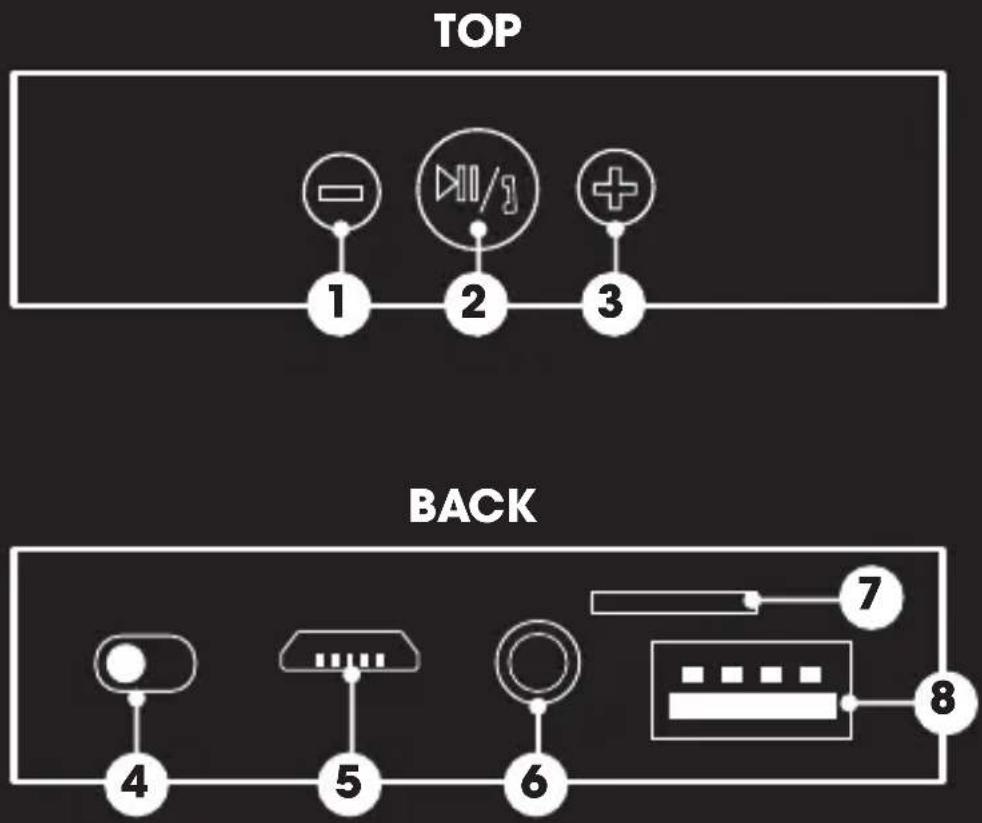
TOP
1 Short press: Last Track Long press: Decrease Volume
2 Pause/Play/Answer Call
3 Short press: Next Track Long press: Increase Volume
BACK
4 Power Switch
5 Micro-USB Charging Port
6 3.5mm Audio Line-In
7 Micro-SD Card Port
8 USB Reader Port
Bluetooth mode
Set power switch to ON
Activate Bluetooth on your device and select "Sound Science Orbit" (you will hear audio cue when connected)

Press ▶II to play music and accept/end phone calls Short press -/+ to change tracks Long press -/+ to adjust volume
Insert USB or Micro-SD card (up to 32G) and Orbit will automatically switch to USB or CARD mode (note: Orbit will only read files in MP3 or WAV format)

Press ▶II to play music Short press -/+ to change tracks Long press -/+ to adjust volume
line-in mode

Insert 3.5mm audio cable to the line-in port and connect the other end to your device

Press ▶ to play music Long Press -/+ to adjust volume
charging
Insert charging cable into Micro-USB port

Connect the other end of charging cable to a computer or charger (red LED on back will light while charging)
Battery charges in less than 2 hours
warnings
Do not submerge in water or subject unit to excessive force, shock, dust or extreme temperature.
Deutsch
manhattanproducts.com
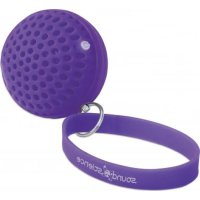
Brand : MANHATTAN
Model : Orbit
Category : Docking station