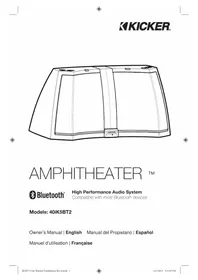
Amphitheater iK5BT2 - Loudspeaker KICKER - Free user manual and instructions
Find the device manual for free Amphitheater iK5BT2 KICKER in PDF.

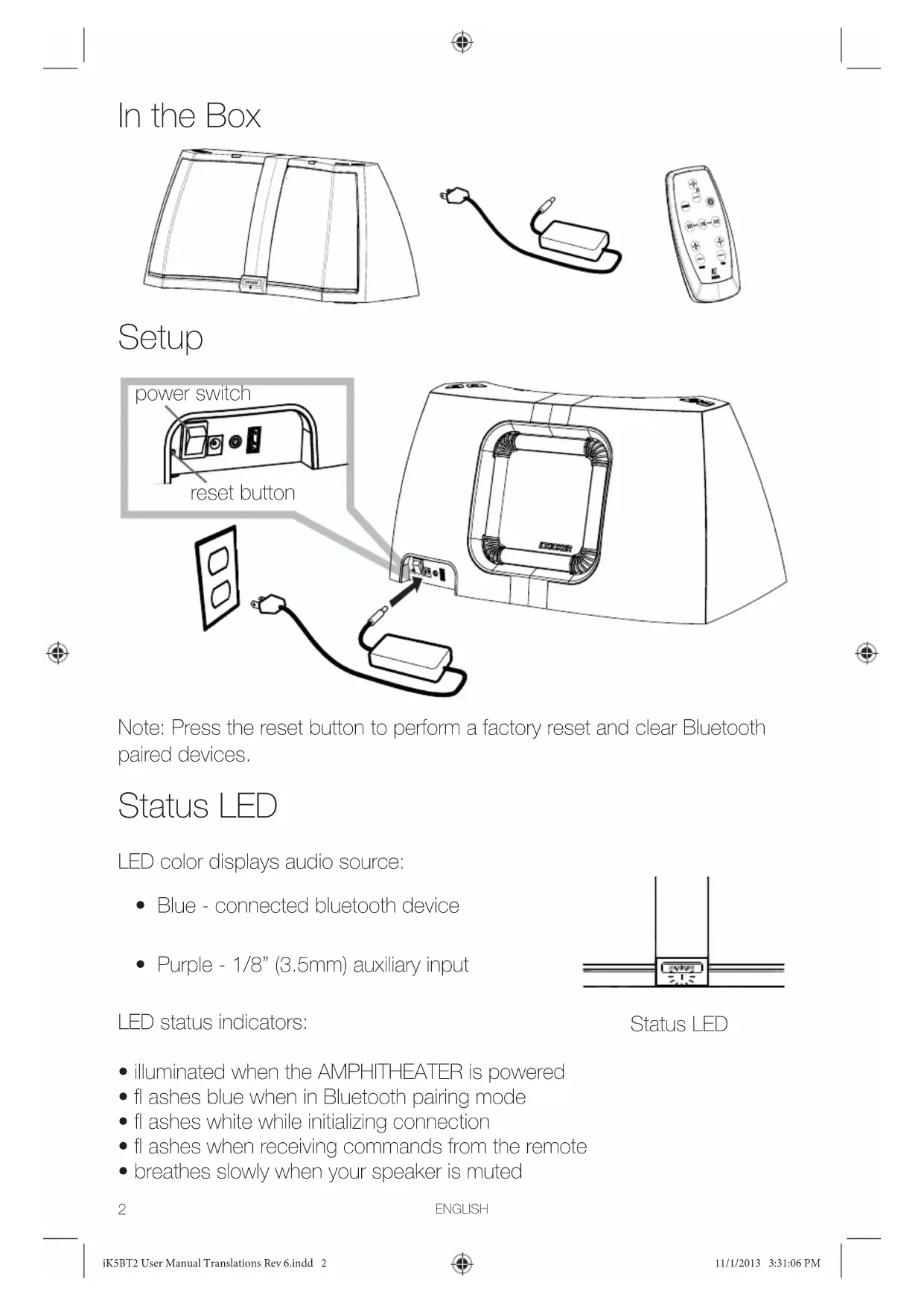


| Product Type | Powered Speaker |
| Brand | KICKER |
| Model | Amphitheater iK5BT2 |
| Weight | 4.4 kg |
| Amplifier | 50 W stereo with DSP |
| Mid-woofers | 5" (127 mm) |
| Tweeters | 3/4" (20 mm) silk dome tweeters |
| Subwoofer | 6" (152 mm) square port reflex |
| Frequency Response | 40 Hz – 20 kHz ±3 dB |
| Wireless Connectivity | Bluetooth |
| Auxiliary Input | 1/8" (3.5 mm) |
| USB Port | USB device charging (5 V) |
| Control | Included remote and KICKSTART app |
| App Functions | 8-channel equalizer, presets, spatialization, firmware update |
| Hands-free Function | Yes (built-in microphone, voice command) |
| Status Indicator | LED: purple (aux), blue (Bluetooth), flashes according to mode |
| Cleaning | Dry cloth only |
| Safety | Do not expose to water or heat sources; maintain at least 10 cm ventilation around |
Frequently Asked Questions - Amphitheater iK5BT2 KICKER
User questions about Amphitheater iK5BT2 KICKER
0 question about this device. Answer the ones you know or ask your own.
Ask a new question about this device
Download the instructions for your Loudspeaker in PDF format for free! Find your manual Amphitheater iK5BT2 - KICKER and take your electronic device back in hand. On this page are published all the documents necessary for the use of your device. Amphitheater iK5BT2 by KICKER.
USER MANUAL Amphitheater iK5BT2 KICKER
natural_image
Line drawing of a frisheeled guitar with a kicker label (no text or symbols on the diagram itself)AMPHITHEATER ™

Bluetooth®
High Performance Audio System
Compatible with most Bluetooth devices
Models: 40iK5BT2
Owner's Manual | English Manual del Propietario | Español
Note: Press the reset button to perform a factory reset and clear Bluetooth paired devices.
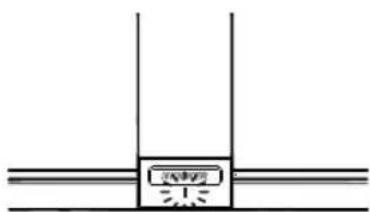
Status LED
LED color displays audio source:
• Blue - connected bluetooth device
• Purple - 1/8" (3.5mm) auxiliary input
LED status indicators:
natural_image
Pure diagram of a mechanical or structural assembly with no visible text, numbers, or symbolsStatus LED
- illuminated when the AMPHITHEATER is powered
- fl ashes blue when in Bluetooth pairing mode
- fl ashes white while initializing connection
- fl ashes when receiving commands from the remote
- breathes slowly when your speaker is muted
2
ENGLISH
Pair and Connect Bluetooth® Devices
-
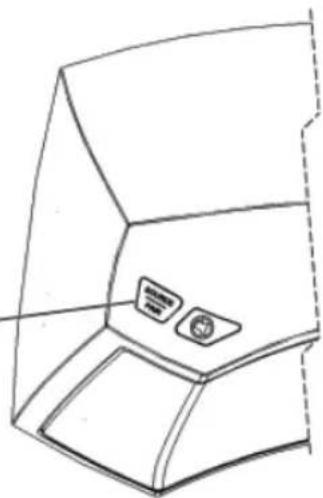
Press and Hold SOURCE | PAIR button on the dock or the remote control to enter pairing mode (status LED fl ashes blue).
-
From your bluetooth device menu, make sure bluetooth is enabled. Scan for devices and pair with Amphitheater BT.
If a code is required by your device, use [0000]
- When your bluetooth device is paired and connected, the status LED will be solid blue.
For advanced DSP control and access to even more features, download the KICKSTART app from your device's app store.
- 8-band EQ
- spatialization control
- autoplay
•device fi rmware updates
• prioritize devices for auto-connect
- enable bluetooth auto-connect
- disconnect
For more information on the KICKSTART app, visit www.kicker.com/KICKSTART
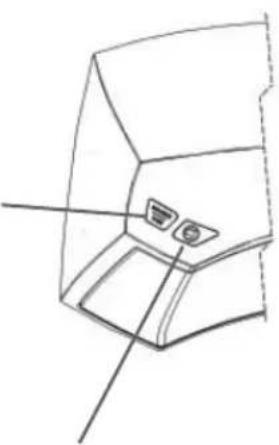
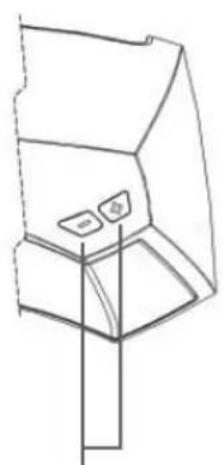
Before you play your device, make sure that the input is set to the correct source. Touch the SOURCE button to select your audio source. When the status LED is blue, your audio source is Bluetooth.
SOURCE | PAIR audio source select / press and hold to pair
natural_image
Line drawing of a 3D object with internal components and two small square features (no text or symbols)mute
natural_image
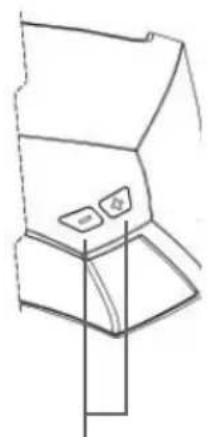
Pure technical line drawing of a mechanical component with no text or symbolsdecrease / increase volume.
ENGLISH
Play Auxiliary Devices
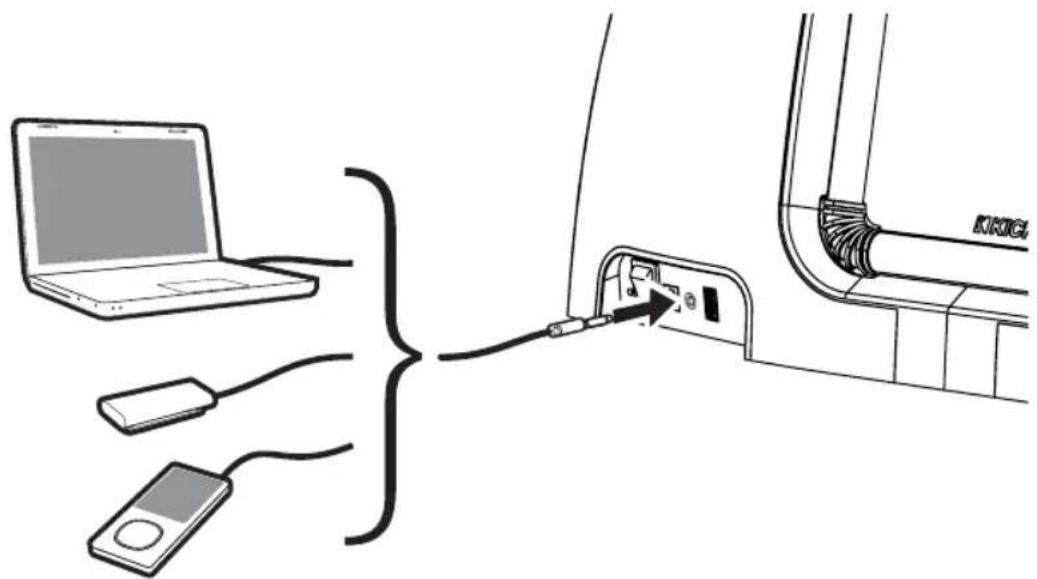
Touch SOURCE to listen to music from your external device. The aux-input is activated when the status LED is purple.
natural_image
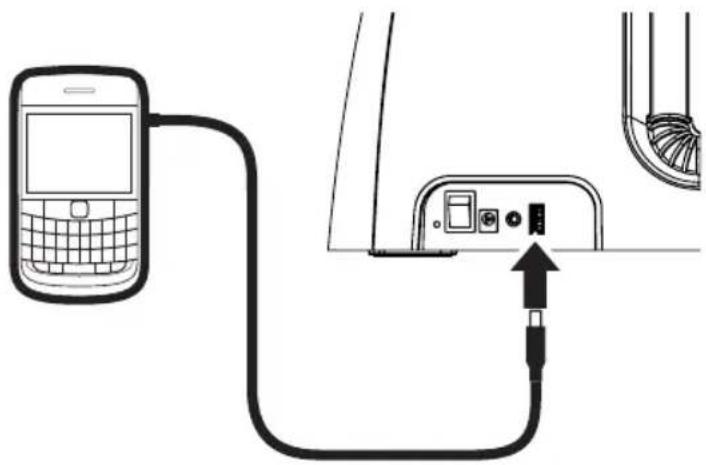
Line drawing of a mechanical component with two buttons and a base (no text or symbols)USB Charging
Note: The rear USB port acts solely as a power source for charging or powering your USB devices.
natural_image
Diagram showing a mobile phone connected to a cable with an attached device (no text or symbols present)Using the Remote
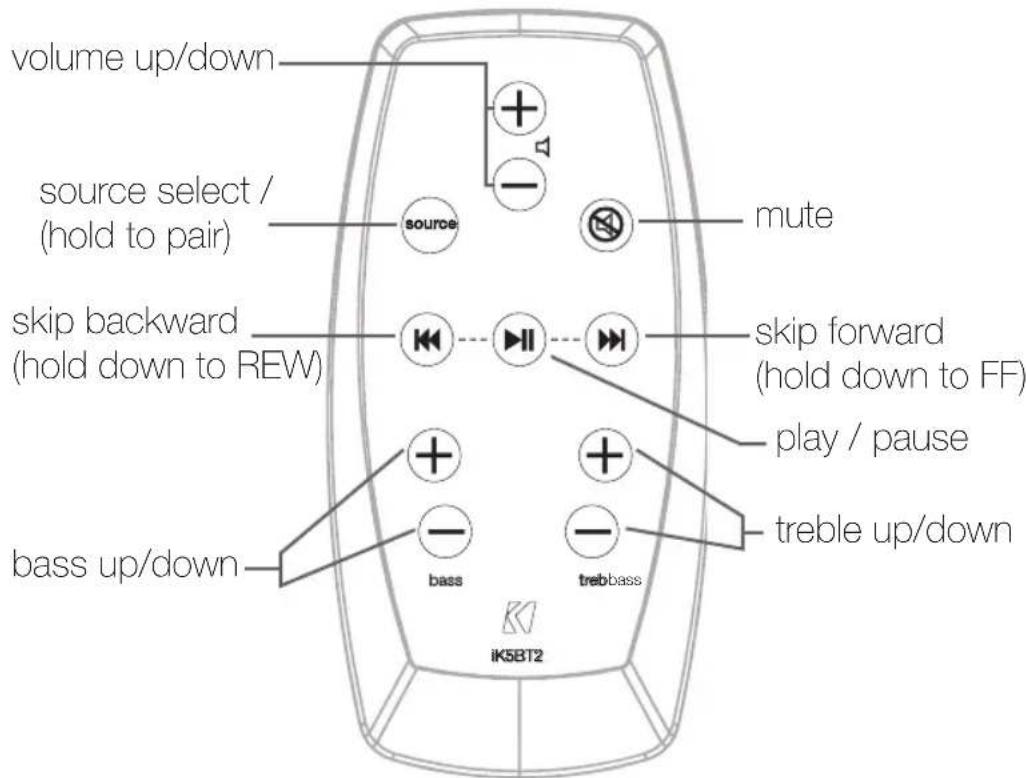
ENGLISH
Specifications
- 50W Stereo Amplifier with DSP
- 5"[127mm] Mid-bass Woofers
•3/4"[20mm] Silk-Dome Tweeters
- 6"[152mm] Square Refl ex Subwoofer
24V-2.9A Power Supply
Freq. Response
40Hz—20kHz ±3dB
Weight
9.7 lbs [4.4kg]
![8.87" [225mm] 19" [483mm] 9.14" [232mm]](/content/2026/03/536677/images/61b75ca137c05bcd643fe20954d7135b63f965b20304d89a84e7c8baf67defcc.jpg)
Made for
- iPhone 5 • iPad (3rd and 4th Generation)
- iPhone 4S - iPad 2
- iPhone 4 - iPad
- iPhone 3GS • iPod touch
- iPhone 3G • iPod nano
- iPad mini
® (2nd, 3rd, 4th, and 5th generation)
^® (7th generation)
DISCLAIMER: Bluetooth wireless audio compatible with most Bluetooth enabled phones, tablets and computers
IMPORTANT SAFETY INSTRUCTIONS
Read and follow all the instructions listed in this manual. Keep these instructions and heed all warnings. Follow all safety and procedural recommendations to prevent damage to your self, your KICKER product, or your portable media device.
The AMPHITHEATER should not be used near water or in an environment where exposure to liquids is possible. This includes but is not exclusive to areas where splashing, dripping, leaks, spills, and exposure to rain can occur. Liquid containers should not be placed on or near the AMPHITHEATER. The AMPHITHEATER should not be cleaned with liquid cleaners. Use only a dry cloth to clean the AMPHITHEATER.
Only use the AMPHITHEATER in areas with adequate open ventilation allowing at least 4" of space on all sides of the AMPHITHEATER. Do not set the AMPHITHEATER on any surface or cover the AMPHITHEATER with any object that could impede the airflow to and from the AMPHITHEATER. The AMPHITHEATER should not be placed near any source of heat. The battery pack or batteries installed shall not be exposed to excessive heat. This includes but is not limited to stoves, radiators, heating elements, electronic heat sources, and areas where excessive solar heat can be generated. Do not place the AMPHITHEATER near any flame or place any flammable objects near the device.
The power outlet used to provide power to the AMPHITHEATER should be accessible at all times. The power cord should be situated in a way that protects it from being pinched, walked on, tripped over, or accidentally pulled from the electrical outlet or the electrical input on the AMPHITHEATER. Where the MAIN plug or an appliance coupler is used as the disconnect device, the disconnect device shall remain readily operable. Do not run the cable through doorways or underneath objects that could damage the wire or tear the insulating material surrounding the wire. Only use the manufacturer supplied power supply with the AMPHITHEATER. We recommend using a surge protector/power conditioner and unplugging the AMPHITHEATER during any electrical storms or situations that could cause voltage fluctuations in the electrical system.
En la Caja
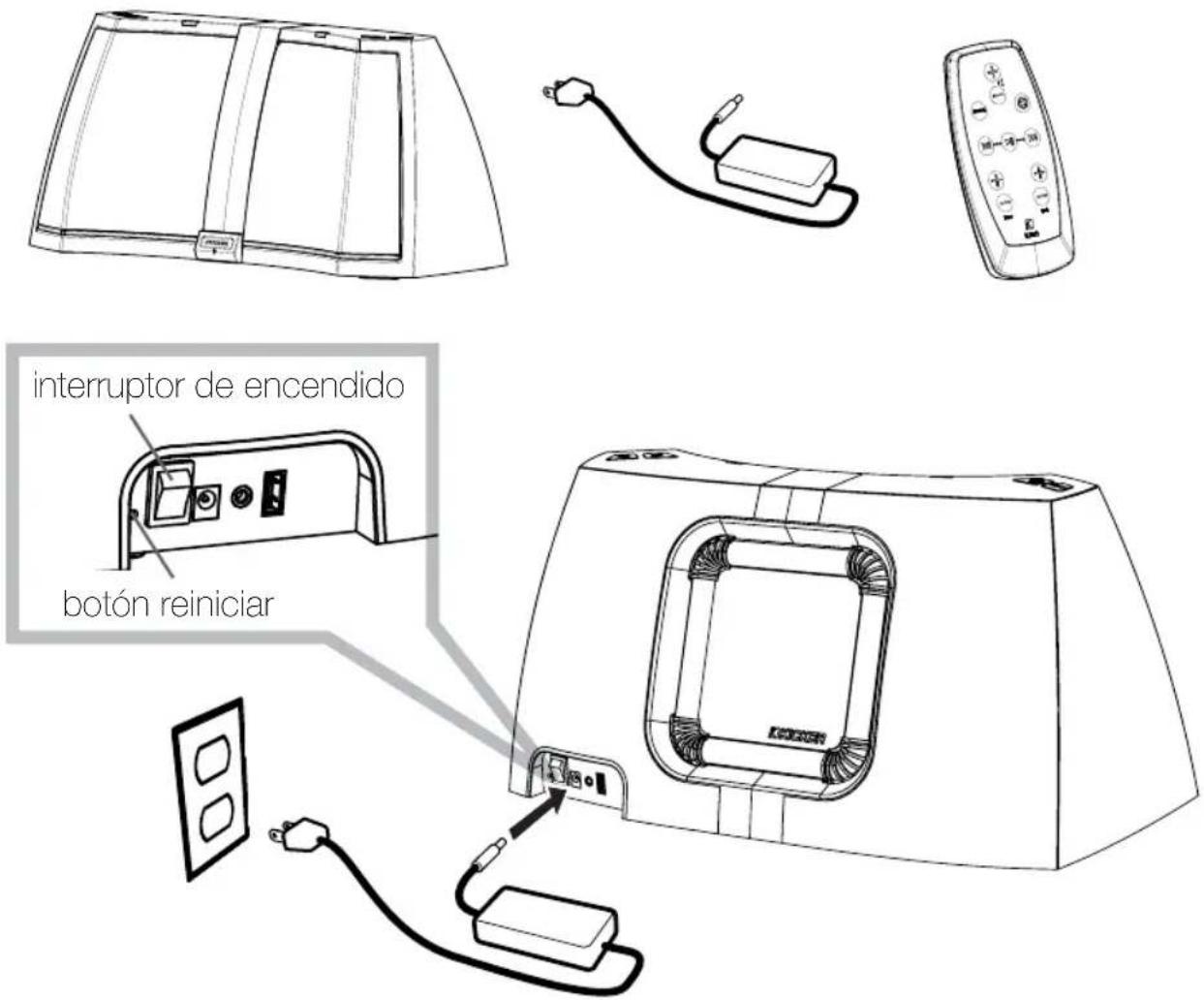
natural_image
Pure diagram of a structural cross-section with no text, numbers, or symbolsLED de Estado
natural_image
Technical line drawing of a mechanical component with two ports and a connecting rod (no text or symbols)modo de silencio
natural_image
Line drawing of a mechanical device with control buttons and a vertical line indicating measurement (no text or symbols)ESPAÑOL
natural_image
Diagram showing a mobile phone connected to a cable with an attached device (no text or symbols present)Hecho para
- iPhone 5 • iPad (3a y 4a Generación)
- iPhone 4S - iPad 2
- iPhone 4 - iPad
- iPhone 3GS • iPod touch
- iPhone 3G • iPod nano
- iPad mini
natural_image
Pure technical line drawing of a mechanical or structural assembly without any text, numbers, or symbolsVoyant d'état
natural_image
Diagram showing a mobile phone connected to a cable with an attached device (no text or symbols visible)Alimentation 24 V-2,9A
Compatible avec
- iPhone 5 • iPad (3ème et 4ème génération)
- iPhone 4S • iPad 2
- iPhone 4 - iPad
- iPhone 3GS • iPod touch
- iPhone 3G • iPod nano
- iPad mini
KICKER warrants this product to be free from defects in material and workmanship under normal use for a period of ONE (1) YEAR from date of original purchase with the original receipt from an Authorized KICKER Dealer. Should service be necessary under this warranty for any reason due to manufacturing defect or malfunction during the warranty period, KICKER will repair or replace (at its discretion) the defective merchandise with equivalent merchandise at no charge. Warranty replacements may have cosmetic scratches and blemishes. Discontinued products may be replaced with more current equivalent products.
This warranty is valid only for the original purchaser and is not extended to owners of the product subsequent to the original purchaser. Any applicable implied warranties are limited in duration to a period of the express warranty as provided herein beginning with the date of the original purchase at retail, and no warranties, whether express or implied, shall apply to this product thereafter. Some states do not allow limitations on implied warranties; therefore these exclusions may not apply to you. This warranty gives you specific legal rights; however you may have other rights that vary from state to state.
Our goods come with guarantees that cannot be excluded under the Australian Consumer Law. You are entitled to a replacement or refund for a major failure and for compensation for any other reasonably foreseeable loss or damage. You are also entitled to have the goods repaired or replaced if the goods fail to be of acceptable quality and the failure does not amount to a major failure.
WHAT TO DO IF YOU NEED WARRANTY OR SERVICE:
Defective merchandise should be returned to your local Authorized KICKER Dealer for warranty service. Assistance in locating an Authorized Dealer can be found at www.kicker.com or by contacting KICKER directly.
If it becomes necessary for you to return defective merchandise directly to Stillwater Designs (KICKER), call the KICKER Customer Service Department at (405) 624-8510 for a Return Merchandise Authorization (RMA) number. Package all defective items in the original container or in a package that will prevent shipping damage, and return to:
Stillwater Designs, 3100 North Husband, Stillwater, OK 74075
The RMA number must be clearly marked on the outside of the package. Include a copy of the original receipt with the purchase date clearly visible, and a "proof-of-purchase" statement listing your name and return shipping address, the Dealer's name and invoice number, and product purchased. Warranty expiration on items without proof-of-purchase will be determined from the type of sale and manufacturing date code. Freight must be prepaid; items sent freight-collect, or COD, will be refused.
WHAT IS NOT COVERED?
This warranty is valid only if the product is used for the purpose for which it was designed.
It does not cover:
o Damage due to improper use.
o. Damage due to improper installation of components or audio/video devices.
o Subsequent damage to other components or audio/video devices.
o. Damage caused by exposure to moisture, excessive heat, chemical cleaners, and/or UV radiation.
o Damage through negligence, misuse, fi ood, fi re, earthquake, accident, or abuse. Repeated returns for the same damage may be considered abuse.
o Items previously repaired or modified by any unauthorized repair facility or person.
o Return shipping on non-defective items.
o Products with tampered or missing barcode labels.
o Products returned without a Return Merchandise Authorization (RMA) number.
o Freight Damage.
c The cost of shipping product to KICKER.
o Service performed by anyone other than KICKER.

stillwaterdesigns
HOW LONG WILL IT TAKE?
KICKER strives to maintain a goal of 1 week service for all electronics (speakers, crossovers, speaker docks, etc.) returns. Delays may be incurred if lack of replacement inventory or parts is encountered. Failure to follow these steps may void your warranty. Any questions can be directed to the KICKER Customer Service Department at (405) 624-8510. Contact your International KICKER dealer or distributor concerning specific procedures for your country's warranty policies.
Note: All specifications and performance figures are subject to change. Please visit www.kicker.com for the most current information. Please allow two weeks of break-in time for the speakers to reach optimum performance.
This equipment has been tested and found to comply with the limits for a Class B digit device, pursuant to Part 15 of the FCC Rules. These limits are designed to provide reasonable protection against harmful interference in a residential installation. This equipment generates uses and can radiate radio frequency energy and, if not installed and used in accordance with the instructions, may cause harmful interference to radio communications. However, there is no guarantee that interference will not occur in a particular installation. If this equipment does cause harmful interference to radio or television reception, which can be determined by turning the equipment off and on, the user is encouraged to try to connect the interference by one or more of the following measures: Reorient or relocate the receiving antenna. Increase the separation between the equipment and receiver. Connect the equipment into an outlet on a circuit different from that to which the receiver is connected. Consult the dealer or an experienced radio/IV technician for help.
FCC Caution: Any changes or modifications not expressly approved by the party responsible for compliance could void the user's authority to operate this equipment. This device complies with Part 15 of the FCC Rules. Operation is subject to the following two conditions: (1) This device may not cause harmful interference, and (2) this device must accept any interference received, including interference that may cause undesired operation.
Radiation Exposure Statement:
This equipment complexs with FCC/IC radiation exposure limits set forth for an uncontrolled environment. This equipment should be installed and operated with minimum distance 20cm between the radiator & your body. This transmitter must not be co-ocatoo or operating in conjunction with any other antenna or transmitter.
IC Statement:
IC Regulations This device complies with industry Canada license-exempt RSS standard(s). Operation is subject to the following two conditions:
(1) this device may not cause interference, and
(2) this device must accept any interference, including interference that may cause undesired operation of the device.
"This Class B digital apparatus complies with Canadian ICLS-003."
Cetapoarelnuméricuede la classeB estconformeia normeNMB 003 du Canada
This Category II radiocommunication device complice with Industry Canada Standard RSS-310. Coolispositilide rad ocommunicatione catégoriell respectela normoCNR-310 d'IndustrieCanada.
IMPORTANT NOTE:
IC Radiation Exposure Statement
This device and its antenna(s) must not be co-located or operating in conjunction with any other antenna or transmitter.
REMARQUE IMPORTANTE :
CAUTION: Danger of explosion if battery is incorrectly replaced. Replace only with the same or equivalent type.

WARNING:
- The battery (battery or batteries or battery pack) shall not be exposed to excessive heat such as sunshine, fire or the like.
- Do not ingest battery, chemical burn hazard
- This product contains a coin/bullon cell battery. If the coin/bullon cell battery is swallowed, it can cause severe internal burns in just 2 hours and can lead to death.
- Keep new and used batteries away from children. If the battery compartment does not close securely, stop using the product and keep it away from children.
- If you think batteries might have been swallowed or placed inside any part of the body, seek immediate medical attention.
- Use only power supplies listed in the user manual (Golden Profit Electronics Ltd, Model: QPE060D2402900)
- Unplug the apparatus during lightning storms or when unused for long periods of time.
- Refer all servicing to qualified personnel. Servicing is required when the apparatus has been damaged in any way, such as power supply cord or plug is damaged, liquid has
been spilled or objects have fallen into the apparatus has been exposed to rain or moisture, does not operate normally, or has been dropped. - Please refer to the information on exterior bottom enclosure for electrical and safety Information before installing or operating the apparatus.



The AMPHITHEATER was not tested on animals (other than humans) nor put through OTA testing
iPhone, iPod, iPod classic, iPod nano, iPod Touch and iPad are trademarks of Apple Inc., registered in the U.S. and other countries.
© 2013 Stillwater Designs
40IK5BT2-AMPHITHEATER-20131101

- AMPHITHEATER ™
- Bluetooth®
- Status LED
- Pair and Connect Bluetooth® Devices
- Play Auxiliary Devices
- USB Charging
- Using the Remote
- Specifications
- Freq. Response
- Weight
- Made for
- IMPORTANT SAFETY INSTRUCTIONS
- En la Caja
- Hecho para
- Compatible avec
- WHAT TO DO IF YOU NEED WARRANTY OR SERVICE:
- WHAT IS NOT COVERED?
- HOW LONG WILL IT TAKE?
- Radiation Exposure Statement:
- IC Statement:
- WARNING:
Brand : KICKER
Model : Amphitheater iK5BT2
Category : Loudspeaker