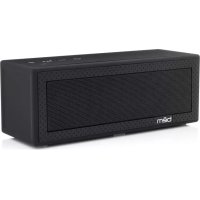
Bravo BE20001 - Speaker Bem - Free user manual and instructions
Find the device manual for free Bravo BE20001 Bem in PDF.


User questions about Bravo BE20001 Bem
0 question about this device. Answer the ones you know or ask your own.
Ask a new question about this device
Download the instructions for your Speaker in PDF format for free! Find your manual Bravo BE20001 - Bem and take your electronic device back in hand. On this page are published all the documents necessary for the use of your device. Bravo BE20001 by Bem.
USER MANUAL Bravo BE20001 Bem
Thanks for purchasing the bem wireless Speaker Bravo! This speaker is Bluetooth ready and easy to use, so you're never more than a couple minutes away from listening to your favorite music. But to make sure you get the best possible results from your new Speaker Bravo Bluetooth speaker, please thoroughly read and carefully follow all instructions in this User Guide. This short guide explains everything you need to know to start using your speaker.
Please keep this User Guide in a convenient location for future reference and visit bemwireless.com for additional information.
Package contents:
Speaker Bravo x 1
Auxiliary (AUX) Cable x 1
Micro USB Charging Cable x 1
USB AC Adaptor x 1
User Guide x 1
If any of these were missing or damaged, please visit
bemwireless.com to obtain replacement.
Compatibility
All devices enabled with Bluetooth technology, including iPhones, iPads, iPods, smartphones, laptops, tablets and more
Meet Your New Speaker Bravo
Before learning about your Speaker Bravo, take a moment to look it over and familiarize yourself with its features.
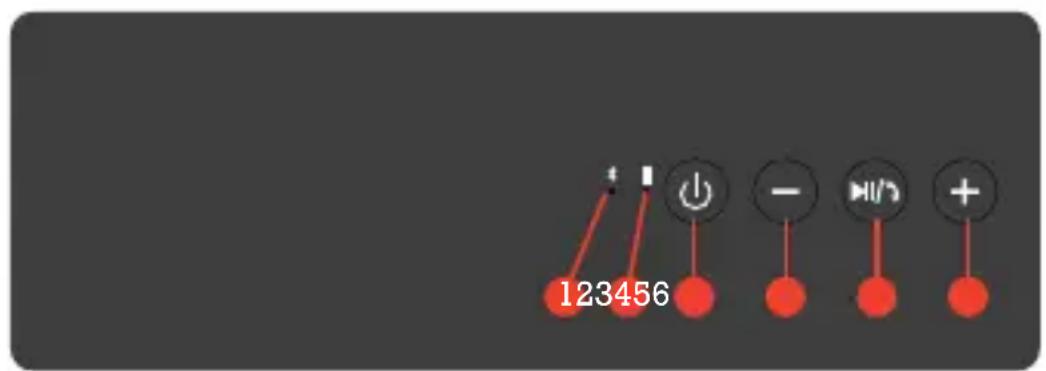
Product Interface: The Speaker Bravo
text_image
123456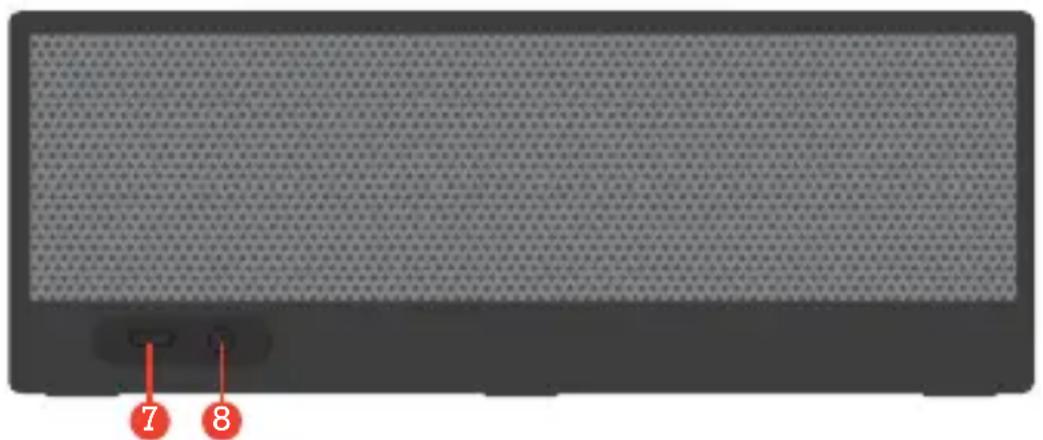
natural_image
Front view of a black rectangular electronic device with textured surface and two red-labeled buttons (7 and 8) at the bottom, no readable text or symbols on the device itself.- Bluetooth Indicator LED
- Charging Indicator LED
- Power
- Volume Down (-)
5.Play/Pause
6. Volume Up (+)
7. Micro USB Port
8. AUX IN Port
Getting Started
We know you're excited to start using your new Speaker Bravo. And you should be. Luckily, these three easy steps will get you up and running quickly.
Step 1: Charge It
Connect your Speaker Bravo to a wall outlet using the USB AC adaptor and the micro USB charging cable or to a PC/laptop using the micro USB charging cable. The charging Indicator LED will light red while charging and will turn off when the speaker is fully charged. Please allow approximately 2 hours to fully charge. You may use your Speaker Bravo while it's charging. (Approx. 3.5 hours).
Step 2: Connect it
Bluetooth
When your Speaker Bravo is fully charged or plugged into a wall outlet or PC/laptop, pair it with your smartphone or other Bluetooth enabled device.
- Press the POWER button to turn on the speaker. The blue Bluetooth Indicator LED will flash rapidly.
- Activate Bluetooth on your smartphone or other Bluetooth enabled device (refer to your device user guide for details). Your smartphone/device will now begin searching for Bluetooth devices.
- When your smartphone/device finishes searching, select "Speaker Bravo" from the device list. When connected, a tone will sound and the blue Bluetooth Indicator LED will flash slowly.
After initial pairing, “Speaker Bravo” will appear in your device list and a connection will automatically be established when the speaker is turned on and Bluetooth is activated on your device. The blue Bluetooth Indicator LED may flash rapidly at first, but when a successful Bluetooth connection has been made a tone will sound and the blue Bluetooth Indicator LED with flash slowly.
NOTE: When you end the Bluetooth connection from your device, the blue Bluetooth Indicator LED will begin to flash rapidly again.
Auxiliary
Your Speaker Bravo can also connect to audio devices that are not Bluetooth enabled. Connect your device to your Speaker Bravo using an auxiliary (AUX) cable (included) by inserting one end of the plug into the AUX IN port on your Speaker Bravo and the other end into your device as specified.
Step 3: Play it
Use your device to find the music you love. Hit play on your device (you can play/pause on the Speaker Bravo after initially playing from your device). Enjoy your music.
Operation Details
The below instructions will help you get the most use out of your Speaker Bravo.
Power on / Power off
Press the POWER button to turn on your Speaker Bravo. The blue Bluetooth Indicator LED will flash rapidly.
Press the POWER button to turn off your Speaker Bravo. No chime will sound when the unit is turned off, but the Bluetooth light will stop flashing.
NOTE: To preserve battery life, the speaker will automatically power off if not connected to Bluetooth for approximately
Music Control
- On your Speaker Bravo: Press the PLAY/PAUSE button to play/pause your music after initially playing from your device.
- On your device: Play, pause, skip and otherwise control your music as you normally would.
Volume Control
- On your Speaker Bravo: Repeatedly press the VOLUME UP (+) button to increase the volume incrementally or hold the VOLUME UP (+) button to steadily increase the volume. Repeatedly press the VOLUME DOWN (-) button to decrease the volume incrementally or hold the VOLUME DOWN (-) button to steadily decrease the volume.
- On your device: Adjust the volume of your music as you normally would.
NOTE: When maximum volume is reached, the VOLUME UP (+) button will no longer increase the volume if pressed or held. If the VOLUME DOWN (-) button is pressed often enough or held long enough, the speaker will stop producing sound until the volume is increased again, but the speaker will remain on and the music will continue to play.
Troubleshooting
Your Speaker Bravo is designed to operate easily and reliably. However, problems can arise from time to time. If you need a little help, check out these common issues and solutions.
Will Not Turn On
Pairing is unsuccessfully after multiple attempts
- Your Speaker Bravo may not be charged. Please charge for 2 hours.
- Make sure to firmly press the POWER button.
Bluetooth Won't Connect
- Make sure your Speaker Bravo is attempting to pair with your Bluetooth device (blue Bluetooth Indicator LED is flashing rapidly).
- Make sure the Bluetooth function on your smartphone or other Bluetooth enabled device is activated.
- Make sure you are within Bluetooth connectivity range (40 feet).
Poor Sound Quality/Volume
• Make sure your Speaker Bravo is sitting on a level surface.
• Make sure your Speaker Bravo is facing outward and is unobstructed
- Make sure the volume on your Speaker Bravo and your device are at your desired level.
If issues persist, you can find additional suggestions and technical support at bemwireless.com/support.
Maintenance
To keep your Speaker Bravo working well and looking sharp, simply wipe with a dry cloth as needed. Do not use cleaning agents as they may damage the finish.
Technical Specifications
Note: All specifications are subject to change without notice
Product Name Speaker Bravo
Model Number BE20001
Music Time 6-8 hours with music at 50%
Bluetooth V4.0 with auto pairing
Power Supply USB AC IN and MICRO USB
Dimensions 188x68x69 mm
Battery 2000mAh rechargeable Lithium Ion
Bluetooth Range 40 Feet
Stay in touch!
For questions, comments, or to purchase additional bem wireless products, go to: bemwireless.com
You can also follow us at:

facebook.com/bemwireless

twitter.com/bemwirelessco

youtube.com/bemwireless
FCC Statement
-
This device complies with Part 15 of the FCC Rules. Operation is subject to the following two conditions:
-
This device may not cause harmful interference.
-
This device must accept any interference received, including interference that may cause undesired operation.
-
Changes or modifications not expressly approved by the party responsible for compliance could void the user's authority to operate the equipment.

text_image
FEDERAL COMMUNICATIONS COMMISSION USA · NOSTONNOTE: This equipment has been tested and found to comply with the limits for a Class B digital device, pursuant to Part 15 of the FCC Rules. These limits are designed to provide reasonable protection against harmful interference in a residential installation.
This equipment generates uses and can radiate radio frequency energy and, if not installed and used in accordance with the instructions, may cause harmful interference to radio communications. However, there is no guarantee that interference will not occur in a particular installation. If this equipment does cause harmful interference to radio or television reception, which can be determined by turning the equipment off and on, the user is encouraged to try to correct the interference by one or more of the following measures:
- Reorient or relocate the receiving antenna.
- Increase the separation between the equipment and receiver.
- Connect the equipment into an outlet on a circuit different from that to which the receiver is connected.
- Consult the dealer or an experienced radio/TV technician for help
FCC Radiation Exposure Statement
This equipment complies with FCC radiation exposure limits set forth for an uncontrolled environment. This equipment should be installed and operated with minimum distance 20cm between the radiator & your body.
Safety Instructions
This product is specially designed based on full attention to safety; in order to encourage accident-free operation, please follow the guidelines listed below:
- Do not drop, unpack, open, hit, bend, puncture, burn or otherwise attempt to damage/modify the speaker
- Avoid using the speaker near basins or sinks where they may come in contact with water
- Protect the speaker from all heat-producing devices, including radiators, forced air vents, cooking surfaces, and other heat-producing devices
- Set the volume properly to prevent damage to the unit and personal injury
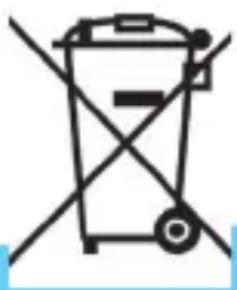
Correct Disposal of this product.
This marking indicates that this product should not be disposed with other household wastes throughout the EU. To prevent possible harm to the environment or human health from uncontrolled waste disposal, recycle it responsibly to promote the sustainable reuse of material resources. To return your used device, please use the return and collection systems or contact the retailer where the product was purchased. They can take this product for environmental safe recycling.
natural_image
Simple line drawing of a trash bin with crossed lines indicating no waste or plastic discharge (no text or symbols)WARNING:
- The battery (battery or batteries or battery pack) shall not be exposed to excessive heat such as sunshine, fire or the like.
- No naked flame sources, such as lighted candles, should be placed on the apparatus.
- CAUTION: Danger of explosion if battery is incorrectly replaced. Replace only with the same or equivalent type.
90-Day Limited Warranty
bem wireless warranties this product against defects in materials and/or workmanship under normal use for a period of NINETY (90) DAYS from the date of purchase by the original purchaser (“Warranty Period”). If a defect arises and a valid claim is received within the Warranty Period, at its option bem wireless will either 1) Repair the defect at no charge, using new or refurbished replacement parts or 2) Replace the product with a new product that is at least functionally equivalent to the original product. A replacement product or part, including a user-installable part installed in accordance with instructions provided by bem wireless, assumes the remaining warranty of the original product. When a product or part is exchanged, any replacement item becomes your property and the replaced item becomes bem wireless’s property.
Obtaining Service: To obtain warranty service, call bem wireless at 1-815-337-0541 or e-mail customerservice@bemwireless.com. Please be prepared to describe the product that needs service and the nature of the problem. A purchase receipt will be required. All repairs and replacements must be authorized in advance. Service options, parts availability and response times will vary. You are responsible for delivery including the cost of delivery of the product or any parts to the authorized service center for replacements, per our instructions.
Limits and Exclusions: Coverage under this Limited Warranty is limited to the United States of America, including the District of Columbia and the U.S. Territories of Guam, Puerto Rico and U.S. Virgin Islands. This Limited Warranty applies only to products manufactured by or for bem wireless that can be identified by the bem wireless trademark, trade name, or logo affixed to them or its packaging. The Limited Warranty does not apply to any non-bem wireless products.
bem wireless
1725 Kilkenny Court
Woodstock, IL 60098 USA
www.bemwireless.com
©2015 bem wireless All Rights Reserved.
Made in China
Aperçu du produit
text_image
Scanned text of a formal notice or announcement with red vertical markers and a table of Chinese text.7 8
Dimensions 188x68x69 mm
Pile 2000mAh rechargeable Lithium Ion
facebook.com/bemwireless

twitter.com/bemwirelessco

youtube.com/bemwireless
Déclaration du FCC
natural_image
Simple line drawing of a trash bin with no text or symbolsAVERTISSEMENT :
©2015 bem wireless All Rights Reserved.
Made in China
text_image
Scanned page of Chinese text with vertical columns and red vertical bars, likely a document or report section.7 8
NOTE: To preserve battery life, the speaker will automatically power off if not connected to Bluetooth for approximately
facebook.com/bemwireless

twitter.com/bemwirelessco

youtube.com/bemwireless
natural_image
Simple line drawing of a trash bin with crossed lines indicating no waste or discharge (no text or symbols)ADVERTENCIA:
©2015 bem wireless All Rights Reserved.
Made in China
bemwireless.com
be-m wireless | 1725 Kilkenny Court | Woodstock IL 60098
© 2015 be-m wireless