ManualGo.com
City Line FC8400 - Vacuum Cleaner PHILIPS - Free user manual and instructions
Find the device manual for free City Line FC8400 PHILIPS in PDF.



Download the instructions for your Vacuum Cleaner in PDF format for free! Find your manual City Line FC8400 - PHILIPS and take your electronic device back in hand. On this page are published all the documents necessary for the use of your device. City Line FC8400 by PHILIPS.
USER MANUAL City Line FC8400 PHILIPS
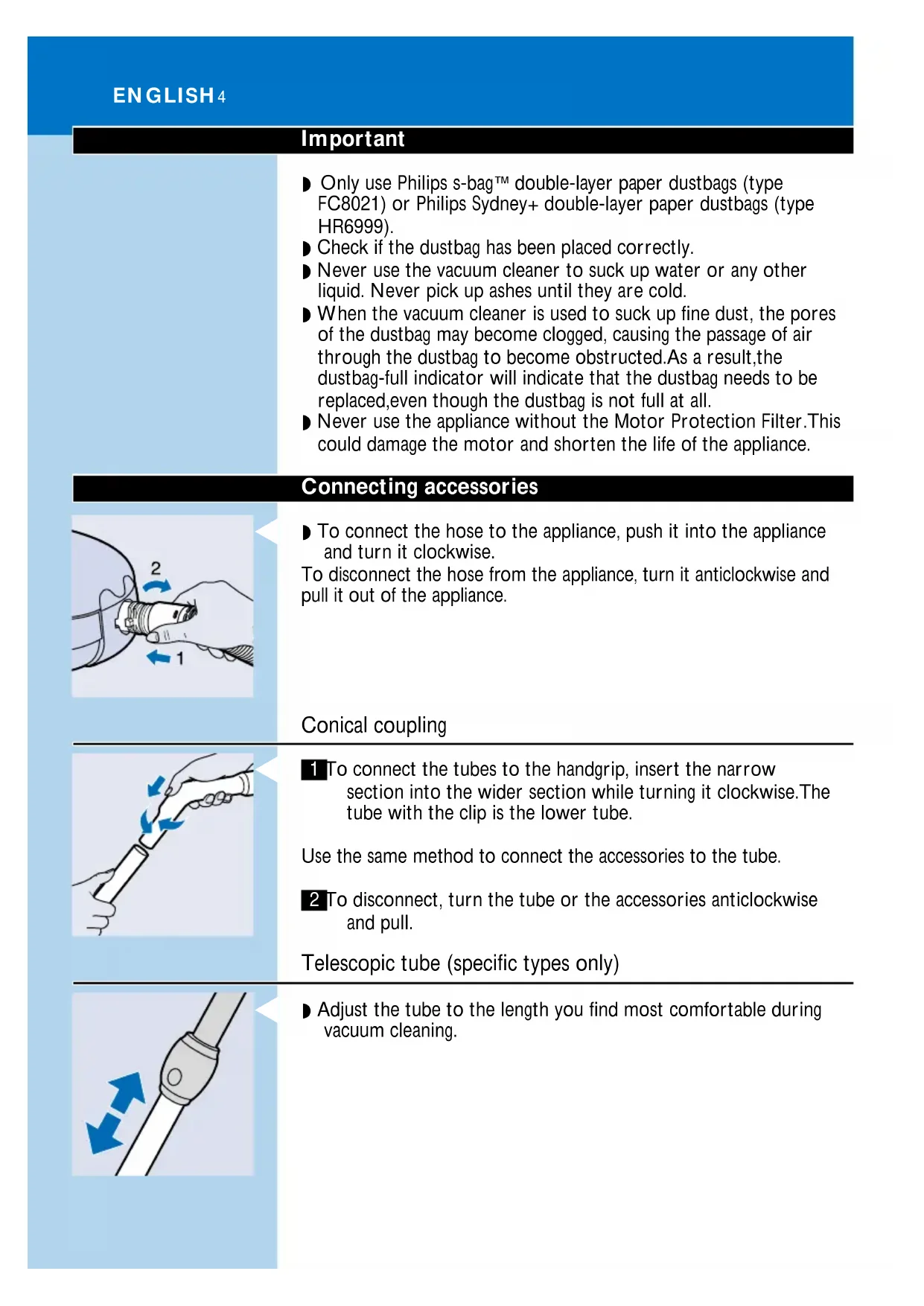
CITY LINE 3Important ◗ Only use Philips s-bag` double-layer paper dustbags (type FC8021) or Philips Sydney+ double-layer paper dustbags (type HR6999). ◗ Check if the dustbag has been placed correctly. ◗ Never use the vacuum cleaner to suck up water or any other liquid. Never pick up ashes until they are cold. ◗ When the vacuum cleaner is used to suck up fine dust, the pores of the dustbag may become clogged, causing the passage of air through the dustbag to become obstructed.As a result,the dustbag-full indicator will indicate that the dustbag needs to be replaced,even though the dustbag is not full at all. ◗ Never use the appliance without the Motor Protection Filter.This could damage the motor and shorten the life of the appliance. Connecting accessories
◗ To connect the hose to the appliance, push it into the appliance and turn it clockwise. To disconnect the hose from the appliance, turn it anticlockwise and pull it out of the appliance. Conical coupling
1 To connect the tubes to the handgrip, insert the narrow section into the wider section while turning it clockwise.The tube with the clip is the lower tube. Use the same method to connect the accessories to the tube. 2 To disconnect, turn the tube or the accessories anticlockwise and pull. Telescopic tube (specific types only)
◗ Adjust the tube to the length you find most comfortable during vacuum cleaning. ENGLISH4Convertible nozzle ◗ The convertible nozzle can be used on either carpets or hard floors. 1 Connect the convertible nozzle to the telescopic tube.
2 Push the rocker switch on top of the convertible nozzle with your foot to make the brush strip for cleaning hard floors come out of the nozzle housing.
3 Push the rocker switch again to make brush strip disappear into the convertible nozzle housing again. Crevice nozzle, brush nozzle and small nozzle The crevice nozzle can be used either for cleaning narrow corners or hard-to-reach places.
1 Lift the handle on the vacuum cleaner to gain access to the accessory storage compartment. 2 Connect the crevice nozzle to the tube or directly to the handgrip.
3 The brush nozzle can be used for cleaning computers, bookshelves etc.
4 The small nozzle can be used for vacuum cleaning small areas, e.g. the seats of chairs and sofas. ENGLISH 5Vacuum cleaning
1 Pull the cord out of the appliance and put the mains plug in the wall socket.
2 Switch the appliance on by pushing the on/off button on top of the appliance with your foot.
3 To carry the appliance, put the handle in upright position and lift the appliance by the handle. Adjusting suction power You can adjust the suction power during vacuum cleaning: There are two ways to adjust the suction power, depending on which appliance you have.
1 Adjust the suction power by means of the slide on the handgrip.
4 Adjust the suction power by means of the electronic suction power control (specific types only). ENGLISH6Storage 1 Switch the appliance off. 2 Remove the mains plug from the wall socket.
3 Rewind the mains cord by pressing the cord rewind button.
4 Put the appliance in upright position and attach the lower tube to the appliance by means of the clip. ◗ The height of the clip can be adjusted by sliding it along the tube. Replacing the dustbag ◗ Replace the dustbag as soon as the "dustbag-full indicator" changes colour (when the nozzle is not placed on the floor). 1 Switch the appliance off..
3 Push the dustbag holder backwards.
4 Remove the full dustbag by pulling the cardboard tag. When you do this, the dustbag will be automatically sealed. ENGLISH 7C 5 Slide the cardboard front of the new dustbag into the two grooves of the dustbag holder. Press it down as far as possible.
6 Pull the dustbag holder forwards (you will hear a click). You cannot close the cover if no dustbag has been inserted. Replacing filters Motor Protection Filter 1 Replace the Motor Protection Filter when you insert the first of a new set of dustbags or once a year.
2 Insert the filter into the appliance with the white side facing upwards. AFS Micro Filter The AFS Micro Filter in this appliance will remove a large part of the smallest particles from the exhaust air by means of its electrostatically charged fibres.
1 Replace the AFS Micro Filter when you insert the first of a new set of dustbags or once a year.
2 Place the sides and the bottom edge of the new filter properly behind the ridges of the holder. 3 Make sure the filter has been properly inserted into the holder before you close the filter holder. ENGLISH8Ordering dustbags and filters Philips s-bag` paper dustbags are available under type number FC 8021 (service number 4822 480 10113). The recommended dustbags fit a variety of Philips vacuum cleaners. For compact vacuum cleaners like the City Line or the Impact, this means that the dustbags will not be filled to their maximum capacity, as the capacity of the dust compartment is smaller than that of the dustbag. However, this does not prevent your vacuum cleaner from functioning optimally. Two AFS Micro Filters and one Motor Protection Filter are available under type number FC 8032 (service number 4822 015 70056). If you have any difficulties obtaining dustbags, filters or other accessories for this appliance, please contact the Philips Helpdesk. See the worldwide guarantee leaflet for telephone numbers of the Philips Helpdesk. Environment Siurbilio plastikinës dalys yra koduotos, kad jas po to bûtø galima perdirbti. Kartoninë pakuotë yra pagaminta i∂ perdirbtø medπiagø ir yra pilnai perdirbama. Replacing the mains cord If the mains cord of this appliance is damaged, it must always be replaced by Philips or a service centre authorised by Philips, as special tools and/or parts are required. Solving problems ◗ The suction power is insufficient: 1 Check if the dustbag needs to be replaced. 2 Check if the filters need to be replaced.
3 Set the electronic suction power control to a higher setting. (specific types only) ENGLISH 9C 4 Close the slide on the handgrip.(specific types only)
Philips. compact City Line Impact,