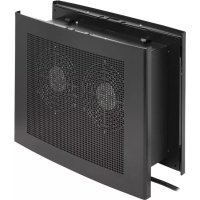
SmartRack SRCLOSETFAN - Fan Tripp Lite - Free user manual and instructions
Find the device manual for free SmartRack SRCLOSETFAN Tripp Lite in PDF.


| Product Type | Exhaust fan for distribution cabinet (smart rack) |
| Brand | Tripp Lite |
| Model | SmartRack SRCLOSETFAN |
| Mounting Dimensions | 508 x 488 mm (20 x 19.2 inches) |
| Approximate Weight | 2.5 kg |
| Housing Material | Steel |
| Color | Black |
| Power Supply | 120 V AC, 60 Hz (max 20 A circuit protection) |
| Power Consumption | 0.5 A (max) |
| Mounting Type | Wall-mount, indoor only |
| Airflow Rate | Not specified |
| Noise Level | Not specified |
| Air Filter | Yes, replaceable |
| Operating Temperature | 0 °C to 40 °C |
| Protection | IP rating not specified, controlled indoor use |
| Warranty | 2-year limited |
| Repairability | No user-serviceable parts |
| Maintenance | Regular filter replacement (no lubrication required) |
| Certifications | Compliant with ANSI/NFPA 70 and C22.1 electrical codes |
Frequently Asked Questions - SmartRack SRCLOSETFAN Tripp Lite
User questions about SmartRack SRCLOSETFAN Tripp Lite
0 question about this device. Answer the ones you know or ask your own.
Ask a new question about this device
Download the instructions for your Fan in PDF format for free! Find your manual SmartRack SRCLOSETFAN - Tripp Lite and take your electronic device back in hand. On this page are published all the documents necessary for the use of your device. SmartRack SRCLOSETFAN by Tripp Lite.
USER MANUAL SmartRack SRCLOSETFAN Tripp Lite
natural_image
Technical line drawing of a modular electronic device with grid-patterned panel and mounting brackets (no text or symbols)Español 5 • Français 9
WARRANTY REGISTRATION
Register your product today and be automatically entered to win an ISOBAR surge protector in our monthly drawing!
tripplite.com/warranty



1111 W. 35th Street, Chicago, IL 60609 USA • tripplite.com/support
Copyright © 2019 Tripp Lite. All rights reserved.
Important Safety Instructions

SAVE THESE INSTRUCTIONS
This manual contains instructions and warnings that must be followed during the installation and operation of the product described in this manual. Read all instructions and warnings thoroughly before attempting installation. Failure to comply may affect the warranty and cause property damage and personal injury.
Connection, Installation and Location Warnings
WARNING – TO REDUCE THE RISK OF FIRE, ELECTRIC SHOCK, OR INJURY TO PERSONS, OBSERVE THE FOLLOWING:
- Inspect the shipping container and the unit for shipping damage. Do not use the unit if it is damaged.
- Install in a controlled indoor environment, away from moisture, temperature extremes, conductive contaminants, dust and direct sunlight. Do not expose to water or rain. FOR USE IN CONTROLLED IT ROOM APPLICATIONS ONLY.
- For best performance, keep the indoor temperature between 32^ and 104^ ( 0^ and 40^ ).
• Installation is to be performed by a SKILLED PERSON, knowledgeable in installing fans.
- All Installation work and electrical wiring must be done by SKILLED PERSON(s) in accordance with all applicable codes and standards, including fire-related construction.
• Install in accordance with local and national electric codes ANSI/NFPA 70 and Canadian Electrical Code, Part I, C22.1.
- To reduce the risk of fire, connect only to a circuit provided with 20A branch circuit overcurrent protection in accordance with the National Electrical Code, ANSI/NFPA 70 and the Canadian Electrical Code, Part I, C22.1.
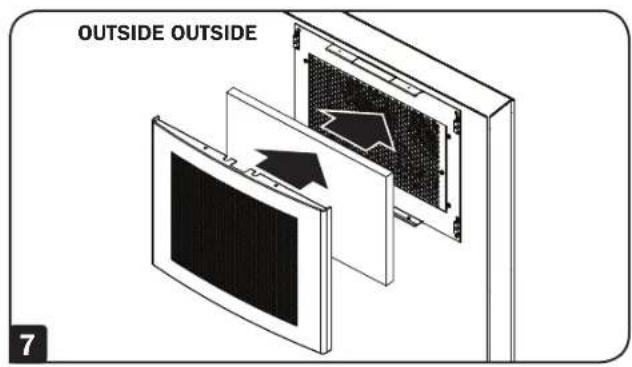
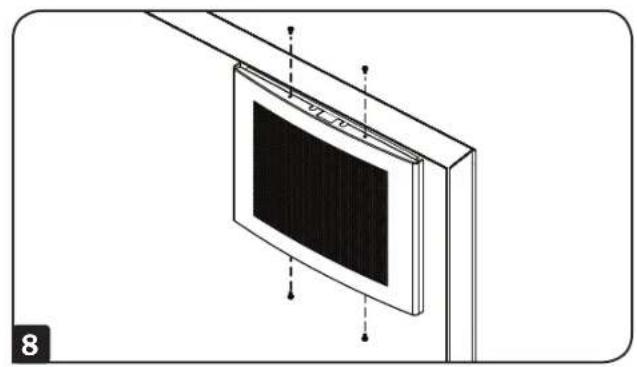
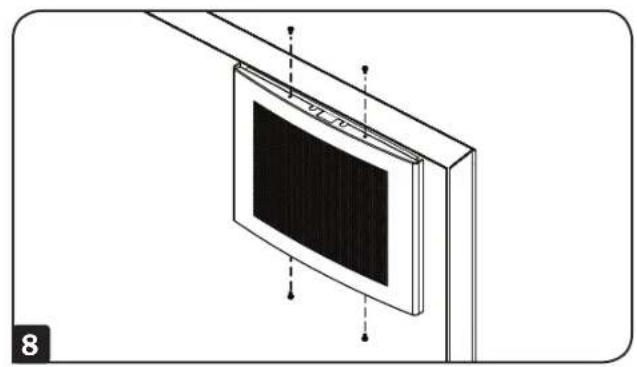
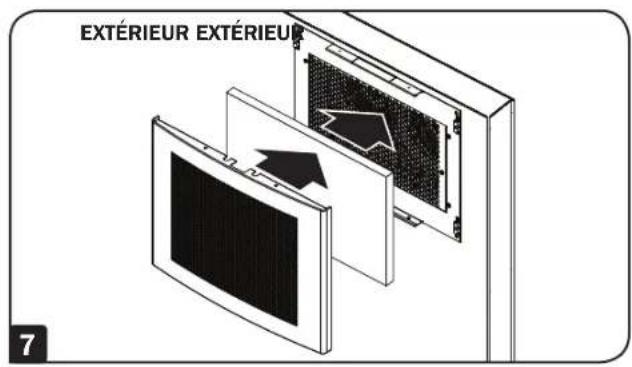
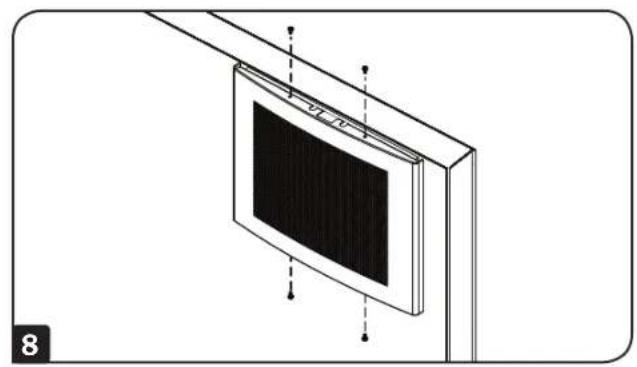
- Not intended for ceiling mounting. Do not mount in a ceiling. DO NOT MOUNT IN A FIRE-RATED WALL. Not for use in kitchens. Do not operate without air filter installed. Always install the outer covers with the supplied screws.
- Do not attempt to modify or drill holes into the enclosure for mounting. Use the mounting holes provided.
- It is the installer's responsibility to choose appropriate hardware to mount the fan.
- When cutting or drilling into wall, do not damage electrical wiring and other hidden utilities.
- When using tools, use eye protection and follow all other safety precautions recommended by the tool Manufacturer and required by applicable regulations.
- Set up a schedule and change the fan filter regularly. Keep hair, clothing and loose objects away from the fan intakes. There is a risk of property damage and personal injury. After filter replacement, be sure to fasten the cover with the screws. The fan does not require routine maintenance. Do not open the fan for any reason. There are no user-serviceable parts inside.
- Do not obstruct the fan openings. Do not block, cover or insert objects into the openings of the fan.
- Use of this equipment in life support applications where failure of this equipment can reasonably be expected to cause failure of the life support equipment or to significantly affect its safety or effectiveness is not recommended.
Explanation of Symbols
 | Caution, Risk of Danger |
 | Caution, Moving Fan Blades |
 | Caution, Electric Shock Hazard |
Mounting
Notes:
- This product should only be installed by someone of good mechanical ability, with basic building experience and a full understanding of this instruction manual.
• Installers are responsible for providing appropriate installation hardware for the mounting surface.
• Make sure that the mounting surface can safely support the combined load of the equipment and all attached hardware and components.

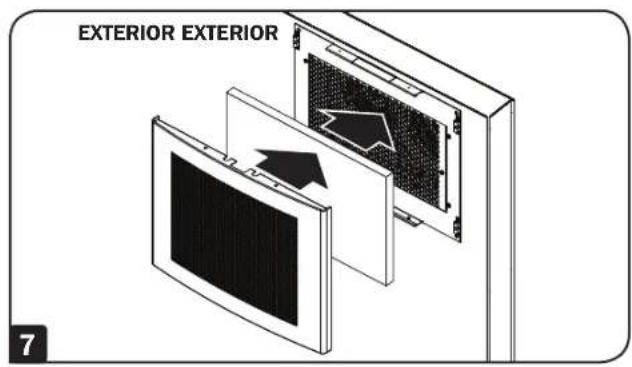
These instructions show an installation in which the fans draw in cool air from the outside. For installations in which the fans pull warm air out from the inside, install the bracket on the inside of the wall and the fan on the outside of the wall.
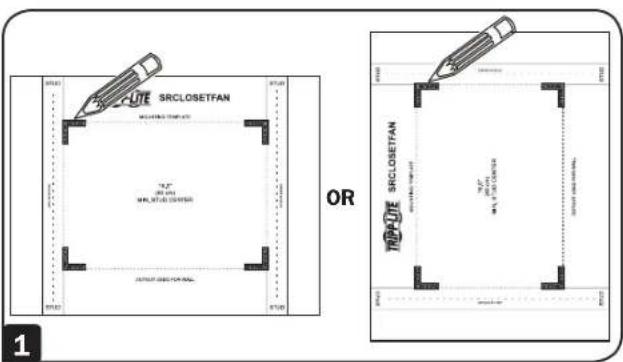
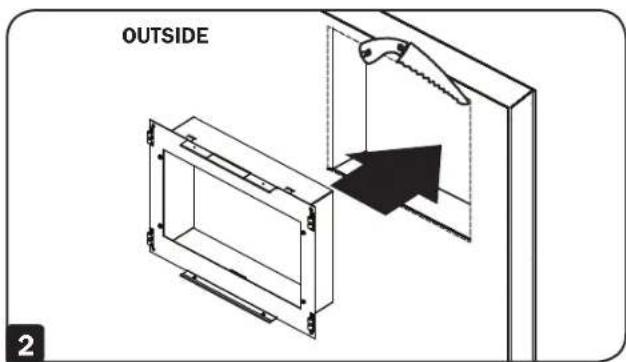

If mounting to wood wall studs, make sure that mounting screws are anchored into the center of the studs. The use of a stud finder is highly recommended.
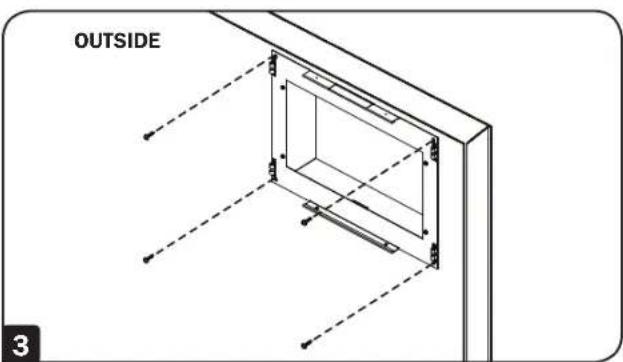
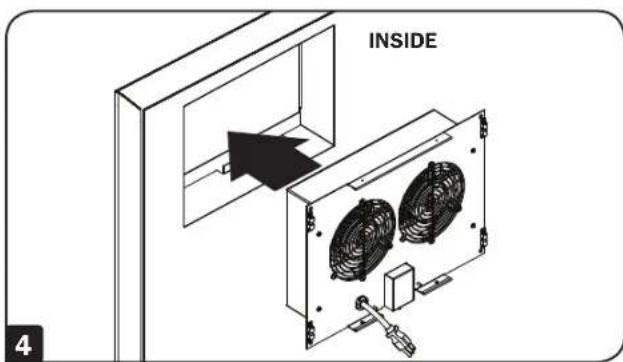

If mounting to wood wall studs, make sure that mounting screws are anchored into the center of the studs. The use of a stud finder is highly recommended.
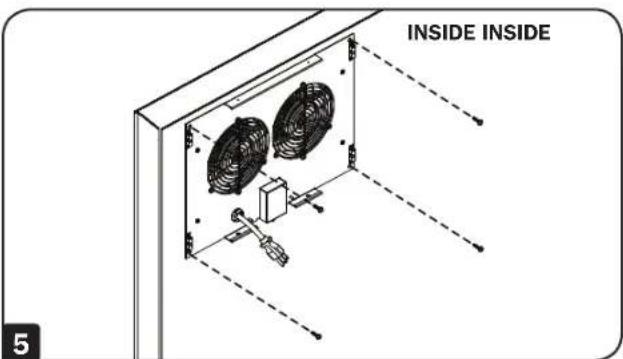
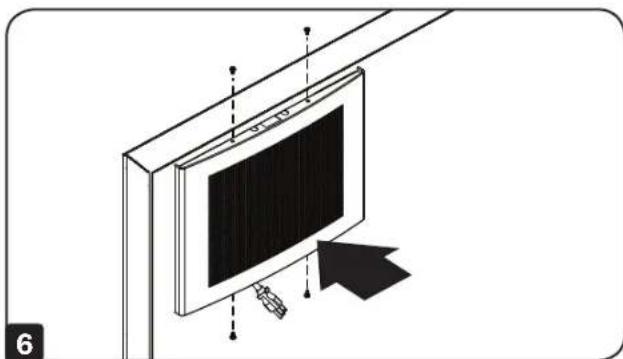
natural_image
Illustration of a monitor mounted on a stand with an arrow pointing to the screen (no text or symbols present)Mounting
natural_image
Diagram of a mounted display panel with mounting bracket and wiring (no text or symbols)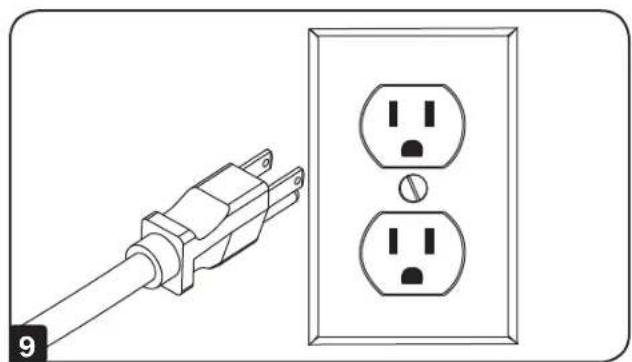
natural_image
Line drawing of a power outlet with two socket outlets and a terminal plug (no text or symbols)
natural_image
Technical line drawing of a mechanical component with an arrow indicating direction (no text or symbols)Warranty and Product Registration
2-Year Limited Warranty
Seller warrants this product, if used in accordance with all applicable instructions, to be free from original defects in material and workmanship for a period of 2 years from the date of initial purchase. If the product should prove defective in material or workmanship within that period, Seller will repair or replace the product, at its sole discretion.
THIS WARRANTY DOES NOT APPLY TO NORMAL WEAR OR TO DAMAGE RESULTING FROM ACCIDENT, MISUSE, ABUSE OR NEGLECT. SELLER MAKES NO EXPRESS WARRANTIES OTHER THAN THE WARRANTY EXPRESSLY SET FORTH HEREIN. EXCEPT TO THE EXTENT PROHIBITED BY APPLICABLE LAW, ALL IMPLIED WARRANTIES, INCLUDING ALL WARRANTIES OF MERCHANTABILITY OR FITNESS, ARE LIMITED IN DURATION TO THE WARRANTY PERIOD SET FORTH ABOVE; AND THIS WARRANTY EXPRESSLY EXCLUDES ALL INCIDENTAL AND CONSEQUENTIAL DAMAGES. (Some states do not allow limitations on how long an implied warranty lasts, and some states do not allow the exclusion or limitation of incidental or consequential damages, so the above limitations or exclusions may not apply to you. This warranty gives you specific legal rights, and you may have other rights which vary from jurisdiction to jurisdiction).
WARNING: The individual user should take care to determine prior to use whether this device is suitable, adequate or safe for the use intended. Since individual applications are subject to great variation, the manufacturer makes no representation or warranty as to the suitability or fitness of these devices for any specific application.
Product Registration
Visit tripplite.com/warranty today to register your new Tripp Lite product. You'll be automatically entered into a drawing for a chance to win a FREE Tripp Lite product!* ^a No purchase necessary. Void where prohibited. Some restrictions apply. See website for details.
Tripp Lite has a policy of continuous improvement. Specifications are subject to change without notice. Photos and illustrations may differ slightly from actual products.


1111 W. 35th Street, Chicago, IL 60609 USA • tripplite.com/support
19-10-070 08-3049_PaxA
natural_image
Technical line drawing of a modular electronic device with grid-patterned panel and mounting brackets (no text or symbols)English 1 • Français 9


1111 W. 35th Street, Chicago, IL 60609, EE. UU. • tripplite.com/support
natural_image
Illustration of a monitor mounted on a stand with an arrow pointing to its side (no text or symbols present)Instalación
natural_image
Diagram of a mounted display panel with mounting bracket and wiring (no text or symbols)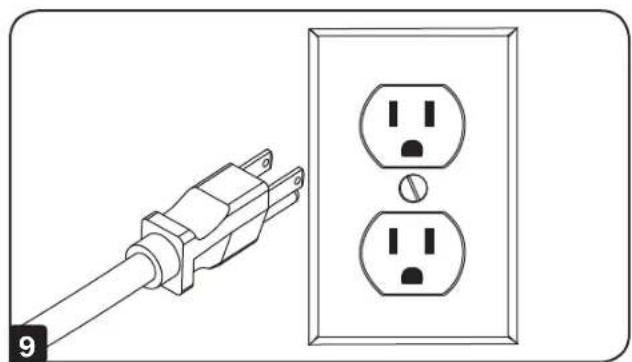
natural_image
Line drawing of a power outlet with two socket outlets and a terminal plug (no text or symbols)
natural_image
Technical line drawing of a mechanical component with an arrow indicating direction (no text or symbols)Garantía
natural_image
Technical line drawing of a modular electronic device with a mesh panel and mounting brackets (no text or symbols)English 1 • Español 5


1111 W. 35th Street, Chicago, IL 60609 USA • tripplite.com/support
natural_image
Illustration of a mounted TV with a remote control panel and an arrow pointing to it (no text or symbols)Montage
natural_image
Diagram of a mounted display panel with mounting bracket and vertical connectors (no text or symbols)
natural_image
Line drawing of a power outlet with two socket outlets and a terminal plug (no text or symbols)
natural_image
Technical line drawing of a mechanical component with an arrow indicating direction (no text or symbols)Garantie

1111 W. 35th Street, Chicago, IL 60609 USA • tripplite.com/support
19-10-070 08-3049_PaxA
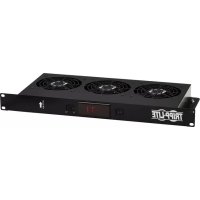
Brand : Tripp Lite
Model : SmartRack SRCLOSETFAN
Category : Fan