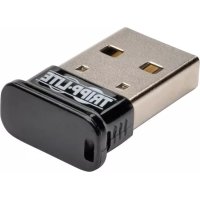
U261001BT4 - USB Bluetooth Adapter Tripp Lite - Free user manual and instructions
Find the device manual for free U261001BT4 Tripp Lite in PDF.


| Product Type | USB Bluetooth 4.0 Adapter |
| Brand | Tripp Lite |
| Model | U261-001-BT4 |
| Bluetooth Version | 4.0 LE+EDR, backward compatible with 3.0, 2.0, 1.2, 1.1 |
| Bluetooth Class | Class 1 |
| Wireless Range | Up to 50 m (165 ft) |
| Max Data Rate | Up to 3 Mbps (EDR) |
| Number of Connected Devices | Up to 7 |
| Security | Built-in pairing, encryption and authentication |
| Connector | USB-A Male |
| Power Source | Via USB port (very low power consumption) |
| Dimensions (approx.) | 25 x 15 x 6 mm |
| Weight (approx.) | 5 g |
| Material | ABS Plastic |
| Color | Black or gray (depending on lot) |
| LED Indicator | Yes (blue or green depending on activity) |
| Supported Operating Systems | Windows XP and later |
| Included Software | BlueSoleil 10 (installation CD included) |
| Operating Temperature | 0 to 40 °C |
| Storage Temperature | -20 to 60 °C |
| Relative Humidity | 10 to 90% (non-condensing) |
| Warranty | 1 year (limited) |
| Package Contents | Adapter, installation CD, quick start guide |
Frequently Asked Questions - U261001BT4 Tripp Lite
User questions about U261001BT4 Tripp Lite
0 question about this device. Answer the ones you know or ask your own.
Ask a new question about this device
Download the instructions for your USB Bluetooth Adapter in PDF format for free! Find your manual U261001BT4 - Tripp Lite and take your electronic device back in hand. On this page are published all the documents necessary for the use of your device. U261001BT4 by Tripp Lite.
USER MANUAL U261001BT4 Tripp Lite
Mini Bluetooth 4.0 (Class 1) USB Adapter
Model: U261-001-BT4
Español 12 • Français 22 • Русский 32
WARRANTY REGISTRATION
Register your product today and be automatically entered to win an ISOBAR® surge protector in our monthly drawing!
tripplite.com/warranty


Manufacturing Excellence.
1111 W. 35th Street, Chicago, IL 60609 USA tripplite.com/support
Copyright © 2022 Tripp Lite. All rights reserved.
Product Features
- Compliant with Bluetooth 4.0 LE+EDR Class 1
- Add Bluetooth wireless capabilities to a laptop or desktop computer's USB port
- Wirelessly communicates with Bluetooth 4.0-enabled printers, tablets, cell phones, headsets, keyboards/mice and more
- Backwards compatible with Bluetooth version 3.0, 2.0, 1.2 and 1.1 devices
- Wireless range of up to 50 m (165 ft.)
• Support for Enhanced Data Rate (EDR) up to 3Mbps - Connects to up to 7 devices at the same time
- Built-in security protects your communication-pairing, encryption and authentication
- Low-profile design blends in with your computer; no need to unplug from your device when traveling
- Ultra-low power consumption
System Requirements
- An available USB port
- Windows® XP and later
Package Includes
- U261-001-BT4
- Driver CD
- Quick Start Guide
Installation and Pairing
Note: It is crucial that preexisting Bluetooth software on the host computer be disabled prior to installing and operating the provided software. Failure to do so may result in reduced functionality or a failure by the computer to recognize the software correctly. If a “Product Key” is requested while operating the software, this is due to a conflict with the provided software and preexisting Bluetooth software.
- Insert the driver CD and run the "setup.exe" driver file in the BlueSoleil10 folder to start the installation.
Note: If your computer does not have a CD drive, you can download the driver file at www.tripplite.com/support. - Follow all on-screen instructions and prompts displayed by the Install Wizard.
- When prompted with a "Restart System" message, click Yes.
- Once your system restarts, insert the Bluetooth adapter into an available USB port on your computer or laptop.
- A Desktop Icon will appear for the BlueSoleil software. Click on the icon.
Note: If no desktop icon appears, go to the start menu to access the software.
Installation and Pairing
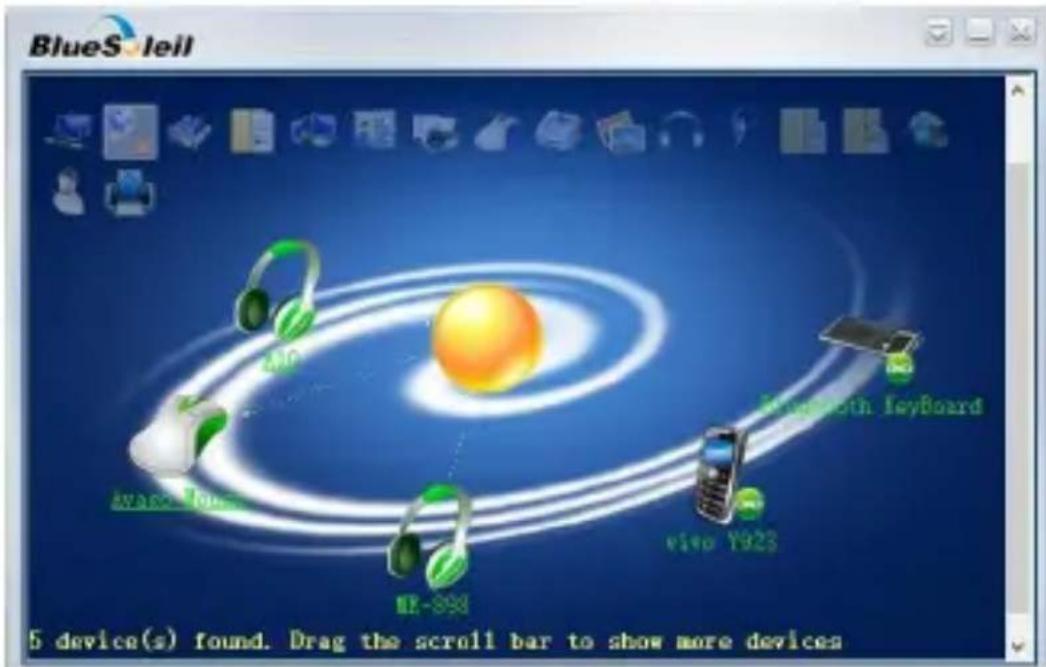
- When the BlueSoleil main screen displays, click the orange ball in the middle of the screen to search for Bluetooth devices. When found, the Bluetooth device will display as an icon orbiting the orange ball.
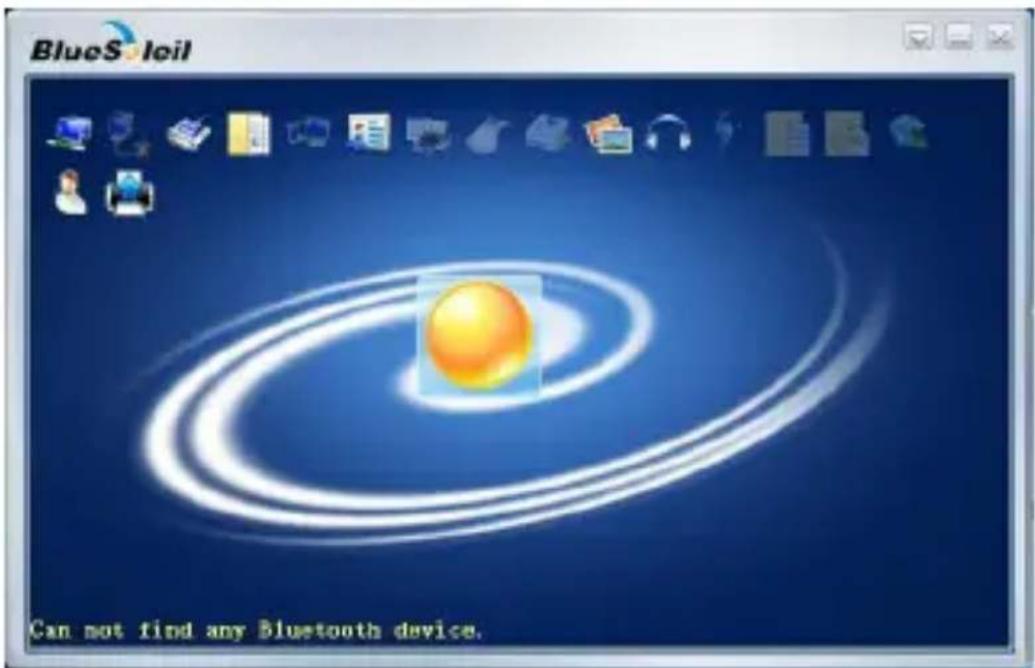
- To begin the pairing process, double-click on the device icon you want to access. Follow the prompts.
Note: In some cases, you may need to establish a trusted relationship between BlueSoleil and the Bluetooth device by entering the same password on both the software and the device. On BlueSoleil, enter a password in the “Passkey” field when the “Enter Bluetooth Passkey” window displays.
Installation and Pairing
- After a successful pairing, a mark will appear beside the paired device icon. A dotted line will appear between the orange ball and the device to confirm a successful Bluetooth connection.
Frequently Asked Questions
Q: What if another third-party Bluetooth application or driver is already installed on my system?
A: Any built-in Bluetooth functionality must be disabled and any third-party Bluetooth applications should be uninstalled or disabled prior to installing BlueSoleil.
Q: Can I install BlueSoleil from a source other than the included CD or download from the Tripp Lite website?
A: No. The only authorized BlueSoleil application approved for use with the U261-001-BT4 must come from the CD or be downloaded from tripplite.com. Downloads/installations from other sources, including the BlueSoleil website, will require an activation code that must be purchased from BlueSoleil. The installation files on the included CD/tripplite.com download are already activated and authorized for use with the U261-001-BT4.
Frequently Asked Questions
Q: Is it okay if I modify the BlueSoleil application?
A: It is recommended that you do not modify the application in any way. The BlueSoleil application allows you to modify settings, but doing so in some cases may create issues with using the U261-001-BT4.
Q: Is connecting and pairing a one-step process?
A: The connecting/pairing process with BlueSoleil may require additional steps. Please see the support document for more detail.
Warranty and Product Registration
1-YEAR LIMITED WARRANTY
TRIPP LITE warrants its products to be free from defects in materials and workmanship for a period of one (1) year from the date of initial purchase. TRIPP LITE's obligation under this warranty is limited to repairing or replacing (at its sole option) any such defective products. To obtain service under this warranty, you must obtain a Returned Material Authorization (RMA) number from TRIPP LITE or an authorized TRIPP LITE service center. Products must be returned to TRIPP LITE or an authorized TRIPP LITE service center with transportation charges prepaid and must be accompanied by a brief description of the problem encountered and proof of date and place of purchase. This warranty does not apply to equipment, which has been damaged by accident, negligence or misapplication or has been altered or modified in any way.
EXCEPT AS PROVIDED HEREIN, TRIPP LITE MAKES NO WARRANTIES, EXPRESS OR IMPLIED, INCLUDING WARRANTIES OF MERCHANTABILITY AND FITNESS FOR A PARTICULAR PURPOSE.
Some states do not permit limitation or exclusion of implied warranties; therefore, the aforesaid limitation(s) or exclusion(s) may not apply to the purchaser.
EXCEPT AS PROVIDED ABOVE, IN NO EVENT WILL TRIPP LITE BE LIABLE FOR DIRECT, INDIRECT, SPECIAL, INCIDENTAL OR CONSEQUENTIAL DAMAGES ARISING OUT OF THE USE OF THIS PRODUCT, EVEN IF ADVISED OF THE POSSIBILITY OF SUCH DAMAGE. Specifically, TRIPP LITE is not liable for any costs, such as lost profits or revenue, loss of equipment, loss of use of equipment, loss of software, loss of data, costs of substitutes, claims by third parties, or otherwise.
Warranty and Product Registration
PRODUCT REGISTRATION
Visit tripplite.com/warranty today to register your new Tripp Lite product. You'll be automatically entered into a drawing for a chance to win a FREE Tripp Lite product!*
* No purchase necessary. Void where prohibited. Some restrictions apply. See website for details.
FCC Notice, Class B
This device complies with part 15 of the FCC Rules. Operation is subject to the following two conditions: (1) This device may not cause harmful interference, and (2) this device must accept any interference received, including interference that may cause undesired operation.
Note: This equipment has been tested and found to comply with the limits for a Class B digital device, pursuant to part 15 of the FCC Rules. These limits are designed to provide reasonable protection against harmful interference in a residential installation. This equipment generates, uses and can radiate radio frequency energy and, if not installed and used in accordance with the instructions, may cause harmful interference to radio communications. However, there is no guarantee that interference will not occur in a particular installation. If this equipment does cause harmful interference to radio or television reception, which can be determined by turning the equipment off and on, the user is encouraged to try to correct the interference by one or more of the following measures:
- Reorient or relocate the receiving antenna.
- Increase the separation between the equipment and receiver.
- Connect the equipment into an outlet on a circuit different from that to which the receiver is connected.
- Consult the dealer or an experienced radio/TV technician for help.
Any changes or modifications to this equipment not expressly approved by Tripp Lite could void the user's authority to operate this equipment.
Warranty and Product Registration
WEEE Compliance Information for Tripp Lite Customers and Recyclers (European Union)
Under the Waste Electrical and Electronic Equipment (WEEE) Directive and implementing regulations, when customers buy new electrical and electronic equipment from Tripp Lite they are entitled to:
- Send old equipment for recycling on a one-for-one, like-for-like basis (this varies depending on the country)
- Send the new equipment back for recycling when this ultimately becomes waste
Use of this equipment in life support applications where failure of this equipment can reasonably be expected to cause the failure of the life support equipment or to significantly affect its safety or effectiveness is not recommended. Do not use this equipment in the presence of a flammable anesthetic mixture with air, oxygen or nitrous oxide.
Tripp Lite has a policy of continuous improvement. Specifications are subject to change without notice. Photos and illustrations may differ slightly from actual products.


1111 W. 35th Street, Chicago, IL 60609 USA tripplite.com/support
Foire aux questions
1111 W. 35th Street, Chicago, IL 60609 USA tripplite.com/support
Вопросы и ответы
1111 W. 35th Street, Chicago, IL 60609 USA tripplite.com/support
- Mini Bluetooth 4.0 (Class 1) USB Adapter
- WARRANTY REGISTRATION
- Product Features
- System Requirements
- Package Includes
- Installation and Pairing
- Frequently Asked Questions
- Q: Is it okay if I modify the BlueSoleil application?
- Q: Is connecting and pairing a one-step process?
- Warranty and Product Registration
- 1-YEAR LIMITED WARRANTY
- PRODUCT REGISTRATION
- FCC Notice, Class B
- WEEE Compliance Information for Tripp Lite Customers and Recyclers (European Union)
- Foire aux questions
- Вопросы и ответы
Brand : Tripp Lite
Model : U261001BT4
Category : USB Bluetooth Adapter