
HER30FSC - Other kitchen appliances HISENSE - Free user manual and instructions
Find the device manual for free HER30FSC HISENSE in PDF.
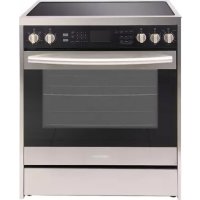


| Type of product | Electric freestanding range |
| Brand | Hisense |
| Model | HER30FSC |
| Dimensions (W x H x D) | 76.2 cm x 119.4 cm x 68.6 cm (30" x 47" x 27") |
| Weight | Approximately 68 kg (150 lb) |
| Power supply | 240 V, 40 A, 60 Hz |
| Number of burners | 4 (including 1 dual ring and 1 triple ring) |
| Cooktop surface type | Ceramic glass |
| Oven functions | Bake, Broil, Convection (Convection Bake, Convection Roast, Convection Broil), Warm, Proof, Convection Conversion, Self-Clean |
| Oven capacity | 142 L (5 ft³) |
| Maximum oven temperature | 260 °C (500 °F) |
| Self-cleaning | Yes, 6 levels (rapid to max), programmable duration |
| Safety | Anti-tip bracket, control lock, door lock in self-clean |
| Body material | Stainless steel |
| Oven lighting | 2 halogen bulbs 25 W (G9) |
| Oven racks | 2 sliding racks with stop |
| Meat probe | Included (socket on left wall) |
| Display | Digital with clock/timer |
| Maintenance | Manual cleaning of ceramic glass with scraper and specific cleaner; self-clean for oven interior |
| Spare parts and repairability | Oven bulbs (G9 25W), door latches, heating elements, gaskets – contact Hisense customer service at 1-855-344-7367 |
| General information | Complies with ANSI/NFPA 70 and Canadian electrical standards. Anti-tip bracket mandatory for safety. |
Frequently Asked Questions - HER30FSC HISENSE
User questions about HER30FSC HISENSE
0 question about this device. Answer the ones you know or ask your own.
Ask a new question about this device
Download the instructions for your Other kitchen appliances in PDF format for free! Find your manual HER30FSC - HISENSE and take your electronic device back in hand. On this page are published all the documents necessary for the use of your device. HER30FSC by HISENSE.
USER MANUAL HER30FSC HISENSE
30" Electric Free-Standing Range
30-inch Electric Free-Standing Range
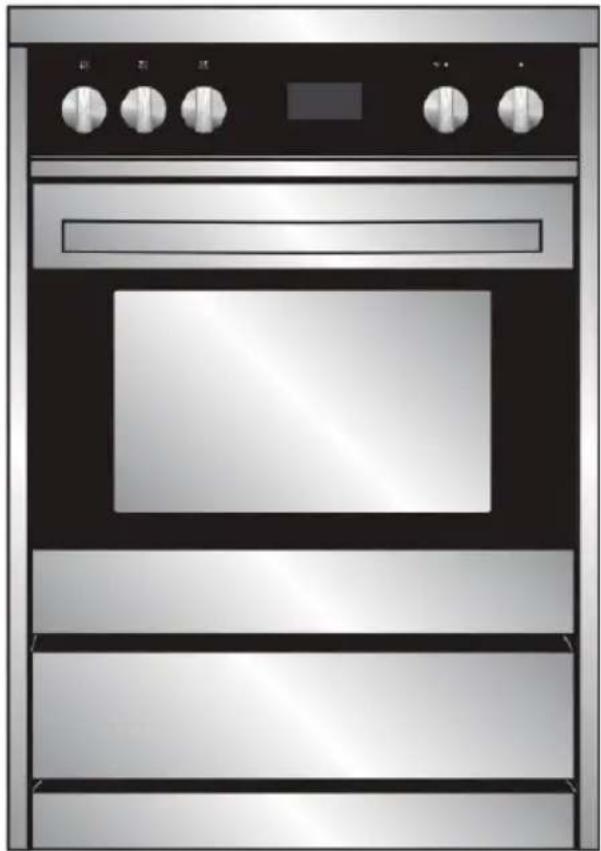
TABLE OF CONTENTS
RANGE SAFETY 2
The Anti-tip Bracket 3
PARTS AND FEATURES 7
CONTROL PANEL. 8
Display 8 Start 8 Cancel. 8 Cook Time 8 Delay Start 9 Oven Lights 9 Timer 10 Settings 10 Control Lock. 13
COOKTOP USE 14
Before Use 14 Heating Elements 15 Control Knobs 17 Cookware 17 Home Canning 19
OVEN USE 19
Before Using the Oven For the First Time 20 General 20 Oven Modes 21 Convection Modes 25
RANGE CARE 33
Cleaning 33 Oven Self-Cleaning 35 Oven Door Removal 37 Replacing an Oven Light 38
TROUBLESHOOTING 40
Baking and Roasting Problems. 40 Cooktop 41 Oven 42
RECORD KEEPING
Thank you for purchasing this Hisense product. This user manual will help you get the best performance from your new range.
For future reference, record the model and serial number located on the inside frame of the range, and the date of purchase.
Staple your proof of purchase to this manual to aid in obtaining warranty service if needed.
Model number
Serial number
Date of purchase
Your safety and the safety of others are very important.
We have provided many important safety messages in this manual and on your appliance. Always read and obey all safety messages.

This is the safety alert symbol.
This symbol alerts you to potential hazards that can kill or hurt you and others. All safety messages will follow the safety alert symbol and either the word "DANGER," "WARNING" or "CAUTION."
These words mean:
DANGER
An imminently hazardous situation. You could be killed or seriously injured if you don't immediately follow instructions.
WARNING
A potentially hazardous situation which, if not avoided, could result in death or serious bodily injury.
CAUTION
A potentially hazardous situation which, if not avoided, may result in moderate or minor injury.
All safety messages will tell you what the potential hazard is, tell you how to reduce the chance of injury, and tell you what can happen if the instructions are not followed.
WARNING
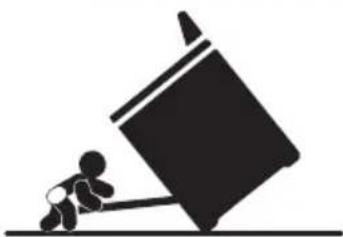
Tip Over Hazard
A child or adult can tip the range and be killed.
Connect anti-tip bracket to rear range foot.
Reconnect the anti-tip bracket, if the range is moved.
See the installation instructions for details.
Failure to follow these instructions can result in death or serious burns to children and adults.
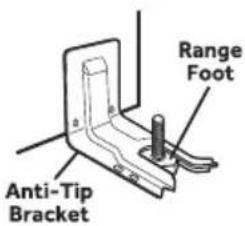
Making sure the anti-tip bracket is installed:
- Slide range forward.
- Look for the anti-tip bracket securely attached to floor.
- Slide range back so rear range foot is under anti-tip bracket.
IMPORTANT SAFETY INSTRUCTIONS
WARNING: To reduce the risk of fire, electrical shock, injury to persons, or damage when using the range, follow basic precautions, including the following:
- WARNING: TO REDUCE THE RISK OF TIPPING OF THE RANGE, THE RANGE MUST BE SECURED BY PROPERLY INSTALLED ANTI-TIP DEVICES. TO CHECK IF THE DEVICES ARE INSTALLED PROPERLY, SLIDE RANGE COMPLETELY FORWARD, LOOK FOR ANTI-TIP BRACKET SECURELY ATTACHED TO THE FLOOR BEHIND THE RANGE AND SLIDE RANGE COMPLETELY BACK UNTIL THE REAR RANGE FOOT IS UNDER ANTI-TIP BRACKET. WARNING: NEVER use this appliance as a space heater to heat or warm the room. Doing so may result in carbon monoxide poisoning and overheating of the oven. WARNING: NEVER cover any slots, holes or passages in the oven bottom or cover an entire rack with materials such as aluminum foil. Doing so blocks airflow through the oven and may cause carbon monoxide poisoning. Aluminum foil linings may also trap heat, causing a fire hazard.
- CAUTION: Do not store items of interest to children in cabinets above a range or on the back guard of a range - children climbing on the range to reach items could be seriously injured.
- Do Not Leave Children Alone
- Children should not be left alone or unattended in area where the range is in use. They should never be allowed to sit or stand on any part of the range.
- Wear Proper Apparel – Loose-fitting or hanging garments should never be worn while using the range.
- User Servicing - Do not repair or replace any part of the range unless specifically recommended in the manual. All other servicing should be referred to a qualified technician.
- Storage in or on the Range - Flammable materials should not be stored in an oven or near surface units.
- Do Not Use Water on Grease Fires - Smother fire or flame or use dry chemical or foam-type extinguisher.
- Use Only Dry Potholders – Moist or damp potholders on hot surfaces may result in burns from steam. Do not let potholder touch hot heating elements. Do not use a towel or other bulky cloth.
IMPORTANT SAFETY INSTRUCTIONS
- DO NOT TOUCH SURFACE UNITS OR AREAS NEAR UNITS - Surface units may be hot even though they are dark in color. Areas near surface units may become hot enough to cause burns. During and after use, do not touch, or let clothing or other flammable materials contact surface units or areas near units until they have had sufficient time to cool. Among those areas are the cooktop and surfaces facing the cooktop.
- Never Leave Surface Units Unattended at High Heat Settings - Boil over causes smoking and greasy spillovers that may ignite.
- Glazed Cooking Utensils – Only certain types of glass, glass/ceramic, ceramic, earthenware, or other glazed utensils are suitable for range-top service without breaking due to the sudden change in temperature.
- Utensil Handles Should Be Turned Inward and Not Extend Over Adjacent Surface Units – To reduce the risk of burns, ignition of flammable materials, and spillage due to unintentional contact with the utensil, the handle of a utensil should be positioned so that it is turned inward, and does not extend over adjacent surface units.
- Clean Cooktop With Caution – If a wet sponge or cloth is used to wipe spills on a hot cooking area, be careful to avoid steam burn. Some cleaners can produce noxious fumes if applied to a hot surface. Use Care When Opening Door - Let hot air or steam escape before removing or replacing food.
- Do Not Heat Unopened Food Containers - Build-up of pressure may cause container to burst and result in injury.
- Keep Oven Vent Ducts Unobstructed.
- Placement of Oven Racks - Always place oven racks in desired location while oven is cool. If rack must be moved while oven is hot, do not let potholder contact hot heating element in oven.
- DO NOT TOUCH HEATING ELEMENTS OR INTERIOR SURFACES OF OVEN - Heating elements may be hot even though they are dark in color. Interior surfaces of an oven become hot enough to cause burns. During and after use, do not touch, or let clothing or other flammable materials contact heating elements or interior surfaces of oven until they have had sufficient time to cool. Other surfaces of the appliance may become hot enough to cause burns – among these surfaces are oven vent openings and surfaces near these openings, oven doors, and windows of oven doors.
IMPORTANT SAFETY INSTRUCTIONS
- Proper Installation - The range, when installed, must be electrically grounded in accordance with local codes or, in the absence of local codes, with the National Electrical Code, ANSI/NFPA 70. In Canada, the range must be electrically grounded in accordance with Canadian Electrical Code. Be sure the range is properly installed and grounded by a qualified technician.
- Disconnect the electrical supply before servicing the appliance.
Injuries may result from the misuse of appliance doors or drawers such as stepping, leaning, or sitting on the doors or drawers. - Maintenance - Keep range area clear and free from combustible materials, gasoline, and other flammable vapors and liquids.
For units with ventilating hood -
- Clean Ventilating Hoods Frequently - Grease should not be allowed to accumulate on hood or filter.
- When flambé cooking under the vent hood, turn the fan on.
READ AND SAVE THESE INSTRUCTIONS
PARTS AND FEATURES
This manual covers several different models. The range you have purchased may have some or all of the items listed. The locations and appearances of the features shown here may not match those of your model.
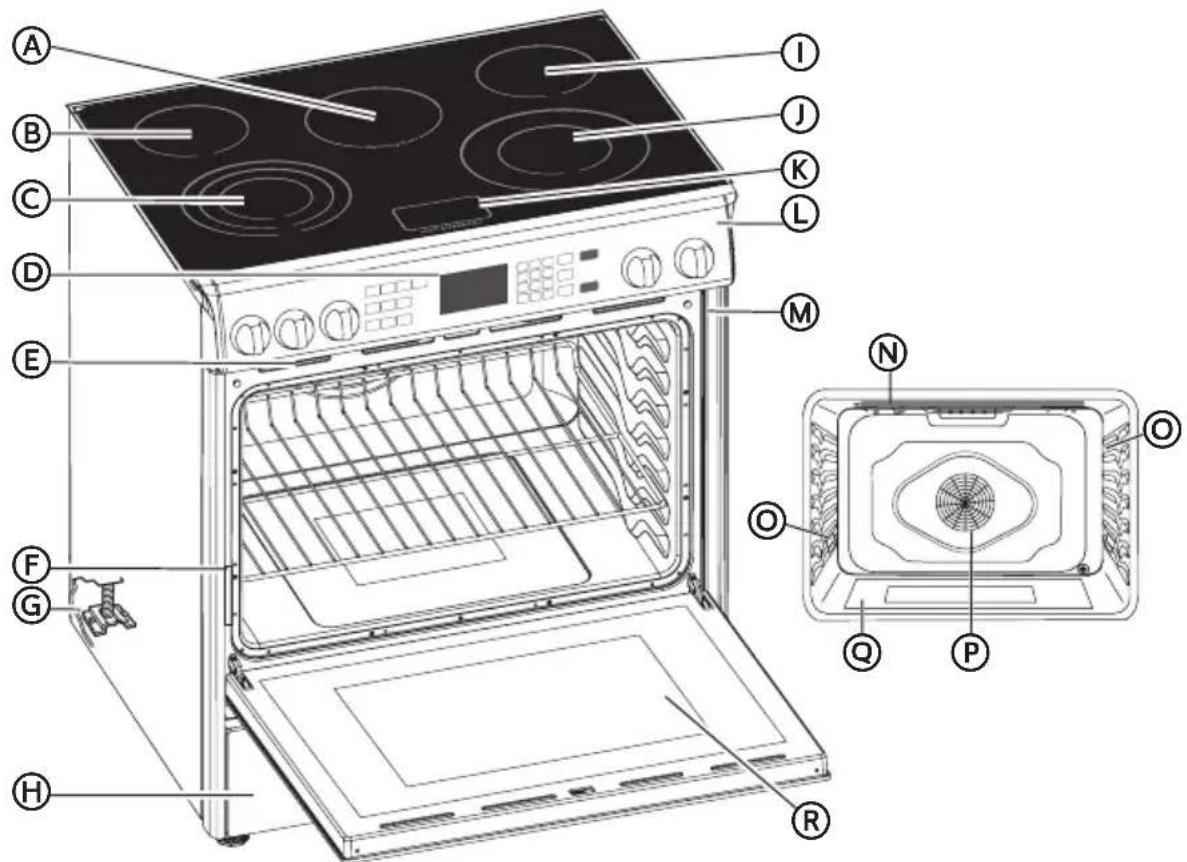
Warming Zone Burner B Left Rear Surface Burner Left Front Surface Burner (Triple-element) Clock/Timer Oven Vent F Model and Serial Number Plate Anti-tip Bracket Storage Drawer Right Rear Surface Burner
Right Front Surface Burner (Dual-element) Hot Surface Indicator Lights Control Panel M Door Gasket Broil Element Oven Light Convection Fan and Element Bottom Element (not visible) Oven Door Window
CONTROL PANEL
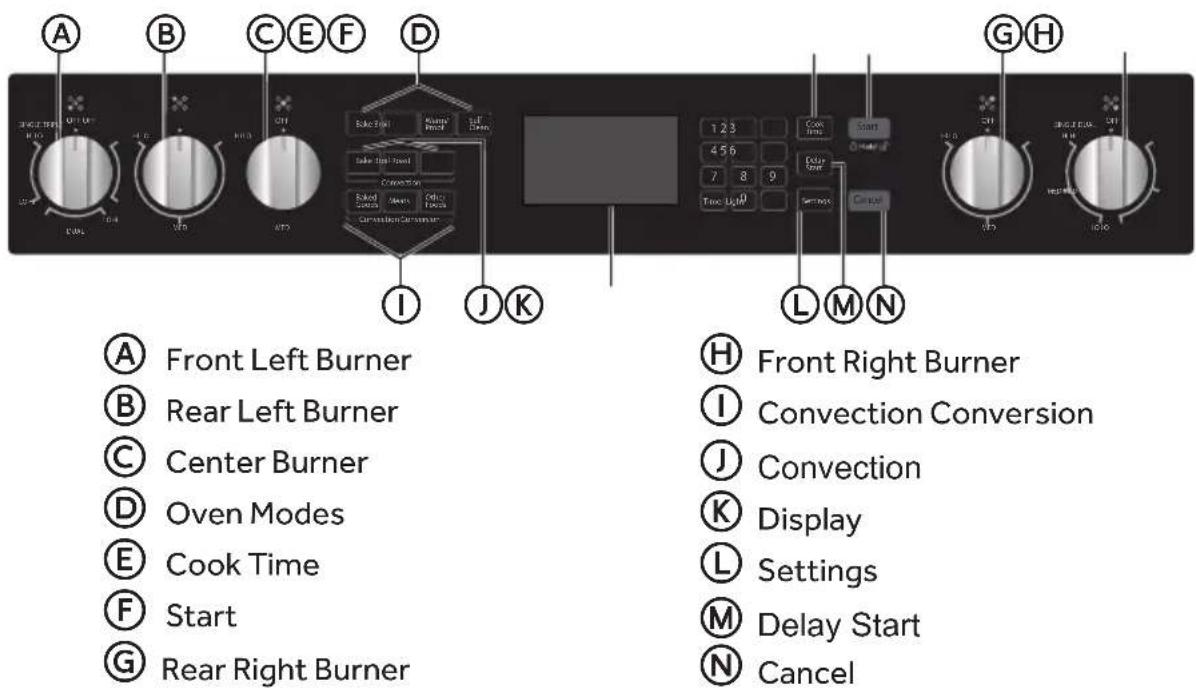
DISPLAY
When power is first supplied to the oven or if a power failure occurs, "12:00" will appear on the display. See "Clock" in the "Settings" section to set time-of-day. When the oven is not in use, the display shows the time-of-day.
Please note the display is factory preset to English only.
START
The Start control starts all cooking functions, and is used to lock the control panel.
- Press and hold START for 3 seconds to lock the control panel.
CANCEL
The Cancel control stops any function except the Timer and Control Panel Lock.
COOK TIME
(REQUIRED FOR SOME OVEN MODES)
The Cook Time feature allows the oven to be set to cook for a set length of time, and then turn off automatically.
IMPORTANT: You must select an Oven Mode before you can set a Cook Time.
NOTES:
Cook Time can be set in hours or minutes up to 11 hours and 59 minutes. - To change the cook time during cooking, press CANCEL. Enter the new cook time and press START. - At the end of the set Cook Time, the oven will turn off automatically, the alert tone will sound, and "Cooking Complete" will appear in the text area.
To Set Cook Time:
- Select cooking mode.
- Select temperature.
- Press COOK TIME.
- Enter the desired cook time using the number keypad. "Press START" will appear in the display.
- Press START. The oven will begin to preheat.
DELAY START
This feature allows you to set the oven to turn on at a later time.
IMPORTANT: The clock must be set to the correct time of day.
WARNING
Food Poisoning Hazard
Do not let food sit in the oven for more than one hour before or after cooking. Doing so can result in food poisoning or sickness.
To Set Delay Start:
- Select an Oven Mode.
- Set a Temperature.
- Set Cook Time. See "Cook Time" earlier in this section.
- Press DELAY START, and then enter the time of day that you want the oven to turn on, using the number keypad.
"Press START" will appear in the display. If a cooking time was not set, the control will prompt you to "Set Cooking Time."
- Place the food in the oven and close the oven door.
- Press START.
- When the Cook Time has elapsed, the oven will turn off automatically, an alert tone will sound, and "Cooking Complete" will appear in the display.
OVEN LIGHTS
Press LIGHT to turn the lights on and off while the oven doors are closed. Both oven lights come on automatically when the door is open.
NOTE: The oven lights will not come on during the Self-Clean cycle.
TIMER
The Timer can be set in hours or minutes up to 11 hours and 59 minutes, and counts down the set time.
NOTES:
The Timer does not start or stop the oven. - At the end of the set time, a reminder beep will sound until the Timer is canceled.
To Set the Timer:
- Press TIMER.
- Enter the time using the number keypad.
- Press TIMER again to start the countdown.
NOTE: At the end of the set time a long beep will sound.
To Cancel the Timer:
- Press TIMER
SETTINGS
The Settings control allows you to access the menu for additional functions and features.
DEGREES FAHRENHEIT AND CELSIUS
- The temperature is factory preset to Fahrenheit, but can be changed to Celsius.
- Press SETTINGS. Options will appear on the display.
- Press 2 on the number keypad. "TEMP UNIT" and "FAHRENHEIT PRESS1: DEGREE F/C" will appear in the text display area.
- Press the "1" number keypad to change the temperature unit setting.
- Press SETTINGS. The temperature units have been changed.
- Press SETTINGS then follow the display prompts to return to Fahrenheit.
TONES
Tones are audible signals, indicating the following basic functions:
| Number of Tones | Indicates | ||
| 1 | Valid Press Function | has been entered | Oven is Preheated |
| 2 | Invalid Touch Pad Press | ||
| 4 | End of Cycle End of | Timer | |
To Turn On/Off Sound:
The oven sound is factory preset for On but can be changed to Off.
- Press SETTINGS. Options will appear in the display.
- Press "3" on the number keypad.
- Press "1" on the number keypad to turn OFF the sound.
- Press SETTINGS. The sound has now been turned off.
- Press SETTINGS, and then follow the display prompts to return the sound to On.
To Adjust Sound Volume:
The oven sound is factory preset for High but can be changed to Low.
- Press Settings. Options will appear in the display.
- Press "4" on the number keypad, and "SOUND VOLUME" "Press 1: HIGH/ LOW" will appear the display.
- Press "1" on the number keypad to turn the sound Low.
- Press SETTINGS. The sound volume has now been changed.
- Press SETTINGS then follow the display prompts to return the sound volume setting to High.
CLOCK
Before setting the clock, make sure the oven and Timer are off.
To Set the Clock:
- Press SETTINGS. Options will appear in the display.
- Press "1" on the number keypad, and "Clock" will appear in the display.
- Press the number keypad to enter the time-of-day.
- Press START to toggle between AM and PM.
- Press SETTINGS to confirm and set the time-of-day.
To Change the Clock to 24-Hour Format:
- The clock can be set to display time in a 12-hour or 24-hour format. The clock is factory preset for the 12-hour format.
- Press SETTINGS. Options will appear in the display. Press "5" in the number keypad, and "12/24 HOUR" and "12". "PRESS1: 12/24" will appear in the display text area.
- Press "1" on the number keypad to change the 12/24-hour setting to 24-hour.
- Press SETTINGS. The 12/24-hour setting has been changed.
SABBATH MODE
The Sabbath function is designed for those whose religious observances require that certain features and modes are disabled. The range is factory preset with Sabbath Mode Off.
To Turn On/Off Sabbath mode:
- Make sure the oven is turned Off, and the meat probe is not plugged in. NOTE: Sabbath mode cannot be set when the oven is On. The oven will not recognize the meat probe while in Sabbath mode.
- Press SETTINGS > Press START > Press 7, and then press 1 (to toggle between ON / OFF).
- Press SETTINGS again to enable Sabbath mode. The only cooking function that works while the oven is set to Sabbath mode is Bake.
To Bake While the Oven is in Sabbath Mode:
- Press BAKE.
- Enter the desired oven temperature by pressing the numbered keypad.
- After selecting Bake and a Temperature, you have the option to set a Cook Time and DELAY START before pressing START. See "Cook Time" and "DELAY START."
- Press START. Pressing Start activates Sabbath mode.
To Turn Off Sabbath mode:
Press SETTINGS > Press START > Press 7, and then press 1 (to toggle OFF). Press SETTINGS to save.
NOTE: If there is a power failure while the oven is in Sabbath mode, the oven will exit Sabbath mode and resume in normal mode when power is restored.
LANGUAGE:
The Language is factory preset to English only.
DEMONSTRATION MODE
The demonstration mode is intended for sales floor demonstrations. It should be Off for normal operation. While demonstration mode is active, the oven will not heat.
To Turn Off Demonstration Mode:
- Press SETTINGS. Options will appear in the display. Press start to go to next screen.
- Press 0 on the number keypad to enter Demo Mode.
- Press "1" in the number keypad to change the Demonstration Mode setting to Off.
- Press SETTINGS. The Demonstration Mode setting has been changed.
- Press SETTINGS, and then follow the display prompts to return the Demonstration Mode setting to On.
CONTROL LOCK
The control panel can be locked to avoid unintended use of the oven.
NOTES:
- The control cannot be locked if the oven is in use or if the Timer is running. The current time of day will remain in the display when the control is locked.
To Lock Control:
- Make sure the oven(s) is not in use and Kitchen Timer is not running.
- Press and hold START for 3 seconds or until "LOCKED" icon appears in the display. "LOCKED" icon will remain lit in the display.
To Unlock Control:
- Press and hold START for 3 seconds or until "LOCKED" icon disappears from the display.
COOKTOP USE
The ceramic cooking area will glow red when a heating element is on. Some parts of the cooktop may not glow red when an element is on. This is normal. The cooking area cycles off and on, even when set to HI, to keep the cooktop glass from overheating. It is normal for the surface of ceramic glass to appear to change colour when surface cooking areas are hot. As the glass cools, it will return to its original colour.
IMPORTANT: To avoid permanent damage from pitting or scratching and to condition the cooktop surface, clean the cooktop after each use. Ceramic glass cooktop cleaner and a cooktop scraper are also recommended for stubborn soils. Do not use abrasive cleaners, cleaning pads or harsh chemicals for cleaning. All of the items needed to clean and condition your ceramic glass cooktop are available at most grocery stores. See the "Range Care" section for additional information.
- Make sure the bottoms of pots and pans are clean and dry before using them. Residue and water can leave deposits when heated.
- Avoid storing jars or cans above the cooktop. Dropping a heavy or hard object onto the cooktop could crack the cooktop.
- To avoid damage to the cooktop, do not leave a hot lid on the cooktop. As the cooktop cools, air can become trapped between the lid and the cooktop, and the ceramic glass could break when the lid is removed.
- For foods containing sugar in any form, clean up all spills as soon as possible. If sugary spills are allowed to cool down, they can adhere to the cooktop and can cause pitting and permanent marks.
- Allow the cooktop to cool down slightly. While wearing oven mitts, remove the spill using a scraper while the surface is still warm.
- To avoid scratches, do not slide cookware or bakeware across the cooktop. Aluminum or copper bottoms and rough finishes on cookware or bakeware could leave scratches or marks on the cooktop.
- Do not cook popcorn in prepackaged aluminum containers on the cooktop. They could leave aluminum marks that cannot be removed completely.
- To avoid damage to the cooktop, do not allow objects that could melt, such as plastic or aluminum foil, to touch any part of the entire cooktop.
- To avoid damage to the cooktop, do not use the cooktop as a cutting board.
- To avoid damage to the cooktop, do not cook foods directly on the cooktop.
BEFORE USE
- If present, remove all packing and literature from the cooktop surface.
- Clean your glass top. A thorough cleaning with a glass top cleaner is recommended. It only takes a minute and puts a clean, shiny coating on the glass top before its initial use.
- Place a saucepan of water on each of the front burners and turn them on HI heat for at least 30 minutes. Turn off the front burners.
- Place a saucepan of water on each of the rear burners and turn them on HI heat for at least 30 minutes. Turn off the rear burners.
NOTES:
- This procedure evaporates any protective oils and humidity collected during the manufacturing process, and enables the electronic control circuits to operate properly.
- There may be a slight odour during the first several uses: this is normal and will dissipate. The cooking surface will hold the heat and remain hot over 20 minutes after the elements have been turned off.
HEATING ELEMENTS
NOTES:
- For fastest boiling with pots 10" (25.4 cm) and larger, use the Triple-ring element with all elements set to "Hi."
- For best low heat performance with pans 10" (25.4 cm) and larger, use the Dual-Size element set to "Single Lo."
- For best melting performance with small pans, use the Triple-ring element.
HOT SURFACE INDICATOR LIGHT
On ceramic glass cooktops the Hot Surface Indicator lights are located on the glass cooktop.
The Hot Surface Indicator Lights will glow as long as any cooking area is too hot to touch, even after the surface cooking area is turned off.
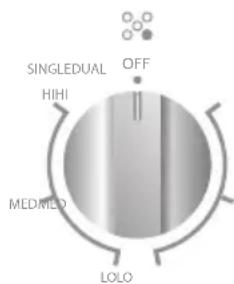
DUAL-RING COOKING ELEMENT
The Dual-Size Cooking Element offers the flexibility to use larger cookware.
- Single-size elements can be used in the same way as a regular element.
- The dual-size combines both the single and outer element and is recommended for larger size cookware.
TRIPLE-RING ELEMENT
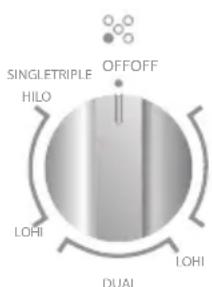
The Triple-ring Element offers flexibility because it features a wide range of settings.
- The High heat option can be used to boil small amounts of liquid quickly. To reduce the power setting, turn the knob clockwise.
- The Melt setting is designed for delicate foods that require low heat, such as when melting chocolate or holding sauces. Use cookware appropriate in size for the Triple-ring Element.
WARMING ZONE ELEMENT
WARNING
Food Poisoning Hazard
Do not let food sit in oven more than one hour before or after cooking. Doing so can result in food poisoning or sickness.
- Use the Warming Zone element to keep cooked foods warm. One hour is the recommended maximum time recommended to maintain food quality.
- Do not use the Warming Zone element to heat cold foods.
- The Warming Zone element can be used alone or when any of the other surface cooking areas are being used.
- The Warming Zone element area will not glow red when cycling on. However, the hot surface indicator will glow while the Warming Zone element is in use.
- Use only cookware recommended for cooktop use.
- Cover all foods with a lid or aluminum foil. When warming baked goods allow a small opening in the cover for moisture to escape.
- Do not use plastic wrap to cover food because the plastic wrap may melt. Use pot holders to remove food.
RECOMMENDED HEATING ELEMENT SETTINGS
Heating elements do not require preheating.
A range of heating settings is listed in the following chart because the required temperature depends on:
Type and quality of pan - Type, quantity and temperature of the food - Element used and cook's preferences
| TYPE OF FOOD | HEAT SETTINGS RADIANT ELEMENTS |
| Energy regulator | |
| Melting butter, chocolate | Lo |
| Delicate sauce, rice, simmering sauces with butter and egg yolk | Lo to Medium |
| Cooking vegetables, fish broth, eggs -fried or scrambled, pasta, milk, pancakes, pudding, simmering meats, steaming vegetables, bacon, stewing meat, spaghetti sauces | Medium |
| Braising meat, pan frying meat, fish, eggs, stir frying, quickly brown or sear meats, hold rapid boil | Medium to Hi |
| Boiling water for vegetables, pasta | Hi |
WARNING
Fire Hazard
Turn off all controls when done cooking.
Failure to do so can result in death or fire.
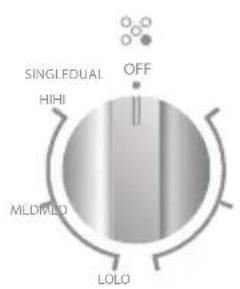
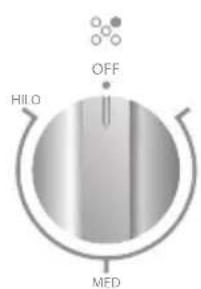
The control knobs turn in either direction and from any position to the desired temperature setting or to OFF.
NOTE: Once the element is turned Off, the Hot Surface indicator light will remain illuminated until the surface temperature of the element has cooled.
The placement of each knob corresponds to the placement of the heating element that it controls.
To Turn On Any Heating Element:
- PUSH DOWN on the knob and TURN in either direction to desired heat setting.

COOKWARE
The choice of pan directly affects the cooking performance (speed and uniformity). For best results, select pans with the following features.
Flat Base
Use flat-bottomed cookware for best heat conduction and energy efficiency. Cookware with rounded, warped, ribbed or dented bottoms could cause uneven heating and poor cooking results.
- Determine flatness by placing the straight edge of a ruler across the bottom of the cookware. While you rotate the ruler, no space or light should be visible between it and the cookware.
- Cookware designed with slightly indented bottoms or small expansion channels can be used.
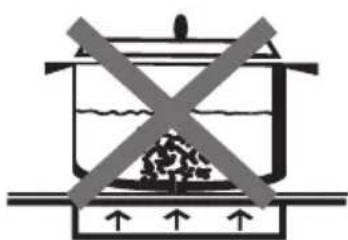
Match Pan Diameter to Element
The base of the pan should cover or match the diameter of the element being used.
BALANCED PAN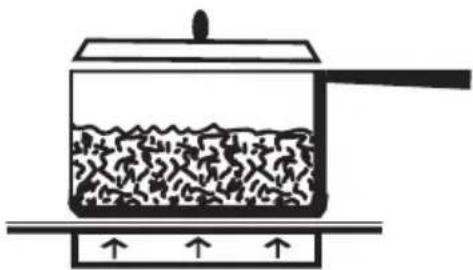
UNBALANCED PAN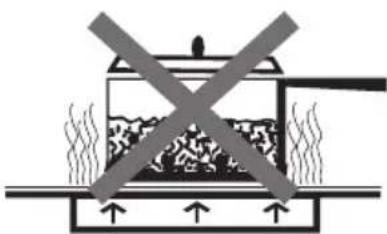
COOKWARE CHARACTERISTICS
- Aluminum: Heats and cools quickly. Frying, braising, roasting. May leave metal markings on glass.
- Cast Iron: On a glass cooktop heats and cools slowly, but retains heat and cooks evenly. Copper: Tin heats and cools quickly. Best used for gourmet cooking, wine sauces, egg dishes.
- Enamel ware: Response depends on base metal. Not recommended. Imperfections in enamel may scratch cooktop.
- Glass Ceramic: Heats and cools slowly. Not recommended. Heats too slowly. Imperfections in enamel may scratch cooktop.
- Stainless Steel: Heats and cools moderately. Soups, sauces, vegetables, and general cooking.
CAUTION
Food Poisoning Hazard
Safe canning requires that harmful micro-organisms are destroyed and that the jars are sealed completely. When canning foods in a water-bath canner, a gentle but steady boil must be maintained for the required time. When canning foods in a pressure canner, the pressure must be maintained for the required time.
After you have adjusted the controls, it is very important to make sure the prescribed boil or pressure levels are maintained for the required time.
Failure to do so can result in food poisoning or sickness.
Canning can be performed on a glass smooth top cooking surface or traditional coil element cooktop.
- When canning for long periods, alternate the use of surface cooking areas or elements between batches. This allows time for the most recently used areas to cool.
- Center the canner on the largest surface cooking area or element. On electric cooktops, canners should not extend more than 1/2 inch (1.3 cm) beyond the surface cooking area or element.
- Do not place canner on 2 surface cooking areas or elements at the same time.
- On ceramic glass models, use only flat-bottomed canners to avoid damage to the cooktop and elements.
For more information, contact your local agricultural extension office, or refer to published home canning guides. Companies that manufacture home canning products can also offer assistance.
OVEN USE
This multi-function oven combines the functions of traditional oven modes with the functions of modern, fan-assisted convection modes in a single oven. Use the Cooking Mode control, located on the control panel, to select the oven mode.
IMPORTANT: During any cycle, the heating elements will turn off when the oven door is opened, and stay off until the door is closed. To maintain oven temperature, limit door openings during cooking.
BEFORE USING THE OVEN FOR THE FIRST TIME
- Close the oven door.
- Press BAKE.
- Press 500°F (260°C) on the number keypad.
- Press START.
- Turn off the oven, and then open the oven door to allow the oven to cool.
NOTE: If the oven is set to Bake, Convection Bake, or Convection Roast, the screen will show "Low" on the left side of the screen and 00:00 m/s on the right. When the temperature inside the oven is about 140°F (60°C), the screen will show the actual temperature instead of "Low". When the set temperature is achieved, the timer on the right side will start to count up.
NOTE: Allow the oven to operate for 30 minutes with the door closed and no food in the cavity.
NOTE: Any odor that may be detected during this initial use is due to the evaporation of substances used to protect the oven during storage.
GENERAL
IMPORTANT: Do not place anything, including dishes, foil and oven trays, on the bottom of the oven when it is in operation to avoid damaging the enamel.
- Place bakeware with food on one or both of the shelves provided with the oven.
- Close the oven door.
NOTE: The oven cannot be set with the door open.
- Press the desired oven mode, i.e., BAKE.
- Set the oven to the desired temperature.
- Press START.
OVEN RACKS
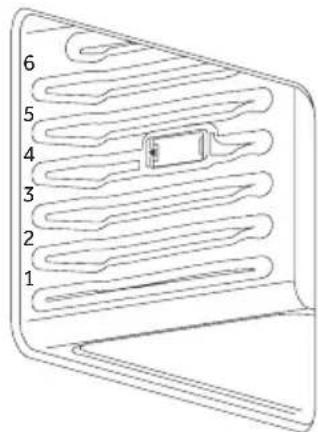
The oven racks can be placed in any of the six height positions within the oven.
Oven racks have a stop to keep them from being unintentionally withdrawn fully.
FAN
The venting fan will remain on for as long as required to cool down the oven interior.
MEAT PROBE
Use a meat probe to determine whether meat, poultry, and fish are cooked to the recommended safe food temperature. The internal temperature, not appearance, should be used to determine whether food is safely cooked.
Insert the meat probe (provided) into the socket on the left-hand side of the oven liner. See diagram on next page.
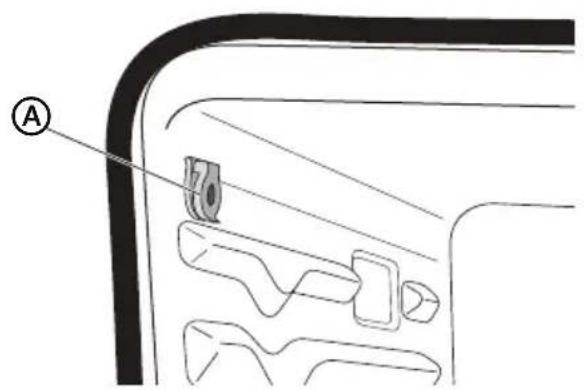

Meat Thermometer Probe Socket
PREHEATING
When beginning a Bake, Convection Bake, or Convection Roast cycle, the oven will begin preheating after Start is pressed. The oven will take approximately 12 to 15 minutes to reach 350°F (177°C) with all of the oven racks provided with your oven inside the oven cavity. Higher temperatures will take longer to preheat. The preheat cycle rapidly increases the oven temperature. The actual oven temperature will go above your set temperature to offset the heat lost when you open the oven door to place the food on the rack. This ensures that cooking will begin at the proper temperature. Do not open the door while the oven is preheating. When the oven has heated to the set temperature, a tone will sound. You can then open the door and place food in the oven. When you set the oven for "Broil" or "Warm/Proof" the timer will begin counting up rather than starting a pre-heat.
OVEN MODES
BAKE
Baking is cooking with heated air. Both upper and lower elements in the oven are used to heat the air but no fan is used to circulate the heat except for preheating.
Follow the recipe or convenience food directions for baking temperature, time and rack position. Baking time will vary with the temperature of ingredients and the size, shape and finish of the baking utensil.
The temperature can be set from 170°F (77°C) to 500°F (260°C).
General Guidelines
For best results, bake food on a single rack with at least 1" - 1 1/2" (2.5 - 4 cm) space between bakeware and oven walls. It is recommended to use only one rack when cooking in bake mode. - Check cooking completion at the minimum time. - Use metal bakeware (with or without a non-stick finish), heatproof glass, glass ceramic, pottery or other utensils suitable for the oven. - When using heatproof glass, reduce temperature by 25°F (15°C) from recommended temperature. - Use baking sheets with or without sides or parchment paper. - Dark metal pans or non-stick coatings will cook faster with more browning. Insulated bakeware will slightly lengthen the cooking time for most foods.
- Do not use aluminum foil or disposable aluminum trays to line any part of the oven. Foil is an excellent heat insulator and heat will be trapped beneath it. This will alter the cooking performance and can damage the finish of the oven.
- Avoid using the opened door as a shelf to place pans.
- See Troubleshooting for tips to Solving Baking and Roasting Problems.
Bake Chart
| FOOD ITEM | RACK POSITION | TEMP. °F (°C) (PREHEATED OVEN) | TIME (MIN) |
| Cake | |||
| Cupcakes | 2 | 350 (175) | 19-22 |
| Bundt Cake | 1 | 350 (175) | 40-45 |
| Angel Food | 1 | 350 (175) | 35-39 |
| Pie | |||
| 2 crust, fresh, 9" | 2 | 375-400 (190-205) | 45-50 |
| 2 crust, frozen, 9" | 2 | 375 (190) | 68-78 |
| Cookies | |||
| Sugar | 2 | 350-375 (175-190) | 8-10 |
| Chocolate Chip | 2 | 350-375 (175-190) | 8-13 |
| Brownies | 2 | 350 (175) | 29-36 |
| Breads | |||
| Yeast bread loaf, 9x5 | 2 | 375 (190) | 18-22 |
| Yeast rolls | 2 | 375-400 (190-205) | 12-15 |
| Biscuits | 2 | 375-400 (190-205) | 7-9 |
| Muffins | 2 | 425 (220) | 15-19 |
| Pizza | |||
| Frozen | 2 | 400-450 (205-235) | 23-26 |
| Fresh | 2 | 475 (246) | 15-18 |
To Bake:
- Close the oven door.
NOTE: The oven controls cannot be set if the oven door is open.
- Press BAKE. "BAKE" will appear in the display, and 350°F (177°C) will be displayed. "Set temp or Press START" will appear in the text area below the temperature.
- Press START, if you wish to bake at 350°F (177°C).
OR
Enter the desired temperature by pressing the number keypad, and then press START. The temperature can be set from 170°F (77°C) to 500°F (260°C).
NOTES:
- The oven mode and temperature may be changed at any time during cooking. Press CANCEL to clear the settings. Select OVEN mode, then enter the desired temperature by pressing the number keypad, and then press START. After selecting an Oven Mode and Temperature, you have the option to set a Cook Time and Delay Start before pressing START. See "Cook Time" and "Delay Start."
- Once START has been pressed, the oven will begin to preheat. The display will read "Low" until oven reaches 140°F (60°C). When the oven has reached the set temperature, a tone will sound. The timer 00:00 m/s starts to count up.
NOTE: If a Delay Start was set, the oven will turn on at the set time.
- Place the food in the oven and close the oven door when preheat is complete.
- Press CANCEL when finished cooking, and remove food from the oven.
NOTE: If you used Cook Time or Delay Start to set a cook time, the oven will turn off automatically.
BROIL
Broiling uses direct radiant heat to cook food. The lower the temperature, the slower the cooking. Thicker cuts and unevenly shaped pieces of meat, fish and poultry may cook better at lower broiling temperatures.
NOTES:
Before broiling, position rack according to the Broiling Chart on page 28. For best results, use a two-piece broiler pan with a grid (not provided). It is designed to drain juices which helps to avoid spatter and smoke. For proper draining, do not cover the grid with foil. The bottom of the pan may be lined with aluminum foil for easier cleaning. Trim excess fat to reduce spattering. Slit the remaining fat on the edges to avoid curling. Select Broil 550°F (288°C) for most broiling. Select Broil 450°F (232°C) for low-temperature broiling for foods that take longer to cook, such as poultry, to avoid over browning. Pull out oven rack to stop position before turning or removing food. Use tongs to turn food to avoid the loss of juices. Very thin cuts of fish, poultry or meat may not need to be turned. After broiling, remove the pan from the oven when removing the food. Drippings will bake on the pan if left in the heated oven, making cleaning more difficult. Position food on grid in the broiler pan, then place it in the center of the oven rack. Close the oven door and set the control.
To Broil:
The temperature can be set from 450°F (232°C) to 550°F (288°C).
- Place the food in the oven, preheating is not necessary.
- Close the oven door.
- Press BROIL. "BROIL" and "Set temp or START" and "550°F" (288°C) will be displayed.
- Press START, if you wish to broil at 550°F (288°C).
OR
Enter the desired temperature by pressing the number keypad, and then press START. The temperature can be set from 450°F (232°C) to 550°F (288°C).
NOTES:
- The oven mode and temperature can be changed at any time during cooking. Press CANCEL to clear the settings. Select desired oven mode, then enter the required temperature by pressing the number keypad, and then press START. After selecting an Oven Mode and Temperature, you have the option to set a Cook Time and Delay Start before pressing START. See "Cook Time" and "Delay Start."
- BROIL will appear in the display after START is pressed.
- When cooking is finished, press CANCEL, and then remove food from the oven.
NOTE: If you used Cook Time or Delay Start to set a cook time, the oven will turn off automatically.
WARM/PROOF
The Warm mode keeps hot, cooked foods at serving temperature.
The Proof mode prepares dough for baking by activating the yeast. Follow the recipe directions as a guide.
WARNING
Food Poisoning Hazard
Do not let food sit in oven more than one hour before or after cooking.
Doing so can result in food poisoning or sickness.
IMPORTANT: Food must be at serving temperature before placing it in the oven to keep warm in Warm mode. Food may be held up to 1 hour; however, breads and casseroles may become too dry if left in the oven during the Warm function. For best results, cover food.
Warm
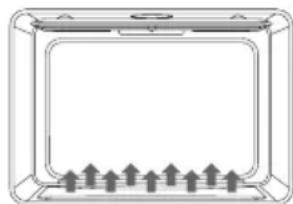
- Press WARM/PROOF, "WARM" and "Set Temp or Press START" and 140°F (60°C) will be displayed.
- Press START, if you wish to Warm food at 140°F (60°C). OR Enter the desired temperature by pressing the number keypad, and then press START. The temperature can be set from 140°F (60°C) to 210°F (99°C).
- "WARM" will appear in the display, once Start is pressed. NOTE: After selecting an Oven Mode and Temperature, you have the option to set a Cook Time before pressing START. Timer will start counting up.
- Place food in the oven and close the door.
- Press CANCEL when finished, and remove food from the oven.
Proof
Before proofing, place the dough in a lightly greased bowl and cover loosely with wax paper, coated with shortening.
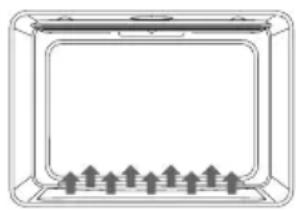
- Place on second rack from the bottom and close the oven door.
- Push and hold WARM/PROOF until PROOF appears on display "PROOF" and 'Set Temp or Press Start' and 100°F (38°C) will be displayed.
- Press START, if you wish to Proof dough at 100°F (38°C) . OR
Enter the desired temperature by pressing the number keypad, and then press START. The temperature can be set from 80°F (27°C) to 120°F (49°C) .
- "PROOF" will appear in the display, once Start is pressed. NOTE: After selecting an Oven Mode and Temperature, you have the option to set a Cook Time and Delay Start before pressing START. See "Cook Time" and "Delay Start."
- Let the dough rise until nearly doubled in size, checking after 20-25 minutes. Proofing time may vary depending on dough type and quantity.
- Press CANCEL twice when finished.
- Before second proofing, shape the dough, place it in baking pan(s) and cover loosely with plastic wrap, coated with cooking spray. Follow the same placement and control steps above. Before baking, remove the plastic wrap.
CONVECTION MODES
During convection cooking, the fan provides hot air circulation throughout the oven. The movement of heated air around the food can help to speed up cooking by penetrating the cooler outer surfaces. Food cooks more evenly, browning and crisping outer surfaces while sealing moisture inside.
When the oven is set to the Convection function, the ring element, bake and broil elements, and the fan operate to heat the oven cavity. If the oven door is opened during convection cooking or preheating, the fan turns off immediately and the element(s) will turn off after 30 seconds. Once the door is closed, the element(s) will automatically turn on.
CONVECTION FAN
The convection fan operates during any convection mode. When the oven is operating in convection mode, the fan will turn off automatically when the door is opened. The convection fan may run in non-convection modes during the preheat time.
CONVECTION BAKE
- Use Convection Bake for single or multiple rack baking. Reduce standard recipe baking temperature by 25°F (15°C).
- For best results, food should be cooked uncovered, in low-sided pans to take advantage of the forced air circulation. Use shiny aluminum pans for best results, unless otherwise specified.
- Heatproof glass or ceramic can be used. Reduce temperature by another 25°F (15°C) when using heatproof glass dishes for a total reduction of 50°F (30°C).
- Dark metal pans may be used. Note that food may brown faster when using dark metal bakeware.
The number of racks used is determined by the height of the food to be cooked.
- Baked items, for the most part, cook extremely well in Convection Bake. Don't try to convert recipes such as custards, quiches, pumpkin pie, or cheeses, which do not benefit from the convection-heating process. Use the regular Bake mode for these foods.
- Multiple rack cooking for oven meals is done on rack positions 1, 2, 3, 4 and 5. All five positions can be used for cookies, biscuits and appetizers.
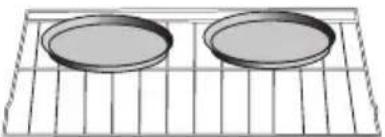
- 2 Rack baking: Use positions 1 and 3.
Rack 3 Rack 1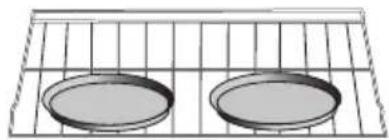
- When baking four cake layers at the same time, stagger pans so that one pan is not directly above another. For best results, place cakes on front of upper rack and back of lower rack. Allow 1" - 1 1/2" (2.5 - 4 cm) air space around pans.
FOODS RECOMMENDED FOR CONVECTION BAKE MODE:
Appetizers, Biscuits, Coffee Cakes, Cookies (2 to 4 racks), Yeast Breads, Cream Puffs, Casseroles and One-Dish Entrees, Oven Meals (rack positions 1, 2, 3), Air Leavened Foods (Soufflés, Meringue, Meringue-Topped Desserts, Angel Food Cakes, Chiffon Cakes)
| FOOD ITEM | RACK POSITION | TEMP. °F (°C) (PREHEATED OVEN) | TIME (MIN) |
| Cake | |||
| Cupcakes | 2 | 350 (175) | 19-22 |
| Bundt Cake | 1 | 350 (175) | 40-45 |
| Angel Food | 1 | 350 (175) | 35-39 |
| Pie | |||
| 2 crust, fresh, 9" | 2 | 375-400 (190-205) | 45-50 |
| 2 crust, frozen, 9" | 2 | 375 (190) | 68-78 |
| Cookies | |||
| Sugar | 2 | 350-375 (175-190) | 8-10 |
| Chocolate Chip | 2 | 350-375 (175-190) | 8-13 |
| Brownies | 2 | 350 (175) | 29-36 |
| Breads | |||
| Yeast bread loaf, 9x5 | 2 | 375 (190) | 18-22 |
| Yeast rolls | 2 | 375-400 (190-205) | 12-15 |
| Biscuits | 2 | 375-400 (190-205) | 7-9 |
| Muffins | 2 | 425 (220) | 15-19 |
| Pizza | |||
| Frozen | 2 | 400-450 (205-235) | 23-26 |
| Fresh | 2 | 475 (246) | 15-18 |
To Set Convection Bake:
- Press Convection BAKE once. Set Temp or Press Start (325°F (162°C) will be displayed).
- Press START If you wish to convection bake at 325°F (162°C).
OR
Enter the desired temperature by pressing the number keypad, and then press START. The temperature can be set from 170°F (77°C) to 500°F (260°C).
NOTES:
- To change the set temperature press CANCEL. Press the number keypad to enter the desired temperature, and then press START. After selecting an Oven Mode and Temperature, you have the option to set a Cook Time and Delay Start before pressing START. See "Cook Time" and "Delay Start."
- The oven will begin preheating once Start is pressed. A tone will sound when the oven is at the set temperature.
- Place the food in the oven and close the oven door when preheat is completed.
- Press CANCEL when finished, and then remove food from the oven.
NOTE: If you used Cook Time or Delay Start to set a cook time, the oven will turn off automatically.
CONVECTION BROIL
General Guidelines
- Place rack in the required position needed before turning on the oven.
- Use Convection Broil mode with the oven door closed.
- When convection broiling, enter your normal broiling temperature.
- Do not preheat oven. Use a broil pan.
- Turn meats once halfway through the cooking time. See the Convection Broil chart.
- Thicker cuts and unevenly shaped pieces of meat, fish and poultry may cook better at lower broiling temperatures.
BROILING CHART
| FOOD AND THICKNESS | RACK POSITION | BROIL SETTING | INTERNAL TEMP. °F (°C) | TIME SIDE 1 (MIN.)* | TIME SIDE 2 (MIN.)* |
| Beef | |||||
| Steak (1½" or more) | |||||
| Medium rare 4 Low 145 (65) | 9-12 8-10 | ||||
| Medium 4 Low 160 (71) | 11-13 | 10-12 | |||
| Well 4 Low 170 (77) | 18-20 16-17 | ||||
| Hamburgers (more than 1") | |||||
| Medium 4 High 160 (71) | 8-11 | 5-7 | |||
| Well 4 High 170 (77) | 11-13 | 8-10 | |||
| Poultry | |||||
| Chicken Quarters | 4 Low | 180 (82) | 16-18 | 10-13 | |
| Chicken Halves | 3 Low | 180 (82) | 25-27 | 15-18 | |
| Chicken Breasts | 4 Low | 170 (77) | 13-15 | 9-13 | |
| Pork | |||||
| Pork Chops (1¼" or more) | 4 Low | 160 (71) | 12-14 | 11-13 | |
| Sausage - fresh | 4 | Low | Low | 160 (71) | 4-6 |
| 3-5 |
To Set Convection Broil:
- Place the food in the oven and close the oven door.
- Press Convection BROIL once. "Set Temp or Press Start" and 450°F (232°C) will be displayed.
- Press START, if you wish to broil at 450°F (232°C).
OR
Enter the desired temperature by pressing the number keypad, and then press START. The temperature can be set from 170°F (77°C) to 550°F (288°C).
NOTES:
- To change the set temperature press CANCEL. Press the number keypad to enter the desired temperature, and then press START. After selecting an Oven Mode and Temperature, you have the option to set a Cook Time and Delay Start before pressing START. See "Cook Time" and "Delay Start."
- "Convect Broil" will be displayed, once Start is pressed.
- Press CANCEL when cooking is finished, and then remove food from the oven.
CONVECTION ROAST
When Convection roasting, enter your normal roasting temperature. The roasting time should be 15-30% less than in conventional cooking. It is not necessary to preheat the oven for convection roast.
General Guidelines
- Do not preheat for Convection Roast.
- Roast in a low-sided, uncovered pan.
- When roasting whole chickens or turkey, tuck wings behind back and loosely tie legs with kitchen string.
- Use a broil pan for roasting uncovered.
- Use the meat probe or a meat thermometer to determine the internal temperature.
- Double-check the internal temperature of meat or poultry by inserting meat probe into another position.
- Large poultry may need to be covered with foil (and pan roasted) during a portion of the roasting time to prevent over-browning.
- The minimum safe temperature for stuffing in poultry is 165°F (75°C).
- After removing the food from the oven, cover loosely with foil for 10 to 15 minutes before carving if necessary to increase the final cook temperature by 5° to 10°F (3° to 6°C).
| Beef | ||||||||
| MEATS | WEIGHT (lb) | OVEN TEMP. °F(C) | RACK POSITION (min:per) | TIME (min) | INTERNAL TEMP. °F(C) | |||
| Rib Roast 4-6325 (150) 216-20 | ||||||||
| Rib Eye Roast, (boneless) | 4-6325 (150) 216-20 | |||||||
| Rump, Eye, Tip, Sirloin (boneless) | 3-6325 (160) 216-20 | |||||||
| Tenderloin Roast 2-3400 (205) 215-20145 (63) | ||||||||
| Pork | 5-8350 (175) 216-20 160(71) | |||||||
| Loin Roast (boneless) | Shoulder 3-6350 (175) 20-25 160(71) | |||||||
| Poultry | 5-8350 (175) 216-20 160(71) | |||||||
| Chicken whole 3-4375 (190) 218-21 180(82) | Turkey, not stuffed 12-15325 (160) 110-14 180(82) | |||||||
| Turkey, not stuffed 16-20325 (160) 19-11 180(82) | Turkey, not stuffed 21-25325 (160) 16-10 180(82) | |||||||
| Turkey, not stuffed 21-25325 (160) 16-10 180(82) | Turkey Breast 3-8325 (160) 15-20 170(77) | |||||||
| Cornish Hen | 1-1½ 350 (175) 245-75 | |||||||
| Whole Leg | 6-8325 (160) 122-27 | |||||||
| Lamb | 3-4325 (160) 222-27 | |||||||
| Middle Leg | 170 (77) well | |||||||
| 28-33 | 170 (77) well | |||||||
| 28-33 | 170 (77) well | |||||||
To Set Convection Roast:
- Place the food in the oven and close the oven door.
- Press CONVECTION ROAST once. "Set Temp or Press Start", and 325°F (163°C) will be displayed.
- Press START, if you wish to convection roast at 325°F (163°C).
OR
Enter the desired temperature by pressing the number keypad, and then press START. The temperature can be set from 170°F (77°C) to 500°F (260°C).
NOTES:
- To change the set temperature during cooking, press CANCEL. Press the number keypad to enter the desired temperature, and then press START. After selecting an Oven Mode and Temperature, you have the option to set a Cook Time and Delay Start before pressing START. See "Cook Time" and "Delay Start."
- Press START. After pressing START, the oven will display "CONVECT ROAST" while cooking.
- Press CANCEL when finished, and then remove food from the oven.
NOTE: If you used Cook Time or Delay Start to set a cook time, the oven will turn off automatically.
CONVECTION CONVERSION
When using a Convection Recipe, enter your normal cooking temperature and time. The Convection Conversion mode will adjust the temperature and time for perfect cooking results. Example: entering 350°F for 15 minutes may adjust to 325°F for 12 minutes. Set Cook Time is mandatory for the Convection Conversion oven mode.
IMPORTANT:
- The oven door must be closed before selecting a Convection Conversion oven mode.
- Setting Cook Time is required for a Convection Conversion oven mode. If Cook Time was not set, the control will prompt you to Set Cook Time. See "Cook Time."
NOTE: At the end of the set Cook Time, the oven will turn off automatically, the end of cycle tone will sound and "Cooking Complete" will appear in the display.
BAKED GOODS
- Press BAKED GOODS among the Convection Conversion controls.
- Set the oven temperature.
NOTE: The temperature can be set from 170°F (77°C) to 500°F (260°C).
- Press COOK TIME and enter time.
- Press the number keypad to enter the desired cook time. "Press START" will appear in the display.
NOTE: If a delayed start time is desired, press DELAY START, and then press the number keypad to enter the desired start time. "Press START" will appear in the display.
- Press START. The oven begins to preheat. Once the set temperature has been reached, a tone will sound. NOTE: If the recipe requires the food to be cooked in a preheated oven, add 15 minutes to Cook Time to allow time for the oven to preheat. Once the oven is heated to the set temperature and the tone sounds, place food in the oven.
- At the end of the set Cook Time the oven will turn off automatically, the end of cycle tone will sound and "Complete" will appear in the display.
MEATS
IMPORTANT: It is not necessary to preheat the oven for the convection conversion MEAT option.
- Press MEATS among the Convection Conversion controls.
- Set the oven temperature.
NOTE: The temperature can be set from 170°F (77°C) to 500°F (260°C).
- Press START. "Set cooking time" will appear in the display.
- Press the number keypad to enter the desired cook time. "Press START" will appear in the display.
NOTE: Set Cooking Time is mandatory for the Convection Conversion oven mode.
- At the end of the set Cook Time the oven will turn off automatically, the end of cycle tone will sound and "Complete" will appear in the display.
OTHER FOODS
- Press OTHER FOODS among the Convection Conversion controls.
- Set the oven temperature.
NOTE: The temperature can be set from 170°F (77°C) to 500°F (260°C).
- Press START. "Set cooking time" will appear in the display.
- Press the number keypad to enter the desired cook time. "Press START" will appear in the display.
NOTE: If a delayed start time is desired, press Delay Start, and then press the number keypad to enter the time-of-day you want the oven to turn on. "Press START" will appear in the display. Set Cook Time is mandatory for the Convection Conversion oven mode. If Cook Time was not set, the control will prompt you to Set Cook Time.
- Once START has been pressed, the oven begins to preheat. Once the set temperature has been reached, a tone will sound. NOTE: If the recipe requires the food to be cooked in a preheated oven, add 15 minutes to Cook Time to allow time for the oven to preheat. Once the oven is heated to the set temperature and the tone sounds, place food in the oven.
- At the end of the set Cook Time the oven will turn off automatically, the end of cycle tone will sound and "Complete" will appear in the display.
RANGE CARE
CLEANING
IMPORTANT: Before cleaning, make sure all controls are turned off, and the oven and cooktop are cool. Always follow label instructions on cleaning products. It is recommended that you first use soap, water and a soft cloth or sponge unless otherwise noted. Do not use abrasive cleaning products.
EXTERIOR PORCELAIN ENAMEL SURFACES
Food spills containing acids, such as vinegar and tomato, should be cleaned as soon as the entire appliance is cool. These spills may affect the finish.
Cleaning Method:
Glass cleaner, mild liquid cleaner or nonabrasive scrubbing pad: Gently clean around the model and serial number plate because scrubbing may remove numbers.
EXTERIOR STAINLESS STEEL
NOTE: Do not use soap-filled scouring pads, abrasive cleaners, cooktop polishing cream, steel-wool pads, gritty washcloths or some paper towels. Damage may occur, even with one-time or limited use.
Rub in direction of grain to avoid damaging.
Cleaning Methods:
Liquid detergent or all-purpose cleaner: Rinse well with clean water and dry with soft, lint-free cloth.
Stainless Steel Cleaner and Polish
Vinegar for hard water spots
OVEN DOOR EXTERIOR
Cleaning Method:
Glass cleaner and paper towels or nonabrasive plastic scrubbing pad: Apply glass cleaner to soft cloth or sponge, not directly on panel.
CERAMIC GLASS COOKTOP
IMPORTANT: To avoid damaging the cooktop, do not use steel wool, abrasive powder cleansers, chlorine bleach, rust remover or ammonia. Ceramic cooktop cleaning materials: cooktop cleaner, cooktop scraper and cooktop cleaning pads are available at most grocery stores.
To Clean the Ceramic Glass Cooktop:
- Remove food/residue with a cooktop scraper.
- For best results, use the cooktop scraper while the cooktop is still warm, but not hot to the touch. It is recommended to wear an oven mitt while scraping the warm cooktop.
- Hold the cooktop scraper at approximately a 45-degree angle against the glass surface and scrape the residue. It will be necessary to apply pressure in order to remove the residue.
- Allow the cooktop to cool down completely before proceeding to Step 2.
- Apply a few dime-sized drops of cooktop cleaner to the affected areas.
- Rub cooktop cleaner onto the cooktop surface with a nylon or similar cooktop cleaning pad. Some pressure is needed to remove stubborn stains.
- Allow the cleaner to dry to a white haze before proceeding to Step 3.
- Polish with a clean, dry cloth or a clean, dry paper towel.
SMUDGES FROM ALUMINUM BOTTOMED PANS
Cleaning Method:
A cloth dampened in vinegar.
COOKTOP CONTROL KNOBS
- Pull knobs straight out from the control panel to remove.
- When replacing knobs, make sure knobs are turned to the Off position.
Cleaning Method:
Soap and water or dishwasher:
NOTE: Do not use steel wool, abrasive cleansers or oven cleaner. Do not soak knobs.
CONTROL PANEL
Cleaning Method:
Glass cleaner and soft cloth or sponge: Apply glass cleaner to soft cloth or sponge, not directly on panel.
NOTE: Do not use abrasive cleaners, steel-wool pads, gritty washcloths or some paper towels. Damage may occur.
OVEN CAVITY
Food spills should be cleaned when oven cools. At high temperatures, foods react with porcelain, so staining, etching, pitting or faint white spots can result.
Cleaning Method:
Mild detergent and warm water.
NOTE: Do not use oven cleaners.
OVEN RACKS
Cleaning Method:
Steel-wool pad
OVEN SELF-CLEANING
WARNING
Burn Hazard
Do not touch the oven during the Self-Cleaning cycle.
Keep children away from oven during Self-Cleaning cycle.
Failure to do so can result in burns.
The Self-Cleaning cycle uses very high temperatures, burning soil to a powdery ash.
IMPORTANT: The health of some birds is extremely sensitive to the fumes given off during the Self-Cleaning cycle. Exposure to the fumes may result in death to certain birds. Always move birds to another closed and well-ventilated room.
NOTES:
- Self-clean the oven before it becomes heavily soiled. Heavy soil results in longer cleaning and more smoke.
- Keep the kitchen well-ventilated during the Self-Cleaning cycle to help get rid of heat, odours, and smoke.
- Do not clean, rub, damage or move the oven gasket. The door gasket is essential for a good seal.
- Allow the oven to cool to room temperature before using the Self-Clean feature. If your oven cavity is above 170°F (77°C), "Oven Cooling" will appear in the display and the Self-Clean cycle will not activate until it cools down.
- The oven light will not work during the Self-Cleaning cycle. On some models, the surface elements will not work during the Self-Cleaning cycle.
- When "LOCK" shows in the display, the oven door cannot be opened. To avoid damage to the door, do not force the door open when "LOCK" is displayed.
Prepare Oven:
- Remove the broiler pan, cookware and bakeware and, on some models, the temperature probe from the oven.
- Remove oven racks to keep them shiny and easy to slide.
- Remove any foil from the oven because it may burn or melt, damaging the oven.
- Hand clean inside door edge and the 1 1/2 (3.8 cm) area around the inside oven cavity frame, being certain not to move or bend the gasket. This area does not get hot enough during self-cleaning to remove soil. Do not let water, cleaner, etc., enter slots on door frame. Use a damp cloth to clean this area.
- Wipe out any loose soil to reduce smoke and avoid damage. At high temperatures, foods react with porcelain. Staining, etching, pitting or faint white spots can result. This will not affect cooking performance.
To Self-Clean:
NOTE: The oven is preset for a 2 hour Cleaning cycle; However, the Cleaning time can be adjusted. Suggested cleaning times are:
2 Hours - Light soil 3.0 Hours - Average soil 3.5 Hours - Heavy soil 1. Close the oven door.
NOTE: If an oven door is left open, "Door Open Clean Canceled" will appear in the display and a tone will sound.
- Press SELF CLEAN. "Remove Racks" will scroll in the selected oven text area for 5 seconds, followed by "Select Option."
"Select Level" and "Press 1. Level 1 (Quick) 2. Level 2, 3. Level 3, 4. Level 4 (reg), 5. Level 5, 6. Level 6 (Maxi)" will show on in the display text area.
- Enter the desired Clean level by pressing the number keypad, and then press START.
NOTE: The oven door will lock. "Oven is cleaning" will show on the display panel until the clean cycle is finished. The lock icon appears on the top right beside the time
When the self-clean cycle ends:
"COMPLETE" appears in the display and the oven door unlocks.
- Open the oven door. Once the oven has completely cooled, remove ash with a damp cloth.
NOTE: To avoid breaking the glass, do not apply a cool, damp cloth to the inner door glass before it has cooled completely.
To Delay Start Self-Clean:
- Press Delay Start.
- "---" will be displayed, and "Set time to delay. Then Press START" will scroll from right to left in the selected oven text area. Enter the time-of-day that you want oven cleaning to begin, by pressing the number keypad.
- Press START. "Select cooking/cleaning mode" will scroll in the selected oven text area.
- Press SELF CLEAN. "Remove Racks" will scroll in the selected oven text area for 5 seconds, followed by "Select Option."
- "Select Level" and "Press 1. Level 1 (Quick) 2. Level 2, 3. Level 3, 4. Level 4 (reg), 5. Level 5, 6. Level 6 (Maxi)" will scroll in the display text area.
- Enter the desired Clean level by pressing the corresponding number on the keypad.
- Press START. The cleaning cycle will begin when the Delay Start is reached.
When the self-clean cycle ends:
"COMPLETE" appears in the display and the oven door unlocks.
- Open the oven door. Once the oven has completely cooled, remove ash with a damp cloth.
NOTE: To avoid breaking the glass, do not apply a cool, damp cloth to the inner door glass before it has completely cooled.
OVEN DOOR REMOVAL
For normal oven use, there is no need to remove the oven door. However, should it become necessary to remove the door, follow the instructions in this section.
IMPORTANT:
- Make sure oven is cool and power to the oven has been turned off before removing the door.
- The oven door is heavy and fragile, and the door front is glass. To avoid oven door glass breakage, use both hands, and grasp only the sides of the oven door to remove.
- Be sure that both levers are securely in place before removing the door.
- Do not force door open or closed.
To remove the oven door:
- Open the oven door completely.
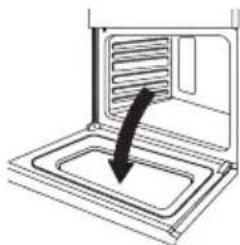
- Lift up the hinge latch on each side.
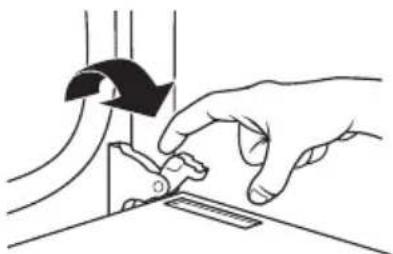
- Close the oven door as far as it will shut.
- While grasping both outside edges of the oven door, lift up on the door.
- Continue to push the top of the door closed, while pulling the bottom of the door out of the hinge receivers in the door frame.
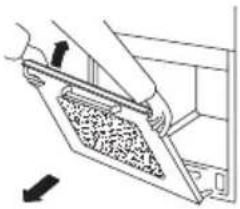
To replace the oven door:
- Insert both hanger arms into the hinge receivers in the door frame.
- Slowly open the oven door, and you will feel the door set into place.
- Move the hinge latches back into the locked position.
- Check that the door opens and closes freely. If it does not, repeat the door removal and replacement procedures.
REPLACING AN OVEN LIGHT
WARNING
Electrical Shock Hazard
Make sure the oven and lights are cool and power to the oven has been turned off before replacing the light bulb(s).
The lenses must be in place when using the oven. The lenses serve to protect the light bulb from breaking.
The lenses are made of glass. Handle carefully to avoid breakage.
Failure to do so could result in death, electric shock, cuts or burns.
The oven light is a standard 25 watt (G9) appliance bulb.
IMPORTANT: Before replacing the bulb, make sure the oven is cool and the controls are turned off.
- Disconnect power at the main power supply (fuse or breaker box).
- Remove the bulb cover by pulling it out of the opening.
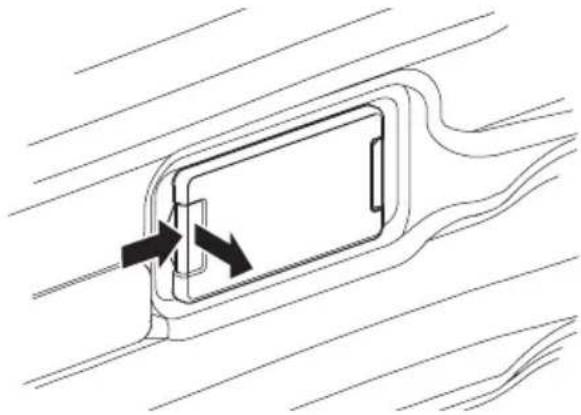
- Remove the burned out bulb from the socket.
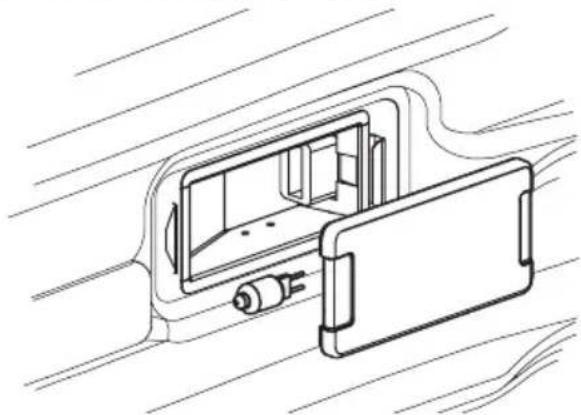
NOTE: To avoid damage or decreasing the life of the new bulb, do not touch bulb with bare fingers. Wear cotton gloves or use a tissue when replacing the light bulb.
- Replace the bulb, and then replace the bulb cover.
- Reconnect power at the main power supply (fuse or breaker box).
TROUBLESHOOTING
BAKING AND ROASTING PROBLEMS
With any oven setting, poor results can occur for many reasons other than a malfunction of the product. Check the chart below for causes of the most common problems. Since the size, shape and material of baking utensils directly affect the baking results, the best solution may be to replace old baking utensils that have darkened and warped with age and use.
| BAKING PROBLEM CAUSE | |
| Food browns unevenly | Oven not preheated Aluminum foil on oven rack or oven bottom Baking utensil too large for recipe Pans touching each other or oven walls |
| Food too brown on bottom | Oven not preheated Using glass, dull or darkened metal pans Incorrect rack position Pans touching each other or oven walls |
| Food is dry or has shrunk excessively | Oven temperature too high Baking time too long Oven door opened frequently Pan size too large |
| Food is baking or roasting too slowly | Oven temperature too low Oven not preheated Oven door opened frequently Tightly sealed with aluminum foil Pan size too small |
| Piecrusts do not brown on bottom or crust is soggy | Baking time not long enough Using shiny steel pans Incorrect rack position Oven temperature is too low |
| Cakes pale, flat and undercooked | Oven temperature too low Incorrect baking time Cake tested too soon Oven door opened too often Pan size may be too large |
| Cakes high in middle with crack(s) on top | ·Oven temperature too high ·Baking time too long ·Pans touching each other or oven walls ·Incorrect rack position ·Pan size too small |
| Piecrust edges too brown | ·Oven temperature too high ·Edges of crust too thin |
COOKTOP
| PROBLEM POSSIBLE CAUSE SOLUTION | ||
| Heating elements and controls do not work. | Fuse is blown or circuit breaker is tripped. No electricity to the cooktop. | Replace the fuse or reset the circuit breaker. If the problem continues, call an electrician. Have electrician check your power supply. |
| Heating elements do not heat properly. | Improper cookware is being used. | Select proper cookware. See "Cookware." If the problem continues, call for service. |
| Heating elements cycle off even when elements are turned to their highest settings. | Heating element temperature limiters are temporarily shutting off the elements due to exceeding the maximum allowable temperature. | This is a normal operating condition, especially during rapid heat-up operations. The element will cycle back on automatically after it has cooled sufficiently. |
| Glass ceramic surface is see through or appears to be red in color. | Under direct or bright lighting, you will sometimes be able to see through the glass and into the chassis due to its transparent quality. You may also notice a red tint under these conditions | These are normal properties of black ceramic glass panels. |
OVEN
| PROBLEM POSSIBLE CAUSE SOLUTION | ||
| Oven is not heating | No power to the oven | Replace the fuse or reset the circuit breaker. If the problem continues, call an electrician. |
| Oven control not turned on | Make sure the oven temperature has been selected. | |
| Oven door is not closed. | Close the oven door. The heating elements turn off when the door is opened and remain off until the oven door is closed. | |
| Oven is not cooking evenly | Not using the correct bake ware or oven rack position | Refer to cook charts for recommended rack position. Always reduce recipe temperature by 25°F (15°C) when baking with Convention Bake mode. |
| Oven display stays Off. | Power interruption Turn off power at the main power supply (fuse or breaker box). Turn breaker back on. If condition persists, call for service. | |
| Oven mode and temperature controls cannot be set. | The oven door is open. | Close the oven door. The oven mode and temperature controls cannot be set if the oven door is open. |
| Cooling fan continues to run after oven is turned off | The electronic components have not yet cooled sufficiently | The fan will turn off automatically when the electronic components have cooled sufficiently. |
| Oven light is not working properly | Light bulb loose or burned-out. | Reinsert or replace the light bulb. Touching the bulb with fingers may cause the bulb to burn out. |
| Oven light stays on | Door is not closing completely | Check for obstruction in oven door. Check to see if hinge is bent or door switch broken. |
| Cannot remove lens cover | Soil build-up around the lens cover. | Wipe lens cover area with a clean, dry towel prior to attempting to remove the lens cover. |
| Clock and timer are not working properly | No power to the oven | Check the circuit breaker or fuse box to your house. Make sure there is proper electrical power to the oven. |
| Excessive Moisture | When using bake mode, preheat the oven first. Convection Bake and Convection Roast will eliminate any moisture in the oven. | |
| Porcelain Chips | Porcelain interior is bumped by oven racks | When removing and replacing oven racks, always tilt racks upward and do not force them to avoid chipping the porcelain. |
FOR MORE HELP, VISIT HISENSE-CANADA.COM OR CALL THE CUSTOMER CARE CENTRE AT 1-855-344-7367.
TABLE OF CONTENTS
RANGE SAFETY 44
Anti-tip bracket 45
PARTS AND FEATURES 50
CONTROL PANEL 51
WARM HOLD/ RISE
CONVECTION BAKING
CONVECTION BROILING
General instructions
REPLACING THE OVEN LAMP
WARNING
- ELECTRIC FREE-STANDING RANGE
- INCH ELECTRIC FREE-STANDING RANGE
- TABLE OF CONTENTS
- RANGE SAFETY
- PARTS AND FEATURES
- CONTROL PANEL
- COOKTOP USE
- OVEN USE
- RANGE CARE
- TROUBLESHOOTING
- RECORD KEEPING
- YOUR SAFETY AND THE SAFETY OF OTHERS ARE VERY IMPORTANT
- DANGER
- WARNING
- CAUTION
- TIP OVER HAZARD
- IMPORTANT SAFETY INSTRUCTIONS
- FOR UNITS WITH VENTILATING HOOD
- READ AND SAVE THESE INSTRUCTIONS
- DISPLAY
- START
- CANCEL
- COOK TIME
- (REQUIRED FOR SOME OVEN MODES)
- NOTES
- TO SET COOK TIME
- DELAY START
- FOOD POISONING HAZARD
- TO SET DELAY START
- OVEN LIGHTS
- TIMER
- TO SET THE TIMER
- TO CANCEL THE TIMER
- SETTINGS
- DEGREES FAHRENHEIT AND CELSIUS
- TONES
- TO TURN ON/OFF SOUND
- TO ADJUST SOUND VOLUME
- CLOCK
- TO SET THE CLOCK
- TO CHANGE THE CLOCK TO 24-HOUR FORMAT
- SABBATH MODE
- TO TURN ON/OFF SABBATH MODE
- TO BAKE WHILE THE OVEN IS IN SABBATH MODE
- TO TURN OFF SABBATH MODE
- LANGUAGE
- DEMONSTRATION MODE
- TO TURN OFF DEMONSTRATION MODE
- CONTROL LOCK
- TO LOCK CONTROL
- TO UNLOCK CONTROL
- BEFORE USE
- HEATING ELEMENTS
- HOT SURFACE INDICATOR LIGHT
- DUAL-RING COOKING ELEMENT
- TRIPLE-RING ELEMENT
- WARMING ZONE ELEMENT
- RECOMMENDED HEATING ELEMENT SETTINGS
- TO TURN ON ANY HEATING ELEMENT
- COOKWARE
- FLAT BASE
- MATCH PAN DIAMETER TO ELEMENT
- COOKWARE CHARACTERISTICS
- BEFORE USING THE OVEN FOR THE FIRST TIME
- GENERAL
- OVEN RACKS
- FAN
- MEAT PROBE
- PREHEATING
- OVEN MODES
- BAKE
- GENERAL GUIDELINES
- TO BAKE
- BROIL
- TO BROIL
- WARM/PROOF
- WARM
- PROOF
- CONVECTION MODES
- CONVECTION FAN
- CONVECTION BAKE
- FOODS RECOMMENDED FOR CONVECTION BAKE MODE
- TO SET CONVECTION BAKE
- CONVECTION BROIL
- TO SET CONVECTION BROIL
- CONVECTION ROAST
- TO SET CONVECTION ROAST
- CONVECTION CONVERSION
- IMPORTANT
- BAKED GOODS
- MEATS
- OTHER FOODS
- CLEANING
- EXTERIOR PORCELAIN ENAMEL SURFACES
- CLEANING METHOD
- EXTERIOR STAINLESS STEEL
- CLEANING METHODS
- OVEN DOOR EXTERIOR
- CERAMIC GLASS COOKTOP
- TO CLEAN THE CERAMIC GLASS COOKTOP
- SMUDGES FROM ALUMINUM BOTTOMED PANS
- COOKTOP CONTROL KNOBS
- OVEN CAVITY
- OVEN SELF-CLEANING
- BURN HAZARD
- PREPARE OVEN
- TO SELF-CLEAN
- WHEN THE SELF-CLEAN CYCLE ENDS
- TO DELAY START SELF-CLEAN
- OVEN DOOR REMOVAL
- TO REMOVE THE OVEN DOOR
- TO REPLACE THE OVEN DOOR
- REPLACING AN OVEN LIGHT
- ELECTRICAL SHOCK HAZARD
- BAKING AND ROASTING PROBLEMS
- OVEN
- WARM HOLD/ RISE
- CONVECTION BAKING
- CONVECTION BROILING
- GENERAL INSTRUCTIONS
- REPLACING THE OVEN LAMP
Brand : HISENSE
Model : HER30FSC
Category : Other kitchen appliances