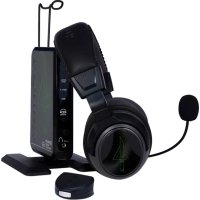
Ear Force Delta - Headphones TURTLE BEACH - Free user manual and instructions
Find the device manual for free Ear Force Delta TURTLE BEACH in PDF.


| Product type | Wireless gaming headset |
| Brand | Turtle Beach |
| Model | Ear Force Delta |
| Connection technology | Wireless (RF 2.4 GHz) + Bluetooth + wired |
| Microphone type | Removable, unidirectional |
| Headset power | 2 AA batteries (not included) |
| Transmitter power | USB (cable included) |
| Audio inputs | Optical (x2), analog, USB |
| Audio output | Additional wired headphone jack |
| Chat modes | Wireless, wired, Bluetooth |
| Sound presets | 9 (1 default + 8 customizable) |
| Audio processing | Dolby Pro Logic IIx, Dolby Digital Surround |
| Compatibility | Xbox 360, PS3, PC, Bluetooth devices |
| Cable length (wired mode) | Approximately 1.2 m |
| Box contents | Headset, transmitter, optical cable, USB cable, Xbox 360 Talkback cable, XBA adapter, 2 AA batteries, preset card |
| Maintenance | Clean with a soft, dry cloth. Avoid liquids. |
| Certifications | CE, FCC, RoHS |
| Warranty | Standard manufacturer warranty |
Frequently Asked Questions - Ear Force Delta TURTLE BEACH
User questions about Ear Force Delta TURTLE BEACH
0 question about this device. Answer the ones you know or ask your own.
Ask a new question about this device
Download the instructions for your Headphones in PDF format for free! Find your manual Ear Force Delta - TURTLE BEACH and take your electronic device back in hand. On this page are published all the documents necessary for the use of your device. Ear Force Delta by TURTLE BEACH.
USER MANUAL Ear Force Delta TURTLE BEACH
USERGUIDE/MODED'EMPLOI
EAR FORCE DELTA
LIMITED EDITION
SERIE LIMITEE
Package Contents / Contenu de l'Emballage / Packungsinhalt
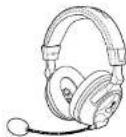
Delta Headset/
Delta Delta, H
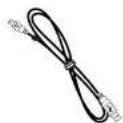
USB Cable /
USB-Kabel
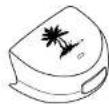
XBALoobtoothChatAdapter/
XBA Adapter Bluetooth 3.0 XBA Bluetooth Chai-Adapter
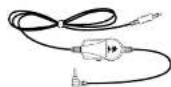
XBOX 360® Talkback Cable /
XBOX 360-Talkback,Kabel
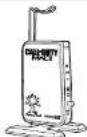
Deta Transmitter/
Efficient Delta Delta-Transmitter
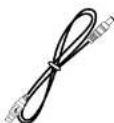
Transmitter Power Cable
MW3 Multimedia Download Card
MW3 Carte de Telecommunication Multimedia / MW3 Multimedia-Download-Xart

Presets Reference Card
Turtle Beach Sticker/
Autocollant Sticker
Delta Headset - Left Controls / Casque Delta - Commandes de Gauche / Delta Headset - Kontrollen Links
1. Main Power:
ON: press and hold for 3 seconds OFF: press and hold for 4 seconds
Off: press and hold for 4 Seconds.
Wireless Chat/Wired Chat Mode: press 2X quickly to switch modes.
Switching Mode: press 1X quickly to switch mode.
Pairing Transmitter1see pg. 101
FRANÇAIS
-
Main: (see pg. 27)
-
Microphone Mute
-
Bluetooth LED
-
Bluetooth Multi-function (see pg. 34)
-
Bluetooth Volume
-
Swivel Ear Cups
-
Battery Cover
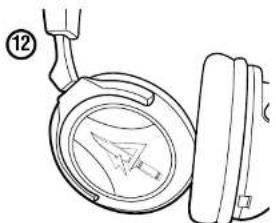
13
Be sure to insert ball as shown
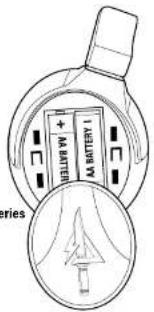
FRANÇAIS
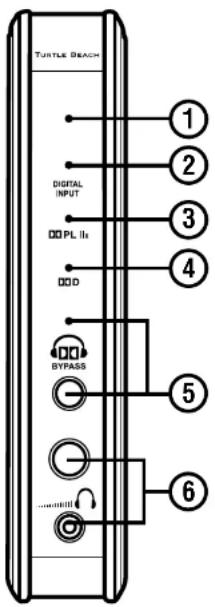
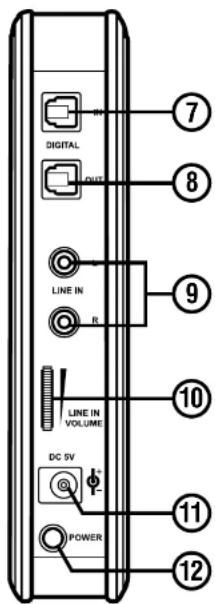
Front View Rear View
1. Power/Pairing LED:
Solid ON: communicating with the Headset.
Slowly Pulsing: cannot communicate with Headset (see pg 10)
2. Digital Input LED: ON when a digital input is detected.
3. Dolly ProLogic® Ixx LED: ON when Dolby Pro Logic Ixx decoder is active.
4. Dolby Digital Surround Sound LED: ON when Dolby Surround Sound decoder is active.
5. Dolby Eypass Button and LED: press to turn OFF Dialby processing LED is ON when the Dialby decoder is turned OFF.
6. Wired Headphone Volume and Output Jack: Used for an additional wired headset. Volume control does not affect the Delta Headset volume.
- Digital Input: Connects transmitter to PS3XBOX 360 (optical cable included).
- Digital Output: Connects transmitter to TV/home theater (additional optical cable required).
- Line In: Connects analog audio sources.
- Line In Volume: Adjusts line in volume (does not affect digital input).
-
Power Socket
-
Power Switch
FRANÇAIS
- Turn OFF the Delta Headset
- Press and hold the Headset POWER button until
the Headset LED flashes rapidly. - Press and hold the Transmitter BYPASS button until
the LED on the top of Transmitter turns OFF - The Transmitter: LED will then flash rapidly and the Headset will be paired.
FRANCAIS
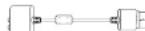
- Connect the Optical Cable.*
NOTE: Remove the protective caps from each end of the optical cable. - Connect the Transmitter Power Cable
- Insert the Headset batteries as shown.
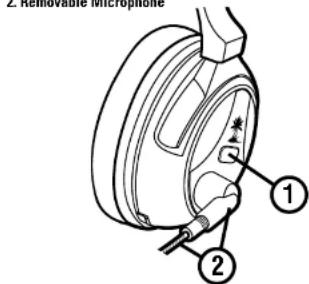
- Insert the Microphone Boom.
- Turn ON the Headset: press the POWER button until LED turns solid, then release. Listen for voice announcement
- Turn ON the Transmitter.
- XBOX 360 original models require the XBOX 360 HDMI Audio Adapter Cable, solid separately.
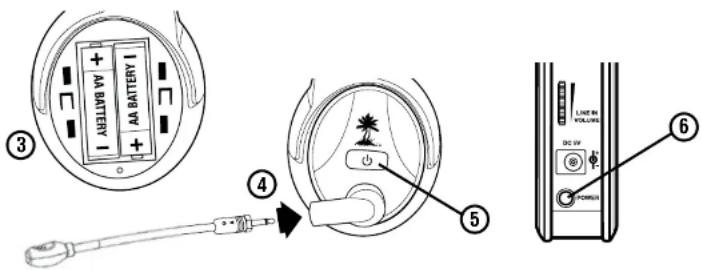
Setup/Installation/Setup
FRANCAIS
Function Button Press LED
Power ON Single 1 blink/sec
Power OFF Hold 3 secs OFF
Mic MUTE Double Solid ON
Mic UNMUTE Double 1 blink/sec
Pairing Mode
Connecting the XBA Bluetooth Chat Adapter
- Place the headset in Wireless Chat Mode by pressing the power button twice. Listen for a voice prompt.
- Turn on your XBOX 360 controller and plug the XBA into the headset jack.
- With the XBA powered off, press and hold the XBA Button for 4 seconds to enter Bluetooth pairing mode. The LED will begin to blink rapidly.
- Press and hold "BT MFB" on the headset for 5 seconds. LED changes from blue to red. Release the button. Listen for the headset to announce "Bluetooth Paired".
Pairing Mode
Hole 4 secs
- blinks / sec
(pared)
blink/sec
- The XBA adapter is not compatible with the XBOX 360 chat pad and may not be compatible with third party controllers.
FRANÇAIS
- In the System Settings of the Dashboard, select Console Settings > Audio Accessory Settings > Audio Device Settings.
2. Digital Output > Dolby Digital 5.1
ESPANOL
In the XBOX 360 System Settings, select "Preferences" > "Voice" > "Play Through Headset".
FRANCAIS
The Delta presets are grouped as one [1] Main preset and eight [8] Alternate presets. The "Main" preset does not process the sound, while the "Alternate" presets are optimized for specific game conditions.
Main: Press the MAIN button to switch between Main and the selected "Alternate" preset.
Alternate: Press the PRESET button to select 1 of 8 "Alternate" presets. Wireless/Wired Chat Modes: Quickly press the Headset POWER button twice to switch between Wireless and Wired chat preset modes.
FRANCAIS
Main: Try kān mān knappen at for skite fēll mēam Mān ag den valte 'alternative' forudinstilling.
Alternative: Tryk på PRESET kappen for at valga 1 af 8 "alternative" forudinstillinger.
Trédlois/Kabel Chat-tilstende: Tryk hurtig par it di headsets POWER knag to gange for at skifte molfen furucindistilede tilstende.
NEDERLANDS
Connect the USB Cable.
- Download new "Alternate" presets at Turflobeach.com.
- Create Custom Presets: download the Delta Preset Editing Software at Turtlebrouch.com.
FRANCAIS
- Delta Bluetooth power OFF
-
Press and hold BT MFB for 5 seconds. Flashing LED changes from blue to red. Release the button.
-
On device: search for Bluetooth devices and select "Turtle Beach COD EFD Headset" (consult manual for activating Bluetooth mode).
- Enter "0000" as the Pass Key.
FRANCAIS
The Delta headshot connects to two Bluetooth devices at once. The "dual pairing" feature enables online chat with other gamers, plus the ability to instantly switch to a phone call.
FRANCAIS
Power Bluetooth ON: Press BT MFB for 3 seconds
Power Bluetooth OFF: Press BT MFB for 4 seconds
Microphone mute: During a call, press MIC MUTE
Adjust volume: Press the + or - buttons
Answer call: Press BT MER
Reject call: Press and hold BT MFB for 2 seconds
End call: Press BT MFB
Cancel outgoing call: Press BT MFB
Redial:Double-click BT MFB
FRANCAIS
To avoid potential damage to the device, always disconnect all cables before transporting it.
WARNING: Permanent hearing damage can occur if a headset is used at high volumes for extended periods of time, so it is important to keep the volume at a safe level. Over time, your ears adapt to loud volume levels, so a level that may not cause initial discomfort can still damage your hearing. If you experience ringing in your ears after listening with the headset, it means the volume is set too loud. The louder the volume is set, the less time it takes to affect your hearing. So, please take care to listen at moderate levels.
Before placing a headset on your ears, turn the volume down completely, then slowly increase it to a comfortable level.
- Turn down the volume if you can't hear people speaking near you.
- Avoid turning up the volume to block out noisy surroundings.
FRANÇAIS
Cagc 104
DEUTSCH
∴ m = 3/11 ;
ESPANDL
EC Declaration of Conformity
Manufacturer: Voyetra Turtle Beach
Manufacturers Address:
150 Clearbrook Rd. Suite 182, Elmsford, NY 10523
Product Name: Ear Force Delta
Type of Product: Wiraass Headset
Model Number/Tab. 1100.01
Model Number(s): 153-4190-01
Year of Manufacture: 2011
We, Voyetra Turtle Beach, Inc. of Elmsford, New York, declare under our own responsibility that the above-referenced product complies with the essential requirements of Article 3 of the RRTTE1999/5EC Directive and standards:
Low Voltage Directive 73/23/EEC [Article 3.1(a) of the R&TTE Directive] comprising the harmonized standards
IEC 60950-1:2005 (2nd Edition)
EN60950-1:2006+A11:2009
EN5032.2-2003
Electromagnetic Compatibility 89/336/EEC [Article 3.1(b) of the R&TTE Directive] comprising the harmonized standards
ESTI EN 301489-1V1.8.1(2008-04)
ESTLEN301489-3V14.1(2002-08)
ESTIEN301489-17V2.1.1(2009)
ESTLEEN30D440-2V131/2009-03
EN 61000-4-2-2001
EN 61000-4-3:2006
EN55022:2008
Radio Frequency Spectrum Usage [Article 3.2 of the R&TTE Directive] comprising the harmonized standards
ESTEN300328V1.7.1(2006-10)
ESTIEN300440-1V1.4.1(2008-05)
ESTIEN300440-2V1.2.1(2008-05)
EC Declaration of Conformity
All test reports have been reviewed and approved with a Positive Opinion from the following Notified Body:
Bay Area Compliance Laboratories Corp (Shenzhen) 2005-140000000000000000000000000000000000000000000000000000000
6b, the 3rd Phase of WanL Industrial Building Shihua Road,FuTien Free Trade Zone,Shenzhen,Guangdong,China 7thPhase of WanL Industrial Building
Tel: 88-735-33320016, Fax: 88-735-33320008, Web: http://cictcip.com
and
QuieTek Technology (Suzhou) Co., Ltd.
No.99 Hongye Road., Suzhou Industrial Park
Loufeng Hi-Tech Development Zone, Suzhou, China
Tel: -86-512-62515088, Fax: +86-512-62515098, Web: quietek.com
and
Shenzhen EBO Technology Co., Ltd.
No.710 Yihua Building,Fulian District,Shenzhen,China 518040
Tel: +86-755-29451282 Fax: 86-755-83709189 Web: ebotek.cn
The technical documentation required by this Directive is maintained at the corporate headquarters of
Voyatra Turtle Beach, 150 Clearbrook Road. Suite 162, Elmsford, New York, 10562.
Authorized Person:

Printed Name: Frederick Romano
Title: Executive Vice President
Date: 8/01/11
39
Manufacturer: Voyetra Turtle Beach
Product Name: Ear Force XBA
Type of Product: Bluetooth Dongle
Model Number: TBS-22
Year (Manufacturer) 2011
Year of Manufacture: 2011
Manufacturers Address:
150 Clearbrook Rd. Suite 162, Elmsford, NY 10523
We, Voyetra Turtle Beach, Inc. of Elmsford, New York, declare under our own responsibility that the above-referenced product complies with the essential requirements of Article 3 of the RSTTE1999/5/EC Directive and standards:
Electromagnetic Compatibility 2004/108/EC [Article 3.1(b) of the R&TTE Directive] comprising the harmonized standards
ESTI EN 301 489-1 V1.8.1 (2008-04)
N 301 489-17 V2.1.1 (2009)
EN 51000-4-2-2001
EN 61000-4-3:2006
EN 55022:2006
All test reports have been reviewed and approved with a Positive Opinion from the following Notified Body:
SGS Taiwan Limited
No.134, Wu Kung Road, Wuku Industrial Zone
Taipei County, Taiwan 248
Tel: +886-2-2299-3279
Fax:886-2-2298-2698
The technical documentation required by this Directive is maintained at the corporate headquarters of
Voyetra Turtle Beach, 150 Clearbrook Road. Suite 162, Elmsford, New York, 10562.
Authorized Person:

Printed Name: Frederick Romano
Title: Executive Vice President
Date: 8/01/11
FCC Declaration of Conformity
Product Name: Ear Force Delta
Model Number(s): TBS-4190-01
FCC Rules: FCC CFR Title 47 Part 15 Subpart B: 2009 CLASS B
FCC CFR Title 47 Part 15 Subpart C:2008
Operating Environment: GENERAL OFFICE AND HOME USE
FCC COMPLIANT STATEMENT
This device complies with part 15 of the FCC rules. Operation is subjected to the following conditions:
(1) This device may not cause harmful interference, and
[2] This device must accept any interference received including interference that may cause undesired operation.
INFORMATION TO USER
This equipment has been tested and found to comply with the limits for a Class B digital device, pursuant to Part 15 of FCC rules. These limits are designed to provide reasonable protection against harmful interference in a residential installation. This equipment generates, uses and can radiate radio frequency energy and, if not installed and used in accordance with the instructions, may cause harmful interference to radio communications. However, there is no guarantee that interference will not occur in a particular installation. If this equipment does cause harmful interference to radio or television reception, which can be determined by turning the equipment off and on, the user is encouraged to try to correct the interference by one or more of the following measures:
1) Reorient or relocate the receiving antenna.
2) Increase the separation between the equipment and receiver.
3) Connect the equipment into an outlet on a circuit different from that to which the receiver is connected.
4) Consult the dealer or an experienced radio/TV technician for help.
The user's manual or instruction manual for an intention or unintentional radiator shall caution the user that the changes or modifications not expressly approved by the party responsible for compliance could void the user's authority to operate the equipment.
WARNING: Changes or modifications made to this equipment not expressly approved by VOYETRA TURTLE BEACH, INC. may void user's authority to operate this equipment.
Product Name: Ear Force XBA
Model Number(s): TBS-2275-01
FCC Rules: FCC CFR Title 47 Part 15 Subpart B: 2009
FCC CFR Title 47 Part 15 Subpart C: 2008
Operating Environment: GENERAL OFFICE AND HOME USE
FCC COMPLIANT STATEMENT
This device complies with part 15 of the FCC rules. Operation is subjected to the following conditions:
(3) This device may not cause harmful interference, and
(4) This device must accept any interference received including interference that may cause undesired operation.
INFORMATION TO USER
This equipment has been tested and found to comply with the limits for a Class B digital device, pursuant to Part 15 of FCC rules. These limits are designed to provide reasonable protection against harmful interference in a residential installation. This equipment generates, uses and can radiate radio frequency energy and, if not installed and used in accordance with the instructions, may cause harmful interference to radio communications. However, there is no guarantee that interference will not occur in a particular installation. If this equipment does cause harmful interference to radio or television reception, which can be determined by turning the equipment off and on, the user is encouraged to try to correct the interference by one or more of the following measures:
5) Reorient or relocate the receiving antenna.
6) Increase the separation between the equipment and receiver.
7) Connect the equipment into an outlet on a circuit different from that to which the receiver is connected.
8) Consult the dealer or an experienced radio/TV technician for help.
The user's manual or instruction manual for an intention or unintentional radiator shall caution the user that the changes or modifications not expressly approved by the party responsible for compliance could void the user's authority to operate the equipment.
WARNING: Changes or modifications made to this equipment not expressly approved by VOYETRA TURTLE BEACH, INC. may void user's authority to operate this equipment.
Limited Warranty for Turtle Beach Products
Voyetra Turtle Beach, Inc. (VTB") warrants to the original end-user purchaser (Purchaser) that the retail Turtle Beach hardware product herein ("Product") will be free of defects in materials and workmanship for a period of one year from the date of purchase by the Purchaser ("Warranty Period"). Any Extended Warranty or Service Plans purchased through a Retail store are not honored by VTB. The Warranty refers to the repair/replacement of a defective product during this period and not a refund.
This limited warranty extends only to the Purchaser and is not transferable or assignable to any subsequent purchaser. This limited warranty is applicable only in the country or territory where the Product was purchased from an authorized VTB retailer and does not apply to a Product that has been purchased as used or refurbished (except refurbished by VTB) or was included as part of a non-VTB product WARRANTY SERVICE.
In the USA and CANADA Warranty Service is provided by our TURTLE BEACH OFFICES and in all other Countries it is provided by our local International Distributors.
VTS does not warrant uninterrupted or error-free operation of the Product and is under no obligation to support the Product for all computer operating systems or future versions of such operating systems.
If a defect should occur during the Warranty Period, Purchaser must contact VTB to obtain a Return Merchandise Authorization (RMA) number. Purchaser will be responsible for shipping costs incurred in returning the defective Product to an authorized VTB service center, or to the repair facility located at VTB's corporate headquarters. A copy of the dated proof of purchase and a description of the problem must be included with the defective Product. VTB will not be responsible for other products or accessories included with the defective Product sent to VTB. The RMA number must be clearly indicated on the outside of the package. Packages without an RMA number will be refused by VTB or its representatives and returned to sender at the sender's expense.
In the event of a defect, Purchaser's sole and exclusive remedy, and VTB's sole liability, is expressly limited to the correction of the defect by adjustment, repair, or replacement of the Product at VTB's sole option and expansia. VTB owns all Products it has replaced and all parts removed from repaired Products. VTB uses new and reconditioned parts made by various manufacturers in performing warranty repairs and building replacement products. If VTB repairs or replaces a product, the original Warranty Period is not extended, however, VTB warrants that repaired or replacement parts will be free from defects in material and workmanship for a period of thirty (30) days from the date of repair or replacement, or for the remainder of the Warranty Period, whichever is greater.
This warranty does not apply to any Product that has had its serial number altered, removed or defaced, or any Product damage caused by shipping, improper storage, accident, problems with electrical power, abuse, misuse, neglect, ordinary wear, acts of God (e.g. flood), failure to follow directions, improper maintenance, use not in accordance with product instructions, unauthorized modification or service of the Product or damage resulting from the use of the Product with hardware, software or other products not provided by or specifically recommended by VTB.
THIS LIMITED WARRANTY IS PURCHASER S SOLE AND EXCLUSIVE REMOY AND IS IN UEU OF ALL OTHER WARRANTYES, EXPRESS OR IMPLIED. TO THE EXTENT PERMITTED BY APPLICABLE LAW, VTB HEREBY DESCLAIMS THE APPLICABILITY OF ANY IMplied WARRANTY OF MERCHANTABILITY, FITNESS FOR A PARTICULAR PURPOSE OR USE FOR THE PRODUCT. IF SUCH A CLAIMER IS PROHIBITED BY APPLICABLE LAW, THE IMPLIED WARRANTY IS LIMITED TO THE DURATION OF THE FOREIGNING LIMITED WRITTEN WARRANTY.
IN NO EVENT SHALL VTB BE LIABLE FOR ANY INDIRECT, INCIDENTAL, SPECIAL, PUNITIVE OR CONSEQUENTIAL DAMAGES, OR DAMAGES, INCLUDING BUT NOT LIMITED TO ANY LOSST PROFITS, DATA, OR LOSS OF USE, ANY THIRD PARTY CLAIMS, AND ANY INJURY TO PROPERTY OR BODILY INJURY (INCLUDING DEATH) TO ANY PERSON, ASRIING FROM OR RELATING TO THE USE OF THIS PRODUCT OR ASRISING FROM BREACH OF THE WARRANTY, BREACH OF CONTRACT, NEGLIGENCE, TORT, OR STRICT LIABILITY. EVEN IF VTB HAS BEEN ADVISED OF THE POSSIBILITY OF SUCH DAMAGES.
This warranty supersedes all prior agreements or understandings, oral or written, relating to the Product, and no representation, promise or condition not contained herein will modify these terms. Some states do not allow the exclusion or limitation of incidental or consequential damages, so the above exclusion or limitation may not apply to you. This warranty gives you specific legal rights. You may also have other rights, which vary from state to state. Any action or lawsuit for breach of warranty must be commenced within eighteen (18) months following the purchase of the Product.
EXCLUSIONS FROM LIMITED WARRANTY:
This Limited Warranty shall not apply and VTB has no liability under this Limited Warranty if the Turtle Beach Product
- is used for commercial purposes such as LAN Centers (including rental or lease);
is modified or tampered with - is damaged by Acts of God, power surge, misuse, abuse, negligence, accident, wear and tear
mishandling, misapplication, or other causes unrelated to defective materials or workmanship; - serial number is defaced, altered or removed;
- is not used in accordance with the documentation and use instructions; or
- is repaired, modified or altered by other than authorized repair centers.
product is no longer available because it was discarded.

For more products, accessories and general product information, please visit
Turtlebeach.com
For warranty information and product support, please visit
TurtleBeach.com/support
FRANCAIS
Federal Communications Commission Interference Statement
This eudaimon has been tested and found to comply with the limits for a Class E digital device, pursuant to part 13 of the FCC Rules. These limits are designed to provide reasonable side protection against harmful interference in a residential installation. This equipment generates, uses and can radiate radio frequency energy, and it not only is useful in accordance with the instructions, may cause harmful interference to radio communication. However, there is no guarantee that interference will not occur in a particular installation. The use of this equipment may be subject to the following requirements: (i) transmission, which can be determined by tuning the equipment off and on; the user is encouraged to try to correct the interference by one or more of the following measures:
Heaant or reate the reatang antenna
- Increase the separation between the equipment and receiver
- Connect the equipment into an outlet on a circuit different from that to which the
receiver is connected.
Consult the dealer or an experienced radio/TV technician for help.
Any changes or modifications that are expressly approved by the grantee of this device could with the user's authority to operate the equipment.
RF Exposure Warning
The equipment contains VCC FP exposure limits set forth for an uncontrolled environment. The equipment must not be located or operating in conjunction with any similar proton or transmitter.
This equipment must be installed and operated in accordance with provided instructions as the antenna used for this transmitter must be installed to provide a repair on distance of 10m from the ground surface. The antenna should be mounted on any other antenna or transmitter. End users and installors must be provided with antenna installation instructions and transmitter operating conditions for safely EF exposure.
CANADA, INDUSTRY CANADA (IC) NOTICES
This Class B digital apparatus complies with Canadian IEC5-023 and RSS-210 Operation is subject to the following two conditions: (1) This device may not cause interference, and (2) this device must accept any interference, including interference that may cause interference operation of the device.
Radio Frequency (RF) Exposure Information:
The radiated output power of the Wireless Device is below the Industry Canada C/341mA frequency exposure limit. The Wireless Device should be used in such manner such that the potentiator for human contact during normal operation is minimized. This device has also been shown to be suitable for use in the field of wireless communication limits under portable exposure conditions. Sometimes are less than 20 cm of a person's body.
The radiated output power of the Wireless Device is below the Industry Canada ICI radio frequency exposure limits. The Wireless Device should be used in such a manner such that
the potential for human contact during normal operation is minimized. This device has also been evaluated and shown components with the IC RF Exposure limits under mobile exposure conditions. The results are presented in Table 1.
This device has been certified for use in Canada. Status of the listing is the Int'l Canadian's RELITrade Equipment Unit can be found in the following two addresses: http://www.c2.com/ and http://www.c2.com/100%
Additional Candian information on BF exposure also can be found at the following web site: http://www.a.u.oi.fr/ewils/awes/awes.pdf
Canada, avis d'Industry Canada (IC)
Copyright © 2011 Voyetra Turtle Beach, Inc. (VTB, Inc.) All rights reserved. No part of this package may be reproduced without permission. Turtle Beach, the Turtle Beach Logo, Voyetra, Ear Force, Sonic Lens, Ear Guard, the Digital RF logo, the DSP logo, Chat Boost and Engineered for Gaming are either trademarks or registered trademarks of VTB, Inc. PlayStation is a registered trademark and PS3 is a trademark of Sony Computer Entertainment Inc. XBOX, XBOX 360 and XBOX LIVE are registered trademarks of Microsoft Corporation. All other trademarks are properties of their respective companies and are hereby acknowledged.
Notes Notes
- Ear force delta
- Package contents / contenu de l'emballage / packungsinhalt
- Delta headset - left controls / casque delta - commandes de gauche / delta headset - kontrollen links
- Main power
- Français
- 13
- Power/pairing led
- Francais
- Setup/installation/setup
- Function button press led
- Connecting the xba bluetooth chat adapter
- Digital output > dolby digital 5.1
- Espanol
- Nederlands
- Deutsch
- ∴ M = 3/11
- Espandl
- Ec declaration of conformity
- Fcc declaration of conformity
- Operating environment: general office and home use
- Fcc compliant statement
- Information to user
- Limited warranty for Turtle Beach products
- Exclusions from limited warranty
- Canada, industry canada (ic) notices
- Canada, avis d'industry canada (ic)
- Notes notes
Brand : TURTLE BEACH
Model : Ear Force Delta
Category : Headphones