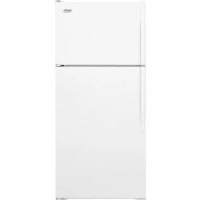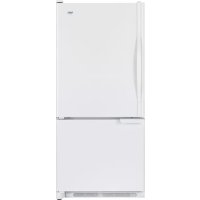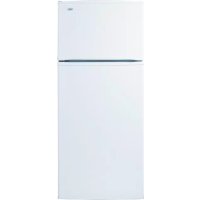
I8RXCGFXQ - Fridge Inglis - Free user manual and instructions
Find the device manual for free I8RXCGFXQ Inglis in PDF.


| Brand | Inglis |
| Model | I8RXCGFXQ |
| Product Type | Refrigerator-freezer with reversible door (depending on model) |
| Installation | Free-standing with required clearances: 1/2" (12.7 mm) on each side, 3" (7.5 cm) above, 1" (25.4 mm) at the back |
| Power Supply | 115 V, 60 Hz, 15 or 20 A AC, grounded, separate circuit recommended |
| Ice Maker | Automatic, auto shutoff, normal production 8-12 batches/24h, max 16-20 batches/24h (on some models) |
| Lighting | 40 W appliance bulb (refrigerator and freezer on some models) |
| Controls | Factory preset temperature settings, with OFF position |
| Defrost | Automatic |
| Shelves | Adjustable tempered glass shelves (slide-out and lift-out) |
| Crisper Drawer | Adjustable humidity control from LOW to HIGH |
| Meat Drawer | With cover, removable |
| Cleaning | Clean interior and exterior with mild detergent and warm water; clean condenser coils regularly |
| Safety | 3-prong grounded outlet; do not use extension cord; keep flammable materials away |
| Parts | Use factory-specified original parts; contact Whirlpool Canada at 1-800-461-5681 |
| Warranty | 1 year full, 2nd to 5th year on sealed refrigeration system |
| Customer Service | Canada: 1-800-807-6777 (service); 1-800-461-5681 (assistance) |
| Serial Number | On the rating plate inside the refrigerator compartment |
Frequently Asked Questions - I8RXCGFXQ Inglis
User questions about I8RXCGFXQ Inglis
0 question about this device. Answer the ones you know or ask your own.
Ask a new question about this device
Download the instructions for your Fridge in PDF format for free! Find your manual I8RXCGFXQ - Inglis and take your electronic device back in hand. On this page are published all the documents necessary for the use of your device. I8RXCGFXQ by Inglis.
USER MANUAL I8RXCGFXQ Inglis
natural_image
Illustration of a tomato and a seafood with snowflakes in the background (no text or symbols)
TOP-MOUNT REFRIGERATOR
Use & Care Guide
In Canada, call for assistance 1-800-461-5681, for installation and service, call: 1-800-807-6777 or visit our website at...
www.whirlpoolcanada.com
RÉFRIGÉRATEUR SUPERPOSE
Proper Disposal of Your Old Refrigerator 3
INSTALLATION INSTRUCTIONS....4
Unpack the Refrigerator....4
Location Requirements....4
Electrical Requirements ....5
Water Supply Requirements....5
Connect the Water Supply....5
Refrigerator Doors....6
Door Closing....10
Normal Sounds ....10
REFRIGERATOR USE....10
Ensuring Proper Air Circulation....10
Using the Controls ....11
Ice Maker....11
REFRIGERATOR FEATURES ....12
Refrigerator Shelves....12
Meat Drawer and Cover....12
Crisper and Crisper Cover 12
Crisper Humidity Control 13
Utility or Egg Bin....13
FREEZER FEATURES....13
Freezer Shelf ....13
DOOR FEATURES....14
Drop-in Door Rails....14
Can Racks and Door Bins....14
REFRIGERATOR CARE ....14
Cleaning....14
Changing the Light Bulbs....15
Power Interruptions....15
Vacation and Moving Care....15
TROUBLESHOOTING 16
ASSISTANCE OR SERVICE....17
WARRANTY 18
TABLE DES MATIÈRES
SÉCURITÉ DU RÉFRIGÉRATEUR ....19
INSTRUCTIONS D'INSTALLATION....20
ASSISTANCE OU SERVICE....35
GARANTIE ....36
REFRIGERATOR SAFETY
Your safety and the safety of others are very important.
We have provided many important safety messages in this manual and on your appliance. Always read and obey all safety messages.

This is the safety alert symbol.
This symbol alerts you to potential hazards that can kill or hurt you and others.
All safety messages will follow the safety alert symbol and either the word "DANGER" or "WARNING."
These words mean:
DANGER
You can be killed or seriously injured if you don't immediately follow instructions.
WARNING
You can be killed or seriously injured if you don't follow instructions.
All safety messages will tell you what the potential hazard is, tell you how to reduce the chance of injury, and tell you what can happen if the instructions are not followed.
IMPORTANT SAFETY INSTRUCTIONS
WARNING: To reduce the risk of fire, electric shock, or injury when using your refrigerator, follow these basic precautions:
■ Plug into a grounded 3 prong outlet.
■ Do not remove ground prong.
■ Do not use an adapter.
■ Do not use an extension cord.
■ Disconnect power before servicing.
■ Replace all panels before operating.
■ Remove doors from your old refrigerator.
■ Use nonflammable cleaner.
- Keep flammable materials and vapors, such as gasoline, away from refrigerator.
■ Use two or more people to move and install refrigerator.
■ Disconnect power before installing ice maker (on ice maker kit ready models only).
■ Use a sturdy glass when dispensing ice or water (on some models).
SAVE THESE INSTRUCTIONS
Proper Disposal of Your Old Refrigerator
WARNING
Suffocation Hazard
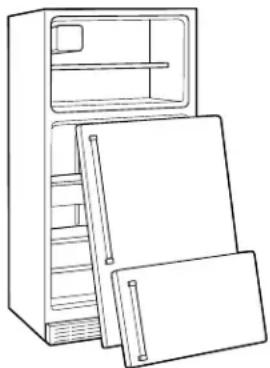
Remove doors from your old refrigerator.
Failure to do so can result in death or brain damage.
IMPORTANT: Child entrapment and suffocation are not problems of the past. Junked or abandoned refrigerators are still dangerous – even if they will sit for “just a few days.” If you are getting rid of your old refrigerator, please follow these instructions to help prevent accidents.
Before You Throw Away Your Old Refrigerator or Freezer:
■Take off the doors.
■Leave the shelves in place so that children may not easily climb inside.
natural_image
Line drawing of a refrigerator with open doors and shelves (no text or symbols)INSTALLATION INSTRUCTIONS
Unpack the Refrigerator
WARNING
Excessive Weight Hazard
Use two or more people to move and install refrigerator.
Failure to do so can result in back or other injury.
Remove the Packaging Materials
■Remove tape and glue residue from surfaces before turning on the refrigerator. Rub a small amount of liquid dish soap over the adhesive with your fingers. Wipe with warm water and dry.
■Do not use sharp instruments, rubbing alcohol, flammable fluids, or abrasive cleaners to remove tape or glue. These products can damage the surface of your refrigerator. For more information, see “Refrigerator Safety.”
■On some models, shelves, bins, door shelf rails, and other feature parts may be packaged in the Interior FeaturePak. Follow the instructions contained in the package for proper assembly.
■Depending on your model, to remove the protective (transparent) film that is on the nameplate, which is located on the freezer handle, use your fingernail and peel off the film, starting from one side and peeling to the other.
■There are 4 bolts that secure the refrigerator to the shipping case. Keep these bolts because they are the refrigerator's leveling legs.
■Properly dispose of packaging.
IMPORTANT: Do not remove the white foam air return insert that is located behind the control panel on the ceiling of the refrigerator (on some models). The insert is part of the refrigerator and not part of the packing material. If the insert is removed, ice may migrate down from the freezer and cause icicles to form.
When Moving Your Refrigerator:
Your refrigerator is heavy. When moving the refrigerator for cleaning or service, be sure to protect the floor. Always pull the refrigerator straight out when moving it. Do not wiggle or "walk" the refrigerator when trying to move it, as floor damage could occur.
Clean Before Using
After you remove all of the package materials, clean the inside of your refrigerator before using it. See the cleaning instructions in "Refrigerator Care."
Important information to know about glass shelves and covers:
Do not clean glass shelves or covers with warm water when they are cold. Shelves and covers may break if exposed to sudden temperature changes or impact, such as bumping. For your protection, tempered glass is designed to shatter into many small, pebble-size pieces. This is normal. Glass shelves and covers are heavy. Use special care when removing them to avoid impact from dropping.
Location Requirements
WARNING
Explosion Hazard
Keep flammable materials and vapors, such as gasoline, away from refrigerator.
Failure to do so can result in death, explosion, or fire.
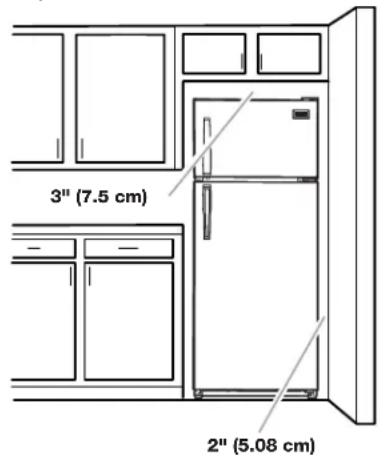
To ensure proper ventilation for your refrigerator, allow for a 12 " (12.70 mm) space on each side. Allow 3" (7.5 cm) of space between overhead cabinets and refrigerator top. Allow at least 1" (25.40 mm) between back of cabinet and the wall. If your refrigerator has an ice maker, make sure you leave some extra space at the back for the water line connections.
■If you are installing your refrigerator next to a fixed wall, leave 2" (5.08 cm) minimum on the hinge side (depending on your model) to allow for the door to swing open.
■ Level the refrigerator. See "Door Closing."
NOTE: Do not install the refrigerator near an oven, radiator, or other heat source, nor in a location where the temperature will fall below 55^ F ( 13^ C).
Electrical Requirements
WARNING
Electrical Shock Hazard
Plug into a grounded 3 prong outlet.
Do not remove ground prong.
Do not use an adapter.
Do not use an extension cord.
Failure to follow these instructions can result in death, fire, or electrical shock.
Before you move your refrigerator into its final location, it is important to make sure you have the proper electrical connection.
Recommended Grounding Method
A 115 Volt, 60 Hz., AC only 15 or 20 amp fused, grounded electrical supply is required. It is recommended that a separate circuit serving only your refrigerator be provided. Use an outlet that cannot be turned off by a switch. Do not use an extension cord.
NOTE: Before performing any type of installation, cleaning, or removing a light bulb, turn the control (Thermostat, Refrigerator or Freezer Control depending on the model) to OFF and then disconnect the refrigerator from the electrical source. When you are finished, reconnect the refrigerator to the electrical source and reset the control (Thermostat, Refrigerator or Freezer Control depending on the model) to the desired setting.
Water Supply Requirements
Read all directions carefully before you begin.
IMPORTANT:
■If you turn the refrigerator on before the water line is connected, turn the ice maker OFF.
■All installations must meet local plumbing code requirements.
■Use copper tubing and check for leaks. Install copper tubing only in areas where the household temperatures will remain above freezing.
TOOLS NEEDED: Flat-blade screwdriver, 716 " and 12 " open-end wrenches or two adjustable wrenches, 14 " nut driver and drill bit, hand drill or electric drill (properly grounded).
NOTE: Your refrigerator dealer has a kit available with a 14 " (6.35 mm) saddle-type shutoff valve, a union, and copper tubing. Before purchasing, make sure a saddle-type valve complies with your local plumbing codes. Do not use a piercing-type or 316 " (4.76 mm) saddle valve which reduces water flow and clogs more easily.
Water Pressure
A cold water supply with water pressure of between 30 and 120 psi (207 - 827 kPa) is required to operate the water dispenser and ice maker. If you have questions about your water pressure, call a licensed, qualified plumber.
Reverse Osmosis Water Supply
IMPORTANT: The pressure of the water supply coming out of a reverse osmosis system going to the water inlet valve of the refrigerator needs to be between 30 and 120 psi (207 - 827 kPa). If a reverse osmosis water filtration system is connected to your cold water supply, the water pressure to the reverse osmosis system needs to be a minimum of 40 to 60 psi (276 - 414 kPa). If the water pressure to the reverse osmosis system is less than 40 to 60 psi (276 - 414 kPa):
■Check to see whether the sediment filter in the reverse osmosis system is blocked. Replace the filter if necessary.
■Allow the storage tank on the reverse osmosis system to refill after heavy usage.
If you have questions about your water pressure, call a licensed, qualified plumber.
Connect the Water Supply
(on some models)
Read all directions carefully before you begin.
IMPORTANT: If you turn the refrigerator on before the water line is connected, turn the ice maker OFF.
Connecting to Water Line:
- Unplug refrigerator or disconnect power.
- Turn OFF main water supply. Turn ON nearest faucet long enough to clear line of water.
- Find a 12 " (1.27 cm) to 114 " (3.18 cm) vertical COLD water pipe near the refrigerator.
NOTE: Horizontal pipe will work, but the following procedure must be followed: Drill on the top side of the pipe, not the bottom. This will help keep water away from the drill. This also keeps normal sediment from collecting in the valve.
- To determine the length of copper tubing you will need, measure from connection on lower left rear of refrigerator to water pipe. Add 7 ft (2.1 m) to allow for moving refrigerator for
cleaning. Use 14 " (6.35 mm) O.D. (outside diameter) copper tubing. Be sure both ends of copper tubing are cut square.
- Using a grounded drill, drill a 14 " (6.35 mm) hole in the cold water pipe you have selected.
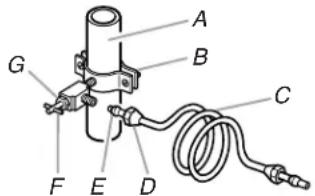
A. Cold Water Pipe
B. Pipe Clamp
C. Copper Tubing
D. Compression Nut
E. Compression Sleeve
F. Shutoff Valve
G. Packing Nut
- Fasten shutoff valve to cold water pipe with pipe clamp. Be sure outlet end is solidly in the 1/4" (6.35 mm) drilled hole in the water pipe and that washer is under the pipe clamp. Tighten packing nut. Tighten the pipe clamp screws carefully and evenly so washer makes a watertight seal. Do not overtighten or you may crush the copper tubing, especially if soft (coiled) copper tubing is used. Now you are ready to connect the copper tubing.
- Slip compression sleeve and compression nut on copper tubing as shown. Insert end of tubing into outlet end squarely as far as it will go. Screw compression nut onto outlet end with adjustable wrench. Do not overtighten.
- Place the free end of the tubing into a container or sink, and turn ON main water supply and flush out tubing until water is clear. Turn OFF shutoff valve on the water pipe. Coil copper tubing.
Connecting to Refrigerator:
NOTE: The first step for connecting the water line to your refrigerator is different depending on the type of water valve provided with your refrigerator. See the diagrams below to determine the style of valve you have. (On kit models, assemble water valve to refrigerator per kit instructions.)
- For Style 1, disconnect the tube clamp on the back of the product and insert the copper tubing through the clamp, as shown. Remove the tape label from the valve inlet and insert copper tubing until it bottoms out (approximately 3/4" [1.9 cm]). Tighten nut by hand as much as possible; then turn the nut an additional 1/2 turn using a wrench. Do not overtighten. Reattach the tube clamp and tube to the back of the cabinet. Skip to Step 2.
For Style 2, disconnect the tube clamp on the back of the product and insert copper tubing through the clamp as shown. Attach the copper tube to the valve inlet using a compression nut and sleeve as shown. Tighten the compression nut. Do not overtighten. Reattach the tube clamp and tube to the back of the cabinet. Move to Step 2.
Style 1
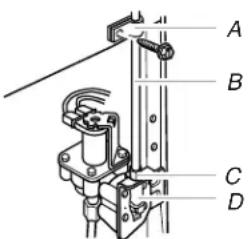
A. Tube Clamp
B. Copper Tubing
C. Compression Nut
D. Valve Inlet
Style 2
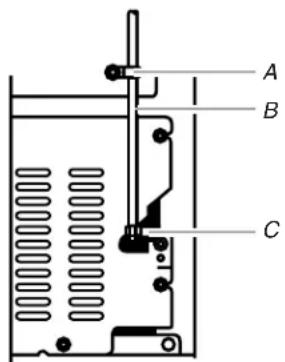
A. Tube Clamp
C. Compression Nut
B. Copper Tubing
- Turn shutoff valve ON. Check for leaks. Tighten any connections (including connections at the valve) or nuts that leak.
- The ice maker is equipped with a built-in water strainer. If local water conditions require periodic cleaning or a well is your source of water supply, a second water strainer should be installed in the 14 " (6.35 mm) water line. Obtain a water strainer from your nearest appliance dealer. Install at either tube connection.
- Plug in refrigerator or reconnect power.
Refrigerator Doors
TOOLS NEEDED: 516 " hex-head socket wrench, No. 2 Phillips screwdriver, flat-head screwdriver, 516 " open-end wrench, flat 2" putty knife.
IMPORTANT:
■Before you begin, turn the refrigerator control OFF. Unplug refrigerator or disconnect power.
■Remove food and any adjustable door or utility bins from doors.
■If you are only removing and replacing the doors, see the "Door and Hinge Removal" and "Door and Hinge Replacement" sections.
■ Depending on your model, you may have standard (Style 1) or contour (Style 2) doors. If you are also going to reverse the door swing, follow the instructions for the appropriate door style.
Door and Hinge Removal
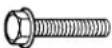
^5/_16 " Hex-Head Hinge Screw
- Unplug refrigerator or disconnect power.
- Close the refrigerator door and keep both doors closed until you are ready to lift them free from the cabinet.
NOTE: Provide additional support for the doors while the hinges are being moved. Do not depend on the door magnets to hold the doors in place while you are working.
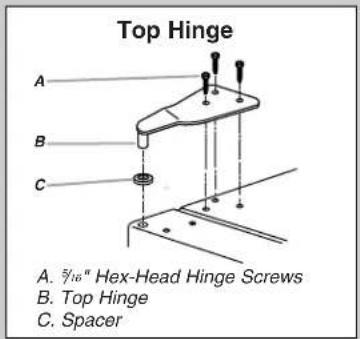
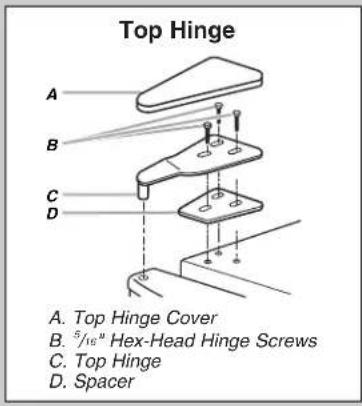
- Remove the parts for the top hinge as shown in Top Hinge graphic.
- Lift the freezer door free from the cabinet.
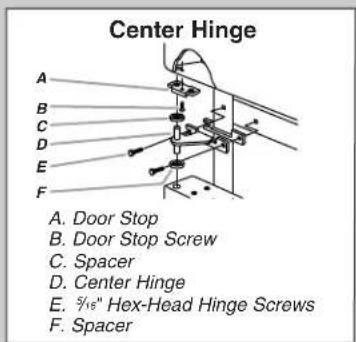
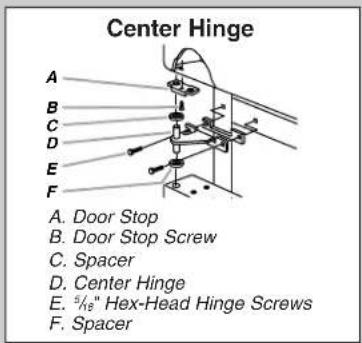
- Remove the parts for the center hinge as shown in the Center Hinge graphic.
-
Lift the refrigerator door free from the cabinet.
-
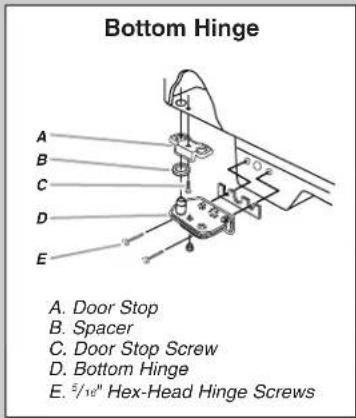
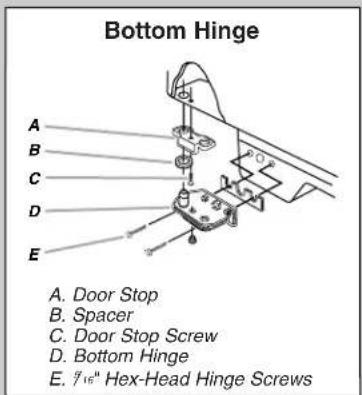
Remove the parts for the bottom hinge as shown in the Bottom Hinge graphic.
IMPORTANT: If you want to reverse your doors so that they open in the opposite direction, follow these steps. If you are not reversing the doors, see "Door and Hinge Replacement."
Door Reversal (optional)
Style 1 - Standard
(Graphics follow these instructions.)

Door Stop Screw

Door Handle Sealing Screw

Flat-Head Handle Screw

Door Handle Seal Screw Front

Door Hinge Hole Plug

Cabinet Hinge Hole Plug

Door Handle Screw Cover

Round-Head Handle Screw
Cabinet
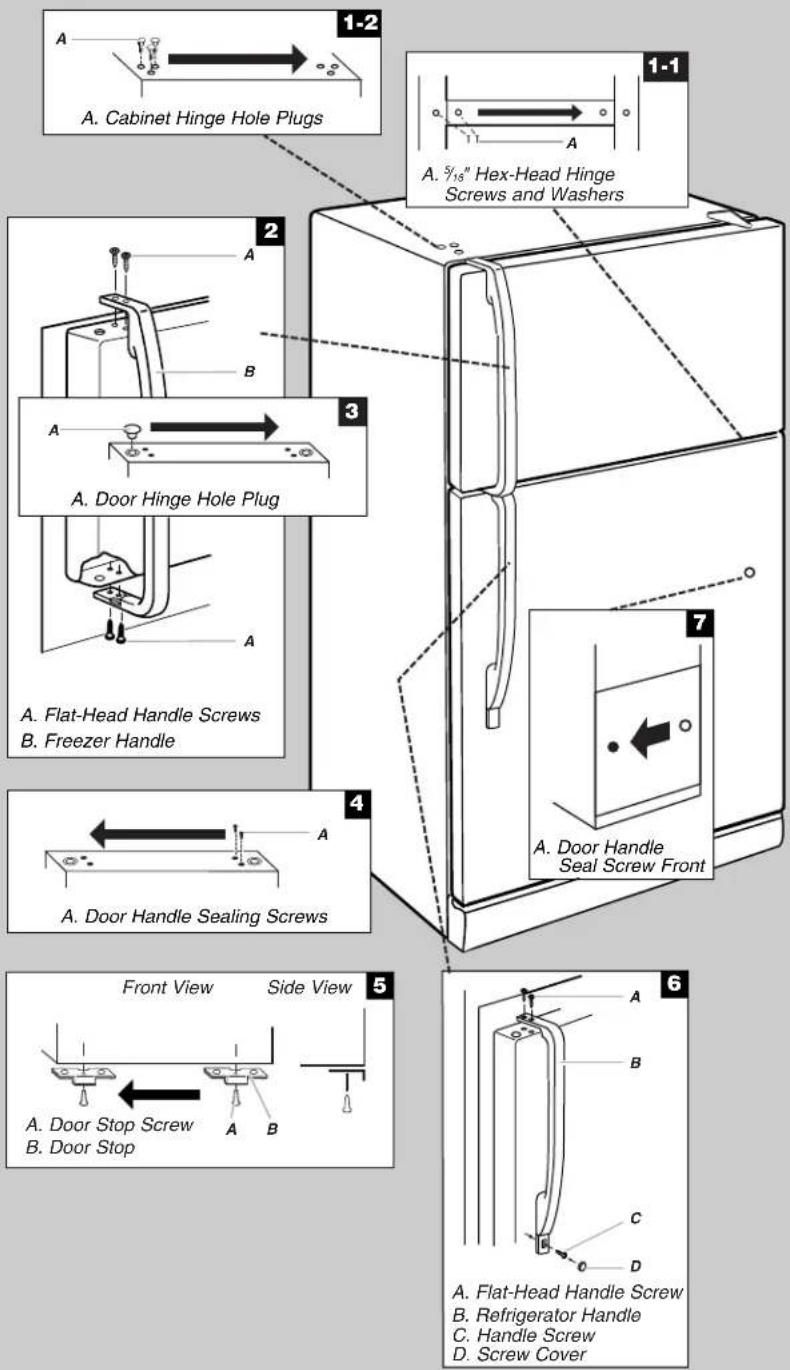
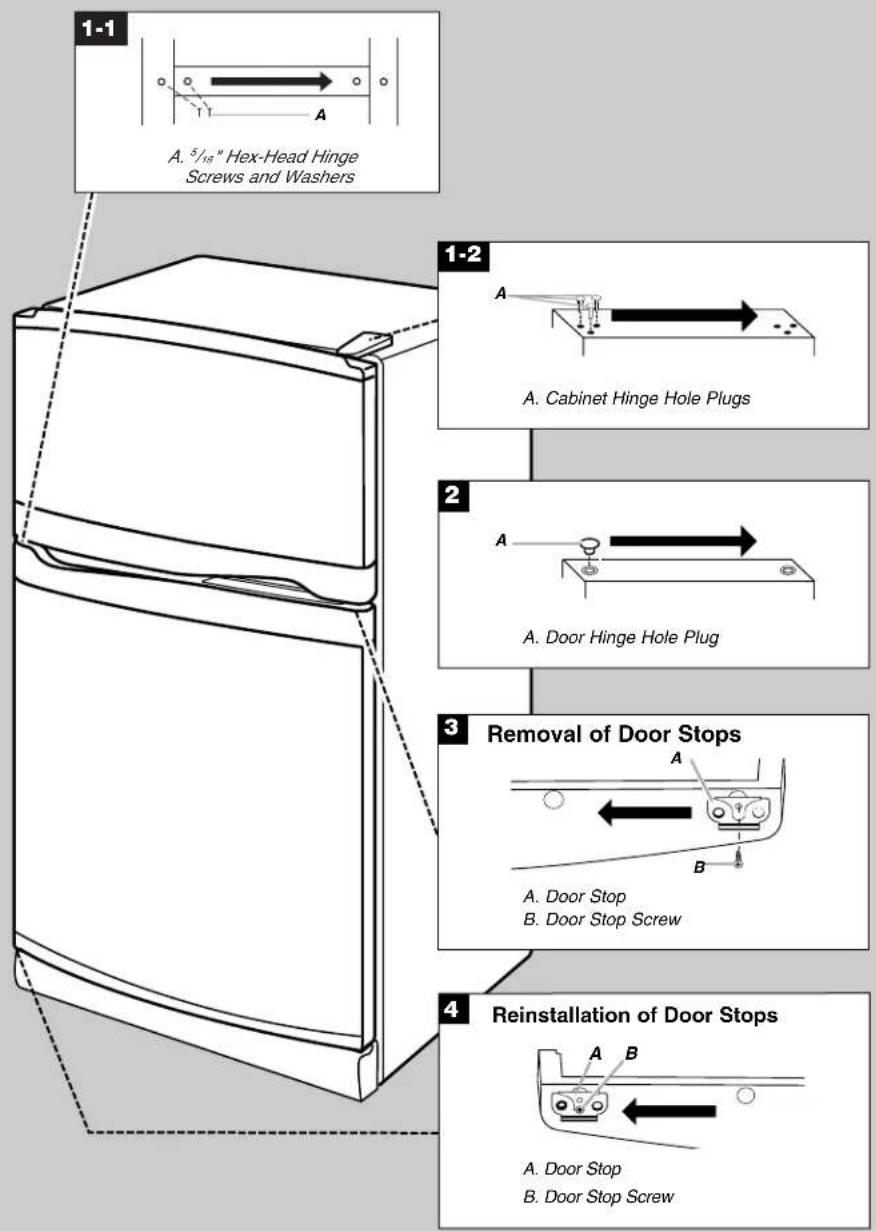
- Remove 516 " hex-head hinge screws from handle side and move them to opposite side. See Graphic 1-1.
- Remove cabinet hinge hole plugs from cabinet top and move them to opposite side hinge holes as shown. See Graphic 1-2.
Freezer door
- Remove freezer handle assembly as shown. Keep all parts together. See Graphic 2.
- Remove door hinge hole plug. Move to opposite side as shown. See Graphic 3.
- Remove door handle sealing screws. Move to opposite side of freezer door as shown. See Graphic 4.
- Remove door stop. Move to opposite side of freezer door as shown. See Graphic 5.
- Position freezer handle on opposite side of freezer door. Assemble handle on door as shown. See Graphic 2.
- Tighten all screws. Set aside door until hinges and refrigerator compartment door are in place.
Refrigerator door
- Remove the screw cover. See Graphic 6.
- Remove refrigerator handle assembly as shown. Keep all parts together. See Graphic 6.
- Remove door hinge hole plug from refrigerator door. Move to opposite side hinge hole as shown. See Graphic 3.
-
Remove door handle sealing screws. Move to opposite side of refrigerator door as shown. See Graphic 4.
-
Remove door handle seal screw front. Move to opposite side of refrigerator door as shown. See Graphic 7.
-
Remove door stop. Move to opposite side of refrigerator door as shown. See Graphic 5.
-
Position refrigerator handle on opposite side of the refrigerator door as shown. See Graphic 6. Drive top two screws in handle first. Align lower portion of handle and drive bottom screw.
-
Replace screw cover. See Graphic 6.
-
Tighten all screws. Set aside refrigerator door until bottom hinge is installed on refrigerator.
Style 2 - Contour
(Graphics follow these instructions.)

Round-Head Handle Screw

Door Handle Screw Hole Plug

Door Hinge Hole Plug
Cabinet
- Remove 516 " hex-head hinge screws from handle side and move them to opposite side. See Graphic 1-1.
- Remove cabinet hinge hole plugs from the cabinet top and move them to opposite side hinge holes as shown. See Graphic 1-2.
Doors
- Remove door hinge hole plug from top of freezer door. Move to opposite side as shown. See Graphic 2.
- Remove door stop from both the freezer and refrigerator doors and move to the other side. See Graphic 3.
Door and Hinge Replacement
NOTE: Graphic may be reversed if door swing is reversed.
- Replace the parts for the bottom hinge as shown. Tighten screws. Replace the refrigerator door. NOTE: Provide additional support for the doors while the hinges are being moved. Do not depend on the door magnets to hold the doors in place while you are working.
- Assemble the parts for the center hinge as shown and tighten all screws. See Center Hinge graphic. Replace the freezer door.
- Assemble the parts for the top hinge as shown. See Top Hinge graphic. Do not tighten screws completely.
- Line up the doors so that the bottom of the freezer door aligns evenly with the top of the refrigerator door. Tighten all screws.
Final Steps
- Check all holes to make sure that hole plugs and screws are in place. Reinstall top hinge cover. See Top Hinge graphic.
- Plug in refrigerator or reconnect power.
- Reset the controls. See "Using the Control(s)" section, depending on your model.
- Return all removable door parts to doors and food to refrigerator.
Style 1 - Standard
Door Removal & Replacement
Door Swing Reversal (optional)
Style 2 - Contour
Door Removal & Replacement
Door Swing Reversal (optional)
Door Closing
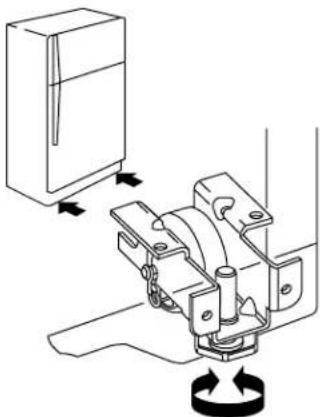
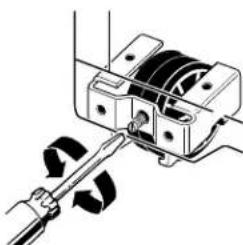
Your refrigerator has two front adjustable rollers – one on the right and one on the left. If your refrigerator seems unsteady or you want the doors to close easier, adjust the refrigerator's tilt using the instructions below:
- Roll out the refrigerator and use a level to check the floor at the back from side to side. If needed, use shims to level the back of the refrigerator if it is uneven. Roll the refrigerator back into place with the rear rollers on top of any shim(s) used so that the rear of the refrigerator is level.
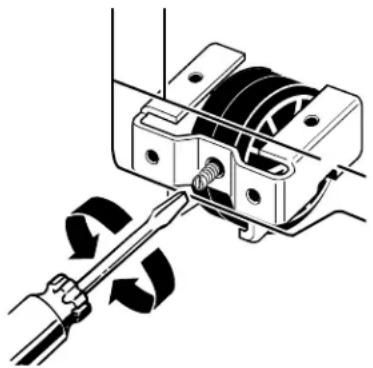
- With the rear already level and the refrigerator in place, use the bottom leveling screws to level the refrigerator from side to side. They are part of the front roller assemblies, which are found at the base of the refrigerator on either side.
NOTE: Having someone push against the top of the refrigerator takes some weight off the leveling screws and rollers. This makes it easier to adjust the screws. - Depending on your model, to level your refrigerator you may either turn the screw clockwise to raise that side of the refrigerator or turn the screw counterclockwise to lower that side. Place a level on top of the refrigerator to check adjustments.
Style 1
natural_image
Technical line drawing of a mechanical assembly with directional arrows indicating motion (no text or symbols)Style 2
natural_image
Mechanical assembly diagram showing a motor or gear mechanism with rotating components (no text or symbols)-
If the doors do not close on their own, you will need to raise the front of the refrigerator so it is slightly higher than the back. To do this, turn both leveling screws clockwise 12 turn.
IMPORTANT: Be sure to turn both screws an equal amount or the refrigerator will no longer be level side to side. -
Open both doors again and check to make sure that they close as easily as you like. If not, repeat steps 3 and 4.
-
Using a level, check to see that the refrigerator is still level side to side. Readjust if necessary.
Normal Sounds
Your new refrigerator may make sounds that your old one didn't make. Because the sounds are new to you, you might be concerned about them. Most of the new sounds are normal. Hard surfaces, such as the floor, walls, and cabinets, can make the sounds seem louder. The following describes the kinds of sounds and what may be making them.
If your product is equipped with an ice maker, you will hear a buzzing sound when the water valve opens to fill the ice maker for each cycle.
■Your refrigerator is designed to run more efficiently to keep your food items at the desired temperatures and to minimize energy usage. The high efficiency compressor and fans may cause your refrigerator to run longer than your old one. You may also hear a pulsating or high-pitched sound from the compressor or fans adjusting to optimize performance.
■You may hear the evaporator fan motor circulating air through the refrigerator and freezer compartments. The fan speed may increase as you open the doors or add warm food.
■Rattling noises may come from the flow of refrigerant, the water line, or items stored on top of the refrigerator.
■Water dripping on the defrost heater during a defrost cycle may cause a sizzling sound.
■As each cycle ends, you may hear a gurgling sound due to the refrigerant flowing in your refrigerator.
■Contraction and expansion of the inside walls may cause a popping noise.
■You may hear air being forced over the condenser by the condenser fan.
■You may hear water running into the drain pan during the defrost cycle.
REFRIGERATOR USE
Ensuring Proper Air Circulation
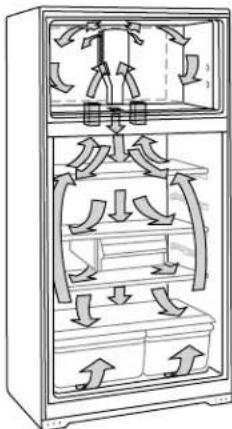
In order to ensure proper temperatures, you need to permit airflow between the refrigerator and freezer sections. As shown in the illustration, cool air enters through the bottom of the freezer section and moves up. Most of the air then flows through the freezer section vents and recirculates under the freezer floor. The rest of the air enters the refrigerator section through the top vent. In some models, cool air enters through the backwall of refrigerator section and moves to the front of the refrigerator and up into the freezer.
natural_image
Technical line drawing of a refrigerator interior showing internal airflow patterns (no text or symbols)Do not block any of these vents with food packages. If the vents are blocked, airflow will be prevented and temperature and moisture problems may occur.
IMPORTANT: Because air circulates between both sections, any odors formed in one section will transfer to the other. You must thoroughly clean both sections to eliminate odors. To prevent odor transfer and drying out of food, wrap or cover foods tightly. See the "Refrigerator Features" section for details.
Using the Controls
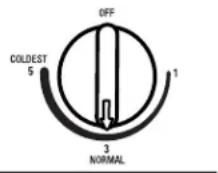
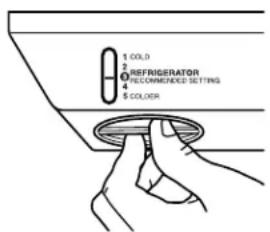
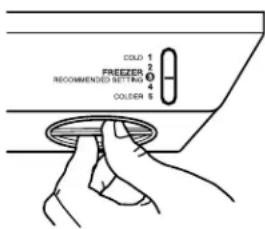
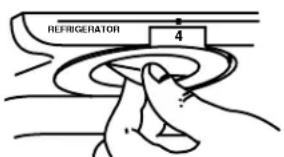
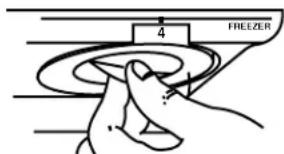
For your convenience, your refrigerator controls are preset at the factory. When you first install your refrigerator, make sure that the controls are still preset to the mid-settings as shown.
NOTE: To turn your refrigerator off, turn the refrigerator control to the word OFF or until the word OFF appears. Your product will not cool when the refrigerator control is set to OFF.
Mid-setting "3"
Mid-setting "3"
Mid-setting "4"
IMPORTANT:
■Give your refrigerator time to cool down completely before adding food. It is best to wait 24 hours before you put food into the refrigerator.
■If you add food before the refrigerator has cooled completely, your food may spoil. Adjusting the Refrigerator and Freezer Controls to a higher (colder) than recommended setting will not cool the compartments any faster.
Adjusting Controls
The mid-settings indicated in the previous section should be correct for normal household usage. The controls are set correctly when milk or juice is as cold as you like and when ice cream is firm.
If the temperature is too warm or too cold in the refrigerator or freezer, first check the air vents to be sure they are not blocked.
If you need to adjust temperatures, use the settings listed in the chart below as a guide. On models with two controls, adjust the refrigerator temperature first. Wait at least 24 hours between adjustments and then recheck the temperatures.
CONDITION/REASON: ADJUSTMENT:
| REFRIGERATOR section too warm- Door opened often, large amount of food added or room temperature very warm | Adjust REFRIGERATOR or TEMPERATURE Control one setting higher |
| FREEZER section too warm/ice not made fast enough- Door opened often, or large amount of food added or very cold room temperature (can’t cycle often enough)- Heavy ice usage | Adjust FREEZER or TEMPERATURE Control one setting higher |
| REFRIGERATOR section too cold- Controls not set correctly for your conditions | Adjust REFRIGERATOR or TEMPERATURE Control one setting lower |
| FREEZER section too cold- Controls not set correctly for your conditions | Adjust FREEZER or TEMPERATURE Control one setting lower |
Ice Maker
(on some models - Accessory)
Turning the Ice Maker On/Off
NOTE: Do not force the wire shutoff arm up or down.
■To turn the ice maker on, simply lower the wire shutoff arm.
NOTE: Your ice maker has an automatic shutoff. As ice is made, the ice cubes will fill the ice storage bin and the ice cubes will raise the wire shutoff arm to the OFF (arm up) position.
■To manually turn the ice maker off, lift the wire shutoff arm to the OFF (arm up) position and listen for the click to make sure the ice maker will not continue to operate.
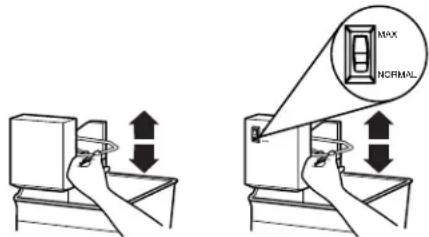
Ice Production Rate
■NORMAL Ice Production: In Normal ice production mode, the ice maker should produce approximately 8 to 12 batches of ice in a 24-hour period. If ice is not being made fast enough, turn the Freezer Control toward a higher (colder) number in half number steps. (For example, if the control is at 3, move it to between 3 and 4.) Wait 24 hours and, if necessary, gradually turn the Freezer Control to the highest setting, waiting 24 hours between each increase.
■MAXIMUM Ice Production (on some models): In Maximum ice production, the ice maker should produce approximately 16 to 20 batches of ice in a 24-hour period. If your refrigerator has the maximum ice production feature, push the switch to MAX.
Remember
■Allow 24 hours to produce the first batch of ice. Discard the first three batches of ice produced.
■The quality of your ice will be only as good as the quality of the water supplied to your ice maker. Avoid connecting the ice maker to a softened water supply. Water softener chemicals (such as salt) can damage parts of the ice maker and lead to poor quality ice. If a softened water supply cannot be avoided, make sure the water softener is operating properly and is well maintained.
■Do not store anything on top of the ice maker or in the ice storage bin.
REFRIGERATOR FEATURES
Your model may have some or all of these features. Features that can be purchased separately as product accessories are labeled with the word "Accessory." Not all accessories will fit all models. See the "Assistance or Service" section if you are interested in purchasing one of the accessories.
Important information to know about glass shelves and covers:
Do not clean glass shelves or covers with warm water when they are cold. Shelves and covers may break if exposed to sudden temperature changes or impact, such as bumping. For your protection, tempered glass is designed to shatter into many small, pebble-size pieces. This is normal. Glass shelves and covers are heavy. Use special care when removing them to avoid impact from dropping.
Refrigerator Shelves
(Glass shelves on some models)
The shelves in your refrigerator are adjustable to match your individual storage needs.
Storing similar food items together in your refrigerator and adjusting the shelves to fit different heights of items will make finding the exact item you want easier. It will also reduce the amount of time the refrigerator door is open, and save energy.
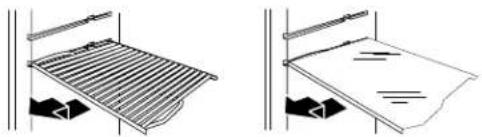
Remove and replace a shelf:
- Remove items from the shelf.
- Slide the shelf straight out to the stop.
- Depending on your model, lift back or front of the shelf past the stop. Slide shelf out the rest of the way.
- Replace the shelf by sliding the back of the shelf into the track in the wall of the cabinet.
- Guide the front of the shelf into the shelf track. Be sure to slide the shelf in all the way.
natural_image
Two technical diagrams showing a metal grate with a handle and a flat plate with a handle, both without any text or symbols.Meat Drawer and Cover
(on some models)
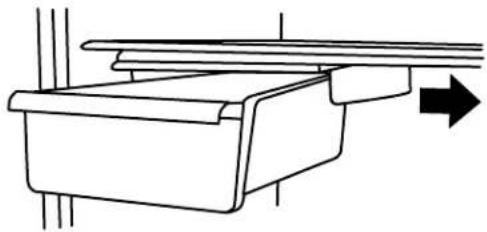
Remove and replace the meat drawer:
- Slide meat drawer out to the stop.
- Lift front of meat drawer with one hand while supporting bottom of drawer with other hand. Slide drawer out the rest of the way.
- Replace the drawer by sliding it back in fully past the drawer stop.
Remove and replace the meat drawer cover (Glass meat drawer cover on some models):
- Remove the meat drawer.
- Push the cover back to release the rear clips from the shelf. Tilt the cover up at the front, and pull it forward.
- Replace the meat drawer cover by fitting the notches and clips on the cover over the rear and center crossbars on the shelf.
- Lower cover into place and pull the cover forward to secure the rear clips onto the shelf.
- Replace the meat drawer.
NOTE: In some models the meat pan moves sideways on the shelf to allow for flexible positioning.
natural_image
Pure technical line drawing of a mechanical assembly with no text or symbolsMeat storage guide
Store most meat in original wrapping as long as it is airtight and moisture-proof. Rewrap if necessary. See the following chart for storage times. When storing meat longer than the times given, freeze the meat.
Fresh fish or shellfish.....use same day as purchased Chicken, ground beef, variety meats (liver).....1-2 days Cold cuts, steaks/roasts .....3-5 days Cured meats.....7-10 days
Leftovers - Cover leftovers with plastic wrap, aluminum foil, or plastic containers with tight lids.
Crisper and Crisper Cover
(on some models)
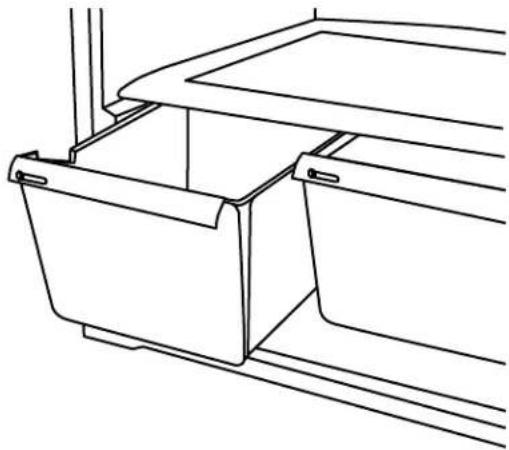
Remove and replace the crisper(s):
- Slide crisper(s) straight out to the stop. Lift the front and slide the crisper(s) out the rest of the way.
- Replace the crisper(s) by sliding the crisper(s) in fully past the stop.
Style 1 - Remove and replace the plastic cover
(Glass insert on some models)
- Remove the crisper(s).
- Lift the front of the cover to remove the cover support. Then lift the cover up and slide it out.
natural_image
Line drawing of a mechanical or architectural component with no visible text, numbers, or symbols.-
Replace the cover by fitting the cover tabs into lowest cabinet slots and pushing them in. Lower the front retainers into place.
-
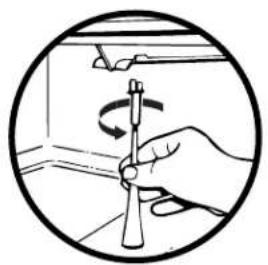
Insert cover support (with the long tab toward the front) into the groove on the underside of the cover.
NOTE: If the support needs adjustment, turn base clockwise to raise or counterclockwise to lower.
natural_image
Hand holding a tool with a rotating knob inside a circular frame (no text or symbols)Style 2 - Remove and replace the glass cover:
- Pull the glass straight out.
- Replace the glass by pushing it straight in.
Crisper Humidity Control
(on some models)
You can control the amount of humidity in the moisture-sealed crisper. Adjust the control to any setting between LOW and HIGH.
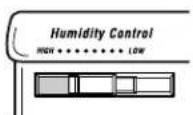
LOW (open) lets moist air out of the crisper for best storage of fruits and vegetables with skins.
■Fruit: Wash, let dry and store in refrigerator in plastic bag or crisper. Do not wash or hull berries until they are ready to use. Sort and keep berries in original container in crisper, or store in a loosely closed paper bag on a refrigerator shelf.
■Vegetables with skins: Place in plastic bag or plastic container and store in crisper.
HIGH (closed) keeps moist air in the crisper for best storage of fresh, leafy vegetables.
■Leafy vegetables: Wash in cold water, drain and trim or tear off bruised and discolored areas. Place in plastic bag or plastic container and store in crisper.
Utility or Egg Bin
(on some models -Accessory)
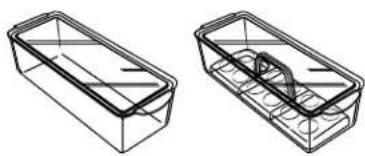
Depending on your model, you may have a one, two or three piece bin. Eggs may be stored in the egg tray or loose in the bin.
NOTE: Store eggs in a covered container for long-term storage. If your model does not have an egg storage bin, store eggs in their original container on an interior shelf.
natural_image
Two wireframe diagrams of rectangular containers with internal channels, no text or symbols presentFREEZER FEATURES
Your model may have some or all of these features. Features that can be purchased separately as product accessories are labeled with the word "Accessory." Not all accessories will fit all models. See the "Assistance or Service" section if you are interested in purchasing one of the accessories.
Important information to know about glass shelves and covers:
Do not clean glass shelves or covers with warm water when they are cold. Shelves and covers may break if exposed to sudden temperature changes or impact, such as bumping. For your protection, tempered glass is designed to shatter into many small, pebble-size pieces. This is normal. Glass shelves and covers are heavy. Use special care when removing them to avoid impact from dropping.
Freezer Shelf
(on some models)
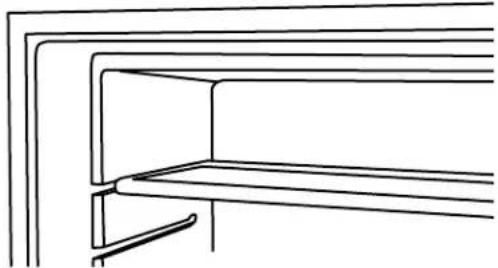
Remove and replace the freezer shelf
- Remove items from the shelf.
- Lift back of shelf over stop and slide shelf straight out.
- Replace the shelf by sliding the back of the shelf into the tracks on walls of cabinet.
- Be sure to slide the shelf in all the way.
natural_image
Pure technical line drawing of a structural bracket or panel (no text or symbols)Frozen food storage guide
Storage times will vary according to the quality and type of food, the type of packaging or wrap used (should be airtight and moisture-proof), and the storage temperature. Seal the package or container securely to prevent taste and odor transfer throughout the product. Ice crystals inside a sealed package are normal. This simply means that moisture in the food and air inside the package have condensed, creating ice crystals.
Put no more unfrozen food into the freezer than will freeze within 24 hours (no more than 2-3 lbs of food per cubic foot [907-1,350 g per L] of freezer space). Leave enough space in the freezer for air to circulate around packages. Be careful to leave enough room for the door to close tightly.
NOTE: For more information on preparing food for freezing, check a freezer guide or reliable cookbook.
DOOR FEATURES
Your model may have some or all of these features. Features that can be purchased separately as product accessories are labeled with the word “Accessory.” Not all accessories will fit all models. See the “Assistance or Service” section if you are interested in purchasing one of the accessories.
Drop-in Door Rails
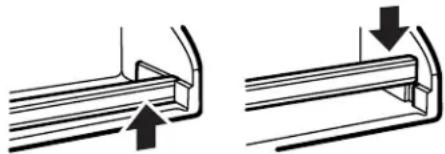
The door rails may be removed for easier cleaning.
Remove and replace the rails
- Remove all items from the shelf and pull straight up on each end of the rails.
- Locate each end of the rail above the rail's pocket opening, and push the rail straight down until it stops.
natural_image
Technical illustration of two mechanical components with arrows indicating motion (no text or symbols)Can Racks and Door Bins
(on some models)
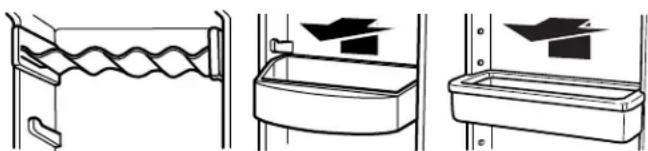
NOTE: Can racks may be purchased as an Accessory for some models.
Remove and replace the racks/bins
- Remove the rack/bin by lifting it and pulling it straight out.
- Replace the rack/bin by sliding it in above the desired support and pushing it down until it stops.
natural_image
Three technical diagrams showing different mechanical or structural configurations (no text or symbols present)REFRIGERATOR CARE
Cleaning
WARNING
Explosion Hazard
Use nonflammable cleaner.
Failure to do so can result in death, explosion, or fire.
Both the refrigerator and freezer sections defrost automatically. However, clean both sections about once a month to prevent odors from building up. Wipe up spills immediately.
Cleaning your refrigerator
- Unplug refrigerator or disconnect power.
- Remove all removable parts from inside, such as shelves, crispers, etc.
- Hand wash, rinse, and dry removable parts and interior surfaces thoroughly. Use a clean sponge or soft cloth and a mild detergent in warm water.
■Do not use abrasive or harsh cleaners such as window sprays, scouring cleansers, flammable fluids, cleaning waxes, concentrated detergents, bleaches or cleansers containing petroleum products on plastic parts, interior and door liners or gaskets. Do not use paper towels, scouring pads, or other harsh cleaning tools. These can scratch or damage materials.
■To help remove odors, you can wash interior walls with a mixture of warm water and baking soda (2 tbs. to 1 qt. [26 g to 0.95 L] of water).
- Wash stainless steel and painted metal exteriors with a clean sponge or soft cloth and a mild detergent in warm water. Do not use abrasive or harsh cleaners. Dry thoroughly with a soft cloth. For additional protection against damage to painted metal exteriors, apply appliance wax (or auto paste wax) with a clean, soft cloth. Do not wax plastic parts.
NOTE: To keep your stainless steel refrigerator looking like new and to remove minor scuffs or marks, it is suggested that you use the manufacturer's approved Stainless Steel Cleaner & Polish.
IMPORTANT: This cleaner is for stainless steel parts only!
Do not allow the Stainless Steel Cleaner & Polish to come into contact with any plastic parts such as the trim pieces, dispenser covers or door gaskets. If accidental contact does occur, clean plastic part with a sponge and mild detergent in warm water. Dry thoroughly with a soft cloth. To order the cleaner, see the "Accessories" section.
- Clean the condenser coils regularly. Coils may need to be cleaned as often as every other month. This may help save energy.
■ Pull refrigerator out away from the wall. See "Unpacking the Refrigerator."
■Vacuum coils when they are dusty or dirty.
■Roll refrigerator back into place. Make sure to leave 1" (2.5 cm) between the cabinet back and the wall.
■Check to see that the refrigerator is level.
- Plug in refrigerator or reconnect power.
Changing the Light Bulbs
NOTE: Not all appliance bulbs will fit your refrigerator. Be sure to replace the bulb with one of the same size, shape, and wattage.
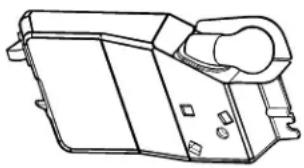
Refrigerator Light
- Unplug refrigerator or disconnect power.
- Reach behind the control panel and unscrew the bulb.
- Replace the bulb with a 40-watt appliance bulb.
- Plug in refrigerator or reconnect power.
natural_image
Technical line drawing of a mechanical component or housing (no text or symbols)Freezer Light (on some models)
- Unplug refrigerator or disconnect power.
- Remove the freezer shelf.
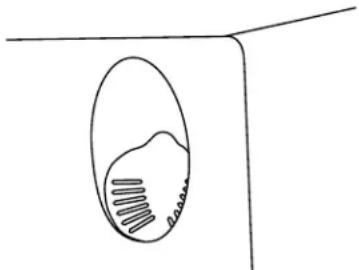
- Remove the freezer light shield by pushing down.
natural_image
Simple line drawing of a vertical oval shape with internal lines, no text or symbols present- Remove the light bulb and replace with one of the same size, shape and wattage.
- Replace the light shield.
- Plug in refrigerator or reconnect power.
Power Interruptions
If the power will be out for 24 hours or less, keep the door or doors closed (depending on your model) to help food stay cold and frozen.
If the power will be out for more than 24 hours, do one of the following:
■Remove all frozen food and store it in a frozen food locker.
■Place 2 lbs (907 g) of dry ice in the freezer for every cubic foot (28 L) of freezer space. This will keep the food frozen for 2 to 4 days.
■If neither a food locker nor dry ice is available, consume or can perishable food at once.
REMEMBER: A full freezer stays cold longer than a partially filled one. A freezer full of meat stays cold longer than a freezer full of baked goods. If you see that food contains ice crystals, it may be refrozen, although the quality and flavor may be affected. If the condition of the food is poor, dispose of it.
Vacation and Moving Care
Vacations
If You Choose to Leave the Refrigerator On While You're Away:
- Use up any perishables and freeze other items.
-
If your refrigerator has an automatic ice maker:
■Raise wire shutoff arm to OFF (up) position or move the switch to the OFF (right) setting.
■Shut off water supply to the ice maker. -
Empty the ice bin.
If You Choose to Turn the Refrigerator Off Before You Leave:
- Remove all food from the refrigerator.
-
If your refrigerator has an automatic ice maker:
■Turn off the water supply to the ice maker at least one day ahead of time.
■When the last load of ice drops, raise the wire shutoff arm to the OFF (up) position or move the switch to the OFF (right) setting. -
Depending on the model, turn the Thermostat Control or Refrigerator Control to OFF. See "Using the Controls."
-
Clean refrigerator, wipe it, and dry well.
-
Tape rubber or wood blocks to the tops of both doors to prop them open far enough for air to get in. This stops odor and mold from building up.
Moving
When you are moving your refrigerator to a new home, follow these steps to prepare it for the move.
-
If your refrigerator has an automatic ice maker:
■Turn off the water supply to the ice maker at least one day ahead of time.
■Disconnect the water line from the back of the refrigerator.
■When the last load of ice drops, raise the wire shutoff arm to the OFF (up) position or move the switch to the OFF (right) setting. -
Remove all food from the refrigerator and pack all frozen food in dry ice.
-
Empty the ice bin.
-
Depending on the model, turn the Thermostat Control or Refrigerator Control to OFF. See "Using the Controls."
-
Unplug refrigerator.
-
Empty water from the defrost pan.
-
Clean, wipe, and dry thoroughly.
-
Take out all removable parts, wrap them well, and tape them together so they don't shift and rattle during the move.
-
Depending on the model, raise the front of the refrigerator so it rolls more easily OR screw in the leveling legs so they don't scrape the floor. See "Adjust the Doors."
-
Tape the doors closed and tape the power cord to the refrigerator cabinet.
When you get to your new home, put everything back and refer to the "Installation Instructions" section for preparation instructions. Also, if your refrigerator has an automatic ice maker, remember to reconnect the water supply to the refrigerator.
TROUBLESHOOTING
Try the solutions suggested here first in order to avoid the cost of an unnecessary service call.
Your refrigerator will not operate
■ Is the power supply cord unplugged? Plug into a grounded 3 prong outlet.
■Has a household fuse blown or circuit breaker tripped?
Replace the fuse or reset the circuit.
■Is the Refrigerator Control turned to the OFF position? See "Using the Control(s)," depending on the model.
Is the refrigerator defrosting? Recheck to see whether the refrigerator is operating in 30 minutes. Your refrigerator will regularly run an automatic defrost cycle.
The lights do not work
■ Is the power supply cord unplugged? Plug into a grounded 3 prong outlet.
Is a light bulb loose in the socket? Turn the refrigerator control to OFF. Disconnect the refrigerator from the electrical supply. Gently remove the bulb and reinsert. Then reconnect the refrigerator to the electrical supply and reset the refrigerator control.
- Has a light bulb burned out? Replace with an appliance bulb of the same wattage, size, and shape. See “Changing the Light Bulb(s),” depending on the model
There is water in the defrost drain pan
■ Is the refrigerator defrosting? The water will evaporate. It is normal for water to drip into the defrost pan.
Is it more humid than normal? Expect that the water in the defrost pan will take longer to evaporate. This is normal when it is hot or humid.
The motor seems to run too much
Is the room temperature hotter than normal? Expect the motor to run longer under warm conditions. At normal room temperatures, expect your motor to run about 40% to 80% of the time. Under warmer conditions, expect it to run even more of the time.
■Has a large amount of food just been added to the refrigerator? Adding a large amount of food warms the refrigerator. It is normal for the motor to run longer in order to cool the refrigerator back down. See “Refrigerator Features.”
Are the doors opened often? Expect the motor to run longer when this occurs. In order to conserve energy, try to get everything you need out of the refrigerator at once, keep food organized so it is easy to find, and close the door as soon as the food is removed.
■Is the control set correctly for the surrounding conditions? See “Using the Control(s),” depending on the model.
Are the doors closed completely? Push the doors firmly shut. If they will not shut all the way. See “The doors will not close completely” later in this section.
Are the condenser coils dirty? This prevents air transfer and makes the motor work harder. Clean the condenser coils. See "Cleaning."
NOTE: Your new refrigerator will run longer than your old one due to its high-efficiency motor.
The refrigerator seems to make too much noise
■ The sounds may be normal for your refrigerator. See "Normal Sounds."
The ice maker is not producing ice (on some models)
■Is the freezer temperature cold enough to produce ice?
Wait 24 hours after hookup for ice production. See “Using the Control(s),” depending on the model.
■Is the wire shutoff arm in the OFF (arm up) position?
Lower the wire shutoff arm to the ON (arm down) position.
See “Ice Maker.”
■Is the water line shutoff valve to the refrigerator turned on? Turn on the water valve. See “Connect the Water Supply.”
Is an ice cube jammed in the ejector arm? Remove the ice from the ejector arm with a plastic utensil. See "Ice Maker."
■Does the ice maker mold have water in it or has no ice been produced? Check to see that your refrigerator has been connected to your home water supply and the supply shutoff valve is turned on. See “Connect the Water Supply.”
NOTE: If not due to any of the above, there may be a problem with the water line. Call for service.
The ice maker is producing too little ice (on some models)
■ Has the ice maker just been installed? Wait 72 hours for full ice production to begin. Once your refrigerator is cooled down, the ice maker should begin producing 70 to 120 cubes every 24 hours.
■ Has a large amount of ice just been removed? Allow 24 hours for ice maker to produce more ice.
Is the control set correctly? See "Using the Control(s)," depending on the model.
■ Is the water shutoff valve turned completely on? Turn valve on fully. See “Connect the Water Supply.”
Is there a water filter installed on the refrigerator? This filter may be clogged or installed incorrectly. First, check the filter installation instructions to ensure that the filter was installed correctly and is not clogged. If installation or clogging is not a problem, call a technician or other qualified person.
■Is a reverse osmosis water filtration system connected to your cold water supply? See "Water Supply Requirements."
Off-taste or gray color in the ice (on some models)
■Are the plumbing connections new, causing discolored or off-flavored ice? Discard the first few batches of ice.
■ Have the ice cubes been stored for too long? Throw away old ice and make a new supply.
■ Has food in the refrigerator been wrapped properly? See "Refrigerator Features."
■ Do the freezer and ice bin need to be cleaned? See "Cleaning."
■ Does the water contain minerals (such as sulfur)? A filter may need to be installed to remove the minerals.
The divider between the two compartments is warm
The warmth is probably due to normal operation of the automatic exterior moisture control. If still concerned, call for service.
Temperature is too warm
- Are the air vents blocked in either compartment? This prevents the movement of cold air from the freezer to the refrigerator. Remove any objects from in front of the air vents. See “Ensuring Proper Air Circulation” for the location of air vents.
Are the door(s) opened often? Be aware that the refrigerator will warm when this occurs. In order to keep the refrigerator cool, try to get everything you need out of the refrigerator at once, keep food organized so it is easy to find, and close the door as soon as the food is removed.
■Has a large amount of food just been added to the refrigerator or freezer? Adding a large amount of food warms the refrigerator. It can take several hours for the refrigerator to return to the normal temperature.
■Are the controls set correctly for the surrounding conditions? See “Using the Control(s),” depending on the model.
There is interior moisture buildup
- Are the air vents blocked in the refrigerator? Remove any objects from in front of the air vents. See “Ensuring Proper Air Circulation” for the location of air vents.
■ Are the door(s) opened often? To avoid humidity buildup, try to get everything you need out of the refrigerator at once, keep food organized so it is easy to find, and close the door as soon as the food is removed. When the door is opened, humidity from the room air enters the refrigerator. The more
often the door is opened, the faster humidity builds up, especially when the room itself is very humid.
■ Is the room humid? It is normal for moisture to build up inside the refrigerator when the room air is humid.
Is the food packaged correctly? Check that all food is securely wrapped. Wipe off damp food containers before placing in the refrigerator.
■Are the controls set correctly for the surrounding conditions? See “Using the Control(s),” depending on the model.
■ Was a self-defrost cycle completed? It is normal for droplets to form on the back wall after the refrigerator self-defrosts.
The doors are difficult to open
■ Are the gaskets dirty or sticky? Clean gaskets and the surface that they touch. Rub a thin coat of paraffin wax on the gaskets following cleaning.
The doors will not close completely
■ Are food packages blocking the door open? Rearrange containers so that they fit more tightly and take up less space.
■ Is the ice bin out of position? Push the ice bin in all the way.
■Are the crisper cover, pans, shelves, bins, or baskets out of position? Put the crisper cover and all pans, shelves, bins, and baskets back into their correct positions. See "Refrigerator Features."
■ Are the gaskets sticking? Clean gaskets and the surface that they touch. Rub a thin coat of paraffin wax on the gaskets following cleaning.
■ Does the refrigerator wobble or seem unstable? Level the refrigerator. See "Door Closing."
■Were the doors removed during product installation and not properly replaced? Remove and replace the doors according to "Refrigerator Doors," or call a qualified service technician.
ASSISTANCE OR SERVICE
Before calling for assistance or service, please check "Troubleshooting." It may save you the cost of a service call. If you still need help, follow the instructions below.
When calling, please know the purchase date and the complete model and serial number of your appliance. This information will help us to better respond to your request.
If you need replacement parts
If you need to order replacement parts, we recommend that you only use factory specified replacement parts. Factory specified replacement parts will fit right and work right, because they are made with the same precision used to build every new INGLIS® appliance.
To locate factory specified replacement parts in your area, call our Customer Interaction Center telephone number or your nearest designated service center.
Call the Whirlpool Canada Inc. Customer Interaction Center toll free: 1-800-461-5681 Monday to Friday 8:00 a.m. - 6:00 p.m. (EST). Saturday 8:30 a.m. - 4:30 p.m. (EST).
Our consultants provide assistance with:
■Features and specifications on our full line of appliances.
■Referrals to local dealers.
For service in Canada
Call 1-800-807-6777. Whirlpool Canada Inc. designated service technicians are trained to fulfill the product warranty and provide after-warranty service, anywhere in Canada.
For further assistance
If you need further assistance, you can write to Whirlpool Canada Inc. with any questions or concerns at:
Whirlpool Canada Inc.
Customer Interaction Center
1901 Minnesota Court
Mississauga, Ontario L5N 3A7
Please include a daytime phone number in your correspondence.
INGLIS® REFRIGERATOR WARRANTY
ONE-YEAR FULL WARRANTY ON REFRIGERATOR
For one year from the date of purchase, when this refrigerator (excluding the water filter) is operated and maintained according to instructions attached to or furnished with the product, Whirlpool Canada Inc. will pay for replacement parts and repair labor costs to correct defects in materials or workmanship. Service must be provided by a Whirlpool Canada Inc. designated service company.
On models with a water filter: 30 day limited warranty on water filter. For 30 days from the date of purchase, when this filter is operated and maintained according to instructions attached to or furnished with the product, Whirlpool Canada Inc. will pay for replacement parts to correct defects in materials and workmanship.
SECOND THROUGH FIFTH YEAR FULL WARRANTY ON SEALED REFRIGERATION SYSTEM PARTS AS LISTED
In the second through fifth years from the date of purchase, when this refrigerator is operated and maintained according to instructions attached to or furnished with the product, Whirlpool Canada Inc. will pay for replacement parts and repair labor costs to correct defects in materials or workmanship in the sealed refrigeration system. These parts are: compressor, evaporator, condenser, dryer, and connecting tubing. Service must be provided by a Whirlpool Canada Inc. designated service company.
Whirlpool Canada Inc. will not pay for:
- Service calls to correct the installation of your refrigerator, to instruct you how to use your refrigerator, to replace house fuses or correct house wiring or plumbing, to replace light bulbs, or for replacement water filters other than as noted above.
- Repairs when your refrigerator is used in other than normal, single-family household use.
- Pickup and delivery. Your refrigerator is designed to be repaired in the home.
- Damage resulting from accident, alteration, misuse, abuse, fire, flood, improper installation, acts of God, or use of products not approved by Whirlpool Canada Inc.
- Any food loss due to product failure.
- Repairs to parts or systems resulting from unauthorized modifications made to the appliance.
- Replacement parts or repair labor costs for units operated outside Canada.
- Travel or transportation expenses for customers who reside in remote areas.
WHIRLPOOL CANADA INC. SHALL NOT BE LIABLE FOR INCIDENTAL OR CONSEQUENTIAL DAMAGES.
Some provinces do not allow the exclusion or limitation of incidental or consequential damages, so this exclusion or limitation may not apply to you. This warranty gives you specific legal rights, and you may also have other rights which vary from province to province.
Outside Canada, this warranty does not apply. Contact your authorized Whirlpool Canada Inc. dealer to determine if another warranty applies.
If you need service, first see the “Troubleshooting” section of this book. After checking “Troubleshooting,” additional help can be found by checking the “Assistance or Service” section or contact your Whirlpool Canada Inc. designated service company or call 1-800-807-6777. 8/02
Keep this book and your sales slip together for future reference. You must provide proof of purchase or installation date for in-warranty service.
Write down the following information about your refrigerator to better help you obtain assistance or service if you ever need it. You will need to know your complete model number and serial number. You can find this information on the model and serial number label located on the inside wall of the refrigerator compartment.
Dealer name
Address
Phone number
Model number
Serial number
Purchase date
SÉCURITÉ DU RÉFRIGÉRATEUR
natural_image
Line drawing of an open refrigerator with doors and shelves (no text or symbols)INSTRUCTIONS D'INSTALLATION
natural_image
Technical illustration of a mechanical assembly with directional arrows indicating motion (no text or symbols)Style 2
natural_image
Mechanical assembly diagram showing a screwdriver inserted into a housing component with rotating arrows indicating rotation (no text or symbols present)natural_image
Technical diagram of a multi-level mechanical or electrical device with internal flow arrows (no text or symbols)natural_image
Pure mechanical diagram showing a lever mechanism with an arrow indicating direction (no text or symbols)natural_image
Line drawing of a mechanical or architectural component with no visible text or symbolsnatural_image
Illustration of a hand holding a tool with a curved arrow indicating rotation (no text or symbols)natural_image
Two wireframe diagrams of rectangular containers with internal compartments (no text or symbols)CARACTÉRISTIQUES DU CONGÉLATEUR
natural_image
Pure technical line drawing of a structural component without any text, numbers, or symbolsnatural_image
Two mechanical pipe fittings with arrows indicating direction of movement (no text or symbols)natural_image
Three technical diagrams showing different mechanical or structural configurations: a spring-loaded component, a container with internal components, and a rectangular enclosure with a triangular support (no text or symbols present)ENTRETIEN DU RÉFRIGÉRATEUR
Nettoyage
AVERTISSEMENT
Risque d'explosion
natural_image
Line drawing of a mechanical component with no visible text or symbolsnatural_image
Simple line drawing of an oval object with internal lines, no text or symbols presentASSISTANCE OU SERVICE
Whirlpool Canada Inc.
Customer Interaction Center
1901 Minnesota Court
Mississauga, Ontario L5N 3A7