BDHV5120 - Fan BLACK & DECKER - Free user manual and instructions
Find the device manual for free BDHV5120 BLACK & DECKER in PDF.


| Product Type | Fan |
| Brand | Black & Decker |
| Model | BDHV5120 |
| Blade Diameter | 500 mm |
| Voltage | 120 V, 60 Hz |
| Number of Speeds | 3 (High, Medium, Low) |
| Main Functions | Directional tilt, speed adjustment |
| Care and Cleaning | Clean with a soft slightly damp cloth, do not immerse in water |
| Safety | Unplug before maintenance, do not use with a damaged cord, do not insert objects into the grille |
| Warranty | 3 years (defects in material and workmanship) |
| Customer Service | 1-888-773-8744 (US and Canada) |
| Package Contents | Fan head, base stand, fixing screws |
Frequently Asked Questions - BDHV5120 BLACK & DECKER
User questions about BDHV5120 BLACK & DECKER
0 question about this device. Answer the ones you know or ask your own.
Ask a new question about this device
Download the instructions for your Fan in PDF format for free! Find your manual BDHV5120 - BLACK & DECKER and take your electronic device back in hand. On this page are published all the documents necessary for the use of your device. BDHV5120 by BLACK & DECKER.
USER MANUAL BDHV5120 BLACK & DECKER
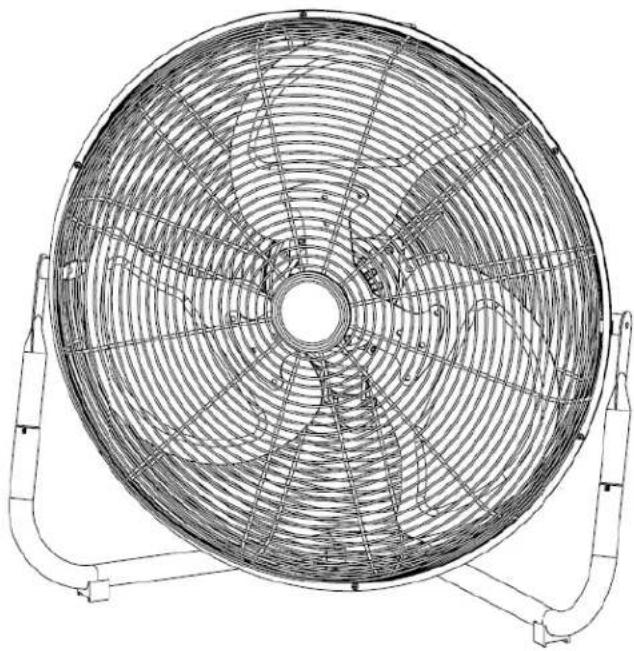
20" High Velocity Floor Fan
natural_image
Line drawing of a large circular fan with radial blades and mounting brackets (no text or symbols)MODEL NUMBER: BDHV-5120


USA & Canada Customer Service Number:
1-888-773-8744
www.BlackandDecker.com
READ THIS MANUAL CAREFULLY BEFORE OPERATING- SAVE IT FOR FUTURE REFERENCE
SAFETY INFORMATION
WARNING
- Always unplug the fan before moving it or performing maintenance. Never touch the fan with wet hands.
- The fan should always be disassembled, repaired or rebuild by a qualified electrician.
- Always unplug the fan when not in use.
- Never unplug the fan by pulling the power cord, always do it by holding the plug.
- Never use the fan if the power cord or plug is damaged. Discard the fan or return it to an authorized service agent for examinaon and/or repair.
- Never use the fan with an extension cord.
- Do no place the fan near heat sources or re.
- Do not insert your hand or any other objects into the guard or moving parts.
- Do not run the power cord under carpets. Do not cover the power cord with area rugs, runners or similar coverings.
- Do not place power cord under furniture or appliances. Always keep the cord away from trac areas so it will not be tripped over.
- To reduce the risk of re or electric shock, do not use this fan with any solid-state speed control device.
- If the power cord is damaged, have it replaced by the manufacturer, an authorized service agent or a similarly qualified person in order to avoid any hazard.
CAUTION
- Always unplug the fan from the main power supply and clean it with a soft cloth.
- DANGER: Risk of electrocuon. Do not immerse the appliance or the cord in water or any other liquid.
- Always t the guard onto the fan before starng up the fan.
- This appliance is not intended for use by persons (including children) with reduced physical, sensory or mental capabilities, or lack of experience and knowledge, unless they are supervised or have been given instrucons concerning the use of the fan by a person responsible for their safety. Children should be supervised to ensure they do not play with the fan.
PACKAGE CONTENTS
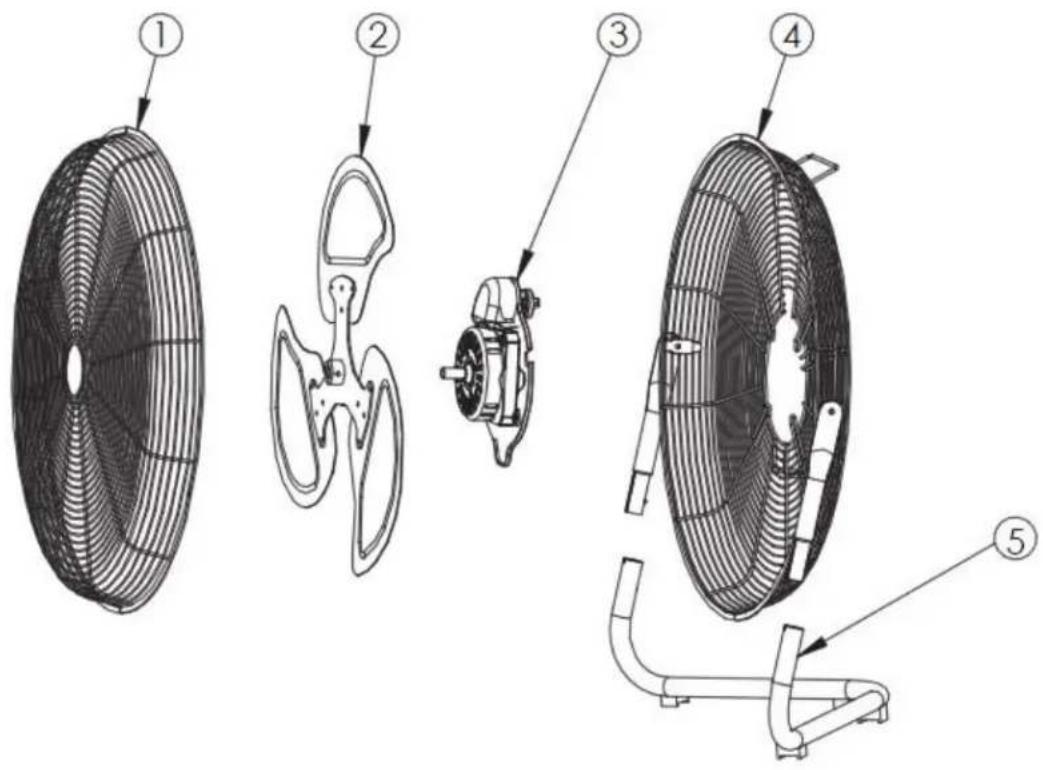
| Part | Description | Quantity |
| 1 | Front Guard | 1 |
| 2 | Blade | 1 |
| 3 | Motor | 1 |
| 4 | Rear Guard | 1 |
| 5 | Base Bracket | 1 |
CARE AND MAINTENANCE
Unplug the appliance before cleaning. Do not use any water to clean metal surfaces. Slightly moisten a cloth and then wipe o the surfaces of the fan. In order to remove dust from the proteve guard, use a vacuum cleaner or remove the front of the proteve guard using a screwdriver to unscrew the securing screw on the edge of the guard. Aer cleaning, replace the safety guard, and fasten the securing screw on the edge of the proteve guard.
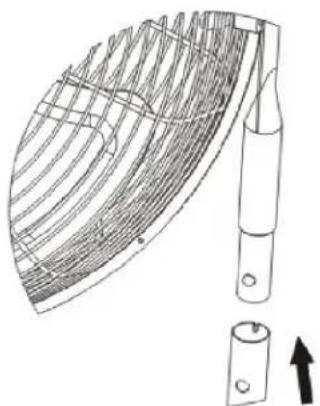
ASSEMBLY INSTRUCTIONS
natural_image
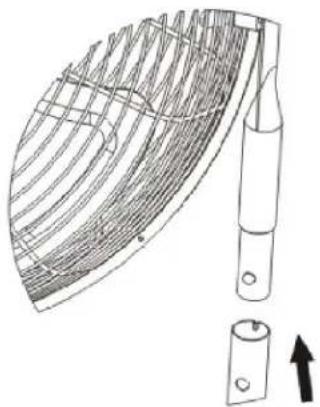
Technical line drawing of a curved mechanical component with internal grid structure and a separate cylindrical component (no text or symbols)Step 1
Press the buon on the base bracket
natural_image
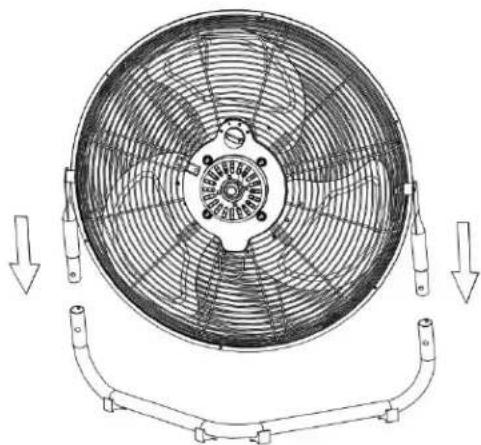
Technical line drawing of a circular fan with internal blades and mounting brackets, showing no text or symbols.Step 2
Insert the fan head into base bracket unl the buon pops-up from the hole
OPERATING INSTRUCTIONS
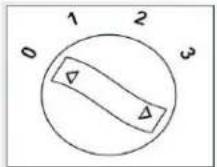
- Adjust the desired speed by rotang the knob: 0: Stop- 1: Low- 2: Medium- 3: High
- Tilt the fan head upward or downward for the desired direcon of air ow.
| PROBLEM POSSIBLE CAUSE CORRECTIVE ACTION | ||
| The fan fails to operate properly2. There may be some 2. Check for any obstrucon if you obstrucons in the fan. OFF.Unplug fan and carefully remove the obstrucon. Plug the fan in and turn it on again. Refer to OPERATING INSTRUCTIONS. | 1.Fan is not plugged in 1.Make and the power outlet is working | |
| 2. Check for any obstrucon if you obstrucons in the fan. OFF. | ||
MAIN SPECIFICATIONS
| MODEL No. BLADE SIZE VOLTAGE/Hz Speed Waage | ||||
| BDHV-5120 50020 INCHESLOW | MM 120V/60 HzMEDIUM 142131 | HIGH 153 | ||
USA & Canada Customer Service Number:
1-888-773-8744
MADE IN CHINA
Imported by Ragalta USA
5870 NW 163th Street,
Miami Lakes, Florida 33014
USA
www.BlackandDecker.com
Black & Decker and the Black and Decker logo are trademarks of the Black & Decker Corporaon and are used under license. All rights reserved. Product may dier slightly from the picture on the cover of this instrucon manual. Not all accessories shown in the photography are included in this package. 3 Year limited warranty: Covers all defective materials and workmanship under normal household use.

BLACK&DECKER®
natural_image
Line drawing of a large circular fan with radial blades and mounting brackets (no text or symbols)NÚMERO DE MODELO: BDHV-5120


natural_image
Technical line drawing of a curved mechanical component with internal grid structure and a separate cylindrical part (no text or symbols)Paso 1
natural_image
Technical line drawing of a circular fan with blades and mounting brackets, showing internal structure and directional arrows (no text or symbols)Paso 2
natural_image
Technical line drawing of a circular fan with radial blades and mounting brackets (no text or symbols)NUMÉRO DE MODÈLE : BDHV-5120


| Partie | Description | Quantite |
| 1 | Protector Avant | 1 |
| 2 | Pale | 1 |
| 3 | Moteur | 1 |
| 4 | Protector Posterieur | 1 |
| 5 | Support de Base | 1 |
INSTRUCTIONS DE MONTAGE
natural_image
Technical line drawing of a curved mechanical component with internal grid structure and a separate cylindrical part (no text or symbols)Étape 1
natural_image
Technical line drawing of a circular fan with internal blades and mounting brackets, showing no text or symbols.Étape 2
5870 NW 163th Street,
Miami Lakes, Florida 33014
USA
www.BlackandDecker.com


Brand : BLACK & DECKER
Model : BDHV5120
Category : Fan