MSPBT300 - Speaker Diamond - Free user manual and instructions
Find the device manual for free MSPBT300 Diamond in PDF.


User questions about MSPBT300 Diamond
0 question about this device. Answer the ones you know or ask your own.
Ask a new question about this device
Download the instructions for your Speaker in PDF format for free! Find your manual MSPBT300 - Diamond and take your electronic device back in hand. On this page are published all the documents necessary for the use of your device. MSPBT300 by Diamond.
USER MANUAL MSPBT300 Diamond
text_image
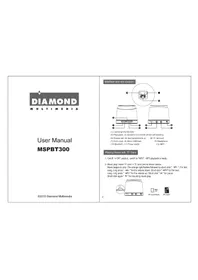
DIAMOND MULTIMEDIAUser Manual MSPBT300
©2013 Diamond Multimedia
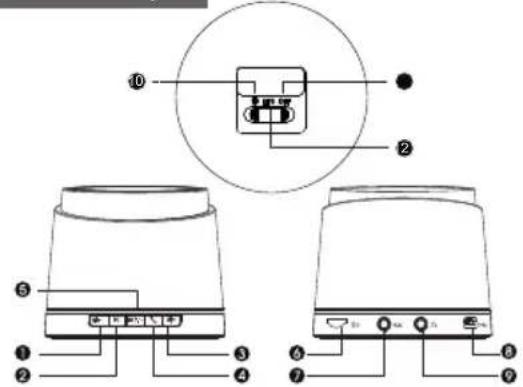
Interface and slot diagram:
text_image
Diagram of a device rear panel with labeled ports and internal components, showing connections between numbered parts.(1) Last song/volume down
(2) Play/pause (3) Speakers and mobile phone call switching
(4) Answer call (5) Next song/volume up (6) TF card port
(7) Audio input (8) Micro USB input (9) Headphone
(10) Bluetooth (11) Power switch (12) MP3
Playing Music with TF Card
- On/off: in OFF position, switch to "MP3", MP3 playback is ready.
- Music play: Insert TF card in TF card port as shown below.
Music begins to play. The orange light flashes followed by short click "→V-". For last song, long press "→V-" for the volume down, Short click "→V+" for the next
song, long press " >>V+" for the volume up; Short click " ▶" for pause.
Short click again " ▶" for resuming music play
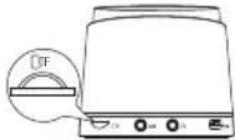

TF Card Mark

TF Card
Bluetooth operation
- On/off: in shutdown mode, switch to "bluetooth symbol, blue light will flash, Bluetooth connection ready.
- Speaker and bluetooth: A. Iphone mobile interface, for example
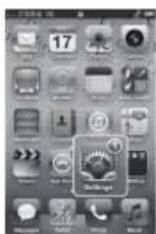
Click "Settings"
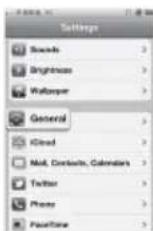
Click "universal"
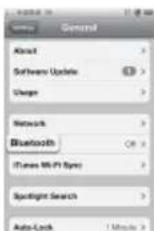
Click: *Bluetooth*

Slide the right slider open bluetooth
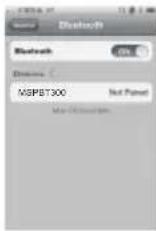
search to "MSPBT300" equipment
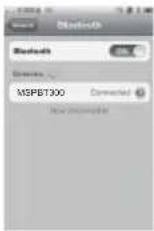
click "disconnected" connection finish
Equipment connection successful please put a tick "media options", the music can be played
Note: 1. Can also be used with iPod/iPad. Basic operation shown above.
- Also supports SONY, SAMSUNG, NOKIA, HTC and other smartphones.
* When the Bluetooth connection fails or mobile phone can't find Bluetooth devices, long click " ▶" this button for 15 seconds until the blue light stays on, then turn off and restart.
3
Bluetooth speakers operation
☒ Bluetooth speaker phone
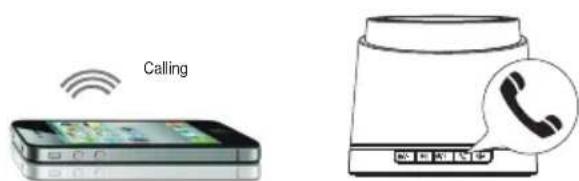
- You can simultaneously answer calls while listening to music by simply short clicking the " 🔊" symbol. Listen to calls using the speaker.
text_image
CallingClicking the above symbol can answer the phone
☒ Switching between Bluetooth speakers and iPhone
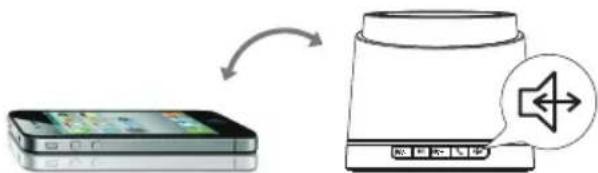
- Short click "sign, and turn the conversation to your mobile phone, Short click "again, and return to Bluetooth speakers, if you want to hang up, short click "key.
flowchart
graph LR
    A["Mobile App"] -->|Signal| B["Sound Output"]
    B --> C["Audio Signal"]
4
AUX audio input
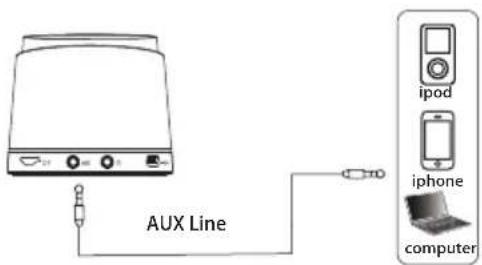
- Use the AUX audio input to play music from your iPod, iPhone, MP3 player or computer
- Short click "play/pause" for muting. If you want to switch to TF card mode or radio, you must remove the AUX audio line first.
text_image
AUX Line ipod iphone computerBluetooth Speaker Sound source
Headphone operation
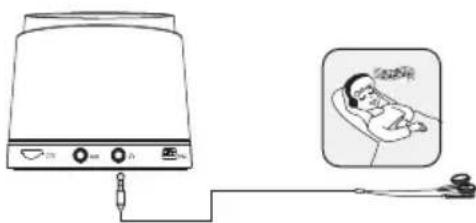
- Insert the headset to headphone jack, and adjust volume to a comfortable level.
natural_image
Illustration of a portable device connected to a medical cross-section showing a sleeping person (no text or symbols present)5
USB cable
- From the "MP3" position, connect a micro USB cable from a computer to the speaker.
- USB card read function: You can use the TF card to add/delete files from your computer.
- USB charging function: connect the USB line, speaker starts to charge.
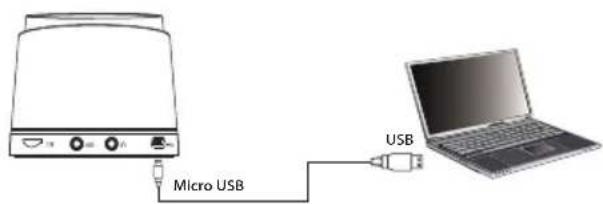
text_image
Micro USB USBiPod, iPad and iPhone are registered trademarks of Apple Inc.
Charging the MSPBT300
Connect the Micro USB cable into the speaker USB interface and then connect the other end to any USB charging device such as your computer.
Charging LED indicator:
Orange blinking (charging)
Orange solid: (charge complete)
A. Computer charging
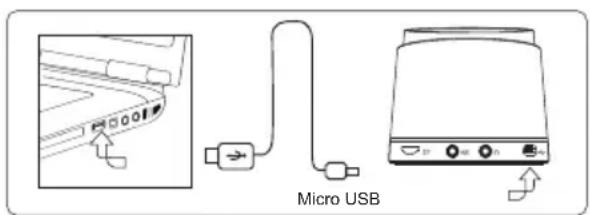
A. Power adapter charging
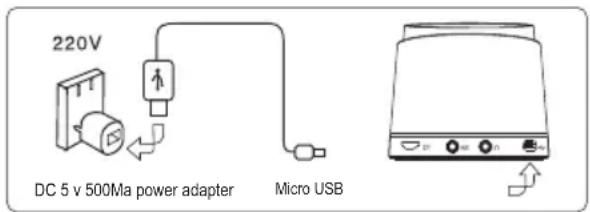
text_image
220V DC 5 v 500Ma power adapter Micro USBDiamond Technical Support
818-357-5165
(long distance rates may apply)
Mon - Fri, 8 - 4:30 PST
http://www.diamondmm.com
7
One Year Limited Warranty
The warranty described below is extended only to the original buyer and is not transferable.
PLEASE NOTE THAT THE PRODUCT YOU HAVE PURCHASED IS DISTRIBUTED AND WARRANTED BY DIAMOND MULTIMEDIA ("DIAMOND") AS DESCRIBED BELOW. QUESTIONS REGARDING THIS WARRANTY AND WARRANTY CLAIMS SHOULD BE MADE TO DIAMOND.
Diamond warrants to the original purchaser of the hardware product, that the product is free from defects in materials or workmanship under normal use and service for a period of one (1) year from the date of purchase at retail. All cables and accessories provided with a Diamond product are warranted to be free from defects in materials or workmanship under normal use and service for a period of for (90) ninety days from date of purchase at retail.
Diamond's sole obligation under this warranty shall be, at Diamond's option, to: (i) repair the defective product or part; (ii) deliver to customer an equivalent product or part to replace the defective product. When a product or part is replaced or exchanged, the item becomes customer's property and the replaced or exchanged item becomes Diamond's property. When a refund or replacement product is given, the defective product becomes Diamond's property. Replacement parts or products may be new or include serviceable used parts with at least the same functional equivalence to the original product. If, at the time of repair, a product is "out of warranty" or within the last ninety (90) days of the warranty period, Diamond warrants any repair for ninety (90) days. All software provided is subject to the terms of the associated software end-user license agreement.
WARRANTY EXCLUSIONS AND LIMITATIONS THIS WARRANTY IS ONLY APPLICABLE TO PRODUCTS SOLD BY DIAMOND AFTER MAY 1, 2007. THIS WARRANTY IS ONLY APPLICABLE IF PRODUCT REGISTRATION IS RECEIVED WITHIN 30 DAYS OF THE DATE THE PRODUCT IS PURCHASED. TO BE ELIGIBLE FOR THIS WARRANTY, YOU MUST REGISTER AT diamondmm.com. THE ORIGINAL SALES RECEIPT SHOWING THE DATE OF PURCHASE OF THE PRODUCT IS PROOF OF THE DATE OF PURCHASE. DIAMOND MAY REQUEST THE ORIGINAL SALES RECEIPT OR A COPY AS PROOF OF DATE OF PURCHASE.
Diamond does not warrant third party products which Diamond distributes "AS IS" unless otherwise specified. Third party products may be warranted by the third party. Diamond makes no warranty or representation that: (i) the operation of the product will be uninterrupted or error free; (ii) defects in the product will be corrected; or (iii) that the product will meet Customer's requirements or work in combination with any hardware or software provided by third parties. TO THE FULLEST EXTENT ALLOWED BY LAW, THE WARRANTIES, REMEDIES AND LIMITATIONS CONTAINED HEREIN ARE EXCLUSIVE AND ARE IN LIEU OF ALL OTHER WARRANTIES, TERMS OR CONDITIONS, EXPRESS OR IMPLIED, EITHER IN FACT OR BY OPERATION OF LAW, STATUTORY OR OTHERWISE, INCLUDING WITHOUT LIMITATION, WARRANTIES, TERMS OR CONDITIONS OF MERCHANTABILITY, FITNESS FOR A PARTICULAR PURPOSE, QUALITY, CORRESPONDENCE WITH DESCRIPTION AND NON-INFRINGEMENT, ALL OF WHICH ARE EXPRESSLY DISCLAIMED. DIAMOND WILL NOT BE LIABLE UNDER THIS WARRANTY IF ITS TESTING AND EXAMINATION DISCLOSE THAT THE ALLEGED DEFECT OR MALFUNCTION IN THE PRODUCT OR SOFTWARE DOES NOT EXIST OR WAS CAUSED BY CUSTOMER'S OR ANY THIRD PARTY'S MISUSE, NEGLECT, IMPROPER INSTALLATION OR TESTING, UNAUTHORIZED ATTEMPTS TO OPEN, REPAIR OR MODIFY THE PRODUCT OR SOFTWARE, OR ANY OTHER CAUSE BEYOND THE RANGE OF THE INTENDED USE, OR BY ACCIDENT, FIRE, LIGHTNING, OTHER HAZARDS, OR ACTS OF GOD. THIS WARRANTY WILL NOT APPLY TO PRODUCTS USED FOR NUCLEAR RELATED, WEAPONS RELATED, MEDICAL OR LIFE SAVING PURPOSES TO THE FULLEST EXTENT ALLOWED BY LAW, DIAMOND ALSO EXCLUDES FOR ITSELF AND ITS SUPPLIERS ANY LIABILITY, WHETHER BASED IN CONTRACT OR TORT (INCLUDING NEGLIGENCE), FOR INCIDENTAL, CONSEQUENTIAL, INDIRECT, SPECIAL OR PUNITIVE DAMAGES OF ANY KIND, OR FOR LOSS OF REVENUE OR PROFITS, LOSS OF BUSINESS, LOSS OF INFORMATION OR DATA, OR OTHER FINANCIAL LOSS ARISING OUT OF OR IN CONNECTION WITH THE SALE, INSTALLATION, MAINTENANCE, USE, PERFORMANCE, FAILURE, OR INTERRUPTION OF ITS PRODUCTS, EVEN IF DIAMOND, ITS SUPPLIERS OR ITS RESELLER HAS BEEN ADVISED OF THE POSSIBILITY OF SUCH DAMAGES. DIAMOND'S SOLE LIABILITY WITH RESPECT TO ITS PRODUCT IS LIMITED TO REPAIR OR REPLACEMENT OF THE PRODUCT, AT DIAMOND'S OPTION. THIS DISCLAIMER OF LIABILITY FOR DAMAGES WILL NOT BE AFFECTED IF ANY REMEDY PROVIDED HEREIN SHALL FAIL FOR ESSENTIAL PURPOSE. DISCLAIMER: Some jurisdictions may not allow the exclusion or limitation of incidental or consequential damages for products supplied to consumers, or the limitation of liability for personal injury, so the foregoing limitations and exclusions may not apply or may be limited in their application to you. When implied warranties are not allowed to be excluded in their entirety, they will be limited to the duration of the applicable written warranty. This warranty gives you specific legal rights that may vary depending on the law of the applicable jurisdiction. OBTAINING WARRANTY SERVICE: Please review the online "help" resources referred to in the accompanying documentation before seeking warranty service. If the product is still not functioning properly after making use of these resources, please access the online help website at diamondmm.com for warranty instructions or to obtain warranty services. Some additional charges may apply for phone support.

text_image
DIAMOND MULTIMEDIAtext_image
Diagram of a device rear panel with labeled ports and internal components, showing top and side views with numbered labels.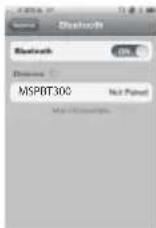
search to "MSPBT300" equipment
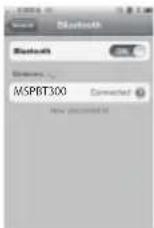
click "disconnected" connection finish
natural_image
Illustration of a coffee maker with a telephone handset and keypad (no text or symbols)flowchart
graph LR
    A["Mobile App"] -->|Transfer| B["Server with Speaker Icon"]
3
4
Entrée audio AUX
text_image
AUX Line ipod iphone computertext_image
Diagram showing a device connected to a patient's head with a thought bubble depicting the same person.5