Upland - Pager GARMIN - Free user manual and instructions
Find the device manual for free Upland GARMIN in PDF.


User questions about Upland GARMIN
0 question about this device. Answer the ones you know or ask your own.
Ask a new question about this device
Download the instructions for your Pager in PDF format for free! Find your manual Upland - GARMIN and take your electronic device back in hand. On this page are published all the documents necessary for the use of your device. Upland by GARMIN.
USER MANUAL Upland GARMIN
Beeper Instructions....2
Garmin ^® and the Garmin logo are trademarks of Garmin Ltd. or its subsidiaries, registered in the USA and other countries. Delta ^™ is a trademark of Garmin Ltd. or its subsidiaries. These trademarks may not be used without the express permission of Garmin.
Beeper Instructions
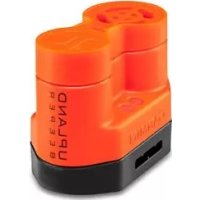
Beeper Device Overview
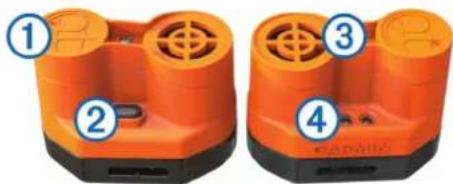
natural_image
Two orange industrial electrical connectors with labeled parts (1, 2, 3, 4), no visible text or symbols on the device itself.| 1 | Battery cover |
| 2 | Power key |
| 3 | Speaker |
| 4 | Status LEDs |
Putting the Beeper Device on Your Dog
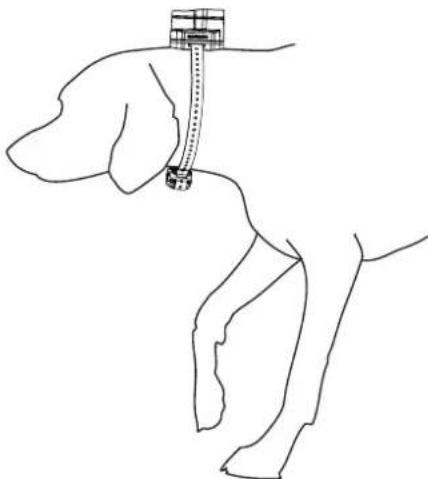
You should install the beeper device onto the same collar strap with a compatible dog device, such as a Delta Upland™ device or a Garmin Pro series device.
1 Insert the end of the collar strap through the slot at the base of the beeper device.
2 Place the collar on the dog's neck, and position the beeper device at the back of the dog's neck.
natural_image
Line drawing of a hand holding a small object, possibly a device or tool, with no visible text or symbols.Turning the Beeper Device On and Off
- Hold the power key until the red status LED flashes once to turn on the device.
- Hold the power key until red status LED turns off, and then release the power key immediately to turn off the device.
Beeper Sounds
The beeper device can emit two sounds: a beep and a hawk scream. These sounds indicate your dog's hunting and pointing status. While your dog is hunting, the beeper device emits a series of one to three beeps every four seconds. You can select the number of beeps in the series, which is useful to distinguish between multiple dogs. You can also disable this sound so that the beeper device is silent while your dog is hunting.
When your dog is pointing, the beeper emits either one beep every second or one hawk scream every five seconds, depending on the setting you choose.
When you select beeper sounds, the selected sounds are indicated briefly by the status LEDs. The red status LED indicates the hunting sound, and the green status LED indicates the pointing sound.
| Mode Red LED Hunting Sound Green LED Pointing Sound | |||
| 1 1 blink 1 beep Solid Hawk scream | |||
| 2 2 blinks 2 beeps | |||
| 3 3 blinks 3 beeps | |||
| 4 Off Silent | |||
| 5 1 blink 1 beep Blinking Beep | |||
| 6 2 blinks 2 beeps | |||
| 7 3 blinks 3 beeps | |||
| 8 Off Silent | |||
Customizing the Beeper Sounds
1 With the device turned on, hold the power key until both LEDs blink rapidly three times, and release the power key.
2 Select the power key to cycle through the sound modes. Each time you select the power key, the LEDs indicate the selected sound mode. You may have to cycle through several sound modes to reach your preferred sound mode.
3 Hold the power key until both LEDs blink rapidly three times, and release the power key to set the sound mode to the current selection.
Resetting to the Default Beeper Sounds
You can reset your beeper device to the factory default sound settings, regardless of the current setting or power state of the device.
Hold the power key for 15 seconds.
The device emits a high-low, high-low beep sequence, and the LEDs flash to confirm the reset.
The next time you turn on the device, it is set to mode 1.
Turning the Beeper Sounds On or Off Remotely
Before you can turn the beeper sounds on or off remotely, the dog collar device and the beeper device must be turned on.
You can use the handheld device to turn the beeper sounds on or off remotely. Turning off the beeper sounds does not turn off the beeper device.
1 On the handheld device, select a training mode in which a training key is assigned to the beeper device.
2 Select the training key assigned to the beeper device to turn the beeper sounds on or off for the selected dog.
Replacing the Beeper Battery
Before you can replace the battery, you must have a Phillipshead screwdriver and a CR123A lithium battery.
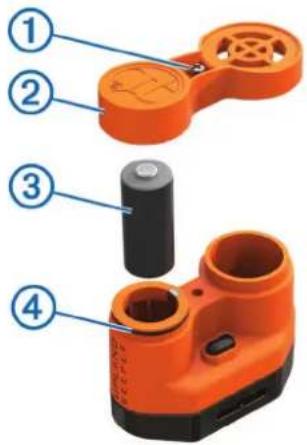
1 Using a Phillips-head screwdriver, remove the screw ① from the battery cover ②.
text_image
Diagram of an orange handheld device with numbered parts labeled 1 to 42 Remove the battery cover and battery ③.
3 Insert the new battery, observing polarity.
4 Verify the gasket ④ is fully seated in the groove.
5 Replace the battery cover and screw.
Beeper Device Specifications
| Battery type CR123A lithium | |
| Battery life Up to 100 hours run time | |
| Operating temperature range -4° to 1 | 10°F (-20° to 43°C) |
| Water resistance IEC 60529 IPX7 |