DW420 - Sander DEWALT - Free user manual and instructions
Find the device manual for free DW420 DEWALT in PDF.


| Brand | DeWalt |
| Model | DW420 |
| Product Type | Random orbital sander |
| Disc Size | 5 inches (127 mm) |
| Disc Attachment Type | Self-adhesive |
| Power | 120 V AC, 60 Hz |
| Double Insulation | Yes |
| No-Load Speed (approx.) | 12,000 orbits per minute |
| Weight (approx.) | 1.2 kg (2.6 lb) |
| Orbital Motion | Random |
| Switch | On/Off rocker switch (I/O) |
| Dust Bag | Not included (model DW420) |
| Cord Length (approx.) | 2 m |
| Minimum Extension Cord Wire Gauge (25 ft) | 18 AWG |
| Pad Material | Vinyl |
| Maintenance | Clean every 5 hours of use, brush replacement, self-lubricating |
| Safety | Wear eye protection and respirator, do not use in explosive atmosphere, disconnect before maintenance |
| Warranty | 1 year, 30-day satisfaction guarantee |
Frequently Asked Questions - DW420 DEWALT
User questions about DW420 DEWALT
0 question about this device. Answer the ones you know or ask your own.
Ask a new question about this device
Download the instructions for your Sander in PDF format for free! Find your manual DW420 - DEWALT and take your electronic device back in hand. On this page are published all the documents necessary for the use of your device. DW420 by DEWALT.
USER MANUAL DW420 DEWALT
DEWALT Industrial Tool Co., 701 East Joppa Road, Baltimore, MD 21286
Printed in U.S.A. (AUG02-CD-1) Form No. 613265-00 DW420, etc.
The following are trademarks for one or more DEWALT power tools: the yellow and black color scheme; the "D" shaped air intake grill; the array of pyramids on the handgrip; the kit box configuration; and the array of lozenge-shaped humps on the surface of the tool.
IF YOU HAVE ANY QUESTIONS OR COMMENTS ABOUT THIS OR ANY DEWALT TOOL, CALL US TOLL FREE AT:
1-800-4-DEWALT (1-800-433-9258)
General Safety Instructions for All Tools
⚠ WARNING! Read and understand all instructions. Failure to follow all instructions listed below, may result in electric shock, fire and/or serious personal injury.
SAVE THESE INSTRUCTIONS
WORK AREA
- Keep your work area clean and well lit. Cluttered benches and dark areas invite accidents
- Do not operate power tools in explosive atmospheres, such as in the presence of flammable liquids, gases, or dust. Power tools create sparks which may ignite the dust or fumes.
- Keep bystanders, children, and visitors away while operating a power tool. Distractions can cause you to lose control.
ELECTRICAL SAFETY
- Double insulated tools are equipped with a polarized plug (one blade is wider than the other.) This plug will fit in a polarized outlet only one way. If the plug does not fit fully in the outlet, reverse the plug. If it still does not fit, contact a qualified electrician to install a polarized outlet. Do not change the plug in any way. Double insulation ☐ eliminates the need for the three wire grounded power cord and grounded power supply system.
- Avoid body contact with grounded surfaces such as pipes, radiators, ranges and refrigerators. There is an increased risk of electric shock if your body is grounded.
- Don't expose power tools to rain or wet conditions. Water entering a power tool will increase the risk of electric shock.
- Do not abuse the cord. Never use the cord to carry the tools or pull the plug from an outlet. Keep cord away from heat, oil, sharp edges or moving parts. Replace damaged cords immediately. Damaged cords increase the risk of electric shock.
- When operating a power tool outside, use an outdoor extension cord marked "W-A" or "W." These cords are rated for outdoor use and reduce the risk of electric shock. Recommended Minimum Wire Size for Extension Cords
Total Length of Cord
| 25 ft. | 50 ft. | 75 ft. | 100 ft. | 125 ft. | 150 ft. | 175 ft. | |
| 7.6 m | 15.2 m | 22.9 m | 30.5 m | 38.1 m | 45.7 m | 53.3 m | |
| Wire Size | |||||||
| 18 AWG | 18 AWG | 16 AWG | 16 AWG | 14 AWG | 14 AWG | 12 AWG | |
PERSONAL SAFETY
- Stay alert, watch what you are doing and use common sense when operating a power tool. Do not use tool while tired or under the influence of drugs, alcohol, or medication. A moment of inattention while operating power tools may result in serious personal injury,
- Dress properly. Do not wear loose clothing or jewelry. Contain long hair. Keep your hair, clothing, and gloves away from moving parts. Loose clothes, jewelry, or long hair can be caught in moving parts. Air vents often cover moving parts and should also be avoided.
- Avoid accidental starting. Be sure switch is off before plugging in. Carrying tools with your finger on the switch or plugging in tools that have the switch on invites accidents.
- Remove adjusting keys or wrenches before turning the tool on. A wrench or a key that is left attached to a rotating part of the tool may result in personal injury.
- Do not overreach. Keep proper footing and balance at all times. Proper footing and balance enables better control of the tool in unexpected situations.
- Use safety equipment. Always wear eye protection. Dust mask, non-skid safety shoes, hard hat, or hearing protection must be used for appropriate conditions.
TOOL USE AND CARE
- Use clamps or other practical way to secure and support the workpiece to a stable platform. Holding the work by hand or against your body is unstable and may lead to loss of control.
- Do not force tool. Use the correct tool for your application. The correct tool will do the job better and safer at the rate for which it is designed.
- Do not use tool if switch does not turn it on or off. Any tool that cannot be controlled with the switch is dangerous and must be repaired.
- Disconnect the plug from the power source before making any adjustments, changing accessories, or storing the tool. Such preventative safety measures reduce the risk of starting the tool accidentally.
- Store idle tools out of reach of children and other untrained persons. Tools are dangerous in the hands of untrained users.
- Maintain tools with care. Keep cutting tools sharp and clean. Properly maintained tools, with sharp cutting edges are less likely to bind and are easier to control.
- Check for misalignment or binding of moving parts, breakage of parts, and any other condition that may affect the tools operation. If damaged, have the tool serviced before using. Many accidents are caused by poorly maintained tools.
- Use only accessories that are recommended by the manufacturer for your model. Accessories that may be suitable for one tool, may become hazardous when used on another tool.
SERVICE
- Tool service must be performed only by qualified repair personnel. Service or maintenance performed by unqualified personnel could result in a risk of injury.
- When servicing a tool, use only identical replacement parts. Follow instructions in the Maintenance section of this manual. Use of unauthorized parts or failure to follow Maintenance Instructions may create a risk of electric shock or injury.
Special Safety Instructions For Sanders
• Always wear eye protection and a respirator when sanding.
- Sanding of lead based paint is not recommended. See "Precautions" section for additional information before sanding paint.
- Do not operate the unit without the dust collection bag. (DW421, and DW423)
- Empty dust bag frequently, especially when sanding resin coated surfaces such as polyurethane, varnish, shellac, etc. Dispose of coated dust particles according to the finish manufacturer's guildelings, or place in a metal can with a tight fitting metal lid. Remove coated dust particles from the premises daily The accumulation of fine sanding dust particles may self ignite and cause fire.
- Replace worn CFS disc when it causes high tool rpm. High tool rpm caused by a worn out CFS disc may result in separation of sanding pad from the sander, possibly causing personal injury. for instructions on replacing the CFS disc, see the section of this manual titled "Tool Care."
ACAUTION: Wear appropriate personal hearing protection during use. Under some conditions and duration of use, noise from this product may contribute to hearing loss.
⚠WARNING: Some dust created by power sanding, sawing, grinding, drilling, and other construction activities contains chemicals known to cause cancer, birth defects or other reproductive harm. Some examples of these chemicals are:
- lead from lead-based paints,
• crystalline silica from bricks and cement and other masonry products, and
• arsenic and chromium from chemically-treated lumber (CCA).
Your risk from these exposures varies, depending on how often you do this type of work. To reduce your exposure to these chemicals: work in a well ventilated area, and work with approved safety equipment, such as those dust masks that are specially designed to filter out microscopic particles.
- Avoid prolonged contact with dust from power sanding, sawing, grinding, drilling, and other construction activities. Wear protective clothing and wash exposed areas with soap and water. Allowing dust to get into your mouth, eyes, or lay on the skin may promote absorption of harmful chemicals.
- The label on your tool may include the following symbols.
V....volts A ....amperes
Hz......hertz W......watts
min ......minutes ......alternating current
--- ....direct current n_0 ....no load speed
☐......Class II Construction .../min ......revolutions or reciprocation
⊕ earthing terminal per minute
⚠️ ____ safety alert symbol
Motor
Your DeWALT tool is powered by a DrWALT built motor. Be sure your power supply agrees with the nameplate marking. (Volts, 120 AC only). Voltage decrease of more than 10% will cause loss of power and overheating. All DeWALT tools are factory tested; if this tool does not operate, check the power supply.
Attaching Sanding Discs
Your sander is designed to use 5" (127 mm) sanding discs. Discs for DW421 and DW423 have an 8 hole dust extraction pattern and hook and loop attachment. Discs for the DW420 have no holes and attach using pressure sensitive adhesive (PSA). To attach paper to the sanding pad:
| REQUIRED SANDPAPERS | |||
| Model Sander | Disc Attachment Size Method | Hole Pattern | |
| DW420 | 5" | PSA | None |
| DW421 | 5" | Hook & Loop | 8 holes |
| DW423 | 5" | Hook & Loop | 8 Holes |
-
Turn off and unplug the tool.
-
Tum the sander over so that the sanding pad is facing upward.
-
Clean dust from the vinyl pad face.
-
Hold the pad with one hand to keep it from rotating.
-
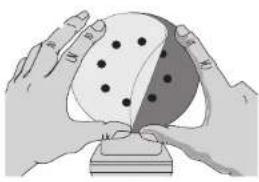
With the other hand, align the holes if they are present, and place the disc directly on top of the pad. (see FIG 1).
NOTE: Do not use sanding screen (e.g. screen used for sanding drywall) directly on the hook and loop pad. The screen will not hold and will damage the hooks on the pad. The hooks on the pad will wear very rapidly if left in contact with the work surface while the tool is operating.
Switch
To turn the unit on, depress the side of the dust protected switch that corresponds to the symbol "I". To turn the tool off, depress the side of the switch that corresponds to the symbol "O". See figure 2.
Speed Control Dial (DW423)
The speed control dial allows you to increase or decrease speed from 7,000 - 12,000 Orbits Per Minute. The optimal speed setting for each application is very much dependent on personal preference. Generally, you will want to use a higher setting on harder materials and a lower setting on softer materials. Material removal rate increases as speed increases.
Dust Extraction (DW421, DW423)
Your sander comes equipped with a cloth bag to collect the dust generated during sanding. It was designed to be very durable and efficient yet easy to empty. To empty the dust collection bag:
-
Tum off and unplug tool.
-
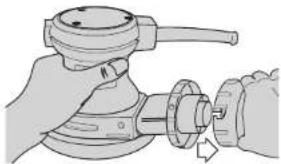
While holding the canister, twist to unlock and remove the adapter. (FIG. 3)
-
Gently empty the bag and shake out the adapter.(FIG. 4)
You may notice that all the dust will not come free from the bag. This will not affect sanding performance but will reduce the sander's dust collection efficiency. To restore your sander's dust collection efficiency, depress the spring inside the dust bag when you are emptying it and tap it on the side of the trash can or dust receptacle.
⚠️CAUTION (DW421 and 423 only): Never operate this tool unless the dust collector is in place. Sanding dust exhaust may create a breathing hazard.
Operation
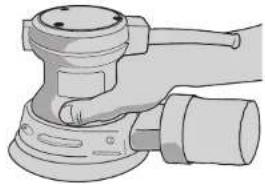
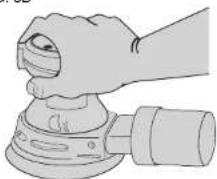
To operate your sander, grasp it as shown in FIG.'s 5A or 5B and turn it on. Move the unit in long, sweeping strokes along the surface being sanded, letting the sander do the work.
Pushing down on the tool while sanding actually slows the removal rate and produces an inferior quality surface. Be sure to check your work often, this sander is capable of removing material rapidly, especially with coarse paper.
The random orbital action of your sander allows you to sand with the grain or at any angle across it for most sanding jobs. To produce the best finish possible, start with coarse grit sandpaper and change gradually to finer and finer paper. Vacuum and wipe surface with a tack cloth between grit steps. Your sander is designed to sand into small or confined areas. Its small size and light weight make it ideal for overhead work.
If your sander has the dust collection feature (DW421 and DW423), the rate at which the dust collection bag fills up will vary with the type of material being sanded and the coarseness of the sandpaper. For best results, empty the bag frequently. When sanding painted surfaces, (see the following for additional precautions when sanding paint) you may find that the sandpaper loads up and clogs with paint. A heat gun will work much better to remove paint before sanding. FOLLOW ALL SAFETY INSTRUCTIONS IN HEAT GUN INSTRUCTION MANUAL.
NOTE (DW420 only): When using PSA sanding discs, remove the disc soon after operation. PSA papers, if the disc is left on during tool storage, sometimes become difficult to remove. To aid in the removal of old PSA paper, sand for a few minutes to soften the adhesive backing prior to changing disc.
Precautions To Take When Sanding Paint
-
Sanding of lead based paint is NOT RECOMMENDED due to the difficulty of controlling the contaminated dust. The greatest danger of lead poisoning is to children and pregnant women.
-
Since it is difficult to identify whether or not a paint contains lead without a chemical analysis, we recommend the following precautions when sanding any paint:
PERSONAL SAFETY
a. No children or pregnant women should enter the work area where the paint sanding is being done until all clean up is completed.
b.A dust mask or respirator should be worn by all persons entering the work area. The filter should be replaced daily or whenever the wearer has difficulty breathing.
NOTE: Only those dust masks suitable for working with lead paint dust and fumes should be used. Ordinary painting masks do not offer this protection. See your local hardware dealer for the proper N.I.O.S.H. approved mask.
c. NO EATING, DRINKING or SMOKING should be done in the work area to prevent ingesting contaminated paint particles. Workers should wash and clean up BEFORE eating, drinking or smoking. Articles of food, drink, or smoking should not be left in the work area where dust would settle on them.
ENVIRONMENTAL SAFETY
a. Paint should be removed in such a manner as to minimize the amount of dust generated.
b. Areas where paint removal is occurring should be sealed with plastic sheeting of 4 mils thickness.
c. Sanding should be done in a manner to reduce tracking of paint dust outside the work area.
CLEANING AND DISPOSAL
a. All surfaces in the work area should be vacuumed and thoroughly cleaned daily for the duration of the sanding project. Vacuum filter bags should be changed frequently.
b. Plastic drop cloths should be gathered up and disposed of along with any dust chips or other removal debris. They should be placed in sealed refuse receptacles and disposed of through regular trash pick-up procedures. During clean up, children and pregnant women should be kept away from the immediate work area.
c. All toys, washable furniture and utensils used by children should be washed thoroughly before being used again.
Tool Care
-
Keep your sander as clean as possible by wiping with a clean cloth and blowing air through it after every 5 hours of use.
-
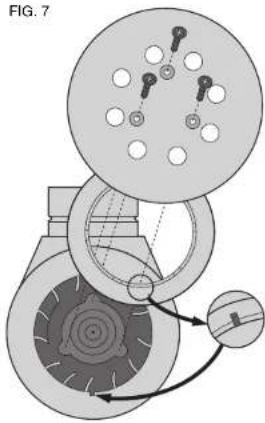
As part of CFS (Controlled Finishing System), your sander is equipped with a replaceable disc which is located between the pad and the shroud. It is designed to increase the dust collection efficiency and control the pad speed while the unit is off the work. The disc is designed to be a consumable part and will occasionally need to be replaced. Replacement is necessary when the pad speed increases very dramatically when the unit is lifted from the work surface. To replace your CFS disc:
a. Turn off and unplug tool.
b. Remove 3 screws from the bottom of the pad.
c. Remove the pad.
d. Snap out worn disc.
e. Snap in new disc, aligning notch in disc with cut out in shroud shown in figure 7.
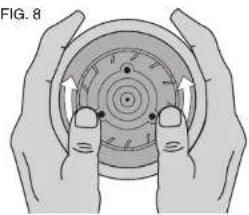
f. Press in new disc around the edges using both hands to ensure that the disc is inserted snugly into the shroud as shown in figure 8.
q. Replace the pad and the 3 screws.
-
Don't use harsh chemicals or solvents to clean the tool. These chemicals could seriously damage the plastic components of your sander.
-
Avoid overloading your sander. Overloading will result in a considerable reduction in speed and finish quality of your work. The unit may also become hot. In this event, run sander at a no load condition for a minute or two.
-
If you wrap the cord around the tool when you store it, leave a generous loop of cord such that the strain relief does not bend. This helps prevent premature cord failure.
Brush Replacement
TURN OFF AND UNPLUG THE SANDER
Follow these directions to replace the tool's brushes:
-
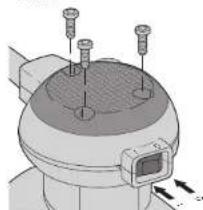
Remove the three screws located in the top cap, as shown in figure 9.
-
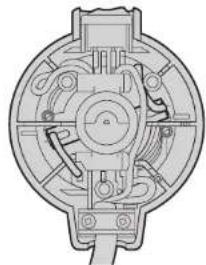
Lift off the top cap. Observe the brush holders and wires leading from the brushes to the motor field, as shown in figure 10A and 10B. (NOTE: On the DW423, the speed dial must be moved out of the way to access brush holder as shown in figure 10B.)
-
Pull the wires from the motor field and then lift and hold out of the way of one of the brush springs.
-
Remove the old brush from the brush holder and discard the brush/wire assembly. Still holding the brush spring out of the way, insert the new brush and release the spring against the back of the brush. Then plug the wire into the motor field. Repeat the procedure for the second brush.
-
Replace the top cap and tighten the three screws that hold it in place. Always replace both brushes.
Lubrication
Self lubricating bearings are used in the tool and periodic relubrication is not required. However, it is recommended that, once a year, you take or send the tool to a service center for a thorough cleaning and inspection.
Repairs
To assure product SAFETY and RELIABILITY, repairs, maintenance and adjustment (including brush inspection and replacement) should be performed by authorized service centers or other qualified service organizations, always using identical replacement parts.
Full Warranty
DeWALT heavy duty industrial tools are warranted for one year from date of purchase. We will repair, without charge, any defects due to faulty materials or workmanship. For warranty repair information, call 1-800-4-DeWALT. This warranty does not apply to accessories or damage caused where repairs have been made or attempted by others. This warranty gives you specific legal rights and you may have other rights which vary in certain states or provinces.
In addition to the warranty, DeWALT tools are covered by our:
natural_image
Illustration of two hands holding a sphere with dots, resting on a base (no text or symbols)FIG. 3
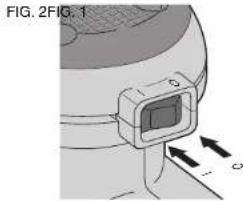
FIG. 4
natural_image
Illustration of a hand using a rotary tool to adjust a mechanical component (no text or symbols visible)FIG. 5A
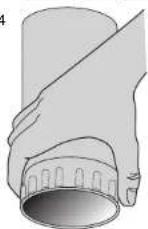
FIG. 5B
natural_image
Illustration of a hand using a power tool on a mechanical component (no text or symbols visible)FIG. 7
natural_image
Illustration of a hand using a power tool on a mechanical component (no text or symbols visible)FIG. 8
natural_image
Mechanical assembly diagram showing gear and cam mechanism (no text or labels)FIG. 10A (DW420 AND DW421 ONLY)
natural_image
Illustration of two hands holding a circular mechanical component with arrows indicating rotation (no text or symbols)FIG. 9
natural_image
Cross-sectional diagram of a mechanical device showing internal components and housing (no text or labels)FIG. 10B (DW423 ONLY)
natural_image
Technical illustration of a mechanical component with three screws and a central base (no text or symbols)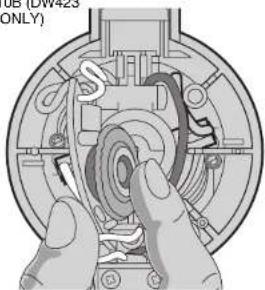
natural_image
Mechanical assembly diagram showing hands operating a gear mechanism (no text or symbols visible)30 DAY NO RISK SATISFACTION GUARANTEE
If you are not completely satisfied with the performance of your DEWALT heavy duty industrial tool, simply return it to the participating seller within 30 days for a full refund. Please return the complete unit, transportation prepaid. Proof of purchase may be required.
FREE WARNING LABEL REPLACEMENT: If your warning labels become illegible or are missing, call 1-800-4-DEWALT for a free replacement.
POUR TOUTE QUESTION OU REMARQUE AU SUJET DE CET OUTIL OU DE TOUT AUTRE OUTIL DE WALT, COMPOSER LE NUMÉRO SANS FRAIS :
1 800 4-DEWALT (1 800 433-9258)