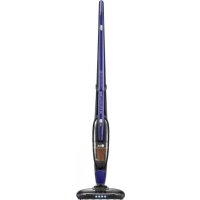
VS8403C - Broom LG - Free user manual and instructions
Find the device manual for free VS8403C LG in PDF.


| Product type | Cordless stick vacuum cleaner |
| Brand | LG |
| Model | VS8403C |
| Power supply | Rechargeable Li-Ion battery 18 V |
| Runtime | 20 min at max power, 30 min at normal power |
| Charging time | About 4 h 30 for one battery, 9 h for two batteries |
| Dust bin capacity | Not specified (estimated ~0.4 L) |
| Filter | Washable interior filter |
| Main brush | Anti-tangle brush with LED lighting |
| Functions | Handheld or stick use, high/low power adjustment, battery indicator, integrated brush |
| Safety | Motor overload protection, automatic shut-off if battery low |
| Maintenance | Clean the filter once a week with a brush, twice a month with water; empty the bin after each use |
| Weight | Approximately 2.5 kg (estimated) |
| Dimensions | Not specified (typical length ~110 cm) |
| Included accessories | Charging stand, charger, mounting screws, spare battery (depending on version) |
| Repairability | Spare parts available from LG after-sales service; removable battery and brush |
Frequently Asked Questions - VS8403C LG
User questions about VS8403C LG
0 question about this device. Answer the ones you know or ask your own.
Ask a new question about this device
Download the instructions for your Broom in PDF format for free! Find your manual VS8403C - LG and take your electronic device back in hand. On this page are published all the documents necessary for the use of your device. VS8403C by LG.
USER MANUAL VS8403C LG
- Material, printing and exterior size are refer to work tables.
- Printing, text size and line are based on LG design drawing.
- Exterier size on the drawing is cutting line.
- Before product controlled by criteria sample.
- The part should not contain prohibited substances(Pb,Cd,Hg,Cr+6,PBB, PBDE) and details should comply with LG standard of LG(63)-A-5501-34
| REV. NO.### | REMARKS REDECUIT FINN###-48 | REF. NO###-12 | DATE### | PREPARED### | APPROVED### |
| PDF/ILLUSTRATOR | DR COMPLETED도면 DR 판료 |
| 판료일: |
| TRIG. | UNIT SCALEm | 1/1 | TITLE | MANUAL,OWNER'S | ||||
| MODELING | REVIEWED | APPROVED | ||||||
| 정자현동 15.10.14 13.10.16 | Cloud-I EAS량 | 1/1 | ||||||
| LG 전자 (주)LG Electronics Inc. | RELATED DWG. | CWG.No. | MFL67983114 | |||||
OWNER'S MANUAL
MANUEL D'UTILISATION
VS84** Series
LG CORDLESS HANDY-STICK CLEANER
This manual contains important information and instructions for the safe use and maintenance of the vaccum cleaner. Please read all of the information on page 4, 5, 6 for your safety. Please keep this manual in an easily accessible place for future reference.
ASPIRATEUR BALAI SANS FIL LG
Important safety instructions 4\~6
Components and functions.... 10
Assembling vacuum cleaner 11
Assembling Charger 12
Cleaning Dust bin 17
IMPORTANT SAFETY INSTRUCTIONS
Read and follow all instructions before using your vacuum cleaner to prevent the risk of fire, electrical shock, personal injury, or damage when using the vacuum cleaner. This guide does not cover all possible conditions that may occur. Always contact your service agent or manufacturer about problems that you do not understand.

This is the safety alert symbol.
This symbol alerts you to potential hazards that can kill or hurt you and others.
All safety messages will follow the safety alert symbol and either the word "WARNING" or "CAUTION."
These words mean:

WARNING
This symbol will alert you to hazards or unsafe practices which could cause serious bodily harm or death.

CAUTION
This symbol will alert you to hazards or unsafe practices which could cause bodily injury or property damage.

WARNING
- This appliance is not intended for use by persons (including children) with reduced physical, sensory or mental capabilities, or lack of experience and knowledge, unless they have been given supervision or instruction concerning use of the appliance by a person responsible for their safety.
- Children should be supervised to ensure that they do not play with the appliance.
- If the supply cord is damaged, it must be replaced by LG Electronics Service Agent in order to avoid a hazard.
- This appliance can be used by children aged from 8 years and above and persons with reduced physical, sensory or mental capabilities or lack of experience and knowledge if they have been given supervision or instruction concerning use of the appliance in a safe way and understand the hazards involved. Children shall not play with the appliance. Cleaning and user maintenance shall not be made by children without supervision.
IMPORTANT SAFETY INSTRUCTIONS

WARNING
- This appliance is designed for normal indoor domestic use only. It is not to be used for any office or commercial application.
- No one other than a repair technician shall disassemble or modify the product. It may cause fire or electrical shock.
- Do not spray combustible materials such as gasoline or solvents, or surfactants such as detergents or bathing goods, or drinks near the cleaner and its charging stand. It can cause an explosion or fire.
- Do not allow the power cord to be crushed, kinked or cut by heavy objects. Using a damaged cord or plug could cause fire or electrical shock. When the power cord is damaged, it is dangerous, so please have the cord replaced by an authorised service center.
- Do not let liquid such as water enter the product, and do not use the unit to pick up liquids, sharp pointy objects, or hot embers.
It causes fire or electrical shock.
If water accidentally enters the unit, immediately turn off the power switch of the main body, pull out the power plug, and contact LG Electronics Service Agent to avoid hazard. - Do not insert pins or sharp pointy utensils into or around the cleaner or its charging stand. There is a risk of electrical shock.
- Do not use the appliance if gas odors can be detected. Unplug the unit and provide ventilation to avoid possible dangers. There is a risk of fire or explosion.
- Make sure that the unit is plugged into a wall socket over 10amp and not overloaded. Overloading of any wall socket can cause fires and product malfunction.
- Do not use the appliance if the power cord or socket is in any way loose or damaged. It can cause fire or electrical shock.
- Do not operate the appliance with the suction inlet or outlet which are blocked. It causes deformation of main body or fire by overheating.
- Do not operate the cleaner while dust bin is taken out. There is a risk of product damage or electrical shock injury.
- Do not place power cord and the product near heating devices. It can cause deformation of main body, malfunction, or fire.
-
Be careful that your fingers do not touch the pins when you pull out the plug from the mains outlet. It can cause electrical shock.
-
Do not allow children or pets to play with the product or use the product as a toy. It can cause personal injury and damage to the unit.
- Do not handle the plug with wet hands. It may cause electrical shock.
- Do not clean the inlet with water and then use immediately without sufficiently drying the components first. It may cause electrical shock and malfunction.
- When you clean the exterior, make sure to pull out the power plug, and do not wash with harsh or abrasive solutions. It can cause electrical shock and exterior damage.
- Do not place hands into the intake while the appliance is operating. Allow the unit to stop operating and disconnect from the wall socket to avoid any personal injury.
- Do not wash the exterior of inlet or bottom surface with water or detergent. Use only a damp cleaning cloth. It may damage product or cause electrical shock.
- If the supply cord is damaged, it must be replaced by the manufacturer, its authorised service agent or similarly qualified persons in order to avoid a hazard.
- Do not use the product at a place subject to lots of industrial oil fumes or metal particulates. Doing so can cause fire or product failure.
- Do not use the product at a place subject to leakage or probable leakage of combustible gases. It may result in fire or explosion.
- Do not disassemble the battery. There is a risk of fire or electric shock.
- Do not expose product to heat or fire. Do not expose product direct sunlight. There is a risk of fire and explosion.
- Do not physically impact the battery. There is a risk of fire and explosion.
- Charge only as specified charger. (Genuine adapter included in the product box) Do not use the provided adapter with any other products or for any other purpose than its intended use.
Please charge the right way. The battery may be damaged and may cause a fire. - If any liquid leaks from the batteries, avoid contact with the skin or eyes. If you touched the liquid, wash contact area with plenty of water and get medical attention. There is a risk of burns and blindness.
IMPORTANT SAFETY INSTRUCTIONS
CAUTION
- Do not use this cleaner on anything other than rated voltage.
It may cause fire and unrepairable product damage. - If the product is not in use for a long period of time, pull out the power plug.
- Static Electricity may be generated at main body during the cleaning.
Cleaner may malfunction due to electrostatic energy, so pull out the power cord and put it back in again. - Big objects such as socks, stocking, tissues, etc., may block the inlet during the cleaning, so please remove them before starting the cleaning.
This appliance must be used to remove dust only. - Do not stop on one spot or use it on the same spot repeatedly for a long time.
The surface may be damaged by the friction and vibration. - Do not touch the bottom surface with hand or foot while the appliance is in operation.
-
Do not operate the appliance without the dust bin and its covers in place. Always ensure the dust bin is cleaned when it reaches its limit or beforehand.
If it is used continuously while dust bin is full, it will cause malfunction and overheating. -
To avoid the risk of fire or electric shock, always grip it from the plug when removing. And never pull on the power cord when removing it from the wall socket.
- If a foreign object is attached to the bottom surface of dust bin, remove it before using the product.
It could compromise the suction motor and cause malfunction and damage. - Never use the product for removing toxic gases.
The product may fail, and toxic gases will not be removed. - Use or place the unit on a level surface and area and do not apply undue force to the unit when using it.
Doing so can cause fire or product failure. - If disposing the unit, it must be done correctly as it contains battery cells that can cause fire or explode if not disposed of correctly.
CONSIGNES DE SÉCURITÉ IMPORTANTES
Components: Charger, Handle holding screw, Spare battery
natural_image
Line drawing of a hand using a vacuum cleaner to adjust the brush, with an inset showing the close-up detail (no text or symbols present)① Assembling the Upper and Lower body parts Assembler les deux parties de l'aspirateur balai
Attach upper body part to the lower body part in arrow direction as shown in the figure.
(When assembling the product, make sure not to get your finger stuck.)
There is a fixing hole on the rear side the product.
Use the fixing screw provided with the product to assemble and secure upper and lower parts.
How to use Assembling Charger
natural_image
Technical line drawing of a mechanical component with an arrow indicating assembly or transformation (no text or symbols present)Insert the upper part of the charging stand to the base until you hear a "click" sound.
How to use Using the Product
Press the power button to turn on the product.
Place the rear bottom of the main body on the charger as shown on the figure.
Make sure the assembly part has docked correctly.
Battery indicator shows remaining charge.
- A fully charged battery lasts for 20 minutes at the high speed and for 30 minutes at the normal speed (depending on the floor type).
- When the battery power level is low, the battery indicator shows one blinking light, and then the power turns off soon after.
Do not use this cleaner to vacuum liquids. Vacuuming liquids will cause the unit to malfunction.
AVERTISSEMENT
natural_image
Illustration of a woman using a vacuum cleaner on tiled flooring, enclosed in a dashed circle (no text or symbols)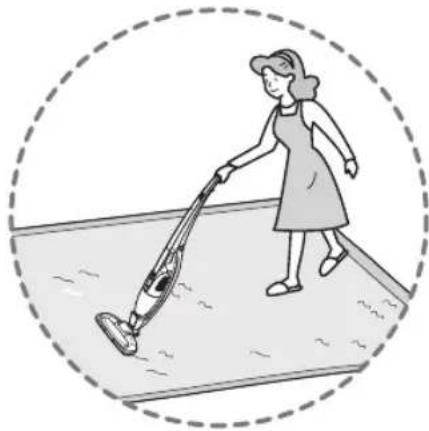
natural_image
Illustration of a woman using a vacuum cleaner on a tiled floor (no text or symbols)The anti-tangle brush is ideal for cleaning short-furred carpet or a normal timber floor surface.
① It is not recommended to vacuum a carpet with long fur.
② If you vacuum a long piled carpet, it may cause the anti-tangle brush to stop rotating.
- When the anti-tangle brush stops due to a motor overload, turn the vacuum cleaner off and on again to allow it to work again.
③ After you have finished using the vacuum, place the vacuum cleaner on the floor or on the charging stand.
- If the product falls over due to improper placement when not in use, it may damage the unit or harm children or pets.
The Anti-hair brush motor is fitted with overload protection which stops the motor from rotating, to help prevent accidental injury or damage to tangled threads and fabrics.
For the convenience of the user, a built-in brush is attached to the hand held cleaner.
When using the hand held cleaner alone, refer to the following instructions.
Pull out the built-in brush until it secures into place at the bottom of the vacuum cleaner in the arrow direction.
Move the brush in the arrow direction until it is locked into place.
Firmly slide the built-in brush in the arrow direction.
Fold the built-in brush body back into the enclosure in the arrow direction.
If the voltage gets low during operation, the power is automatically turned off to protect the battery. You must then recharge the battery. Before beginning the recharge, check that the hand held cleaner is properly docked to the main body, and then place it on the charging stand.
② The charging time may vary depending on the battery condition.
When the minimum amount of charge is left, it takes about 4.5 hours to fully charge the battery. (Charging one battery)
- The battery fitted to the vacuum cleaner is charged first, and then the battery attached to the charging stand is charged.
- While the hand held cleaner is charging, the battery indicator light blinks to show the charge amount.
- When the battery is fully charged, the hand held battery status indicator stays on.
- While the battery on the charging stand is charging, the single LED indicator on the charging stand will blink, and when the battery is fully charged, the LED will remain on.
- If the vacuum is not used for a long period of time, it is recommended to, remove the charging adaptor plug from the wall socket.
• To get a full charge for the two discharged batteries at the same time, it may take up to 9 hours.
How to use Cleaning Dust bin
How to use Assembling Dust bin
① Attach the inner filter back onto the filter cover.
② Put the dust separator back into the dust bin.
③ Assemble the filter cover back onto the dust separator in the direction indicated by the arrow.
natural_image
Technical line drawing of a mechanical component with an inset close-up view showing internal detail (no text or symbols)How to use Cleaning Nozzle
• After cleaning or for replacement, assemble the anti-tangle brush properly in the opposite way of removal.
- Before beginning your cleaning, check the nozzle wheels and brush to see if other foreign objects are stuck in them.
- Remove the objects to protect the floor surface.
Conseils :
If there is an abnormality in the product, check the following items first before requesting for a service center or calling the store.
A service cost will be charged if the appliance has a user related malfunction, or no malfunction is found.
Following simple actions in the user manual may solve the problem.
| CHECK PLEASE PERFORM | THE FOLLOWING ACTIONS |
| Weak or no suction and vibration noise. | ·Check if inlet or dust bin is blocked by any foreign objects or debris that weaken the suction.·Separate dust bin from the main body, and check if the filters are dirty. |
| Cleaner is not working at all? | ·Check that the switch is turned on.·Check if battery level is low.·Check if the operation procedure is correct according to the instructions within this manual. |
| Odor comes out of the cleaner? | ·Some odors are normal when the product is first operated and will diminish within 3 months of normal operation.·Odors can also be caused by old dust in the dust bin and filters that has not been cleaned for some time. Empty, clean and wash the dust bin and filters thoroughly before reusing the appliance. |
| Hot air comes out, and main body is hot? | ·The air coming out of the outlet holes may be warm because it is coming out after cooling the motor. This is normal. |
| It only vibrates, and there is no suction. | ·Because of the suction motor overheat prevention device, this may occur when 1) dust bin is full, 2) filter or inlet is blocked, or 3) it is used for a long time. Allow the unit to rest and cool for at least 40 minutes before attempting to operate again.- Before using it again, clean the filter and dust bin.- If the inlet is blocked, please remove the foreign object. |
| Adaptor cord is defective | ·The defective plug should be replaced by a qualified electrician. |
Guide de dépannage
natural_image
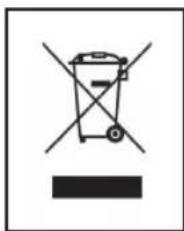
Simple line drawing of a trash bin with crossed x's and no text or symbolsDisposal of your old appliance
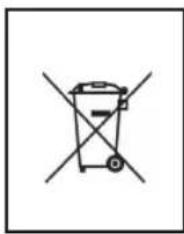
- All electrical and electronic products should be disposed of separately from the municipal waste stream via designated collection facilities appointed by the government or the local authorities.
- The correct disposal of your old appliance will help prevent potential negative consequences for the environment and human health.
- For more detailed information about disposal of your old appliance, please contact your city office, waste disposal service or the shop where you purchased the product.
natural_image
Simple line drawing of a trash bin with no text or symbolsDisposal of waste batteries/accumulators
- This symbol may be combined with chemical symbols for mercury(Hg), cadmium(Cd) or lead(Pb) if the battery Contains more that 0.0005% of mercury, 0.002% of cadmium or 0.004% of lead.
- All batteries/accumulators should be disposed separately from the municipal waste stream via designated collection facilities appointed by the government or the local authorities.
- The correct disposal of Your old batteries/accumulators will help to prevent potential negative consequences for the environment, animal and human health.
- For more detailed information about disposal of Your old batteries/accumulators, please contact Your city office, waste disposal service or the shop where You purchased the product.
natural_image
Simple line drawing of a trash bin with crossed x's and no text or symbolsnatural_image
Simple line drawing of a trash bin with crossed x-bracing (no text or symbols)natural_image
Illustration of three different electronic devices: a power plug, a cylindrical rod, and a battery pack (no text or symbols present)المكُونات:
natural_image
Line drawing of a vacuum cleaner with a hand holding a tool, showing the handle and internal component (no text or symbols)natural_image
Technical line drawing of a mechanical component with an arrow indicating assembly or transformation (no text or symbols present)natural_image
Illustration of a woman using a vacuum cleaner on a tiled floor, enclosed in a dashed circle (no text or symbols)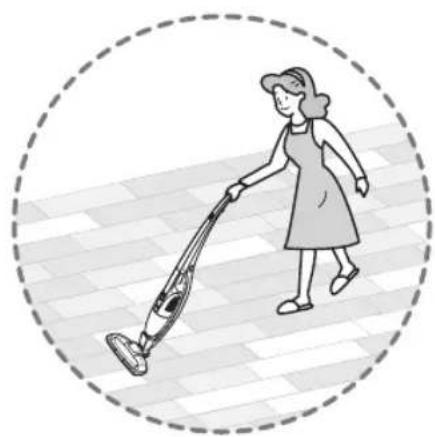
natural_image
Illustration of a woman using a vacuum cleaner on a tiled floor (no text or symbols)natural_image
Illustration of a hairdryer with two views of the tool being inserted (no text or symbols present)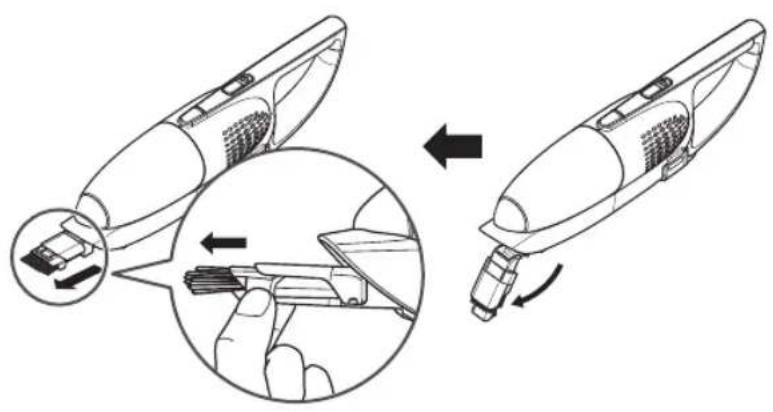
natural_image
Symbol of a trash bin with crossed lines and a solid black rectangle below (no text or labels)natural_image
Simple line drawing of a trash bin with two crossed x-axes (no text or symbols)