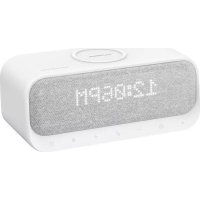
USER MANUAL Wakey soundcore
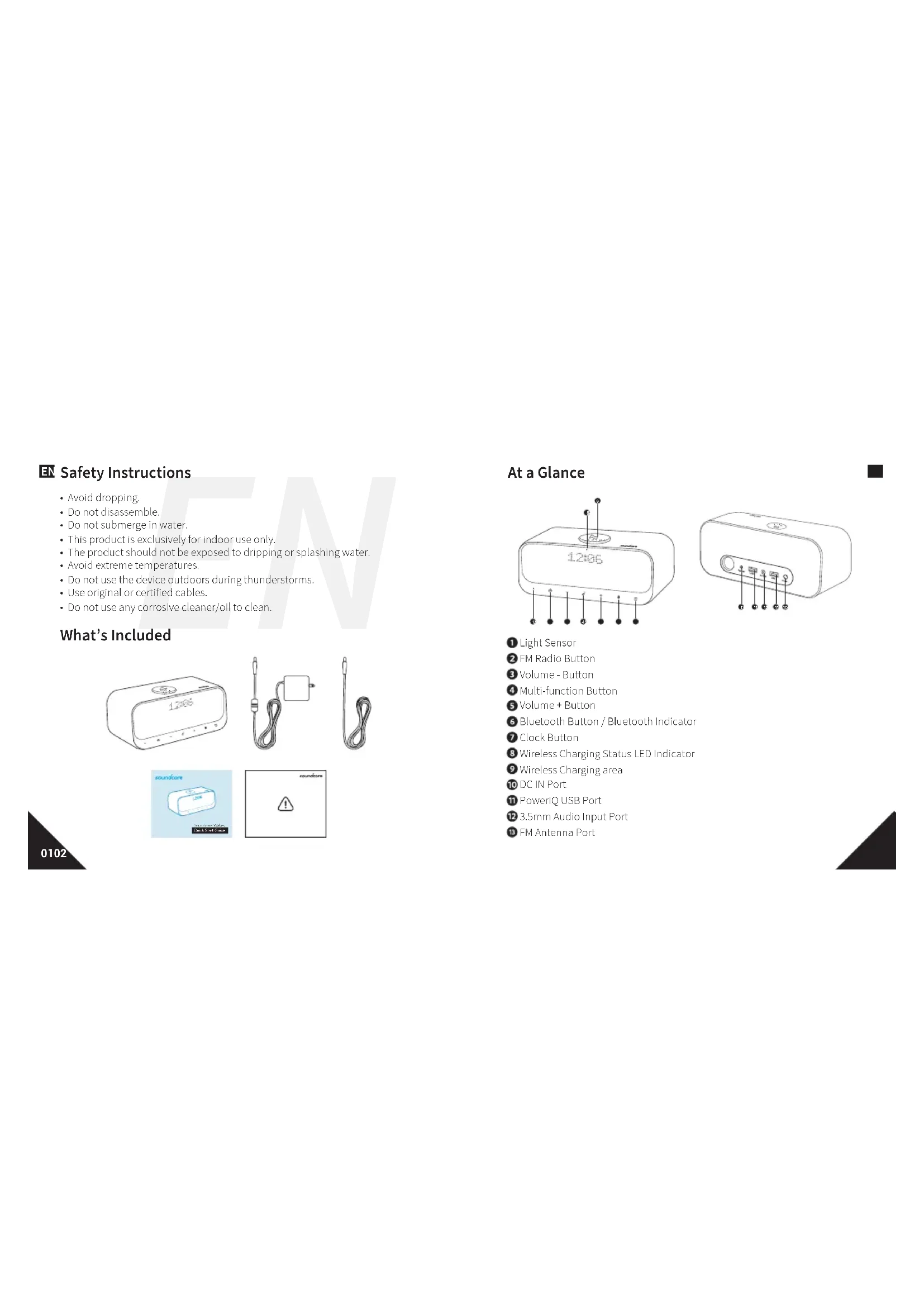
EN Safety Instructions
- Avoid dropping.
- Do not disassemble.
- Do not submerge in water.
• This product is exclusively for indoor use only.
• The product should not be exposed to dripping or splashing water.
- Avoid extreme temperatures.
- Do not use the device outdoors during thunderstorms.
- Use original or certified cables.
- Do not use any corrosive cleaner/oil to clean.
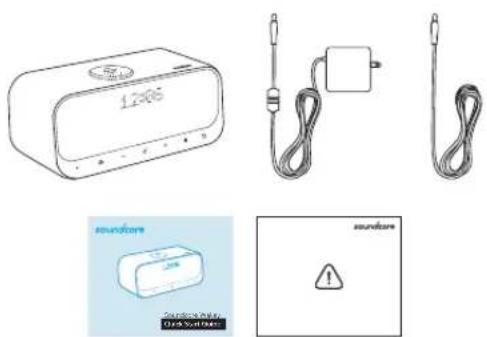
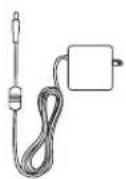
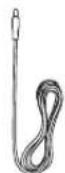
What's Included
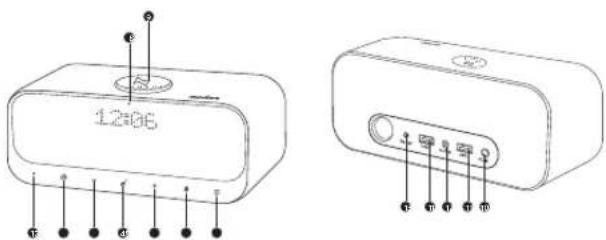
At a Glance
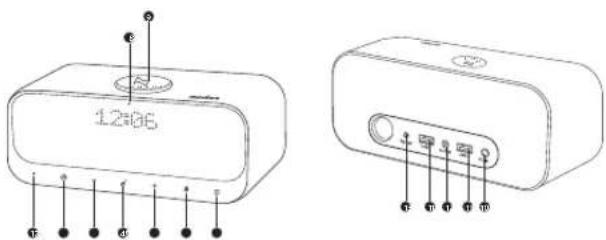
① Light Sensor
② FM Radio Bullon
3 Volume - Button
4 Multi-function Button
⑤ Volume + Button
6 Bluetooth Button / Bluetooth Indicator
7 Clock Button
8 Wireless Charging Status LED Indicator
9 Wireless Charging area
10 DC IN Port
11 PowerIQ USB Port
12 3.5mm Audio Input Port
13 FM Antenna Port
EN Using Your Soundcore Wakey
- Turn On / Off (Plug in the power adapter and Wakey switches on automatically)
Note: Download Soundcore App before you start using Soundcore Wakey. The time will automatically update when Soundcore Wakey is added to app list.
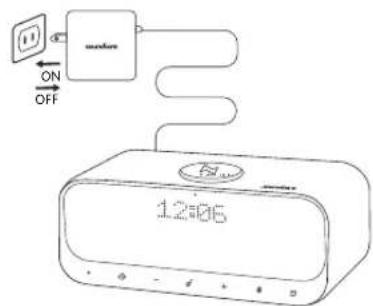
ON Connect to power
OFF Disconnect from power
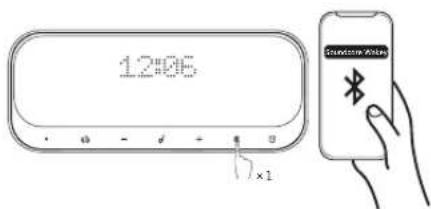
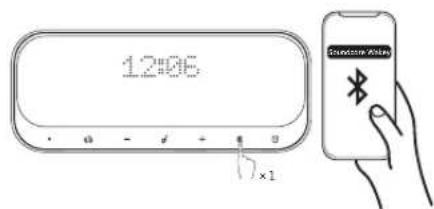
a. Bluetooth Mode
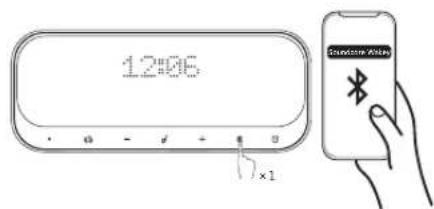

Flashing White Bluetooth Pairing Mode
O
Solid White Connected to a device

Play / Pause

Play Next Song

Answer Call / End Call

Reject Call / Switch between a call on hold and an active call

End current call and answer incoming call / End current call and switch to call on hold

Switch audio source between speaker and phone

Put current call on hold and answer incoming call

Volume Up / Down
Screen display light

Solid White On a Call

Flashing White Incoming Call

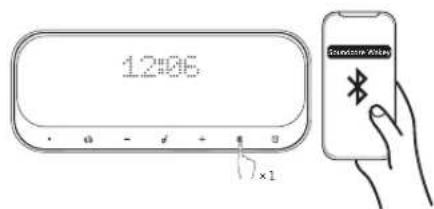
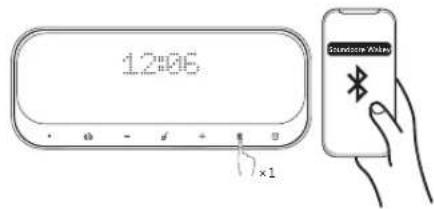
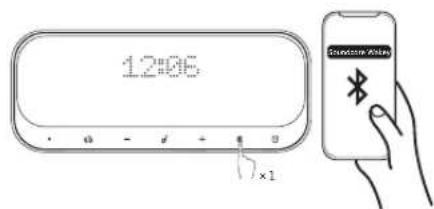
When turned on, Soundcore Wakey will automatically connect to the last connected device if available. If not, press the Bluetooth pairing button to activate pairing mode.
To pair a different device, press and hold the Bluetooth button for 2 seconds to re-enter pairing mode. Then repeat the pairing steps.
Having connection problems? Remove Soundcore Wakey from your device's Bluetooth history and ensure it's less than 3 feet away.
Then try pairing again. To get the best sound quality, make sure there is a clear line of sight between the connected device and your speaker.
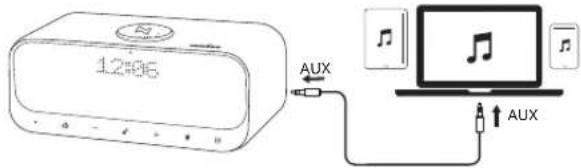
b. AUX-In mode
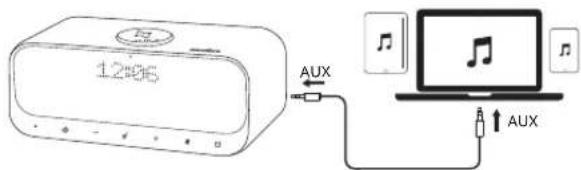
EN \*SoundLine AUX cable sold separately.

Soundcore Wakey will play music via the Bluetooth connection over the AUX connection when both are connected.
When using AUX mode, control audio playback via the connected device.
c. FM Radio
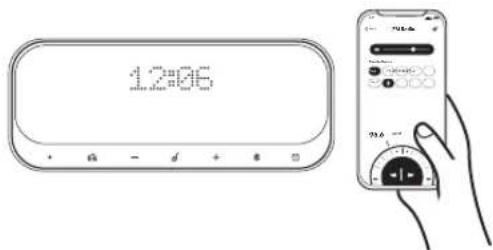
Set the FM radio on the Soundcore App. (FM Radio needs to be used with the provided antenna cable)
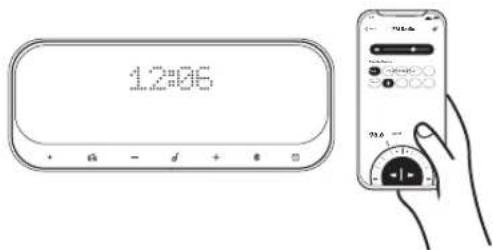

Solid White FM radio turned on
OFF FM radio turned off

Change to next FM channel (When FM radio is on)

Change to previous FM channel (When FM radio is on)
Note: You can store your favorite channels in the FM channel folder on the Soundcore app. If there are no channels saved in the FM channel folder, Wakey will automatically switch to previous or next available channel.
d. Alarm Preset
Set the preset alarm on the Soundcore App. You can set up alarms on the Soundcore App. When alarm activates on, press any button to enter snooze mode, press and hold any button for a few seconds to cancel current alarm clock.

Solid White Alarm is on
OFF Alarm is off
e. Superior Sleep
This function offers a collection of sounds from nature for aiding sleep. Select your desired sounds on the Soundcore App. User can set sleep countdown timer to control the duration of playtime.
- Add Soundcore Wakey to the Soundcore App list.
- Enter Superior Sleep page
- Follow onscreen instructions to set the "Sleep timer" and "Ambient sound".
EN 2. Charging Your Devices
You can charge your mobile phone wirelessly with Soundcore Wakey. Note: Wireless charging requires compatible smart devices.
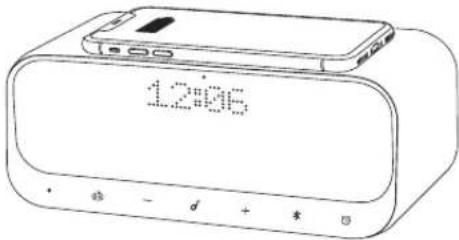

Solid Bue Charging

Flashing Bue Misplacement (In charging area)
You can also charge your other devices via the PowerIQ USB ports on the rear of Soundcore Wakey.
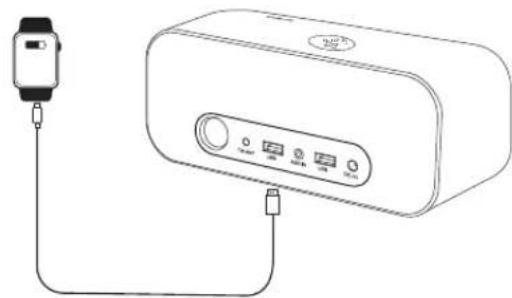
natural_image
Line drawing of a smartwatch connected to a device via cable (no text or symbols)

When not in use, store your speaker in a cool place.
EN Specifications

Specifications are subject to change without notice.
Input: 15V→3A
Wireless charge out: 10W (for Samsung) 7.5W (for iPhone)
Charge out: 5V=2A
Audio output: 5 W × 2
Size: 82 x 92 x 200 mm
Weight (without packaging): 5/2 g / 20 oz
Bluetooth version: V5.0
Bluetooth range: 20 m / 66 ft
Soundcore App
- Full FM features
- Full Alarm features
- Superb sleep
- Device settings
- More


Download on the App Store
Apple and the Apple logo are trademarks of Apple Inc.

GET IT ON
Google Play
Google Play and the Google Play logo are trademarks of Google Inc.
natural_image
Line drawing of a smartwatch connected to a device via cable (no text or symbols)
Download on the App Store
Apple and the Apple logo are trademarks of Apple Inc.

GET IT ON
Google Play
Google Play and the Google Play logo are trademarks of Google Inc.

natural_image
Line drawing of a smartwatch connected to a rectangular device with ports and cables (no text or symbols)

- Full FM features
- Full Alarm features
- Superb sleep
- Device settings
- More


Download on the App Store
Apple and the Apple logo are trademarks of Apple Inc.

GET IT ON Google Play
Google Play and the Google Play logo are trademarks of Google Inc.
IT \*Cavo SoundLine AUX venduto separatamente.

natural_image
Line drawing of a smartwatch connected to a device via cable (no text or symbols)

- Full FM features
- Full Alarm features
- Superb sleep
- Device settings
- More


Download on the App Store
Apple and the Apple logo are trademarks of Apple Inc.

GET IT ON
Google Play
Google Play and the Google Play logo are trademarks of Google Inc.
natural_image
Line drawing of a smartwatch connected to a device via cable (no text or symbols)

- Full FM features
- Full Alarm features
- Superb sleep
- Device settings
- More


Download on the App Store
Apple and the Apple logo are trademarks of Apple Inc.

GET IT ON
Google Play
Google Play and the Google Play logo are trademarks of Google Inc.

Bezpečnostní pokyny

natural_image
Line drawing of a smartwatch connected to a device via cable (no text or symbols)

- Full FM features
- Full Alarm features
- Superb sleep
- Device settings
- More


Download on the App Store
Apple and the Apple logo are trademarks of Apple Inc.

GET IT ON Google Play
Google Play and the Google Play logo are trademarks of Google Inc.
TÄNDT Tilslut strom
natural_image
Line drawing of a smartwatch connected to a device via cable (no text or symbols)
- Full FM features
- Full Alarm features
- Superb sleep
- Device settings
- More


Download on the App Store
Apple and the Apple logo are trademarks of Apple Inc.

GET IT ON
Google Play
Google Play and the Google Play logo are trademarks of Google Inc.
natural_image
Line drawing of a rectangular electronic device with four labeled ports (no text or symbols)
natural_image
Line drawing of a smartwatch connected to a device via cable (no text or symbols)

- Full FM features
- Full Alarm features
- Superb sleep
- Device settings
- More


Download on the
App Store
Apple and the Apple logo are trademarks of Apple Inc.

GET IT ON
Google Play
Google Play and the Google Play logo are trademarks of Google Inc.
natural_image
Line drawing of a smartwatch connected to a rectangular device with ports and cables (no text or symbols)

- Full FM features
- Full Alarm features
- Superb sleep
- Device settings
- More


Download on the App Store
Apple and the Apple logo are trademarks of Apple Inc.

GET IT ON
Google Play
Google Play and the Google Play logo are trademarks of Google Inc.
PÅ Tilkoblet strøm
AV Frakoblet strøm
a. Bluetooth-modus
NO

Blinker hvitt Bluetooth paringsmodus
O
NO \*SoundLine AUX-kabel selges separat.

Soundcore Wakey spiller av musikk via Bluetooth-tilkoblingen fremfor AUX tilkoblingen när begge er tilkoblet.
Når du bruker AUX-modus, kontrollerer du lydavspillingen via den tilkoblede enheten.
c. FM-radio
Angi FM-radioen i Soundcore-appen. (FM-radioen må brukes med den medfølgende antennekabelen)

natural_image
Line drawing of a smartwatch connected to a device via cable (no text or symbols)

- Full FM features
- Full Alarm features
- Superb sleep
- Device settings
- More


Download on the App Store
Apple and the Apple logo are trademarks of Apple Inc.

GET IT ON
Google Play
Google Play and the Google Play logo are trademarks of Google Inc.
natural_image
Line drawing of a rectangular electronic device with labeled ports (no text or symbols beyond basic labels)

\*SoundLine AUX-kabel säljs separat.

natural_image
Line drawing of a smartwatch connected to a device via cable (no text or symbols)

- Full FM features
- Full Alarm features
- Superb sleep
- Device settings
- More


Download on the App Store
Apple and the Apple logo are trademarks of Apple Inc.

GET IT ON
Google Play
Google Play and the Google Play logo are trademarks of Google Inc.
natural_image
Line drawing of a smartwatch connected to a rectangular device with ports and cables (no text or symbols)

- Full FM features
- Full Alarm features
- Superb sleep
- Device settings
- More


Download on the App Store
Apple and the Apple logo are trademarks of Apple Inc.

GET IT ON
Google Play
Google Play and the Google Play logo are trademarks of Google Inc.
PT \*Cabo AUX SoundLine vendido separadamente.

natural_image
Line drawing of a smartwatch connected to a rectangular device via cable (no text or symbols)

- Full FM features
- Full Alarm features
- Superb sleep
- Device settings
- More


Download on the App Store
Apple and the Apple logo are trademarks of Apple Inc.

GET IT ON
Google Play
Google Play and the Google Play logo are trademarks of Google Inc.
JP 安全にご使用いただくために
オン電源に接続
オフ 電源から抜く
a. Bluetooth モード

natural_image
Line drawing of a smartwatch connected to a rectangular device with ports and cables (no text or symbols)

Download on the App Store
Apple and the Apple logo are trademarks of Apple Inc.

GET IT ON
Google Play
Google Play and the Google Play logo are trademarks of Google Inc.
KO 안전 지침
켜기 전원 연결
끄기 전원 분리
a. Bluetooth 모드

natural_image
Line drawing of a smartwatch connected to a device via cable (no text or symbols)

- Full FM features
- Full Alarm features
- Superb sleep
- Device settings
- More


Download on the App Store
Apple and the Apple logo are trademarks of Apple Inc.

GET IT ON
Google Play
Google Play and the Google Play logo are trademarks of Google Inc.
CN 安全须知
开接通电源
关断开电源
a. 蓝牙模式

白色闪烁 蓝牙配对模式

常亮白色已连接到设备

播放/暂停

播放下一曲目

接听通话 / 结束通话

natural_image
Line drawing of a smartwatch connected to a device via cable (no text or symbols)

不使用时,请将扬声器存放在阴凉处。
CN 规格

规格如有变更,恕不另行通知。
输入:15V=3A
- Full FM features
- Full Alarm features
- Superb sleep
- Device settings
- More


Download on the App Store
Apple and the Apple logo are trademarks of Apple Inc.

GET IT ON Google Play
Google Play and the Google Play logo are trademarks of Google Inc.
TW 安全指示
概觀
開啟連接至電源
關閉 中斷電源
a. 藍牙模式

閃爍白燈 藍牙配對模式

持續亮起白燈已連線至裝置

播放/暫停

播放下一首

接聽通話 / 結束通話

natural_image
Line drawing of a smartwatch connected to a device via cable (no text or symbols)
未使用時,請將您的揚聲器放置在涼爽處。
TW 規格

規格可能隨時變更,恕不另行通知。
输入:15V=3A
- Full FM features
- Full Alarm features
- Superb sleep
- Device settings
- More


Download on the App Store
Apple and the Apple logo are trademarks of Apple Inc.

GET IT ON
Google Play
Google Play and the Google Play logo are trademarks of Google Inc.
إرشادات السلام
نظرة سريعة
natural_image
Line drawing of a rectangular electronic device with labeled ports (no text or symbols)
Bluetooth . Uganda
AR
AUX-In ∪ ∪ ∪ ∪ ∪ ∪ ∪ ∪ ∪ ∪ ∪ ∪ ∪ ∪ ∪ ∪ ∪ ∪ ∪ ∪ ∪ ∪ ∪ ∪ ∪ ∪ ∪ ∪ ∪ ∪ ∪ ∪ ∪ ∪ ∪ ∪ ∪ ∪ ∪ ∪ ∪ ∪ ∪ ∪ ∪ ∪ ∪ ∪ ∪ ∪ ∸
AR
natural_image
Line drawing of a smartwatch connected to a rectangular device via cable (no text or symbols)
- Full FM features
- Full Alarm features
- Superb sleep
- Device settings
- More


Download on the
App Store
Apple and the Apple logo are trademarks of Apple Inc.

GET IT ON
Google Play
Google Play and the Google Play logo are trademarks of Google Inc.
限用物質含有情況標示聲明書
Declaration of the Presence Condition of the Restricted Substances Marking
| 設備名稱: 盤牙音箱 Equipment name | 型號(型式): A3300 Type designation (Type) |
| 單元Unit | 限用物質及其化學符號 Restricted substances and its chemical symbols |
| 鉛Lead(Pb) | 汞Mercury(Hg) | 鉛Cadmium(Cd) | 六價鉻Hexavalentchromum(Cr10) | 多溴聯苯Polybrominateddiphenyls(PBB) | 多溴二苯醚Polybrominateddiphenyl others(PBDE) |
| 電源板 | ○○○○○ | ○ | | | | |
| 外殼 | ○○○○○ | ○ | | | | |
| 敷織線 | ○○○○○ | ○ | | | | |
| 電吸 | ○○○○○ | ○ | | | | |
| 備考1. *超出0.1wt.%2及*超出0.01wt.%2係指限用物質之百分比含量超出百分比含量基準值。備考2. °○*係指款項限用物質之百分比含量未超出百分比含量基準值。備考3. °一*係指該項限用物質為排除項目。 |
產品名稱:藍牙音箱
型號:A3300
NCC 警語:
This device complies with Part 15 of the FCC Rules. Operation is subject to the following two conditions: (1) This device may not cause harmful interference, and (2) this device must accept any interference received, including interference that may cause undesired operation.
Warning: Changes or modifications not expressly approved by the party responsible for compliance could void the user's authority to operate the equipment.
Anker Innovations Limited
Room 1318-19, Hollywood Plaza, 610 Nathan Road, Mongkok, Kowloon, Hong Kong
Customer Service
18-month limited warranty
Lifetime technical support
+1 (800) 988 7973 (US) Mon-Fri 9:00 - 17:00 (PT)
+41 (0) 1604 936200 (UK) Mon-Fri 6:00 - 11:00 (GMT)
+49 (0) 69 9579 7960 (DE) Mon-Fri 6:00 - 11:00
+810344557873(日本)月-金9:00-17:00
For FAQs and more information, please visit: