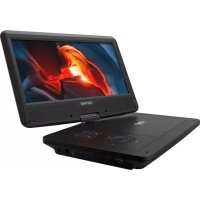
MT1087T2H - Portable DVD Player DENVER - Free user manual and instructions
Find the device manual for free MT1087T2H DENVER in PDF.


| Product type | Portable DVD player with 10.1-inch LCD screen |
| Brand | Denver |
| Model | MT1087T2H |
| Dimensions (L x W x H) | 256.2 x 189.5 x 40.3 mm |
| Weight | Approximately 1 kg |
| Screen size | 10.1 inches |
| Screen resolution | 1024 x 600 pixels |
| Power supply | AC adapter 100-240V AC / 12V DC (1A); built-in lithium battery |
| Power consumption | Less than 12 W |
| Compatible disc formats | DVD+R/RW, DVD-R/RW, CD-DA, CD-R/RW, MP3, JPEG |
| Digital TV tuner | Built-in DVB-T2-H.265 (free channels) |
| Main functions | DVD/CD playback, USB playback (photo, music, movie, text), TV recording to USB, headphones, AV output |
| Remote control | Supplied with full functions (EPG, recording, subtitles, etc.) |
| Care and cleaning | Clean with a soft dry cloth; avoid moisture and solvents |
| Safety | Class 1 laser; do not open the casing; Macrovision copy protection |
| Spare parts and repairability | Specific AC adapter supplied; repair by qualified technician only |
| General information | Warranty: refer to manufacturer; operating temperature 0-40°C |
Frequently Asked Questions - MT1087T2H DENVER
User questions about MT1087T2H DENVER
0 question about this device. Answer the ones you know or ask your own.
Ask a new question about this device
Download the instructions for your Portable DVD Player in PDF format for free! Find your manual MT1087T2H - DENVER and take your electronic device back in hand. On this page are published all the documents necessary for the use of your device. MT1087T2H by DENVER.
USER MANUAL MT1087T2H DENVER
DENVER®
natural_image
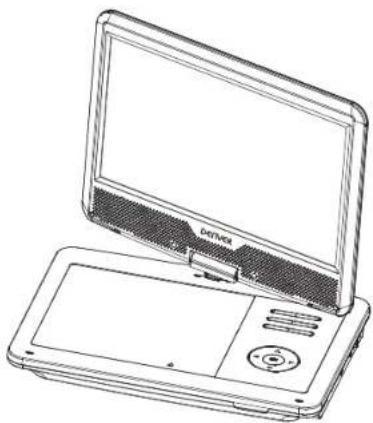
Line drawing of a portable electronic device with a screen and control panel (no text or symbols)USER'S MANUAL MT-1087T2H
Important Safety Instructions
- Warning: To reduce the risk of electric shock, do not remove the cover or back. There are no user-serviceable parts inside. Refer servicing to qualified personnel.
- Warning: To prevent fire or electric shock hazard, do not expose the unit to rain or moisture.
- Do not expose the Adaptor and portable DVD to water (dripping or splashing) and no objects filled with liquids, such as vases, should be placed on the unit.
- Keep the portable DVD away from direct sunlight and heat source such as radiators or stoves.
- Do not block the ventilation openings. Slots and openings on the unit are provided for ventilation. The openings should never be blocked by placing your portable DVD on a cushion, sofa or other similar surface.
- Do not place the portable DVD on unstable cart, stand, tripod, bracket or table. The unit may fall, resulting in possible damage or injury.
- Never place heavy or sharp objects on the LCD panel or frame.
- Only use the AC adapter included with portable DVD. Using any other adapter will void your warranty.
- The plug of AC adaptor is used as the disconnect device, the disconnect device shall remain readily operable.
- Unplug the power from the outlet when the unit is not in use.
- WARNING: Excessive sound pressure from earphones or headphones can cause hearing loss.

ENG-1
- WARNING: Only use attachments/accessories specified provided by the manufacturer, the portable DVD is supplied by AC adapter, the AC adapter is used as disconnect device, the disconnect device shall remain readily operable.
- Warning: Lithium battery inside.
- It will charge internal battery when the device is connected with external power supply and the LED indicator will turn yellow when fully charged.
- Danger of explosion if battery is incorrectly replaced. Replace only with the same or equivalent type.
- Keep this user manual for future reference.
This marking indicates that this product should not be disposed with other household wastes throughout the EU. To prevent possible harm to the environment or human health from uncontrolled waste disposal, recycle it responsibly to promote the sustainable reuse of material resources. To return your used device, please use the return and collection systems or contact the retailer where the product was purchased. They can take this product for environmental safe recycling.

ENG-2
Safety Precautions
WARNING
RISK OF ELECTRIC SHOCK DO NOT OPEN
Warning: This digital video disc player employs a laser system. Use of controls, adjustments, or the performance of procedures other than those specified herein may result in hazardous radiation Exposure.
Warning: To prevent direct exposure to laser beam, do not open the enclosure.
Visible laser radiation when open.
⚠ Warning: Never stare directly into the laser beam.
Caution: Do not install this product in a confined space such as a book case or similar unit.
Warning: more than 250mm USB extension cord is prohibited to use for USB port.
N Notes on Copyrights:
It is forbidden by law to copy, broadcast, show, broadcast via cable, play in public, or rent copyrighted material without permission.
This product features the copy protection function developed by Macrovision. Copy protection signals are recorded on some discs. When recording and playing the pictures of these discs picture noise will appear. This product incorporates copyright protection technology that is protected by method claims of certain U.S. Patents and other intellectual property rights owned by Macrovision Corporation and other rights owners. Use of this copyright protection technology must be authorized by Macrovision Corporation, and is intended for home and other limited viewing uses only unless otherwise authorized by macrovision Corporation. Reverse engineering or disassembly is prohibited.
Main Unit Controls
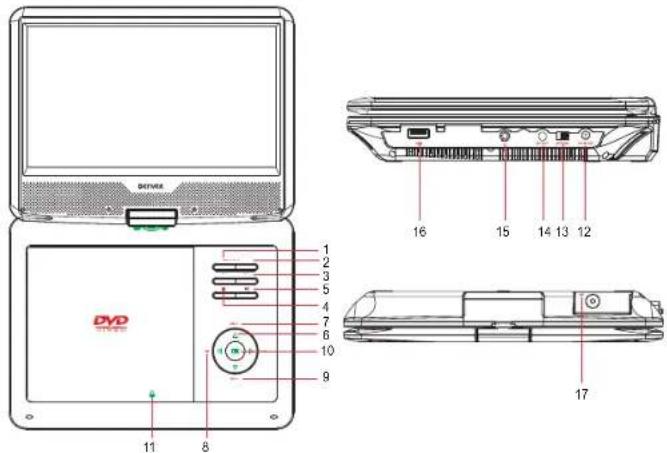
- MENU: Show main menu
- SOURCE: Select operating mode(DTV/DVD/USB)
- VOL-/VOL+: Volume down/up
- ■: Stop
- ▶: Play/Pause
- ▲/▼/◄/►:Navigation buttons(up/down/left/right)
- ◀◀ ▶▶: Previous / Next file
- ◀◀ ▶▶ : Search backward / forward
- CH-/CH+: To decrease or increase channel
- OK: to confirm
- ▲: press to open the DVD compartment so to load the disc
- DC IN 12V: To connect to the supplied AC/DC adapter or car adapter
- OFF/ON: Switch the device off / on
- AV OUT: AV out(for DVD mode only)
- 📞: Earphone jack
- USB: USB port
- ANT: Antenna port
Remote Control
-
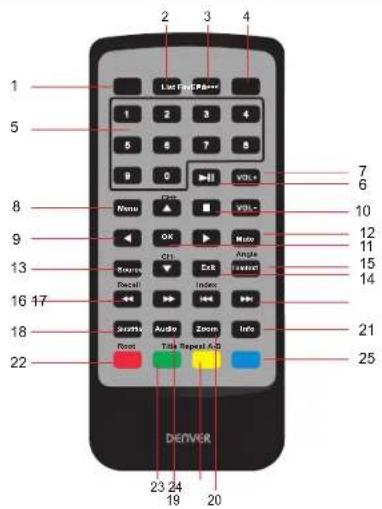
EPG: Show TV programme guide
-
List: Display the channel list
-
Record: Press to record the programme
-
Fav: Show favorite channel list
-
0\~9: Select specific TV channel
-
▶:Play/Pause
-
VOL+/VOL-: Volume up/down
-
Menu: show main menu
-
▲/▼/◄/►:Navigationbuttons (up/down/left/right)
CH+/CH-: Increase or decrease channel
- ■ : Stop
11.OK: to cofirm
-
Mute: Mute the audio
-
Source: Select operating mode (DTV/DVD/USB)
-
Exit: Exit current status
-
Teletext:show teletext
Angle: Select different angle
ENG-5
- ◀◀ ▶: Search backward / forward
Recall: Back to last TV programme
- |◀◀ ▶▶|: Previous / Next file
Index: show the record list
-
Subtitle: Choose subtitle language
-
Audio: Choose audio language
-
Zoom: To zoom in/out the image during the playback.
-
Info: Display information
-
Root: Show root menu
Red button: some specific function in DVBT mode
- Title: Select to display the DVD title information.
Green button: some specific function in DVBT mode.
- Repeat: Select to repeat the current title, chapter, or all.
Yellow button: some specific function in DVBT mode.
- A-B: Select to repeat a specific portion from point A to B, press it again to cancel repeat playing.
Blue button: some specific function in DVBT mode.
Input Source
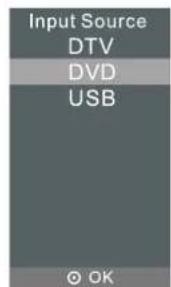
Press SOURCE to display the input source list.
Press ▼/▲ to highlight the input source and press OK to confirm
Press EXIT to exit the On-Screen menu. The menu will also disappear automatically after seconds without pressing Exit.
ENG-6
TV Search
Turn on the unit, select OSD language and country, the player will search channels automatically. Or press MENU button, and press ▼/▲ to select Auto Tuning, then press OK button to start auto search. If you want to stop searching automatically, press MENU and ◀ to confirm, or press EXIT and ▶ to cancel. Before searching, please don't forget to connect the antenna.
TV Recorder
When broadcasting programmes, press RECORD button to record the programme you like, and press ■ button to stop recording. Before recording programme, you should insert USB first, the programme you recorded will be saved in the USB. If you want to watch the programme which has been already recorded, press INDEX button, the record list will show, also you can switch to USB mode to find the record file in folder (MSTPVR).
USB Media
In source menu, select USB with▼/▲ button, and press OK button to enter USB mode.
1. Choose Photo, Music, Movie, Text, press OK button to confirm, press EXIT to return.
2. Press ◀/▶ to select the file you want, press PLAY button to start.
3. After entering playing mode, press OK button you will see the control bar, press EXIT button to cancel.
OSD Menu Operation
Press MENU button to open the main menu. Press EXIT button to save and exit all menu.
Press ◀/▶ button to select the option which you want and press ▼/▲ button to enter submenu to adjust.
| CHANNEL | Auto Tuning: Search for available channels and programmes |
| DTV Manual Tuning: Search channels from the current frequency | |
| Programme Edit: Edit the programmePress the red button to delete the channel.Press the yellow button to set the channel to moving state, then press again to move it to the selected position.Press the blue button to skip the selected channel.Press FAV to add or delete the channel to your favorite list. | |
| Signal Information: Show the signal information of current channel, such as signal quality and strength. | |
| Software Update (USB): Update the software. | |
| PICTURE | Picture Mode: Highlight the item and press OK button to enter to the submenu. |
| Color Temperature: Select the color temperature that you feel comfortable. | |
| Aspect Ratio: Select the suitable aspect ratio. | |
| SOUND | Sound Mode: Press to select the sound menu. |
| TIME | Clock: Set the time |
| Sleep Timer: Select the time that you want the TV to turn off automatically. | |
| Auto Sleep: Select the time in hours that you want the TV to remain power on after your last operation. Cancel it by setting it to Never. | |
| Time Zone: Set the time zone. | |
| OPTION | OSD Language: Set the OSD display language |
| Audio Language: Set the default audio language | |
| Subtitle Language: Set the default subtitle language | |
| Restore Factory Default: Recall the default setting | |
| LOCK | Lock System: Input password to enter this page. The default password is 0000 |
| Set Password: Change the password | |
| Block Program: Lock the programme | |
| Parental Guidance: Enter this option to set the parental control level to some unsuitable channel being watched by children. |
Specifications
Compatible disc: DVD+R/RW, DVD-R/RW, CD-DA, CD-R/RW, MP3, JPEG
DVB-T2-H.265 digital TV tuner built-in for free-to-air channels
Panel size: 10.1 inch
Picture resolution: 1024*600
Input: AC 100-240V (Wall adapter power source)
Power source: DC 12V
Power consumption: 12W
Operating temperature: 0\~40℃
Dimension: 256.2*189.5*40.3mm
Weight: Approx 1kg
Note
- The quality and speed for reading JPEG photos depend on the resolution and compression ratio of the photos. Some JPEG photo may not be played due to the disc quality and formats.
- Some DVD+R/RW, DVD-R/RW, CD-R/RW disc may not be played due to the quality on burning conditions.
N Note: Design and specifications are subject to change prior notice.
AC/DC adapter
| Manufacturer's name or trade mark, commercial registration number and address | TEKA Shenzhen Teka Technology Co., Ltd. 914403007703151648 Address:Building A, No.21, XiFu Road, Red Star Community, SongGang Street Baoan District, Shenzhen, Guangdong Province, 518105. P.R.China |
| Model identifier | TEKA012-1201000EU |
| Input voltage | 100-240V |
| Input AC frequency | 50/60Hz |
| Output voltage | 12.0V |
| Output current | 1.0A |
| Output power | 12.0W |
| Average active efficiency | 83.09% at 115V60Hz 83.38% at 230V50Hz |
| Efficiency at low load(10%) | 81.63% at 115V 60 Hz 76.43% at 230V 50Hz |
| No-load power consumption | 0.044W at 115V 60Hz 0.057W at 230V 50Hz |
Please notice - All products are subject to change without any notice. We take reservations for errors and omissions in the manual.
ALL RIGHTS RESERVED, COPYRIGHT DENVER ELECTRONICS A/S

www.denver-electronics.com

Electric and electronic equipment and included batteries contains materials, components and substances that can be hazardous to your health and the environment, if the waste material (discarded electric and electronic equipment and batteries) is not handled correctly.
Electric and electronic equipment and batteries is marked with the crossed out trash can symbol, seen above. This symbol signifies that electric and electronic equipment and batteries should not be disposed of with other household waste, but should be disposed of separately.
As the end user it is important that you submit your used batteries to the appropriate and designated facility. In this manner you make sure that the batteries are recycled in accordance with legislature and will not harm the environment.
All cities have established collection points, where electric and electronic equipment and batteries can either be submitted free of charge at recycling stations and other collection sites, or be collected from the households. Additional information is available at the technical department of your city.
Hereby, Inter Sales A/S declares that the radio equipment type MT-1087T2H is in compliance with Directive 2014/53/EU. The full text of the EU declaration of conformity is available at the following Internet address: www.denver-electronics.com and then click the search ICON on topline of website. Write model number: MT-1087T2H. Now enter product page, and red directive is found under downloads/other downloads.
Operating Frequency Range:177.5\~226.5MHz, 474\~858MHz Max Output Power: <12W
DENVER ELECTRONICS A/S
Omega 5A, Soeften
DK-8382 Hinnerup
Denmark
www.facebook.com/denverelectronics
ENG-11
DENVER®
natural_image
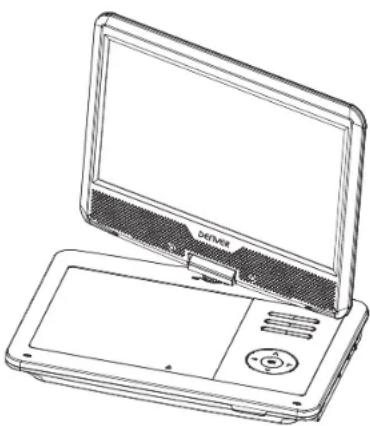
Line drawing of a laptop with open screen and control panel (no text or symbols)MANUEL DE L'UTILISATEUR MT-1087T2H
natural_image
Line drawing of a desktop computer with open screen and control panel (no text or symbols)
Brand : DENVER
Model : MT1087T2H
Category : Portable DVD Player