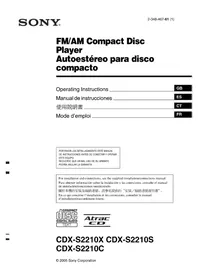
CDXS2210S - Cd player/recorder SONY - Free user manual and instructions
Find the device manual for free CDXS2210S SONY in PDF.



| Product Type | Car CD Player/Recorder |
| Brand | Sony |
| Model | CDXS2210S |
| Dimensions (W x H x D) | 178 x 50 x 178 mm |
| Weight | Approximately 1.2 kg |
| Power Supply | 12 V DC vehicle battery (negative ground) |
| Playback Formats | CD-DA, CD-R/RW (MP3, multisession), CD ATRAC (ATRAC3/ATRAC3plus) |
| Radio Functions | FM (87.5-108 MHz) / AM (531-1602 kHz), memory up to 6 stations per band (FM1, FM2, FM3, AM1, AM2), BTM function |
| Equalizer | EQ3 with presets (XPLOD, VOCAL, CLUB, JAZZ, NEW AGE, ROCK, CUSTOM) and manual adjustment of bass, midrange, treble |
| Playback Functions | Repeat (track/group), random play (group/disc) |
| Display | Screen with scrolling text, clock, CD TEXT/ID3 information |
| Supplied Remote Control | Mini remote control RM-X151 (wired) |
| Optional Accessories | Mini remote control RM-X114, command satellite RM-X4S |
| Output Power | 52 W x 4 (max., 4 ohms) |
| Signal-to-Noise Ratio (CD player) | 120 dB |
| Frequency Response (CD player) | 10 - 20,000 Hz |
| Fuse | Replace with a fuse of the same rating (ampere value on the old fuse) |
| Maintenance | Clean connectors with a cotton swab moistened with alcohol; replace the CR2025 lithium battery of the remote control |
| Safety | Do not use optical instruments; keep the battery away from children; disconnect the battery before cleaning connectors |
| Repairability | Can be disassembled using release keys; contact a Sony dealer for repairs |
Frequently Asked Questions - CDXS2210S SONY
User questions about CDXS2210S SONY
0 question about this device. Answer the ones you know or ask your own.
Ask a new question about this device
Download the instructions for your Cd player/recorder in PDF format for free! Find your manual CDXS2210S - SONY and take your electronic device back in hand. On this page are published all the documents necessary for the use of your device. CDXS2210S by SONY.
USER MANUAL CDXS2210S SONY
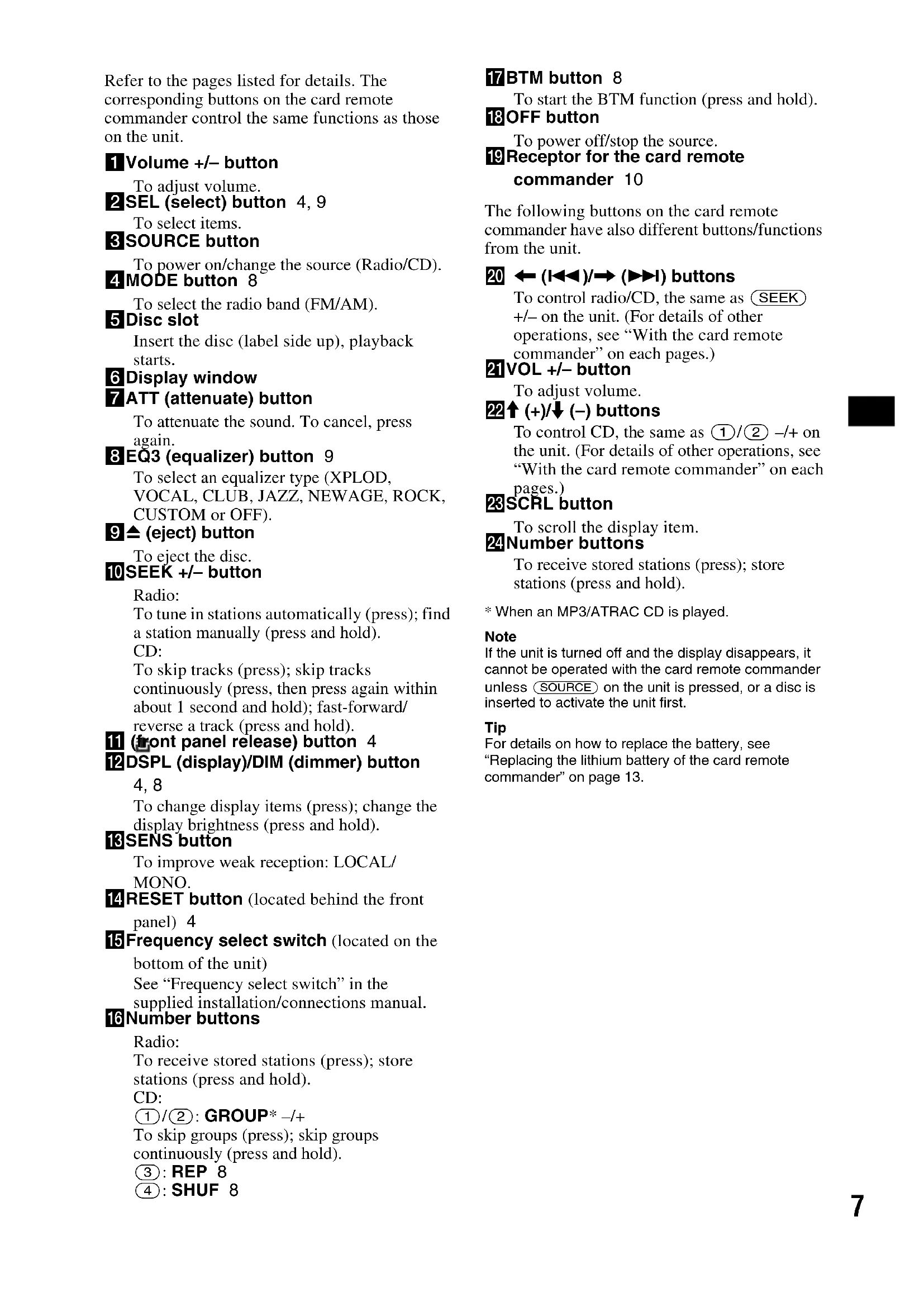
Operating Instructions GB
Thank you for purchasing this Sony Compact Disc Player. You can enjoy your drive with the following functions.
CD playback:
You can play CD-DA (also containing CD TEXT*), CD-R/CD-RW (MP3 files also containing Multi Session (page 12)) and ATRAC CD (ATRAC3 and ATRAC3plus format (page 12)).
| Type of discs Label on the disc | ||
| CD-DA | COMPACT DISC DIGITAL AUDIO Recordable | COMPACT DISC DIGITAL AUDIO ReWritable |
| MP3 | COMPACT DISC | COMPACT DISC |
| ATRAC CD | DIGITAL AUDIO Recordable | DIGITAL AUDIO ReWritable |
| COMPACT DISC | COMPACT DISC | |
| Recordable | ReWritable | |
-
Radio reception:
-
You can store up to 6 stations per band (FM1, FM2, FM3, AM1 and AM2).
BTM (Best Tuning Memory) function: the unit selects strong signal stations and stores them.
- A CD TEXT disc is a CD-DA that includes information such as disc, artist and track name.
About this manual
This manual explains the functions of three units, CDX-S2210X, CDX-S2210S and CDX-S2210C. The table below shows the differences between the 3 units. It is also described in each section (example, "CDX-S2210S only").
| CDX-S2210X | CDX-S2210S | CDX-S2210C | |
| Card remote commander RM-X151 (supplied) | ● | ||
| Rotary commander RM-X4S (optional) | ● | ||
| Key illumination colour switches | ● |
Warning if your car's ignition has no ACC position
After turning the ignition off, be sure to press and hold OFF on the unit until the display disappears.
Otherwise, the display does not turn off and this causes battery drain.
CLASS 1 LASER PRODUCT
This label is located on the bottom of the chassis.
CAUTION
The use of optical instruments with this product will increase eye hazard.
SonicStage and its logo are trademarks of Sony Corporation.
ATRAC, ATRAC3, ATRAC3plus and their logos are trademarks of Sony Corporation.
Table of Contents
Getting Started
Resetting the unit. 4
Setting the clock 4
DEMO mode 4
Detaching the front panel 4
Attaching the front panel 5
Location of controls and basic operations
Main unit 6
Card remote commander RM-X151 6
CD
Display items 8
Repeat and shuffle play 8
Radio
Storing and receiving stations 8
Storing automatically BTM 8
Storing manually 8
Receiving the stored stations 8
Tuning automatically 8
Other functions
Changing the sound settings 9
Adjusting the sound characteristics
BAL/FAD/SUB 9
Adjusting the equalizer curve - EQ3 9
Adjusting setup items—SET 9
Using optional remote commanders 10
Card remote commander RM-X114 10
RotarycommanderRM-X4S 10
Additional Information
Precautions 11
Notes on discs 11
About MP3 files 12
About ATRAC CD 12
Maintenance 13
Removing the unit. 14
Specifications 14
Troubleshooting 15
Error displays/Messages 16
Getting Started
Resetting the unit
Before operating the unit for the first time, or after replacing the car battery or changing the connections, you must reset the unit.
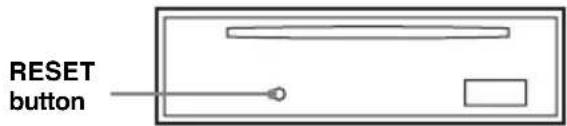
Detach the front panel and press the RESET button with a pointed object, such as a ballpoint pen.
Note
Pressing the RESET button will erase the clock setting and some stored contents.
Setting the clock
The clock uses a 12-hour digital indication.
1 Press and hold (SEL).
The setup display appears.
2 Press repeatedly until "CLOCK-ADJ" appears.
3 Press DSPL.
The hour indication flashes.
4 Press the volume + / - button to set the hour and minute.
To move the digital indication, press DSPL.
5 Press SEL.
The clock starts and the next setup display appears.
6 Press and hold SEL.
The setup is complete.
To display the clock, press DSPL. Press DSPL again to return to the previous display.
With the card remote commander
In step 4, to set the hour and minute, press or .
DEMO mode
When the unit is turned off, the clock is displayed first, then demonstration (DEMO) mode starts the demonstration display.
To cancel the DEMO mode, set "DEMO-OFF" in setup (page 9) while the unit is turned off.
Detaching the front panel
You can detach the front panel of this unit to prevent theft.
Caution alarm
If you turn the ignition switch to the OFF position without detaching the front panel, the caution alarm will sound for a few seconds.
The alarm will only sound if the built-in amplifier is used.
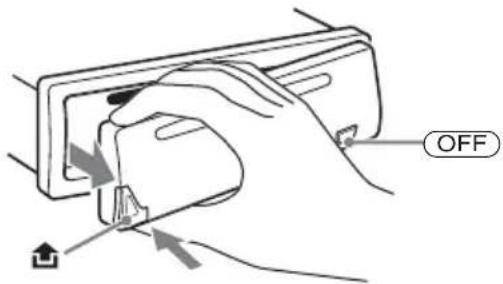
1 Press OFF
The unit is turned off.
2 Press then pull it off towards you.
Notes
- Do not drop or put excessive pressure on the front panel and display window.
- Do not subject the front panel to heat/high temperature or moisture. Avoid leaving it in a parked car or on a dashboard/rear tray.
Tip
When carrying the front panel, use the supplied front panel case.
Attaching the front panel
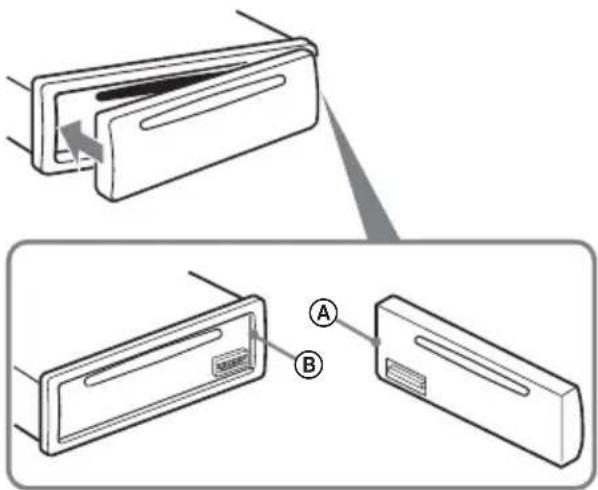
Engage part A of the front panel with part B of the unit, as illustrated, and push the left side into position until it clicks.
Note
Do not put anything on the inner surface of the front panel.
Location of controls and basic operations
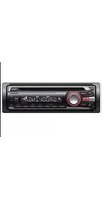
Main unit
Card remote commander RM-X151
(CDX-S2210S only)
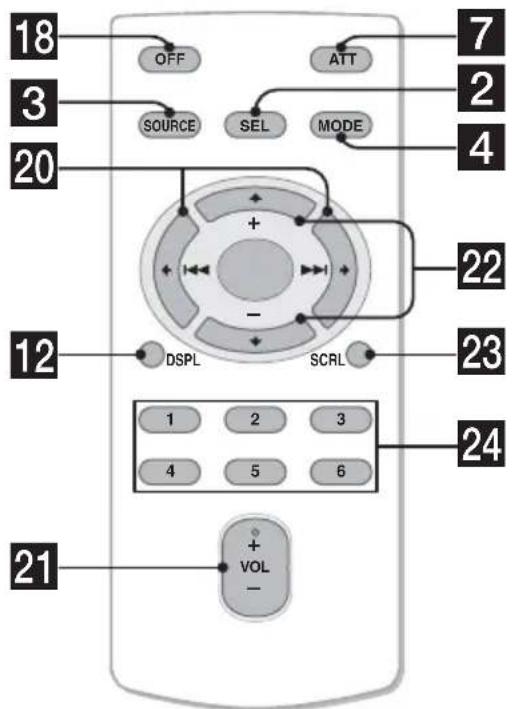
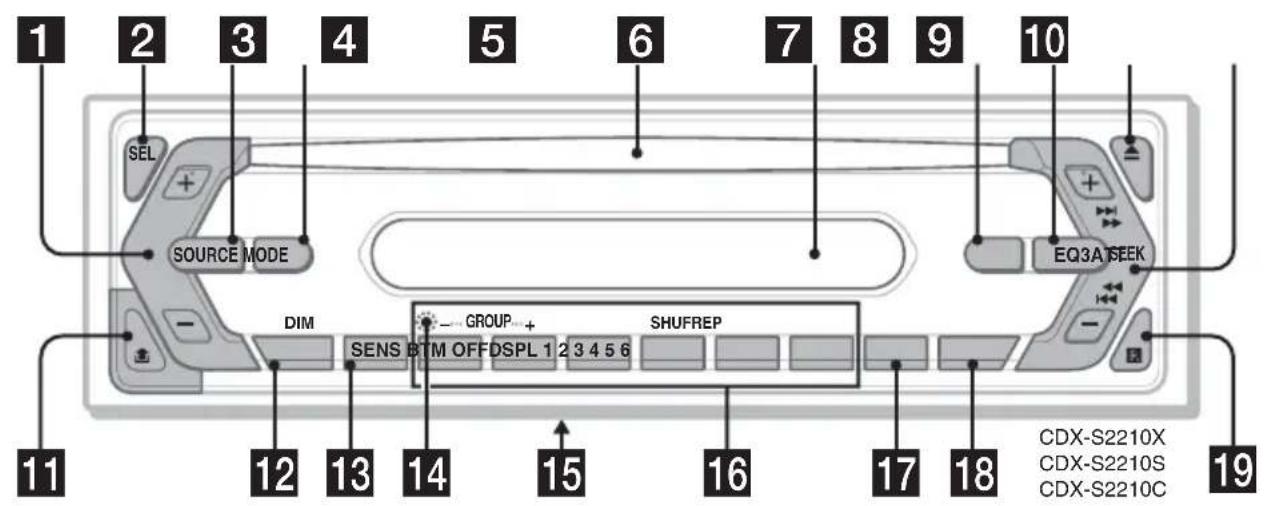
Refer to the pages listed for details. The corresponding buttons on the card remote commander control the same functions as those on the unit.
Volume + / - button
To adjust volume.
2SEL (select) button 4,9
To select items.
3 SOURCE button
To power on/change the source (Radio/CD).
4 MODE button 8
To select the radio band (FM/AM).
5Disc slot
Insert the disc (label side up), playback starts.
6 Display window
7ATT (attenuate) button
To attenuate the sound. To cancel, press again.
8 EQ3 (equalizer) button 9
To select an equalizer type (XPLOD, VOCAL, CLUB, JAZZ, NEWAGE, ROCK, CUSTOM or OFF).
9 (eject) button
To eject the disc.
10SEEK + / - button
Radio:
To tune in stations automatically (press); find a station manually (press and hold).
CD:
To skip tracks (press); skip tracks continuously (press, then press again within about 1 second and hold); fast-forward/ reverse a track (press and hold).
11 (front panel release) button 4
DSPL(display)/DIM(dimmer) button
4,8
To change display items (press); change the display brightness (press and hold).
13SENS button
To improve weak reception: LOCAL/MONO.
14RESET button (located behind the front panel) 4
15 Frequency select switch (located on the bottom of the unit)
See "Frequency select switch" in the supplied installation/connections manual.
16Number buttons
Radio:
To receive stored stations (press); store stations (press and hold).
CD:
1/2:GROUP*-/+
To skip groups (press); skip groups continuously (press and hold).
③: REP 8
④: SHUF 8
17BTM button 8
To start the BTM function (press and hold).
18 OFF button
To power off/stop the source.
19Receptor for the card remote commander 10
The following buttons on the card remote commander have also different buttons/functions from the unit.
20 ← (1 1) / → (1→ 1) buttons
To control radio/CD, the same as + / - on the unit. (For details of other operations, see "With the card remote commander" on each pages.)
21VOL + / - button
To adjust volume.
22↑ (+)/ (-) buttons
To control CD, the same as 1 / 2 - / + on the unit. (For details of other operations, see "With the card remote commander" on each pages.)
23 SCRL button
To scroll the display item.
24Number buttons
To receive stored stations (press); store stations (press and hold).
- When an MP3/ATRAC CD is played.
Note
If the unit is turned off and the display disappears, it cannot be operated with the card remote commander unless SOURCE on the unit is pressed, or a disc is inserted to activate the unit first.
Tip
For details on how to replace the battery, see
"Replacing the lithium battery of the card remote commander" on page 13.
Display items
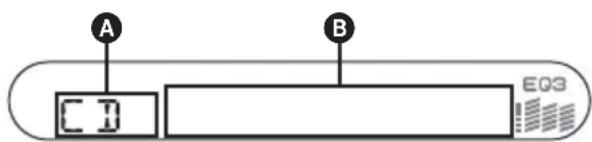
ASource
Track number/Elapsed playing time, Disc/artist name, Group number*1, Group name, Track name, Text information*2, Clock
1 Group number is displayed only when the group is changed.
2 When playing an MP3, ID3 tag is displayed and when playing ATRAC CD, text information written by SonicStage, etc. is displayed.
To change display items B, press DSPL; scroll display items B, press SCRL on the card remote commander or set "A.SCRL-ON" (page 9).
Tip
Displayed item will differ, depending on the disc type and recorded format. For details on MP3, see page 12; ATRAC CD, see page 12.
Repeat and shuffle play
1 During playback, press ③ (REP) or ④ (SHUF) repeatedly until the desired setting appears.
Select To play
REP-TRACK track repeatedly.
REP-GP* group repeatedly.
SHUF-GP* group in random order.
SHUF-DISC disc in random order.
- When an MP3/ATRAC CD is played.
To return to normal play mode, select "REP-OFF" or "SHUF-OFF."
Radio
Storing and receiving stations
Caution
When tuning in stations while driving, use Best Tuning Memory (BTM) to prevent an accident.
Storing automatically — BTM
1 Press SOURCE repeatedly until "TUNER" appears.
To change the band, press MODE repeatedly. You can select from FM1, FM2, FM3, AM1 or AM2.
2 Press and hold until "BTM" flashes.
The unit stores stations in order of frequency on the number buttons.
A beep sounds when the setting is stored.
Storing manually
1 While receiving the station that you want to store, press and hold a number button (① to ⑥) until "MEM" appears.
The number button indication appears in the display.
Note
If you try to store another station on the same number button, the previous stored station will be replaced.
Receiving the stored stations
1 Select the band, then press a number button (① to ⑥).
With the card remote commander To select preset stations, press or
Tuning automatically
1 Select the band, then press (SEEK) +/- to search for the station.
Scanning stops when the unit receives a station. Repeat this procedure until the desired station is received.
Tip
If you know the frequency of the station you want to listen to, press and hold (SEEK) +/- to locate the approximate frequency, then press (SEEK) +/- repeatedly to fine adjust to the desired frequency (manual tuning).
Other functions
Changing the sound settings
Adjusting the sound characteristics — BAL/FAD/SUB
You can adjust the balance, fader and subwoofer volume.
1 Press repeatedly until "BAL," "FAD" or "SUB" appears.
The item changes as follows:
LOW ^ 1 MID ^ 1 HI ^ 1 BAL (left - right) → FAD (front - rear) → SUB (subwoofervolume) ^ 2
1 When EQ3 is activated (page 9).
2 When the audio output is set to "SUB" (page 9).
"ATT" is displayed at the lowest setting, and can be adjusted up to 20 steps.
2 Press the volume + / - button repeatedly to adjust the selected item.
After 3 seconds, the setting is complete and the display returns to normal play/reception mode.
Note
Adjust within 3 seconds of selecting the item.
With the card remote commander
In step 2, to adjust the selected item, press ← , , → or .
Adjusting the equalizer curve - EQ3
You can adjust and store the equalizer settings for different tone ranges.
1 Select a source, then press EQ3 repeatedly to select the EQ3 type.
2 Press repeatedly until "LOW," "MID" or "HI" appears.
3 Press the volume + / - button repeatedly to adjust the selected item.
The volume level is adjustable in 1 dB steps, from -10 dB to +10 dB.
LOW

6d3

Repeat steps 2 and 3 to adjust the equalizer curve.
To restore the factory-set equalizer curve, press and hold SEL before the setting is complete.
After 3 seconds, the setting is complete and the display returns to normal play/reception mode.
With the card remote commander
In step 3, to adjust the selected item, press ← , , →
or
Adjusting setup items — SET
1 Press and hold (SEL).
The setup display appears.
2 Press SEL repeatedly until the desired item appears.
3 Press the volume + / - button to select the setting (example "ON" or "OFF").
4 Press and hold (SEL).
The setup is complete and the display returns to normal play/reception mode.
Note
Displayed items will differ, depending on the source and setting.
With the card remote commander
In step 3, to select the setting, press ← or → .
The following items can be set (follow the page reference for details):
"·" indicates the default settings.
CLOCK-ADJ (page 4)
(Clock Adjust)
BEEP To set "BEEP-ON" ( ) or "BEEP-OFF."
SUB/REAR*1 To switch the audio output.
“SUB”: to output to a subwoofer.
- "REAR": to output to a power amplifier.
DIM (Dimmer) To change the brightness of the display.
-“DIM-ON”: to dim the display.
- "DIM-OFF" () : to deactivate the dimmer.
ILM-1/ILM-2 To change the illumination (Illumination) colour.
(CDX-S2210C - "ILM-1" () : Red
only) - "ILM-2": Amber
DEMO*1 To set "DEMO-ON" () or (Demonstration) "DEMO-OFF" (page 4).
A.SCRL To scroll long displayed items (Auto Scroll) automatically when the group/ track is changed.
-A.SCRL-ON":to scroll.
-A.SCRL-OFF" () : to not scroll.
LPF*2 (Low To select the cut-off frequency Pass Filter) "78HZ," "125HZ" or "OFF" ()
1 When the unit is turned off.
2 When the audio output is set to "SUB."
Using optional remote commanders
Card remote commander RM-X114
Location of controls
The corresponding buttons on the card remote commander control the same functions as those on this unit.
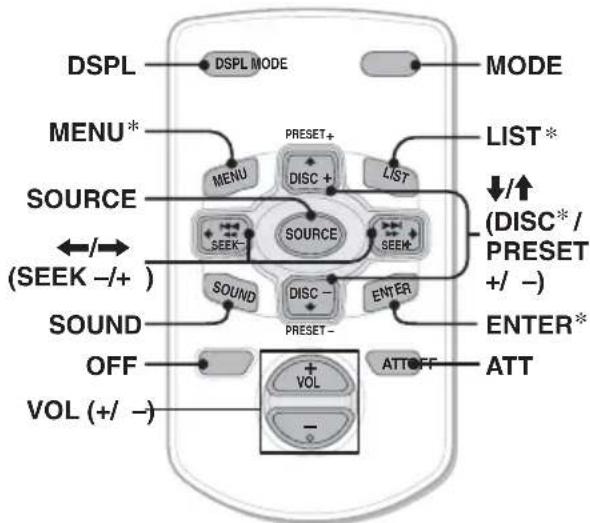
The following buttons on the card remote commander have also different buttons/functions from the unit.
- SOUND button The same as (SEL) on the unit.
- ← / → (SEEK -/ + ) buttons To control radio/CD, the same as (SEEK) +/- on the unit. (For details of other operations, see "With the card remote commander" on each pages.)
- ↑/↓ (DISC*/PRESET +/-) buttons To control CD, the same as ①/② -/+ on the unit. (For details of other operations, see "With the card remote commander" on each pages.)
- Not available for this unit.
Note
If the unit is turned off and the display disappears, it cannot be operated with the card remote commander unless SOURCE on the unit is pressed, or a disc is inserted to activate the unit first.
Tip For details on how to replace the battery, see "Replacing the lithium battery of the card remote commander" on page 13.
Rotary commander RM-X4S (CDX-S2210C only)
Attaching the label
Attach the indication label depending on how you mount the rotary commander.
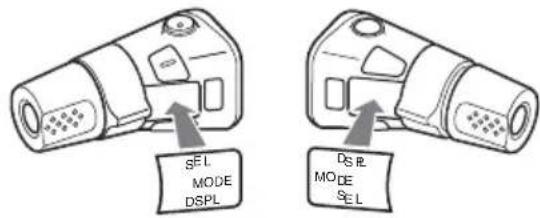
Location of controls
The corresponding buttons on the remote commander control the same functions as those on this unit.
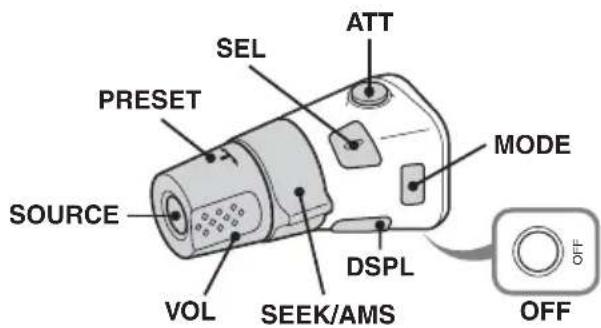
The following controls on the rotary commander require a different operation from the unit.
- PRESET control
To select preset stations; control CD (same as 1 / 2 on the unit) (push in and rotate).
VOL control
The same as the volume + / - button on the unit (rotate).
- SEEK/AMS control
The same as on the unit (rotate, or rotate and hold).
Changing the operative direction
The operative direction of the controls is factory-set as shown below.
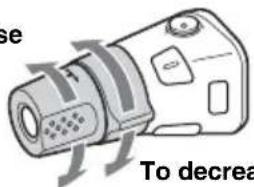
To increase
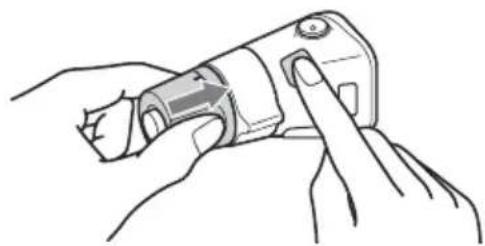
If you need to mount the rotary commander on the right hand side of the steering column, you can reverse the operative direction.
1 While pushing the VOL control, press and hold SEL.
Additional Information
Precautions
- If your car has been parked in direct sunlight, allow the unit to cool off before operating it.
- Power aerial will extend automatically while the unit is operating.
Moisture condensation
On a rainy day or in a very damp area, moisture condensation may occur inside the lenses and display of the unit. Should this occur, the unit will not operate properly. In such a case, remove the disc and wait for about an hour until the moisture has evaporated.
To maintain high sound quality
Be careful not to splash juice or other soft drinks onto the unit or discs.
Notes on discs
- To keep a disc clean, do not touch its surface. Handle the disc by its edge.
- Keep your discs in their cases or disc magazines when not in use.
- Do not subject discs to heat/high temperature. Avoid leaving them in a parked car or on a dashboard/rear tray.
- Do not attach labels, or use discs with sticky ink/residue. Such discs may stop spinning when used, causing a malfunction, or may ruin the disc.

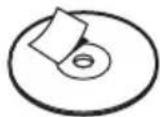

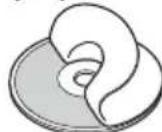

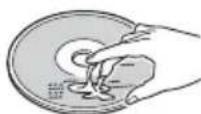
- Do not use any discs with labels or stickers attached.
The following malfunctions may result from using such discs:
- Inability to eject a disc (due to a label or sticker peeling off and jamming the eject mechanism).
- Inability to read audio data correctly (e.g., playback skipping, or no playback) due to heat shrinking of a sticker or label causing a disc to warp.
- Discs with non-standard shapes (e.g., heart, square, star) cannot be played on this unit. Attempting to do so may damage the unit. Do not use such discs.
-
You cannot play 8cm (31 / 4 in) CDs.
-
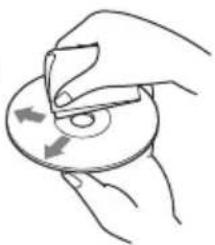
Before playing, clean the discs with a commercially available cleaning cloth. Wipe each disc from the centre out. Do not use solvents such as benzine, thinner, commercially available cleaners, or antistatic spray intended for analogue discs.
Notes on CD-R/CD-RW discs
- Some CD-Rs/CD-RWs (depending on the equipment used for its recording or the condition of the disc) may not play on this unit.
- You cannot play a CD-R/a CD-RW that is not finalized.
Music discs encoded with copyright protection technologies
This product is designed to play back discs that conform to the Compact Disc (CD) standard. Recently, various music discs encoded with copyright protection technologies are marketed by some record companies. Please be aware that among those discs, there are some that do not conform to the CD standard and may not be playable by this product.
About MP3 files
MP3, which stands for MPEG-1 Audio Layer-3, is a music file compression format standard. It compresses audio CD data to approximately 1/10 of its original size.
The unit is compatible with the ISO 9660 level 1/level 2 format, Joliet/Romeo in the expansion format, ID3 tag version 1.0, 1.1, 2.2, 2.3 and 2.4, and Multi Session.
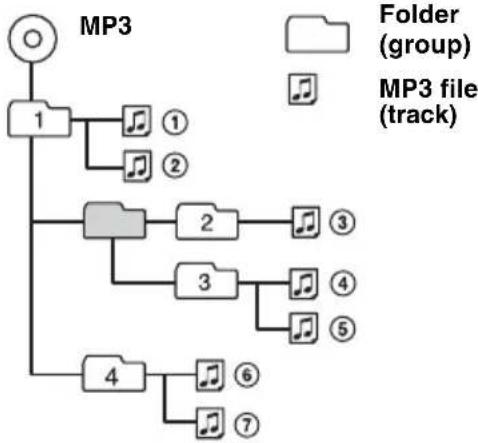
The maximum number of: - folders (groups): 150 (including root and empty folders).
- MP3 files (tracks) and folders contained in a disc: 300 (if a folder/file names contain many characters, this number may become less than 300).
displayable characters for a folder/file name is 32 (Joliet), or 32/64 (Romeo); ID3 tag is 15/30 characters (1.0, 1.1, 2.2 and 2.3), or 63/126 characters (2.4).
Playback order of MP3 files
Notes
- Be sure to finalize the disc before using on the unit.
- When naming an MP3 file, be sure to add the file expansion ".mp3" to the file name.
If you play a high-bit-rate MP3, such as 320 kbps, sound may be intermittent. - During playback of a VBR (variable bit rate) MP3 file or fast-forward/reverse, elapsed playing time may not display accurately.
-
When the disc is recorded in Multi Session, only the first track of the first session format is recognized and played (any other format is skipped). The priority of the format is CD-DA, ATRAC CD and MP3.
-
When the first track is a CD-DA, only CD-DA of the first session is played.
- When the first track is not a CD-DA, an ATRAC CD or MP3 session is played. If the disc has no data in any of these formats, "NO MUSIC" is displayed.
About ATRAC CD
ATRAC3plus format
ATRAC3, which stands for Adaptive Transform Acoustic Coding3, is audio compression technology. It compresses audio CD data to approximately 1/10 of its original size. ATRAC3plus, which is an extended format of ATRAC3, compresses the audio CD data to approximately 1/20 of its original size. The unit accepts both ATRAC3 and ATRAC3plus format.
ATRAC CD
ATRAC CD is recorded audio CD data which is compressed to ATRAC3 or ATRAC3plus format using authorized software, such as SonicStage 2.0 or later, or SonicStage Simple Burner.
The maximum number of:
- folders (groups): 255
- files (tracks): 999
- The characters for a folder/file name and text information written by SonicStage is displayed.
For details on ATRAC CD, see the SonicStage or SonicStage Simple Burner manual.
Note
Be sure to create the ATRAC CD using authorized software, such as SonicStage 2.0 or later, or SonicStage Simple Burner 1.0 or 1.1, which are supplied with Sony Network products.
If you have any questions or problems concerning your unit that are not covered in this manual, consult your nearest Sony dealer.
Maintenance
Replacing the lithium battery of the card remote commander
Under normal conditions, the battery will last approximately 1 year. (The service life may be shorter, depending on the conditions of use.) When the battery becomes weak, the range of the card remote commander becomes shorter. Replace the battery with a new CR2025 lithium battery. Use of any other battery may present a risk of fire or explosion.
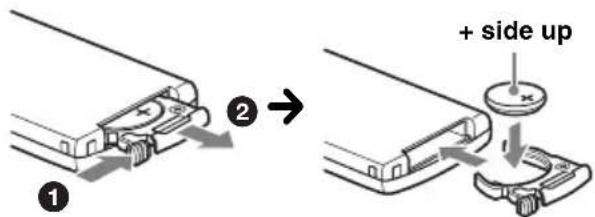
RM-X151 (CDX-S2210S only)
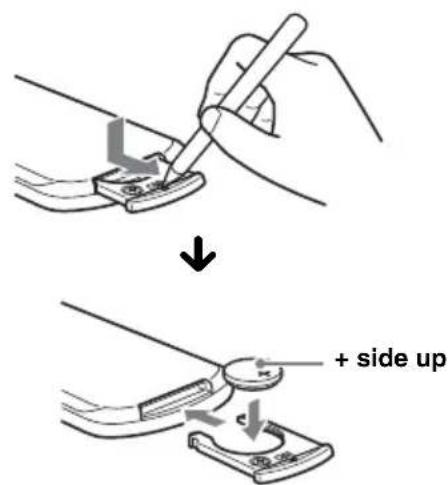
RM-X114
Notes on the lithium battery
- Keep the lithium battery out of the reach of children. Should the battery be swallowed, immediately consult a doctor.
- Wipe the battery with a dry cloth to assure a good contact.
- Be sure to observe the correct polarity when installing the battery.
- Do not hold the battery with metallic tweezers, otherwise a short-circuit may occur.
WARNING
Battery may explode if mistreated.
Do not recharge, disassemble, or dispose of in fire.
Fuse replacement
When replacing the fuse, be sure to use one matching the amperage rating stated on the original fuse. If the fuse blows, check the power connection and replace the fuse. If the fuse blows again after replacement, there may be an internal malfunction. In such a case, consult your nearest Sony dealer.
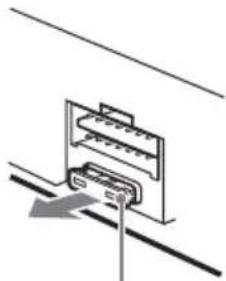
Fuse (10A)
Cleaning the connectors
The unit may not function properly if the connectors between the unit and the front panel are not clean. In order to prevent this, detach the front panel (page 4) and clean the connectors with a cotton swab dipped in alcohol. Do not apply too much force. Otherwise, the connectors may be damaged.
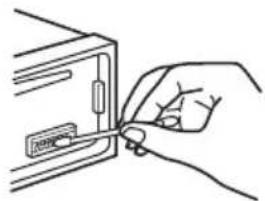
Main unit
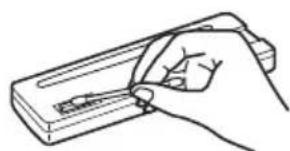
Back of the front panel
Notes
- For safety, turn off the ignition before cleaning the connectors, and remove the key from the ignition switch.
- Never touch the connectors directly with your fingers or with any metal device.
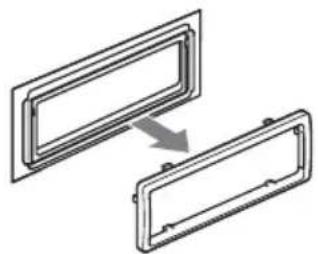
Removing the unit
1 Remove the protection collar.
Detach the front panel (page 4).
2 Engage the release keys together with the protection collar.
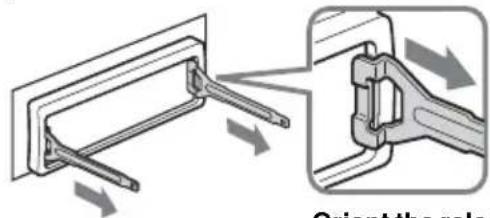
Orient the release keys as shown.
3Pull out the release keys to remove the protection collar.
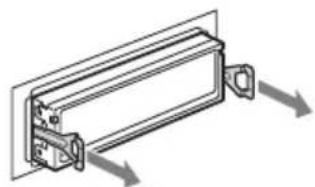
2 Remove the unit.
Insert both release keys simultaneously until they click.

Pull the release keys to unseat the unit.
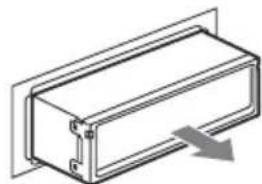
③ Slide the unit out of the mounting.
Specifications
CD Player section
Signal-to-noise ratio: 120dB
Frequency response: 10 - 20,000Hz
Wow and flutter: Below measurable limit
Tuner section
FM
Tuning range:
87.5 - 108.0 MHz (at 50 kHz step)
87.5 - 107.9 MHz (at 200 kHz step)
FM tuning interval: 50kHz / 200kHz switchable
Aerial terminal: External aerial connector
Intermediate frequency: 10.7MHz / 450kHz
Usable sensitivity: 9 dBf
Selectivity: 75dB at 400kHz
Signal-to-noise ratio: 67 dB (stereo), 69 dB (mono)
Harmonic distortion at 1 kHz: 0.5% (stereo), 0.3% (mono)
Separation: 35 dB at 1 kHz
Frequency response: 30 - 15,000Hz
AM
Tuning range:
531-1,602 kHz (at 9 kHz step)
530 - 1,710 kHz (at 10 kHz step)
AM tuning interval: 9kHz / 10kHz switchable
Aerial terminal: External aerial connector
Intermediate frequency: 10.7MHz / 450kHz
Sensitivity: 30µV
Power amplifier section
Outputs: Speaker outputs (sure seal connectors)
Speaker impedance: 4 - 8 ohms
Maximum power output: 52W× 4 (at 4 ohms)
General
Outputs:
Audio outputs terminal (sub/rear switchable)
Power aerial relay control terminal
Power amplifier control terminal
Inputs:
Remote controller input terminal (CDX-S2210C only)
Aerial input terminal
Tone controls:
Low: ± 10 dB at 60Hz (XPLOD)
Mid: ± 10 dB at 1kHz (XPLOD)
High: ± 10 dB at 10kHz (XPLOD)
Power requirements: 12 V DC car battery (negative earth)
Dimensions: Approx. 178× 50× 178mm (71 / 8× 2× 71 / 8 in) (w/h/d)
Mounting dimensions: Approx. 182× 53× 161mm (71 / 4× 21 / 8× 63 / 8 in) (w/h/d)
Mass: Approx. 1.2kg (2 1b 10 oz)
Supplied accessories:
Card remote commander: RM-X151 (CDX-
S2210S only)
Parts for installation and connections (1 set)
Front panel case (1)
Optional accessories:
Card remote commander: RM-X114
Rotary commander: RM-X4S (CDX-S2210C only)
US and foreign patents licensed from Dolby Laboratories.
Design and specifications are subject to change without notice.

- Lead-free solder is used for soldering certain parts. (more than 80% )
- Halogenated flame retardants are not used in the certain printed wiring boards.
- Halogenated flame retardants are not used in cabinets.
VOC (Volatile Organic Compound)-free vegetable oil based ink is used for printing the carton. (CDXS2210X and CDX-S2210S only) - Packaging cushions do not use polystyrene foam.
Troubleshooting
The following checklist will help you remedy problems you may encounter with your unit. Before going through the checklist below, check the connection and operating procedures.
General
No power is being supplied to the unit.
- Check the connection. If everything is in order, check the fuse.
- If the unit is turned off and the display disappears, it cannot be operated with the remote commander. → Turn on the unit.
The power aerial does not extend.
The power aerial does not have a relay box.
No sound.
The volume is too low.
- The ATT function is activated.
- The position of the fader control (FAD) is not set for a 2-speaker system.
No beep sound.
- The beep sound is cancelled (page 9).
- An optional power amplifier is connected and you are not using the built-in amplifier.
The contents of the memory have been erased.
- The RESET button has been pressed. → Store again into the memory.
- The power connecting lead or battery has been disconnected.
- The power connecting lead is not connected properly.
Stored stations and correct time are erased. The fuse has blown.
Makes noise when the position of the ignition key is switched.
The leads are not matched correctly with the car's accessory power connector.
The display disappears from/does not appear in the display window.
The dimmer is set "DIM-ON" (page 9).
- The display disappears if you press and hold OFF.
→ Press and hold OFF again until the display appears.
- The connectors are dirty (page 13).
CD playback
The disc cannot be loaded.
- Another disc is already loaded.
- The disc has been forcibly inserted upside down or in the wrong way.
The disc does not playback.
Defective or dirty disc.
- The CD-Rs/CD-RWs are not for audio use (page 12).
MP3 files cannot be played back.
The disc is not corresponding to the MP3 format and version (page 12).
MP3 files take longer to play back than others.
The following discs take a longer time to start playback.
- a disc recorded with a complicated tree structure.
- a disc recorded in Multi Session.
- a disc to which data can be added.
The ATRAC CD cannot play.
- The disc is not created by authorized software, such as SonicStage or SonicStage Simple Burner.
Tracks that are not included in the group cannot be played.
The display items do not scroll.
- For discs with very many characters, those may not scroll.
- "A.SCRL" is set to off. → Set "A.SCRL-ON" (page 9) or press SCRL on the card remote commander.
The sound skips.
- Installation is not correct.
Install the unit at an angle of less than 45irc in a sturdy part of the car.
Defective or dirty disc.
The operation buttons do not function. The disc will not eject.
Press the RESET button (page 4).
continue to next page
Radio reception
The stations cannot be received. The sound is hampered by noises.
- Connect a power aerial control lead (blue) or accessory power supply lead (red) to the power supply lead of a car's aerial booster (only when your car has built-in FM/AM aerial in the rear/ side glass).
- Check the connection of the car aerial.
- The auto aerial will not go up.
→ Check the connection of the power aerial control lead.
- Check the frequency.
Preset tuning is not possible.
- Store the correct frequency in the memory.
The broadcast signal is too weak.
Automatic tuning is not possible.
- Setting of the local seek mode is not correct. → Tuning stops too frequently: Press (SENS) until "LOCAL-ON" appears.
→ Tuning does not stop at a station: Press repeatedly until "MONONON" or "MONO-OFF" (FM), or "LOCAL-OFF" (AM) appears.
The broadcast signal is too weak. Perform manual tuning.
During FM reception, the "ST" indication flashes.
- Tune in the frequency accurately.
The broadcast signal is too weak. → Press (SENS) to set the monaural reception mode to "MONO-ON."
An FM programme broadcast in stereo is heard in monaural.
The unit is in monaural reception mode. → Press SENS until "MONO-OFF" appears.
Error displays/Messages
ERROR
The disc is dirty or inserted upside down. Clean or insert the disc correctly.
- The disc cannot play because of some problem. → Insert another disc.
FAILURE
The speaker/amplifier connection is incorrect. → See the supplied installation/connections manual to check the connection.
L.SEEK +/-
The local seek mode is on during automatic tuning.
NO ID3
ID3 tag information is not written in the MP3 file.
NO INFO
Text information is not written in the ATRAC3/ ATRAC3plus file.
NO MUSIC
The disc is not a music file.
Insert a music CD.
NO NAME
A track/group/disc name is not written in the track.
OFFSET
There may be an internal malfunction.
→ Check the connection. If the error indication remains on in the display, consult your nearest Sony dealer.
READ
The unit is reading all track and group information on the disc.
→ Wait until reading is complete and playback starts automatically. Depending on the disc structure, it may take more than a minute.
RESET
The unit cannot be operated because of some problem.
→ Press the RESET button (page 4).
“llll” r
During fast-forward or reverse, you have reached the beginning or the end of the disc and you cannot go any further.
“
The character cannot be displayed with the unit.
If these solutions do not help improve the situation, consult your nearest Sony dealer. If you take the unit to be repaired because of CD playback trouble, bring the disc that was used at the time the problem began.
Bienvenido
CLASS 1 LASER PRODUCT
ATRAC3 (Adaptive Transform Acoustic
CLASS 1 LASER PRODUCT
此標籤位於機殼的底部。
僅限於 CDX-S2210S
僅適用於台灣

廢電池請回收
·無線電接收:
CLASS 1 LASER PRODUCT
Appareil principal 6
Mini-telecommande RM-X151 6
CD
2 Touche SEL (selection) 4, 9, 10
- About this manual
- Warning if your car's ignition has no ACC position
- CLASS 1 LASER PRODUCT
- CAUTION
- Table of Contents
- Getting Started
- Location of controls and basic operations
- CD
- Radio
- Other functions
- Additional Information
- Resetting the unit
- Note
- Setting the clock
- With the card remote commander
- DEMO mode
- Detaching the front panel
- Caution alarm
- Notes
- Tip
- Attaching the front panel
- Card remote commander RM-X151
- Volume + / - button
- SOURCE button
- MODE button 8
- 5Disc slot
- Display window
- 7ATT (attenuate) button
- EQ3 (equalizer) button 9
- (eject) button
- 10SEEK + / - button
- (front panel release) button 4
- DSPL(display)/DIM(dimmer) button
- 13SENS button
- 14RESET button (located behind the front panel) 4
- Frequency select switch (located on the bottom of the unit)
- 16Number buttons
- 17BTM button 8
- OFF button
- 19Receptor for the card remote commander 10
- ← (1 1) / → (1→ 1) buttons
- 21VOL + / - button
- 22↑ (+)/ (-) buttons
- SCRL button
- 24Number buttons
- Display items
- ASource
- Repeat and shuffle play
- Select To play
- Storing and receiving stations
- Storing automatically — BTM
- Press SOURCE repeatedly until "TUNER" appears.
- Press and hold until "BTM" flashes.
- Storing manually
- While receiving the station that you want to store, press and hold a number button (① to ⑥) until "MEM" appears.
- Receiving the stored stations
- Select the band, then press a number button (① to ⑥).
- Tuning automatically
- Select the band, then press (SEEK) +/- to search for the station.
- Changing the sound settings
- Adjusting the sound characteristics — BAL/FAD/SUB
- Press repeatedly until "BAL," "FAD" or "SUB" appears.
- Press the volume + / - button repeatedly to adjust the selected item.
- Adjusting the equalizer curve - EQ3
- Select a source, then press EQ3 repeatedly to select the EQ3 type.
- Press repeatedly until "LOW," "MID" or "HI" appears.
- Press the volume + / - button repeatedly to adjust the selected item.
- Adjusting setup items — SET
- Press and hold (SEL).
- Press SEL repeatedly until the desired item appears.
- Press the volume + / - button to select the setting (example "ON" or "OFF").
- Press and hold (SEL).
- Using optional remote commanders
- Card remote commander RM-X114
- Location of controls
- Rotary commander RM-X4S (CDX-S2210C only)
- Attaching the label
- - PRESET control
- VOL control
- - SEEK/AMS control
- Changing the operative direction
- Precautions
- Moisture condensation
- To maintain high sound quality
- Notes on discs
- Notes on CD-R/CD-RW discs
- Music discs encoded with copyright protection technologies
- About MP3 files
- Playback order of MP3 files
- About ATRAC CD
- ATRAC3plus format
- ATRAC CD
- Maintenance
- Replacing the lithium battery of the card remote commander
- Notes on the lithium battery
- WARNING
- Fuse replacement
- Cleaning the connectors
- Removing the unit
- Remove the protection collar.
- Remove the unit.
- Specifications
- CD Player section
- Tuner section
- FM
- AM
- Power amplifier section
- General
- Troubleshooting
- No power is being supplied to the unit.
- The power aerial does not extend.
- No sound.
- No beep sound.
- The contents of the memory have been erased.
- Stored stations and correct time are erased. The fuse has blown.
- Makes noise when the position of the ignition key is switched.
- The display disappears from/does not appear in the display window.
- CD playback
- The disc cannot be loaded.
- The disc does not playback.
- MP3 files cannot be played back.
- MP3 files take longer to play back than others.
- The ATRAC CD cannot play.
- The display items do not scroll.
- The sound skips.
- The operation buttons do not function. The disc will not eject.
- Radio reception
- The stations cannot be received. The sound is hampered by noises.
- Preset tuning is not possible.
- Automatic tuning is not possible.
- During FM reception, the "ST" indication flashes.
- An FM programme broadcast in stereo is heard in monaural.
- Error displays/Messages
- ERROR
- FAILURE
- L.SEEK +/-
- NO ID3
- NO INFO
- NO MUSIC
- NO NAME
- OFFSET
- READ
- RESET
- Bienvenido
Brand : SONY
Model : CDXS2210S
Category : Cd player/recorder