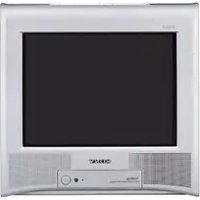
USER MANUAL Trinitron KVBZ14M70 SONY
Operating Instructions
GB
- Before operating the unit, please read this manual thoroughly and retain it for future reference.
Mode d'emploi
FR
- Dangerously high voltages are present inside the TV.
TV operating voltage: 110 - 240VAC
- Do not plug in the power cord until you have completed making all other connections; otherwise a minimum leakage current might flow through the antenna and other terminals to ground.
- T o avoid battery leakage and damage to the remote, remove the batteries from the remote if you are not going to use it for several days. If any liquid leaks from the batteries and touches your skin, immediately wash it away with water.
| For your own safety, do not touch any part of the TV, the power cord and the antenna cable during lightning storms. | XXX
For children's safety, do not leave children alone with the TV. Do not allow children to climb onto it. | XXX
Topprevent fire or shock hazard, do not expose the TV to rain or moisture. |
| Do not place any objects on the TV.
The apparatus shall not be exposed to dripping or splashing and that no objects filled with liquids, such as vases, shall be placed on the apparatus. | XX
Do not operate the TV if any liquid or solid object falls into it. Have it checked immediately by qualified personnel only. | XX
Install the TV on a stable TV stand and floor which can support the TV set weight. Ensure that the TV stand surface is flat and its area is larger than the bottom area of the TV. |
| Do not block the ventilation openings of the TV. Do not install the TV in a confined space, such as a bookcase or built-in cabinet. | XX
Your TV is recommended for home use only. Do not use the TV in any vehicle or where it may be subject to excessive dust, heat, moisture or vibrations. | XX
Do not plug in too many appliances to the same power socket. Do not damage the power cord. |
| Do not open the cabinet and the rear cover of the TV as high voltages and other hazards are present inside the TV. Refer servicing and disposal of the TV to qualified personnel. | XX
Clean the TV with a dry and soft cloth. Do not use benzine, thinner, or any other chemicals to clean the TV. Do not attach anything (e.g., adhesive tape, cellophane tape, glue) on the painted cabinet of the TV. Do not scratch the picture tube. | XX
Pull the power cord out by the plug. Do not pull the power cord itself. Even if your TV is turned off, it is still connected to the AC power source (mains) as long as the power cord is plugged in. Unplug the TV before moving it or if you are not going to use it for several days. |
Table of Contents
Getting Started 4
Setting up your TV ("Initial Setup") 5
TV top control, front and rear panels 7
Connecting optional components 8
Using the remote control and basic functions 10
Introducing the WEGA GATE navigator 12
"Settings" Adjustment 13
Changing the "Picture" setting. 14
Changing the "Sound" setting 15
Changing the "Channel Setup" setting 16
Changing the "Setup" setting 18
Viewing Teletext 19
Troubleshooting 20
Specifications Back cover
Getting Started

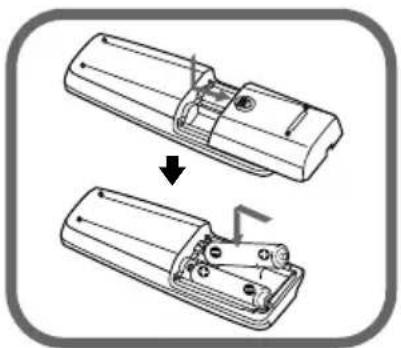
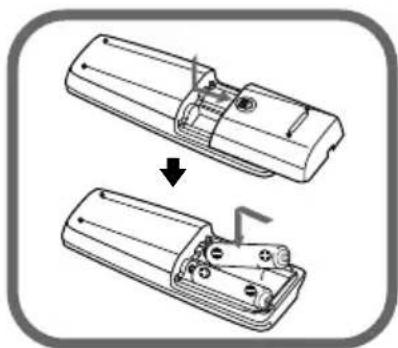
Insert the batteries (supplied) into the remote.
Note
- Do not use old or different types of batteries together.
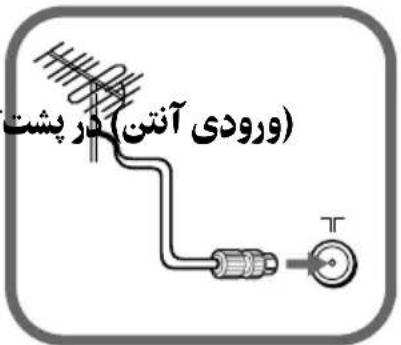
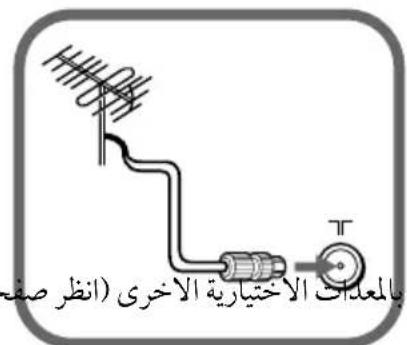
Connect the antenna cable (not supplied) to (antenna input) at the rear of the TV.
Tip
- You can also connect your TV to other optional components (see page 8).

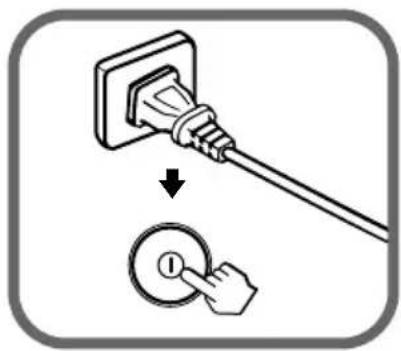
Plug in the power cord, then press ① on the TV to turn it on.
Note
- The (standby) indicator flashes green for a few seconds when turning on the TV. This does not indicate a malfunction.
Set up the TV by following the instructions of the "Initial Setup" menu (see page 5).
Setting up your TV ("Initial Setup")
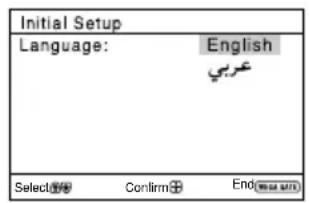
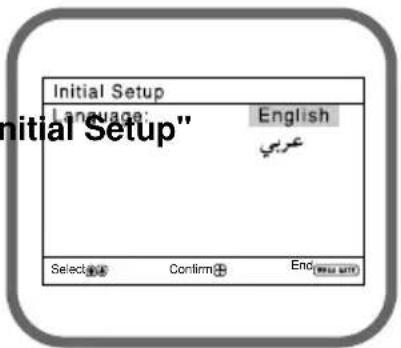
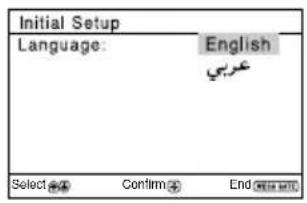
When you turn on your TV for the first time, the "Initial Setup" menu will appear. You may change the menu language, preset the TV channels automatically, sort or edit the channels and adjust the picture position using the buttons on the remote control or TV top control panel.
1 Press or to select the desired menu language, then press.
The selected menu language appears.
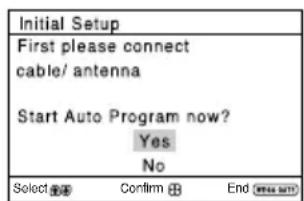
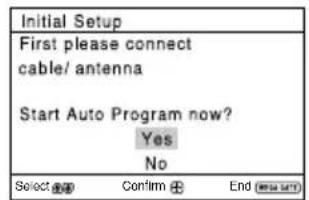
2 Press or to select "Yes", then press to preset the channels automatically.
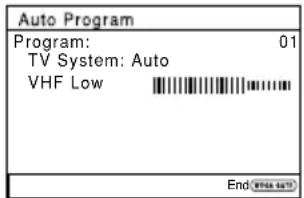
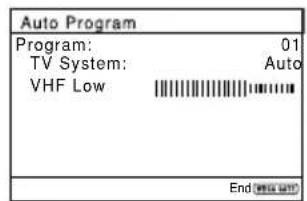
The screen will indicate automatic presetting is in progress.
After all available channels have been tuned and stored, the "Program Sorting/Edit" menu appears automatically on the screen.
To skip automatic channel presetting, select "No", then press + .
If the message "No channel found. Please connect cable/antenna" appears, check your TV connections, then press
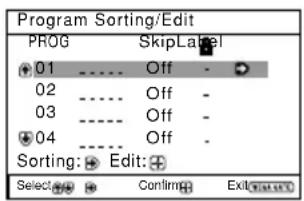
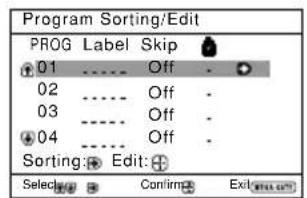
3 The "Program Sorting/Edit" menu enables you to sort and edit the channels.
a) If you wish to keep the channels in the current condition, press WEGA GATE to exit.
b) Press or to select the program number with the channel you wish to change. The selected channel will appear on the screen.
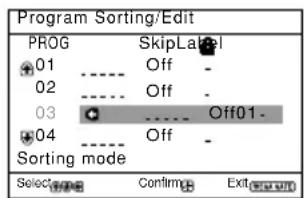
c) If you wish to store the channels in a different order:
1) Press → to enter sorting mode.
2) Press or to select the new program number position for your selected channel, then press ← .
Setting up your TV ("Initial Setup") (continued)
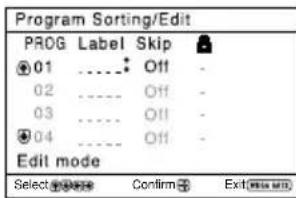
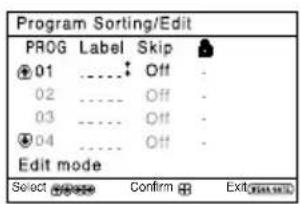
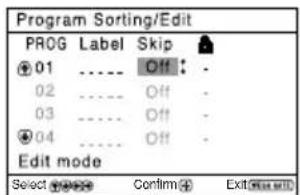
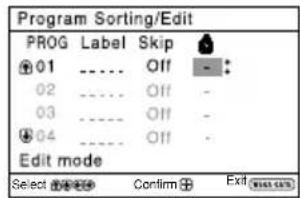
d) If you wish to edit the channels, press + to change to edit mode. Press until the mode that you wish to edit is highlighted: Label, Skip, (block symbol). Then press + .
1) To label, press or to select the alphanumeric characters for the label. Then press + .
2) To skip the program number, press or to select "On". Then press. You can skip this program number when using PROG + / -
3) To block unwanted program number, press lubsuit or lubsuit to select lubsuit . Then press +
e) Repeat step b) to d) if you wish to change other channels.
Press WEGA GATE to go to the next menu.
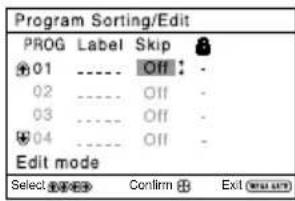
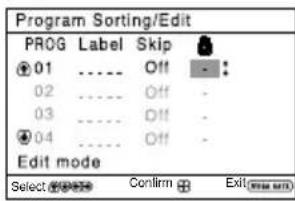
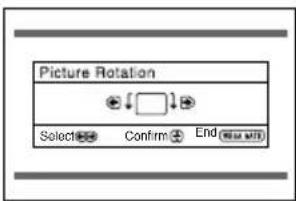
4 Press or to adjust the bars on the top and bottom of the menu if they are slanted, then press (KV-BZ21M81 only). If no adjustment is necessary, then press.
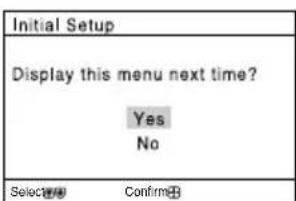
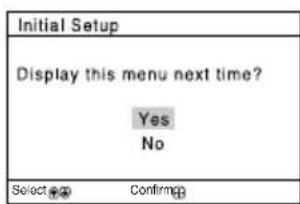
5 To prevent this "Initial Setup" menu from appearing again when you turn on the TV by pressing ① press lubsuit or to select "No", then press.
To allow this menu to appear again, select "Yes", then press
Tip You can immediately go to the end of the "Initial Setup" menu by pressing WEGA GATE.
TV top control, front and rear panels
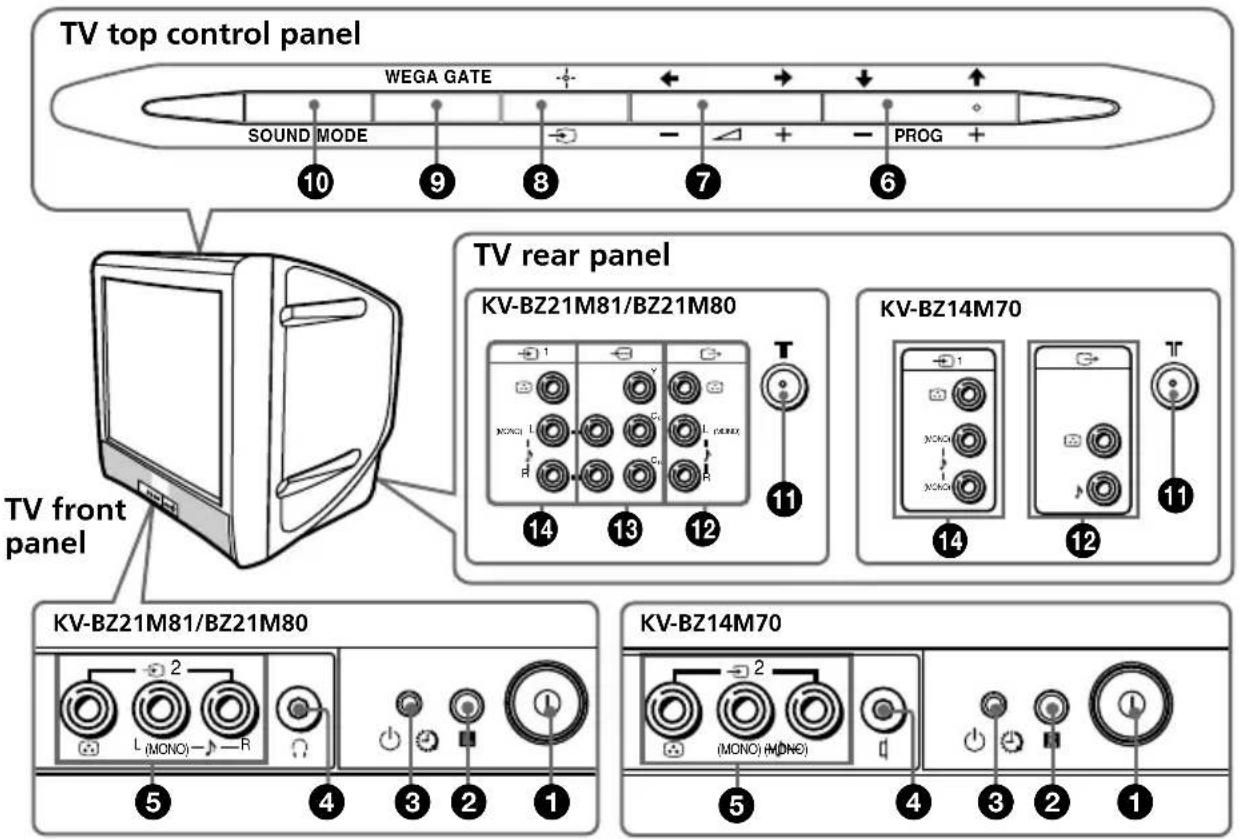
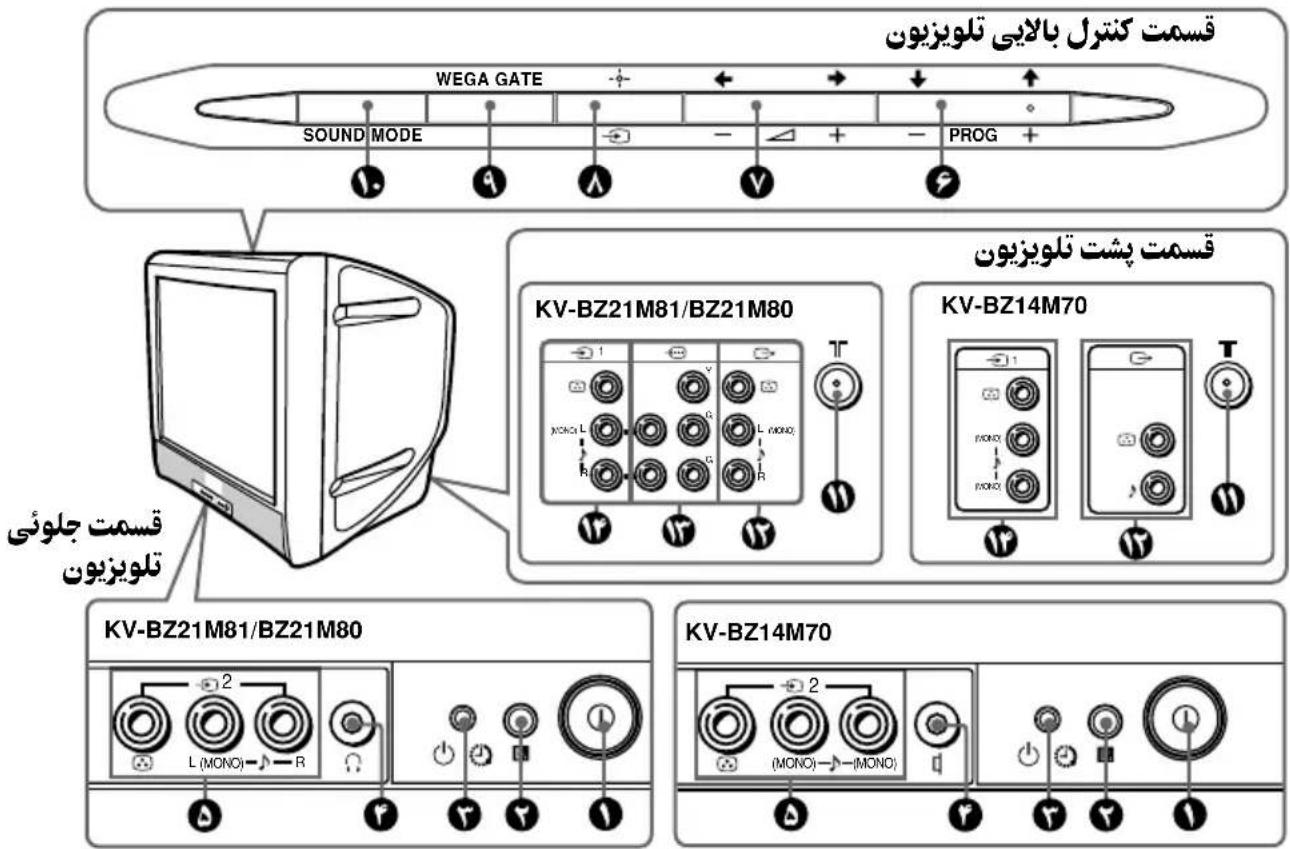
| Button/Terminal Function | Page | |
| 1① Turn off or turn on the TV. 4 | |
| 2Rote control sensor. - | |
| 3Wake Up indicator. 11 | |
| 3Standby indicator. 4 | |
| 4 ☐ | Headphone jack. | - |
| 4Erfphone jack. | - | |
| 5-2 | Video input terminal 2. | 8 |
| 6 PROG +/- | Select program number. | - |
| 7-+/- | Adjust volume. | - |
| 8- | Select TV or video input. | 8 |
| WEGA GATE menu operations
6,7 ↑,↓,←,→ | Select and adjust items. | 12 |
| 8+ | Confirm selected items. | 12 |
| 9 WEGA GATE | Display or cancel WEGA GATE menu. | 12 |
| 10 SOUND MODE
(KV-BZ21M81/
BZ21M80 only) | Select sound mode options with a 5-Band Graphic Equalizer display. | 10 |
| 11 T | Antenna input terminal. | 8 |
| 12 G | Monitor output terminal. | 8 |
| 13 Component video input terminal. | 9 | |
| 14 -1 | Video input terminal 1. | 8 |
Connecting optional components
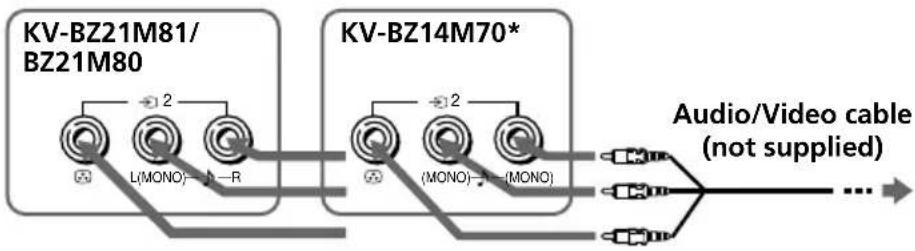
TV front panel
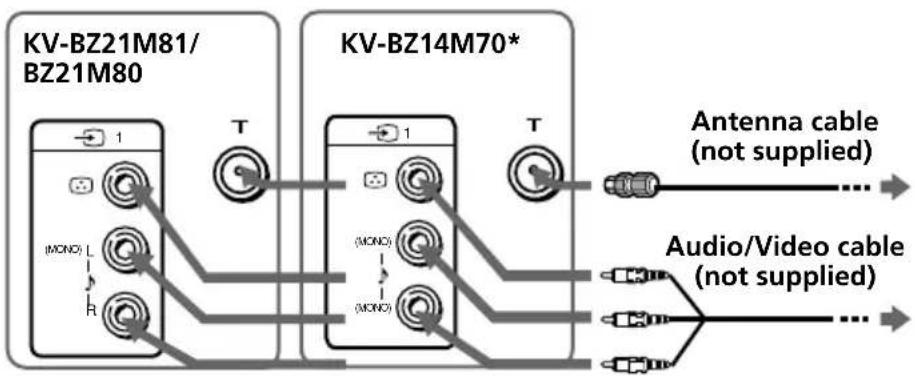
TV rear panel
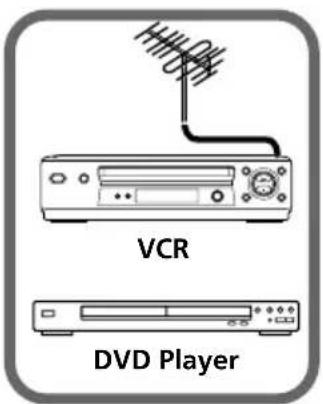
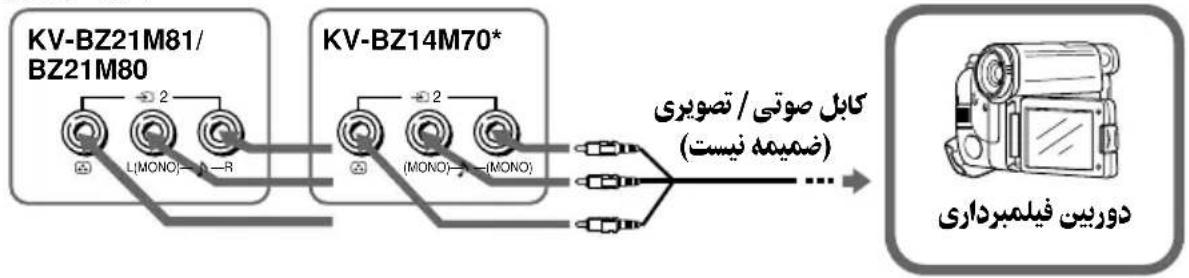
* Sound Mix Terminal (KV-BZ14M70 only)
You can connect the audio L and R jacks from your AV equipment to both (MONO) jacks on the TV to enjoy mixed left and right sound. If you do not prefer the mixed sound, disconnect either one of the (MONO) jacks.
Note
- If you connect a VCR to (antenna input), preset the signal output from the VCR to the program number 0 on the TV (see page 17).
Connecting to the monitor output terminal ( )
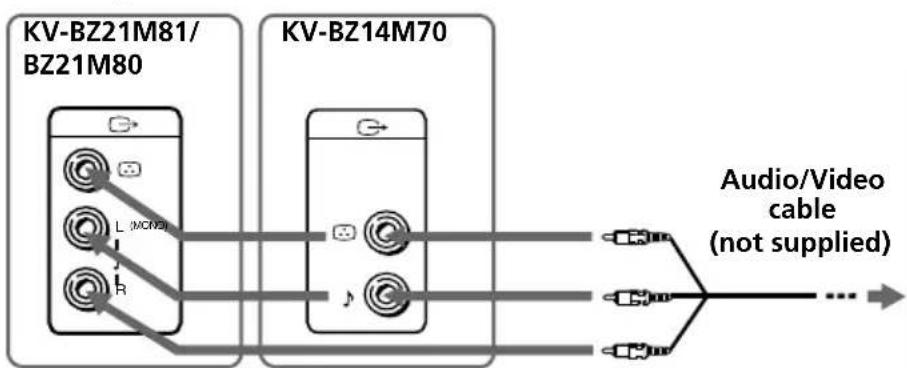
TV rear panel
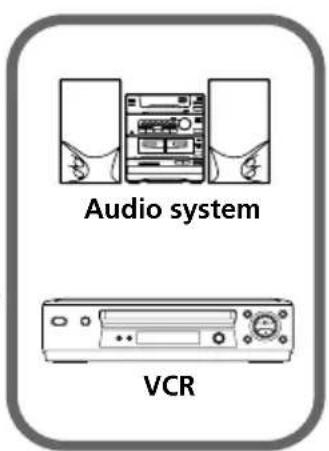
KV-BZ21M81/BZ21M80 only
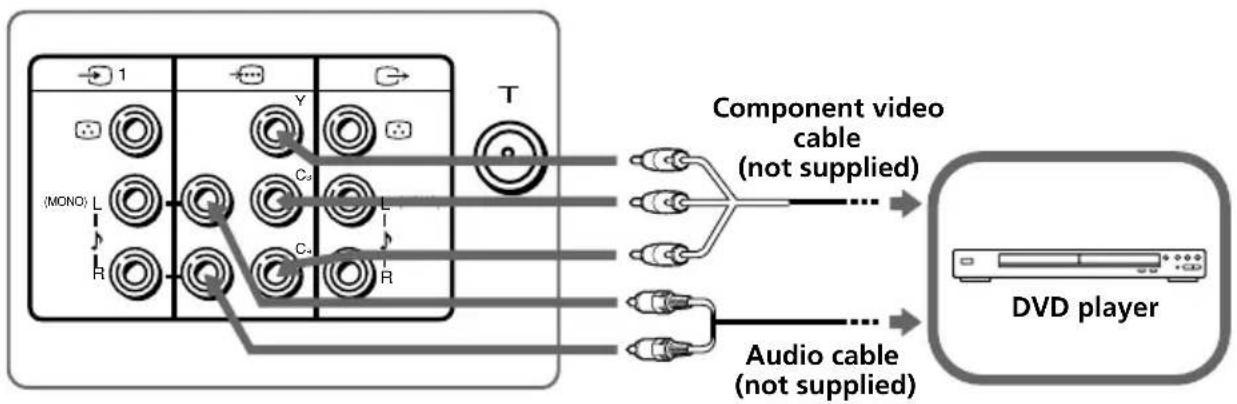
TV rear panel
Notes
- If your DVD player can output interlace and progressive mode signals, select the interlace output when connecting to → (component video input) on your TV. Your TV can receive either 525i / 60Hz or 625i / 50Hz interlace signals.
- The component video terminals on your DVD player are sometimes labeled Y/Cb/CR, Y/PB/PR, Y/Cb/ Cr or Y/B-Y/R-Y.
- If you select "DVD" on your TV screen, the signal from the (monitor output) jacks will not be output properly. This does not indicate a malfunction.
Using the remote control and basic functions
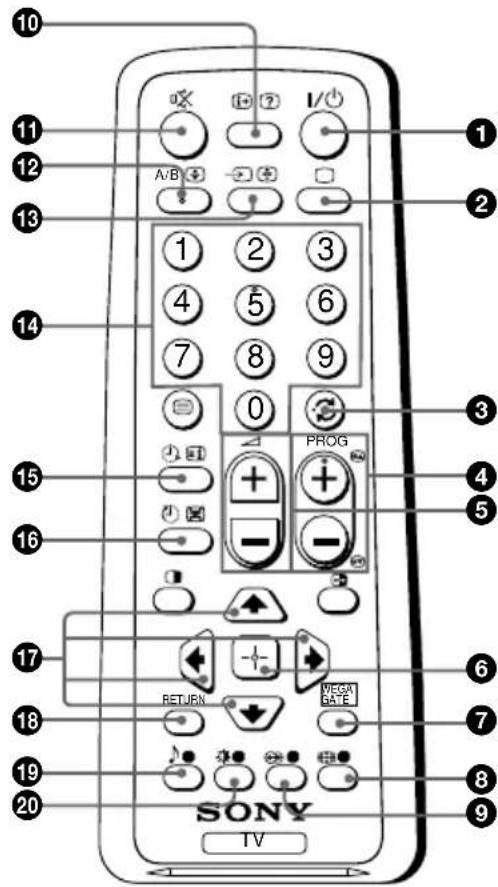
| Button Description | tion Page | |
| 1 I/0 | Turn off temporarily or turn on the TV. | - |
| 2 Display the TV program. - | | |
| 3 Jump to last program number - that has been watched for at least five seconds. | | |
| 4 PROG +/- Select program number. - | | |
| 5 +/- Adjust volume. - | | |
| 8 Net function for your TV. - | | |
| 9 Select surround mode options: 15 (KV-BZ21M81/ BZ21M80 only) | | |
| 10 Display on-screen information. - | | |
| 11 Mutte the sound. - | | |
| 13 - | Select TV or video input. | 8 |
| 14 0-9 | Input numbers. For program numbers 10 and above, enter the second digit within two seconds. | - |
| 19 ↓ (KV-BZ21M81/ BZ21M80 only) | Select sound mode options with a 5-Band Graphic Equalizer display: "Dynamic", "Standard", "Custom"*.* When the "Custom" mode is selected, you can receive the last adjusted sound settings from the "Sound Adjustment" option in the menu. | 15 |
| Standard ↓ Custom 100 300 1k 0k 0k 0k 0k 0k 0k 0k 0k 0k 0k 0k 0k 0k 0k 0k 0k 0k 0k 0k 0k 0k 0k 0k 0k 0k 0k 0k 0k 0k 0k 0k 0k 0k 0K 0K 0K 0K 0K 0K 0K 0K 0K 0K 0K 0K 0K 0K 0K 0K 0K 0K 0K 0K 0K 0K 0K 0K 0K 0K 0K 0K 0K 0K 0K 0K 0K 0K | Select picture mode options: "Vivid", "Standard", "Custom"*.* When the "Custom" mode is selected, you can receive the last adjusted picture settings from the "Picture Adjustment" option in the menu. | 14 |
| Button Description Page | | |
| WEGA GATE menu operations
6 Confirm selected items. 12 |
| 7 WEGA GATE Display or cancel WEGA GATE menu. |
| 17 ↑, ↓, ←, → | Select and adjust items. |
| 18 RETURN Return to the previous level. |
| Timer operations
15 Set TV to turn on automatically according to the - desired period of time (max. of 12 hours).
(Wake Up Timer) | The indicator on TV lights up amber once you set the wake up timer.
If no buttons or controls are pressed for more than one hour after the TV is turned on using the wake up timer, the TV automatically goes into standby mode. |
| 16 Set TV to turn off automatically according to the - desired period of time (max. of one hour and 30 min.). |
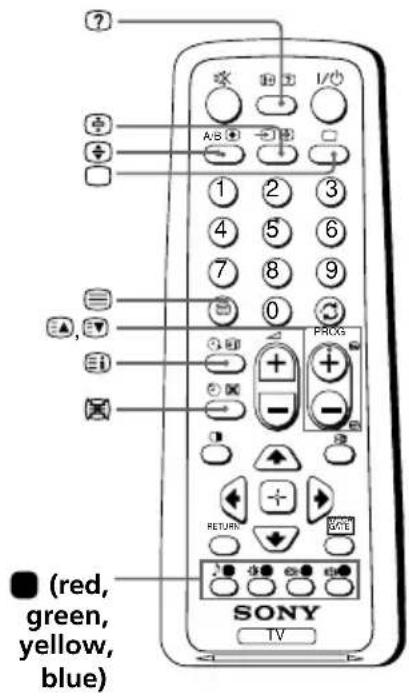
| Teletext operations (green label)
(KV-BZ21M81 only) | All buttons are used for Teletext operations. | 19 |
| 17, red, green, yellow, blue) |
| PIP operations
1, 2, 3, 4, 5, 6, 7 | Not function for your TV. | - |
| Stereo/bilingual operations
12 A/B | Not function for your TV. | - |
Introducing the WEGA GATE navigator
WEGA GATE is a gateway that allows you to access to preset TV channels, connected external inputs and "Settings" menu.
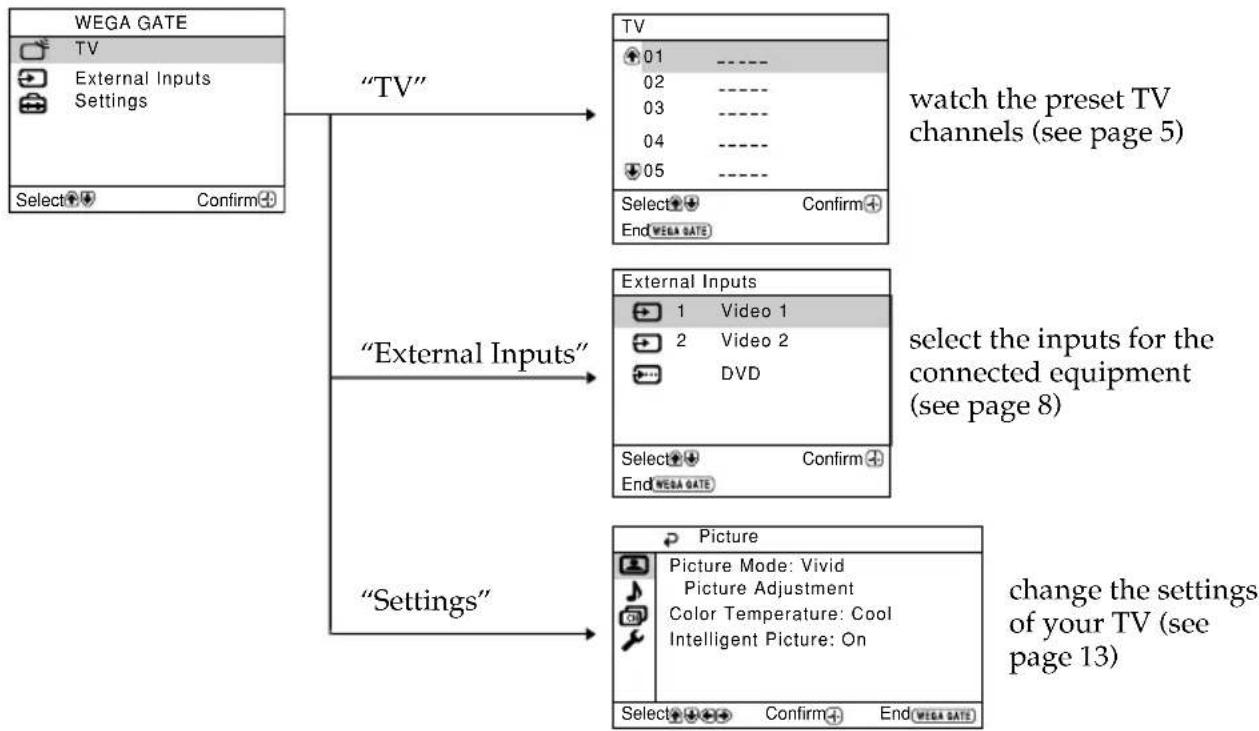
How to use WEGA GATE
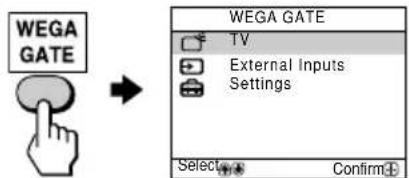
(1) Press WEGA GATE to display or cancel the WEGA GATE menu.
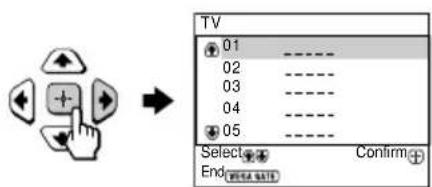
(2) Press + (or → ) to confirm your selection or go to the next level.
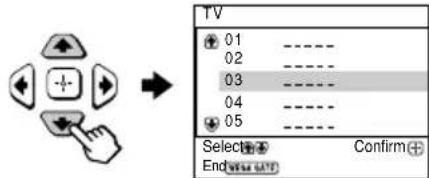
(3) Press or to select the desired item.
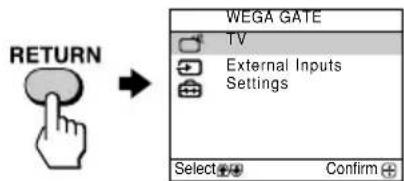
(4) Press RETURN to move to the previous level.
Tip
- The WEGA GATE, - and , , ↔ buttons on the top control panel can also be used for the operations above.

"Settings" Adjustment
You are able to change the settings of your TV from "Settings" in WEGA GATE menu.
Press WEGA GATE button to display WEGA GATE menu. Press or to select "Settings" and press + .
The following is an overview of the items that can be adjusted.
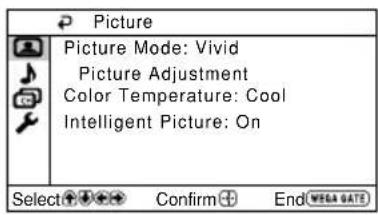
"Picture" (see page 14)
"Picture Mode": "Vivid" → "Standard" → "Custom"
"Picture Adjustment": "Picture", "Brightness", "Color", "Hue", "Sharpness", "Reset"
"Color Temparature": "Cool" → "Neutral" "Warm"
"Intelligent Picture": "On" → "Off"
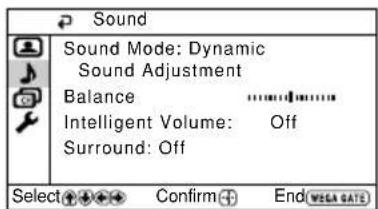
"Sound" (see page 15)
"Sound Mode": "Dynamic" - Standard" Custom"
KV-BZ21M81/BZ21M80 only)
"Sound Adjustment": "Adjust", "Reset" (KV-BZ21M81/BZ21M80 only)
"Balance"(KV-BZ21M81/BZ21M80 only)
"Intelligent Volume": "On" → "Off"
"Surround": "On" → "Simulated" "Off" (KV-BZ21M81/BZ21M80 only)
"Channel Setup" (see page 16)
"Auto Program"
"Manual Program"
"Program": "00" - "99"
"TV System": "B/G" "I" "B/K" "M"
"Setup" (see page 18)
"Language": "English" → "(Arabic)
"Picture Rotation" (KV-BZ21M81 only)
"Video Label": "Video Input", "Label"
"Color System": "Auto" "PAL" "SECAM" "NTSC3.58" "NTSC4.43"
"Wake Up Timer Beep": "On" → "Off" (KV-BZ21M81/BZ21M80 only)
"Factory Settings": "Yes" → "No"
Note
- When a feature is dimmed in the menu, it is not selectable.
Changing the "Picture" setting
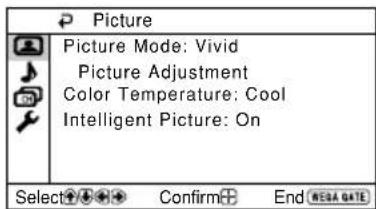
The "Picture" menu allows you to adjust the picture settings.
1 Press WEGA GATE and select "Settings".
2 Make sure the "Picture" icon ( selected, then press .
Press or to select the desired item (e.g., "Picture Mode"), then press
Select To
"Picture Mode" choose either "Vivid" (contrast and sharp), "Standard" (normal) or "Custom"*.
"Color Temperature" adjust white color tint.
Choose either "Cool" (blue tint), "Neutral" (neutral tint) or "Warm" (red tint).
"Intelligent Picture" optimize picture quality.
Press or to select "On", then press
To cancel, select "Off", then press
- Y ou can adjust the setting to your personal preference in the "Picture Adjustment" and "Color Temperature" options only when the "Custom" mode is selected.
Adjusting the "Picture Adjustment" items under "Custom" mode
1 Press or to select either "Picture" (contrast), "Brightness", "Color", "Hue" (color tones) or "Sharpness", then press. Selecting "Reset" will set your TV to the factory settings.
2 Press , , ↔ or → to adjust the setting of your selected item, then press + .
3 Repeat the above steps to adjust other items. The adjusted settings will be received when you select "Custom".
Notes
- "Hue" can be adjusted for the NTSC color system only.
- Reducing "Sharpness" can also reduce picture noise.
Changing the "Sound" setting
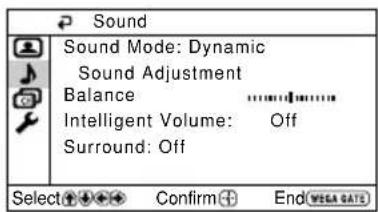
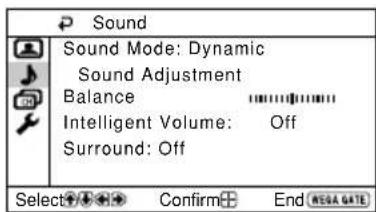
The "Sound" menu allows you to adjust the sound settings.
Press WEGA GATE and select "Settings".
2 Press or to select the "Sound" icon (J), then press
Press lubsuit or to select the desired item (e.g., "Sound Mode"), then press + .
Select To
"Sound Mode" choose either "Dynamic" (low and high tones), "Standard" (KV-BZ21M81/ (voice and high tones) or "Custom"*. BZ21M80 only)
"Balance"
(KV-BZ21M81/
BZ21M80 only)
Press or to emphasize the left speaker.
Press or to emphasize the right speaker.
"Intelligent Volume" adjust the volume of all program numbers and video inputs automatically.
Press or to select "On", then press + .
To cancel, select "Off", then press
"Surround" choose either "On" (surround), "Simulated" (stereo-like (KV-BZ21M81/ monaural sound) or "Off". BZ21M80 only)
- Y ou can adjust the setting to your personal preference in the "Sound Adjustment" option only when the "Custom" mode is selected.
Adjusting the "Sound Adjustment" items under "Custom" mode (KV-BZ21M81/BZ21M80 only)
The 5-Band Graphic Equalizer feature allows you to adjust sound frequency settings of "Custom" mode in the menu.
1 Make sure that "Adjust" is selected, then press
Selecting "Reset" will set your TV to the factory settings.
2 Press or to select the desired sound frequency, then press or to adjust the setting and press + .
The adjusted settings will be received when you select "Custom".
Notes
- Adjusting higher frequency will affect higher pitched sound and adjusting lower frequency will affect lower pitched sound.
- Y ou may display the settings directly using the SOUND MODE button on the top control panel (see page 7) or button on the remote control (see page 10).
Changing the "Channel Setup" setting
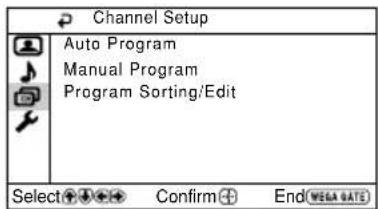
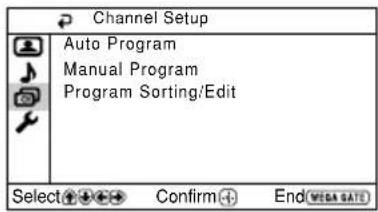
The "Channel Setup" menu allows you to preset channels automatically, manually preset channels and sort or edit the channels.
1 Press WEGA GATE and select "Settings".
2 Press or to select the "Channel Setup" icon (,), then press
Press or to select the desired item (e.g., "Auto Program"), then press + .
Select To
"Auto Program" preset channels automatically.
"Manual Program" manually preset desired channels and channels that cannot be preset automatically (see Presetting channels manually in page 17).
"Program Sorting/Edit" change the order in which the channels appear on the screen, label the program number, skip the program number and block unwanted programs. (see step 3 of the section "Initial Setup" in page 5).
Notes
- If you preset a blocked program number, that program number will be unblocked automatically.
- If you sort a blocked program, that program will remain blocked.
Presetting channels manually
1 After selecting "Manual Program", select the program number to which you want to preset a channel.
(1) Make sure "Program" is selected, then press + .
(2) Press or until the program number you want to preset appears on the menu, then press + .
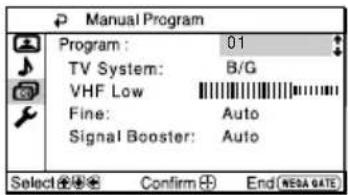
2 Select the desired channel.
(1) Make sure either "VHF Low", "VHF High" or "UHF" is selected, then press
(2) Press or until the desired channel's broadcast appears on the TV screen, then press
3 If the sound of the desired channel is abnormal, select the appropriate TV system.
(1) Press or to select "TV System", then press
(2) Press or until the sound becomes normal, then press
4 If you are not satisfied with the picture and sound quality, you may be able to improve them by using the "Fine" tuning feature.
(1) Press or to select "Fine", then press
(2) Press or to select "Manual", then press
(3) Press , , ↔ or → until the picture and sound quality are optimal, then press + . The + or - icon on the menu flashes while tuning.
5 If the TV signal is too strong (picture distorted; picture with lines; signal interference) or weak (snowy picture), you may be able to improve the picture quality by setting the "Signal Booster" feature.
(1) Press or to select "Signal Booster", then press
(2) Press or to select either "Off" (for picture distorted; picture with lines; signal interference) or "Auto" (for snowy picture), then press + .
Changing the "Setup" setting
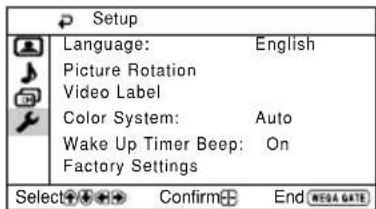
The "Setup" menu allows you to change the menu language, adjust the picture position, label the connected equipment, select the color system, set the wake up timer beep and reset your TV to factory settings.
Press WEGA GATE and select "Settings".
2 Press or to select the "Setup" icon (F), then press
3 Press or to select the desired item (e.g., "Language"), then press + .
| Select To |
| "Language" change the menu language.Press ↓ or ↓ to select either "English" or "..." (Arabic), then press ☑. |
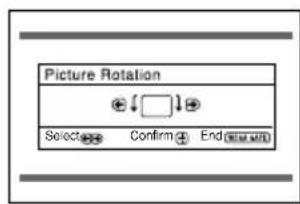
| "Picture Rotation"(KV-BZ21M81 only) | adjust the picture position when it is not aligned with the TV screen.Press ← or → to adjust the picture position, then press ☑. |
| "Video Label" label the connected equipment.(1) Select "Video Input" and press ☐. Press ← or ↓ to select the input you want to label, then press ☐.(2) Select "Label" and press ☐, then press ← or ↓ to select the label options: "Video 1" / "Video 2" / "DVD" (KV-BZ21M81/ BZ21M80 only), "VCR", "SAT", "Game" or "Edit".* You may edit the video label to your favorite name. Press ← or ↓ to select alphanumeric characters for the label, then press ☑. | |
| "Color System" select the color system.Press ← or ↓ to select either "Auto", "PAL", "SECAM", "NTSC3.58" or "NTSC4.43", then press ☑Normally, set this to "Auto". |
| "Wake Up TimerBeep" automatically using wake up timer.(KV-BZ21M81/ BZ21M80 only) To cancel, select "Off", then press . ☑ |
| "Factory Settings" | reset your TV to factory settings.Press ☐ and press ← or ↓ to select "Yes", then press ☐.To cancel, select "No", then press ☐. |
Notes
- T o ensure the beeping sound can be heard, you must set an appropriate volume level on your TV and make sure the TV is not in mute condition.
- T o stop the beeping sound, press any buttons on the remote control or top control panel.
- If no button is pressed for three minutes, the beeping sound will automatically go off.
Viewing Teletext
KV-BZ21M81 only
Some TV stations broadcast an information service called Teletext which allows you to receive various information, such as stock market reports and news.
You can use the buttons on the remote to view Teletext.
| ToDo this |
| display a Teletext Press . Each time you press , the page on the screen changes as follows:
TV picture | Teletext → Teletext and TV → TV.
If there is no Teletext broadcast, “100” is displayed at the top left corner of the screen. |
| check the contents Press . ③
of a Teletext service An overview of the Teletext contents, including page numbers, appears on the screen. |
| select a Teletext page | Press the number buttons to enter the three-digit page number of the desired Teletext page. If you make a mistake, reenter the correct page number. To access the next or previous page, press ⓷ or ⓸ |
| hold (pause) a
Teletext display | Press ⓹ to display the symbol “⓺” at the top left corner of the screen. To resume normal Teletext viewing, press ⓺. |
| reveal concealed
information (e.g., an answer to a quiz) | Press ⓻.
To conceal the information, press the button again. |
| enlarge the Teletext
display | Press ⓹. Each time you press ⓹, the Teletext display changes as follows: Enlarge upper half → Enlarge lower half → Normal size. |
| stand by for a Teletext
page while watching
a TV program | (1) Enter the Teletext page number that you want to refer to, then press ⓹.
(2) When the page number is displayed, press ⓹ show the text. |
| select a FASTEXT Press
menu or the colored
boxes | (red, green, yellow and blue)
that corresponds to the desired menu or page number. |
| turn off Teletext | Press ⓹. |
Note
- The FASTEXT feature can be used only when the FASTEXT broadcast is available.
Troubleshooting
If you find any problem while viewing your TV, you can either use the "Factory Settings" function or check the Troubleshooting guide below. If the problem persists, contact your Sony dealer.
"Factory Settings" function
Press the WEGA GATE button. Choose "Settings" and go to "Setup" (menu. From "Setup" menu, select "Factory Settings". Then select "Yes" and press. Your TV will go blank for a few seconds, then the "Initial Setup" menu will appear. Your TV will be set to factory settings, but certain problems may be solved.
| Symptom Solutions |
| Snowy picture, noisy sound | Check the antenna cable and connection on the TV, VCR and at the wall (see page 8).Check the antenna setup. Contact a Sony dealer for advice.Display the "Channel Setup" menu and select "Manual Program" to preset the channel again (see page 17).Display the "Channel Setup" menu and set the "Signal Booster" to "Auto" from "Manual Program" (see page 17).Try using an external booster. |
| Distorted picture, noisy sound | Turn off or disconnect the external booster if it is in use.Display the "Channel Setup" menu and set the "Signal Booster" to "Off" from "Manual Program" (see page 17). |
| Good picture, noisy sound | Display the "Channel Setup" menu and select the appropriate "TV System" from "Manual Program" (see page 17). |
| No picture, no sound | Check the power cord, antenna and VCR connections (see page 8).Press I/(power) to turn on the TV (see page 10).Press ① (main power) on the TV to turn off the TV for about five seconds, then turn it on again (see page 7). |
| Good picture, no sound | Press + to increase the volume level (see page 10).Pr ess to cancel the muting (see page 10). |
| Dotted lines or stripes | Do not use a hair dryer or other equipment near the TV. Check the antenna setup. Contact a Sony dealer for advice. |
| Double images or "ghosts" | Use a highly directional antenna.Use the fine tuning ("Fine") function (see page 17).Check the antenna setup. Contact a Sony dealer for advice.T urn off or disconnect the external booster if it is in use. |
| No color | Display the "Picture" menu and select "Custom" from "Picture Mode", then adjust the "Color" level from "Picture Adjustment" (see page 14).Display the "Setup" menu and check the "Color System" setting (usually set this to "Auto") (see page 18).Check the antenna setup. Contact a Sony dealer for advice. |
| Picture slant | ·Keep external speakers or other electrical equipment away from the TV.
·Display the “Setup” menu and adjust “Picture Rotation” so that the picture position is optimal (KV-BZ21M81 only) (see page 18). |
| Abnormal color patches | ·Keep external speakers or other equipment away from the TV. Do not move the TV while the TV is turned on. Press ① (main power) on the TV to turn off the TV for about 15 minutes, then turn it on again to demagnetize the TV. |
| Teletext display is incomplete (snowy picture or double images) (KV-BZ21M81 only). | ·Check the antenna cable and connection on the TV, VCR and at the wall (see page 8).
·Check the antenna setup. Contact a Sony dealer for advice.
·Display the “Channel Setup” menu and set the “Signal Booster” to “Auto” from “Manual Program” (see page 17).
·Try using an external booster.
·Use the fine tuning (“Fine”) function (see page 17). |
| The Ⓞ (standby) indicator on your TV flashes red several times after every three seconds. | ·Count the number of times the Ⓞ (standby) indicator flashes. Press ① (main power) to turn off your TV. Contact your nearest Sony service center. |
| The TV screen sometimes goes blank for slightly longer than usual during channel change. | ·The “Signal Booster” is functioning to detect a weak signal. This does not indicate a malfunction. |
| TV cabinet creaks. | ·Changes in room temperature sometimes make the TV cabinet expand or contract, causing a noise. This does not indicate a malfunction. |
| A small “boom” sound is heard when the TV is turned on. | ·The TV’s demagnetizing function is working. This does not indicate a malfunction. |
AVENTISSEMENT
"Color Temperature": "Cool" - Neutral"Warm"
"Intelligent Picture": "On" Off
"Sound" (voir page 15)
"Sound Mode": "Dynamic" "Standard" "Custom"
(KV-BZ21M81/BZ21M80 unquipment)
"Sound Adjustment": "Adjust", "Reset" (KV-BZ21M81/BZ21M80 unique)
"Balance" (KV-BZ21M81/BZ21M80 uniquement)
"Intelligent Volume": "On" → "Off"
"Surround": "On" → "Simulated" "Off" (KV-BZ21M81/
BZ21M80 uniquement)
"Picture Rotation" (KV-BZ21M81 uniquement)
"Video Label": "Video Input", "Label"
"Color System": "Auto" "PAL" "SECAM" "NTSC3.58" "NTSC4.43"
"Wake Up Timer Beep": "On" → "Off" (KV-BZ21M81/BZ21M80 unquirement)
"Factory Settings": "Yes" - "No"
Remarque
Fonction "Factory Settings"
| X
X
X
X
X
X
X
X
X
X
X
X
X
X
X
X
X
X
X
X
X
X
X
X
X
X
X
X
X
X
X
X
X
X
X
X
X
X
X
X
X
X
X
X
X
X
X
X
X
X
X |
| X
X
X
X
X
X
X
X
X
X
X
X
X
X
X
X
X
X
X
X
X
X
X
X
X
X
X
X
X
X
X
X
X
X
X
X
X
X
X
X
X
X
X
X
X
X
X
X
X
x
x
x
x
x
x
x
x
x
x
x
x
x
x
x
x
x
x
x
x
x
x
x
x
x
x
x
x
x
x
x
x
x
x
x
x
x
x
x
x
x
x
x
x
x
x
x
x
x
x
X
X
X
X
X
X
X
X
X
X
X
X
X
X
X
X
X
X
X
X
X
X
X
X
X
X
X
X
X
X
X
X
X
X
X
X
X
X
X
X
X
X
X
X
X
X
X
X
X
x |
| X
X
X
X
X
X
X
X
X
X
X
X
X
X
X
X
X
X
X
X
X
X
X
X
X
X
X
X
X
X
X
X
X
X
X
X
X
X
X
X
X
X
X
X
X
X
X
X
x
x |
| X
X
X
X
X
X
X
X
X
X
X
X
X
X
X
X
X
X
X
X
X
X
X
X
X
X
X
X
X
X
X
X
X
X
X
X
X
X
X
X
X
X
X
X
X
X
X
x
x
x |
Jb0
4 1k.
"Initial Setup")
V 1
A
1.
17 WEGA GATE
"Settings"
"Picture"
"Sound"
"Channel Setup"
"Setup"
19 1
1
#
a 100000000000000000000000000000000000000000000
A
. 1. i S i o slaaii p a ly l s r bly aiie y gill ay
402
(0a)
Joo
S
100
()
A
①
.0gw g
A
()
.
4
gio giaa jolao 1 1
(du5 10 a 4aio) uis pbi
"Initial Setup" 500,125,500,500,500,500,500,500,500,500,500,500,500,500,500,500,500,500,500,500,500,500,500,500,500,500,500,50
001 1
2g 0r0
2
2g 15
s
"Program Sorting/Edit"
.25 5
j5 j5 1 j
No
"No channel found. Please connect cable/ antenna"
"Program Sorting/Edit" 3
.
(a)
WEGA GATE
5 15 b 00b
a 590d1 Jl.
2g 0
(c
05
SΔACD = SΔCOD + SΔDCE
2
J 1
(sol) ("Initial Setup")
(d.
40S.2.00s,1wG sdy.40
45
25 2
()
1
1
中
2
On
oJoojI jI Jg PROG+/-jIoJooJpKoo
SΔAOB = SΔCOD + SΔOBC
Bolol 50o oJy Jow s dLw 3
6
.100
d) b) 1jL
L
WEGA GATE
gio 24,0 s1 algo logai 1y1 + 4
1
.(KV-BZ21M81
.
5
Jl 1aLdaNo "Initial Setup"
.
"Yes" 1
.
S
"Initial Setup" WEGA GATE
| | |
| | ① ① |
| | R ①. |
| | ① ①. |
| . . . . . . . . . . . . . . . . . . . . . . . . . . . . . . . . . . . . . . . . . . . . . . . . . . . . . . . . . . . . . . . . . . . . . . . . . . . . . . . . . . . . . . . . . . . . . . . . . . . . ..
① ①. | |
| | ①.①. |
| . . . . . . . . . . . . . . . . . . . . . . . . . . . . . . . . . . . . . . . . . . . . . . . . . . . . . . . . . . . . . . . . . . . . . . . . . . . . . . . . . . . . . . . . . . . ..
①.①. | |
| | ①.①. |
| . . . . . . . . . . . . . . . . . . . . . . . . . . . . . . . . . . . . . . . . . . . . . . . . . . . . . . . . . . . . . . . . . . . . . . . . . . . . . . . ..
①.①. | |
| | ①.①. |
()gss
gglgclaa
Color Temperature: Cool
Intelligent Picture: On
Select Confirm End
"Settings"
1
10 : 2os α + α = 1,os α - α = - 1
(1) | x - 2| = | x - 4|
WEGA GATEj0a
TV
01
02
03 04
05
Select
End
Confirm
WEGA GATE
TV
External Inputs
Settings
Select
Confirm
WJ 1
a + b = 3
WEGA GATE (1)
WEGA GATE
WEGA GATE
TV
External Inputs
Settings
TV
01
02
86 84
05
Select
End
Confirm
Select Confirm
RETURN (4)
.
Lg 1s ()
.12
S
yblslgj yj yj j 1s s g, 一 _ 一 ,
25 1g olaie 2
WEGA GATE "Settings" 1500000000000000000000000000000000000000000000000000000000000000000000000000000
"Picture" (w
"Picture Mode": "Vivid" → "Standard" → "Custom"
"Picture Adjustment": "Picture", "Brightness", "Color", "Hue"
"Sharpness", "Reset"
"Color Temperature": "Cool" → "Neutral" → "Warm"
"Intelligent Picture": "On" → "Off"
"Sound" (1540 1040 4)
"Sound Mode": "Dynamic" → "Standard" → "Custom"
(KV-BZ21M81/BZ21M80
"Sound Adjustment": "Adjust", "Reset"
(KV-BZ21M81/BZ21M80
"Balance"(KV-BZ21M81/BZ21M80
"Intelligent Volume": "On" → "Off"
"Surround": "On" → "Simulated" → "Off"
(KV-BZ21M81/BZ21M80
"Channel Setup" (1940)
"Auto Program"
"Manual Program"
"Program": "00" - "99"
"TV System": "B/G" → "I" → "D/K" → "M"
"Picture Rotation" (KV-BZ21M81
"Video Label": "Video Input", "Label"
"Color System": "Auto" → "PAL" → "SECAM" → "NTSC3.58"
"NTSC4.43"
"Wake Up Timer Beep": "Off" → "On"
(KV-BZ21M81/BZ21M80
"Factory Settings": "Yes" → "No"

1
"Picture"
"Settings" w WEGA GATE
J 1
J 1
| باني | العربية باني | |
| ر "Custom"*ر (عاد) "Standard"."العاد" .(سَنّطُفَسِت وَفَسَعَه) "Vivid" الحَلْد
.العَدْبَسَبَمَلْد | "Picture Mode" | |
| "Neutral".(العَد)
.العَد" "Cool". "Cool". "العَد"
.العَد" "Warm" "J" (العَد)
.العَد" "Warm" "J" (العَد)
.العَد" "Warm" "J" (العَد)
.العَد" "Warm" "J" (العَد)
.العَد" "Warm" "J" (العَد)
.العَد" "Warm" "J" (العَد)
.العَد" "Warm" “J” (العَد)
.العَد" "Warm" "J" (العَد)
.العَد" "Warm" "J" (العَد)
.العَد" "Warm" "J" (العَد)
.العَد" "Warm" "J" (العَد)
.العَد" "Warm" "J" (العَد)
.العْد" "Warm" "J" (العَد)
.العَد" "Warm" "J" (العَد)
.العَد" "Warm" "J" (العَد)
.العَد" "Warm" "J" (العَد)
.العَد" "Warm" "J" (العَد)
.العَد" "Warm" "J" (ALG) | "Color Temperature" | |
| "Intelligent Picture" | |
| "Intelligent Picture" | |
| "Intelligent Picture" | |
| "Intelligent Picture" | |
| "Intelligent Picture" | |
| "Intelligent Picture" | |
| "Intelligent Picture" | |
| "Intelligent Picture" | |
| "Intelligent Picture" | |
| "Intelligent Picture" | |
| "Intelligent Picture" | |
| "Intelligent Picture" | |
"Custom" "Picture Adjustment"
"Hue". "Color". "Brightness". (C) "Picture" 4.4.4.4.4.4.4.4.4.4.4.4.4.4.4.4.4.4.4.4.4.4.4.4.4.4.4.4.4.4.4.4.4.4.4.4.4.4.4.4.4.4.4.4.4.4.4.4.4.4.4 1000000000000000000000000000000000000000000000000000000000000000000000000
J 1+405
. 100000000000000000000000000000000000000000000000000000000
NTSC "Hue"
"Sharpness"
"Settings" w WEGA GATE
1
"Sound" c#e b
2
J (Sound Mode)
3
.
JU
| (الحَسُمُّل) | ("Standard") | "Sound Mode" |
| Rَالْنَتَبِير "Custom" | "Dynamic" |
| | (KV-BZ21M81/ |
| | BZ21M80 |
| | "—Balance" |
| | (KV-BZ21M81/ |
| | BZ21M80 |
| | "—Intelligent Volume" |
| | |
| | "—Surround" |
| | (KV-BZ21M81/ |
| | BZ21M80 |
| | "—"— |
| | |
"Custom" "Sound Adjustment"
(KV-BZ21M81/BZ21M80)
150 5- Band Graphic Equalizer"
1
"Adjust" 40
"Reset"
1 405dww.0dsololgfoafoafoafoafoafoafoafoafoafoafoafoafoafoafoafoafoafoafoafoafoafoafoafoafoafoafoafoafoafoafoafoafoafoafoafoafoafoafoafoafoafoafoafoafoafoafoafoafoafoafo
"Custom"
2
山
SOUND MODE 4d jdoaia b aiaa
()
"Channel Setup"
.
"Settings" wJ WEGA GATE
.
J (Auto Program)
.
"Setup" "Settings" WEGA GATE 455 "Yes" "Factory Settings" "Setup"
g g g g g g g g g g g g g g g g g g g g g g g g g g g g g g g g g g g g g g g g g g
J 1
| الله批示 | الإستعمال | | |
| \( ( \text{ مصحيى} \) "Signal Booster" )\(\text{ Signal Booster } \)\( \text{ Signal Booster } \)\( \text{ Signal Booster } \)\( \text{ Signal Booster } \)\( \text{ Signal Booster } \)\( \text{ Signal Booster } \)\( \text{ Signal Booster } \)\( \text{ Signal Booster } \)\( \text{ Signal Booster } \)\( \text{ Signal Booster } \)\( \text{ Signal Booster } \)\( \text{ Signal Booster } \)\( \mathrm { } \text{ Signal Booster } \)\( \mathrm { } \text{ Signal Booster } \)\( \mathrm { } \text{ Signal Booster } \)\( \mathrm { } \text{ Signal Booster } \)\( \mathrm { } \text{ Signal Booster } \)\( \mathrm { } \text{ Signal Booster } \)\( \mathrm { } \text{ Signal Booster } \)\( \mathrm { } \text{ Signal Booster } \)\$ | \( \begin{array}{l}\bullet\bullet\bullet\bullet\bullet\bullet\bullet\bullet\bullet\bullet\bullet\bullet\bullet\bullet\bullet\bullet\bullet\bullet\bullet\bullet\bullet\bullet\bullet\bullet\bullet\bullet\bullet\bullet\bullet\bullet\bullet\bullet\bullet\bullet\bullet\bullet\bullet\bullet\bullet\bullet\bullet\bullet\bullet\bullet\bullet\bullet\bullet\bullet\bullet\bullet\bullet\\ \bullet\bullet\bullet\bullet\bullet\bullet\bullet\bullet\bullet\bullet\bullet\bullet\bullet\bullet\bullet\bullet\bullet\bullet\bullet\bullet\bullet\bullet\bullet\bullet\bullet\bullet\bullet\bullet\bullet\bullet\bullet\bullet\bullet\bullet\bullet\bullet\bullet\bullet\bullet\bullet\bullet\bullet\bullet\bullet\bullet\bullet\bullet\bullet\bullet\bullet \end{array} \) | | |
| \( \begin{array}{l}\bullet\bullet\bullet\bullet\bullet\bullet\bullet\bullet\bullet\bullet\bullet\bullet\bullet\bullet\bullet\bullet\bullet\bullet\bullet\bullet\bullet\bullet\bullet\bullet\bullet\bullet\bullet\bullet\bullet\bullet\bullet\bullet\bullet\bullet\bullet\bullet\bullet\bullet\bullet\bullet\bullet\bullet\bullet\bullet\bullet\cdot\bullet\bullet\bullet\bullet\bullet\bullet\bullet\bullet\bullet\bullet\bullet\bullet\bullet\bullet\bullet\bullet\bullet\bullet\bullet\bullet\bullet\bullet\bullet\bullet\bullet\bullet\bullet\bullet\bullet\bullet\bullet\bullet\bullet\bullet\bullet\bullet\bullet\bullet\bullet\bullet\bullet\bullet\bullet\bullet\bullet\bullet\bullet\bullet\bullet\cdot\bullet\bullet\bullet\bullet \end{array} \) | \( \begin{array}{l}\bullet\bullet\bullet\bullet\bullet\bullet\bullet\bullet\bullet\bullet\bullet\bullet\bullet\bullet\bullet\bullet\bullet\bullet\bullet\bullet\bullet\bullet\bullet\bullet\bullet\bullet\bullet\bullet\bullet\bullet\bullet\bullet\bullet\bullet\bullet\bullet\bullet\bullet\bullet\bullet\bullet\bullet\bullet\bullet\bullet\circ \\ \bullet\bullet\bullet\bullet\bullet\bullet\bullet\bullet\bullet\bullet\bullet\bullet\bullet\bullet\bullet\bullet\bullet\bullet\bullet\bullet\bullet\bullet\bullet\bullet\bullet\bullet\bullet\bullet\bullet\bullet\bullet\bullet\bullet\bullet\bullet\bullet\bullet\bullet\bullet\bullet\bullet\bullet\bullet\bullet\bullet\bullet\bullet\bullet\bullet\circ \\ \bullet\bullet\bullet\circ\text{ " } \end{array} \) | | |
| \( \begin{array}{l}\bullet\bullet\bullet\bullet\bullet\bullet\bullet\bullet\bullet\bullet\bullet\bullet\bullet\bullet\bullet\bullet\bullet\bullet\bullet\bullet\bullet\bullet\bullet\bullet\bullet\bullet\bullet\bullet\bullet\bullet\bullet\bullet\bullet\bullet\bullet\bullet\bullet\bullet\bullet\bullet\bullet \end{array} \) | \( \begin{array}{l}\bullet\bullet\bullet\bullet\bullet\bullet\bullet\bullet\bullet\bullet\bullet\bullet\bullet\bullet\bullet\bullet\bullet\bullet\bullet\bullet\bullet\bullet\bullet\bullet\bullet\bullet\bullet\bullet\bullet\bullet\bullet\bullet\bullet\bullet\bullet\bullet\bullet\bullet \end{array} \) | | |
| \( \begin{array}{l}\bullet\bullet\bullet\circ\text{ " } \end{array} \) | \( \begin{array}{l}\bullet\bullet\bullet\circ\text{ " } \end{array} \) | | |
| \( \begin{array}{l}\bullet\bullet\circ\text{ " } \end{array} \) | \( \begin{array}{l}\bullet\bullet\circ\text{ " } \end{array} \) | | |
| \( \begin{array}{l}\bullet\bullet\circ\text{ " } \end{array} \) | \( \begin{array}{l}\bullet\bullet\circ\text{ " } \end{array} \) | | |
| \( \begin{array}{l}\bullet\bullet\circ\text{ " } \end{array} \) | | | |
| \( \begin{array}{l}\bullet\bullet\circ\text{ " } \end{array} \) | | | |
| \( \begin{array}{l}\bullet\bullet\circ\text{ " } \end{array} \) | | | |
| \( \begin{array}{l}\bullet\bullet\circ\text{ " } \end{array} \) | | | |
| \( \begin{array}{l}\bullet \bullet \circ \text{ " } \end{array} \) | | | |
| \( \begin{array}{l}\bullet \bullet \circ \text{ " } \end{array} \) | | | |
| \( \begin{array}{l}\bullet \bullet \circ \text{ " } \end{array} \) | | | |
| \( \begin{array}{l}\bullet \bullet \circ \text{ " } \end{array} \) | | | |
| \( \begin{array}{l}\bullet \bullet \circ \text{ " } \end{array} \) | | | |
| \( \begin{array}{l}\bullet \bullet \circ \text{ " } \end{array} \) | | | |
| \( \begin{array}{l}\bullet \bullet \circ \text{ " } \end{array} \) | | | |
| \( \begin{array} { l } { \text{ " } \text{ " } } \end{array} \) | | | |
| \( \begin{array} { l } { \text{ " } } \end{array} \) | | | |
| \( \begin{array} { l } { \text{ " } } \end{array} \) | | | |
| \( \begin{array} { l } { \text{ " } } \end{array} \) | | | |
| \( \begin{array} { l } { \text{ " } } \end{array} \) | | | |
| \( \begin{array} { l } { \text{ " } } \end{array} \) | | | |
| \( \begin{array} { l } { \text{ " } } \end{array} \) | | | |
| \( \begin{array} { l } { \text{ " } } \end{array} \) | | | |
| \( \begin{array} { c } { \text{ " } } \end{array} \) | | | |
| \( \begin{array} { c } { \text{ " } } \end{array} \) | | | |
| \( \begin{array} { c } { \text{ " } } \end{array} \) | | | |
| \( \begin{array} { c } { \text{ " } } \end{array}\rbrack \) | | | |
| \( \begin{array} { c } { \text{ " } } \end{array} \) | | | |
| \( \begin{array} { c } { \text{ " } } \end{array} \) | | | |
| \( \begin{array} { c } { \text{ " } } \end{array} \) | | | |
| \( \begin{aligned} & \text{ " } \end{aligned} \) | | | |
| \( \begin{aligned} & \text{ " } \end{aligned} \) | | | |
| \( \begin{aligned} & \text{ " } \end{aligned} \) | | | |
| \( \begin{aligned} & \text{ " } \end{aligned} \) | | | |
| \( \begin{aligned} & \text{ " } \end{array} \) | | | |
| \( \begin{aligned} & \text{ " } \end{aligned} \) | | | |
| \( \begin{aligned} & \text{ " } \end{aligned} \) | | | |
| \( \begin{aligned} & \text{ " } \end{aligned} \) | | | |
| \( \begin{aligned} & \text{ “ } \end{aligned} \) | | | |
| \( \begin{aligned} & \text{ " } \end{aligned} \) | | | |
| \( \begin{aligned} & \text{ " } \end{aligned} \) | | | |
| \( \begin{aligned} & \text{ " } \end{aligned} \) | | | |
| \( \begin{aligned} & \text{ “ } \end{array} \) | | | |
| \( \begin{aligned} & \text{ " } \end{aligned} \) | | | |
| \( \begin{aligned} & \text{ " } \end{aligned} \) | | | |
| \( \begin{aligned} & \text{ " } \end{aligned} \) | | | |
| \( \begin{aligned} & \text{ ' } \end{aligned} \) | | | |
| \( \begin{aligned} & \text{ ' } \end{aligned} \) | | | |
| \( \begin{aligned} & \text{ ' } \end{aligned} \) | | | |
| \( \begin{aligned} & \text{ ' } \end{aligned} \) | | | |
| \( \begin{aligned} & \text{ 1 } \end{aligned} \) | | | |
| \( \begin{aligned} & \text{ ' } \end{aligned} \) | | | |
| \( \begin{aligned} & \text{ ' } \end{aligned} \) | | | |
| \( \begin{aligned} & \text{ ' } \end{aligned} \) | | | |
| \( \begin{aligned} & \text{ " } \end{aligned} \) | | | |
| \( \begin{aligned} & \text{ ' } \end{aligned} \) | | | |
| \( \begin{aligned} & \text{ ' } \end{aligned} \) | | | |
| \( \begin{aligned} & \text{ " } \end{aligned} \) | | | |
| \( \begin{aligned} & \text{ " } \end{aligned} \) | | | |
| \( \begin{aligned} & \text{ ' } \end{aligned} \) | | | |
| \( \begin{aligned} & \text{ " } \end{aligned} \) | | | |
| \( \begin{aligned} & \text{ ' } \end{aligned} \) | | | |
| \( \begin{aligned} & \text{ " } \end{aligned} \) | | | |
| \( \begin{aligned} & \text{ " } \end{aligned} \) | | | |
| \( \begin{aligned} & \text{ " } \end{aligned} \) | | | |
| \( \begin{aligned} & \text{ ' } \end{array} \) | | | |
| \( \begin{aligned} & \text{ ' } \end{array} \) | | | |
| \( \begin{aligned} & \text{ ' } \end{array} \) | | | |
| \( \begin{aligned} & \text{ ' } \end{array} \) | | | |
| \( \begin{aligned} & \text{ ' } \end{aligned} \) | | | |
| \( \begin{aligned} & \text{ ' } \end{aligned} \) | | | |
| \( \begin{aligned} & \text{ ' } \end{aligned} \) | | | |
| \( \begin{aligned} & \text{ ' } \end{array} \) | | | |
| \( \begin{aligned} & \text{ ' } \end{array} \) | | | |
| \( \begin{aligned} & \text{ ' } \end{array} \) | | | |
| \( \begin{aligned} & \text{ " } \end{aligned} \) | | | |
| \( \begin{aligned} & \text{ ' } \end{aligned} \) | | | |
| \( \begin{aligned} & \text{ ' } \end{aligned} \) | | | |
| \( \begin{aligned} & \text{ ' } \end{array} \) | | | |
| \( \begin{aligned} & \text{ " } \end{aligned} \) | | | |
| \( \begin{aligned} & \text{ ' } \end{aligned} \) | | | |
| \( \begin{aligned} & \text{ ' } \end{array} \) | | | |
| \( \begin{aligned} & \text{ ' } \end{aligned} \) | | | |
| \( \begin{aligned} & \text{ ' } \end{aligned} \) | | | |
| \( \begin{aligned} & \text{ ' } \end{array} \) | | | |
| \( \begin{aligned} & \text{ ' } \end{aligned} \) | | | |
| \( \begin{aligned} & \text{ " } \end{aligned} \) | | | |
| \( \begin{aligned} & \text{ ' } \end{aligned} \) | | | |
| \( \begin{aligned} & \text{ ' } \end{array} \) | | | |
| \( \begin{aligned} & \text{ ' } \end{array} \) | | | |
| \( \begin{aligned} & \text{ " } \end{aligned} \) | | | |
| \( \begin{aligned} & \text{ ' } \end{array} \) | | | |
| \( \begin{aligned} & \text{ ' } \end{array} \) | | | |
| \( \begin{aligned} & \text{ ' } \end{aligned} \) | | | |
| \( \begin{aligned} & \text{ ' } \end{array} \) | | | |
| \( \begin{aligned} & \text{ ' } \end{aligned} \) | | | |
| \( \begin{aligned} & \text{ ' } \end{array} \) | | | |
| \( \begin{aligned} & \text{ ' } \end{array} \) | | | |
| \( \begin{aligned} & \text{ ' } \end{aligned} \) | | | |
| \( \begin{aligned} & \text{ " } \end{aligned} \) | | | |
| \( \begin{aligned} & \text{ ' } \end{array} \) | | | |
| \( \begin{aligned} & \text{ ' } \end{array} \) | | | |
| \( \begin{aligned} & \text{ " } \end{array} \) | | | |
| \( \begin{aligned} & \text{ ' } \end{array} \) | | | |
| \( \begin{aligned} & \text{ ' } \end{array} \) | | | |
| \( \begin{aligned} & \text{ ' } \end{array} \) | | | |
| \( \begin{aligned} & \text{ " } \end{array} \) | | | |
| \( \begin{aligned} & \text{ ' } \end{aligned} \) | | | |
| \( \begin{aligned} & \text{ ' } \end{array} \) | | | |
| \( \begin{aligned} & \text{ ' } \end{array} \) | | | |
| \( \begin{aligned} & \text{ " } \end{array} \) | | | |
| \( \begin{aligned} & \text{ " } \end{array} \) | | | |
| \( \begin{aligned} & \text{ ' } \end{array} \) | | | |
| \( \begin{aligned} & \text{ ' } \end{array} \) | | | |
| \( \begin{aligned} & \text{ " } \end{array} \) | | | |
| \( \begin{aligned} & \text{ " } \end{aligned} \) | | | |
| \( \begin{aligned} & \text{ ' } \end{aligned} \) | | | |
| \( \begin{aligned} & \text{ ' } \end{aligned} \) | | | |
| \( \begin{aligned} & \text{ " } \end{array} \) | | | |
| \( \begin{aligned} & \text{ ' } \end{array} \) | | | |
| \( \begin{aligned} & \text{ ' } \end{array} \) | | | |
| \( \begin{aligned} & \text{ ' } \end{aligned} \) | | | |
| \( \begin{aligned} & \text{ " } \end{array} \) | | | |
| \( \begin{aligned} & \text{ ' } \end{array} \) | | | |
| \( \begin{aligned} & \text{ ' } \end{aligned} \) | | | |
| \( \begin{aligned} & \text{ ' } \end{aligned} \) | | | |
| \( \begin{aligned} & \text{ " } \end{array} \) | | | |
| \( \begin{aligned} & \text{ ' } \end{aligned} \) | | | |
| \( \begin{aligned} & \text{ ' } \end{aligned} \) | | | |
| \( \begin{aligned} & \text{ ' } \end{aligned} \) | | | |
| \( \begin{aligned} & \text{ " } \end{array} \) | | | |
| \( \begin{aligned} & \text{ " } \end{array} \) | | | |
| \( \begin{aligned} & \text{ ' } \end{array} \) | | | |
| \( \begin{aligned} & \text{ ' } \end{aligned} \) | | | |
| \( \begin{aligned} & \text{ ' } \end{array} \) | | | |
| \( \begin{aligned} & \text{ " } \end{array} \) | | | |
| \( \begin{aligned} & \text{ ' } \end{array} \) | | | |
| \( \begin{aligned} & \text{ ' } \end{aligned} \) | | | |
| \( \begin{aligned} & \text{ " } \end{array} \) | | | |
| \( \begin{aligned} & \text{ " } \end{array} \) | | | |
| \( \begin{aligned} & \text{ ' } \end{aligned} \) | | | |
| \( \begin{aligned} & \text{ ' } \end{aligned} \) | | | |
| \( \begin{aligned} & \text{ ' } \end{array} \) | | | |
| \( \begin{aligned} & \text{ " } \end{array} \) | | | |
| \( \begin{aligned} & \text{ ' } \end{aligned} \) | | | |
| \( \begin{aligned} & \text{ ' } \end{aligned} \) | | | |
| \( \begin{aligned} & \text{ " } \end{array} \) | | | |
| \( \begin{aligned} & \text{ " } \end{aligned} \) | | | |
| \( \begin{aligned} & \text{ ' } \end{aligned} \) | | | |
| \( \begin{aligned} & \text{ ' } \end{array} \) | | | |
| \( \begin{aligned} & \text{ " } \end{array} \) | | | |
| \( \begin{aligned} & \text{ " } \end{array} \) | | | |
| \( \begin{aligned} & \text{ ' } \end{aligned} \) | | | |
| \( \begin{aligned} & \text{ ' } \end{array} \) | | | |
| \( \begin{aligned} & \text{ " } \end{array} \) | | | |
| \( \begin{aligned} & \text{ " } \end{aligned} \) | | | |
| \( \begin{aligned} & \text{ ' } \end{array} \) | | | |
| \( \begin{aligned} & \text{ ' } \end{array} \) | | | |
| \( \begin{aligned} & \text{ " } \end{aligned} \) | | | |
| \( \begin{aligned} & \text{ " } \end{aligned} \) | | | |
| \( \begin{aligned} & \text{ ' } \end{aligned} \) | | | |
| \( \begin{aligned} & \text{ ' } \end{array} \) | | | |
| \( \begin{aligned} & \text{ " } \end{aligned} \) | | | |
| \( \begin{aligned} & \text{ " } \end{aligned} \) | | | |
| \( \begin{aligned} & \text{ ' } \end{array} \) | | | |
| \( \begin{aligned} & \text{ ' } \end{aligned} \) | | | |
| \( \begin{aligned} & \text{ ' } \end{array} \) | | | |
| \( \begin{aligned} & \text{ " } \end{aligned} \) | | | |
| \( \begin{aligned} & \text{ ' } \end{array} \) | | | |
| \( \begin{aligned} & \text{ ' } \end{aligned} \) | | | |
| \( \begin{aligned} & \text{ ' } \end{aligned} \) | | | |
| \( \begin{aligned} & \text{ " } \end{aligned} \) | | | |
| \( \begin{aligned} & \text{ ' } \end{array} \) | | | |
| \( \begin{aligned} & \text{ ' } \end{aligned} \) | | | |
| \( \begin{aligned} & \text{ " } \end{aligned} \) | | | |
| \( \begin{aligned} & \text{ " } \end{aligned} \) | | | |
| \( \begin{aligned} & \text{ ' } \end{array} \) | | | |
| \( \begin{aligned} & \text{ " } \end{array} \) | | | |
| \( \begin{aligned} & \text{ ' } \end{array} \) | | | |
| \( \begin{aligned} & \text{ " } \end{array} \) | | | |
| \( \begin{aligned} & \text{ ' } \end{array} \) | | | |
| \( \begin{aligned} & \text{ " } \end{aligned} \) | | | |
| \( \begin{aligned} & \text{ ' } \end{array} \) | | | |
| \( \begin{aligned} & \text{ " } \end{aligned} \) | | | |
| \( \begin{aligned} & \text{ ' } \end{array} \) | | | |
| \( \begin{aligned} & \text{ " } \end{array} \) | | | |
| \( \begin{aligned} & \text{ ' } \end{aligned} \) | | | |
| \( \begin{aligned} & \text{ " } \end{aligned} \) | | | |
| \( \begin{aligned} & \text{ ' } \end{aligned} \) | | | |
| \( \begin{aligned} & \text{ " } \end{array} \) | | | |
| \( \begin{aligned} & \text{ ' } \end{array} \) | | | |
| \( \begin{aligned} & \text{ " } \end{array} \) | | | |
| \( \begin{aligned} & \text{ ' } \end{aligned} \) | | | |
| \( \begin{aligned} & \text{ " } \end{array} \) | | | |
| \( \begin{aligned} & \text{ ' } \end{array} \) | | | |
| \( \begin{aligned} & \text{ " } \end{aligned} \) | | | |
| \( \begin{aligned} & \text{ ' } \end{aligned} \) | | | |
| \( \begin{aligned} & \text{ " } \end{aligned} \) | | | |
| \( \begin{aligned} & \text{ ' } \end{array} \) | | | |
| \( \begin{aligned} & \text{ " } \end{array} \) | | | |
| \( \begin{aligned} & \text{ " } \end{array} \) | | | |
| \( \begin{aligned} & \text{ " } \end{array} \) | | | |
| \( \begin{aligned} & \text{ ' } \end{aligned} \) | | | |
| \( \begin{aligned} & \text{ " } \end{array} \) | | | |
| \( \begin{aligned} & \text{ " } \end{array} \) | | | |
| \( \begin{aligned} & \text{ " } \end{array} \) | | | |
| \( \begin{aligned} & \text{ ' } \end{array} \) | | | |
| \( \begin{aligned} & \text{ " } \end{array} \) | | | |
| \( \begin{aligned} & \text{ " } \end{array} \) | | | |
| \( \begin{aligned} & \text{ " } \end{aligned} \) | | | |
| \( \begin{aligned} & \text{ ' } \end{aligned} \) | | | |
| \( \begin{aligned} & \text{ " } \end{array} \) | | | |
| \( \begin{aligned} & \text{ ' } \end{aligned} \) | | | |
| \( \begin{aligned} & \text{ " } \end{array} \) | | | |
| \( \begin{aligned} & \text{ ' } \end{aligned} \) | | | |
| \( \begin{aligned} & \text{ ' } \end{array} \) | | | |
| \( \begin{aligned} & \text{ ' } \end{aligned} \) | | | |
| \( \begin{aligned} & \text{ " } \end{array} \) | | | |
| \( \begin{aligned} & \text{ ' } \end{aligned} \) | | | |
| \( \begin{aligned} & \text{ " } \end{aligned} \) | | | |
| \( \begin{aligned} & \text{ ' } \end{array} \) | | | |
| \( \begin{aligned} & \text{ " } \end{aligned} \) | | | |
| \( \begin{aligned} & \text{ ' } \end{aligned} \) | | | |
| \( \begin{aligned} & \text{ " } \end{array} \) | | | |
| \( \begin{aligned} & \text{ " } \end{array} \) | | | |
| \( \begin{aligned} & \text{ " } \end{aligned} \) | | | |
| \( \begin{aligned} & \text{ ' } \end{array} \) | | | |
| \( \begin{aligned} & \text{ " } \end{array} \) | | | |
| \( \begin{aligned} & \text{ " } \end{aligned} \) | | | |
| \( \begin{aligned} & \text{ " } \end{array} \) | | | |
| \( \begin{aligned} & \text{ ' } \end{aligned} \) | | | |
| \( \begin{aligned} & \text{ ' } \end{aligned} \) | | | |
| \( \begin{aligned} & \text{ " } \end{aligned} \) | | | |
| \( \begin{aligned} & \text{ " } \end{array} \) | | | |
| \( \begin{aligned} & \text{ ' } \end{aligned} \) | | | |
| \( \begin{aligned} & \text{ ' } \end{array} \) | | | |
| \( \begin{aligned} & \text{ " } \end{aligned} \) | | | |
| \( \begin{aligned} & \text{ " } \end{array} \) | | | |
| \( \begin{aligned} & \text{ ' } \end{aligned} \) | | | |
| \( \begin{aligned} & \text{ " } \end{array} \) | | | |
| \( \begin{aligned} & \text{ " } \end{aligned} \) | | | |
| \( \begin{aligned} & \text{ ' } \end{array} \) | | | |
| \( \begin{aligned} & \text{ ' } \end{aligned} \) | | | |
| \( \begin{aligned} & \text{ " } \end{array} \) | | | |
| \( \begin{aligned} & \text{ " } \end{aligned} \) | | | |
| \( \begin{aligned} & \text{ " } \end{array} \) | | | |
| \( \begin{aligned} & \text{ ' } \end{array} \) | | | |
| \( \begin{aligned} & \text{ ' } \end{array} \) | | | |
| \( \begin{aligned} & \text{ " } \end{aligned} \) | | | |
| \( \begin{aligned} & \text{ " } \end{array} \) | | | |
| \( \begin{aligned} & \text{ ' } \end{array} \) | | | |
| \( \begin{aligned} & \text{ " } \end{array} \) | | | |
| \( \begin{aligned} & \text{ " } \end{aligned} \) | | | |
| \( \begin{aligned} & \text{ " } \end{aligned} \) | | | |
| \( \begin{aligned} & \text{ ' } \end{aligned} \) | | | |
| \( \begin{aligned} & \text{ " } \end{array} \) | | | |
| \( \begin{aligned} & \text{ " } \end{aligned} \) | | | |
| \( \begin{aligned} & \text{ " } \end{aligned} \) | | | |
| \( \begin{aligned} & \text{ ' } \end{array} \) | | | |
| \( \begin{aligned} & \text{ " } \end{aligned} \) | | | |
| \( \begin{aligned} & \text{ " } \end{array} \) | | | |
| \( \begin{aligned} & \text{ " } \end{array} \) | | | |
| \( \begin{aligned} & \text{ ' } \end{aligned} \) | | | |
| \( \begin{aligned} & \text{ " } \end{aligned} \) | | | |
| \( \begin{aligned} & \text{ " } \end{aligned} \) | | | |
| \( \begin{aligned} & \text{ " } \end{array} \) | | | |
| \( \begin{aligned} & \text{ ' } \end{aligned} \) | | | |
| \( \begin{aligned} & \text{ " } \end{aligned} \) | | | |
| \( \begin{aligned} & \text{ " } \end{array} \) | | | |
| \( \begin{aligned} & \text{ ' } \end{array} \) | | | |
| \( \begin{aligned} & \text{ ' } \end{aligned} \) | | | |
| \( \begin{aligned} & \text{ " } \end{aligned} \) | | | |
| \( \begin{aligned} & \text{ " } \end{array} \) | | | |
| \( \begin{aligned} & \text{ " } \end{array} \) | | | |
| \( \begin{aligned} & \text{ ' } \end{array} \) | | | |
| \( \begin{aligned} & \text{ " } \end{aligned} \) | | | |
| \( \begin{aligned} & \text{ " } \end{array} \) | | | |
| \( \begin{aligned} & \text{ " } \end{aligned} \) | | | |
| \( \begin{aligned} & \text{ ' } \end{array} \) | | | |
| \( \begin{aligned} & \text{ " } \end{aligned} \) | | | |
| \( \begin{aligned} & \text{ " } \end{aligned} \) | | | |
| \( \begin{aligned} & \text{ " } \end{aligned} \) | | | |
| \( \begin{aligned} & \text{ ‘ } \\ & \\ & \\ & \\ & \\ & \\ & \\ & \\ & \\ & \\ & \\ & \\ & \\ & \\ & \\ & \\ & \\ & \\ & \\ & \\ & \\ & \\ & \\ & \\ & \\ & \\ & \\ & \\ & \\ & \\ & \\ & \\ & \\ & \\ & \\ & \\ & \\ & \\ & \\ & \\ & \\ & \\ & \\ & \\ & \\ & \\ & \\ & \\ & \\ & \\ & \\& \\ & \\ & \\ & \\ & \\ & \\ & \\ & \\ & \\ & \\ & \\ & \\ & \\ & \\ & \\ & \\ & \\ & \\ & \\ & \\ & \\ & \\ & \\ & \\ & \\ & \\ & \\ & \\ & \\ & \\ & \\ & \\ & \\ & \\ & \\ & \\ & \\ & \\ & \\ & \\ & \\ & \\ & \\ & \\ & \\ & \\ & \\ & \\ & \\ & \\ &
& \\ & \\ & \\ & \\ & \\ & \\ & \\ & \\ & \\ & \\ & \\ & \\ & \\ & \\ & \\ & \\ & \\ & \\ & \\ & \\ & \\ & \\ & \\ & \\ & \\ & \\ & \\ & \\ & \\ & \\ & \\ & \\ & \\ & \\ & \\ & \\ & \\ & \\ & \\ & \\ & \\ & \\ & \\ & \\ & \\ & \\ & \\ & \\ & \\ &\\ & \\ & \\ & \\ & \\ & \\ & \\ & \\ & \\ & \\ & \\ & \\ & \\ & \\ & \\ & \\ & \\ & \\ & \\ & \\ & \\ & \\ & \\ & \\ & \\ & \\ & \\ & \\ & \\ & \\ & \\ & \\ & \\ & \\ & \\ & \\ & \\ & \\ & \\ & \\ & \\ & \\ & \\ & \\ & \\ & \\ & \\ & \\ & \\ & \\ &\\
& \\ &\\
& \\ &\\
& \\ &\\
& \\ &\\
& \\ &\\
& \\ &\\
& \\ &\\
& \\ &\\
& \\ &\\
& \\ &\\
& \\ &\\
& \\ &\\
& \\ &\\
& \\ &\\
& \\ &\\
& \\ &\\
& \\ &\\
& \\ &\\
& \\ &\\
& \\ &\\
&
&\\
&\\
&\\
&\\
&\\
&\\
&\\
&\\
&\\
&\\
&\\
&\\
&\\
&\\
&\\
&\\
&\\
&\\
&\\
&\\
&\\
&\\
&\\
&\\
&\\
&\\
&\\
&\\
&\\
&\\
&\\
&\\
&\\
&\\
&
&\\
&\\
&\\
&\\
&\\
&\\
&\\
&\\
&\\
&\\
&\\
&\\
&\\
&\\
&\\
&\\
&\\
&\\
&\\
&\\
&\\
&\\
&\\
&\\
&\\
&\\
&\\
&\\
&\\
&\\
&\\
&\\
&
&\\ | | | |
| الإستعمال | |
| %.الإستعمال الحرفية الحرفية الحرفية الحرفية الحرفية الحرفية الحرفية الحرفية الحرفية الحرفية الحرفية الحرفية الحرفية الحرفية الحرفية الحرفية الحرفية الحرفية الحرفية الحرفية الحرفية الحرفية الحرفية الحرفية الحرفية الحرفية الحرفية الحرفية الحرفية الحرفية الحرفية الحرفية الحرفية الحرفية EXTERIOR | %.الإستعمال الحرفية الحرفية الحرفية الحرفية EXTERIOR |
| %.الإستعمال الحرفية الحرفية EXTERIOR | %.الإستعمال EXTERIOR |
| %.الإستعمال EXTERIOR | %.الإستعمال EXTERIOR |
| %.الإستعمال EXTERIOR | %.الإستعمال EXTERIOR |
| %.الإستعمال EXTERIOR | %.الTABLALE |
| %.الTABLALE | %.الTABLALE |
| %.الTABLALE | %.الTABLALE |
| %.الTABLALE | %.الTABLALE |
| %.الTABLALE | %.الTABLALE |
| %.الTABLALE | %.الTABLALE |
| %.الTABLALE | %.الTABLALE |
| %.الTABLALE | %.الTABLALE |
| %.الTABLALE | % |
| %.الTABLALE | %. |
| %.الTABLALE | %. |
| %.الTABLALE | %. |
| %.الTABLALE | %. |
| %.الTABLALE | %. |
| %.الTABLALE | %. |
| %.الTABLALE | %. |
| %.الTABLALE | %. |
| %.الTABLALE | %. |
| %.الTABLALE | %. |
| %.الTABLALE | % |
| %.الTABLALE | % |
| %.الTABLALE | % |
| %.الTABLALE | % |
| %.الTABLALE | % |
| %.الTABLALE | % |
| %.الTABLALE | % |
| %.الTABLALE | % |
| %.الTABLALE | % |
| %.الTABLALE | % |
| %.الTABLALE | %. |
| %.الTABLALE | % |
| %.الTABLALE | % |
| %.الTABLALE | % |
| %.الTABLALE | % |
| %.الTABLALE | % |
| %.الTABLALE | % |
| %.الTABLALE | % |
| %.الTABLALE | % |
| %.الTABLALE | %. |
| %.الTABLALE | %. |
| %.الTABLALE | %. |
| %.الTABLALE | %. |
| %.الTABLALE | %. |
| %.الTABLALE | %. |
| %.الTABLALE | %. |
| %.الTABLALE | %. |
| %.الTABLALE | % |
| %.الTABLALE | %. |
| %.الTABLALE | %. |
| %.الTABLALE | %. |
| %.الTABLALE | %. |
| %.الTABLALE | %. |
| %.الTABLALE | %. |
| %.الTABLALE | %. |
| %.الTABLALE | %. |
| %.الTABLALE | %
.
.
.
.
.
.
.
.
.
.
.
.
.
.
.
.
.
.
.
.
.
.
.
.
.
.
.
.
.
.
.
.
.
.
.
.
.
.
.
.
.
.
.
.
.
.
.
.
.
.
.
.
.
.
.
.
.
.
.
.
.
.
.
.
.
.
.
.
.
.
.
.
.
.
.
.
.
.
.
.
.
.
.
.
.
.
.
.
.
.
.
.
.
.
.
.
.
.
.
.
-
.
.
.
.
.
.
.
.
.
.
.
.
.
.
.
.
.
.
.
.
.
.
.
.
.
.
.
.
.
.
.
.
.
.
.
.
.
.
.
.
.
.
.
.
.
.
.
.
.
.
.
.
.
.
.
.
.
.
.
.
.
.
.
.
.
.
.
.
.
.
.
.
.
.
.
.
.
.
.
.
.
.
.
.
.
.
.
.
.
.
.
.
.
.
.
.
.
.
.
?
.
.
.
.
.
.
.
.
.
.
.
.
.
.
.
.
.
.
.
.
.
.
.
.
.
.
.
.
.
.
.
.
.
.
.
.
.
.
.
.
.
.
.
.
.
.
.
.
.
.
.
.
.
.
.
.
.
.
.
.
.
.
.
.
.
.
.
.
.
.
.
.
.
.
.
.
.
.
.
.
.
.
.
.
.
.
.
.
.
.
.
.
.
.
.
.
.
.
.
25
25
25
25
25
25
25
25
25
25
25
25
25
25
25
25
25
25
25
25
25
25
25
25
25
25
25
25
25
25
25
25
25
25
.
.
.
.
.
.
.
.
.
.
.
.
.
.
.
.
.
.
.
.
.
.
.
.
.
.
.
.
.
.
.
.
.
.
.
.
.
.
.
.
.
.
.
.
.
.
.
.
.
.
.
.
.
.
.
.
.
.
.
.
.
.
.
.
.
.
.
.
.
.
.
.
.
.
.
.
.
.
.
.
.
.
.
.
.
.
.
.
.
.
.
.
.
.
.
.
.
.
.
100
100
100
100
100
100
100
100
100
100
100
100
100
100
100
100
100
100
100
100
100
100
100
100
100
100 |
dots + ( 2r - 1) r + 1 z.
.
1
pI 1 aae e 1 1 1 1 1 1 1 1 1 1 1 1 1 1
1g, 1s
| X
X
X
X
X
X
X
X
X
X
X
X
X
X
X
X
X
X
X
X
X
X
X
X
X
X
X
X
X
X
X
X
X
X
X
X
X
X
X
X
X
X
X
X
X
X
X
X
X
X
X |
| X
X
X
X
X
X
X
X
X
X
X
X
X
X
X
X
X
X
X
X
X
X
X
X
X
X
X
X
X
X
X
X
X
X
X
X
X
X
X
X
X
X
X
X
X
X
X
X
X
x
x
x
x
x
x
x
x
x
x
x
x
x
x
x
x
x
x
x
x
x
x
x
x
x
x
x
x
x
x
x
x
x
x
x
x
x
x
x
x
x
x
x
x
x
x
x
x
x
x
X
X
X
X
X
X
X
X
X
X
X
X
X
X
X
X
X
X
X
X
X
X
X
X
X
X
X
X
X
X
X
X
X
X
X
X
X
X
X
X
X
X
X
X
X
X
X
X
X
x |
| X
X
X
X
X
X
X
X
X
X
X
X
X
X
X
X
X
X
X
X
X
X
X
X
X
X
X
X
X
X
X
X
X
X
X
X
X
X
X
X
X
X
X
X
X
X
X
X
x
x |
| X
X
X
X
X
X
X
X
X
X
X
X
X
X
X
X
X
X
X
X
X
X
X
X
X
X
X
X
X
X
X
X
X
X
X
X
X
X
X
X
X
X
X
X
X
X
X
x
x
x |
Ugul Ugl
2 1
0 (")
V 1
1
aLwI 1 10
11 WEGA GATE 2
15 1
12 0
10
17 .
"
19 2
1
1
1
. 100 aiee e 100
g12
1
.(
()
13
①
如上
Jus Jus Jus Jus Jus Jus Jus Jus Jus Jus Jus Jus Jus Jus Jus Jus Jus Jus Jus Jus Jus Jus Jus Jus Jus Jus Jus Jus Jus Jus
/i625j/1525JlLlIaIlaIgjzjzgl.
.
DvDD
Y/B-Y/R-Yy/Y/Cb/CRy/PB/PRy/CB/CR
110
u1 < u2 < u3
| الإستعمال | | |
| - | الترجمة الحرفية بعس و ص響 ملاوي | 11 |
| | 12 |
| الترجمة الحرفية بعس و ص響 ملاوي | 13 |
| - | الترجمة رسماعيلوانيت | PROG +/- 14 |
| - | الإستعمال الحرفية | Δ+/- 15 |
| الترجمة الحرفية | 16 |
| 10 | الترجمة الحرفية الحرفية الحرفية الحرفية الحرفية الحرفية الحرفية الحرفية الحرفية الحرفية الحرفية | 17 18 |
| الإستعمال الحرفية | 19 |
| 11 | الترجمة الحرفية الحرفية الحرفية الحرفية الحرفية الحرفية الحرفية | 20 |
| - | الترجمة الحرفية الحرفية الحرفية الحرفية الحرفية الحرفية | 0-9 19 |
| 10 | الترجمة الحرفية الحرفية الحرفية الحرفية الحرفية الحرفية | 10 |
| "5-Band Graphic Equalizer" . "5-Band Graphic Equalizer" . "5-Band Graphic Equalizer" . "5-Band Graphic Equalizer" . "5-Band Graphic Equalizer" . "5-Band Graphic Equalizer" . "5-Band Graphic Equalizer" . "5-Band Graphic Equalizer" . "5-Band Graphic Equalizer" . "5-Band Graphic Equalizer" . "5-Band Graphic Equalizer" . "5-Band Graphic Equalizer" . "7" "5-Band Graphic Equalizer" . "7" "5-Band Graphic Equalizer" . "7" "5-Band Graphic Equalizer" . "7" "5-Band Graphic Equalizer" . "7" "5-Band Graphic Equalizer" . "7" "5-Band Graphic Equalizer" . "7" "5-Band Graphic Equalizer" . "7" "5-Band Graphic Equalizer" . "7" "5-B bandGraphic" . "7" "5-B bandGraphic" . "7" "5-B bandGraphic" . "7" "5-B bandGraphic" . "7" "5-B bandGraphic" . "7" "5-B bandGraphic" . "7" "5-B bandGraphic" . "7" "5-B bandGraphic" . "7" "5-B bandGraphic" . "7" "5-B bandGraphic" . "7" "5-B band Graphic" . "7" "5-B band Graphic" . "7" "5-B band Graphic" . "7" "5-B band Graphic" . "7" "5-B band Graphic" . "7" "5-B band Graphic" . "7" "5-B band Graphic" . "7" "5-B band Graphic" . "7" "5-B band Graphic" . "7" "5-B band Graphic" . "7" "5-B bandGraphic" . "7" "5-B bandGraphic" . "7" "5-B bandGraphic" . "7" "5-B band Graphic" . "7" "5-B band Graphic" . "7" "5-B band Graphic" . "7" "5-B band Graphic" . "7" "5-B band Graphic" . "7" "5-B band Graphic" . "7" "5-B bandGraphic" . "7" "5-B band Graphic" . "7" "5-B band Graphic" . "7" "5-B band Graphic" . "7" "5-B band Graphic" . "7" "5-B band Graphic" . "7" "5-B band Graphic" . "7" "5-B band Graphic" . "7" "5-B band Graphic" . "7" "5-B bandGraphic" . "7" "5-B band Graphic" . "7" "5-B band Graphic" . "7" "5-B bandGraphic" . "7" "5-B band Graphic" . "7" "5-B band Graphic" . "7" "5-B band Graphic" . "7" "5-B band Graphic" . "7" "5-B band Graphic" . "7" "5-B band Graphic" . "7" "5-B bandGraphic" . "7" "5-B band Graphic" . "7" "5-B bandGraphic" . "7" "5-B band Graphic" . "7" "5-B band Graphic" . "7" "5-B band Graphic" . "7" "5-B band Graphic" . "7" "5-B band Graphic" . "7" "5-B band Graphic" . "7" "5-B band Graphic" . "7" "5-B bandGraphic" . "7" "5-B band Graphic" . "7" "5-B bandGraphic" . "7" "5-B bandGraphic" . "7" "5-B band Graphic" . "7" "5-B band Graphic" . "7" "5-B band Graphic" . "7" "5-B band Graphic" . "7" "5-B band Graphic" . "7" "5-B band Graphic" . "7" "5-B band Graphic" . "7" "5-B bandGraphic" . "7" "5-B bandGraphic" . "7" "5-B band Graphic" . "7" "5-B band Graphic" . "7" "5-B band Graphic" . "7" "5-B band Graphic" . "7" "5-B band Graphic" . "7" "5-B band Graphic" . "7" "5-B bandGraphic" . "7" "5-B bandGraphic" . "7" "5-B band Graphic" . "7" "5-B bandGraphic" . "7" "5-B band Graphic" . "7" "5-B band Graphic" . "7" "5-B band Graphic" . "7" "5-B band Graphic" . "7" "5-B band Graphic" . "7" "5-B band Graphic" . "7" "5-B bandGraphic" . "7" "5-B bandGraphic" . "7" "5-B bandGraphic" . "7" "5-B bandGraphic" . "7" "5-B band Graphic" . "7" "5-B band Graphic" . "7" "5-B band Graphic" . "7" "5-B band Graphic" . "7" "5-B band Graphic" . "7" "5-B bandGraphic" . "7" "5-B band Graphic" . "7" "5-B band Graphic" . "7" "5-B band Graphic" . "7" "5-B bandGraphic" . "7" "5-B band Graphic" . "7" "5-B band Graphic" . "7" "5-B band Graphic" . "7" "5-B band Graphic" . "7" "5-B band Graphic" . "7" "5-B bandGraphic" . "7" "5-B band Graphic" . "7" "5-B band Graphic" . "7" "5-B bandGraphic" . "7" "5-B bandGraphic" . "7" "5-B band Graphic" . "7" "5-B band Graphic" . "7" "5-B band Graphic" . "7" "5-B band Graphic" . "7" "5-B band Graphic" . "7" "5-B bandGraphic" . "7" "5-B band Graphic" . "7" "5-B bandGraphic" . "7" "5-B band Graphic" . "7" "5-B bandGraphic" . "7" "5-B band Graphic" . "7" "5-B band Graphic" . "7" "5-B band Graphic" . "7" "5-B band Graphic" . "7" "5-B band Graphic" . "7" "5-B bandGraphic" . "7" "5-B band Graphic" . "7" "5-B bandGraphic" . "7" "5-B bandGraphic" . "7" "5-B bandGraphic" . "7" "5-B band Graphic" . "7" "5-B band Graphic" . "7" "5-B band Graphic" . "7" "5-B band Graphic" . "7" "5-B band Graphic" . "7" "5-B bandGraphic" . "7" "5-B bandGraphic" . "7" "5-B band Graphic" . "7" "5-B band Graphic" . "7" "5-B bandGraphic" . "7" "5-B band Graphic" . "7" "5-B band Graphic" . "7" "5-B band Graphic" . "7" "5-B band Graphic" . "7" "5-B band Graphic" . "7" "5-B bandGraphic" . "7" "5-B bandGraphic" . "7" "5-B band Graphic" . "7" "5-B bandGraphic" . "7" "5-B bandGraphic" . "7" "5-B band Graphic" . "7" "5-B band Graphic" . "7" "5-B band Graphic" . "7" "5-B band Graphic" . "7" "5-B band Graphic" . "7" "5-B bandGraphic" . "7" "5-B bandGraphic" . "7" "5-B bandGraphic" . "7" "5-B band Graphic" . "7" "5-B bandGraphic" . "7" "5-B band Graphic" . "7" "5-B band Graphic" . "7" "5-B band Graphic" . "7" "5-B band Graphic" . "7" "5-B band Graphic" . "7" "5-B bandGraphic" . "7" "5-B bandGraphic" . "7" "5-B bandGraphic" . "7" "5-B bandGraphic" . "7" "5-B bandGraphic" . "7" "5-B band Graphic" . "7" "5-B band Graphic" . "7" "5-B band Graphic" . "7" "5-B band Graphic" . "7" "5-B bandGraphic" . "7" "5-B band Graphic" . "7" "5-B band Graphic" . "7" "5-B band Graphic" . "7" "5-B band Graphic" . "7" "5-B bandGraphic" . "7" "5-B band Graphic" . "7" "5-B band Graphic" . "7" "5-B band Graphic" . "7" "5-B bandGraphic" . "7" "5-B bandGraphic" . "7" "5-B band Graphic" . "7" "5-B band Graphic" . "7" "5-B band Graphic" . "7" "5-B band Graphic" . "7" "5-B bandGraphic" . "7" "5-B band Graphic" . "7" "5-B band Graphic" . "7" "5-B bandGraphic" . "7" "5-B band Graphic" . "7" "5-B bandGraphic" . "7" "5-B band Graphic" . "7" "5-B band Graphic" . "7" "5-B band Graphic" . "7" "5-B band Graphic" . "7" "5-B bandGraphic" . "7" "5-B band Graphic" . "7" "5-B band Graphic" . "7" "5-B bandGraphic" . "7" "5-B bandGraphic" . "7" "5-B bandGraphic" . "7" "5-B band Graphic" . "7" "5-B band Graphic" . "7" "5-B band Graphic" . "7" "5-B band Graphic" . "7" "5-B bandGraphic" . "7" "5-B band Graphic" . "7" "5-B bandGraphic" . "7" "5-B band Graphic" . "7" "5-B band Graphic" . "7" "5-B bandGraphic" . "7" "5-B band Graphic" . "7" "5-B band Graphic" . "7" "5-B band Graphic" . "7" "5-B band Graphic" . "7" "5-B bandGraphic" . "7" "5-B band Graphic" . "7" "5-B bandGraphic" . "7" "5-B band Graphic" . "7" "5-B bandGraphic" . "7" "5-B bandGraphic" . "7" "5-B band Graphic" . "7" "5-B band Graphic" . "7" "5-B band Graphic" . "7" "5-B band Graphic" . "7" "5-B bandGraphic" . "7" "5-B band Graphic" . "7" "5-B bandGraphic" . "7" "5-B bandGraphic" . "7" "5-B band Graphic" . "7" "5-B bandGraphic" . "7" "5-B band Graphic" . "7" "5-B band Graphic" . "7" "5-B band Graphic" . "7" "5-B band Graphic" . "7" "5-B bandGraphic" . "7" "5-B band Graphic" . "7" "5-B bandGraphic" . "7" "5-B bandGraphic" . "7" "5-B bandGraphic" . "7" "5-B bandGraphic" . "7" "5-B band Graphic" . "7" "5-B band Graphic" . "7" "5-B band Graphic" . "7" "5-B band Graphic" . "7" "5-B bandGraphic" . "7" "5-B bandGraphic" . "7" "5-B band Graphic" . "7" "5-B band Graphic" . "7" "5-B band Graphic" . "7" "5-B bandGraphic" . "7" "5-B bandGraphic" . "7" "5-B band Graphic" . "7" "5-B band Graphic" . "7" "5-B band Graphic" . "7" "5-B bandGraphic" . "7" "5-B band Graphic" . "7" "5-B band Graphic" . "7" "5-B band Graphic" . "7" "5-B band Graphic" . "7" "5-B bandGraphic" . "7" "5-B bandGraphic" . "7" "5-B band Graphic" . "7" "5-B band Graphic" . "7" "5-B bandGraphic" . "7" "5-B bandGraphic" . "7" "5-B band Graphic" . "7" "5-B band Graphic" . "7" "5-B band Graphic" . "7" "5-B band Graphic" . "7" "5-B bandGraphic" . "7" "5-B bandGraphic" . "7" "5-B bandGraphic" . "7" "5-B band Graphic" . "7" "5-B band Graphic" . "7" "5-B bandGraphic" . "7" "5-B band Graphic" . "7" "5-B band Graphic" . "7" "5-B band Graphic" . "7" "5-B band Graphic" . "7" "5-B bandGraphic" . "7" "5-B bandGraphic" . "7" "5-B bandGraphic" . "7" "5-B band Graphic" . "7" "5-B bandGraphic" . "7" "5-B bandGraphic" . "7" "5-B band Graphic" . "7" "5-B band Graphic" . "7" "5-B band Graphic" . "7" "5-B band Graphic" . "7" "5-B bandGraphic" . "7" "5-B bandGraphic" . "7" "5-B band Graphic" . "7" "5-B bandGraphic" . "7" "5-B bandGraphic" . "7" "5-B bandGraphic" . "7" "5-B band Graphic" . "7" "5-B band Graphic" . "7" "5-B band Graphic" . "7" "5-B band Graphic" . "7" "5-B bandGraphic" . "7" "5-B bandGraphic" . "7" "5-B bandGraphic" . "7" "5-B bandGraphic" . "7" "5-B band Graphic" . "7" "5-B bandGraphic" . "7" "5-B bandGraphic" . "7" "5-B band Graphic" . "7" "5-B band Graphic" . "7" "5-B band Graphic" . "7" "5-B bandGraphic" . "7" "5-B bandGraphic" . "7" "5-B band Graphic" . "7" "5-B bandGraphic" . "7" "5-B bandGraphic" . "7" "5-B band Graphic" . "7" "5-B bandGraphic" . "7" "5-B band Graphic" . "7" "5-B band Graphic" . "7" "5-B band Graphic" . "7" "5-B bandGraphic" . "7" "5-B bandGraphic" . "7" "5-B band Graphic" . "7" "5-B band Graphic" . "7" "5-B bandGraphic" . "7" "5-B bandGraphic" . "7" "5-B bandGraphic" . "7" "5-B band Graphic" . "7" "5-B band Graphic" . "7" "5-B band Graphic" . "7" "5-B bandGraphic" . "7" "5-B bandGraphic" . "7" "5-B band Graphic" . "7" "5-B band Graphic" . "7" "5-B bandGraphic" . "7" "5-B band Graphic" . "7" "5-B bandGraphic" . "7" "5-B band Graphic" . "7" "5-B band Graphic" . "7" "5-B band Graphic" . "7" "5-B bandGraphic" . "7" "5-B band Graphic" . "7" "5-B band Graphic" . "7" "5-B band Graphic" . "7" "5-B bandGraphic" . "7" "5-B band Graphic" . "7" "5-B bandGraphic" . "7" "5-B band Graphic" . "7" "5-B band Graphic" . "7" "5-B band Graphic" . "7" "5-B bandGraphic" . "7" "5-B bandGraphic" . "7" "5-B band Graphic" . "7" "5-B bandGraphic" . "7" "5-B band Graphic" . "7" "5-B band Graphic" . "7" "5-B bandGraphic" . "7" "5-B band Graphic" . "7" “5-B band Graphic” | 10 |
| 11 | الترجمة الحرفية الحرفية الحرفية الحرفية الحرفية الحرفية الحرفية الحرفية الحرفية الحENA
الترجمة الحرفية الحرفية الحرفية الحENA
الترجمة الحرفية الحENA
الترجمة الحرفية الحENA
الترجمة الحENA
الترجمة الحENA
الترجمة الحENA
الTRL
الTRL
الTRL
الTRL
الTRL
الTRL
الTRL
الTRL
الTRL
الTRL
الTRL
الTRL
الTRL
الTRL
الTRL
الTRL
الTRL
الTRL
الTRL
الTRL
الTRL
الTRL
الTRL
الTRL
الTRL
الTRL
الTRL
الTRL
الTRL
الTRL
الTRL
الTRL
الTRL
الTRL | 12 |
| 12 | الترجمة الحرفية الحرفية الحرفية الحENA
الTRL
الTRL
الTRL
الTRL
الTRL
الTRL
الTRL
الTRL
الTRL
الTRL
الTRL
الTRL
الTRL
الTRL
الTRL
الTRL
الTRL
الTRL
الTRL
الTRL
الTRL
الTRL
الTRL
الTRL
الTRL
الTRL
الTRL
الTRL
الTRL
الTRL
الTRL
الTRL
AL
AL
AL
AL
AL
AL
AL
AL
AL
AL
AL
AL
AL
AL
AL
AL
AL
AL
AL
AL
AL
AL
AL
AL
AL
AL
AL
AL
AL
AL
AL
AL
AL
AL
AL
AL
AL
AL
AL
AL
AL
AL
AL
AL
AL
AL
AL
AL
AL
AL
Al
Al
Al
Al
Al
Al
Al
Al
Al
Al
Al
Al
Al
Al
Al
Al
Al
Al
Al
Al
Al
Al
Al
Al
Al
Al
Al
Al
Al
Al
Al
Al
Al
Al
Al
Al
Al
Al
Al
Al
Al
Al
Al
Al
Al
Al
Al
Al
Al
Al
AL
AL
AL
AL
AL
AL
AL
AL
AL
AL
AL
AL
AL
AL
AL
AL
AL
AL
AL
AL
AL
AL
AL
AL
AL
AL
AL
AL
AL
AL
AL
AL
AL
AL
AL
AL
AL
AL
AL
AL
AL
AL
AL
AL
AL
AL
AL
AL
AL
ALA
AL
AL
AL
AL
AL
AL
AL
AL
AL
AL
AL
AL
AL
AL
AL
AL
AL
AL
AL
AL
AL
AL
AL
AL
AL
AL
AL
AL
AL
AL
AL
AL
AL
AL
AL
AL
AL
AL
AL
AL
AL
AL
AL
AL
AL
AL
AL
AL
AL
CAL
AL
AL
AL
AL
AL
AL
AL
AL
AL
AL
AL
AL
AL
AL
AL
AL
AL
AL
AL
AL
AL
AL
AL
AL
AL
AL
AL
AL
AL
AL
AL
AL
AL
AL
AL
AL
AL
AL
AL
AL
AL
AL
AL
AL
AL
AL
AL
AL
AL
A
AL
AL
AL
AL
AL
AL
AL
AL
AL
AL
AL
AL
AL
AL
AL
AL
AL
AL
AL
AL
AL
AL
AL
AL
AL
AL
AL
AL
AL
AL
AL
AL
AL
AL
AL
AL
AL
AL
AL
AL
AL
AL
AL
AL
AL
AL
AL
AL
AL
AL
AL
AL
AL
AL
AL
AL
AL
AL
AL
AL
AL
AL
AL
AL
AL
AL
AL
AL
AL
AL
AL
AL
AL
AL
AL
AL
AL
AL
AL
AL
AL
AL
AL
AL
AL
AL
AL
AL
AL
AL
AL
AL
AL
AL
AL
AL
AL
AL
AL
al
AL
AL
AL
AL
AL
AL
AL
AL
AL
AL
AL
AL
AL
AL
AL
AL
AL
AL
AL
AL
AL
AL
AL
AL
AL
AL
AL
AL
AL
AL
AL
AL
AL
AL
AL
AL
AL
AL
AL
AL
AL
AL
AL
AL
AL
AL
AL
AL
AL
cal
AL
AL
AL
AL
AL
AL
AL
AL
AL
AL
AL
AL
AL
AL
AL
AL
AL
AL
AL
AL
AL
AL
AL
AL
AL
AL
AL
AL
AL
AL
AL
AL
AL
AL
AL
AL
AL
AL
AL
AL
AL
AL
AL
AL
AL
AL
AL
AL
AL
Cal
AL
AL
AL
AL
AL
AL
AL
AL
AL
AL
AL
AL
AL
AL
AL
AL
AL
AL
AL
AL
AL
AL
AL
AL
AL
AL
AL
AL
AL
AL
AL
AL
AL
AL
AL
AL
AL
AL
AL
AL
AL
AL
AL
AL
AL
AL
AL
AL
AL
LAL
AL
AL
AL
AL
AL
AL
AL
AL
AL
AL
AL
AL
AL
AL
AL
AL
AL
AL
AL
AL
AL
AL
AL
AL
AL
AL
AL
AL
AL
AL
AL
AL
AL
AL
AL
AL
AL
AL
AL
AL
AL
AL
AL
AL
AL
AL
AL
AL
AL | |
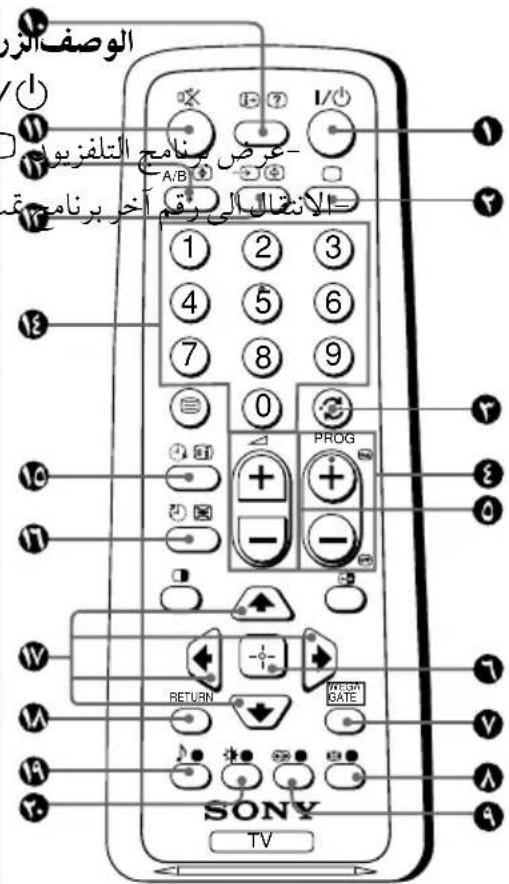
| | | |
| WEGA GATE
GRF
GFR
GFR
GFR
GFR
GFR
GFR
GFR
GFR
GFR
GFR
GFR
GFR
GFR
GFR
GFR
GFR
GFR
GFR
GFR
GFR
GFR
GFR
GFR
GFR
GFR
GFR
GFR
GFR
GFR
GFR
GFR
GFR
GFR
GFR | WEGA GATE
V
4.5% | |
| | RETURN.السلام.
السلام.
السلام.
السلام.
السلام.
السلام.
السلام.
السلام.
السلام.
السلام.
السلام.
السلام.
السلام.
السلام.
السلام.
السلام.
السلام.
السلام.
السلام.
السلام.
السلام.
السلام.
السلام.
السلام.
السلام.
السلام.
السلام.
السلام.
السلام.
السلام.
السلام.
السلام.
السلام.
السلام.
ALI
ALI
ALI
ALI
ALI
ALI
ALI
ALI
ALI
ALI
ALI
ALI
ALI
ALI
ALI
ALI
ALI
ALI
ALI
ALI
ALI
ALI
ALI
ALI
ALI
ALI
ALI
ALI
ALI
ALI
ALI
ALI
ALI
ALI
Al
Al
Al
Al
Al
Al
Al
Al
Al
Al
Al
Al
Al
Al
Al
Al
Al
Al
Al
Al
Al
Al
Al
Al
Al
Al
Al
Al
Al
Al
Al
Al
Al
Al
Al
Al
Al
Al
Al
Al
Al
Al
Al
Al
Al
Al
Al
Al
Al
Al
ALI
ALI
ALI
ALI
ALI
ALI
ALI
ALI
ALI
ALI
ALI
ALI
ALI
ALI
ALI
ALI
ALI
ALI
ALI
ALI
ALI
ALI
ALI
ALI
ALI
ALI
ALI
ALI
ALI
ALI
ALI
ALI
ALI | |
| - | | | |
| - | | | |
| - | | | |
| - | | | |
| - | | | |
| 19 | | | |
| 19 | | | |
| - | | | |
| - | | | |
| - | | | |
| - | | | |
WEGA GATE
a aabg jyjzalil 1 g jg JgJg WEGA GATE
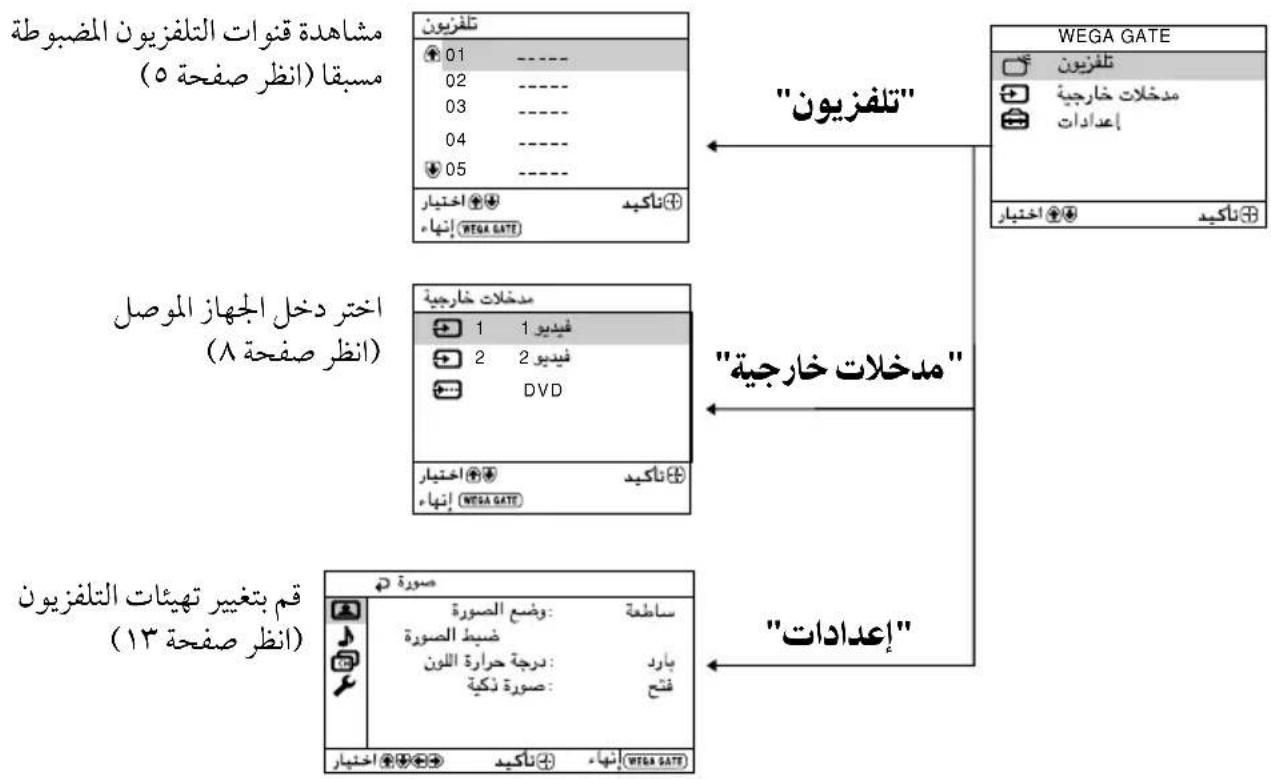
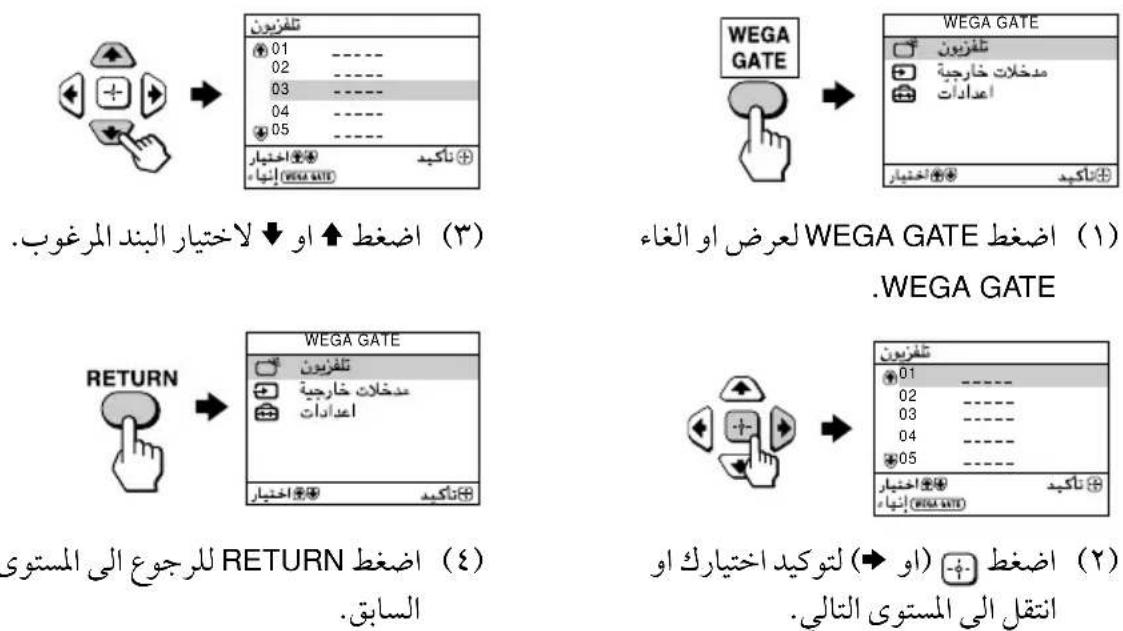
WEGA GATE
L
.WEGA GATE "t"J 1000000000000000000000000000000000000000000000000000000
"1234567890
"1234567890
"1234567890
"1234567890
"1234567890
"1234567890
"1234567890
"1234567890
"1234567890
"12
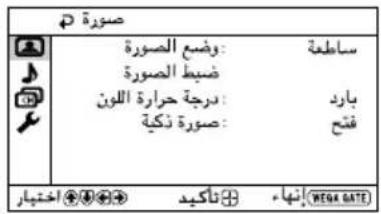
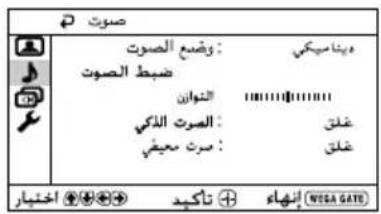
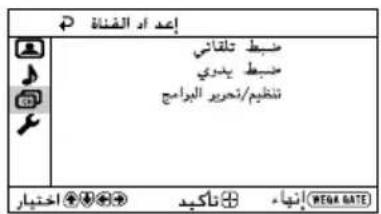
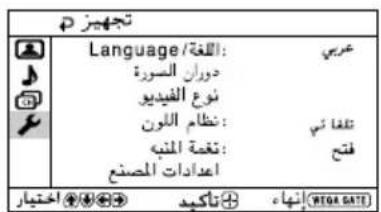
.1
| "\"\d\nwegagate\hskip 14.226378pt" | 1 |
| \(\text{+}\)jz jz (国)"\d\nwegagate\hskip 14.226378pt" | 2 |
| \(\text{+}\)bɪəlɪp(“\d\nwegagate\hskip 14.226378pt" | 3 |
| J. | J. | |
| . * "(''s) 'l" (s's) "s's" .(s's) (s's) (s's) "s's" ) "a'b'w" J.l.l.l.l.l.l.l.l.l.l.l.l.l.l.l.l.l.l.l.l.l.l.l.l.l.l.l.l.l.l.l.l.l.l.l.l.l.l.l.l.l.l.l.l.l.l.l.l.l.l.l.l.l.l.l.l.l.l.l.l.l.l.l.l.l.l.l.l.l.l.l.l.l.l.l.l.l.l.l.l.l.l.l.l.l.l.l.l.l.l.l.l.l.l.l.l.l.l.l.l l.l.l.l.l.l.l.l.l.l.l.l.l.l.l.l.l.l.l.l.l.l.l.l.l.l.l.l.l.l.l.l.l.l.l.l.l.l.l.l.l.l.l.l.l.l.l.l.l.l.l.l.l.l.l.l.l.l.l.l.l.l.l.l.l.l.l.l.l.l.l.l.l.l.l.l.l.l.l.l.l.l.l.l.l.l.l.l.l.l.l.l.l.l.l.l.l.l.l.ll.l.l.l.l.l.l.l.l.l.l.l.l.l.l.l.l.l.l.l.l.l.l.l.l.l.l.l.l.l.l.l.l.l.l.l.l.l.l.l.l.l.l.l.l.l.l.l.l.l.l.l.l.l.l.l.l.l.l.l.l.l.l.l.l.l.l.l.l.l.l.l.l.l.l.l.l.l.l.l.l.l.l.l.l.l.l.l.l.l.l.l.l.l.l.l.l.l.l.l.L | " 's' g' s' g' s' g' s' g' s' g' s' g' s' g' s' g' s' g' s' g' s' g' s' g' s' g' s' g' s' g' s' g' s' g' s' g' s' g' s' g' s' g' s' g' s' g' s' g' s' g' s' g' S' g' s' g' s' g' s' g' s' g' s' g' s' g' s' g' s' g' s' g' s' g' s' g' s' g' s' g' s' g' s' g' s' g' s' g' s' g' s' g' s' g' s' g' s' g' s' g' s' g' g' s' g' s' g' s' g' s' g' s' g' s' g' s' g' s' g' s' g' s' g' s' g' s' g' s' g' s' g' s' g' s' g' s' g' s' g' s' g' s' g' s' g' s' g' s' g' s' g' f' L' L' L' L' L' L' L' L' L' L' L' L' L' L' L' L' L' L' L' L' L' L' L' L' L' L' L' L' L' L' L' L' L' L' L' L' L' L' L' L' L' L' L' L' L' L' L' L' L' L' I' L' L' L' L' L' L' L' L' L' L' L' L' L' L' L' L' L' L' L' L' L' L' L' L' L' L' L' L' L' L' L' L' L' L' L' L' L' L' L' L' L' L' L' L' L' L' L' L' L' S' S' S' S' S' S' S' S' S' S' S' S' S' S' S' S' S' S' S' S' S' S' S' S' S' S' S' S' S' S' S' S' S' S' S' S' S' S' S' S' S' S' S' S' S' S' S' S' S' S' s' S' S' S' S' S' S' S' S' S' S' S' S' S' S' S' S' S' S' S' S' S' S' S' S' S' S' S' S' S' S' S' S' S' S' S' S' S' S' S' S' S' S' S' S' S' S' S' S' S' I' L' L' L' L' L' L' L' L' L' L' L' L' L' L' L' L' L' L' L' L' L' L' L' L' L' L' L' L' L' L' L' L' L' L' L' L' L' L' L' L' L' L' L' L' L' L' L' L' I' S' S' S' S' S' S' S' S' S' S' S' S' S' S' S' S' S' S' S' S' S' S' S' S' S' S' S' S' S' S' S' S' S' S' S' S' S' S' S' S' S' S' S' S' S' S' S' S' S'S' S' S' S' S' S' S' S' S' S' S' S' S' S' S' S' S' S' S' S' S' S' S' S' S' S' S' S' S' S' S' S' S' S' S' S' S' S' S' S' S' S' S' S' S' S' S' S' S' S' 1234567890123456789012345678901234567890123456789012345678901234567890123456789012345678901234567890123456789123456789012345678901234567890123456789012345678901234567890123456789012345678901234567890123456789 | " 's ' g ' s ' g ' s ' g ' s ' g ' s ' g ' s ' g ' s ' g ' s ' g ' s ' g ' s ' g ' s ' g ' s ' g ' s ' g ' s ' g ' s ' g ' s ' g ' s ' g ' s ' g ' s ' g ' s ' g ' s ' g ' s ' g ' s ' g ' s ' g ' s ' g ' s ' g ' ' s ' g ' ' s ' g ' ' s ' g ' ' s ' g ' ' s ' g ' ' s ' g ' ' s ' g ' ' s ' g ' ' s ' g ' ' s ' g ' ' s ' g ' ' s ' g ' ' s ' g ' ' s ' g ' ' s ' g ' ' s ' g ' ' s ' g ' ' s ' g ' ' s ' g ' ' s ' g' ' ' s ' g ' ' s ' g ' ' s ' g ' ' s ' g ' ' s ' g ' ' s ' g ' ' s ' g ' ' s ' g ' ' s ' g ' ' s ' g ' ' s ' g ' ' s ' g ' ' s ' g ' ' s ' g ' ' s ' g ' ' s ' g ' ' s ' g ' ' s ' g ' ' s ' g ' ' s 'g ' ' s ' g ' ' s ' g ' ' s ' g ' ' s ' g ' ' s ' g ' ' s ' g ' ' s ' g ' ' s ' g ' ' s ' g ' ' s ' g ' ' s ' g ' ' s ' g ' ' s ' g ' ' s ' g ' ' s ' g ' ' s ' g ' ' s ' g ' ' s ' g ' ' s ' g ' ' s ' ' ' s ' g ' ' s ' g ' ' s ' g ' ' s ' g ' ' s ' g ' ' s ' g ' ' s ' g ' ' s ' g ' ' s ' g ' ' s ' g ' ' s ' g ' ' s ' g ' ' s ' g ' ' s ' g ' ' s ' g ' ' s ' g ' ' s ' g ' ' s ' g ' ' s ' g ' ' s ' s ' g ' ' s ' g ' ' s ' g ' ' s ' g ' ' s ' g ' ' s ' g ' ' s ' g ' ' s ' g ' ' s ' g ' ' s ' g ' ' s ' g ' ' s ' g ' ' s ' g ' ' s ' g ' ' s ' g ' ' s ' g ' ' s ' g ' ' s ' g ' ' s ' g ' ' s ' g
" 's ' g ' s ' g ' s ' g ' s ' g ' s ' g ' s ' g ' s ' g ' s ' g ' s ' g ' s ' g ' s ' g ' ' s ' g ' ' s ' g ' ' s ' g ' ' s ' g ' ' s ' g ' ' s ' g ' ' s ' g ' ' s ' g ' ' s ' g ' ' s ' g ' ' s ' g ' 's ' g ' ' s ' g ' ' s ' g ' ' s ' g ' ' s ' g ' ' s ' g ' ' s ' g ' ' s ' g ' ' s ' g ' ' s ' g ' ' s ' g ' ' s ' g ' ' s ' g ' ' s ' g ' ' s ' g ' ' s ' g ' ' s ' g ' ' s ' g ' ' s ' g ' ' s ' g ' 's ' g ' ' s ' g ' ' s ' g ' ' s ' g ' ' s ' g ' ' s ' g ' ' s ' g ' ' s ' g
" 's ' g ' s ' g ' s ' g ' s ' g ' s ' g ' s ' g ' s ' g ' s ' g ' s ' g ' s ' g ' ' s ' g ' ' s ' g ' ' s ' g ' ' s ' g ' ' s ' g ' ' s ' g ' ' s ' g ' ' s ' g ' ' s ' g ' ' s ' g ' ' s ' g ' ' s ' g ' " |
12i01p"zis"J#y+1+bi
中
"000000000000000000000000000000000000000000000000
"ss
"NTSC jg","jgll","gbs"(j) "oal"loj
1 1
1
+
s
"J"
山
NTSCJU"NTSCJU"
L 1
"..." WEGA GATE
b()"g"aoXg+
1
2
3
| الله
الله
الله
الله
الله
الله
الله
الله
الله
الله
الله
الله
الله
الله
الله
الله
الله
الله
الله
الله
الله
الله
الله
الله
الله
الله
الله
الله
الله
الله
الله
الله
الله
الله
AL
AL
AL
AL
AL
AL
AL
AL
AL
AL
AL
AL
AL
AL
AL
AL
AL
AL
AL
AL
AL
AL
AL
AL
AL
AL
AL
AL
AL
AL
AL
AL
AL
AL
AL
AL
AL
AL
AL
AL
AL
AL
AL
AL
AL
AL
AL
AL
AL
AL
Al
Al
Al
Al
Al
Al
Al
Al
Al
Al
Al
Al
Al
Al
Al
Al
Al
Al
Al
Al
Al
Al
Al
Al
Al
Al
Al
Al
Al
Al
Al
Al
Al
Al
Al
Al
Al
Al
Al
Al
Al
Al
Al
Al
Al
Al
Al
Al
Al
Al
AL
AL
AL
AL
AL
AL
AL
AL
AL
AL
AL
AL
AL
AL
AL
AL
AL
AL
AL
AL
AL
AL
AL
AL
AL
AL
AL
AL
AL
AL
AL
AL
AL
AL
AL
AL
AL
AL
AL
AL
AL
AL
AL
AL
AL
AL
AL
AL
AL
CAL
AL
AL
AL
AL
AL
AL
AL
AL
AL
AL
AL
AL
AL
AL
AL
AL
AL
AL
AL
AL
AL
AL
AL
AL
AL
AL
AL
AL
AL
AL
AL
AL
AL
AL
AL
AL
AL
AL
AL
AL
AL
AL
AL
AL
AL
AL
AL
AL
AL
(AL)
AL
AL
AL
AL
AL
AL
AL
AL
AL
AL
AL
AL
AL
AL
AL
AL
AL
AL
AL
AL
AL
AL
AL
AL
AL
AL
AL
AL
AL
AL
AL
AL
AL
AL
AL
AL
AL
AL
AL
AL
AL
AL
AL
AL
AL
AL
AL
AL
AL
AL | "الله
الله
الله
الله
AL
AL
AL
AL
AL
AL
AL
AL
AL
AL
AL
AL
AL
AL
AL
AL
AL
AL
AL
AL
AL
AL
AL
AL
AL
AL
AL
AL
AL
AL
AL
AL
AL
AL
AL
AL
AL
AL
AL
AL
AL
AL
AL
AL |
| "الله
الله
AL
AL
AL
AL
AL
AL
AL
AL
AL
AL
AL
AL
AL
AL
AL
AL
AL
AL
AL
AL
AL
AL
AL
AL
AL
AL
AL
AL
AL
AL
AL
AL
AL
AL
AL
AL
AL
AL
AL
AL
AL
AL
AL
AL
AL
AL
AL | |
(KV-BZ21M81/BZ21M80) "S"g
a 5-Band Graphic Equalizer" a
.
1
bglgagglb+gl+blgglgglgallgglg
"J11111111111111
1
2
山
222 1 1 1 1 1 1 1 1 1 1 1 1 1 1 1 1 1 1 1 1 1 1 1 1 1 1 1 1 1 1 1 1 1 1 1 1 1 1 1 1
(1.aa)
| "\"d\ddot{a}\ddot{a}\ddot{a}\ddot{a\ddot{a}}\ddot{a\ddot{a}}\ddot{a\ddot{a}}\ddot{a\ddot{a}}\ddot{a\ddot{a}}\ddot{a\ddot{a}}\ddot{a\ddot{a}}\ddot{a\ddot{a}}\ddot{a\ddot{a}}\ddot{a\ddot{a}}\cdots\cdots\cdots\cdots\cdots\cdots\cdots\cdots\cdots\cdots\cdots\cdots\cdots\cdots\cdots\cdots\cdots\cdots\cdots\cdots\cdots\cdots\cdots\cdots\cdots\cdots\cdots\cdots\cdots\cdots\cdots\cdots\cdots\cdots
. | 1 | |
| . | 2 | |
| . | 3 | |
| J | J | |
| L | L | |
| L | L | |
| L | L | |
| L | L | |
| L | L | |
| L | L | |
| L | L | |
| L | L | |
| L | L | |
| L | L | |
| L | L | |
| L | L | |
| L | L | |
| L | L | |
| L | L | |
| L | L | |
| L | L | |
| . | (1V a a a) | |
| . | "\"d\ddot{a}\ddot{a}\ddot{a}\ddot{a}\ddot{a\ddot{a}}\ddot{a\ddot{a}}\ddot{a\ddot{a}}\ddot{a\ddot{a}}\ddot{a\ddot{a}}\ddot{a\ddot{a}}\ddot{a\ddot{a}}\ddot{a\ddot{\text{出}}} \cdots\cdots\cdots\cdots\cdots\cdots\cdots\cdots\cdots\cdots\cdots\cdots\cdots\cdots\cdots\cdots\cdots\cdots\cdots\cdots\cdots\cdots\cdots\cdots\cdots\cdots\cdots\cdots\cdots\cdots\cdots\cdots\cdots\ cd\ddot{a}\ddot{a}\ddot{a}\ddot{a}\ddot{a}\ddot{a}\ddot{a}\ddot{a}\ddot{a}\ddot{a}\ddot{a}\ddot{a}\ddot{a}\ddot{a}\ddot{a}\ddot{a}\ddot{a}\ddot{a}\ddot{a}\ddot{a}\ddot{a} \cdots\cdots\cdots\cdots\cdots\cdots\cdots\cdots\cdots\cdots\cdots\cdots\cdots\cdots\cdots\cdots\cdots\cdots\cdots\cdots\cdots\cdots\cdots\cdots\cdots\cdots\cdots\cdots\cdots\cdots\cdots\cdots\cdots
. | "\"d\ddot{a}\ddot{a}\ddot{a}\ddot{a}\ddot{a}\ddot{a}\ddot{a}\ddot{a}\ddot{a}\ddot{a}\ddot{a}\ddot{a}\ddot{a}\ddot{a}\ddot{a}\ddot{a}\ddot{a}\ddot{a}\ddot{a}\ddot{b}\ddot{b}\ddot{b}\ddot{b}\ddot{b}\ddot{b}\ddot{b}\ddot{b}\ddot{b}\ddot{b}\ddot{b}\ddot{b}\ddot{b}\ddot{b}\ddot{b}\ddot{b}\ddot{b}\ddot{b}\ddot{b}\ddot{b}\ddot{a}\ddot{a}\ddot{a}\ddot{a}\ddot{a}\ddot{a}\ddot{a}\ddot{a}\ddot{a}\ddot{a}\ddot{a}\ddot{a}\ddot{a}\ddot{a}\ddot{a}\ddot{a}\ddot{a}\ddot{a}\ddot{a}\ddot{b} \cdots\cdots\cdots\cdots\cdots\cdots\cdots\cdots\cdots\cdots\cdots\cdots\cdots\cdots\cdots\cdots\cdots\cdots\cdots\cdots\cdots\cdots\cdots\cdots\cdots\cdots\cdots\cdots\cdots\cdots\cdots\cdots\cdOTS |
山
15
1
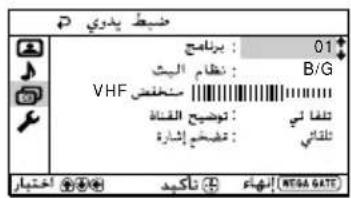
i 1
1
1
jbjbfoj jaojol 1
.
| KV-BZ21M81
KV-BZ21M80 | KV-BZ14M70 | Note |
| Power requirements | 110-240 V AC, 50/60 Hz | |
| Power consumption (W) | Indicated on the rear of the TV | |
| Television system | B/G, I, D/K, M | |
| Color system | PAL, PAL 60, SECAM, NTSC3.58, NTSC4.43 | |
| Teletext language | English, Farsi (Persian) KV-BZ21M81 only | |
| Channel coverage
B/G | VHF: E2 to E12 /UHF: E21 to E69 /
CATV: S01 to S03, S1 to S41 | |
| I | UHF: B21 to B68 /CATV: S01 to S03, S1 to S41 | |
| D/K | VHF: C1 to C12, R1 to R12 /
UHF: C13 to C57, R21 to R60 /
CATV: S01 to S03, S1 to S41, Z1 to Z39 | |
| M | VHF: A2 to A13 /UHF: A14 to A79 /
CATV: A-8 to A-2, A to W+4, W+6 to W+84 | |
| TT (Antenna) | 75-ohm external terminal | |
| Audio output (Speaker) | 3 W + 3 W 3 W | | |
| Number of terminal
(Video) | Input: 2 Output: 1 Phono jacks; 1 Vp-p, 75 ohms | |
| J (Audio) | Input: 3 Output: 1 Phono jacks; 500 mVrms KV-BZ21M81/ | BZ21M80 only |
| Input: 2 Output: 1 Phono jacks; 500 mVrms KV-BZ14M70 only | |
| (Component
Video) | Input: 1 Phono jacks; KV-BZ21M81/
Y: 1 Vp-p, 75 ohms, BZ21M80 only
sync negative
Ct: 0.7 Vp-p, 75 ohms
Cr: 0.7 Vp-p, 75 ohms | |
| (Headphone) | Output: 1 Stereo minijack KV-BZ21M81/ | BZ21M80 only |
| (Earphone) | Output: 1 Monaural minijack KV-BZ14M70 only | |
| Picture tube | 21 in. 14 in. | | |
| Tube size (cm) | 54 37 | | Measured diagonally |
| Screen size (cm) | 51 34 | | Measured diagonally |
| Dimensions (w/h/d, mm) | 497 × 468 × 494 | 374 × 360 × 431 | |
| Mass (kg) | 23 | 12 | |
Design and specifications are subject to change without notice.